हर किसी तक पहुँचिए — फोन आने से पहले। फोन आने से पहले
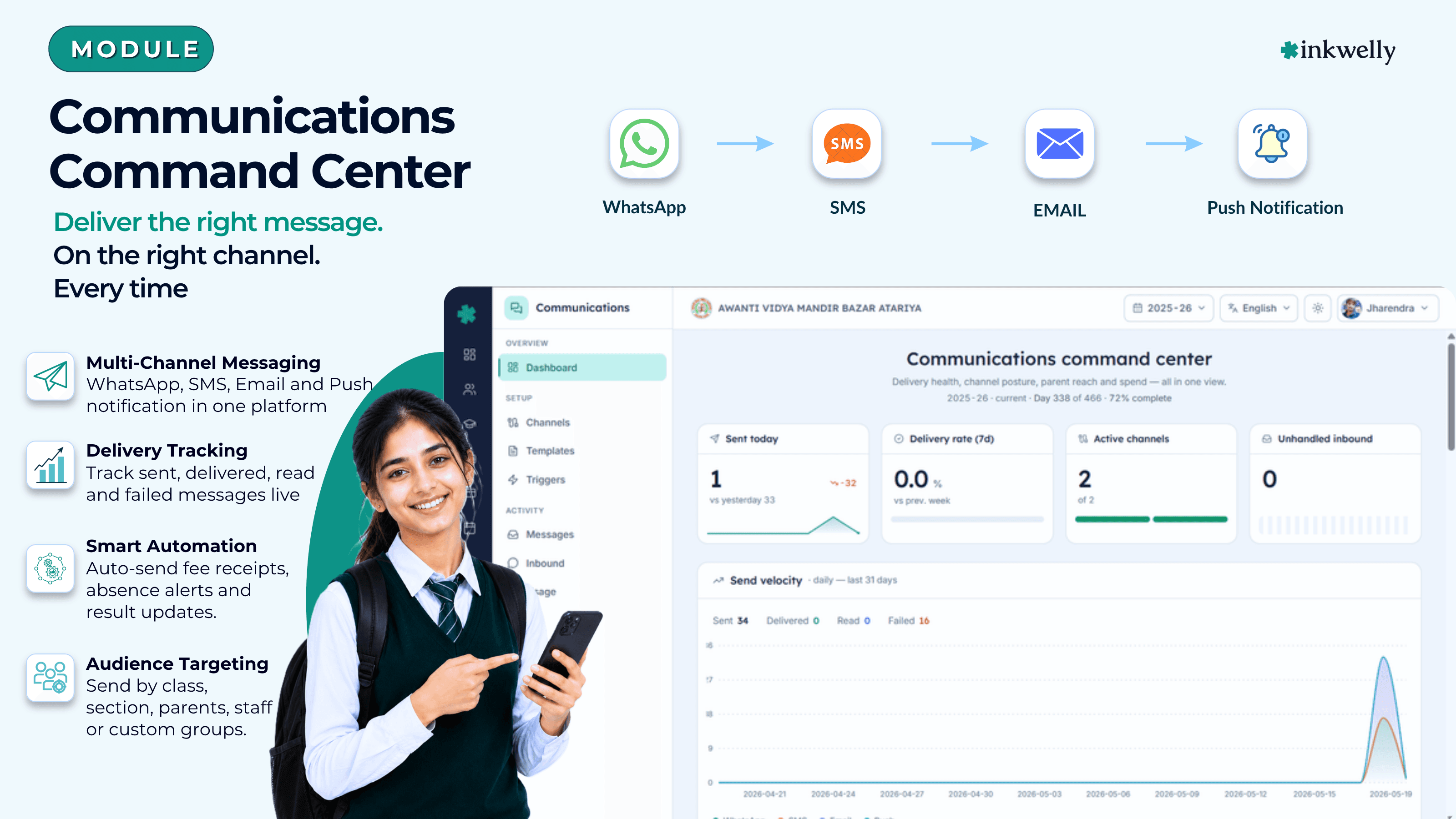
हर वो message जो स्कूल भेजता है — parents, students और staff को। Fee receipts, attendance alerts, exam results, admit cards, homework notices, payroll slips और duty rosters — एक workspace से, हर recipient की पसंदीदा channel पर, अपने आप। SMS के लिए DLT-compliant, WhatsApp के लिए Meta-approved, और end-to-end DPDP-Act safe।
आज ज़्यादातर Indian स्कूल parents से कैसे बात करते हैं
ज़्यादातर स्कूलों में parent communication एक दराज़ में पड़े पुराने smartphones पर चलती है। एक फोन WhatsApp broadcast list के लिए है। दूसरे पर SMS sender का login है। तीसरे पर school Gmail खुला है। हर सुबह एक junior office assistant attendance register से absent बच्चों के नाम copy करता है, desk computer पर WhatsApp Web खोलता है, और एक ही line को 14 अलग-अलग parent groups में बारी-बारी paste करता है — और दुआ करता है कि कोई message गलत class में न पहुँच जाए। जब 10 बजे principal आती हैं, तब तक तीन parents office को फोन कर चुके होते हैं — पूछते हुए कि Saturday के UPI payment की fee receipt अब तक क्यों नहीं आई।
कीमत चुपचाप जुड़ती रहती है। दो staff हर दिन तीन घंटे सिर्फ़ typing में निकाल देते हैं। Result day के दिन SMS credits 4 बजे खत्म हो जाते हैं। स्कूल का WhatsApp number 24 घंटे के लिए block हो जाता है क्योंकि बहुत से parents ने एक holiday-greeting को spam mark कर दिया। Accountant email पर fee receipt फिर से भेजता है और parent उसे bank में phishing बताकर report कर देता है। Principal complaint inquiry में delivery proof माँगती हैं, और office के पास कुछ नहीं — न record, न read marks, न दिखाने का तरीका कि message असल में गया था। सबसे बड़ी कीमत वो है जो दिखती नहीं: वो parents जिन्हें attendance alert, fee reminder या admit card कभी नहीं मिला, उन्हें यह भी पता नहीं चला कि कुछ छूटा है, और महीने-दर-महीने स्कूल पर भरोसा कम होता गया।
अगर यह सब कुछ जाना-पहचाना लग रहा है, तो आप अकेले नहीं हैं। पिछले पंद्रह सालों से Indian school communication WhatsApp groups, SMS panels, Gmail accounts और printed letters का जोड़-तोड़ रहा है। Inkwelly Communications वो workspace है जो यह सब आख़िरकार replace करता है — WhatsApp, SMS, Email और Push, एक inbox, एक log, एक consent record और महीने के अंत में एक bill।
Inkwelly Communications असल में किसकी जगह लेता है
Inkwelly Communications पूरे स्कूल के लिए messaging layer है — हर parent, हर student, हर employee, हर channel। अपने स्कूल का WhatsApp Business number एक बार connect कीजिए। अपने DLT-approved SMS credentials एक बार paste कीजिए। एक school email domain एक बार verify कीजिए। Parent app push एक बार set up कीजिए। उस एक setup से, बाकी Inkwelly में होने वाला हर meaningful event — fee payment, attendance में absent mark, marksheet publish, admit card issue, homework post — अपने आप parent के WhatsApp, SMS, Email या app push पर पहुँचता है, उसकी पसंदीदा भाषा में, कुछ ही seconds में।
रजिस्टर से copy-paste नहीं। Results 4:30 बजे publish हो गए और SMS भेजना 5 बजे याद आए — ऐसा नहीं। चार logins juggle करने की ज़रूरत नहीं। यह सवाल नहीं कि message parent तक पहुँचा या नहीं। Office staff part-time SMS desk बनना बंद करता है और असली school work पर समय लगाने लगता है। Principal को "क्या यह गया?" पूछना नहीं पड़ता क्योंकि वो खुद देख सकती हैं कि आज building से कौन-कौन से message निकले — एक dashboard पर, channel और class के हिसाब से।
Indian स्कूल जो कुछ भी communicate करते हैं — सब cover है
- चार native channels — WhatsApp Business, आपके DLT-approved vendor से SMS, आपके school domain से Email, और Inkwelly parent app पर Push
- दस ready-to-use message types — fee receipt, fee reminder, fine notice, payment link, invoice details, daily absence alert, marksheet published, admit card issued, homework assigned, और आपके अपने custom broadcasts
- Automatic और manual दोनों messages — UPI payment settle होते ही fee receipt चली जाती है; broadcasts तब जाते हैं जब office Send दबाता है
- Out of the box bilingual — हर message type के लिए English और Hindi version, हर channel पर
- Per-school message customisation — किसी भी ready-to-use template को fork कीजिए, body, footer या buttons edit कीजिए, और अपने version को इस्तेमाल करते रहिए
- Automatic alerts list — एक screen पर हर वो event जिस पर स्कूल react कर सकता है, हर event हर channel के लिए switch के साथ
- Audience filter built-in — सिर्फ़ student, सिर्फ़ parent, student-with-parent-fallback, employees, या custom class / section / individual pick
- Per school daily limits, quiet hours और promotional windows — parents को 11 बजे रात के message से बचाइए, स्कूल को runaway bills से
- SMS के लिए TRAI DLT-ready — आपके स्कूल की मौजूदा DLT registration honour होती है; re-registration का इंतज़ार नहीं
- DPDP Act 2023 ready — हर parent और हर channel के लिए consent record, automatic STOP-reply handling, email के लिए one-click unsubscribe
- Two-way WhatsApp inbox — parents के reply Inkwelly thread में आते हैं; office assign करता है, notes लिखता है, उसी workspace में reply करता है
एक complete communication operations toolkit
यह "fee module के अंदर एक feature" वाला messaging नहीं है। यह पूरे स्कूल का messaging operating system है। नीचे है पूरा surface area — हर वो screen जिसमें office रहेगा, हर वो workflow जो principal हफ्ते में एक बार check करेंगी, हर वो report जो accountant को महीने के अंत में चाहिए।
हर वो screen जो office इस्तेमाल करेगा
Channel Setup
WhatsApp Business, अपना DLT-approved SMS sender, school email domain और parent app push — सब एक tab पर connect कीजिए। Sender names, daily caps और monthly caps यहीं रहते हैं।
Templates
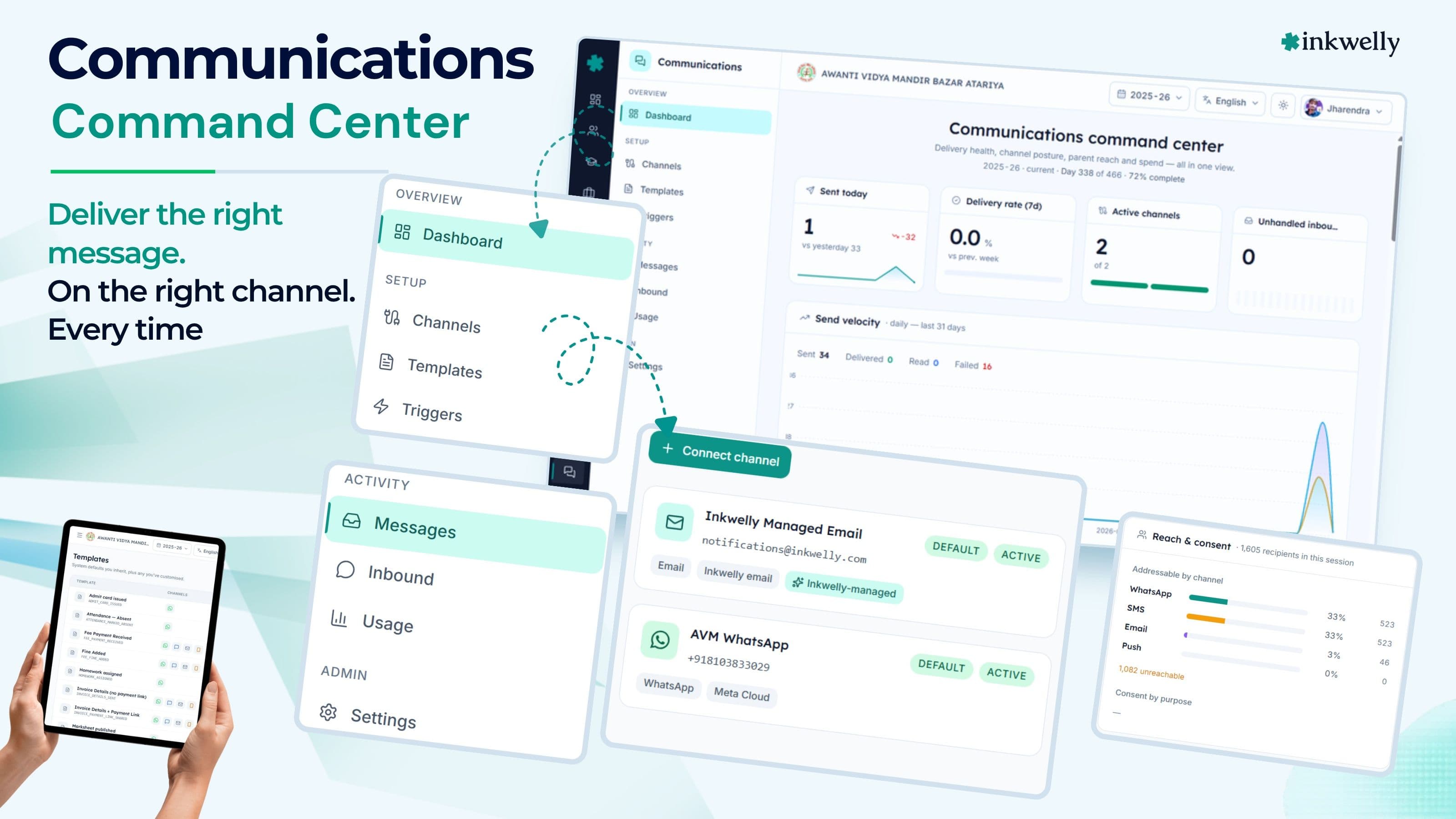
दस ready-to-use templates और आपकी अपनी school-specific edits। Subject, body, footer, attachments, action buttons — एक बार बदलिए और उसी screen से WhatsApp पर re-submit कीजिए।
Automatic Alerts
हर वो event जिस पर स्कूल react कर सकता है — fee paid, बच्चा absent, results out, admit card ready, homework posted — एक screen पर list, हर event हर channel के लिए switch के साथ।
Broadcast Composer
Template चुनिए, audience चुनिए (class, section, individual, parents, students), English और Hindi में side-by-side preview देखिए, Send दबाइए।
Inbound Inbox
WhatsApp notification पर reply करने वाले parents Inkwelly thread में आते हैं। Office उस thread को class teacher या principal को assign करता है, notes जोड़ता है, inline reply करता है।
Message Log
अब तक भेजा गया हर message — channel, template, recipient, event के हिसाब से — sent, delivered, opened और failed marks के साथ। Filter, search, export।
Audience Filter
Recipient list एक बार बनाइए — Class 10 parents जो fee defaulter नहीं हैं, सिर्फ़ weekday शाम। Campaigns में reuse कीजिए। Class teacher और section student records से अपने आप पकड़ जाते हैं।
Consent Record
DPDP-Act-2023 के तहत हर parent और student के लिए consent, हर channel पर, हर purpose के लिए। Append-only audit trail। STOP reply parent को तुरंत unsubscribe कर देता है।
Quiet Hours & Promo Window
10 बजे सुबह से 6 बजे शाम IST के बाहर promotional messages block। 9 बजे रात से 7 बजे सुबह के बीच सब कुछ defer या drop। OTP login codes दोनों को bypass करते हैं।
Usage & Cost
Live spend dashboard — channel, category, language के हिसाब से। आज बनाम पिछले महीने तुलना। Top templates, top recipients, monthly cap remaining देखिए।
Language Fallback
हर parent को उसकी पसंदीदा भाषा में message मिलता है। अगर parent ने set नहीं किया तो school default लगता है। Tamil, Marathi या Bengali versions जब आपके पास तैयार हों तब जोड़िए।
Settings
हर channel के लिए sender name, business hours, throttle, default message language। एक settings screen जिसे office एक बार configure करता है और फिर शायद ही छूता है।
एक workspace, हर channel जो आपके स्कूल को चाहिए
Indian school parents एक channel पर नहीं होते। Tier-1 city के CBSE parents WhatsApp पसंद करते हैं। UP के एक छोटे शहर की दादी SMS पढ़ती हैं। Working IT-parent ITR के लिए receipt email पर चाहता है। Boarding-school parent को Inkwelly app पर push notification चाहिए। Inkwelly Communications चारों को first-class मानता है — एक ही composer, एक ही audit log, एक ही consent record — ताकि स्कूल चार vendors juggle किए बिना हर event के लिए सही channel चुन सके।
WhatsApp Business — वो channel जो parents असल में खोलते हैं
अपने स्कूल का WhatsApp Business number एक बार connect कीजिए। बाकी Inkwelly handle करता है — Meta से message approvals, conversation pricing, attachment delivery, और वो moment-by-moment delivery status जो parents तब notice करते हैं जब दो blue ticks आते हैं।
हर WhatsApp template Inkwelly के अंदर रहता है और उसी screen से Meta को submit होता है। Approval status और rejection reasons template के बगल में, plain English में दिखते हैं। Fee receipts और marksheets PDF attachments की तरह जाते हैं — secure download links के साथ जो 30 दिन तक काम करते हैं — इतने लंबे कि parent अपने accountant को forward कर सके, इतने छोटे कि अगले महीने एक चुराया हुआ screenshot काम का न रहे। WhatsApp read rates किसी भी और channel से ज़्यादा हैं — Inkwelly जिन स्कूलों में चलता है, वहाँ fee-receipt templates आम तौर पर 92% read cross करते हैं।
SMS — वो channel जो आज भी दादी तक पहुँचता है
India में SMS मरा नहीं है — यह वो channel है जो हर Jio, VIL और Airtel handset तक पहुँचता है, बिना app install, बिना data pack, बिना smartphone। Inkwelly MSG91 और Fast2SMS दोनों के साथ काम करता है — स्कूल price और इस आधार पर चुन सकता है कि किसके पास स्कूल की DLT registration पहले से है।
आपके स्कूल की मौजूदा TRAI DLT registration जैसी है वैसी honour होती है — कोई re-registration नहीं, कोई दो-हफ्ते का इंतज़ार नहीं। Inkwelly का template-edit screen वही exact text और variable shape निकालता है जो आपके DLT portal को चाहिए, तो नया template जोड़ना copy-paste है, rewrite नहीं। Parents के STOP replies अपने आप consent record में route हो जाते हैं और parent बिना staff intervention के unsubscribe हो जाता है।
Email — receipts, results और ITR-वाले parent के लिए
कई Indian school parents fee receipt inbox में चाहते हैं। ITR submission, employer reimbursement, scholarship documentation — हर एक के लिए email-शक्ल का proof चाहिए, WhatsApp screenshot नहीं। Inkwelly school email आपके verified school domain से भेजता है, तो वो असली school email जैसा दिखता है — generic mass-mailer जैसा नहीं। Bounces और unsubscribe replies उसी delivery log में आते हैं।
हर email में one-click unsubscribe link होता है जो उस parent के लिए promotional sends बंद कर देता है। Body उसी template engine से बनती है जो WhatsApp और SMS चलाता है — तो office एक बार fee-receipt template लिखता है और तीनों channel versions अपने आप render हो जाते हैं।
Push — मुफ्त से भी सस्ता channel
Inkwelly parent app को push notification मिलती है जब भी fee receipt बनती है, attendance पर absence mark होती है, marksheet publish होती है या homework assign होती है — वही template engine, वही variables, वही consent gate, वही audit log। Cost शून्य है।
Push वो channel है जो lock-screen पर भी पहुँचता है। एक parent जिसने school WhatsApp group mute कर दिया, उसे 9:14 बजे फिर भी phone की lock screen पर absence alert दिखता है। जब parent app uninstall करता है, Inkwelly notice करता है और भेजना बंद कर देता है — स्कूल को यह ढूँढने में time नहीं लगता कि parent को notifications क्यों मिलना बंद हो गए।
Templates — एक बार लिखिए, दो भाषाओं में चार channels पर render कीजिए
Inkwelly में template एक sentence नहीं है। यह एक छोटा program है। यह उन हिस्सों को declare करता है जो हर recipient के लिए बदलते हैं — student का नाम, paid amount, payment date, receipt download link — और WhatsApp body बनाता है जहाँ amounts highlight होते हैं, 160-character का SMS बनाता है जो TRAI DLT पास करता है, school letterhead वाला email बनाता है, और एक push notification जो lock screen पर fit होता है। एक author edit, चार channel versions, English और Hindi दोनों।
दस templates, हर एक bilingual
स्कूल blank screen से नहीं शुरू करता। Inkwelly दस production-ready templates के साथ आता है, हर एक English और Hindi versions में, हर channel पर — fee paid, fee receipt resend, fine added, payment link sent, invoice details sent, payment-link reminder, attendance absence, marksheet published, admit card issued, homework assigned।
ये templates filler नहीं हैं। ये उस voice में लिखे गए हैं जिस पर Indian school parents असल में भरोसा करते हैं — छोटे, गर्मजोशी से भरे, professional, amounts bold में और clear next action। Hindi versions में Devanagari grammar के साथ English domain words (Fee, Payment, Invoice, Receipt, Class) mix होते हैं — ठीक उसी तरह जैसे principals असल में बोलती हैं। नतीजा एक असली school message जैसा पढ़ा जाता है, English से textbook translation जैसा नहीं।
किसी भी template को fork करके अपना version बनाइए
Email footer में अपने स्कूल की address line जोड़नी है? Hindi marksheet template में "Dear parent" को "Pranam" करना है? Ready-to-use template पर Customize दबाइए। Inkwelly आपके स्कूल का एक version बनाता है — original से independent। Body, subject, footer, buttons edit कीजिए। उसी screen से अपने version को WhatsApp पर re-approval के लिए submit कीजिए।
आपके स्कूल का version आपका है — जब ready-to-use template update होगा, Inkwelly आपकी edits को चुपचाप overwrite नहीं करेगा। जिन school groups की कई branches हैं, वे group level पर एक बार version publish कर सकते हैं और हर branch उसी का इस्तेमाल करती है।
वो हिस्से जो हर recipient के लिए बदलते हैं
हर template में कुछ हिस्से हर parent के लिए बदलते हैं — student का नाम, amount, date, download link। Inkwelly भेजने से पहले value को साफ़ करता है: amounts Indian-rupee notation में आते हैं (₹1,200.00), dates 2026-03-15 नहीं, 15/03/2026 की शक्ल में आते हैं, phone numbers +91 format में आते हैं जिसे आपके parents पहचानते हैं।
अगर कोई हिस्सा missing है — मान लीजिए कोई custom note जो office ने नहीं भरा — तो template आधे-अधूरे sentence भेजने के बजाय एक sensible default पर fallback कर लेता है। अगर download link अभी तैयार नहीं है, तो system broken link भेजने के बजाय attachment चुपचाप skip कर देता है। अगर कुछ असल में गलत है, तो message failed-messages list में reason के साथ आ जाता है — office bug तुरंत पकड़ लेता है।
Secure download links जो 30 दिन चलते हैं
Fee receipt PDF या marksheet PDF public URL पर नहीं रह सकते — एक forwarded WhatsApp message document को leak कर देगा। Inkwelly template render होते ही एक secure download link बनाता है, उसे WhatsApp message से attach करता है, और file सिर्फ़ उसी parent को serve करता है जो वही exact link click करे।
Link जिस parent को मिला, उसके लिए 30 दिन तक काम करता है। उसके बाद link expire हो जाता है और document accessible नहीं रहता — कोई broken link नहीं, कोई exposed PDF नहीं। यही secure-link approach admit cards और result PDFs के लिए भी इस्तेमाल होता है, तो Inkwelly से भेजा गया हर attachment by default एक ही तरह की protection रखता है।
Automatic alerts — स्कूल का हर meaningful event, तैयार
Template सिर्फ़ एक body है। Automatic alert वो wire है जो school event से उस body तक जाती है। Inkwelly एक screen देता है जिस पर स्कूल की हर alert list होती है — दस events, हर event के लिए चार channel switches। Office fee receipts के लिए SMS on करता है, homework के लिए off। Marksheet publication के लिए Email on करता है ताकि parents को printable PDF मिले। Push सब पर on रखता है क्योंकि वो मुफ्त है।
Automatic चलती है, control स्कूल का
Student Fee में Saturday सुबह 11:47 बजे एक fee payment record होती है। Inkwelly Communications सही template चुनता है, स्कूल के channel switches के हिसाब से WhatsApp + Email चुनता है, parent और student को ढूँढता है, consent record check करता है, promotional window check करता है (fee receipts इसे bypass करते हैं क्योंकि वो transactional हैं), parent की पसंदीदा भाषा Hindi है तो body Hindi में render करता है, और WhatsApp send queue करता है।
11:47:04 बजे तक parent को phone पर Fee paid — receipt attached दिखता है, PDF के साथ। 11:48 बजे तक उसी receipt के साथ email आती है। दोनों events एक साथ log होते हैं — तो audit time पर principal वो हर message निकाल सकती हैं जो उस एक payment से trigger हुआ — हर channel पर, sent, delivered और read times के साथ।
Per-school, per-event, per-channel switches
Automatic-alerts list के platform पर sensible defaults हैं, school group के लिए optional overrides हैं, और individual स्कूल के लिए per-school overrides हैं। स्कूल हर event पर override कर सकता है — homework alerts पर SMS off क्योंकि parents volume की शिकायत करते हैं, daily absence alerts पर SMS on क्योंकि reliability ज़्यादा मायने रखती है।
किसी event पर सारे channels off करने से वो साफ-सुथरे ढंग से silent हो जाता है — कोई message नहीं जाता, कोई credit नहीं खर्च होता, alert उस दिन के लिए registered रहती है जब स्कूल मन बदल ले। दोबारा enable करना एक click है। Inkwelly कभी चुपचाप break नहीं होता: जिस event के सारे channels off हैं, वो dashboard पर साफ "idle" दिखती है — "failed" नहीं, ताकि office को पता रहे कि "हमने नहीं भेजा" और "कुछ टूटा है" अलग चीज़ें हैं।
Manual broadcasts जिन्हें office भरोसे के साथ चला सके
Diwali greeting, parent-teacher meeting reminder, अचानक हुई school-closure notice — ये automatic events नहीं हैं। Office इन्हें लिखता है, audience चुनता है, और भेजता है। Inkwelly का broadcast composer वो screen है जिसे office असल में इस्तेमाल करता है: template चुनिए (या free-form message लिखिए), audience चुनिए (Class 10 parents जिनकी fee default में नहीं है), channels चुनिए (WhatsApp + Push), English और Hindi में side-by-side preview देखिए, Send दबाइए।
कुछ भी निकलने से पहले Inkwelly report करता है — "247 को message मिलेगा, 8 को नहीं (4 promotional hours के बाहर, 4 unsubscribe हो चुके हैं), और 3 के पास WhatsApp के लिए phone number file पर नहीं है।" Office credit खर्च होने से पहले breakdown देख लेता है। चुपचाप under-delivery नहीं। Surprise bills नहीं।
Audience filters जो आपके स्कूल को पहले से जानते हैं
Filter free-form query language नहीं है। Inkwelly आपके स्कूल का structure पहले से समझता है — class, section, parent बनाम student, class teacher, fee status, attendance trend। "All parents of Class 10 A" दो click में चुनिए। "Mothers of girl students in Class 8" तीन में। "Parents of students who were absent yesterday" एक toggle से।
Individual selection एक power feature है: class teacher search box से छह students को नाम से चुन सकती हैं और उन छह families को 12 seconds में WhatsApp पर एक parent-teacher-meeting reminder भेज सकती हैं। Audiences save होकर reuse हो सकती हैं — "Class 10 parents" एक बार define होती है, और हर parent-teacher-meeting reminder, fee-reminder और exam-schedule update उसी को reuse करता है।
Inkwelly Communications से पहले और बाद में
“Pehle attendance ke 200 SMS bhejne mein admin staff ko 45 minute lagte the. Ab attendance mark karte hi auto chala jata hai — WhatsApp pe receipt, SMS pe alert, agar wo nahi mila to push. Sab kuch ek workspace mein, ek log mein. Parents ne complaint karna band kar diya.”
हर उस इंसान के लिए बना है जो school message छूता है
Communications workspace एक इंसान के लिए नहीं है। Principal को spend report और delivery proof चाहिए। Office assistant रोज़ के broadcasts चलाता है। Class teacher parent replies का जवाब देती हैं। Accountant SMS bill reconcile करता है। IT head channel accounts connect करता है। हर role को उसकी ज़रूरत के मुताबिक screen मिलती है — और सब उसी data, उसी consent record और उसी audit trail पर काम करते हैं।
Principal के लिए
एक dashboard जिस पर वो numbers हैं जो management committee हर meeting में पूछती है — इस महीने भेजे गए messages, channel-wise delivery rate, top alert, top template, monthly spend vs cap, inbound replies vs resolved, complaints SLA। किसी भी number पर drill-down करके underlying records देखिए। उस message volume को approve कीजिए जो office की daily authority limit से ऊपर है। Unsubscribe trends देखिए — किसी एक class से STOP replies का spike investigate करने का signal है, और Inkwelly principal को बिना ढूँढे यह दिखा देता है।
Office Assistant के लिए
Daily worklist — आज भेजने वाले broadcasts (parent-teacher-meeting reminder, holiday notice, result-day batch), assignment के इंतज़ार में inbound parent replies, retry के लिए failed messages, low credit वाले channels। Composer assistant की एकमात्र screen है, जहाँ कल की audience एक click में reuse होती है और credit pre-flight over-budget broadcast को निकलने से पहले पकड़ लेता है।
Class Teacher के लिए
Filtered inbound view — सिर्फ़ इस teacher के class section के parents के replies। Teacher parent का message पढ़ती हैं, Inkwelly के अंदर reply करती हैं (parent के WhatsApp पर वही school number दिखता है), और principal के पास audit trail रहता है। Personal phone numbers का आदान-प्रदान नहीं, अलग WhatsApp groups नहीं, teacher के private phone पर 9 बजे रात के बाद pressure नहीं।
Accountant के लिए
Usage screen accountant की दोस्त है। Channel, category, language के हिसाब से — spend ठीक वैसे itemise होता है जैसे accountant सोचता है। Monthly caps का मतलब surprise bills नहीं। Per-channel daily limits का मतलब misconfigured alert से runaway नहीं। Year-end audit एक single export है — हर भेजा गया SMS, हर WhatsApp conversation जो शुरू हुई, हर dispatch हुआ email, per send cost के साथ।
TRAI DLT, WhatsApp approvals, DPDP Act — Indian rules, अंदर तक baked
Indian school communication regulated है। SMS TRAI के DLT framework से जाता है। WhatsApp Meta की template-approval queue से जाता है। Email bounce और unsubscribe rules से जाता है। यह सब Digital Personal Data Protection Act, 2023 से bound है। Inkwelly हर एक axis पर स्कूल का काम आसान करने के लिए बना है — सिर्फ़ compliance का दावा करने के लिए नहीं, बल्कि वो evidence trail देने के लिए जो compliance authorities और चिंतित parents दोनों माँगते हैं।
Compliance workflow के अंदर बनी है, बाद में bolted नहीं
- आपकी मौजूदा TRAI DLT registration — Principal Entity, sender header, approved template IDs — जैसी है वैसी honour होती है
- May 2025 का header-suffix mandate (-T, -S, -P, -G) अपने आप apply होता है, इस आधार पर कि message OTP है, transactional notice है, promotional send है या government-style notification है
- हर WhatsApp template पर उसका मौजूदा Meta approval status दिखता है — submitted, approved या rejected — rejection reason plain English में
- हर parent और हर channel के लिए अलग, append-only consent record, हर बदलाव पर एक row
- WhatsApp या SMS पर STOP replies parent को promotional sends से कुछ seconds में auto-unsubscribe कर देते हैं
- हर email में one-click unsubscribe link
- OTP login codes हमेशा जाते हैं — वे quiet hours, promotional windows और unsubscribes को bypass करते हैं क्योंकि regulators की उम्मीद है कि वे पहुँचें
- आपके vendors का हर delivery record timestamps और signatures के साथ stored है, ताकि message गया या नहीं — इस पर he-said-she-said dispute न हो
उस हर module से connected, जो parent moment बनाता है
एक communication system जो अकेले रहता है, वो glorified SMS console है। Inkwelly Communications हर उस Inkwelly module से wired है जो parent को बताने लायक moment बनाता है — वो fee payment जो अभी settle हुआ, वो absence जो morning roll call पर अभी mark हुआ, वो marksheet जो अभी publish हुई, वो admit card जो अभी generate हुआ, वो homework जो अभी post हुआ। हर integration एक production wire है, roadmap promise नहीं।
Fees, Attendance, Examinations और Homework से wired
Inkwelly जो भी module ship करता है, Communications के पास उसके लिए एक matching alert और एक matching template है। Student Fee UPI / Razorpay payment land होते ही receipt fire करता है। Student Attendance morning roll call के बाद daily absence alert fire करता है। Examinations result और admit-card notifications fire करता है। Homework सही class section को homework alert fire करता है।
कोई अलग setup नहीं। Student lists का copy-paste नहीं। Parent का phone number, language preference, consent state और channel choice — सब student के Student Information profile से अपने आप resolve होते हैं।
एक profile change, हर message update
Mid-session में parent का phone number बदलता है। Office उसे Student Information profile पर एक बार update करता है। उस moment से, हर WhatsApp send, हर SMS send, हर Email send नए number पर route होता है। पुराना number receive करना बंद कर देता है, delivery log बदलाव दिखाता है, consent record parent की पहले की consent को सुरक्षित रखता है (वो parent के साथ चलती है, number के साथ नहीं)।
Parent app या STOP reply से parent promotional messages unsubscribe करता है। उस moment से, हर promotional send (alumni-event invitations, scholarship-launch announcements) उस parent को अपने आप skip कर देता है। Transactional और OTP messages — fee receipts, login codes, attendance alerts — फिर भी जाते हैं, क्योंकि parent ने उनसे unsubscribe नहीं किया। एक record, तीन purposes, ज़ीरो confusion।
vs Excel-and-broadcast-list वाला ज़माना
Quiet hours, promotional windows, daily limits — parents और स्कूल दोनों की हिफाज़त
ऐसा messaging system जो parents को रात 11 बजे fee reminder से ठोकता है — वो feature नहीं, होने वाली complaint है। Inkwelly Communications स्कूल को खुद से बचाने के लिए engineered है। तीन controls — quiet hours, promotional windows, daily limits — हर स्कूल पर first-class settings हैं। इनमें से कोई भी OTP login codes पर लागू नहीं होता, क्योंकि regulators की माँग है कि वे तुरंत पहुँचें। बाकी सब पर ये by default लागू होते हैं — पहले दिन से।
Quiet hours — hold करिए या drop, स्कूल तय करता है
Quiet-hours window हर स्कूल के लिए IST में set होती है — आम तौर पर 9 बजे रात से 7 बजे सुबह। उस window के अंदर, messages या तो hold होते हैं (queue में, 7 बजे window खुलते ही चले जाते हैं) या drop होते हैं (log entry के साथ चुपचाप discard)। यह setting settings screen पर एक toggle है।
OTP login codes हमेशा quiet hours को bypass करते हैं, क्योंकि regulator-defined OTP delivery failure parent-irritation problem से अलग तरह की problem है। Transactional notices जैसे fee receipts और attendance alerts स्कूल के चुने हुए behaviour को follow करते हैं। Promotional sends कम-से-कम hold ज़रूर होते हैं — Inkwelly कभी quiet hours में promotional message नहीं भेजता, चाहे स्कूल ने ग़लती से कोशिश की हो।
Promotional window — promo sends को working hours तक रखिए
India की WhatsApp Business policy और Meta का spam metric ग़लत समय पर promotional content भेजने वाले स्कूलों को सज़ा देते हैं। Inkwelly हर स्कूल के लिए एक promotional window enforce करता है — आम तौर पर 10 बजे सुबह से 6 बजे शाम IST। Promotional templates उस window तक gated हैं: उसके बाहर, message तब तक hold होता है जब तक window खुले, या "outside promo hours" reason के साथ drop हो जाता है।
Transactional और OTP messages promotional window को पूरी तरह bypass करते हैं। स्कूल रात 11:43 बजे भी fee receipt भेज सकता है — parent ने pay किया, parent receipt की उम्मीद कर रहा है, यह transactional है, promotional नहीं, और Inkwelly फर्क समझता है। हर channel पर daily और monthly limits एक तीसरी protection layer जोड़ते हैं: 5,000 messages का daily cap एक runaway alert को पूरे महीने की credit एक बेपरवाह broadcast में खर्च करने से रोकता है।
Usage और cost — हर रुपया दिखे, surprise एक भी नहीं
Usage dashboard वो screen है जिसे accountant हर महीने की पहली तारीख को खोलता है। Channel-wise live spend — Meta से WhatsApp conversation cost, आपके DLT-approved vendor की SMS rates, email provider की rates, push शून्य पर। Daily trend, top templates by send count, top recipients by message count, monthly cap remaining। एक screen, पूरी picture।
Usage dashboard पर क्या-क्या दिखता है
- इस महीने का, इस हफ्ते का, आज का total spend — पिछले महीने के comparison के साथ
- Channel-wise spend — WhatsApp, SMS, Email, Push — ₹ amount और message count दोनों
- Category-wise spend — transactional vs promotional vs OTP — board reviews के लिए useful
- Language-wise spend — EN vs HI vs others — capacity planning के लिए useful
- Daily trend chart — result-day spike, fee-deadline spike देखिए
- Top 10 templates by send count — असल में क्या इस्तेमाल हो रहा है
- Top 10 recipients by message count — आम तौर पर fee defaulters, कभी-कभी bug का signal
- Monthly cap remaining (अगर cap set है) — green / amber / red traffic-light
Migration — WhatsApp groups, SMS panel या किसी और ERP से आना
हर स्कूल जो सबसे बड़ा blocker बताता है वो है migration। "हमारे पास 8 अलग-अलग WhatsApp broadcast lists हैं", "पिछले साल SMS template IDs को DLT-approve होने में दो महीने लगे थे", "हमारे पुराने ERP में 18 महीने का message history है जिसे रखना है"। Inkwelly का Communications onboarding ठीक उल्टी assumption पर बना है — हर स्कूल को दो weekends में live होना चाहिए, उसी data और approvals के साथ जो उसके पास पहले से हैं, और migration की शुरुआत कभी "अपनी मौजूदा DLT registrations फेंक दीजिए" से नहीं होनी चाहिए।
WhatsApp groups और अपने मौजूदा SMS panel से
अगर स्कूल पहले से 14 WhatsApp broadcast lists और एक personal SMS account पर चलता है, तो Inkwelly की onboarding team स्कूल को एक mapping spreadsheet देती है। हर class section के parent phone numbers paste कीजिए। अपना DLT-approved sender ID और template IDs paste कीजिए। WhatsApp Business number paste कीजिए। Inkwelly contacts को student profiles में import करता है, DLT IDs को matching templates से attach करता है, WhatsApp connection verify करता है।
दो weekends, पूरी तरह live। स्कूल की मौजूदा DLT approvals honour होती हैं — कोई re-registration नहीं, कोई दो-हफ्ते का इंतज़ार नहीं। Personal SMS account तब decommission होता है जब स्कूल का Inkwelly-issued account verify हो जाए। WhatsApp Business number वही रहता है — parents को वही sender दिखता है, लेकिन अब हर message Inkwelly के audit trail से होकर जाता है।
किसी और school ERP से
अगर आप Fedena, Entab, Campus, MyClassboard या किसी और ERP से shift कर रहे हैं, Inkwelly ने यह migration इतनी बार किया है कि अब boring है। हम पुराने system से message templates export करते हैं, उन्हें Inkwelly के template catalogue पर map करते हैं, variables validate करते हैं, import करते हैं। जो DLT IDs स्कूल को पहले से registered हैं, वो स्कूल के साथ रहती हैं। Historical message log — sent, delivered, failed — read-only archive के रूप में migrate होता है ताकि principal पिछले साल की result-day SMS batch भी निकाल सके।
पुराने ERP का communication module एक term के लिए read-only रहता है। Parents को कोई disruption नहीं — WhatsApp number, SMS sender ID और email domain वही रहते हैं। दूसरे term तक पुराना system decommission हो जाता है और स्कूल के पास दो की जगह एक workspace होता है।
Communications को एक असली school dataset पर देखिए
बीस मिनट। एक असली स्कूल का WhatsApp / SMS / Email / Push setup। अपनी pain points लाइए। हम end to end दिखाएँगे कि हर एक कैसे handle होती है। कोई sales pitch नहीं।
vs imported global tools (HR / messaging suites)
Communications के साथ क्या-क्या शामिल है
- चार channels — WhatsApp Business, आपके DLT-approved vendor से SMS, आपके school domain से Email, और Inkwelly parent app पर Push
- दस ready-to-use templates — fee paid, fee receipt resend, fine added, payment link sent, invoice details, payment-link reminder, attendance absence, marksheet published, admit card issued, homework assigned
- Out of the box bilingual — हर template पर हर channel पर English और Hindi
- Per-school template forks, अपने approval status के साथ
- Per-event, per-channel switches और एक sensible default वाला automatic alerts list
- Audience filter, channel picker और side-by-side EN+HI preview वाला broadcast composer
- Thread assignment और internal notes के साथ Two-way WhatsApp inbox
- Per-message audit log — sent, delivered, opened — जिन्हें नहीं मिला उनके लिए reasons के साथ
- DPDP Act 2023 consent record — parent × channel × purpose, append-only
- पहले दिन से TRAI DLT-honoured; May 2025 का header-suffix mandate अपने आप handle
- Per-school quiet hours और promotional windows, hold या drop behaviour configurable
- हर channel पर daily और monthly limits; channel, category और language के हिसाब से live spend dashboard
- Student Fee, Student Attendance, Examinations, Homework से auto-wired — कोई अलग setup नहीं
'क्या यह पहुँचा?' वाला सवाल रोकिए
बीस मिनट। एक असली school dataset। उसके बाद decide कीजिए। हम sales emails से पीछा नहीं करेंगे।
What’s new
2 updatesअक्सर पूछे गए सवाल
14 सवालक्या हमें अपना WhatsApp Business account चाहिए, या Inkwelly देता है?
स्कूल अपना खुद का WhatsApp Business number connect करता है। इससे sender identity स्कूल के नाम पर रहती है (parents को Inkwelly नहीं, स्कूल दिखता है), WhatsApp conversation pricing स्कूल के account पर रहती है, और स्कूल WhatsApp के लिए Inkwelly में locked नहीं रहता। हम onboarding के हिस्से के रूप में WhatsApp Business setup से आपको ले जाते हैं — phone-number verification सहित आम तौर पर 2-3 दिन end-to-end।
हमारे MSG91 के साथ DLT-approved SMS templates पहले से हैं — क्या उन्हें फिर से register करना होगा?
नहीं। आपकी मौजूदा TRAI DLT registration — Principal Entity, sender header, approved template IDs — onboarding के दौरान Inkwelly honour करता है। कोई re-registration इंतज़ार नहीं। अगर बाद में नए templates जोड़ने हैं, तो Inkwelly का template-edit screen वही exact text निकालता है जो आपके DLT portal को चाहिए — submit करना rewrite नहीं, copy-paste है।
Parents को sender की जगह Inkwelly का नाम दिखेगा या हमारे स्कूल का?
हर channel पर आपके स्कूल का नाम। WhatsApp पर स्कूल का verified business name और number दिखता है। SMS पर स्कूल का DLT-approved sender ID दिखता है। Email आपके verified school domain (yourschool.com) से जाता है। Push notifications पर स्कूल का नाम title में होता है। Parent को Inkwelly invisible है — यह वो workspace है जिसे आपका office इस्तेमाल करता है, parent जो brand देखता है वो नहीं।
WhatsApp या SMS message पर STOP reply करने वाले parent का क्या होता है?
Reply parse होती है, consent record update होता है, और parent तुरंत उस channel पर future promotional sends से unsubscribe हो जाता है। Transactional messages और OTP login codes फिर भी जाते हैं (parent ने उनसे रुकने को नहीं कहा, और regulators की उम्मीद है कि वे पहुँचें)। एक अलग STOPALL reply हर purpose से unsubscribe कर देता है। Office को बदलाव audit trail और parent profile पर दिखता है।
क्या स्कूल कुछ events के लिए SMS off कर सकता है और दूसरों के लिए on रख सकता है?
हाँ — automatic-alerts screen ठीक इसी के लिए है। SMS daily absence alert के लिए on हो सकता है (जहाँ reliability मायने रखती है) और homework alerts के लिए off (जहाँ volume SMS credits जला देगा)। Toggle per school, per event, per channel है। किसी event के सारे channels off करना उसे silent करता है — बाकी school communications को disable किए बिना।
Inkwelly Hindi, English या दोनों बोलने वाले parents को कैसे handle करता है?
हर template English और Hindi में, हर channel पर ship होता है। Inkwelly पहले parent की preferred language चुनता है, फिर school default, और ultimate fallback English। जिस parent ने parent app में Hindi set किया है, उसे Hindi WhatsApp, Hindi SMS और Hindi push मिलते हैं — अपने आप, हर send पर अलग configuration नहीं। Tamil, Marathi और Bengali versions उसी template structure में जोड़े जा सकते हैं जब स्कूल तैयार हो।
अगर parent कहे कि उन्हें message कभी नहीं मिला, तो audit trail कैसा दिखता है?
Message log खोलिए, recipient से filter कीजिए। अब तक भेजा गया हर message दिखता है — channel, template, language, sent time, delivered time और (WhatsApp के लिए) opened time के साथ। अगर message fail हुआ, तो reason row पर है — wrong number, parent unsubscribed, outside promotional hours। WhatsApp के लिए 'opened' timestamp इस बात का proof है कि parent ने message देखा।
क्या parent data — phone numbers, message bodies — India में stored हैं?
हाँ। सभी Inkwelly data — phone numbers, message bodies, delivery records, consent record और two-way inbox — Mumbai के servers पर stored है। Inkwelly India के Digital Personal Data Protection Act, 2023 के साथ compliant है। Transactional, promotional और OTP purposes के लिए consent admission पर digitally capture होती है और auditable है। Promotional consent parent कभी भी parent app या STOP reply से revoke कर सकता है।
OTP login codes का क्या — क्या वे quiet hours का सम्मान करते हैं?
नहीं, design से। TRAI के DLT framework और Meta की WhatsApp policy दोनों की माँग है कि OTP login codes parent तक तुरंत पहुँचें, चाहे quiet hours या promotional window कुछ भी हों। Inkwelly इसका सम्मान करता है — रात 11:43 बजे OTP रात 11:43 बजे जाता है। Transactional messages (fee receipts) और promotional messages (parent-teacher-meeting reminders) configured time windows का सम्मान करते हैं।
WhatsApp / SMS message पर कितना खर्च होता है?
WhatsApp conversation cost वही है जो Meta आपके business account से charge करता है — Inkwelly per-message margin ऊपर से नहीं जोड़ता। India में आम transactional conversations लगभग ₹0.30 की पड़ती हैं; promotional conversations लगभग ₹0.80 की। SMS rates आपके DLT-registered vendor पर depend करती हैं — MSG91 आम तौर पर transactional SMS पर ₹0.15-0.20 और promotional पर ₹0.20-0.25 charge करता है। School volumes पर Email लगभग ₹0.01 per email की पड़ती है। Parent app की Push notifications मुफ्त हैं।
क्या class teacher अपना personal number share किए बिना parent को reply कर सकती है?
हाँ — two-way inbox का यही उद्देश्य है। School WhatsApp Business number पर parents के replies Inkwelly thread में आते हैं। Class teacher thread खोलती है, message पढ़ती है, Inkwelly के अंदर reply करती है। Parent को school number दिखता है (teacher का personal phone नहीं)। Principal पूरी conversation audit trail में देख सकती हैं। Teachers रात 9 बजे के बाद अपने personal phones पर on-call रहना बंद कर देती हैं।
अगर fee payment पर receipt template fire हुआ लेकिन parent ने promotional sends से unsubscribe किया है, तो?
Receipt फिर भी जाती है। Fee receipt एक transactional message है — parent ने pay किया, parent receipt की उम्मीद कर रहा है — और transactional sends के लिए promotional consent की ज़रूरत नहीं। Inkwelly में consent per purpose है, per recipient नहीं — parent promotional sends से unsubscribe कर सकता है और फिर भी transactional messages जैसे fee receipts, attendance alerts और result notifications पाता रहता है।
लगभग 800 students वाले स्कूल के लिए initial setup में कितना समय लगता है?
आम तौर पर दो weekends। Weekend 1 — WhatsApp Business number verification (~2-3 दिन end-to-end), DLT credentials paste, school email domain verification, parent-app push setup। Weekend 2 — मौजूदा parent phone numbers को student profiles में import, दस ready-to-use templates की review, school-specific versions की customisation, स्कूल के असली data पर automatic alerts test। Monday सुबह तक पहली fee receipt अपने आप fire होती है।
क्या हम Inkwelly Communications सिर्फ़ parent messages नहीं, staff messages के लिए भी इस्तेमाल कर सकते हैं?
हाँ। Audience filter staff को एक recipient type के रूप में support करता है, तो वही composer जो parent broadcasts भेजता है, वो WhatsApp, SMS, Email या Push पर staff-only messages भी भेज सकता है — payroll notifications, holiday declarations, exam-duty rosters, fire-drill reminders। वही consent record लागू होता है। वही audit trail लागू होता है। वही templates staff-specific versions में fork हो सकते हैं।
आपको ये भी पसंद आ सकता है
6 लेखInkwelly आपके स्कूल पर — खुद देखें
30 मिनट का डेमो। आपके मौजूदा ERP को आपके साथ खोलकर, कॉल पर ही आपका डेटा Inkwelly में लोड करते हैं। कॉल ख़त्म होते-होते एक तय तारीख़ का गो-लाइव प्लान आपके हाथ में।