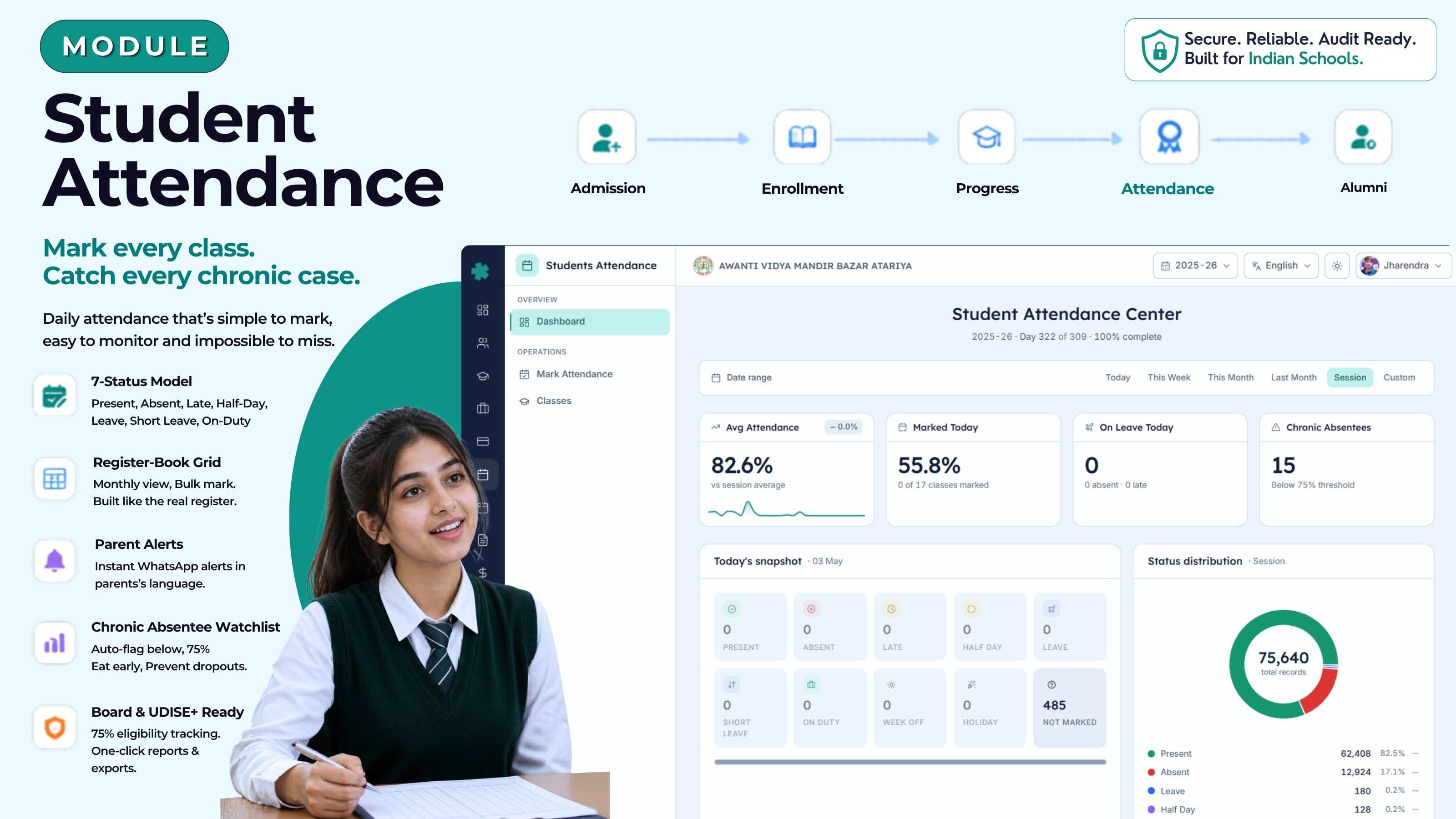
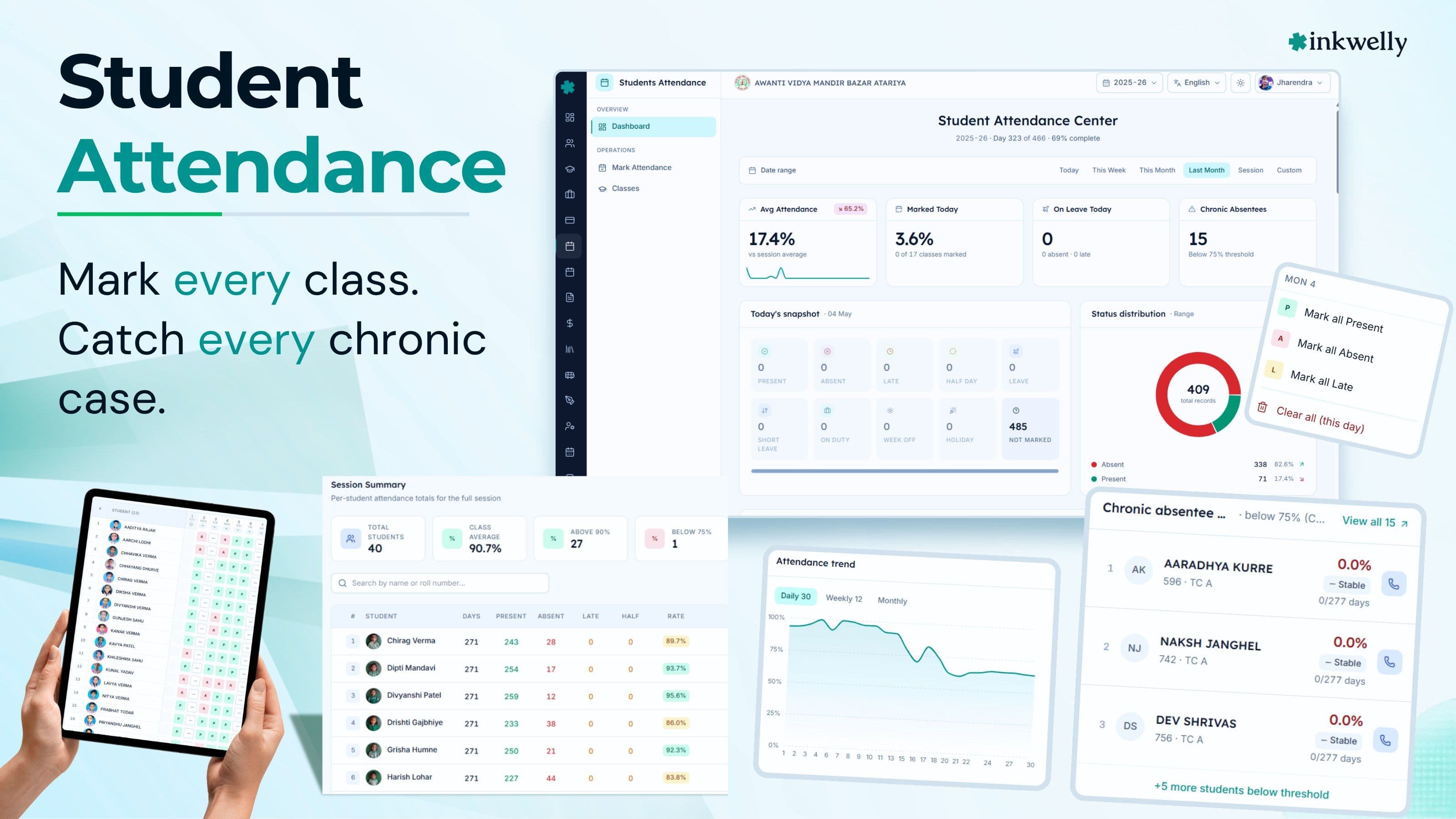
Mark every class. Catch every chronic case. Catch every chronic case.
Daily class-by-class attendance with the 7-status model Indian schools actually use, a register-book monthly grid, chronic-absentee watchlists, parent WhatsApp alerts, and UDISE+ ready exports — for CBSE, ICSE, IB and State Board schools.
How most Indian schools mark student attendance today
At 8:05 a.m., the class teacher of Class 5 B opens a hardbound register, calls out roll numbers from 1 to 47, and ticks present or absent next to each name. The same scene plays out in 38 other classrooms in the school. By 9:00 a.m., the registers are back in the staff-room rack. By 9:30, a peon is carrying them, one by one, to the principal's office where the office assistant types the day's totals into an Excel sheet — class-wise, section-wise, gender-wise, by social category if the school is on UDISE+.
A parent calls at 11:00 a.m. — 'Did Aarav reach school today?' The office staff opens the Excel, finds Class 7 A, scrolls to Aarav, sees a blank cell, says 'haan ji aa gaye' without actually knowing. A few hours later it turns out Aarav's section register was never sent up — the teacher was on substitute duty in another class. Three months from now, when CBSE renewal asks for the 75% attendance roster, four people will spend two evenings reconciling registers, Excel, and notebooks to compute attendance for 1,200 students.
The cost is not the time spent ticking boxes. The cost is the Class 10 board student whose attendance fell to 71% and nobody noticed until the school had to write a letter to CBSE for relaxation. The RTE-EWS student who stopped coming after Diwali and the school discovered the drop-out only at term-end. The parent who tells four other parents that 'this school doesn't even know if my child is in school'. The state inspector who pulls the attendance register and finds it doesn't reconcile with the UDISE+ submission. Attendance is not paperwork. It is the most-watched signal in any Indian school.
What we built instead
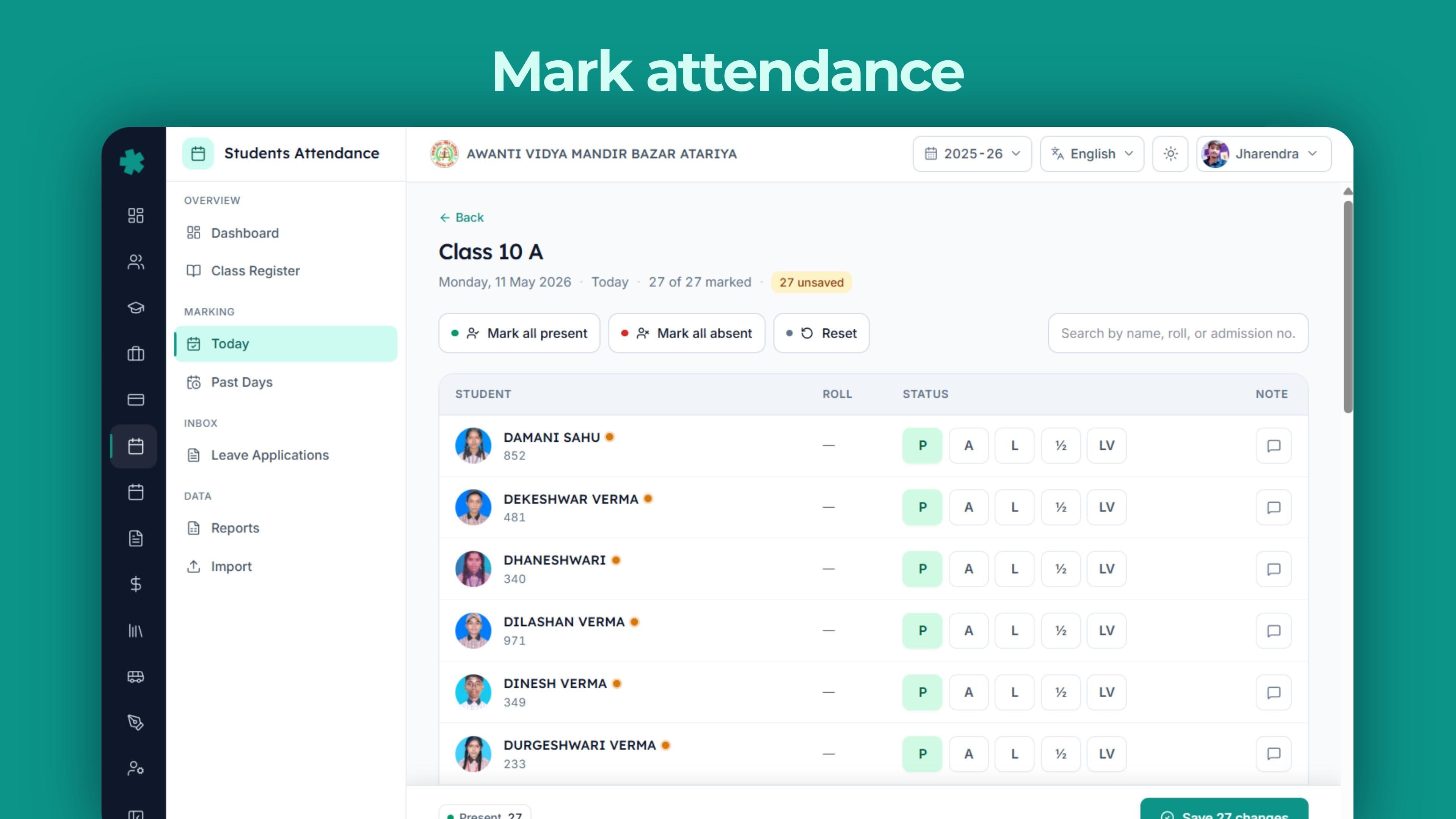
Inkwelly's Student Attendance module is one register per class, every working day, with the seven statuses Indian schools actually need — Present, Absent, Late, Half-day, Leave, Short Leave and On-Duty — marked in under two minutes by the class teacher on her phone, instantly visible to the principal and the parent.
It understands the Indian school calendar. The session runs April to March. Saturdays are full or half working depending on the week. Sundays and gazetted holidays are non-working. Diwali, Holi, Eid, Christmas, Janmashtami, Independence Day, Republic Day, Founder's Day are pre-loaded as holidays. So 'attendance percentage' is computed against actual working days — not 365, not 200, but the 220 (or 180, or 240) days your school actually opens. Class teachers do not configure this; the school's academic session does it once.
It understands the seven realities of Indian school absence. A child can be Present. Absent without leave. Late by twenty minutes. On half-day because of a doctor visit. On approved Leave for a family function. On Short Leave for two periods. On-Duty representing the school at an inter-school competition. Each status drives a different downstream effect — fee penalties, board-eligibility, parent communication, UDISE+ category — and the system models all seven, not just the binary.
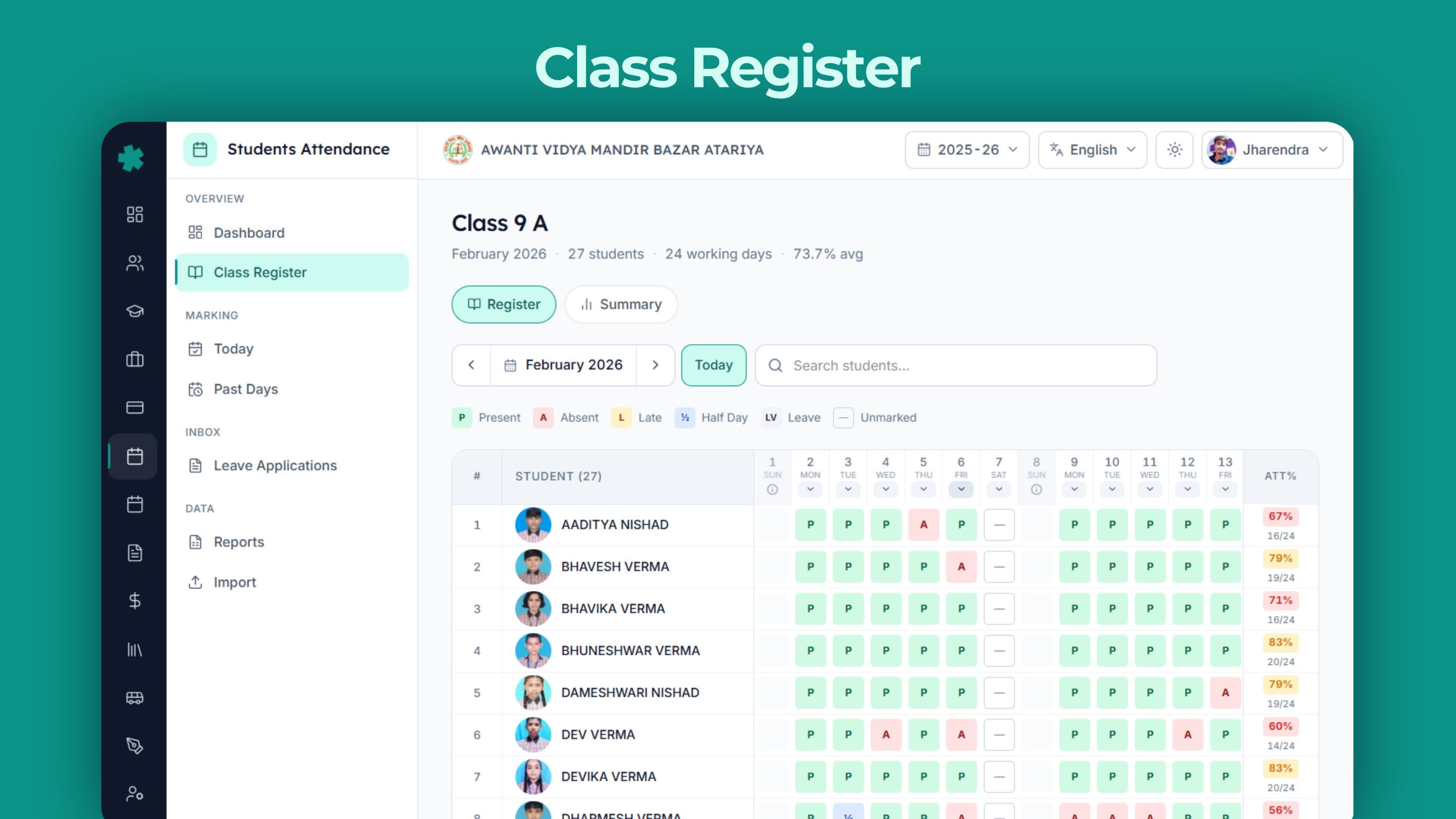
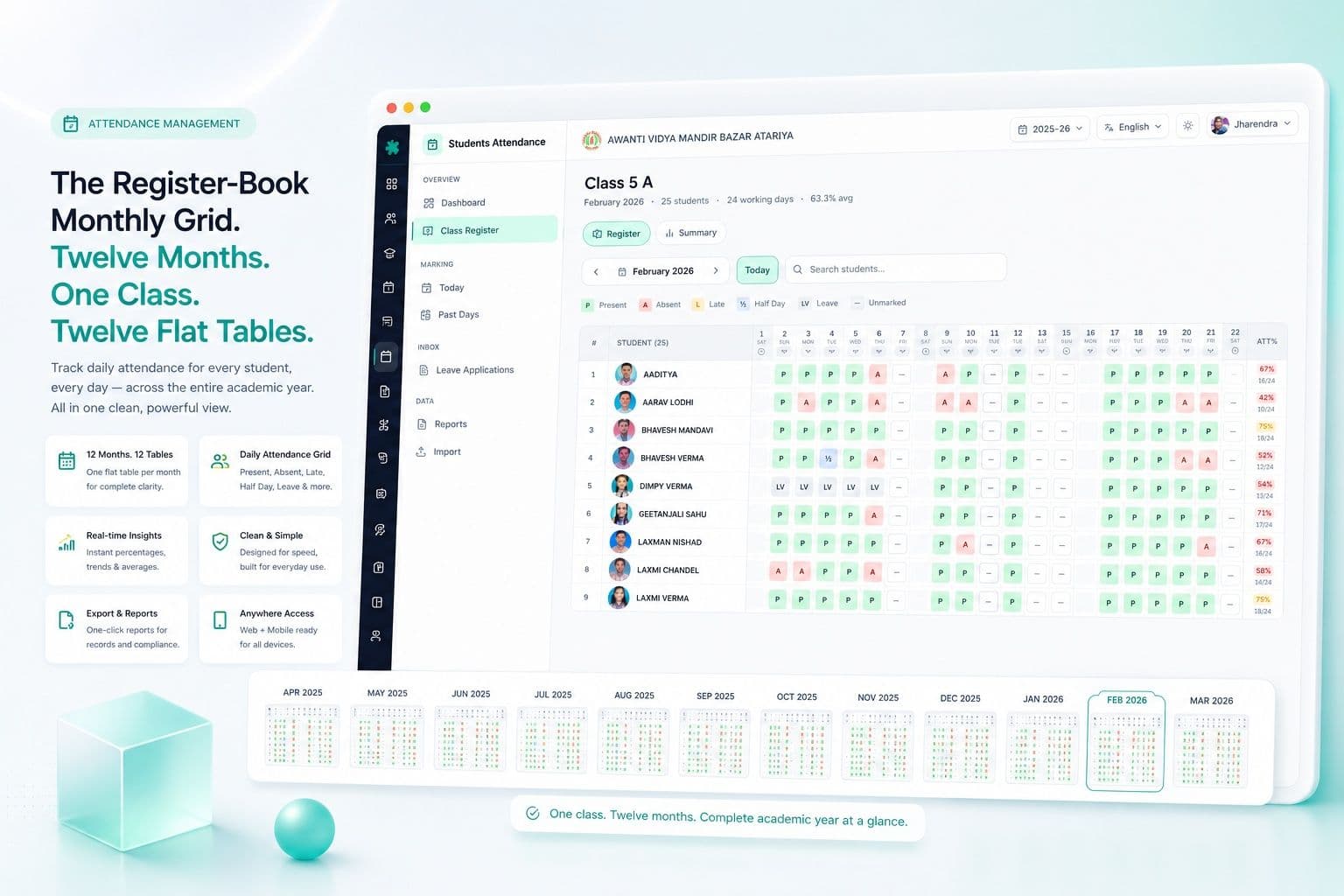
It understands that the register-book monthly grid is how Indian class teachers actually think about attendance. Twelve months × forty students × thirty cells per row is a flat 2D table — not a date-picker, not a pop-up — that the teacher scans, ticks, and closes. We built the digital version that prints to the same paper register if the inspector still asks for it.
Highlights
- 7-status attendance model — Present, Absent, Late, Half-day, Leave, Short Leave, On-Duty — covering every reality of an Indian school day, not just present/absent.
- Register-book monthly grid — 30-day flat table per class, the way teachers actually think about attendance, with one-click bulk marking and Saturday/Sunday/holiday awareness baked in.
- Class pulse grid — every section's attendance rate at a glance, colour-coded, principal opens it before the morning meeting.
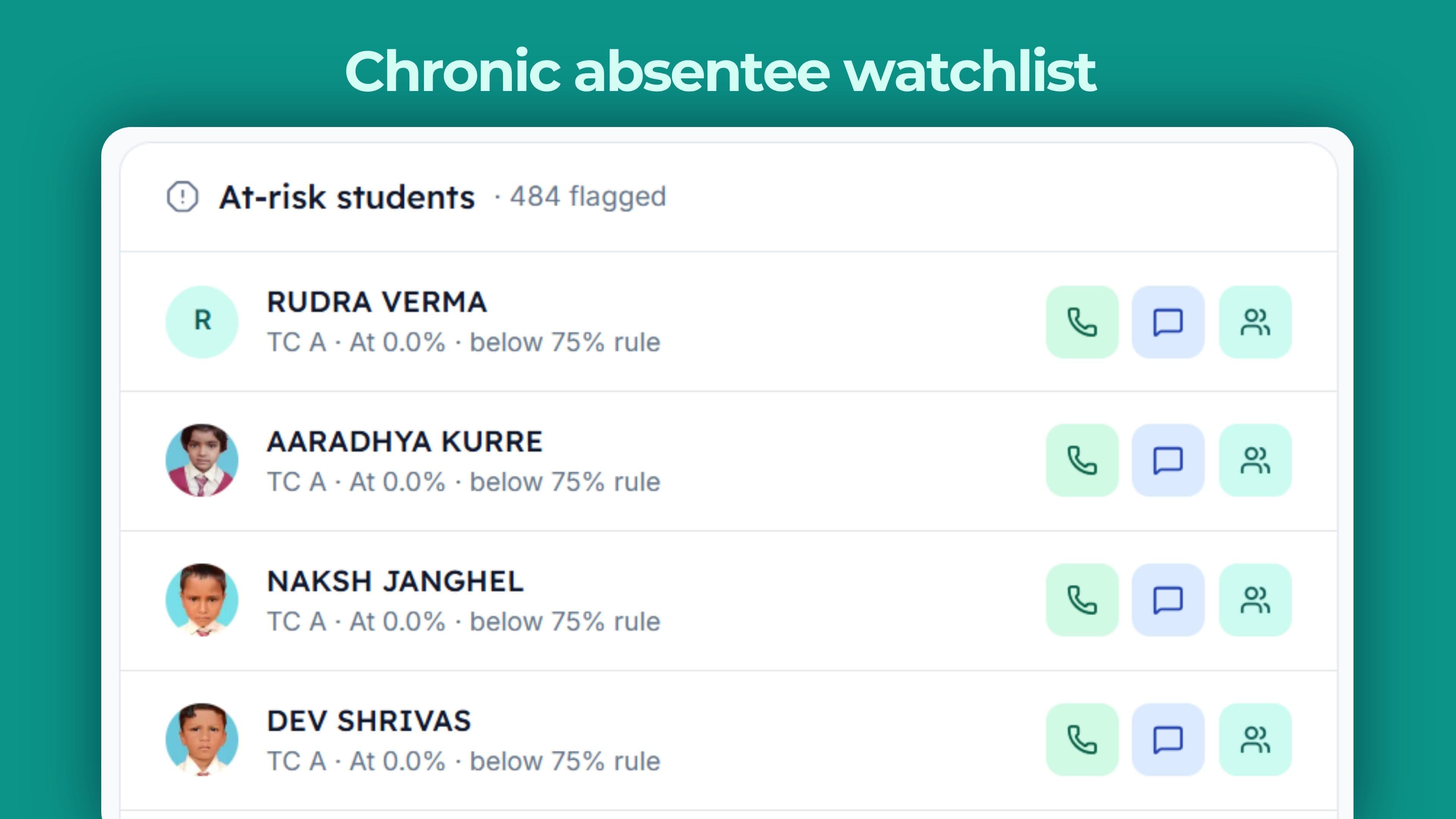
- Chronic absentee watchlist — students below the 75% threshold flagged automatically, sorted by class, with parent contact one click away.
- Marking coverage card — which classes have not marked attendance today, by what time, by which teacher; the principal sees it before the second period.
- Parent WhatsApp alerts — auto-sent when a child is marked absent, on the parent's preferred mobile, in English or Hindi or regional script.
- Source mix tracking — manual marking, biometric, portal self-mark, parent-reported leave — every source captured with audit trail and recorded-by user.
- Holiday and week-off intelligence — gazetted holidays, second Saturdays, Sundays, school-specific closures all pre-loaded; attendance percentage computes against real working days.
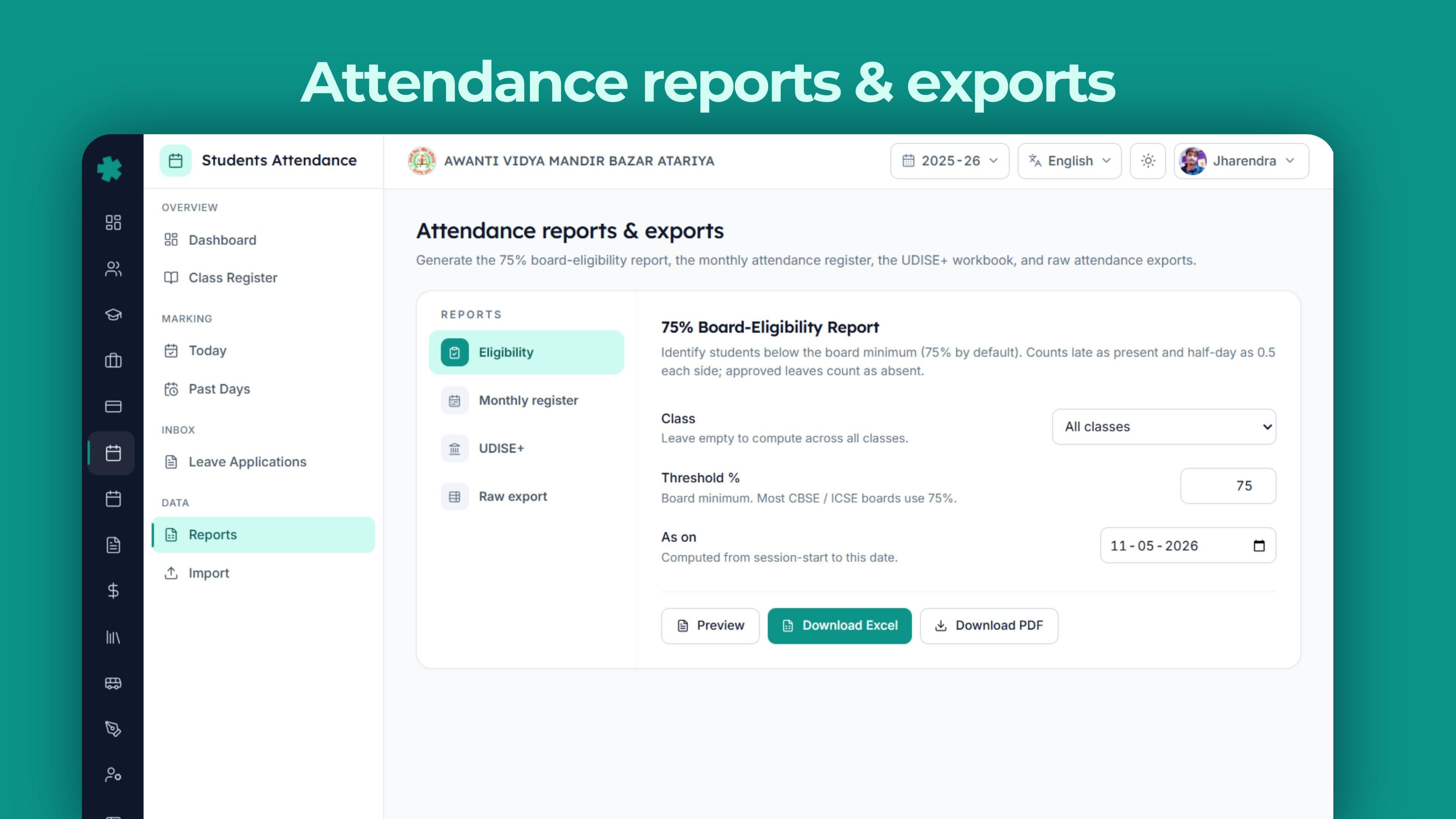
- 75% CBSE board-eligibility tracking — Class 9, 10, 11, 12 students flagged the day they fall below 75%, not three months later when the board roster is due.
- RTE 25% reservation attendance — EWS-DG students' attendance tracked separately for RTE register; drops flagged before they become a state inspection issue.
- UDISE+ submission ready — class-wise enrolment, gender-wise, social-category-wise attendance exported in the format the portal accepts.
- Audit log per record — who marked, when, from which device, with edits captured. Inspectors get the answer; teachers get the back-up.
See the product
The seven statuses Indian schools actually need
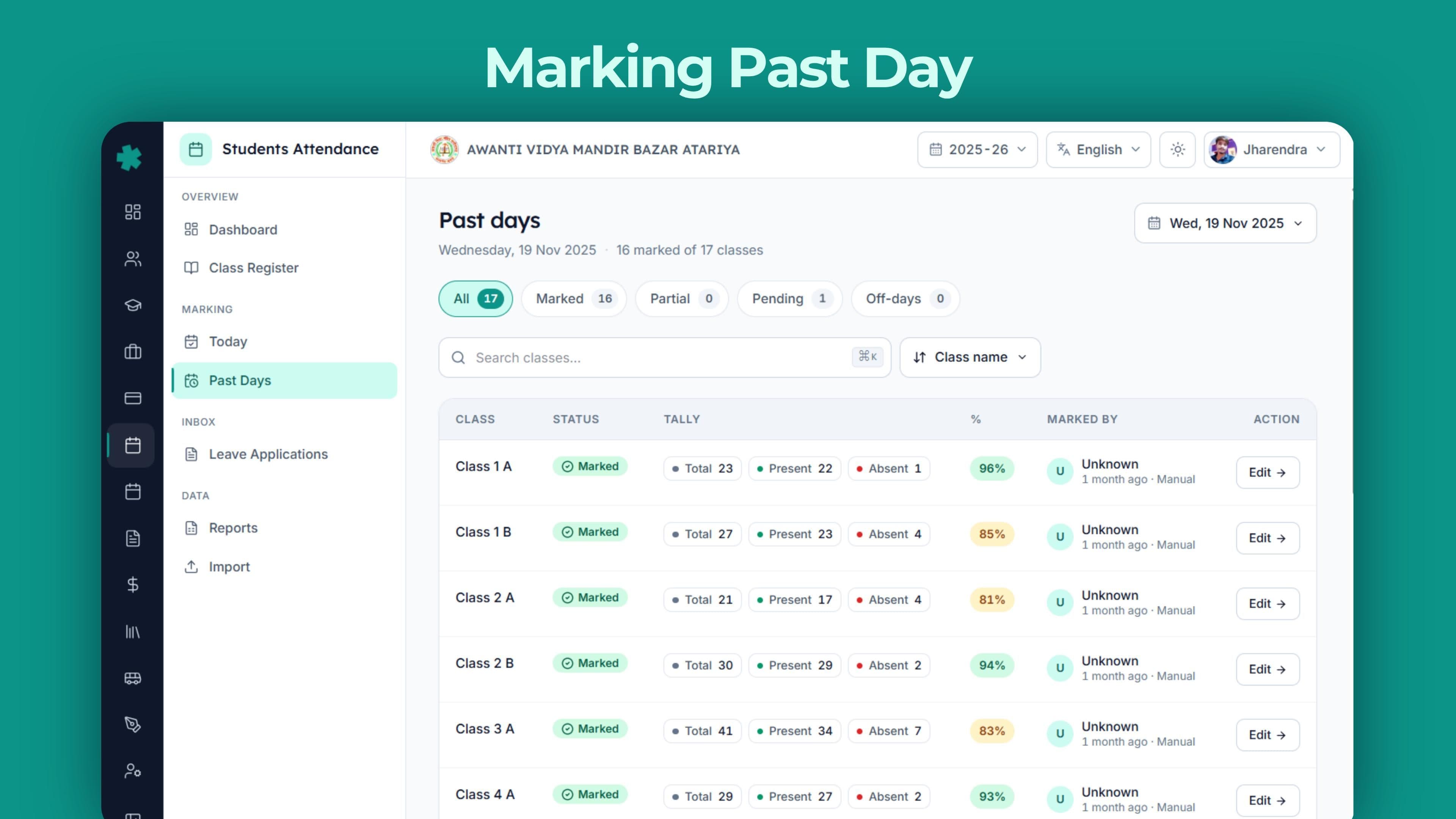
A name, a tick, and a cross is not enough for a real school day. A child arrives at 8:42 — late, but present. A child leaves after the second period because the mother came to fetch her — short leave, not absent. A child is at the inter-school sports tournament representing the school — on-duty, not absent. A child has informed leave for a wedding — leave, not absent without permission. Each of these is a different downstream effect. Different parent message. Different UDISE category. Different fee implication. Different board-eligibility weight.
We modelled all seven as first-class statuses in the data model. The teacher picks the right one in the dropdown; the system does the rest. The principal's dashboard, the parent's WhatsApp, the academic record, the examinations module — all read the right status, not a flattened binary.
Present
Default. Student attended the full day. Counts as 1.0 toward attendance percentage. No parent message triggered.
Absent
Without prior leave. Counts as 0 toward attendance. Auto WhatsApp to parent at 9:30 a.m. asking for reason. Repeat absences trigger chronic flag.
Late
Arrived after the late-coming cut-off. Counts as 1.0 (configurable to 0.75). Late count above threshold flags an attendance pattern review.
Half-day
Arrived late and left early, or doctor / function. Counts as 0.5. Common for primary classes; tracked separately so trends are visible.
Leave
Pre-approved by class teacher, recorded against the [leave application](/modules/students-attendance). Counts as 0 for attendance % but does not flag chronic; CBSE-eligible if medical.
Short Leave
Two periods or less, in or out. Counts as 0.85. Used for medical, parent visits, school-permission errands. Audit-logged with reason.
On-Duty
Representing the school — sports, debate, science Olympiad, NCC parade. Counts as 1.0. Excluded from chronic analysis. Visible in achievement record.
The register-book monthly grid — Indian schools' actual mental model
Ask any class teacher in any Indian school how she thinks about attendance and she will draw a 30-column-wide table. Names down the left, dates across the top, ticks and crosses in the cells. Every register from every paper-based school in India looks like this. Every Excel sheet that office assistants maintain is this. The mental model is fixed; the medium is paper or spreadsheet; the friction is in the medium, not the model.
We built the digital version of exactly this register. Class 5 B opens to a flat table — 38 student rows, 30 day columns, status dots in each cell. Saturdays and Sundays are pre-shaded. The October 2 holiday is auto-marked. The teacher can tap one cell to change a status. She can shift-click a range to mark a row of cells. She can bulk-mark an entire column 'Present' for a normal day, then click the absentees individually. She closes the page and the data is in the database, in the principal's dashboard, in the parent's app, in the UDISE+ export.
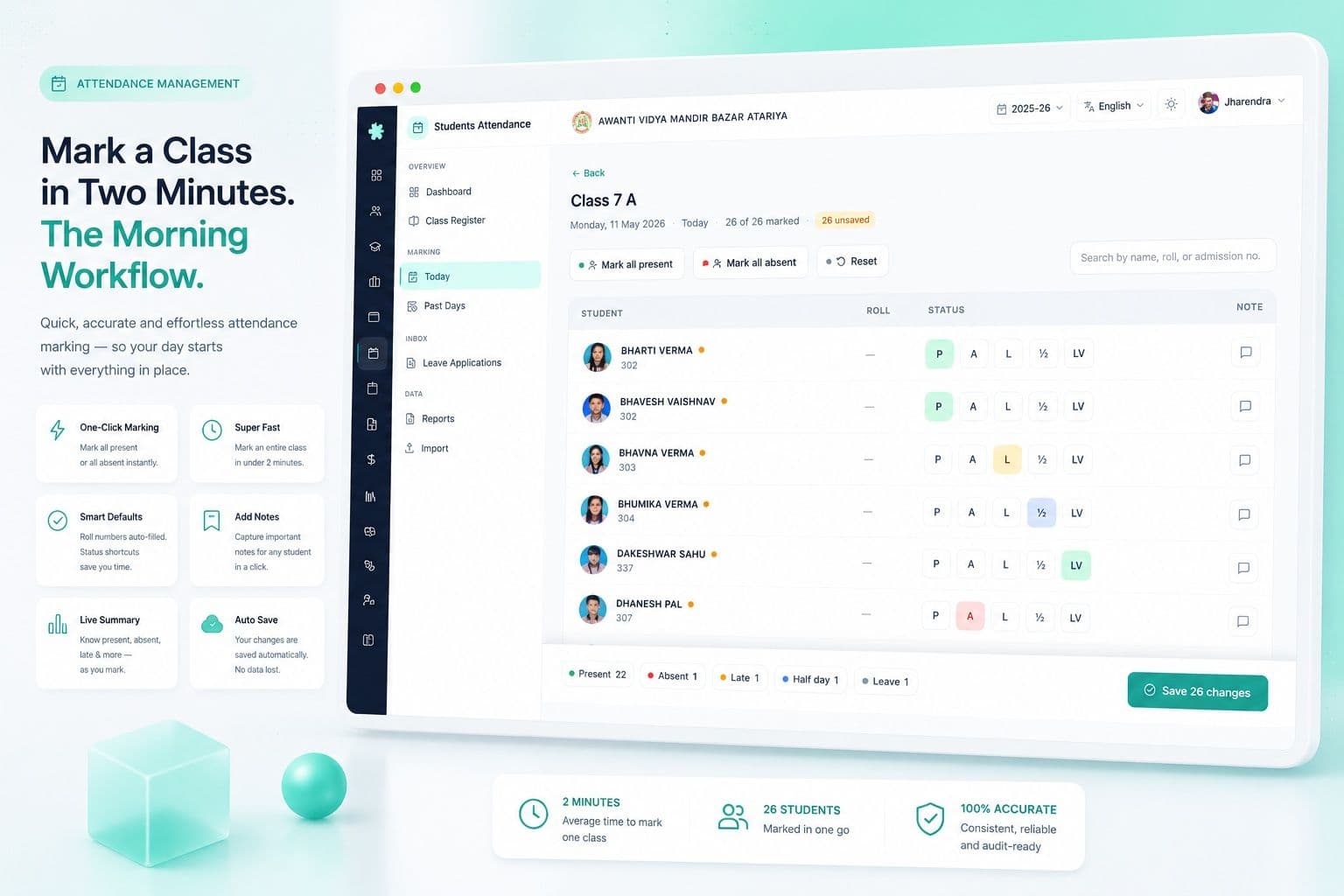
Mark a class in two minutes — the morning workflow
At 8:30 the class teacher opens the classes register on her phone. Class 7 A opens to today's date, all 47 students listed, all defaulting to Present. She scrolls, finds Aarav, marks him Absent. Finds Priya, marks her Late. Finds Rohan, marks him On-Duty (he is at the Math Olympiad). Saves. The whole thing takes ninety seconds.
At 8:35 the principal sees Class 7 A turn green on the class pulse grid — marked, 45 present, 1 absent, 1 late, 1 on-duty. By 9:00 every class is green. The principal walks into the morning meeting knowing the school's attendance rate before anyone has finished their tea. By 9:30 Aarav's mother gets a WhatsApp: Aarav is marked absent today. Please reply if this is a mistake. By 9:32 she has replied — Aarav was vomiting, please mark sick leave. The teacher fixes the status. The audit log captures the change.
Class pulse grid — the principal's morning view
Forty sections from Pre-KG to Class 12 on one screen. Each tile shows section name, total students, present count, attendance rate, and a marking-status flag — green if marked, amber if marking is in progress, red if not started. The principal's eye goes to red first.
If Class 8 B has not been marked by 9:15, a glance tells her the substitute teacher has not opened the register. She messages the teacher; one click sends a reminder. Marking coverage at 100% by 9:30 is a measurable, visible KPI — not an assumption. On Saturdays when only half the school is open, only the working sections show; non-working sections are greyed out without flags. The grid honours the school's calendar; the principal does not chase phantom absences.
Chronic absentee watchlist — catch the drop-out before it happens
A student does not become a drop-out on the day she stops coming. She becomes a drop-out three weeks later, when the school finally notices. Indian government schools lose 4% of Class 9 students every year to invisible drop-outs; private schools lose less, but they lose them too — and they only find out at term-end.
Inkwelly flags every student whose attendance drops below 75% (the CBSE board-eligibility bar, configurable per school) the day it happens. The watchlist is sorted by severity — students at 50% above students at 70%. The class teacher's name, the parent's mobile, the student profile link are one click each. The principal can call ten parents in a focused half-hour and recover most of them. The 4% drop-out becomes 0.5%.
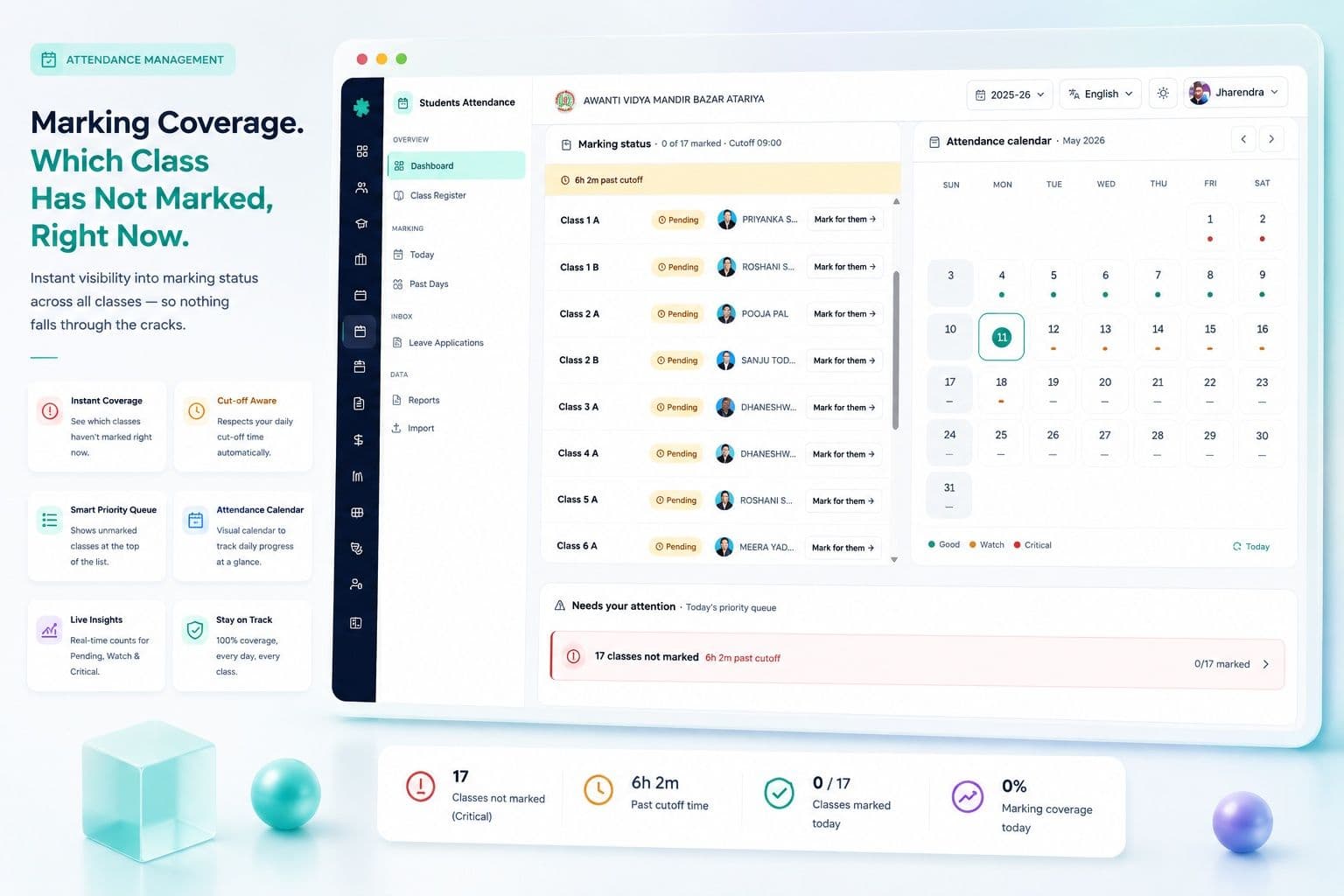
Marking coverage — which class has not marked, right now
If the principal has to ask 'has Class 6 A marked attendance?', the system has already failed her. Inkwelly shows marking coverage live — 38 sections, 35 marked, 3 pending, by name, by class teacher, by time. If the threshold is 9:30 and it is 9:32, the three pending are red; the principal sends a one-click WhatsApp reminder to those three teachers.
The coverage card breaks down marking by source as well — which sections marked manually, which had biometric punching auto-mark, which were marked from the office because the substitute teacher was unfamiliar. The audit trail shows recorded-by user and timestamp on every cell. When CBSE inspections ask 'how do you ensure attendance is marked daily?', the answer is on screen, exportable as a PDF.
Source mix — manual, biometric, portal, parent-reported
Attendance arrives through four channels in a real Indian school. The class teacher marks manually. A biometric or RFID punching device at the school gate records arrival. The student or parent uses the self-service portal to inform a planned absence. The office staff records leave applications received in person.
Inkwelly captures the source on every record — manual · biometric · portal · admin — visible in the audit log, exportable in reports. When sources conflict (the gate biometric says 'arrived', the class teacher marked 'absent'), the system flags it for review rather than silently choosing one. The principal sees the conflict count daily; the office reconciles. Most days, conflicts are zero.
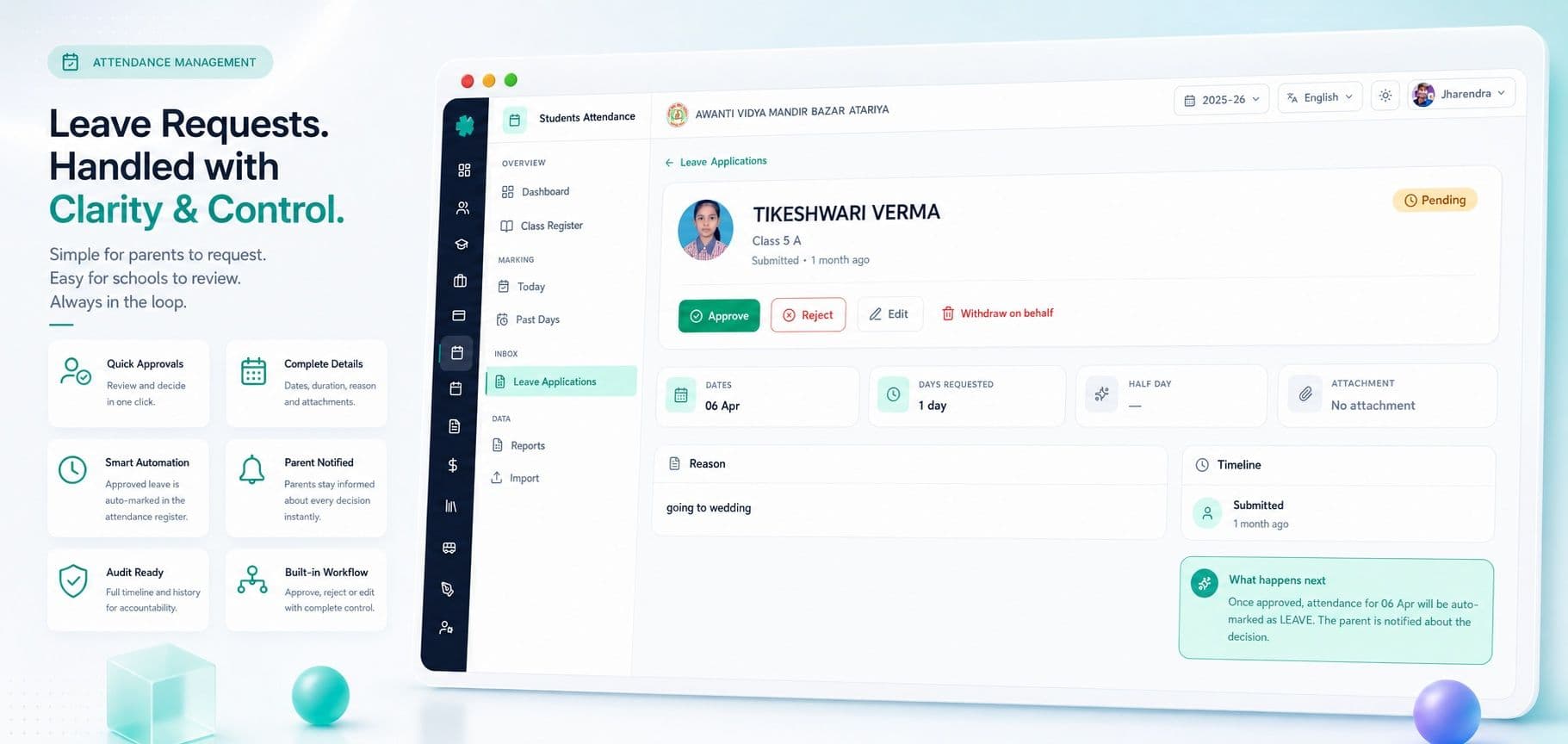
Leave pipeline — applications, approvals, audit
A real Indian school day starts with eight to twelve leave applications. Some are written in the diary the previous evening. Some are texted on WhatsApp to the class teacher. Some are walked in by the parent at 8:00 a.m. with a hand-written note. Most schools track these in a notebook in the staff-room and forget half by month-end.
Inkwelly's leave pipeline captures every application — date, reason category (Medical · Family Function · Travel · Other), supporting document if any, requested-by, approved-by, decision timestamp. When the leave is approved the attendance status auto-flips to Leave on the right dates. When CBSE renewal asks for medical-leave aggregates by class, the answer is one click — not a week of register-hunting.
Parent WhatsApp alerts — every absence, every parent
The single most-asked question in any Indian school is 'is my child in school today?'. The single most-anxious moment for a parent is when she realises she sent her child off to school but is not sure he reached. Inkwelly answers both — automatically.
When a child is marked Absent, the parent receives a WhatsApp message at 9:30 a.m. on the registered mobile: Your child Aarav (Class 7 A) is marked absent today. If this is wrong, please reply to fix it. The message is in the parent's preferred language — English, Hindi, or regional script. Reply-to-fix is built in. Schools see parent walk-in calls drop by 70% within the first month — and the parents who do call are the ones who genuinely need to talk.
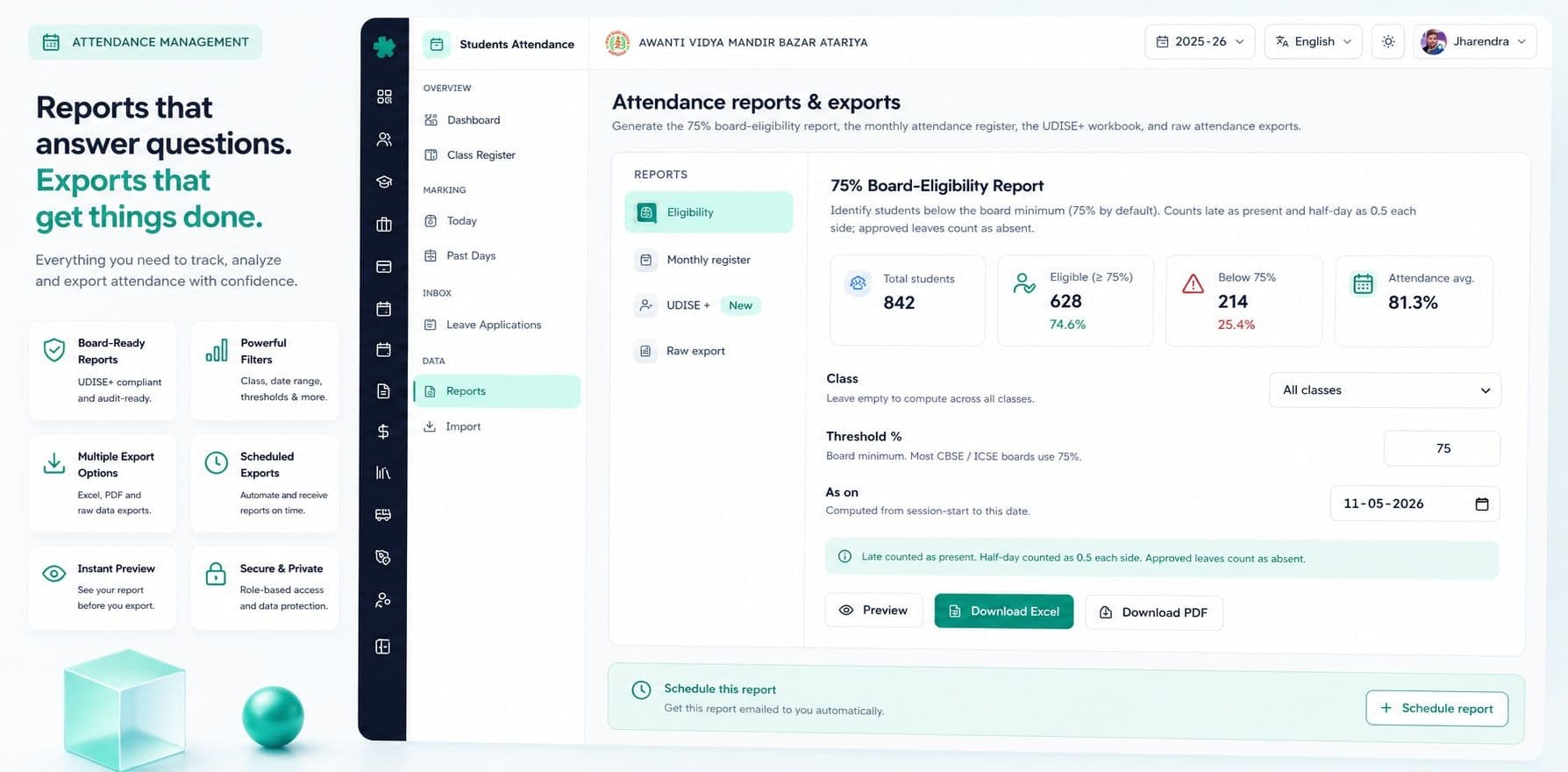
75% CBSE board-eligibility — caught, not chased
The Central Board of Secondary Education (CBSE) requires 75% attendance for a Class 10 or Class 12 student to appear in the board exam. The board-eligibility roster is due in February. Most schools discover their at-risk students in January when the office assistant runs the calculation — by then a student at 60% can mathematically not reach 75%.
Inkwelly tracks every Class 9, 10, 11, 12 student's projected attendance live — current %, days remaining, mathematical maximum % achievable. A student dropping below 75% is flagged on the day, not the month. The principal can intervene with the parent in October, when the student can still recover. Schools using Inkwelly report 80%+ recovery of at-risk students; the rest get the early notice for the CBSE relaxation letter, with documented evidence.
UDISE+ attendance — every October, ready
Unified District Information System for Education+ (UDISE+) is the Ministry of Education's primary data system for every recognised school in India. The October submission window asks for class-wise, gender-wise, social-category-wise, age-wise enrolment AND attendance — not just headcount but the percentage attended.
Most schools rebuild attendance aggregates from registers in the last week of September, working evenings to type Excel sheets that match UDISE+ field names. Inkwelly keeps the aggregates live, every day, in the right structure. When the October window opens, the UDISE-compatible export is one click. Source documents are linked — every student's attendance is backed by the day-by-day register, with audit trail. DEEO inspections find the records on file, not missing.
RTE 25% — attendance, not just admission
Under the Right to Education Act 2009, every recognised private school in India must reserve 25% of its Class I (and pre-primary, in some states) seats for children from economically weaker sections (EWS) and disadvantaged groups (DG). State governments reimburse part of the fees — but only for students who actually attend. A 30% attendance child does not earn the reimbursement.
Inkwelly tags RTE-admitted students separately and tracks their attendance against state-specific thresholds. When the state government's annual RTE register is requested, attendance percentage per RTE student is on it. Drops are flagged early so the principal can call the parent before the child becomes irrecoverable. Most schools cannot produce this data; Inkwelly produces it on a one-day notice.
Holiday and week-off intelligence
Indian schools do not run for 365 days. They run for 220, or 200, or 240 working days depending on board, state and school calendar. Saturdays may be full, half, or alternating. Sundays are off. October 2 (Gandhi Jayanti) and August 15 (Independence Day) are off. Diwali is two days; Holi is one or two; Eid moves with the lunar calendar; Janmashtami, Christmas, Founder's Day, mid-term break, summer vacation — every school has its own list.
We pre-load the gazetted holidays for the state your school is in, and let the principal add school-specific closures. Attendance percentage computes against the actual working days — not the calendar days. Saturday-week logic (first / second / third / fourth / last Saturday off) is encoded once. The class teacher does not configure it. The system does the right thing every day.
“Pehle do hafte lagte the CBSE 75% list nikaalne mein. Ab principal Madam roz subah dekh leti hain — kaun girne wala hai. Saal mein paanch students bachaa liye hum ne is se.”
Before and after Inkwelly Student Attendance
Inkwelly vs generic school ERPs
Different people, same one register
Attendance means different things to the principal, the class teacher, the office clerk, and the parent. We built the same data to serve all four — with the right view for each.
Principal
Live school attendance rate. Class pulse grid — every section coloured by rate. Marking coverage — which class has not marked. Chronic absentee watchlist — students below 75% sorted by severity. 75% board-eligibility roster for Classes 9–12. RTE 25% attendance compliance. UDISE+ readiness. Trend lines — last 30 days, last 3 months, year-on-year. Every signal a principal would normally ask the office for, on screen, before the meeting starts.
Class teacher
Her section, her students, her register. Roll-number-wise list, quick status dropdowns, bulk-present action, individual override. Yesterday's pattern visible — who was absent two days running. Her own monthly grid for any month, exportable as PDF if the inspector still asks for paper. Leave applications received via WhatsApp surface here. Two-minute marking, every morning, on her phone.
Office clerk / Admin staff
The heavy user. Adjust attendance for an On-Duty roster (cricket team, debate team, NCC parade). Process the leave pipeline — approve, reject, request more info. Generate UDISE+ export. Run the 75% CBSE board-eligibility report. Bulk import attendance from the biometric gate device. Generate parent absentee letters for chronic cases. Every action audit-logged, every record reversible, no data loss.
Parent / Student portal
At /s/<id>, the parent sees the child's attendance summary — month-to-date %, days present, days absent, leave used, on-duty days, projected board-eligibility for board classes. Monthly register-style grid for any month. Submit a leave application with supporting document. View absentee WhatsApp history. Eliminates the morning calls to the school office, gives the parent the ownership the school cannot.
Inkwelly vs imported global student attendance tools
One register powers six other modules
Student Attendance is the daily heartbeat that the school's other systems read from. A change here — a child marked Leave, a section closed for an event, an On-Duty roster — flows everywhere instantly, audit-logged, no drift.
Attendance data is sensitive — minors, pattern, location
Attendance reveals movement patterns of minors. It is governed under the DPDP Act 2023 with verifiable parental consent. POCSO sensitivities apply. We treat it accordingly — not as an afterthought.
- AES-256 encryption at rest on PostgreSQL; TLS 1.3 in transit on every endpoint.
- Role-based access — principal sees all, class teacher sees her section only, parents see only their children.
- Per-cell audit log — who marked, when, from which device, with edits captured. Visible to inspectors and parents on request.
- Verifiable parental consent captured at admission for every minor; renewable, revocable, DPDP Act 2023 compliant.
- Soft-delete with 90-day restore — accidentally deleted attendance comes back; no data loss, no panicked support tickets.
- Multi-tenant isolation at the database level. Your school's attendance is fully isolated from any other tenant. Forever.
- Hosted in India (Mumbai region). No cross-border PII transfer for normal operation.
- POCSO-aligned — sensitive student details around late-coming and short-leave reasons remain access-restricted.
Migration — bring your existing attendance over
Most schools come to us already running attendance on registers, Excel, biometric gate devices, or another ERP. Migration is the part schools fear most, so we own it. Free for the first session of attendance, on us.
From paper registers + Excel
Most mid-tier Indian schools have hardbound registers per class plus a master Excel that the office maintains. We accept the Excel as-is — no specific format. Our migration team maps your columns to Inkwelly fields, validates against your student master, reconstructs holiday/week-off awareness from the school calendar, and imports daily attendance back to a chosen start date. Paper-only schools can opt for OCR scanning of registers — paid service, optional.
From Educomp, Campus Care, MyClassCampus, Vidyalaya, Teachmint
We have migrated attendance histories from most major Indian school ERPs. Export attendance, leave applications, holiday calendar in their standard formats — we map every status to Inkwelly's seven-status model, reconstruct working-day calendars, and import every cell. Most schools are live in under a week. Parallel-run validation against your previous system runs for 14 days. After cutover, you stop paying for two systems.
From biometric gate / RFID device
If your school has a biometric or RFID device at the gate (Realtime, eSSL, ZKTeco, Matrix, Mantra), we ingest its punch logs. Each student's first punch becomes 'arrived'; the late-coming threshold (typically 8:30) decides Late vs Present. Class teachers still get to override — biometric is a source, not the final word. Most schools run biometric AND class-teacher marking in parallel; the source-mix card shows which marked which.
See your school's attendance in 30 minutes
Bring your existing register, Excel or biometric export to the demo. We will set up a Class with your real students, mark a real day, send a real WhatsApp absentee message, and project board-eligibility for your real Class 10 — during the call. By the end, you will see your real attendance inside Inkwelly.
“Every school marks attendance. Few can tell you, by 9:30 a.m., which child has fallen below 75% and which parent has not been informed yet. We built this for the few who care about the difference.”
The dashboard signals your principal actually wants
A student attendance module's job is not to mark ticks. Its job is to tell the principal — every Friday morning — exactly what the school's attendance health looks like, where the risks are, and which parent needs a call before Monday. We built the dashboard for that conversation.
What you see on the dashboard
- Hero KPIs — today's school-wide attendance %, students present, students absent, students on leave, on-duty count, marking coverage %.
- Class pulse grid — every section coloured by attendance rate; red sections need attention.
- Today's snapshot — class-by-class present/absent/late counts; drill into any section in one click.
- Status distribution — present, absent, late, half-day, leave, short-leave, on-duty as a stacked bar.
- Class breakdown — primary vs middle vs senior school attendance averages, gender-wise, social-category-wise.
- Chronic absentee watchlist — students below 75% sorted by severity, parent contact one click.
- Marking coverage — which sections have not marked today, by teacher, with one-click reminder.
- Source mix — manual vs biometric vs portal vs admin marking, with conflict count.
- Recent activity — last 50 attendance changes, who, when, from what device.
- Trends card — 30-day, 90-day, year-on-year attendance trends; pattern anomalies flagged.
- Leave pipeline — pending leave applications, by reason category, by class.
- Data quality alerts — sections with mismatched biometric, missing-marking days, late-marking warnings.
What's included with Student Attendance
- Unlimited classes, sections, students. No per-student fee.
- 7-status attendance model (Present, Absent, Late, Half-day, Leave, Short Leave, On-Duty).
- Register-book monthly grid for every class, every month.
- Class pulse grid, chronic absentee watchlist, marking coverage card.
- 75% CBSE board-eligibility tracker for Classes 9–12.
- RTE 25% attendance register for state inspections.
- UDISE+ submission-ready export.
- Parent WhatsApp absentee alerts in English, Hindi, regional script.
- Biometric gate / RFID device integration (Realtime, eSSL, ZKTeco, Matrix, Mantra).
- Self-service parent / student portal at /s/<id>.
- Audit log per cell, soft-delete with 90-day restore, role-based access.
- Hosted in India (Mumbai), DPDP Act 2023 compliant, parental consent verified.
Ready to see what 'every class marked, every parent informed' actually looks like?
30 minutes. No commitment. Bring your register or biometric export — we'll bring the structure. By the end of the call, you'll see your real classes, your real students, your real holiday calendar, and a real Class 10 board-eligibility roster — inside Inkwelly.
Frequently asked
13 questionsHow long does daily marking take a class teacher?
For a class of 45–50 students, marking takes 60–120 seconds on a phone. The default for every student is Present; the teacher overrides only the absentees, late-comers, and on-duty students. Bulk-present action covers the rest. Most class teachers mark in under two minutes; substitute teachers in three.
Does it work on a class teacher's phone?
Yes. The class teacher's daily marking workflow is built mobile-first — designed for a phone in landscape, in a busy staff-room, on a slow Jio connection. iOS and Android both supported via the Inkwelly app or the responsive web. The teacher does not need a laptop.
Can we use our existing biometric or RFID gate device?
Yes. We integrate with Realtime, eSSL, ZKTeco, Matrix and Mantra devices most commonly used in Indian schools. Punch logs are ingested every 5–10 minutes; the late-coming threshold (typically 8:30) drives Present vs Late. Class teachers retain override authority — biometric is a source, not the final word.
How does the 75% CBSE board-eligibility check work?
Every Class 9–12 student has a live attendance percentage and a projected maximum percentage achievable in the remaining working days. The system flags every student below 75% the day they cross. The roster is sortable, exportable, and includes the parent's mobile for a one-click call. Schools using Inkwelly recover most at-risk students by January because they got the flag in October.
Can parents get a WhatsApp message when their child is absent?
Yes. WhatsApp absentee alerts are auto-sent at a configurable time (default 9:30 a.m.) to the registered parent mobile. Messages are in the parent's preferred language — English, Hindi or regional script (Bengali, Tamil, Telugu, Kannada, Marathi, Gujarati, Punjabi). Reply-to-fix is built in: a parent replying with a reason auto-creates a leave application in the pipeline.
How are holidays, Sundays and second Saturdays handled?
Gazetted holidays for the state your school is in are pre-loaded. Sundays are off by default. The Saturday rule — full / half / first-and-third-off / second-and-fourth-off — is configured once per school. School-specific closures (Founder's Day, mid-term break) are added by the principal. Attendance percentage computes against actual working days only, not calendar days.
What about On-Duty for sports, debates, science Olympiad?
On-Duty is one of the seven first-class statuses. The class teacher (or office, with a roster) marks the student On-Duty with a reason. The parent does not get an absentee WhatsApp. Board-eligibility stays at 100% for the day. The achievement is logged on the [student profile](/modules/student-information). UDISE+ counts the student as present. One dropdown, every right answer.
Can we generate UDISE+ attendance submission directly?
Yes. The October UDISE+ submission asks for class-wise, gender-wise, social-category-wise enrolment AND attendance percentage. Inkwelly keeps the aggregates live, every day, in the right structure. The UDISE-compatible export is one click. Source documents are linked, so DEEO inspections find the records on file with audit trail.
Does it support RTE 25% reservation attendance tracking?
Yes. RTE-admitted students are tagged separately at admission. Their attendance is tracked against state-specific thresholds, on its own register, audit-ready for state inspectors. Drops below threshold are flagged early so the school can call the parent before the child becomes irrecoverable. Reimbursement filings reference the live attendance percentage.
Can we run it in Hindi or our regional language?
Yes. The class teacher's marking screen, the principal's dashboard, the parent portal, and the parent WhatsApp messages all support English plus Hindi (Devanagari) plus your regional script (Bengali, Tamil, Telugu, Kannada, Marathi, Gujarati, Punjabi). Latin digits (0–9) only — never Devanagari numerals — for consistency with the rest of Inkwelly.
What if a student is mid-year transferred between classes?
The student's attendance history stays continuous on the [student profile](/modules/student-information). The class change is timestamped; days before the change show under old class, days after show under new class. The 75% board-eligibility calculation uses both segments. The class pulse grid reflects the change instantly. No data is lost; no re-import is required.
Is attendance data stored securely? Where is it hosted?
All attendance data is encrypted at rest with AES-256 on PostgreSQL, in transit with TLS 1.3, hosted in Indian regions (Mumbai). Per-cell audit log captures every change. Role-based access — class teacher sees her section, principal sees all, parents see only their children. DPDP Act 2023 with verifiable parental consent for minors is built in. POCSO-sensitive details are access-restricted by default.
What if our school has multiple branches under one trust?
Inkwelly supports multi-school trusts natively. Each branch has its own classes, its own attendance, its own holiday calendar — fully isolated. Trust-level dashboards roll up attendance KPIs across schools. RTE register, UDISE+ export, and board-eligibility roster generate separately per branch. One platform, every branch, fully isolated by default.
You might also like
4 readsSee Inkwelly on your school
30-minute demo. We open your current ERP with you and load your data into Inkwelly on the call. Dated go-live plan by the end of it.