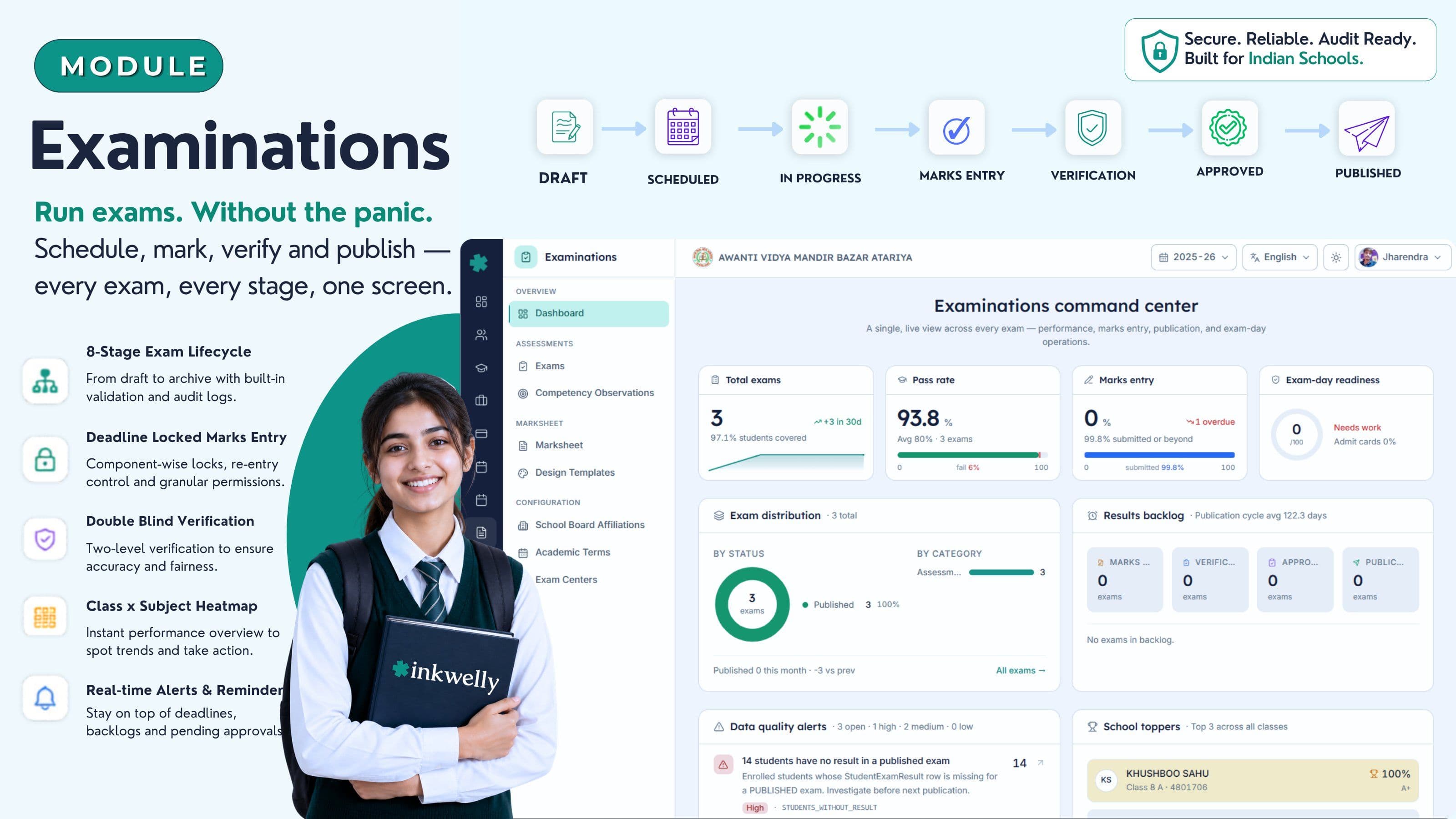
Exams चलाइए — April की panic के बिना। Schedule, mark, verify, publish — एक sign-off workflow।
8-stage exam lifecycle, deadline-locked marks entry, co-scholastic Part 2, चार-perspective competency observations, board-aware marksheet templates और class × subject heatmap — भारतीय स्कूल वर्ष के लिए एक structured exam backbone। CBSE, ICSE, ISC, IGCSE, IB और हर State Board के लिए जिसके papers आप असल में चलाते हैं।
आज ज़्यादातर भारतीय स्कूल exams कैसे चलाते हैं
Lucknow के एक CBSE upper-primary स्कूल में March का दूसरा हफ़्ता है। Class 10 का pre-board अभी ख़त्म हुआ है। Exam coordinator के सामने तीन Excel files हैं, maths department का एक printed mark register है, एक WhatsApp group में subject teachers पूछ रहे हैं 'Bhaiya, marks ka sheet kahan upload karna hai?', और principal का office पूछ रहा है कि report cards कब तक ready होंगे। Peon दो बार answer scripts का stack ले के आ चुका है जो Class 9 की English teacher half-day से पहले handover करना भूल गई थीं। पूरे स्कूल में एक भी ऐसी screen नहीं है जिसे पता हो कि कौन सा exam कहाँ खड़ा है।
खर्चा सिर्फ़ घंटों का नहीं है। PT teacher के grade 6 PE marks ग़लत column में जाते हैं। Class teacher result day से एक रात पहले 11:48 PM पर printed marksheet PDFs parents को email करती हैं, और उन में से तीन PDFs में बच्चे का percentage 1043% दिखा देता है — एक stray decimal की वजह से। एक parent screenshot सुबह तक स्कूल के WhatsApp broadcast group में पहुँच जाता है। Principal हर parent को personally call करती हैं, local stationery shop पर जा के fresh marksheets print करवाती हैं, और स्कूल की reputation को एक झटका लगता है जिसका ज़िक्र कोई कभी नहीं करेगा — पर अगले March में हर admission inquiry चुपचाप उसे तौलेगी।
अगर आपने भारतीय स्कूल में दो session से ज़्यादा exams चलाये हैं, आप यह सब जी चुके हैं। Inkwelly Examinations वही है जो हम ने इसलिए बनाया है ताकि यह दोबारा कभी न हो — एक 8-stage exam lifecycle जिसे हर paper, हर subject, हर component और हर बच्चा कहाँ खड़ा है यह SCHEDULED से PUBLISHED तक हर moment पर पता है। साथ में deadline-locked marks entry, double-blind verification, board-aware marksheet templates और एक class × subject heatmap जिसे principal staff-room की coffee queue में अपने phone पर पढ़ सकती हैं।
हम ने इसकी जगह क्या बनाया — 8-stage exam lifecycle
ज़्यादातर school ERPs एक exam को 'table में एक row जिसके सामने marks हैं' मानते हैं। हम इसे एक workflow मानते हैं। Inkwelly में हर exam एक fixed 8-stage lifecycle से गुज़रता है — DRAFT, SCHEDULED, IN_PROGRESS, MARKS_ENTRY, VERIFICATION, APPROVED, PUBLISHED, ARCHIVED — और system को पता है कि किस stage पर क्या allowed है, कौन कर सकता है, और कौन से data integrity rules लागू हैं।
यह इसलिए important है क्योंकि ग़लतियों का खर्चा asymmetric है। SCHEDULED exam पर ग़लत subject code 30 second का fix है। PUBLISHED marksheet पर ग़लत mark एक parent meeting, एक re-print, एक re-email, और स्कूल की चुपचाप एक memory है जो कभी ख़त्म नहीं होती। Lifecycle gates इसी लिए design किये गए हैं ताकि verification से पहले publish करना impossible हो, lock के बाद marks दोबारा enter करना impossible हो, और जब कुछ ग़लत हो तब audit history खोना impossible हो। हर status transition marks audit log में एक entry लिखता है — user, timestamp, पिछला status, और reason के साथ — ताकि जब trustees पूछें 'Class 8 maths re-evaluation कि approval किसने की?', आपके पास जवाब हो।
दूसरी चीज़ हम ने एक structured assessment model बनाया — हर exam में हर subject में एक से ज़्यादा components हो सकते हैं (WRITTEN, PRACTICAL, INTERNAL, ORAL, PROJECT), हर component के अपने max marks, pass marks, weightage, schedule और deadline। CBSE, ICSE, ISC, IGCSE, IB और हर State Board जिसके papers आप असल में चलाते हैं उसे सही तरीके से model किया जा सकता है — generic '100 marks per subject' shape force किये बिना। Best-of-N components, grace marks, partial marks और per-attempt re-entry — सब first-class concepts हैं, after-thought नहीं।
तीसरी चीज़ marksheet output system है जो असली, board-aware report cards बनाता है — generic single template नहीं। CBSE Part 1 और Part 2 (co-scholastic), ICSE/ISC scholastic और SUPW, IB MYP descriptors, custom State Board layouts, और competency observations annex जो चार-perspective assessments से आती है — teacher, self, peer और parent — सब design templates हैं जिन्हें school चुनता है, customise करता है और save करता है। QR-verified school letterhead, principal sign और class teacher remark के साथ।
Inkwelly Examinations में क्या-क्या शामिल है
- 8-stage exam lifecycle valid-transition guards के साथ — DRAFT, SCHEDULED, IN_PROGRESS, MARKS_ENTRY, VERIFICATION, APPROVED, PUBLISHED, ARCHIVED
- Multi-component subjects — WRITTEN, PRACTICAL, INTERNAL, ORAL, PROJECT — पाँच assessment modes के साथ MARKS_BASED, GRADE_ONLY, RUBRIC_BASED, PORTFOLIO और DESCRIPTIVE
- Marks entry per-component deadline locks, grace marks, best-of-N components, partial marks और per-attempt re-entry के साथ, plus per-row marks audit log
- Co-scholastic assessment CBSE Part 2 और ICSE SUPW के लिए — अलग config, grading scale और remarks; scholastic marks से कभी mix नहीं
- चार-perspective competency observations — teacher, self, peer और parent — report card के holistic profile में feed होते हैं
- Marksheet design templates — स्कूल के letterhead, board logo, principal sign, class teacher remark और QR code के साथ जो verified DigiLocker copy तक resolve करता है
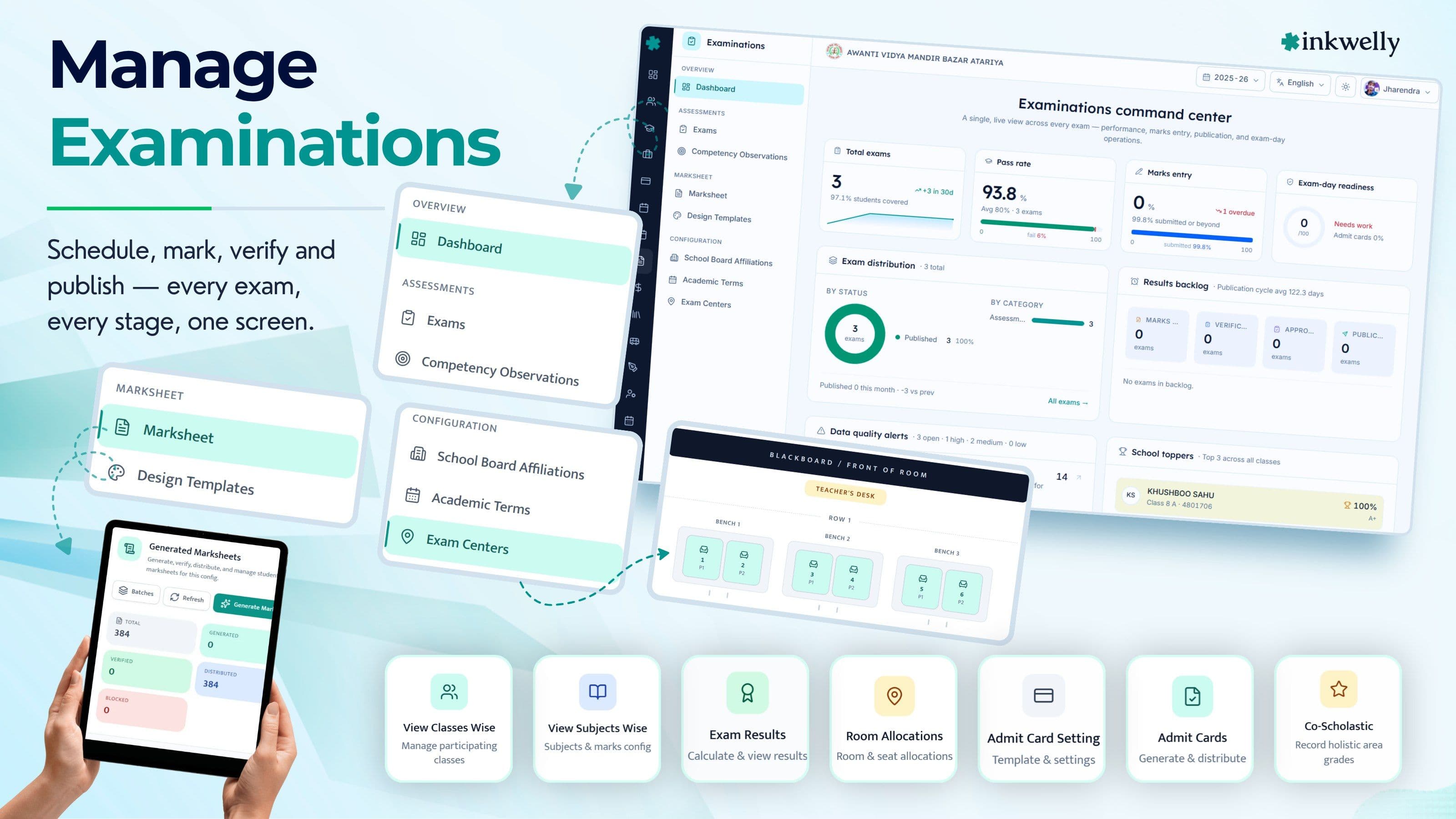
- Exam centers, room allocations और printable seating plan PDFs, admit cards एक class-wise booklet के रूप में export होते हैं
- Per-session multiple grading scales — A1-E2 (CBSE), 9-1 (IGCSE), 1-7 (IB), Distinction/A/B (Maharashtra) — और languages व electives के लिए per-subject overrides
- Academic terms में weightage — FA1 + FA2 + SA1 + SA2 per-term weightage percentage के साथ जो automatically final aggregate में flow करता है
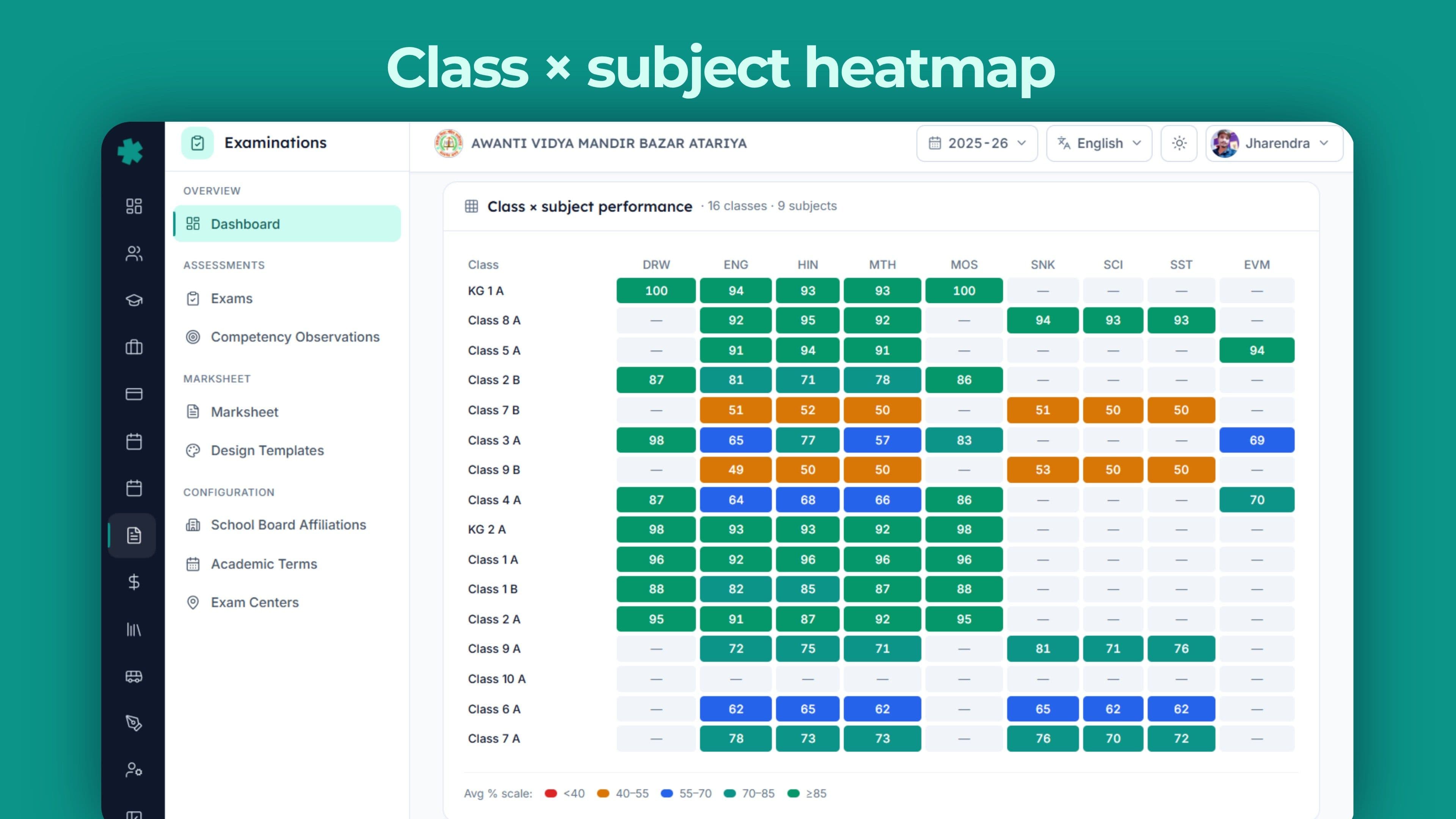
- Stats dashboard — status composition, marks entry funnel, backlog age, grade distribution, class × subject heatmap, school topper podium और live alerts के साथ
- Result publish parents तक WhatsApp Business, parent app push और SMS पर — 1-click 'unpublish' audit-guarded और re-print queue के साथ
- DPDP-compliant audit trail हर mark, हर verification, हर approval और हर published marksheet पर — trustees और affiliation cell के लिए PDF export
इसे action में देखिए
8-stage exam lifecycle, एक screen पर
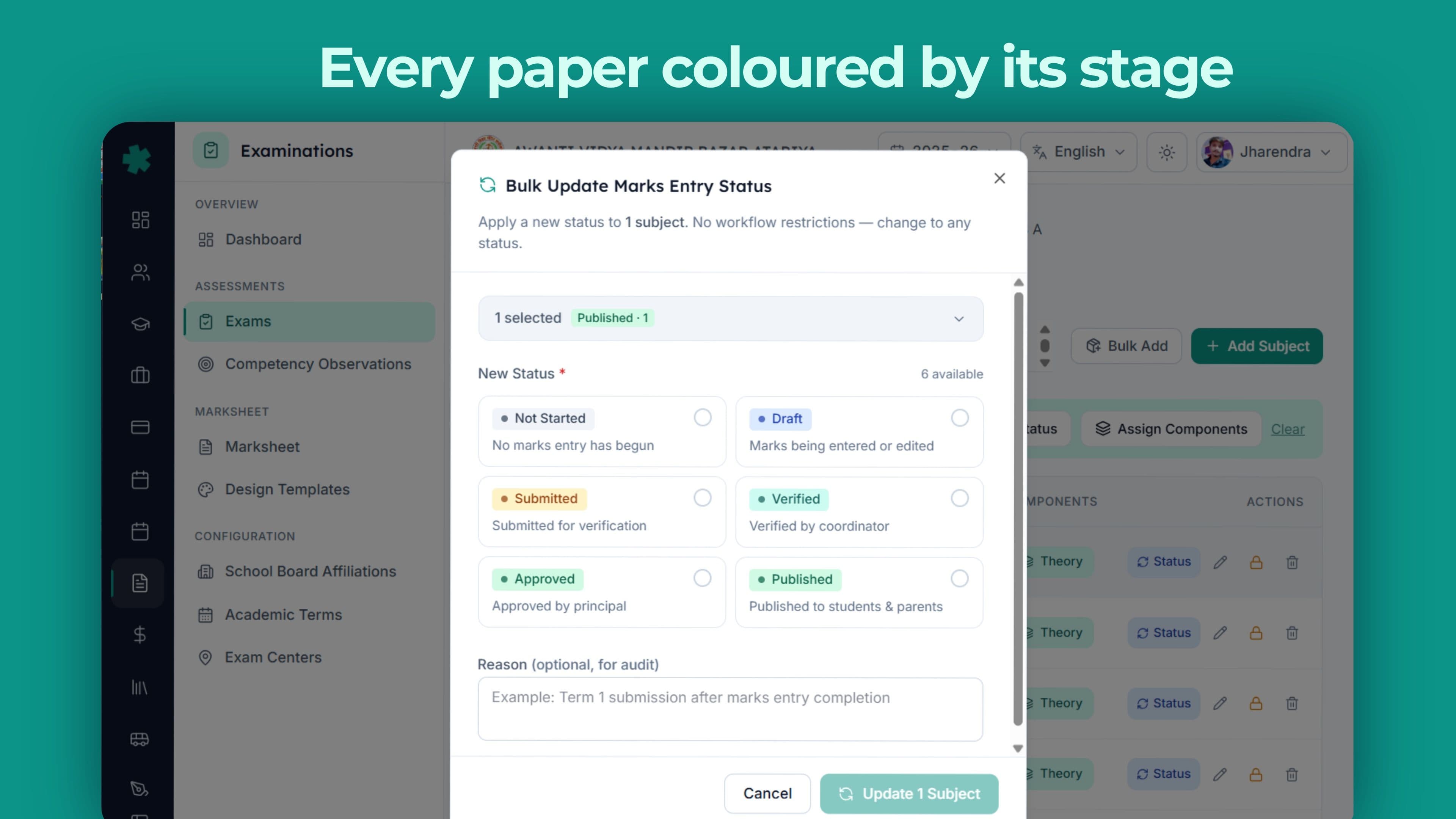
Inkwelly में हर exam किसी भी moment पर ठीक एक status में होता है — आठ में से एक। Valid transition graph server-side enforce होता है — आप DRAFT से सीधे PUBLISHED पर नहीं जा सकते, PUBLISHED exam को ARCHIVE और re-start किये बिना दोबारा open नहीं कर सकते, और verification queue को कोई skip नहीं कर सकता। यही सबसे बड़ा reliability फ़र्क़ है Inkwelly और spreadsheet-and-Excel exam process के बीच — lifecycle ही audit है। हर transition who, what, when और why लिखता है; और कुछ नहीं लिखा जा सकता।
नीचे जो 8-stage grid है वो tutorial नहीं है — ये असल में वही statuses हैं जो system इस्तेमाल करता है, हर status badge का colour वही है जो dashboard में दिखता है।
हर Inkwelly exam के 8 stages
DRAFT
Coordinator अभी exam wire-up कर रहे हैं — subjects, components, max marks, dates। Teachers को कुछ नहीं दिखता। Outgoing transition: सिर्फ़ SCHEDULED।
SCHEDULED
Exam timetable में publish हो गया है। Class और subject teachers date sheet देख सकते हैं। Admit cards generate हो सकते हैं। Marks entry अभी नहीं।
IN_PROGRESS
Papers चल रहे हैं। Seating plan के against attendance record हो रही है। Office staff यहाँ से subjects या components दोबारा accidentally edit नहीं कर सकते।
MARKS_ENTRY
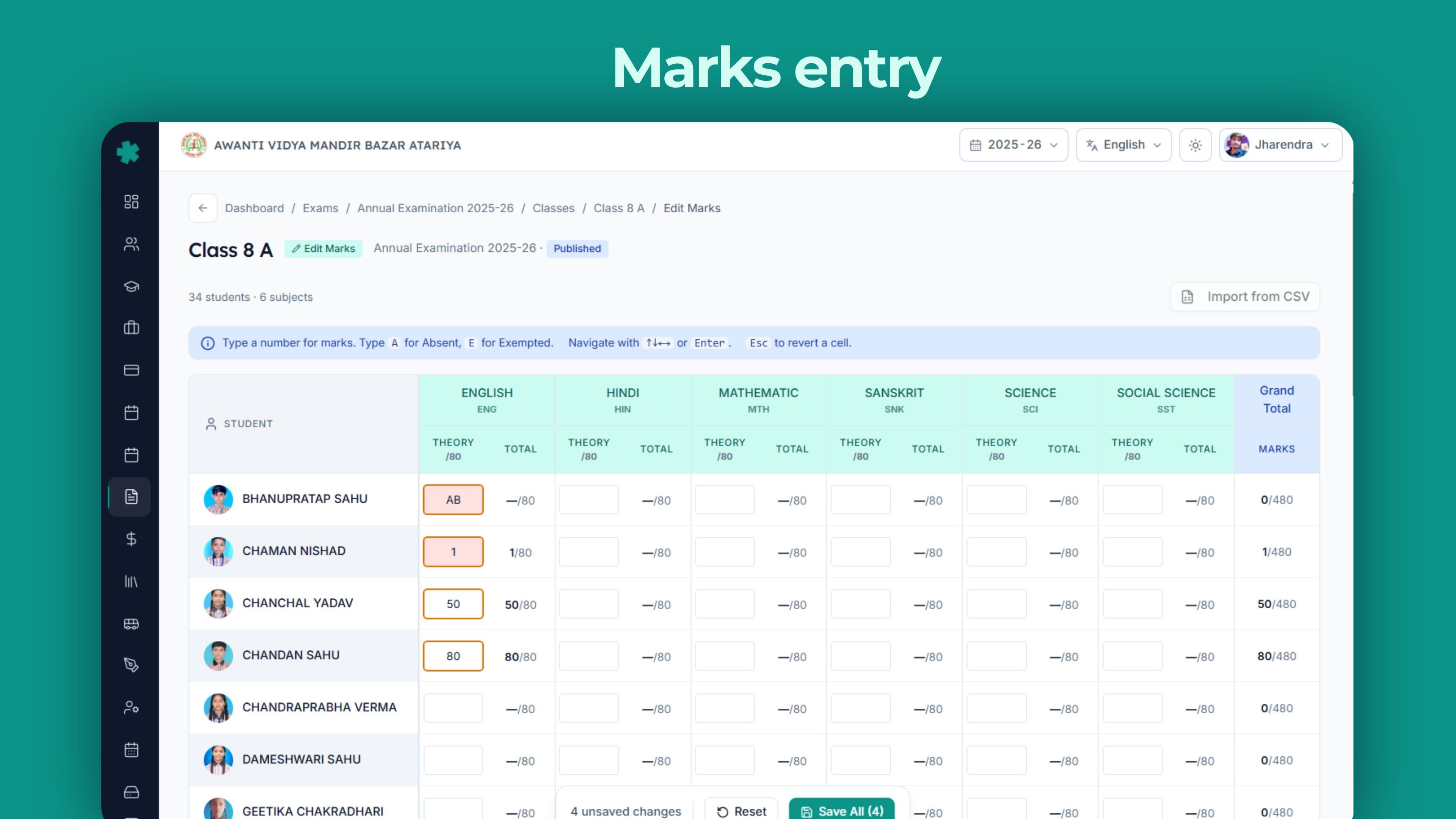
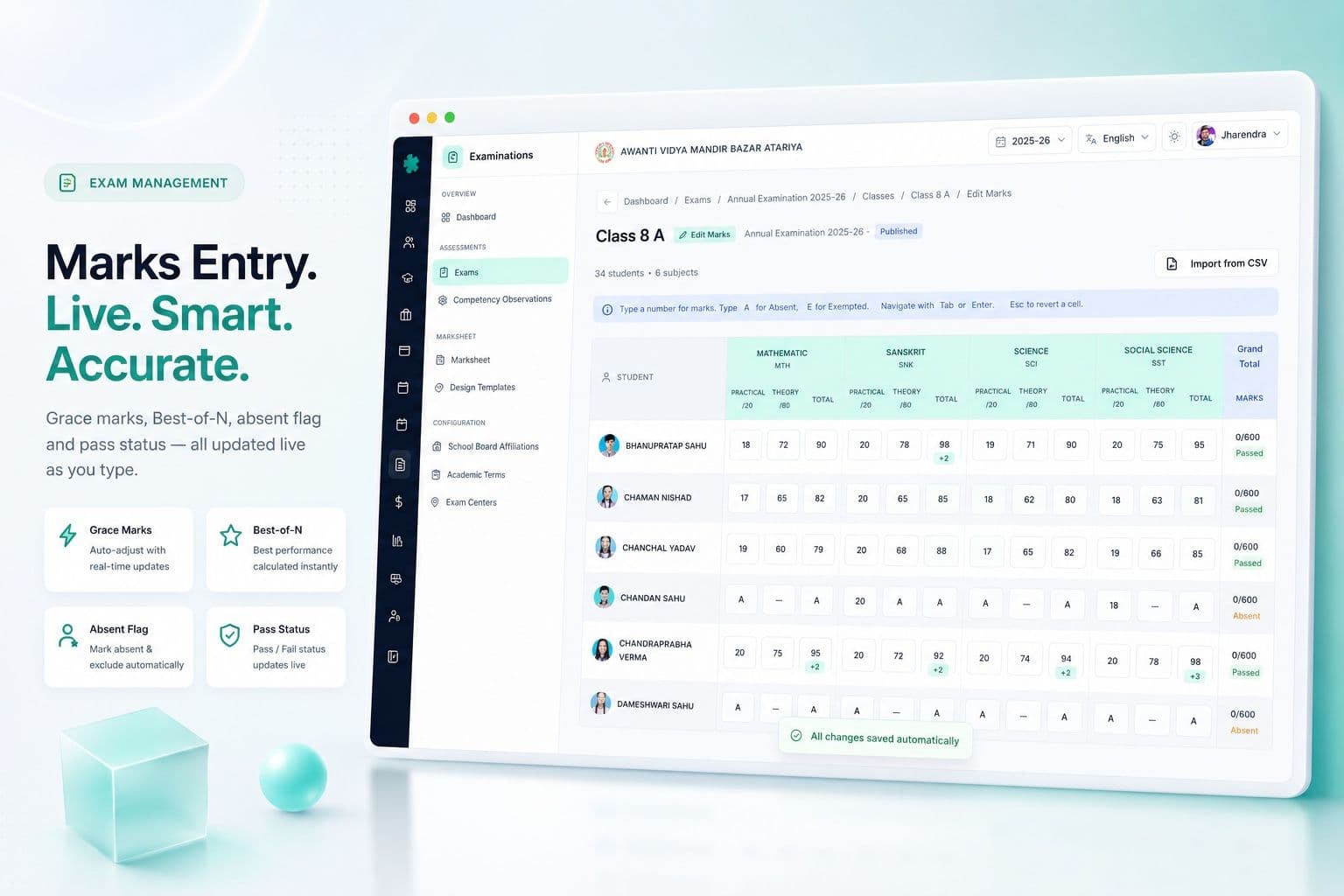
Subject teachers per-component marks enter करते हैं — grace marks, best-of-N selection और absent flag के साथ। Per-component deadline lock post-deadline edits रोकता है।
VERIFICATION
Class teacher और exam coordinator हर mark sheet review करते हैं, anomalies flag करते हैं (95+ outliers, missing students, percentage mismatches)। Marks MARKS_ENTRY पर लौट सकते हैं।
APPROVED
Verification के बाद principal sign-off। Marksheet PDFs design template के against generate होती हैं। Parents को अभी कुछ नहीं भेजा जाता — यह rehearsal stage है।
PUBLISHED
Marksheets parents को WhatsApp, parent app और SMS पर release होती हैं। Result publish date log होती है। Re-print queue post-publish corrections को अलग track करता है।
ARCHIVED
Session-end पर exam archive में जाता है। Records re-evaluation, board affiliation cell, RTI requests और trustees की 5-year academic review के लिए queryable रहते हैं।
Subjects, components और assessment model जो भारतीय boards पर सच में fit बैठता है
Imported school ERPs के सबसे बुरे experiences में से एक यह assumption है कि हर subject '100 marks total' है जिसमें हर बच्चे के लिए एक mark column है। यह assumption पहले CBSE Class 9 Hindi paper पर टूटता है, पहले ICSE Class 10 Computer Applications पर, पहले IB MYP rubric पर, पहले IGCSE Coursework component पर, और हर एक Maharashtra/UP/Karnataka State Board subject पर जो कभी existed। Inkwelly का assessment model ground से multi-component है।
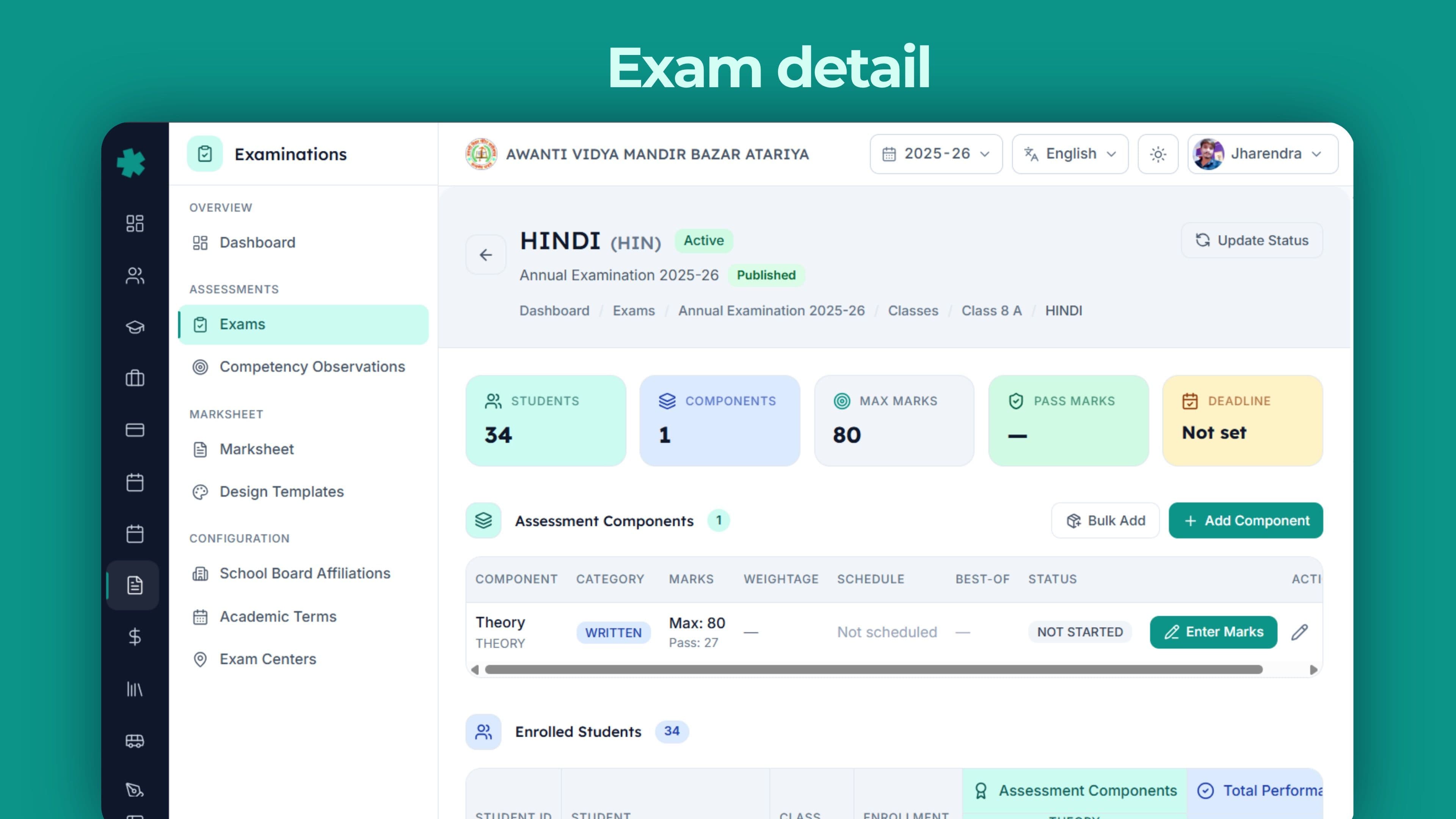
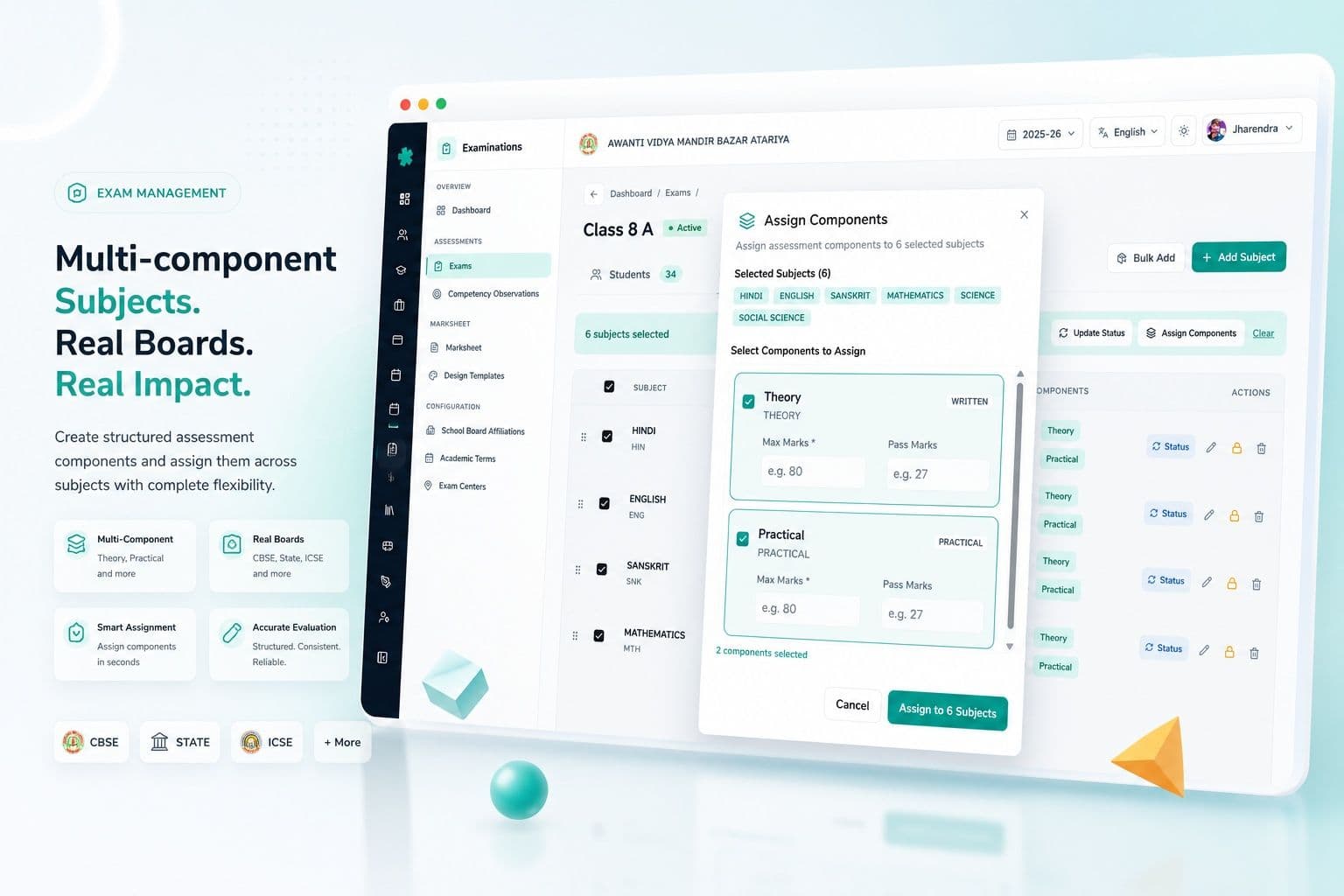
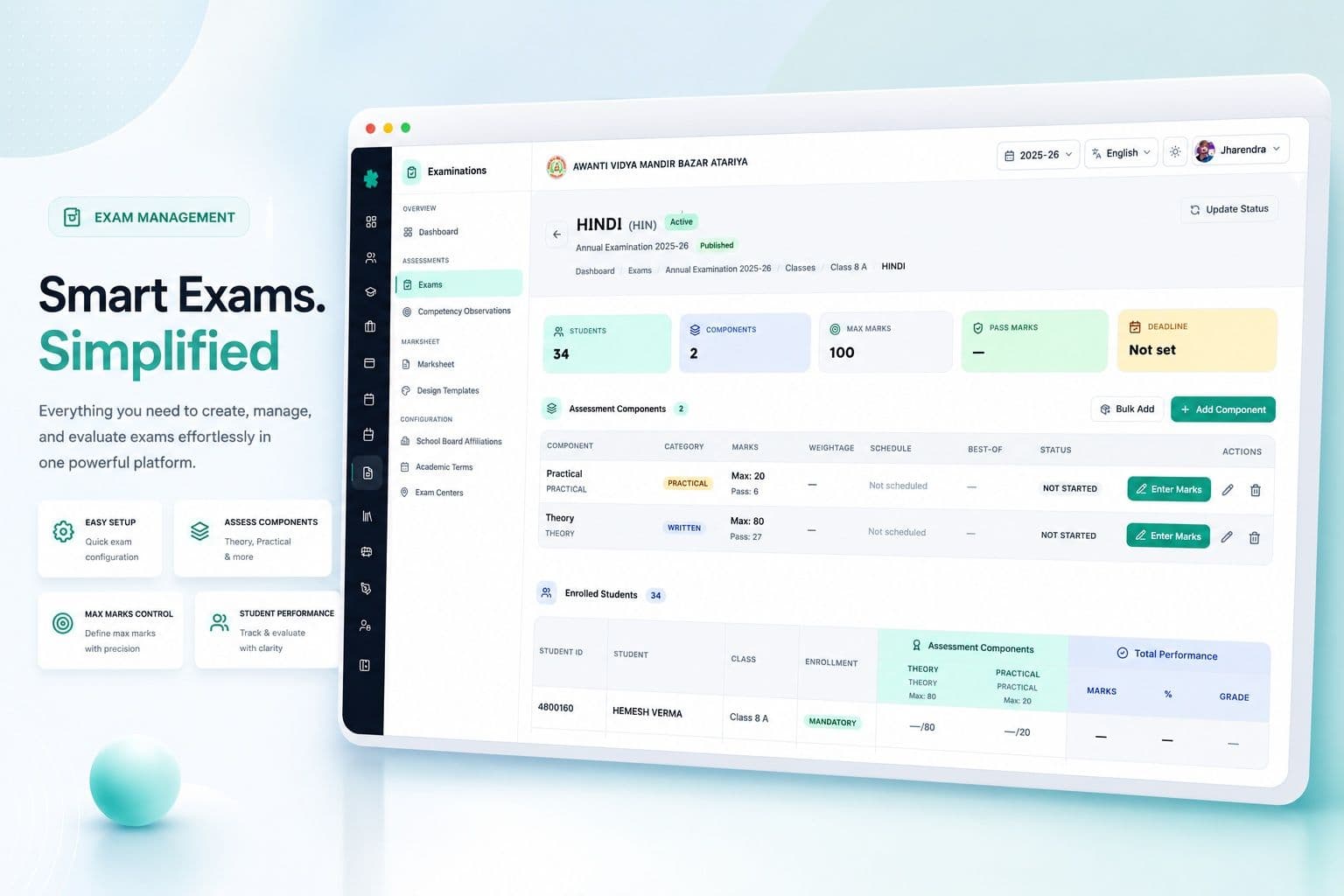
हर exam में हर subject के लिए, coordinator जितने भी components board prescribe करता है उतने configure कर सकते हैं। हर component अपने max marks, pass marks, weightage, exam date, start time, end time, duration in minutes, marks entry deadline, marks lock timestamp और best-of-N selection carry करता है। Components categorised हैं — WRITTEN, PRACTICAL, INTERNAL, ORAL, PROJECT — और हर एक का assessment mode है — MARKS_BASED, GRADE_ONLY, RUBRIC_BASED, PORTFOLIO या DESCRIPTIVE। Class 6 PE marks enter करने वाली teacher को अलग UI मिलती है, Class 11 Physics practical marks enter करने वाले teacher को अलग — और यह सही है।
Multi-component subjects, असली boards, असली shapes
Class 10 CBSE Science paper में Theory (80) + Practical (20) होता है। Class 10 ICSE English Language में Section A (40) + Section B (40) + 20% Internal Assessment। Class 9 IGCSE Mathematics में Paper 1 + Paper 3 + Coursework। एक IB MYP unit चार-criterion rubric पर close होती है, हर एक 1-8 scale पर। Maharashtra State Board Class 10 में हर subject में internal 20 marks, written 80 marks, plus अलग Physical Education और SUPW assessment।
Inkwelly इन सभी को out of the box सही model करता है। System में कहीं 'forced 100' field नहीं है। School board affiliation के हिसाब से components एक बार configure करता है, और उस affiliation के against बने हर exam को सही shape inherit होती है — office के घंटों की repeat data entry बचती है, और 'मेरी Class 10 Science marksheet 80+20 की जगह 100 क्यों दिखा रही है?' जैसी पूरी bug class हट जाती है।
Best-of-N components, grace marks, partial marks — boring details जो बच्चे की promotion तय करती हैं
जो स्कूल सही result publish कर पाता है और जिस स्कूल में हर published result के बाद एक parent meeting होती है — फ़र्क़ उन details में है जिनका ज़िक्र marketing site आम तौर पर नहीं करती। Inkwelly करता है — क्योंकि हम ने हर एक detail बनाया है।
Best-of-N — कई स्कूलों में Class 11/12 के तीन Unit Tests होते हैं; सिर्फ़ best 2 count होते हैं। Inkwelly के isBestOf और bestOfCount flags component पर automatically best pick करते हैं, और marksheet में column header में '(Best 2 of 3)' दिखता है।
Grace marks — CBSE pass at 33 पर 32/100 के borderline cases को principal की discretion पर 1-mark adjustment मिलता है। Inkwelly grace को marksObtained से अलग store करता है, reason field के साथ जो audit log में flow होती है।
Partial marks और outOfAttempts — जब बच्चा paper दो बार लिखता है (re-test), system attempts track करता है, policy-defined value pick करता है (best, latest, average) और marksheet पर chosen value एक footnote के साथ दिखाता है।
Absent flag — seating plan पर ABSENT marked बच्चा automatically marks entry sheet पर ABSENT हो जाता है — कभी भी silently 0 नहीं।
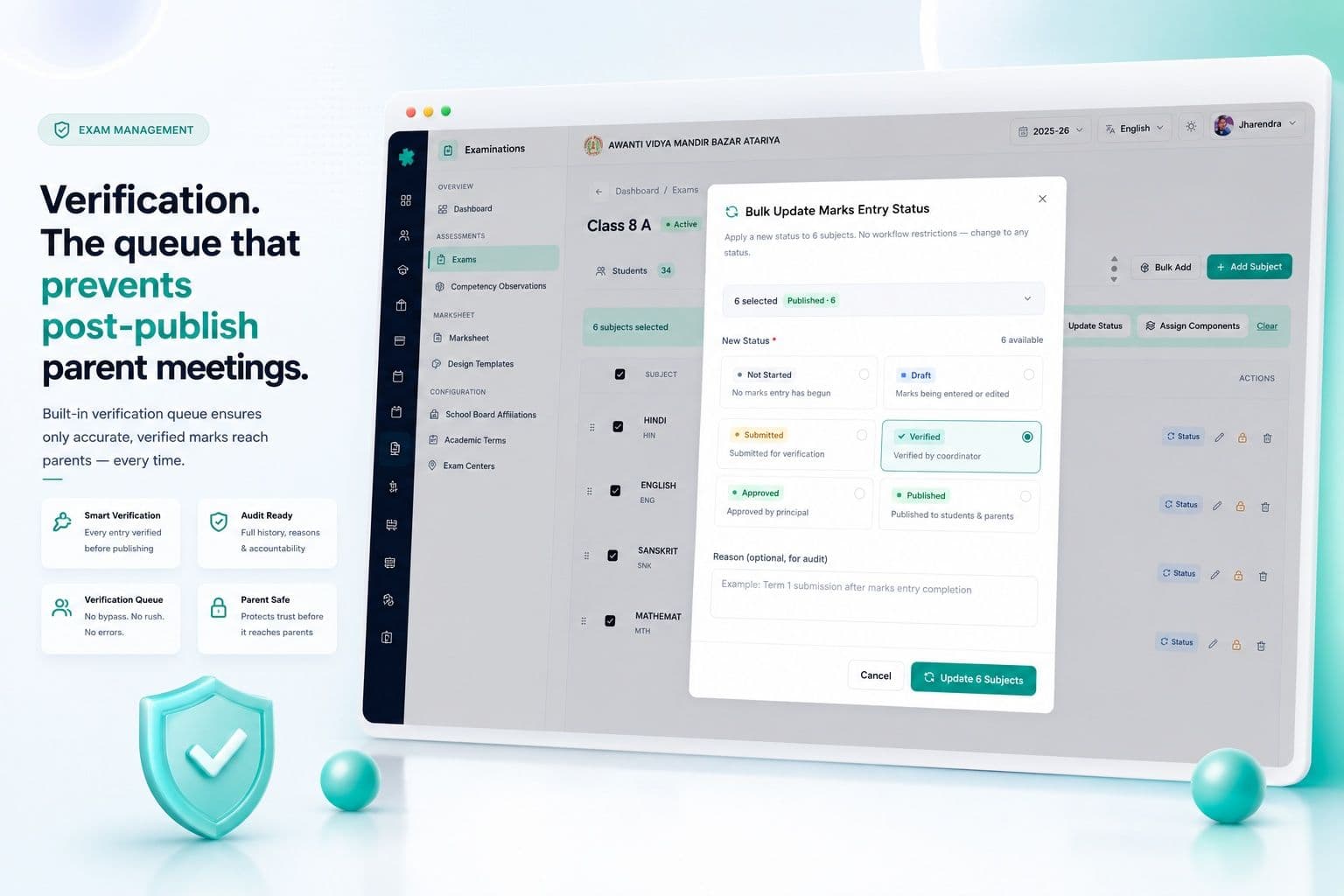
Verification — वो queue जो post-publish parent meetings रोकती है
भारतीय स्कूल calendar का सबसे महंगा minute वही है जो 'marks entered' और 'marksheet published' के बीच है। Inkwelly उस minute को एक queue में बदल देता है। हर subject की marks entry deadline close होने के बाद, entry lock हो जाती है और row VERIFICATION में move होती है। Class teacher और exam coordinator एक screen पर हर वो paper देखते हैं जिसकी review चाहिए।
Queue blank नहीं है — annotated है। Inkwelly automatic outliers flag करता है (Class 6 paper जहाँ 19 students 95+ score करते हैं जब पिछले term का average 72 था), missing students (seating plan ने कहा 32 बच्चे बैठे थे, marks 30 के enter हुए हैं), component sum और total के बीच percentage mismatches, और deadline के बाद unfilled components। हर flag पर 1-click 'send back to MARKS_ENTRY' option है जो subject teacher को specific reason और original deadline reference के साथ email करता है।
Queue empty होने तक कुछ APPROVED तक नहीं पहुँचता। Principal को 412 mark sheets पढ़ने नहीं हैं — सिर्फ़ flagged 4 पढ़ने हैं। Verification heroic exercise से 20-minute meeting बन जाती है।
Co-scholastic Part 2 — वो section जो CBSE schools हमेशा ग़लत करते हैं
CBSE Part 2 (Co-scholastic) marksheet का वो हिस्सा है जो ज़्यादातर schools result day से एक रात पहले 11 PM पर भरते हैं — क्योंकि regular ERP इसे model करना भूल जाता है। Work Education, Art Education, Health and Physical Education, Discipline — हर एक 5-point grade पर CBSE Circular 39/2018 के descriptors के साथ, plus class teacher remarks जो हर बच्चे के लिए एक ही paragraph नहीं होने चाहिए।
Inkwelly Co-scholastic per-session एक बार configure होता है, scholastic marks से अलग, अपनी grading scale के साथ, अपने component set के साथ, अपनी teacher-assignment per class के साथ, और अपनी deadline के साथ। PT teacher Class 6-10 के लिए HPE grades एक screen में enter करती हैं। Art teacher AE grades enter करती हैं। Class teacher discipline और remarks finalise करती हैं। Marksheet template Part 2 को CBSE prescribed layout में render करता है, descriptor grade के बगल में — ताकि parent पढ़े 'Outstanding — initiates and leads activities' न कि सिर्फ़ 'A'।
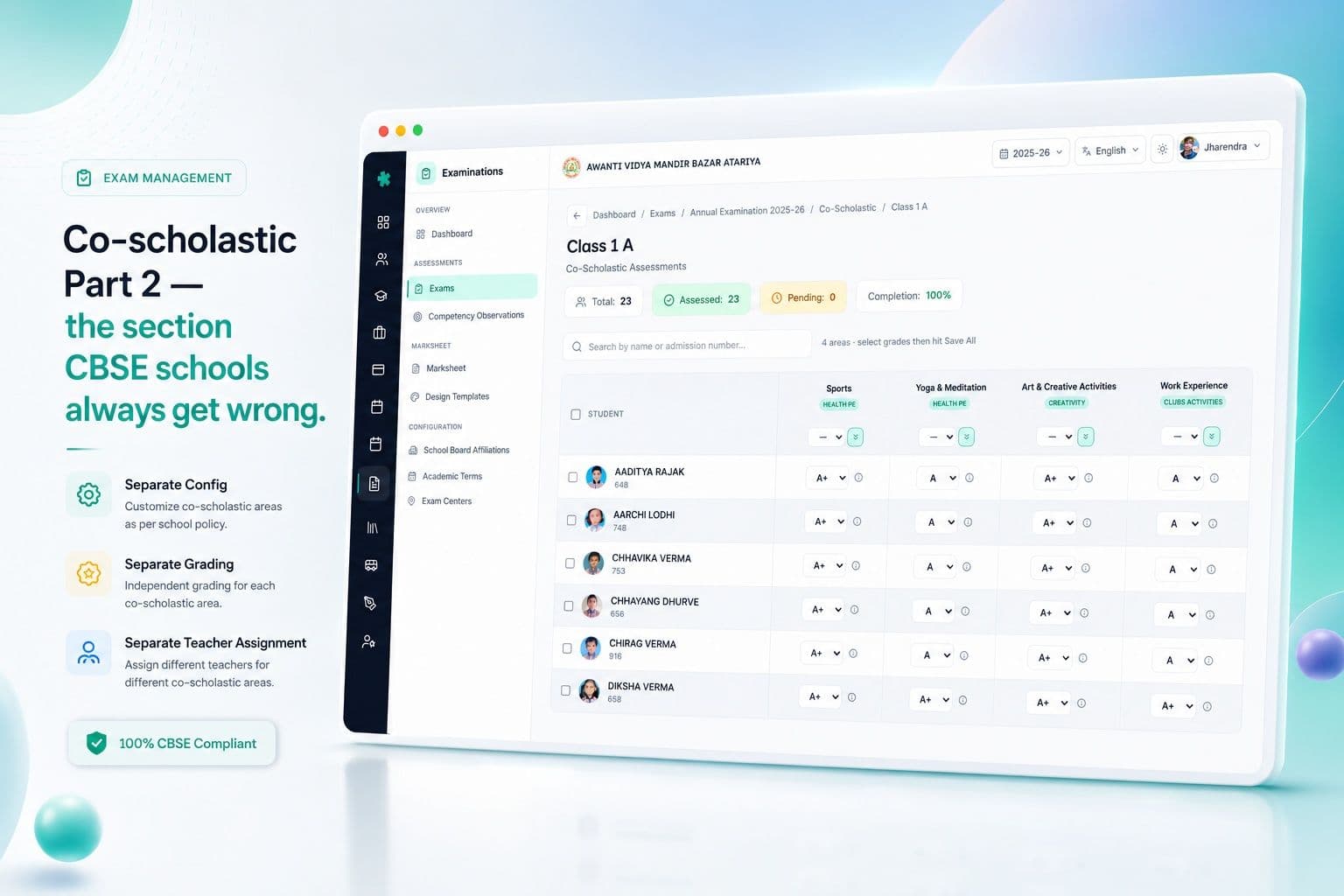
चार-perspective competency observations — marks से आगे
NEP 2020 और CBSE का holistic progress card school से कहता है कि बच्चे की competencies — critical thinking, collaboration, communication, creativity, citizenship — एक से ज़्यादा perspectives से capture हों, सिर्फ़ teacher की नहीं। Inkwelly का competency observations module per competency चार assessments capture करता है: teacher (subject और class teacher), self (बच्चा अपने आप को rate करता है), peer (एक structured peer-review window), और parent (5-question form जो result eve पर WhatsApp पर भेजा जाता है)।
चार ratings per-competency-per-child-per-term store होती हैं और report card के competency annex में flow होती हैं — एक छोटा, ईमानदार visual जो कहता है 'चार lenses से देखें तो यह बच्चा X जैसा दिखता है'। Self-rating अपने आप में एक teaching tool है; peer rating social-emotional profile बनाती है; parent rating home-school loop बंद करती है। System चारों ratings को एक score में average नहीं करता (ऐसा करना तो पूरा purpose ही ख़त्म करता है) — यह चारों side-by-side दिखाता है, एक छोटा disagreement flag के साथ जहाँ चारों meaningfully अलग हों।
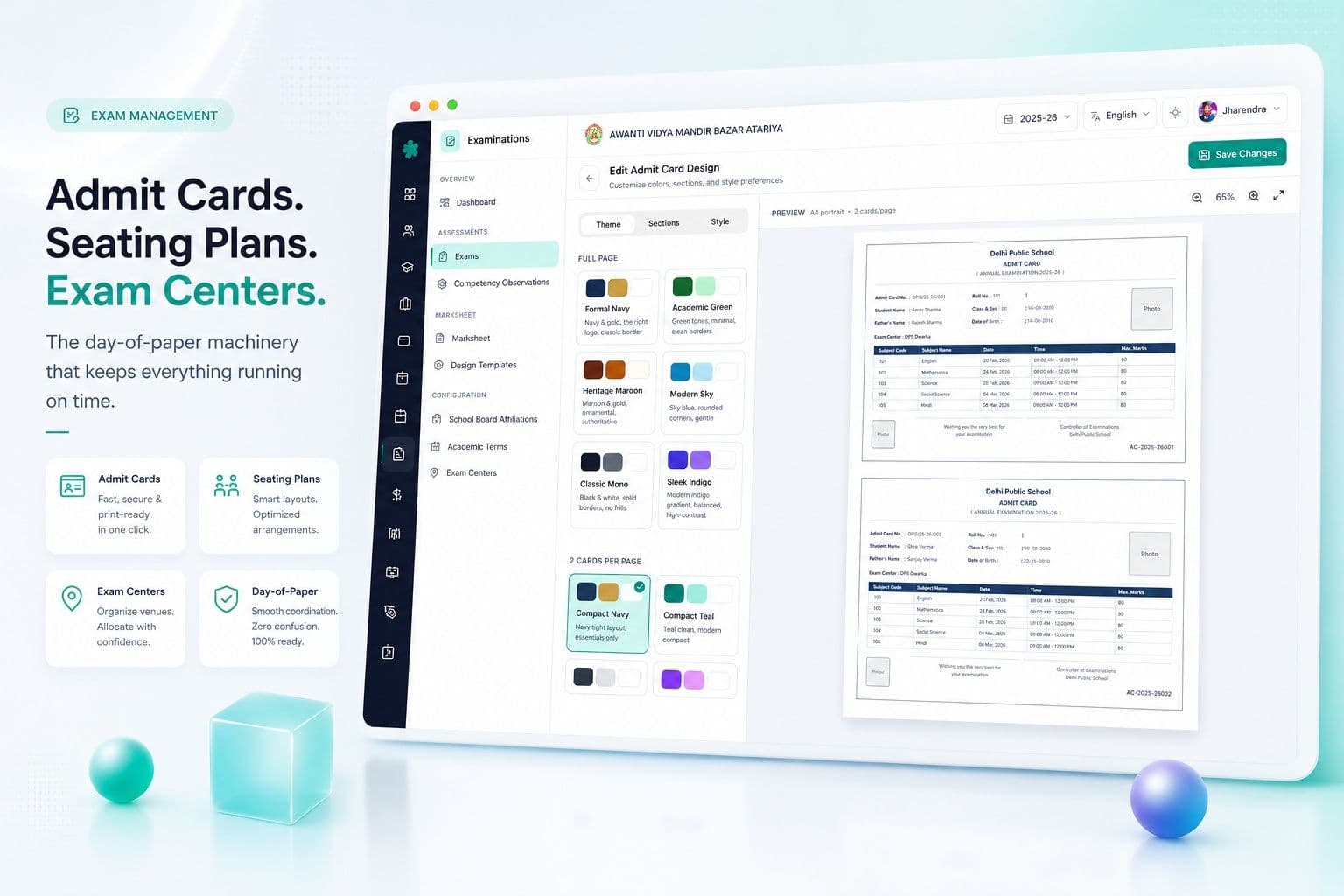
Admit cards, seating plans और exam centers — paper-day की machinery
सबसे छोटे unit test से बड़े किसी भी exam में, paper-day logistics घंटों office time खाती हैं। Inkwelly Examinations Centers, Rooms और Allocations layer के साथ आता है जिसे पता है कि हर room में कितने बच्चे बैठेंगे, seating plan को roll numbers कैसे rotate करने चाहिए (एक ही class के दो consecutive students नहीं), कौन सा invigilator किस room में assigned है, और building का map कैसा दिखता है।
Admit cards उसी data से generate होते हैं — एक PDF booklet per class, एक card per बच्चा, school logo, photo, roll number, school code, per-paper time और room के साथ। पूरा booklet एक single PDF में export होता है जिसे office Friday को print कर के 20 minutes में class teachers को handover कर सकता है।
जो स्कूल board pre-board mock exams official affiliation-recognised events की तरह hold करते हैं, Centers layer inter-school venues भी handle करती है — आपका स्कूल किसी और स्कूल के बच्चों को host कर सकता है, seating plan दोनों को accommodate करती है, और admit cards दोनों school codes के साथ stamped होते हैं।
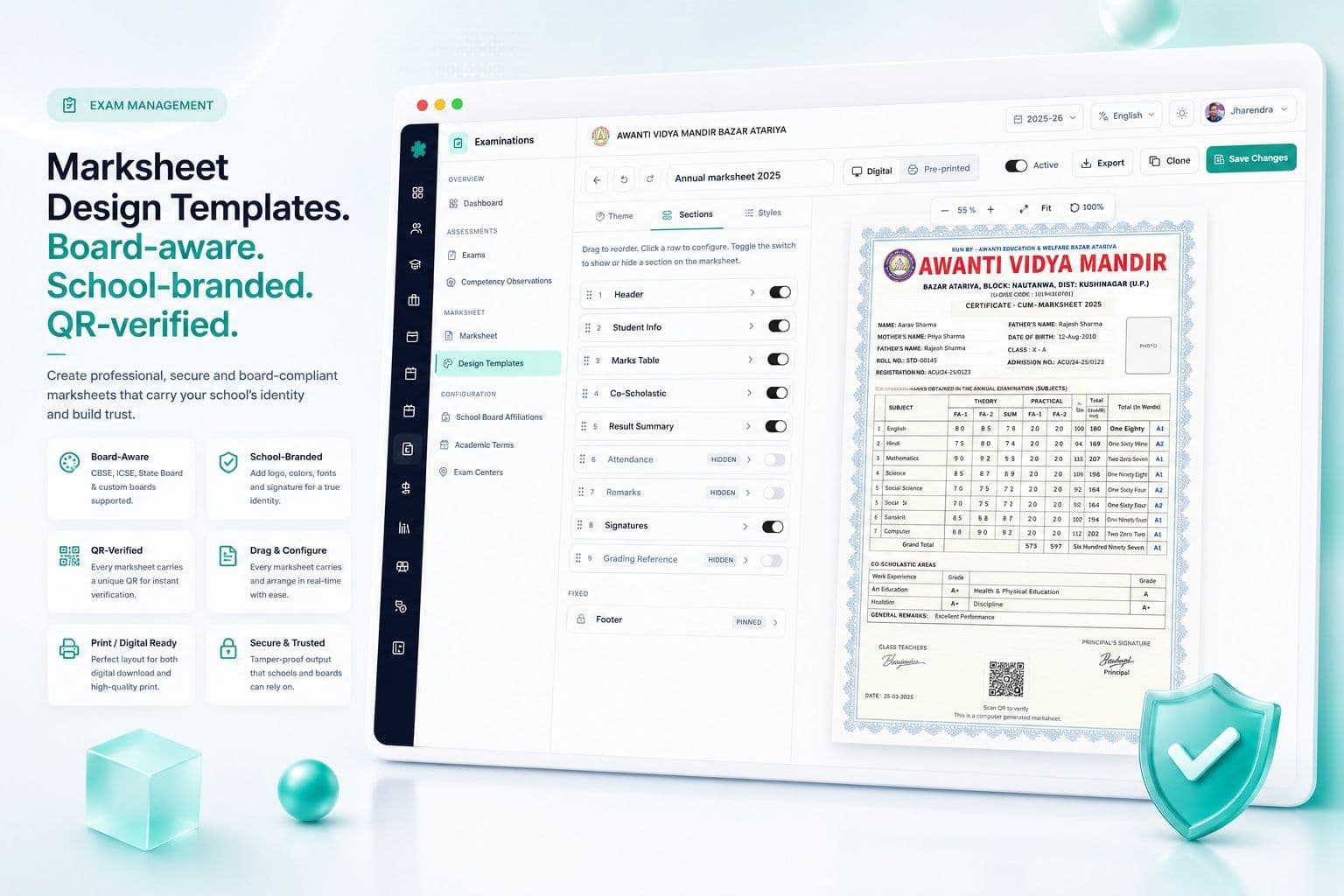
Marksheet design templates — board-aware, school-branded, QR-verified
Marksheet ही वो एक चीज़ है जो parent को आपके exam process से दिखती है। ज़्यादातर school ERPs एक generic template ship करते हैं और स्कूल को उसी के साथ जीना पड़ता है। Inkwelly Marksheet Design स्कूल को जितने templates चाहिए उतने बनाने देता है — CBSE Class 1-5, CBSE Class 6-8, CBSE Class 9-10 with Part 2, ICSE Class 10 with SUPW, ISC Class 12, IGCSE, IB MYP, custom State Board layouts — हर एक अपने school letterhead, board logo, principal signature, class teacher remark slot और QR code के साथ।
QR parent app पर store की हुई एक verified copy तक resolve करता है (और जो schools opt-in करते हैं उनके लिए DigiLocker पर भी)। Bahraich में एक parent WhatsApp group पर post हुई marksheet को verify कर सकती हैं कि यह वही है जो Inkwelly ने issue की — Photoshop screenshots नहीं, admission interview के दौरान claim disputes नहीं। Multiple scripts (Hindi, Urdu, Tamil) में language चलाने वाले स्कूलों के लिए, template student name दोनों scripts में side-by-side render कर सकता है Student Information Module के localised name से।
Per-session multiple grading scales — A1-E2, 9-1, 1-7, Distinction/A/B
2026 में एक स्कूल अक्सर एक ही session में 2 grading scales चलाता है — Class 9-12 (CBSE) के लिए A1-E2, foundational stage Class 1-2 के लिए letter grades, State Board Class 11/12 के लिए percentages, IGCSE Cambridge stream के लिए 9-1, IB MYP stream के लिए 1-7। Inkwelly grading scales को first-class entities की तरह store करता है — हर एक का name, slug, band list और passing threshold — और exam create होते समय एक pick होता है।
Per-subject overrides language papers, elective subjects और bridging cases handle करते हैं। Class 10 Sanskrit को Class 10 English से अलग pass threshold चाहिए हो सकता है — language committee के circular की वजह से। Inkwelly subject config पर एक gradingScaleOverrideId से इसे handle करता है — parent scale का fork नहीं, 'Sanskrit पर 95% पर D2 दिखे' bug नहीं, manual marksheet patching नहीं।
Term weightage — FA1 + FA2 + SA1 + SA2, एक rule, हर जगह apply
ज़्यादातर boards पर annual aggregate report card 'marks का average' नहीं है। यह एक weighted aggregate है — Formative Assessment 1 + Formative Assessment 2 + Summative Assessment 1 + Summative Assessment 2 — कुछ boards पर weights 10/10/30/50 हो सकते हैं, कुछ पर 20/20/30/30, और State Boards पर पूरी तरह custom।
Inkwelly weightage Academic Term और Examination row पर store करता है। हर exam का अपना weightagePercentage field है। System session-end पर सही aggregate करता है — Excel formula कोई नहीं चलाता। अगर session के बीच में स्कूल weightage change कर दे (होता है — हर September में board एक circular issue करता है), change log होता है और recalculation background में चलती है; कोई marksheet silently re-issue नहीं होती।
Result publish — WhatsApp, parent app, SMS, एक un-publish guard के साथ
Result day से पहले के last 30 minutes पूरे exam process के सबसे dangerous हैं। Inkwelly का PUBLISHED stage तीन confirmations माँगता है — principal का sign-off, class teacher का class-list match, और result publish date check। Confirm होने के बाद system तीन channels fire करता है — WhatsApp Business message marksheet PDF attachment के साथ, parent-app push QR-verified copy के साथ, और SMS percentage और parent-app deep-link के साथ।
अगर publish के बाद कोई mistake catch हो (होती है — एक बच्चे का wrong subject mapping), Inkwelly का un-publish delete नहीं है। यह एक tracked transition है जो 're-print queue' entry create करती है। Original server-side invalidate होती है; parent app एक छोटा banner दिखाता है — 'A corrected marksheet is being prepared' — silently ग़लत copy disappear नहीं होती। Corrected marksheet उसी तरह publish होती है, parent app के audit timeline में दोनों copies visible रहती हैं।
“Pichli baar half-yearly mein 11 baje raat tak printout cha rahe the. Is baar Inkwelly pe mark entry se result publish tak 4 din mein ho gaya. Mere class teachers ko phone call karne ki zarurat hi nahi padi.”
Inkwelly Examinations से पहले और बाद — Excel और paper के मुक़ाबले
Generic school ERPs के मुक़ाबले
उन चार लोगों के लिए बना है जो असल में exam-day चलाते हैं
ज़्यादातर school ERP marketing pages सिर्फ़ principal से बात करती हैं। Examinations को चार लोग चलाते हैं, और system को सब के लिए काम करना है — वरना fail होता है। हम ने Inkwelly Examinations Lucknow, Bhopal, Pune और Bangalore के असली schools में बैठ के, तीन full exam cycles देख के बनाया — हर एक person असल में क्या करता है यह देखा, और हर वो step हटाया जो information add नहीं करता था।
Principal के लिए
उन्हें phone पर 30 seconds में तीन जवाब चाहिए — class × subject heatmap क्या है, school का topper podium क्या है, और कौन से exams result publish date miss होने के risk पर हैं। Inkwelly का stats dashboard इसी के लिए बना है — heatmap hero visual है, podium एक single card है, at-risk list एक alert है। वो staff-room की coffee queue में Class 8 maths की concern पहले से ले के पहुँचती हैं, और maths HOD को पता है।
Exam Coordinator के लिए
वो lifecycle चलाती हैं। Inkwelly उन्हें एक single Kanban-style board देता है जिसमें 8 stages columns हैं और हर paper एक card है जिसे वो drag कर सकती हैं (valid-transition rules के अंदर)। Marks entry deadlines हर card पर visible हैं। वो किसी भी paper को MARKS_ENTRY पर reason के साथ वापस भेज सकती हैं; subject teacher को तुरंत notification जाती है। Side drawer में हर transition का audit log open है — trustees पूछते हैं, उनके पास 5 seconds में जवाब है।
Class Teacher के लिए
वो verification gate हैं। Inkwelly का verification screen उन्हें उनकी class के लिए हर subject की marks seating-plan attendance के against, हर flagged outlier, हर missing student, हर late-component दिखाता है। उन्हें सिर्फ़ अपनी class दिखती है — किसी और teacher का data कभी नहीं। उनके sign-off से bundle APPROVED पर move होता है। Publish के बाद वो parent confirmations live होते देखती हैं — और अगर parent address field पर typo report करे, तो वो individually re-print कर सकती हैं — marks invalidate किये बिना।
Subject Teacher के लिए
वो staff-room में 38 answer scripts और एक phone के साथ बैठी हैं। Inkwelly की marks entry screen mobile-first है — Hindi/English/regional UI, per-student per-component, grace marks toggle, absent toggle, type करते-करते pass-status live। Deadline top पर visible है। Deadline लगते ही screen freeze हो जाती है; वो 11:58 PM पर accidentally edit नहीं कर सकतीं। वो submit करती हैं, screen confirm करती है, अगला paper उसी window में queue हो जाता है।
Imported global tools (Pearson, McGraw-Hill, Blackboard) के मुक़ाबले
Integration — एक mark, 11 modules update
Inkwelly Examinations stand-alone नहीं है। Inkwelly से सबसे बड़ा फ़ायदा यह है कि एक mark सही enter होने पर 11 और modules में बिना copy-paste cascade होता है। Student का Student Profile latest term aggregate दिखाता है। Parent को Communications module से WhatsApp marksheet attachment के साथ जाता है। Academics readiness score का syllabus axis update होता है। Attendance cross-check alert trigger करती है अगर paper day पर PRESENT marked बच्चा seating plan पर ABSENT दिखे। Term के fee receipts parent app में marksheet PDF के साथ bundle होते हैं। इन में से कोई भी अलग manual task नहीं है।
Security, audit और DPDP — trustees meeting और affiliation visit के लिए designed
DPDP Act 2023, CBSE Examination Bye-Laws और affiliation cell का annual review — सभी school से on demand demonstrate करवाते हैं कि कौन सा mark कब किसने देखा और क्यों। ज़्यादातर school ERPs इन सवालों का जवाब नहीं दे पाते क्योंकि वो इन सवालों को answer करने के लिए बने ही नहीं। Inkwelly बना है। Marks entry screen का हर read, stages के बीच हर transition, हर grace-mark adjustment, हर un-publish, हर parent-consent acknowledgement — marks audit log में लिखा जाता है।
Security और compliance — build में असल में क्या है
- Per-stage role-based access — DRAFT सिर्फ़ coordinators को visible; PUBLISHED parents को सिर्फ़ class teacher और principal sign-off के बाद
- Marks audit log — हर cell write — prior value, new value, user, timestamp, reason — PDF export के साथ
- DPDP-compliant parental consent flow WhatsApp publish से पहले; consent withdrawn = सिर्फ़ parent app
- Mumbai (ap-south-1) primary + Hyderabad (ap-south-2) DR; data कभी India बाहर नहीं जाता
- Per-school encryption keys; backups KMS rotation के साथ at rest encrypted
- Two-factor authentication principal sign-off और un-publish के लिए
- किसी भी PUBLISHED exam के लिए 24-hour rollback window — audit history खोए बिना
- DigiLocker integration option — verified marksheet copies student के DigiLocker account में issue
- RTI-ready PDF export हर audit log का on demand
Migration — Excel से, generic ERP से, paper से
Exam software switch करने के सबसे बड़े blocker में से एक यह डर है कि 2 साल के historical results lose या mangled हो जाएँगे। Inkwelly की migration उन तीन realistic starting positions के लिए designed है जिनसे भारतीय schools आते हैं।
Excel से
ज़्यादातर State Board schools और CBSE Class 1-5 schools Excel पर exams चलाते हैं। Inkwelly last 2 sessions के result Excel files (एक per class, एक per term) historical results table में import करता है। CSV uploader column headers detect करता है, subjects और components से map करता है, Best-of-N के बारे में एक बार पूछता है, और student profile पर historical aggregate लिखता है। पुरानी marksheets regenerate नहीं होतीं; original PDFs student profile से link होते हैं — parent download के लिए। Session N से आगे के नए exams full-stack Inkwelly हैं।
Generic school ERP से
Fedena, Entab, Schoolmint, MasterSoft, BeBeAxis — हर भारतीय school ERP के पास marks export है। Inkwelly का importer सबसे common 8 formats पढ़ता है। Office के लिए key choice यह है कि पुराने grading scales as-is लाने हैं (historical authenticity preserve) या new Inkwelly scales में map करने हैं (cleaner reports)। दोनों supported हैं; SDM/RTI authenticity के लिए हम पहले की recommend करते हैं।
Paper से
सबसे छोटे pre-primary और primary schools, ख़ास तौर पर semi-urban Tier-3 शहरों में, अब भी paper marks registers पर exams चलाते हैं। Inkwelly का intake form scanned marks registers upload करता है, marks columns पर basic OCR apply करता है, principal से imported data verify करवाता है, और history में लिखता है। Inkwelly पर पहला session ख़ुद MARKS_ENTRY-first mode में चलता है — pending exams की कोई migration नहीं, सिर्फ़ forward।
Onboarding timeline — पहले 21 दिन कैसे दिखते हैं
Days 1-3: school setup, board affiliation, grading scales, academic terms। Days 4-7: per-class subject component templates, marksheet design template selection। Days 8-14: historical results import, student profile linking, parent app rollout। Days 15-21: पहला practice exam DRAFT में, पहला SCHEDULED exam, staff को sample marksheet, go-live confirmation। Day 21 के बाद, school full exams Inkwelly पर चलाता है — original consultant 30-day standby पर।
Inkwelly Examinations live देखें — आपके school के data पर
एक 30-minute walkthrough आपके मौजूदा exam structure के sample पर — आपके subjects, आपकी grading scale, आपका marksheet template। कोई sales pitch नहीं, कोई slide deck नहीं — सिर्फ़ product आपके school की shape पर चलता हुआ।
“Examinations वो screen है जो principal हर सुबह सबसे पहले खोलती हैं, parent हर शाम सबसे आख़िर में खोलते हैं, और trustees हर तिमाही पूछते हैं। इसे feature की तरह मत बनाइए — building की load-bearing wall की तरह बनाइए।”
Exam calendar — एक Inkwelly school year असल में कैसा दिखता है
Lucknow में एक CBSE upper-primary school का full Inkwelly exam year 4 exams चलाता है: Periodic Test 1 (July), Half-Yearly (October), Periodic Test 2 (December), और Annual Examination (March)। Class 9-10 के लिए February में Pre-Board जुड़ता है। Session में Co-scholastic assessment cycles July, December और March में, और Competency Observation window October और February में होती है। एक single dashboard पूरा साल दिखाता है — हर exam अपने stage के colour में, हर overdue item flagged, हर result publish date locked।
Final differentiation — Inkwelly Examinations को सही choice क्या बनाता है
Examinations module में क्या-क्या शामिल है
- 8-stage exam lifecycle valid-transition guards और full audit के साथ
- Multi-component subject builder — पाँच categories और पाँच assessment modes
- Marks entry — grace, absent, best-of-N, partial marks, per-component deadline lock
- Verification queue — automatic outlier flagging और send-back-with-reason
- Co-scholastic Part 2 module — अलग config, grading और teacher assignment
- चार-perspective competency observations — teacher, self, peer, parent
- Admit cards, seating plan, room allocations और exam centers
- Marksheet design templates — visual editor, board-aware, QR-verified
- Per-session multiple grading scales per-subject overrides के साथ
- Term-weighted aggregation — FA1, FA2, SA1, SA2 और Pre-Boards के across
- तीन-channel publish — WhatsApp Business, parent app, SMS — तीन confirmations के साथ
- DPDP-compliant audit log, RTI-ready PDF export, optional DigiLocker integration
- Stats dashboard — status composition, marks entry funnel, grade distribution, class × subject heatmap और topper podium के साथ
अगला exam April की panic के बिना चलाइए
Inkwelly Examinations Lucknow, Bahraich, Bhopal, Pune, Bangalore और Coimbatore के schools में production में है। 30-minute walkthrough book करें — decide करने से पहले अपने मौजूदा exam shape को Inkwelly पर चलता हुआ देखें।
अक्सर पूछे गए सवाल
12 सवालक्या Inkwelly CBSE Part 2 (Co-scholastic) सही handle करता है?
हाँ। Co-scholastic Part 2 एक first-class module है — अपनी configuration, grading scale, component set (Work Education, Art Education, Health and Physical Education, Discipline), per-class teacher assignments और अपनी marks entry deadline के साथ — scholastic marks से पूरी तरह अलग। Marksheet template Part 2 को CBSE Circular 39/2018 layout में render करता है, descriptor grade के बगल में, और class teacher की remark slot APPROVED status से पहले हमेशा required है।
क्या एक ही session में school multiple grading scales चला सकता है?
हाँ। 2026 में एक स्कूल आम तौर पर 2-3 scales चलाता है — CBSE Class 9-12 के लिए A1-E2, foundational stage के लिए letter grades, State Board Class 11-12 के लिए percentages, IGCSE के लिए 9-1, IB MYP के लिए 1-7। Inkwelly grading scales को first-class entities की तरह store करता है, हर exam create होने पर एक pick होती है, और language व elective bridging cases per-subject overrides handle करते हैं।
Lock और approval workflow कैसे काम करता है?
हर exam 8-stage lifecycle से गुज़रता है — DRAFT, SCHEDULED, IN_PROGRESS, MARKS_ENTRY, VERIFICATION, APPROVED, PUBLISHED, ARCHIVED। Transitions server-side guarded हैं; stages skip नहीं हो सकते। Marks entry per-component deadline पर lock होती है, verification automatically outliers flag करता है, APPROVED तक पहुँचने के लिए principal sign-off चाहिए, और PUBLISHED तीन confirmations माँगता है। Un-publish एक tracked queue है — delete नहीं।
क्या best-of-N components और grace marks supported हैं?
हाँ। Best-of-N component पर ही `isBestOf` और `bestOfCount` flags से configure होता है — marksheet column header में '(Best 2 of 3)' automatically दिखता है। Grace marks `marksObtained` से अलग store होते हैं, reason field के साथ जो audit log में flow होती है। Partial marks, absent flag और per-attempt re-entry first-class concepts हैं — bolt-on नहीं।
क्या यह ICSE/ISC और IGCSE marksheets सही produce करता है?
हाँ। ICSE Class 10 with SUPW, ISC Class 12 with internal assessment, IGCSE Cambridge Class 9-10 paper components और coursework के साथ, और IB MYP rubric-based assessment — सब native marksheet design templates हैं। School अपने letterhead और principal sign के साथ एक बार customise करता है, और उसके बाद हर exam वही template use करता है।
क्या स्कूल mid-session Inkwelly पर migrate कर सकता है?
हाँ — और हम ने यह उन schools के लिए भी किया है जो March के दूसरे हफ़्ते के pre-board season पर थे। Recommended migration 3 forward exams Excel-import-mode में चलाती है — जब तक structure (subjects, components, grading scales, marksheet design) set up हो रहा है। अगले exam से full Inkwelly। पुरानी marksheets student profile पर PDF के रूप में accessible रहती हैं — parent download के लिए।
क्या marksheet bilingual rendering support करती है — English और Hindi?
हाँ। Marksheet पर student name English (`firstName/middleName/lastName` से) और regional script (localised name field से, Hindi/Tamil/Marathi/Bengali/Kannada support के साथ) — दोनों में render हो सकता है। Subject names per-template किसी एक या दोनों scripts में render होते हैं। Marks entry UI ख़ुद fully multilingual है — Hindi-medium school में subject teacher Hindi UI में marks enter करती हैं।
Timetable, admit cards और seating plan के साथ integration कैसा है?
Exam lifecycle SCHEDULED stage पर automatically timetable blocks बनाती है। Admit cards उसी exam-class-subject data से generate होते हैं — एक PDF booklet per class। Seating plans rooms में roll numbers rotate करते हैं और एक ही class के consecutive students avoid करते हैं। Room allocations exam center के against store होती हैं, और exam centers multiple schools host कर सकते हैं (inter-school pre-boards के लिए)।
Results parents तक कैसे publish होते हैं?
तीन channels — WhatsApp Business marksheet PDF attachment के साथ, parent-app push QR-verified copy के साथ, और SMS percentage और parent-app deep-link के साथ। Publish से पहले तीन confirmations चाहिए — principal sign-off, class teacher class-list match, और result publish date check। Un-publish एक tracked queue है — दोनों copies parent app के audit timeline में visible रहती हैं — silent delete नहीं।
क्या re-evaluation और supplementary exams supported हैं?
हाँ। Re-evaluation एक नया EXAM row बनाती है जो original से `re_evaluation_of` reference से linked है; workflow 8 stages से independently चलता है और एक अलग marksheet produce करता है। Failing students के लिए supplementary exams एक अलग exam के रूप में same subject set और `supplementary_for` reference के साथ model होते हैं। Student record में दोनों attempts side-by-side दिखते हैं।
Competency observations और holistic profile का क्या?
Inkwelly का competency module per competency चार perspectives capture करता है — teacher, self, peer, parent — critical thinking, collaboration, communication, creativity और citizenship के across। चारों ratings report card के holistic annex में flow होती हैं। System चारों को एक score में average नहीं करता — चारों side-by-side दिखाता है, एक छोटा disagreement flag के साथ जहाँ meaningfully diverge हों। NEP 2020 और CBSE holistic progress card framework design reference हैं।
क्या student marks data India में host होता है?
हाँ। Primary Mumbai (AWS ap-south-1), DR Hyderabad (AWS ap-south-2)। Exam data कभी India बाहर नहीं जाता। DPDP Act 2023 parental consent admission पर capture होती है और हर WhatsApp publish से पहले recheck होती है — consent withdrawn = parent-app-only delivery, उसी number पर silent SMS नहीं। Optional DigiLocker integration board-recognised exams के लिए student के DigiLocker account में verified copy issue करता है।
आपको ये भी पसंद आ सकता है
3 लेखInkwelly आपके स्कूल पर — खुद देखें
30 मिनट का डेमो। आपके मौजूदा ERP को आपके साथ खोलकर, कॉल पर ही आपका डेटा Inkwelly में लोड करते हैं। कॉल ख़त्म होते-होते एक तय तारीख़ का गो-लाइव प्लान आपके हाथ में।