Collect every rupee, on time. Without chasing parents.
From class-wise fee structures and online collection to scholarships, RTE claims, cheque tracking and WhatsApp reminders — Inkwelly runs the entire money cycle of an Indian school. Built for CBSE, ICSE, IB and every State Board, with audit trails, role-based access and data hosted in India.
How most Indian schools collect fees today
It is the third week of April. The school office is full of parents lined up at the cashier's window. The accountant is hand-writing receipts in a triplicate book — original to the parent, carbon to the file, second carbon to the audit binder. Someone runs out of ₹100 change. A class teacher comes in mid-conversation to ask whether Anaya from VI-B has paid; she has, but the receipt is in a different binder, and finding it takes seven minutes.
Meanwhile, the principal's WhatsApp keeps buzzing. Five parents are asking the same question — did our cheque clear? The accountant cannot answer until she walks down to the bank in the afternoon. By the next staff meeting on Saturday, a third of the questions are still about fees: who paid, who didn't, who should have got the sibling discount but didn't, why a Class 5 student's RTE claim is still unprocessed at the BSA office.
This is not a small problem. A school with 800 students collects ₹2-3 crore a year — most of it in 90-day windows around April, July and January. A 10% delay in collection is a ₹20-30 lakh hole in the working-capital plan. Multiply that across 1.5 lakh private schools in India and the cost of running fees on a register adds up to thousands of teachers not paid on time. If your fee book can't tell you exactly who owes how much by lunch on the 10th, it isn't a fee book — it's a liability.
What Inkwelly built instead
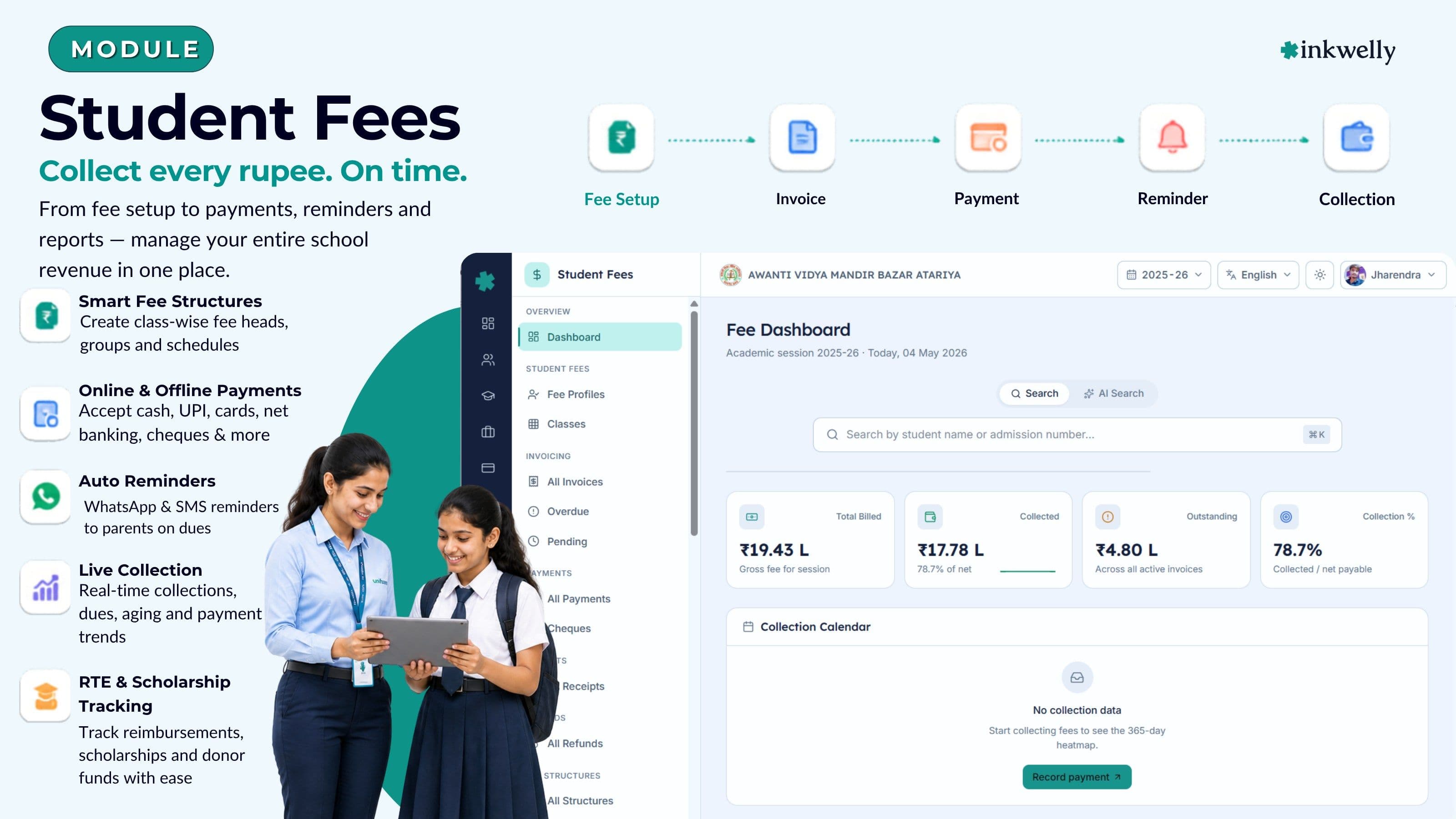
Inkwelly Student Fees is one connected system from fee categories to receipts. The accountant defines fee heads once (Tuition, Transport, Activity, Lab, Annual, Smart Class, Examination, Library), bundles them into class-wise structures, and assigns students to fee groups. Invoices generate on the chosen schedule — monthly, quarterly, term-wise, annual — with sibling, staff-ward, scholarship and RTE adjustments computed automatically.
Parents pay through the channel they prefer — cash at the counter, cheque, demand draft, UPI QR scanned at the front desk, NEFT/RTGS, card swipe, wallet, or an online gateway link sent over WhatsApp. Receipts generate in PDF with school letterhead in seconds. Late fees compute by rule; reminders go out by WhatsApp without anyone in the office lifting a finger. Every action — every receipt, refund, waiver, structure change — writes to an audit log that the school's CA or fee committee can review without asking the office to compile anything.
What Inkwelly Student Fees does end-to-end
- Fee Heads & Categories — Tuition, Transport, Activity, Smart Class, Lab, Library, Annual, Examination, Late Fee, custom heads with GL mapping
- Class-wise Fee Structures — different structures per class, section, board stream (CBSE, ICSE, IB, State Board); copy-forward across academic sessions
- Fee Groups — bundle students into pricing tiers without re-defining structures (e.g. day scholar vs. boarder, hostel A vs. hostel B)
- Sibling, Staff-Ward, Early-Payment, Need-Based and merit Scholarship discounts — rule-based, auditable
- Late Fee Rules — flat, slab-wise or daily compounding, with grace days; auto-applies on the configured day, no manual chase
- Invoicing engine — bulk generate term-wise/monthly invoices for an entire class in one click, preview before commit
- Multi-mode collection — Cash, Cheque, Demand Draft, UPI QR, Card Swipe, Net Banking, Wallet, NEFT/RTGS, Online Gateway
- Cheque pipeline — Issued → Deposited → Cleared / Bounced with bounce charges and re-presentment tracking
- Receipt PDFs with school letterhead, GST handling, multi-copy, downloadable from parent app
- RTE claim tracker — Section 12(1)(c) reimbursement file per child, BSA submission status, government cheque receipt
- Scholarships + Donor module — internal scholarships, external donor-funded sponsorships with utilisation reports
- WhatsApp reminders, defaulter heatmap, escalation funnel and DPDP Act 2023-compliant audit logs
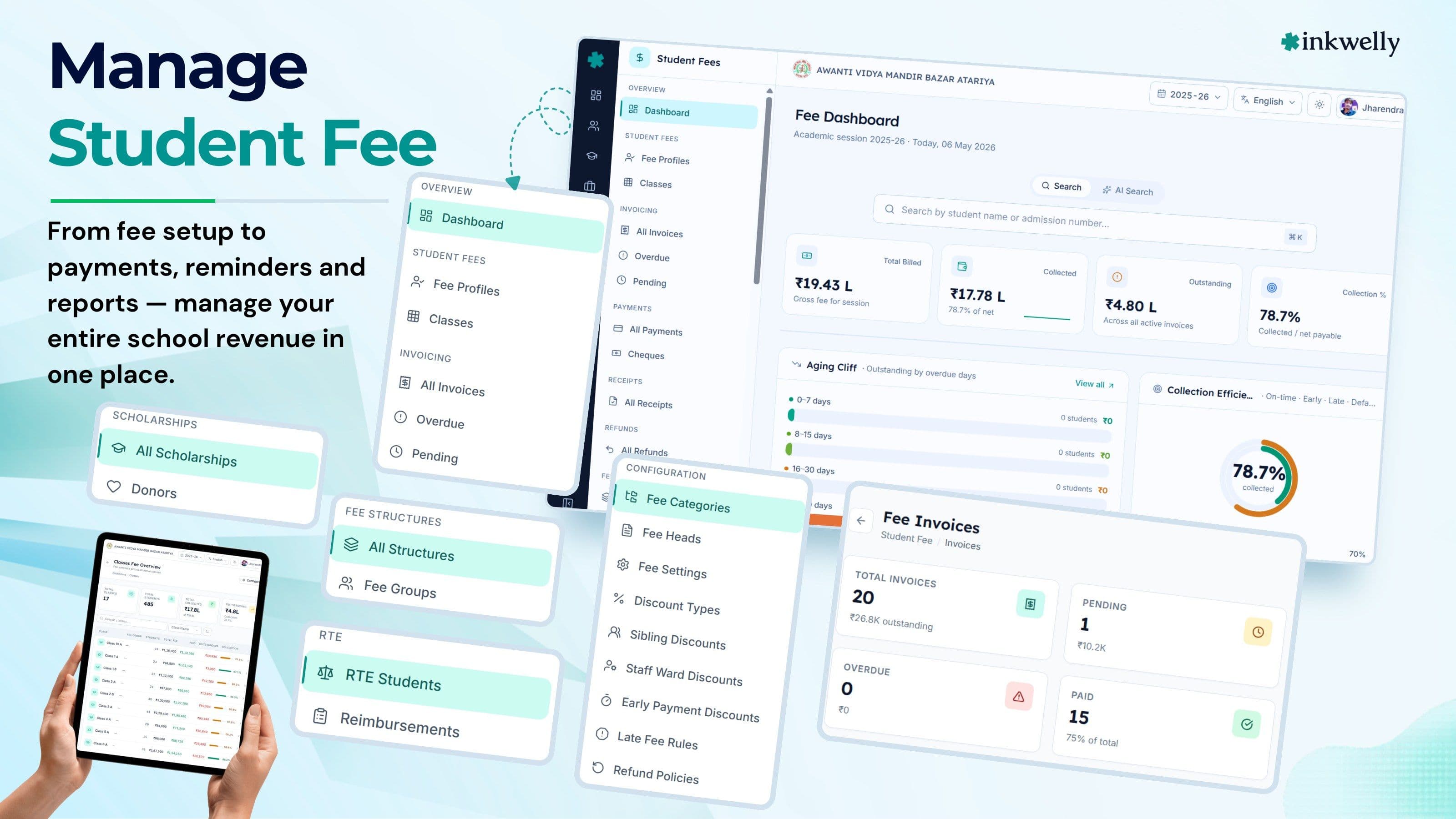
A live fee dashboard, not a Tally export
Most ERPs hand the accountant a Tally-style dump and call it analytics. Inkwelly gives the office a single screen with sixteen live panels — built around the question every principal asks at 9:30 AM: what changed since yesterday, and what needs my attention before lunch?
The dashboard answers the questions the office actually has — today's collection by mode and collector; aging buckets that show where the money is stuck (1-30, 31-60, 61-90, 90+ days); the cheque pipeline; the defaulter heatmap by class; the escalation funnel from reminder → call → notice → fee committee. Every number is clickable — opening the underlying list of students, invoices or receipts in one tap. The principal does not have to ask the accountant for the number; the number is on the screen, and the underlying transactions are one click away.
Sixteen live dashboard panels — one screen for the office
Money-Flow Waterfall
Invoiced → Discounted → Paid → Outstanding, by month and by fee head. The single chart that explains where the year stands in 5 seconds.
Today's Pulse
Live counter of receipts created since midnight, by collector and by mode. Refreshes every minute. The accountant's morning standup, in one tile.
Collection Calendar Heatmap
12-month grid of daily collection. Spot the dry weeks, the spikes after a reminder run, and the seasonal cycle of your school.
Aging Cliff Chart
Outstanding split into 0-30, 31-60, 61-90 and 90+ day buckets. The chart that tells the principal which class to call next.
Collection Efficiency Dial
Paid ÷ Invoiced, year-to-date and current month. Schools using Inkwelly aim for 95%+ by month-end and use this dial to defend the number.
Payment Mode & Gateway Mix
Share of Cash, Cheque, UPI QR, Net Banking, Card and Online Gateway. Knowing the mix is what gives schools leverage with their bank.
Collector Leaderboard
Receipts cleared by each office staff member, ranked. Ends the 'who collected what' argument at the staff meeting.
Defaulters Heatmap
Class × week grid showing where defaults are concentrating. The principal's tool for choosing whom to call into the office.
Built for the way Indian schools actually price
Indian school pricing is not a flat number. A CBSE school in Lucknow might charge ₹38,000/year for Class 5 day-scholars, ₹42,000 for boarders, with a 10% sibling discount, a ₹3,500 transport add-on per quarter, RTE seats fully waived under Section 12(1)(c), and a ₹2,000 annual fee billed in April only. Inkwelly's configuration screens speak this language directly — fee heads, fee structures, fee groups, RTE flags and per-student discount overrides — without forcing any of it through a generic 'product catalogue'.
Every configuration object lives in a normalised, auditable model so that a single change — a board-mandated transport hike, a new RTE notification, a January early-payment scheme — propagates instantly across every affected invoice. No spreadsheet copy-paste; no missed students; no 'we'll fix it next term'.
Fee Heads & Fee Categories
Define every chargeable head once — Tuition, Transport, Annual, Activity, Smart Class, Lab, Library, Examination, Late Fee, custom heads — each with its own GST/HSN rules and General Ledger mapping. Group heads into Categories (e.g. Academic, Facility, One-time) for cleaner reports and a tidier Tally export.
Heads are reusable across sessions — copy 2025-26 setup into 2026-27 in one click; only the amounts need updating. Refundability and proration behaviour are stored on the head, so when a student exits mid-term, the system already knows which heads refund and which don't, without arguments at the front desk.
Class-wise Fee Structures
Every class can have its own structure — Class 5 charges ₹38,000/year, Class 11 Science charges ₹62,000, Class 11 Commerce charges ₹54,000. Structures bind heads to amounts, frequencies (Monthly, Quarterly, Termly, Annual, One-time) and due dates.
Different boards, different structures: a school running ICSE up to Class 10 and IB Diploma in Classes 11-12 simply attaches the right structure to the right class. Structures clone in one click for a new session — change only the amounts, not the architecture. Deviations (a single late joiner, a mid-year scheme change) attach as overrides without breaking the parent structure.
Fee Groups — pricing tiers without spreadsheets
Fee Groups bundle students into pricing tiers without re-defining the structure. A boarding school with separate hostels (Hostel A premium, Hostel B standard), a school with day-scholar / weekly-boarder / full-boarder mixes, or an entrance-tested merit cohort with a fixed scholarship — each is one Fee Group.
A student joining mid-term is dropped into the right group; the system computes their pro-rated invoice automatically. When the principal moves a student from Hostel B to Hostel A in October, every future invoice picks up the new pricing — and the office is notified to adjust the running invoice if the term has already been billed.
Late Fee Rules that auto-apply
Define late fees once per school: flat ₹100 after a 7-day grace, or slab-wise (₹100 in week 2, ₹200 in week 3, ₹500 thereafter), or daily compounding with a per-month cap. The system applies them on the configured day — no manual chase, no 'I forgot to add the fine' arguments at month-end.
Waivers are role-controlled: only the principal or fee committee can waive, and every waiver leaves an audit-log entry with reason. The office assistant can request — never decide. The ₹2,000 fine that 'somehow disappeared' last March stops disappearing.
Sibling, Staff-Ward, Early-Payment & Need-Based discounts
Four configurable discount policies cover what Indian schools actually use. Sibling Discount — automatic %-off for the second/third child once you mark the family group. Staff-Ward — for children of teaching/non-teaching staff; tied to the Employee record, so it ends the day the parent leaves. Early-Payment — pay before 10th of April, get 5% off; pay before 10th of July, get 2%.
Need-Based — manually approved, with a reason, with documentary proof attached. Every discount lives on the audit trail. When a parent claims 'I should have got the sibling discount last year', the screen tells you in 5 seconds whether the discount was applied, who approved it, and on which invoice.
Bulk invoicing in one click
Generate the term's invoices for an entire class — or the entire school — in one click. The system previews exactly which students will be billed, which heads will appear, which discounts and scholarships will adjust, and which RTE seats are excluded. Commit only after the preview is signed off.
The Invoicing dashboard shows All / Pending / Overdue invoices with one-click filters. Re-generate a single student's invoice without rebuilding the batch. Drop an invoice (with reason) when a student disenrols mid-cycle. The office never has to 'manually adjust' a system-generated number again — the system does the math, and the audit log carries the proof.
Cheque Pipeline — Issued → Deposited → Cleared / Bounced
Every cheque accepted at the front desk is logged with cheque number, bank, date, amount and student. Mark cheques 'Deposited' in batches — the system prints the bank slip in the right format. When the bank confirms, mark 'Cleared' and the receipt is finalised. When a cheque bounces, mark 'Bounced' — bounce charges (configurable) auto-add to the student's account, the receipt reverses, and a WhatsApp goes to the parent.
The Cheque Pipeline view groups cheques by status — exactly what the accountant needs on the Tuesday morning bank-deposit run. No more 'which cheques did I deposit on Friday?' confusion.
Scholarships and external donors
Inkwelly handles two kinds of scholarships. Internal — funded by the school: merit, sports, EWS, principal's discretion. Each has a budget cap and an applied-amount tracker; a single screen shows year-to-date scholarship outflow against the board-mandated budget.
External / donor-funded — a separate Donors module records the donor (individual, trust, CSR), the scholarships funded, and the per-child utilisation report that most CSR donors require for their 80G filing. When a donor commits ₹2 lakh for 5 students for a year, every receipt and every utilisation report is tagged to that donor — and exports as a single PDF when the donor asks. No more 'where did Mrs Sharma's 2024 donation go?' questions before the next ask.
RTE Section 12(1)(c) reimbursement, tracked end-to-end
Under the Right to Education Act 2009, private unaided schools reserve 25% of entry-class seats for EWS / disadvantaged children, and claim per-child reimbursement from the state government. The claim cycle takes 6-18 months and gets stuck at multiple desks — BSA, DEO, treasury, district education office.
Inkwelly's RTE module tracks every claim per child: enrolment certificate, Aadhaar, income certificate, caste certificate, BSA submission date, government cheque receipt, amount received, gap to the per-child entitlement. A single RTE Claim Tracker tells the principal which children's claims are stuck and where, instead of a paper file that no one has the time to maintain. For schools recovering ₹15-30 lakh a year through RTE, this alone pays for the software.
Refunds, with a written policy and a queue
Every school's biggest fee fight is the mid-year refund — the parent who pulls the child out in October expects 70% back, the office quotes 30%, and the principal mediates over a coffee. Inkwelly fixes this with a written Refund Policy on every fee head, applied consistently.
When a student exits, the system computes the refundable amount per the policy — month-wise pro-rata for tuition, full for one-time-not-yet-utilised heads (textbook), zero for already-consumed heads (admission). A refund request enters a queue with approval workflow; once approved, the office issues a cheque, NEFT or wallet refund and the audit log carries the trail. The argument moves from what is fair to what the policy says.
“When fee management stops being a department and starts being a dashboard, the office gets its mornings back.”
Before and after Inkwelly Student Fees
Inkwelly vs. generic Indian school ERPs
Who in your school will use this every day
Fee software in an Indian school is used by four people on four different schedules. The Principal needs a 9 AM dashboard with the right four numbers — collected, outstanding, today's pulse, this week's escalations. The Accountant needs a transactional console for the day's receipts, the bank deposit run, and the month-end reconciliation. The Office Assistant needs a fast receipt counter for the parents standing at the window. The Parent needs a clear invoice, a clean WhatsApp reminder and an easy way to pay. Inkwelly is built so that all four open the same system — and each sees only the part they need.
Principal — the 9 AM dashboard
Opens at 9:00 AM, glances at four numbers: today's collection, outstanding total, top-3 defaulter classes, and the cheque clearance count. Drills into the Aging Cliff to decide which class teacher to call first. Reviews the Discount Audit Log on Saturday — every waiver, with reason and approver. The principal does not handle a single transaction; they manage the loop.
At term-end, opens the Collector Leaderboard before the staff meeting — it is the calmest fee meeting in the school's history because everyone already knows the number. The Inkwelly principal screen is read-only by design; the principal sees everything but breaks nothing.
Accountant — the transactional console
The accountant lives in three screens: the receipt counter for parent payments, the cheque pipeline for the bank-deposit run, and the reconciliation health card for the day-end check. Records UPI QR / NEFT / Net Banking receipts with auto-fetch of the bank reference number. Exports the day's collection to Tally with mapped GL codes — no double entry.
Monthly: runs the bulk-invoice job for the term, reviews the defaulter list, sends the WhatsApp reminder batch and exports the GST report for the school's CA. The accountant's tasks shrink from 30 hours/week to under 8 — the rest of the time goes back to actual finance work, not data entry.
Office Assistant — the receipt counter
Four parents at the window. The office assistant searches by name or admission number, sees the outstanding amount in one click, accepts cash or scans the UPI QR, generates a receipt PDF, prints if asked, sends to WhatsApp if not. Total time per parent: under 90 seconds.
For cheque payments, captures cheque number, bank, date — system auto-validates the cheque number length and warns if the bank IFSC doesn't match the school's whitelist. For RTE students, the system blocks any payment attempt with a clear 'this is an RTE seat' message — preventing the most common front-desk mistake.
Parent — invoice → pay → receipt in three taps
Parent receives a WhatsApp from the school with the invoice link. Taps to open the parent app, sees the outstanding amount and the breakdown by head, taps Pay, scans the UPI QR or completes the gateway flow. The receipt PDF appears in the app within 5 seconds — and downloads to the phone's gallery in one more tap.
The parent sees only their own child's data. Sibling fees show up in the same app under a Switch Child control. There is nothing to install separately, no extra password to remember, no PDF the office has to email later — the entire fee experience for the parent fits into the same app where they already check attendance and result cards.
Inkwelly vs. imported global school tools
Connected to every other Inkwelly module
A fee system that works in isolation is useless. The same student record drives admission, attendance, marksheet, transport, parent app — and now fees. When a class teacher promotes a student to Class 6 in Academics, the next term's fee structure picks up automatically. When Examinations finalise mark-sheets, the parent app shows the receipt next to the report card. When the Employee module records a teacher's exit, the staff-ward discount on their child's fees ends the same week.
No data lives in one place; every change in one module ripples to every dependent. This is the leverage of an integrated platform — and the reason a one-module fee software (only fees, nothing else) eventually fails when the school's actual operations cross the fee boundary.
Security, audit and DPDP-Act compliance
Fee data is the most sensitive operational data in a school — every parent's bank reference, every teacher's family link, every RTE child's caste and income certificate. Inkwelly treats it that way by default. Every action — receipt, refund, waiver, discount, scholarship, structure change — writes an audit-log entry with user, timestamp, IP and the before/after value.
Role-based access ensures the office assistant cannot waive fines, the cheque-deposit operator cannot delete a receipt, and only the principal or fee committee can approve a refund above the configured threshold. Data is hosted on India-based servers in Mumbai, encrypted in transit (TLS) and at rest, and is aligned with the DPDP Act 2023 — including the parent-as-data-principal model required for K-12 education.
Built-in security and compliance
- Role-based access control — Principal, Accountant, Office Assistant, Cashier, Read-only — each scoped to the actions they need
- Audit log on every fee action — receipt, refund, discount, waiver, structure change — with user, IP, timestamp
- Approval workflows for refunds above a configurable threshold (default ₹10,000) and for any need-based waiver
- RTE seat lock — system blocks any payment attempt on an RTE seat unless explicitly overridden by the principal
- Cheque IFSC whitelist — warn if the parent's cheque is from an unverified branch, reducing bounce risk
- Two-factor authentication on all super-admin accounts; session timeout configurable
- Data hosted in India (Mumbai); DPDP Act 2023 aligned by design
- Daily encrypted backups with 30-day retention; on-demand exports for the school's CA / auditor
Moving from your current ERP or from Excel
Moving fee data is the part most schools fear, and most ERPs handle badly. Inkwelly's migration path is designed for the three real starting points — a generic ERP (Fedena/Entab/Campus), a Tally + Excel hybrid, and pure paper. Each path is documented, dry-run-able, and finishes within a week without disrupting the school year.
We do not ship a 'data import wizard' that fails on the first irregular row. The migration team — usually the founder for the first 50 schools — pulls the data, reconciles balances head-by-head, and only then turns the school live. The day-1 dashboard matches the closing register from the previous system, to the rupee.
Coming from Excel
Most schools we onboard start on Excel. Send us the master sheet — fee heads, class structures, student list with paid amounts and outstanding balances. We reconcile rows, flag duplicates, fix carry-forward dues, and import. The dashboard on day 1 matches the Excel sheet to the rupee.
Mid-year migration is fully supported. The system imports historical receipts as 'closing balance' entries so that the audit trail is preserved. From the next collection day, every receipt flows through Inkwelly. No double entry. No 'we'll start from April'.
Coming from Fedena, Entab, Campus or similar
We support direct exports from the major Indian school ERPs. Fee heads, structures, students, receipts and outstanding balances import in a single batch. The previous ERP's quirks — duplicate students, half-applied discounts, orphaned receipts — surface in a reconciliation report so the school can decide what to clean up before going live.
Most migrations from a generic ERP take 3-7 working days. The school keeps using the old ERP read-only for 30 days as a safety net while staff get comfortable with Inkwelly. After 30 days, the old ERP can be archived — every historical receipt is now in Inkwelly's audit trail.
Coming from paper / register
A school still on a hand-written fee register can come live within 10-14 days. We send a one-page intake template — students, classes, fee heads, current balances, RTE list — that the office fills in over a weekend. We onboard the data, set up structures and groups, import receipts as opening balances, and run a parallel week with the paper register before going fully live.
The biggest gain for paper-register schools is the WhatsApp reminder loop — defaults often drop 30-40% in the first quarter once parents start receiving timely reminders instead of mid-term phone calls.
See Student Fees on your school's data
20-minute walkthrough with your fee structure pre-loaded. We migrate one class as a sample so you see exactly how Inkwelly behaves with your numbers — not a demo dataset.
“If your fee book can't tell you, by lunch on the 10th, exactly who owes how much — it isn't a fee book. It's a liability.”
Two end-to-end workflows the office runs every term
A fee system earns its keep on two recurring loops: the monthly invoicing run, and the defaulter recovery loop. Inkwelly is built so that both happen with the office spending an hour, not a week, on each. The screenshots below show exactly what each loop looks like step-by-step — from invoice preview to WhatsApp reminder to fee-committee escalation. Each loop is configurable per school — the school decides the reminder calendar, the escalation thresholds and the message templates — but the rails are the same: a clear sequence, a complete audit trail, and a single screen for the office to manage from.
Everything included with Student Fees
- Fee Heads, Categories and GL mapping for any Indian K-12 pricing model
- Class-wise Fee Structures with Monthly / Quarterly / Termly / Annual / One-time frequencies
- Fee Groups for day scholar / boarder / hostel-tier / merit cohort pricing
- Sibling, Staff-Ward, Early-Payment and Need-Based discount policies
- Late Fee Rules — flat, slab-wise, daily compounding — with role-controlled waivers
- Bulk invoice generation with preview, exception flags and one-click commit
- Multi-mode receipts — Cash, Cheque, DD, UPI QR, Card, Net Banking, Wallet, NEFT/RTGS, Online Gateway
- Cheque Pipeline with auto bounce charges and re-presentment tracking
- Internal scholarships, external donor module with utilisation reports
- RTE Section 12(1)(c) claim tracker — BSA submission, government cheque receipt, gap-to-entitlement
- Refund engine with written policy enforcement and approval queue
- 16-panel live dashboard with Money-Flow Waterfall, Aging Cliff, Defaulter Heatmap and Cheque Pipeline
- Built-in WhatsApp reminders with payment links and click tracking
Run your next month's fees on Inkwelly
Most schools onboard within 7-10 days, mid-year, without disrupting the running term. Book a 20-minute call — we'll bring your data, not a demo dataset.
What’s new
4 updatesFrequently asked
12 questionsDoes Inkwelly support online fee collection through Razorpay or PayU?
Yes. Inkwelly captures all major payment modes — UPI QR, Net Banking, Wallet, Card Swipe, NEFT/RTGS, Demand Draft, Cheque, Cash and Online Gateway. For online gateway collection we work with Razorpay, Cashfree and PayU using the school's own merchant ID — payments settle directly to the school's bank account, never through Inkwelly. The receipt and reconciliation flow is identical regardless of which gateway the school chooses.
Can we run multi-board pricing in the same school (CBSE + IB + State Board sections)?
Yes. Each class can have its own fee structure, with its own heads, frequencies and amounts. A school running CBSE up to Class 10 and Cambridge IGCSE in Classes 11-12 attaches the right structure to the right class group. Sibling discounts work across structures, so a CBSE Class 7 child and an IB Class 11 sibling are still recognised as one family.
How does Inkwelly handle RTE Section 12(1)(c) reimbursement claims?
A dedicated RTE module records every RTE-flagged child with their enrolment certificate, Aadhaar, income and caste certificates, BSA submission date, government cheque receipt and gap-to-entitlement. The Claim Tracker tells the principal which child's claim is stuck and where, instead of a paper file at the BSA office. Schools recovering ₹15-30 lakh/year through RTE typically save 2-3 months of cycle time after switching.
What happens to fee data when a student transfers mid-year?
When a student transfers, the system applies the school's written Refund Policy automatically — month-wise pro-rata for tuition, full for unused one-time heads, zero for already-consumed heads. The refund enters an approval queue; once approved, the office issues a cheque, NEFT or wallet refund and the audit log carries the trail. The student's fee profile is closed but never deleted — historical receipts stay accessible for the next 7 years for audit.
Can the principal restrict who can waive late fees?
Yes. Role-based access ensures the office assistant cannot waive fines, only request a waiver. The principal or fee committee approves; the system records the user, timestamp, IP and reason on every waiver. The audit log can be exported for the school's CA or for the management committee's quarterly review.
How long does it take to migrate from our existing ERP or Excel?
3-14 days depending on the starting point. From a major Indian school ERP (Fedena, Entab, Campus): 3-7 working days. From Excel: 5-10 working days. From paper register: 10-14 working days. We migrate during the school year — the dashboard matches your closing register on day 1 to the rupee, and you can keep the old system read-only for 30 days as a safety net.
Where is the fee data hosted? Is it DPDP Act 2023 compliant?
All data is hosted on India-based servers in Mumbai, encrypted in transit (TLS) and at rest. Inkwelly is aligned with the DPDP Act 2023, including the parent-as-data-principal model required for K-12 — every parent can access, correct and request erasure of their child's data through the parent app. No student or fee data ever leaves India.
Can parents pay via WhatsApp directly?
Yes. The fee invoice goes out as a WhatsApp message with a payment link; the parent taps, opens the parent app, sees the breakdown by head, scans the UPI QR or completes the gateway flow, and the receipt PDF appears in the app within 5 seconds. No separate parent ERP login, no email-only fallback.
Does Inkwelly handle GST on fee heads correctly for K-12 schools?
Yes. Each fee head carries its GST/HSN configuration. K-12 tuition is exempt under the Indian GST Act; Inkwelly applies the exemption automatically and emits the right HSN codes on receipts and reports. For ancillary heads that are GST-applicable (uniforms sold by the school, hostel mess where applicable), the system computes and reports tax correctly. Schools with their own GSTIN get a monthly GSTR-1 ready export.
We have students from EWS / minority quota under state government schemes. Are those handled separately from RTE?
Yes. RTE Section 12(1)(c) is the central scheme. State-level EWS, minority and SC/ST scholarship schemes have their own claim cycles — Inkwelly's Scholarship module supports each as a separate scheme with its own budget, approval workflow and donor (state government, NSP, district education office). Each child can have multiple stacked schemes recorded against them, with no double-counting.
Can the school accountant export to Tally?
Yes. The day's receipts export to Tally Prime in the standard Voucher format with mapped GL codes per fee head. The export job runs daily; the accountant downloads and imports into Tally in under 5 minutes. For schools that don't use Tally, equivalent exports for Zoho Books and Marg are available.
What happens if a cheque bounces? Are bounce charges automated?
Yes. When the accountant marks a cheque as Bounced in the Cheque Pipeline, the system reverses the receipt, adds the configured bounce charges (typical: ₹500-1000) to the student's account, and sends a WhatsApp to the parent with the bounce notice. The parent sees the new outstanding amount in the parent app and can pay through any other mode. The audit log carries the bounce reason, the bank's return memo if uploaded, and the action history.
You might also like
4 readsSee Inkwelly on your school
30-minute demo. We open your current ERP with you and load your data into Inkwelly on the call. Dated go-live plan by the end of it.