Nayi teacher 6 minute mein enrol. Profile, IDs aur joining — ek hi form, ek hi save.
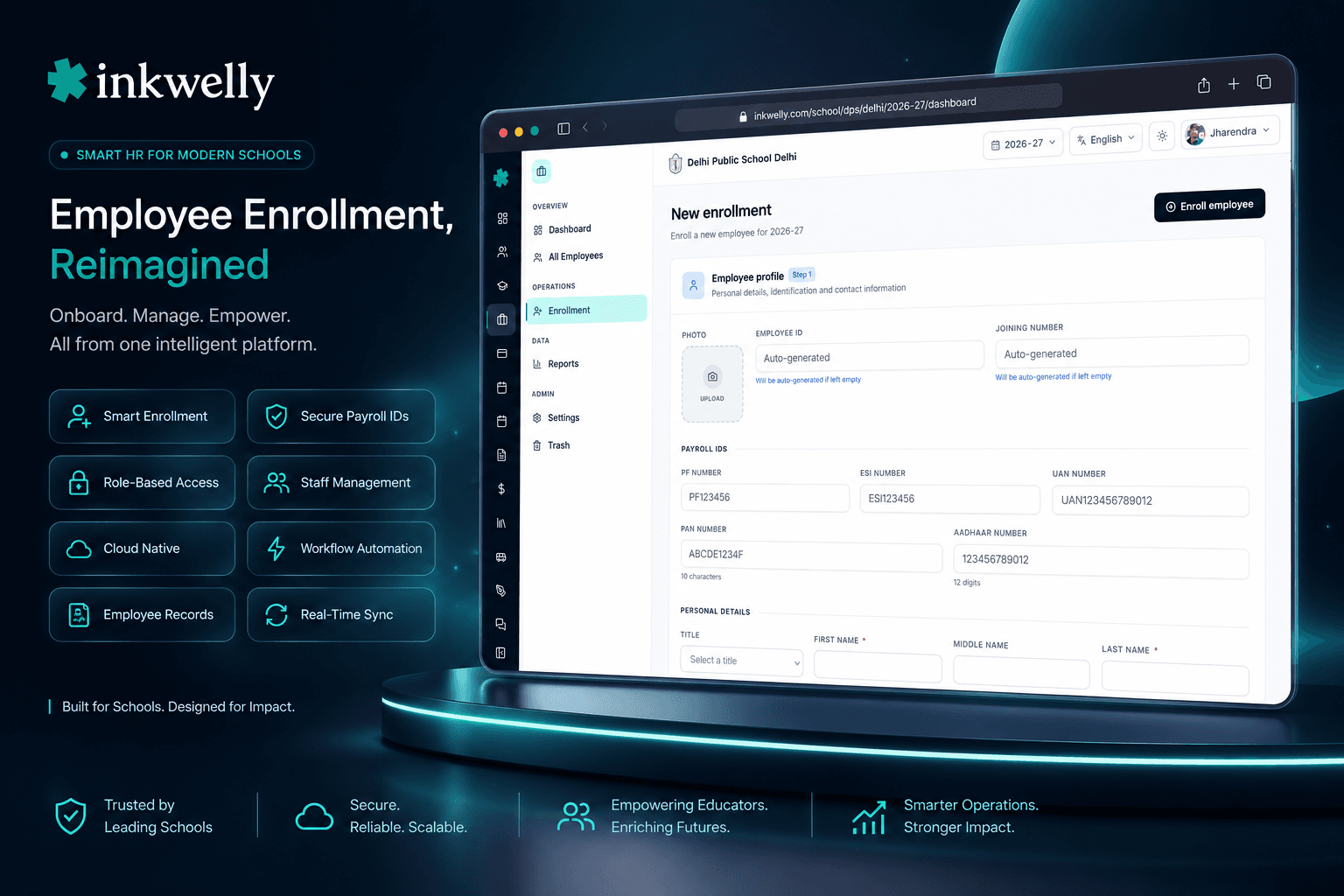
Har naye joiner ke liye single-page enrollment form — teacher, PRT, accountant, librarian, bus driver, security guard. Profile, statutory identifiers (PAN, Aadhaar, UAN, PF, ESI), academic session aur department — sab kuch ek hi save mein. Employee ID auto-generate, Aadhaar inline validate, naam English plus Hindi plus regional script mein store — taaki appointment letter, EPFO Form 11 aur salary register sab day-one se sahi rahein.
Aaj ke Indian schools nayi teacher kaise onboard karte hain
April ka pehla week hai. Principal ne 3 naye joiners finalise kiye hain — ek TGT Mathematics, ek PRT Hindi, aur senior science block ke liye ek lab assistant. HR clerk joining register nikaalti hai, staff ka Excel sheet kholti hai, last year ka EPFO Form 11 PDF reference ke liye open rakhti hai, aur shuru karti hai. Naam. Father's name. Aadhaar — 12 digits, card ki photo se copy, ummeed hai koi zero na chhoot jaaye. PAN — 10 characters, 5 letters, 4 digits, 1 letter, koi space nahi. UAN — 12 digits agar teacher ke paas hai, warna blank. Joining date. Department. Yahi 3 teachers, 15 fields each, 3 forms — appointment letter, EPFO Form 11, salary register ka opening row.
Lunch tak lab assistant ka record Excel mein hai par appointment letter template mein nahi, TGT ka appointment letter sign ho gaya hai par PAN galat type ho gaya, aur PRT Hindi teacher ka naam salary register mein English mein hai par principal ko management trust ke formal appointment letter ke liye Devanagari mein chahiye. 3 naye joiners. 2.5 ghante office time. Kam se kam ek galti jo 6 hafte baad EPFO ECR upload mein UAN-PAN mismatch banke aayegi.
Ab sochiye agar ek hi April joining cycle mein 15 teachers, plus saal mein 3 lateral hires hon. Cost typing ki nahi hai — cost hai galat PAN waala appointment letter, EPFO ka penalty notice, salary register aur bank statement ka mismatch, aur day-one par walk-in hone waali nayi teacher jiska record 5 jagah adhura hai. Hum ne Employee Enrollment isi liye banaya — taaki day-one ek hi baar ho, 6 minute mein, aur har downstream module — payroll, attendance, employee documents, school website CMS roster, parent app teacher card — wahi record automatic uthhaaye, koi re-typing nahi.
New Enrollment kaise kaam karta hai — ek form, 6 minute
Employees → New Enrollment open karein. Page par ek scrolling form mein 2 structured sections hain: Employee Profile (the person) aur Academic Enrollment (current academic session ki joining). Neeche ek hi Enrol Employee button hai jo dono commit karta hai — koi half-saved record nahi, koi orphan profile nahi, koi academic record bina person ke nahi.
Section 1 — Employee Profile. Identifiers row se shuru karein. Employee ID manually type kar sakte hain ya Inkwelly auto-generate kar sakta hai agar school ne Enrollment Settings mein autoGenerateEmployeeId enable kiya hai — same logic Joining Number ke liye. PF Number, ESI Number, UAN Number — sab optional, sab 50-character free-text fields. PAN ko official format ^[A-Z]{5}[0-9]{4}[A-Z]{1}$ ke against inline validate kiya jaata hai — ek galat character type kiya to form save se pehle bata deta hai, EPFO portal 6 hafte baad nahi. Aadhaar ko exactly 12 digits hone chahiye — ^\d{12}$ — koi space, dash ya dot accept nahi; validator silently strip karke canonical form maangta hai.
Title ek 12-option dropdown hai — Shri, Smt, Kumari, Kumar, Master, Miss, Mr, Mrs, Ms, Dr, Prof, Other — Indian government schools, residential schools aur trust-run schools ke salutation conventions ke liye built. First Name required hai, Middle aur Last names optional hain par har name field multi-language hai. English value type karein, input ke saath ke language icon par click karein, Hindi ya regional value ek baar bhar dein, save — appointment letter draft Devanagari naam automatic uthha leta hai.
Date of birth, gender (Male / Female / Other), blood group (8 options), religion (Hinduism / Islam / Christianity / Sikhism / Buddhism / Jainism / Other), nationality, mother tongue, caste category (General / OBC / SC / ST / Other), marital status (Single / Married / Divorced / Widowed) — har woh demographic field jo CBSE board affiliation paperwork, EPFO Form 11, ESIC Form 1, state board roster, ya school management trust review maangta hai, ek hi baar capture. Spouse name aur spouse occupation tab dikhte hain jab marital status Married, Divorced ya Widowed ho. Profile photo Inkwelly MediaPicker se — school ki existing media library se chunein ya new image upload karein, proportional cropping, baaki sab cheezo ke saath hi capture.
Contact row. Email validate hota hai; mobile aur alternate mobile 15-character strings hain country-code support ke saath. Mobile number directly WhatsApp announcement workflow mein flow karta hai jo school har payday bhejta hai, aur OTP-based employee portal login mein jisse teacher day-one se apni profile khud check kar sakti hai.
Section 2 — Academic Enrollment. Academic session chunein (active session par default — 2025-26 April ke joiners ke liye). Employee Number session ke liye optional hai aur global Employee ID se separate — un schools ke liye useful jo har academic year shuru hote waqt staff re-number karte hain. Department chunein school ki department list se (Mathematics / Science / Computer Science / Hindi / English / Administration / Transport / Support — jo bhi school ne configure kiya hai, multi-language department names ke saath agar school ne enable kiye hain). Joining Date required aur audited hai — ek baar save hone par, Service Period Certificate aur EPFO Form 11 row ka official service-period anchor ban jaata hai. Remarks ek optional free-text note hai — contract type, probation period, ya jis trust resolution ne appointment authorise kiya uska number note karne ke liye useful.
Enrol Employee click karein. 2 second mein, naya staff member 5 jagah ek saath exist karta hai: Employee Information directory mein full 11-tab profile ke saath, current session ka academic session roster mein, Identity & Access Management system mein teacher role aur OTP-able login ke saath, employee portal /e/<profileId> par pehle sign-in ke liye ready, aur audit log mein timestamp, user, IP aur full enrollment payload ke saath. Koi double entry nahi. Koi orphan rows nahi. Har downstream module ko abhi se uske baare mein pata hai, automatically.
Day-one par New Enrollment har field capture karta hai
- Statutory identifiers (5): Employee ID, Joining Number, PAN (regex-validated), Aadhaar (12-digit-validated), UAN — woh row jo Form 11, Form 16 aur EPFO ECR sab maangte hain.
- Statutory contributions (2): PF Number, ESI Number — joining par capture taaki onboarding ke baad pehla ECR upload cleanly chala jaaye.
- Salutation (1): Title — 12 options Shri, Smt, Kumari, Kumar, Master, Miss, Dr, Prof samet — woh salutations jo Indian schools sach mein use karte hain har board aur trust mein.
- Names (3 with i18n): First Name (required), Middle Name, Last Name — har ek English plus Hindi plus regional script mein store, appointment letters, salary register, ID card aur EPFO paperwork mein use hota hai.
- Demographic (8): Date of Birth, Gender, Blood Group (A+ / A- / B+ / B- / O+ / O- / AB+ / AB-), Religion, Nationality, Mother Tongue, Caste Category, Marital Status — har woh dimension jo Indian board paperwork maangta hai.
- Spouse details (2): Spouse Name, Spouse Occupation — tab capture jab marital status zaroori karta ho, Form 16 nominee declarations aur ESIC dependant entries par dikhta hai.
- Contact (4): Email (RFC-validated), Mobile, Alternate Mobile, Profile Photo — OTP login, WhatsApp salary slip mail-out aur parent app teacher card ko feed karta hai.
- Academic enrollment (5): Academic Session (multi-session aware), Employee Number for session, Department, Joining Date (audited), Remarks — woh service period banaata hai jis par poora payroll aur HR machinery anchor karta hai.
- Multi-language inputs (7 fields): First Name, Middle Name, Last Name, Nationality, Mother Tongue, Spouse Name, Spouse Occupation — English plus jo locale aapka school chalata hai uss mein type, ek hi record mein stored.
Employee ID aur Joining Number auto-generate karein — ya khud type karein
Zyaadatar Indian schools ki Trust-set staff numbering policy hoti hai — 4-digit running number, department prefix, financial year suffix. Kuch schools chaahte hain ki principal har employee ID khud assign kare. Inkwelly dono ko support karta hai.
Academic year ki shuruaat mein ek baar Enrollment Settings khol kar autoGenerateEmployeeId toggle on karein agar chaahte hain ki system enrollment ke moment par next sequential ID assign kare — field form mein optional ho jaata hai, value save par generate hoti hai, koi clash possible nahi kyunki sequence school level par lock hai. Toggle off karein agar trust resolution manual assignment maangti hai — field required ho jaata hai, validation inline fire hoti hai agar office assistant blank chhodne ki koshish kare. Same logic autoGenerateJoiningNumber ke liye. Dono settings independent hain — woh schools jo employee ID auto-generate karte hain par joining number manually type karte hain, common hain; hum form fork kiye bina us mix ko support karte hain.
Ek form, naam English, Hindi aur aapke regional script mein
Teacher names optional fields nahi hain. Appointment letter, salary register, EPFO Form 11, trust resolution, ID card, parent app teacher card, WhatsApp salary slip cover — har artefact jo school produce karta hai staff naam reference karta hai. Aadhi cheezein English mein chahiye (PAN-aligned for TDS), aadhi regional script mein (UP aur Bihar ke liye Devanagari, Tamil Nadu ke liye Tamil, West Bengal ke liye Bengali, Maharashtra ke liye Marathi, Gujarat ke liye Gujarati).
Inkwelly ka LocalizedTextInput ye sab ek widget mein solve karta hai. English value type karein, language icon click karein, Devanagari (ya Tamil, ya Bengali, ya Marathi) value type karein, save — dono versions same employee record par live rahte hain. Appointment letter template Devanagari naam use karta hai; EPFO Form 11 export English naam use karta hai; parent app jo language parent ne select ki hai woh dikhata hai. Ek enrollment, har locale-correct artefact, har baar. Wahi i18n map Middle Name, Last Name, Nationality, Mother Tongue, Spouse Name aur Spouse Occupation ko cover karta hai.
PAN aur Aadhaar inline validate — EPFO portal reject karne se pehle
PAN un 2 fields mein se ek hai jahan ek galat character ghantonn ki correction maangta hai. Inkwelly office assistant ke type karte hi official format ^[A-Z]{5}[0-9]{4}[A-Z]{1}$ ke against validate karta hai — 5 letters (entity code), 4 digits (sequence), 1 letter (check). Lowercase letter type karein, polite uppercase suggestion milegi. Shuruaat mein 6 letters type karein, format hint milega. Form save tab tak refuse karta hai jab tak PAN sahi ya empty na ho.
Aadhaar ko bhi same treatment — exactly 12 digits, regex ^\d{12}$, spaces aur dashes silently strip ho jaate hain validation se pehle. UAN, PF aur ESI numbers 50-character free-text strings hain kyunki unke formats establishment code par vary karte hain; ye optional rahte hain taaki abhi tak UAN na rakhne waali fresher aaj enrol ho sake aur EPFO se UAN milne par baad mein add ho. Result: jab aapka accountant agla EPFO ECR upload chalata hai, row first attempt mein chala jaata hai — koi rejected records nahi, koi penalty notices nahi, koi 14B nahi.
Profile photo MediaPicker se — koi resizing nahi, koi re-upload nahi
Zyaadatar school ERPs office se kehte hain ki ID card ke liye 4:5 photo crop karein, appointment letter ke liye 3:4, aur website roster ke liye square crop. Inkwelly alag tareeke se karta hai. Enrollment form MediaPicker khol deta hai — wahi media library jo har Inkwelly module ko power karti hai. Pehle se uploaded photo chunein, ya new image drag-in karein; Inkwelly original store karta hai aur har surface ko sahi variant (thumb, card, hero) serve karta hai.
ID card template, appointment letter PDF, parent app teacher card, school website CMS roster, employee portal header — sab same profilePhotoMediaId se pull karte hain. Agle saal photo ek baar replace karein jab teacher appearance update kare, har artefact downstream update ho jaata hai. 5 alag modules par re-upload chain ki zaroorat nahi.
“Pehle ek nayi teacher ko enrol karne mein 1-2 ghante lagte the — alag form, alag register, photo alag, appointment letter alag. Ab Inkwelly mein ek hi page hai. April mein 12 teachers enrol kiye, sab 6-6 minute mein. Form 11 ka data CSV se direct upload ho gaya. EPFO se ek bhi rejection nahi aaya.”
Real-world enrollments jo aapka office har term chalata hai
1. April joining cycle (har saal). April ke pehle 2 hafton mein school 8-18 nayi teachers add karta hai — TGT aur PRT replacements, lateral subject hires, senior block ka naya lab assistant. Inkwelly ke bina: 2 din office work, 3 half-built Excel sheets, ek physical files ka stack. Inkwelly ke saath: har enrollment 6 minute, naye joiners ka ek single CSV usi shaam EPFO Form 11 batch upload ke liye export, aur har nayi teacher day-one par walk-in karte waqt apni profile already exist deekh leti hai parent app par photo ke saath.
2. Mid-year lateral hire. October mein ek senior English teacher resign karti hai. Principal hafte ke andar replacement interview aur finalise karti hai. HR clerk New Enrollment kholti hai, active session (2025-26) chunti hai, joining date 2025-10-21 daalti hai, English department chunti hai, aur save karti hai. Nayi teacher ka pehla salary slip 1st ko correctly generate ho jaata hai — koi scrambled overrides nahi, koi manual adjustments nahi.
3. Non-teaching staff onboarding. July mein ek naya bus driver, 2 security guards aur ek librarian join karte hain — sab non-teaching, sab ko teaching staff jaisi hi statutory paperwork chahiye. Wahi enrollment form unko handle karta hai — relevant department chunein (Transport, Support, Library), PAN aur Aadhaar capture karein, salary register aur EPFO Form 11 batch unko teaching staff ke saath agle monthly run mein include karte hain.
4. Multi-school trust onboarding. Ek trust ek city mein 3 schools chalata hai. HR head aaj ek school mein teacher enrol karta hai, aur 3 mahine baad wahi teacher trust ke sibling school mein transfer hoti hai. Inkwelly trust-level employees Identity & Access Management module se support karta hai; har school par New Enrollment trust roster surface karta hai taaki doosre school ki enrollment existing trust profile ki one-click promotion ho, fresh entry nahi. Service period continuity automatically preserved.
5. Re-joining after a sabbatical. 2022 mein chhodi hui senior teacher 2-saal break ke baad 2025-26 mein wapas aati hai. HR clerk form ki shuruaat mein uska PAN type karti hai; Inkwelly ka Trash & Restore flow uska purana record surface karta hai. Uski qualifications, certifications, previous employment history aur purani photographs preserved hain — usse sirf new session ke liye fresh academic enrollment fill karna hai, naye joining date, naye department aur naye role ke saath. Full service history ek bhi past field re-type kiye bina restore ho jaati hai.
6. Probation conversions. April mein 6-mahine probation par hire ki gayi teacher October mein confirm hoti hai. Yahan New Enrollment use nahi hota — instead, existing employee record ka academic remarks field update hota hai, aur employee documents module confirmation letter generate karta hai. New Enrollment ek one-time create event hai; uske baad ka lifecycle baaki Employee Information module handle karta hai.
Common scenarios jo New Enrollment handle karta hai
- Fresh teacher bina UAN ke — aaj PAN + Aadhaar ke saath enrol, UAN blank chhodein, EPFO agle hafte issue karega, aapka accountant employee documents se enrollment redo kiye bina bhar dega.
- Married teacher with regional-script formal name — wahi multi-language input mein English PAN-aligned naam aur Devanagari trust-resolution naam type karein.
- Non-teaching staff bina PAN ke — PAN blank chhodein (optional hai), Aadhaar + UAN ke saath enrol, salary register aur EPFO Form 11 row dono chala jaata hai.
- Lateral hire mid-session — active session chunein, joining date October mein set karein, November ka salary run usse pro-rata basis par automatically include karta hai.
- Bulk April joiners — har ek ko form se enrol karein (har 6 minute), employee reports se new-joiners CSV export karein, EPFO Form 11 batch upload karein.
- Trust transfer — promoter trust roster existing trust employees surface karta hai taaki doosre school ki enrollment one-click ho, service continuity preserved.
- Returning teacher after a break — uska PAN type karein, Trash & Restore se historical record uthhayein, sirf new session ke liye fresh academic enrollment.
- Aadhaar mistype — inline validator wrong-length input ko hote hi catch karta hai, exactly 12 digits hone tak save nahi.
- Missing photo — enrollment par Profile Photo blank chhodein, MediaPicker baad mein bharta hai — ID card aur parent app teacher card upload hone par automatically update ho jaate hain.
30 minute mein apne school ke data par live New Enrollment dekhein
Demo par 3 nayi teachers ki joining files laayein — PAN, Aadhaar, UAN, joining date, department. Hum teenon ko live enrol karenge, EPFO Form 11 CSV generate karenge, aur call khatam hone se pehle aapko appointment letter PDF wapas denge.
Limits, safety aur small print
Ek person, ek record. New Enrollment single-person create flow hai. Fresh school migration ke dauraan ek saath 50-200 staff onboard karne ke liye, Employee Information module ka bulk import flow use karein — wahi field set, CSV-driven, migration team aapke sheet ko import se pehle validate karti hai.
Required fields kam hain, optional fields kafi hain. Validator hard-require sirf First Name, Date of Birth, Gender, Academic Session aur Joining Date karta hai. Employee ID aur Joining Number tab optional hote hain jab Enrollment Settings mein auto-generation enable ho. Har statutory identifier (PAN, Aadhaar, UAN, PF, ESI) enrollment par optional hai taaki paperwork mid-flight waali teacher aaj onboard ho sake — missing identifier baad mein same profile se bhar dein.
Inline validation strict hai jahan zaroori hai. PAN ko official format ^[A-Z]{5}[0-9]{4}[A-Z]{1}$ match karna chahiye — 5 letters, 4 digits, 1 letter. Aadhaar exactly 12 digits hone chahiye. Email RFC validation satisfy karna chahiye. Mobile international country codes support ke liye 15 characters par capped hai. Title 12 enum values mein se ek tak constrained hai. Gender Male / Female / Other tak constrained hai. Religion, Blood Group, Caste Category, Marital Status — sab enum-validated. Free-text drift possible nahi.
Multi-language per school opt-in hai. Agar aapke school ka supportedLanguages array sirf ['ENGLISH'] hai, naam fields par language-icon UI nahi dikhta aur form single-language form ki tarah behave karta hai. School setting mein Hindi ya regional language ek baar add karein, aur form, directory, appointment letter template aur salary register ke har naam field multi-language input uthha lete hain — bina re-deploy ya re-train ke.
Audit log har save par. Har enrollment ek audit row likhti hai — user, timestamp, IP, full payload (masked Aadhaar ke saath) — taaki baad mein koi edit, correction, ya dispute joining ke moment tak trace ho sake. Role-based access ke saath, aapko exactly pata hai konse office user ne kaunsi teacher enrol ki.
Cross-tenant isolation. Har Inkwelly module ki tarah, New Enrollment sirf aapke school ke tenant mein likhta hai. Sibling schools mein trust-level promotion explicit, audit-logged transfer hai — kabhi accidental cross-school write nahi. Multi-school trusts jo per school apni staff lists chalate hain strict isolation enjoy karte hain; trust-wide rosters per-school tenant data ke upar built read-only views hain.
India mein hosted. Saari enrollment data — masked Aadhaar, encrypted PAN, photos aur full audit log samet — Inkwelly ke Mumbai-region PostgreSQL par stored hai. Normal operation ka part cross-border PII transfer nahi hai. DPDP Act 2023 obligations — consent capture, purpose limitation, deletion-on-request, breach notification — har school ke Inkwelly lifecycle ke day-one se built-in hain.
किस मॉड्यूल का हिस्सा
1 moduleअक्सर पूछे गए सवाल
8 सवालNayi teacher enrol karne mein actually kitna time lagta hai?
Ek staff member jiski paperwork ready ho — PAN, Aadhaar, UAN, joining date, photo — uske liye lagbhag 6 minute. Form ek scrolling page hai 2 sections (Profile + Academic Enrollment) ke saath; ek save dono commit karta hai. April ke pehle hafte mein 12-18 teachers onboard karne waale schools poori batch 3 ghante se kam office work mein clock karte hain — EPFO Form 11 CSV export samet.
Office staff PAN ya Aadhaar enrollment par skip kar sakta hai?
Haan — dono enrollment par optional hain. Hum ne ye deliberately rakha hai taaki paperwork mid-flight waali fresh joiner aaj onboard ho sake. Fields baad mein same employee profile se bhare jaa sakte hain. Validation tab fire hoti hai jab value present ho — agar PAN daalein, official format `^[A-Z]{5}[0-9]{4}[A-Z]{1}$` match karna chahiye; agar Aadhaar daalein, exactly 12 digits hone chahiye. Enrollment par required fields sirf First Name, Date of Birth, Gender, Academic Session aur Joining Date hain.
Kya system Employee IDs aur Joining Numbers auto-generate karta hai?
Haan, optionally. Saal ki shuruaat mein ek baar Enrollment Settings khol kar `autoGenerateEmployeeId` aur `autoGenerateJoiningNumber` independently toggle karein. Auto-generation on hone par, field form mein optional ho jaata hai aur Inkwelly save ke moment par next sequential value assign karta hai — koi clash possible nahi kyunki sequence school level par lock hai. Auto-generation off hone par (kuch trusts manual assignment maangti hain), field required ho jaata hai aur blank chhodne par inline validation fire hoti hai.
Kya hum same form se teaching aur non-teaching staff dono enrol kar sakte hain?
Haan. Form field-level par koi distinction nahi karta — Department dropdown teaching versus non-teaching context set karta hai. Mathematics ya Hindi chunein to staff member teaching hai; Transport, Support ya Administration chunein to non-teaching. Wahi statutory identifiers (PAN, Aadhaar, UAN, PF, ESI) dono par apply hote hain. Bus drivers, security guards, librarians, lab assistants aur accountants sab is single form se enrol hote hain TGTs, PRTs aur PGTs ke saath.
Kya teachers ke naam Hindi ya hamare regional script mein enter ho sakte hain?
Haan. 7 fields out of the box multi-language input support karte hain — First Name, Middle Name, Last Name, Nationality, Mother Tongue, Spouse Name aur Spouse Occupation. English value type karein, input ke saath language icon click karein, Hindi (ya Tamil, Bengali, Marathi, Gujarati, Kannada, Telugu, Malayalam, Punjabi) value ek baar bharein, save — dono same record par live rehte hain. Appointment letter PDF regional value uthhata hai, EPFO Form 11 export English value uthhata hai, parent app jo language parent ne select ki hai woh dikhata hai — sab ek hi enrollment se.
Pehle chhod chuki teacher wapas aaye to kya hota hai?
Enrollment form ke top par uska PAN type karein aur Inkwelly uska existing record surface karega — agar archive ki gayi thi to Trash & Restore se pull karega. Uski purani qualifications, certifications, previous employment history aur photograph preserved hain. Aapko sirf fresh Academic Enrollment section bharna hai — new session, new joining date, new department, new role. Full service history ek bhi past field re-type kiye bina restore ho jaati hai. Cross-session continuity automatic hai.
Save karne ke baad new employee record kahan dikhta hai?
5 jagah, simultaneously, 2 second se kam mein. Employee Information directory full 11-tab profile ke saath. Current session ka academic session roster. Identity & Access Management system teacher role aur OTP-able login ke saath /e/<profileId> par. Employee portal pehle sign-in ke liye ready. Aur audit log timestamp, user, IP aur full enrollment payload ke saath. Payroll, attendance, school website roster ya parent app mein koi double entry nahi — har downstream module new record automatically uthha leta hai.
Kya enrollment data India mein store hota hai?
Haan. Saari enrollment data — masked Aadhaar, encrypted PAN, profile photo, aur full audit log samet — Inkwelly ke Mumbai-region PostgreSQL par stored hai. Normal operation ka part cross-border PII transfer nahi hai. DPDP Act 2023 obligations — enrollment par consent capture, purpose limitation, deletion-on-request, breach notification flow — day-one se built-in hain. Aadhaar at rest last-4-digits par masked hai; full-view ke liye designated KYC role chahiye aur har full-view event audit-logged hai.
आपको ये भी पसंद आ सकता है
5 लेखInkwelly आपके स्कूल पर — खुद देखें
30 मिनट का डेमो। आपके मौजूदा ERP को आपके साथ खोलकर, कॉल पर ही आपका डेटा Inkwelly में लोड करते हैं। कॉल ख़त्म होते-होते एक तय तारीख़ का गो-लाइव प्लान आपके हाथ में।