कोई भी employee report, 30 सेकंड में। Fields चुनें। Scope filter करें। Export करें।
Employee Information module के अंदर ही reports का एक पूरा workshop — fields चुनिए, staff filter कीजिए, row-level list चाहिए या summary breakdown — एक click पर list तैयार। Template के रूप में save कर लीजिए, अगले May में फिर वही template Run कीजिए। CSV export एक click में। यह उन्हीं lists के लिए बना है जो इंडियन स्कूल हर महीने file करते हैं — Form 16 issuance, EPFO ECR, ESIC additions, department-wise headcount, joining और exit reconciliation, statutory compliance audits।
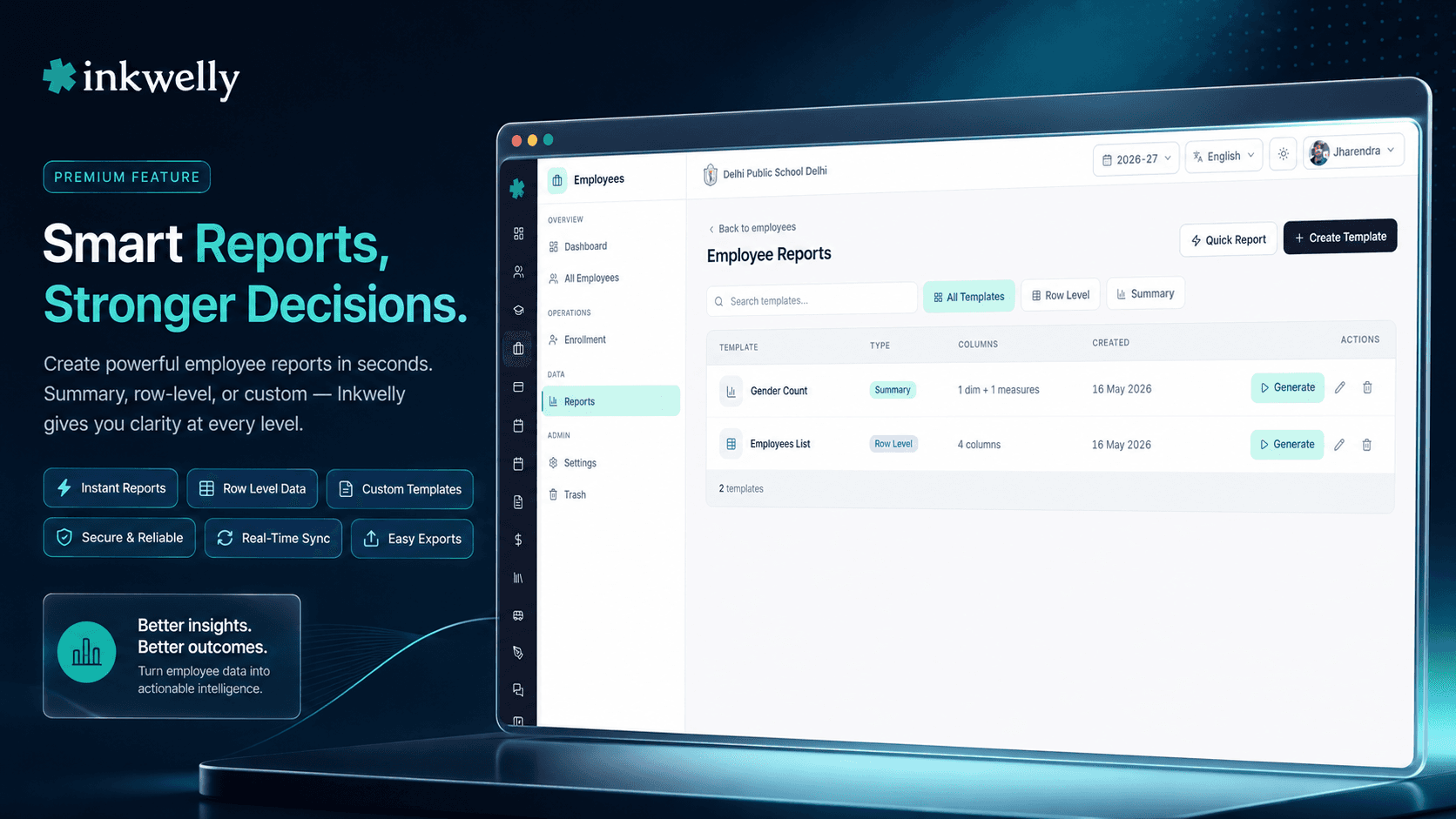
हर इंडियन स्कूल के office को एक असली employee reports tool क्यों चाहिए
May का आख़िरी हफ़्ता। School accountant के पास 12 दिन हैं — हर उस employee को Form 16 issue करने हैं जिसने FY 2024-25 में salary draw की। उन्हें एक clean list चाहिए — employee name, PAN, joining date, gross salary paid, TDS deducted, ESI/PF eligibility — department-wise sort, उस format में export जो Form 16 generation tool expect करता है। वो पिछले साल की Excel sheet खोलते हैं, rows copy करते हैं, जो employees छोड़ चुके उन्हें manually delete करते हैं, इस साल जो जुड़े उन्हें manually add करते हैं, अलग sheet से PAN numbers dhundhte हैं, किसी के name में typo fix करते हैं। 3 घंटे बाद list तैयार। 2 दिन बाद पता चलता है कि 3 retired teachers छूट गए और एक PAN गलत था जो Form 16 already bank में चला गया।
यह accountant की failure नहीं है। यह system की failure है। इंडियन स्कूल हर quarter staff के लिए 20+ statutory और management lists file करते हैं — हर May Form 16 / Form 16A generation list, हर महीने 15 तारीख तक EPFO ECR upload, 21 तारीख तक ESIC monthly contribution, हर onboarding पर new-joiners EPFO Form 11, हर separation पर leavers' Form 19/10C/10D, school inspection HR roster, CBSE board affiliation teaching-staff list, हर payday salary slip mailing list, management review के लिए department headcount। हर list उसी तरह बनती है — कोई Excel खोलता है, कोई type करता है, कोई scroll करता है।
हमने सोचा — अगर accountant या HR head जो fields चाहिए चुन ले, जो staff चाहिए filter कर ले, और 30 सेकंड में list तैयार हो जाए — print, export, या अगली May के लिए template के रूप में save? तो हमने यही बनाया। Inkwelly का Employee Reports office staff या principal को 3 click में custom list या summary breakdown बनाने देता है। एक बार बनाओ। हर महीने वही चलाओ। अगला accountant दूसरे स्कूल चला जाए, तो उसी template से नया accountant काम कर सके।
Employee Reports कैसे काम करता है
Employees → Reports खोलिए। Page पर हर वो report template दिखती है जो आपके स्कूल ने save कर रखी है — sortable, name-searchable, type-filterable। Header में 2 buttons हैं: Quick Report उस ad-hoc list के लिए जिसे save नहीं करना चाहते, + Create Template उस list के लिए जिसे हर payday या हर quarter फिर से चलाना है।
Step 1 — Fields चुनिए। एक field selector खुलता है जिसमें हर employee field groups में बंटा है: Basic (employee number, name, DOB, photo), Contact (email, mobile, alternate mobile), Demographic (gender, blood group, religion, nationality, mother tongue, caste category), Identity (Aadhaar, PAN, PF number, ESI number, UAN), Academic (department, employee number per session, joining date, leaving date, status, session, remarks), Address — Permanent और Current (5 fields each), Emergency Contact (3 fields), Marital (status, spouse name, spouse occupation), Cross-session (first joining date, last leaving date, total sessions attended, employment duration), Work History, और Status। जो columns चाहिए tick कीजिए।
Step 2 — Scope filter कीजिए। Academic session चुनिए (एक या एक से ज़्यादा — year-over-year reports के लिए useful), department चुनिए (Mathematics, Science, Administration, Transport, Support — जो भी आपने configure किया हो)। Status filter कीजिए (Active / Suspended / Resigned / Terminated / Retired / Inactive)। April 1, 2025 के बाद joined staff चाहिए — EPFO Form 11 के new-joiners batch के लिए? Joining date पर date-range filter। Filters automatically compose होते हैं।
Step 3 — Row-level या summary चुनिए। Row-level report हर matching employee को एक row में list करती है। Summary report aggregate करती है — Total, Male | Female | Other | Total, General | OBC | SC | ST | Other | Total, Hindu | Muslim | Sikh | Christian | Buddhist | Jain | Other | Total, Active | Suspended | Resigned | Terminated | Retired | Inactive | Total, A+ | A- | B+ | B- | O+ | O- | AB+ | AB- | Total। Rows को department, status, या joining year से group कीजिए। जो breakdown audience को चाहिए, वो pick कीजिए।
Step 4 — Save या export। Save Template click कीजिए ताकि अगले महीने use हो। Download CSV click कीजिए ताकि accountant या EPFO portal को आज ही bhej सकें। आज जो template save करते हैं, वही template 5 साल बाद का accountant Run करेगा।
हर वो employee field जो आपकी reports में आ सकता है
- Basic (8 fields): Employee ID, employee number, first/middle/last/full name, date of birth, profile photo flag।
- Contact (3 fields): Email, mobile, alternate mobile — हर salary-slip mail-out और emergency notification को जो contact list चाहिए।
- Demographic (6 fields): Gender, blood group, religion, nationality, mother tongue, caste category — HR diversity और board affiliation paperwork जो dimensions मांगता है।
- Identity — Statutory (5 fields): Aadhaar number, PAN number, PF number, ESI number, UAN number — वो 5 identifiers जो EPFO Member Portal, ESIC Portal, TRACES, और CBSE affiliation portal expect करते हैं।
- Academic per session (8 fields): Department ID, department name, employee number per session, joining date, leaving date, academic status, session name, academic remarks — हर academic year के payroll-relevant fields।
- Cross-session (5 fields): First joining date (सब sessions across), last leaving date, total sessions attended, full session history, employment duration — Service Period Certificate के लिए चाहिए data।
- Address (10 fields): Permanent address (line 1, city, state, pin code, country) और current address (5 mirror fields) — HRA / EPFO Form 11 / ESIC Form 1 paperwork के लिए separate।
- Emergency contact (3 fields): Name, mobile, relationship — medical room और HR जिसे call करते हैं जब कुछ गलत हो।
- Marital (3 fields): Marital status, spouse name, spouse occupation — Form 16 nominee declarations और ESIC dependant entries पर आते हैं।
- Work history (3 fields): Last work action, last work action date, last work reason — promotions, demotions, transfers, suspensions और reinstatements का audit trail।
- Status (2 fields): Active flag, academic status — हर payroll run, EPFO ECR submission, और CBSE inspection roster जो 2 filters पर चलते हैं।
- Multi-language fields: Names, spouse name, address fields, occupation — English value या Hindi/regional script value, जो भी locale audience को चाहिए।
- Computed fields: Age (DOB से report-run date पर compute होती है), full name (first/middle/last से जुड़ा), employment duration (first joining date से आज तक compute होती है)।
2 report modes — audience के हिसाब से सही mode चुनिए
इंडियन स्कूलों को employee reports tool से 2 बहुत अलग चीज़ें चाहिए। कभी आपको हर employee list में चाहिए — name, department, PAN, UAN, joining date — Form 16 issuance run, salary slip mailing list, EPFO ECR upload के लिए। यह row-level report है। हर employee एक row, हर chosen column, sort और group जैसा आपने माँगा।
कभी आपको numbers चाहिए — department-wise staff count, इस quarter में कितने resigned, department-wise कितने missing PAN। यह summary report है। Department rows पर, chosen breakdown columns पर, totals नीचे। CBSE annual return teaching-staff count, management board का gender-ratio review, audit committee का PF compliance question — सब summary reports हैं। Inkwelly दोनों handle करता है। वही field selector। वही filter system। वही template engine। सिर्फ़ mode का switch।
Routine reports के लिए templates, one-off के लिए Quick Report
हर list save करने की ज़रूरत नहीं। Principal आते हैं और October में जन्मे staff की list मांगते हैं — Teachers' Day पर एक छोटी celebration के लिए। Template की ज़रूरत नहीं। Quick Report click कीजिए, name + department + DOB tick कीजिए, October पर filter कीजिए, run कीजिए, CSV download कीजिए, tab बंद कर दीजिए। Inkwelly report भूल जाता है। Principal को 30 सेकंड में list मिल जाती है।
Form 16 issuance list, EPFO ECR upload, ESIC monthly contribution list, new-joiners Form 11 batch — ये हर payday, हर महीने, हर quarter, हर accountant द्वारा चलते हैं जो आपके स्कूल से होकर गुज़रता है। इन्हें templates के रूप में save कीजिए। एक clear name दीजिए (Form 16 Issuance — Annual), short description (May 31 deadline, सब employees जिन्होंने FY में salary draw की), और वो list फिर कभी मत बनाइए। नया accountant July में join करता है? Template पर click, Run, export — पहले दिन से productive।
Filters जो compose होते हैं — session, department, status, हर dimension
ज़्यादातर school ERPs जो employee reports tool ship करते हैं, वो सिर्फ़ एक चीज़ पर filter करने देते हैं। Inkwelly compose करता है। Session multi-select में 2024-25 + 2025-26 चुनिए। Department multi-select में Mathematics + Science + Computer Science चुनिए। Report scope automatically वही intersection हो जाता है: उन 3 departments के, उन 2 sessions वाले staff। 20 सेकंड।
सिर्फ़ Active employees चाहिए (resigned, retired, terminated, on leave छोड़कर)? Status filter add कीजिए। April 1, 2025 के बाद joined staff चाहिए — EPFO Form 11 batch? Joining date range filter add कीजिए। PAN missing वाले employees चाहिए — TDS compliance audit list? PAN पर field-completion filter add कीजिए। Filters automatically compose होते हैं — हर filter scope को और narrow करता है, हर change live grid को update करता है — save करने से पहले ही आप list देख लेते हैं। यही filter system row-level और summary दोनों reports को चलाता है — एक बार सीखिए, हर जगह use कीजिए।
वो 7 summary breakdowns जो इंडियन school HR सच में मांगता है
Summary mode में 7 ready-made measures हैं, उन्हीं questions से बने जो इंडियन school HR teams और government departments routine में पूछते हैं:
- Total Count — department-wise employees, filter scope-wise employees, total active vs total separated।
- Gender breakdown — Male | Female | Other | Total। CBSE board affiliation paperwork और management diversity reviews हर साल यही मांगते हैं।
- Caste category breakdown — General | OBC | SC | ST | Other | Total। State-aided schools के reservation hires और central government affiliated schools के annual returns के लिए critical।
- Religion breakdown — Hindu | Muslim | Sikh | Christian | Buddhist | Jain | Other | Total। Minority-status schools को board affiliation paperwork के लिए चाहिए।
- Status breakdown — Active | Suspended | Resigned | Terminated | Retired | Inactive | Total। हर महीने EPFO ECR submission और salary slip mailing list चलाने वाली एक ही report।
- Blood group breakdown — A+ | A- | B+ | B- | O+ | O- | AB+ | AB- | Total। Medical room की emergency response list और school bus first-aid kit।
- Field completion —
Field Filled | Field Empty | Total। PAN coverage, UAN coverage, ESI coverage, Aadhaar coverage, profile-photo coverage, emergency-contact coverage audit कीजिए। EPFO inspector या auditor से पहले अपने statutory gaps खुद ढूँढिए।
Reports English में या आपकी regional script में — same template
इंडियन state boards और कई government portals staff records English और regional script दोनों में मांगते हैं। UP Board school के लिए Devanagari में Service Period Certificate, Tamil Nadu Matric school के लिए Tamil में Salary Acknowledgement Receipt, West Bengal school के लिए Bengali में appointment letter। ज़्यादातर school ERPs आपको system level पर एक language चुनने पर मजबूर करते हैं। Inkwelly नहीं।
Reports उस user की language preference inherit करते हैं जो उसे run कर रहा है। Accountant वही template English में खोलते हैं — Rajendra A Verma दिखता है। HR clerk locale Hindi पर वही template खोलता है — राजेन्द्र अ वर्मा दिखता है। CSV export locale-correct value carry करता है। Multi-language fields (employee names, spouse names, addresses, emergency-contact names) Employee Information module में एक बार store होते हैं — और हर उस report में correctly दिखते हैं जिसमें वो field include है। कोई double maintenance नहीं, कोई 2 parallel lists नहीं, Hindi-medium teacher को कभी भी wrong-script appointment letter नहीं।
“Form 16 ka time aata hai aur main 3-4 din pareshaan rehta tha — Excel mein PAN, joining date, salary milana, departments separate karna. Ab Inkwelly mein template hai — May ke 25 ko Run karta hoon, sab ek CSV mein, Form 16 tool mein paste, kaam khatam. Sab employees ko time pe Form 16 mil jaata hai.”
हर महीने आपका office जो असली reports चलाता है
5 routine school-office reports जो traditionally Excel में हर एक 1-3 घंटे लेते हैं:
1. Form 16 issuance list (annual, by 31 May) — हर वो employee जिसने पिछले financial year में salary draw की — employee number, name, PAN, joining date, leaving date (अगर हो), department के साथ। एक बार template बनाइए, हर May में 30 सेकंड में Run कीजिए, CSV export कीजिए, payroll Form 16 generation में feed कीजिए। Templates के बिना: हर May 25 तारीख को 2-3 घंटे का Excel काम, और अगर accountant किसी employee को miss कर दे तो और 1 घंटा।
2. EPFO ECR upload list (monthly, by 15th) — हर active employee — UAN, PF number, gross wages, EPF wages, EPS wages, EDLI wages के साथ — उसी column order में जो EPFO Member Portal accept करता है। Inkwelly का row-level report सही field selection के साथ इसे directly produce करता है। 12 तारीख तक Run कीजिए, 15 तक upload कीजिए, कोई penalty notice नहीं।
3. ESIC monthly contribution list (monthly, by 21st) — हर वो employee जो ESI wage ceiling के नीचे है — ESI number, gross salary, ESI wages के साथ। Salary-range threshold पर filter, ESI-relevant fields pick, export, ESIC portal पर upload। जो list Excel में 90 मिनट लेती थी, अब 90 सेकंड।
4. New-joiners Form 11 batch (per onboarding cycle) — पिछली EPFO submission के बाद joined हर employee — name, DOB, gender, joining date, basic salary, PAN, Aadhaar के साथ। HR clerk हर joining month के बाद इस template को Run करता है, CSV export, Form 11 को batch में generate करता है — एक-एक करके नहीं। नई joining के पहले दिन से EPFO compliance।
5. Department-wise headcount (monthly, management review के लिए) — Department rows पर, Active / Resigned / Retired counts columns पर, totals row। Principal monthly review meeting में इसे use करते हैं — understaffed departments और pending exit interviews spot करने के लिए। Run कीजिए, PDF export कीजिए, meeting में चलिए।
हर महीने इंडियन स्कूल जो common employee reports बनाते हैं
- Form 16 issuance list — annual, 31 May तक, FY में salary draw करने वाले हर employee — PAN और TDS-eligible fields के साथ।
- EPFO ECR upload list — monthly, 15 तक, UAN, PF number, EPF wages, EPS wages, EDLI wages के साथ।
- ESIC monthly contribution list — monthly, 21 तक, ESI wage ceiling के नीचे employees — ESI number और gross salary के साथ।
- Form 11 new-joiner batch — हर onboarding cycle के बाद, names + DOB + joining date + PAN + Aadhaar।
- Form 19 / 10C / 10D leaver list — हर separation के बाद, EPFO claim batch के लिए names + leaving date + reason।
- Salary slip mailing list — monthly, salary slip auto-mail run के लिए हर active employee — email और department के साथ।
- Department-wise headcount — monthly, management review के लिए department-wise Active vs Resigned vs Retired।
- TDS Form 24Q list — quarterly, हर वो employee जिसकी salary TDS threshold cross कर गई — PAN के साथ।
- Probation period ending list — monthly, अगले 30 दिन में probation खत्म होने वाले employees — confirmation review के लिए।
- Statutory document compliance audit — PAN, UAN, ESI number, Aadhaar, या profile photo missing वाले employees — वो gaps जो EPFO inspection या audit ढूँढेगा।
- Service Period Certificate batch — इस महीने retiring या resigning employees — first joining date और total employment duration के साथ।
- CBSE board affiliation teaching-staff list — annual, हर teaching employee — qualification और department के साथ — affiliation submission के लिए।
- Birthday / anniversary list by month — staff celebrations और management birthday cards।
- Year-over-year staff trend — multi-session active vs separated vs new-joinings — HR planning के लिए।
अपने स्कूल के data पर Employee Reports देखिए, 30 मिनट में live
5 staff lists लाइए जो आपका office Excel में बनाता है। Demo में हम आपके स्कूल के departments set up करेंगे, सब 5 को Inkwelly templates के रूप में बनाएंगे, और आपके असली staff पर चला कर CSV में आपको हाथ में देंगे।
Limits, safety, और small print
हर report run के लिए row limit। एक row-level report आपके school plan के row count तक capped है — standard plan के लिए 5,000 employees, multi-school trust plan के लिए 25,000। हम जिन सबसे बड़े schools के साथ काम करते हैं उनमें भी 500 employees rarely cross होते हैं — तो आप limit के अंदर comfortably रहते हैं। 10 schools वाले multi-school trust की annual all-staff list के लिए run को school से segment कीजिए।
CSV-first export। हर report default पर CSV export करती है — Excel, Google Sheets, EPFO Member Portal, ESIC Portal, TRACES portal, CBSE affiliation portal, और हर government department portal के साथ universal compatibility जो file uploads accept करता है। PDF export per-template page-orientation setting (portrait या landscape) से available — printed appointment letters, salary slip-mailing covers, और management review packs के लिए useful।
Filters data edit नहीं करते। Reports read-only हैं। Department पर filter करना और fields select करना कभी employee record को modify नहीं करता। उसी scope में bulk-edit के लिए Employee Information module का bulk-edit use कीजिए — field selector और filter UI बिल्कुल वही है, तो जो reports जानता है वो bulk editor पहले से जानता है।
Salary, payslip और statutory wages इस module में नहीं हैं। Inkwelly payroll-amount data Payroll module के अंदर रखता है जहाँ उसे रहना चाहिए — अपनी permission rules, audit log, और salary-revision history के साथ। Employee Reports employees और उनके identifiers (PAN, UAN, ESI number, joining date) list करता है ताकि आप वो reference lists compose कर सकें जो Indian payroll work को चाहिए। Salary numbers Payroll से point of use पर pull होते हैं।
हर template का audit log। हर report run audit log में जाता है — user, timestamp, template ID (या 'ad-hoc'), filter parameters, result का row count, CSV-export flag। Audit log school admin panel से exportable है। अगर employee personal data वाली CSV वहाँ पहुँच जाए जहाँ नहीं पहुँचनी चाहिए थी, आप user, timestamp, और exact filter तक trace कर सकते हैं।
Role-based access। Reports Inkwelly के Identity & Access Management permissions respect करते हैं। Department heads सिर्फ़ अपने department का staff देखते हैं; HR पूरा स्कूल; principals सब कुछ; accountants सिर्फ़ salary-relevant fields। Aadhaar, PAN, UAN और bank-account fields per-field permission rules के through non-admin roles से hide हो सकते हैं। Bulk download permission अलग से gate करने योग्य है — एक department head screen पर report run कर सकता है, लेकिन CSV export नहीं कर सकता जब तक role allow न करे।
Multi-tenant isolation। हर Inkwelly module की तरह, reports strictly आपके स्कूल के staff data पर operate होती हैं। Multi-school trusts हर स्कूल पर independently reports run करते हैं — कोई cross-tenant access नहीं, गलती से दूसरे स्कूल की employee list pull करने का कोई risk नहीं।
किस मॉड्यूल का हिस्सा
1 moduleअक्सर पूछे गए सवाल
7 सवालक्या report salary, payslip, या TDS amounts cover करती है?
नहीं — जानबूझकर। Salary numbers, payslip line-items, salary-revision history और TDS calculations Inkwelly Payroll module के अंदर रहते हैं — अपनी permissions और audit के साथ। Employee Reports आपको वो reference lists देता है जो Indian payroll को चाहिए — employee names, PAN, UAN, ESI number, joining date, department, status — ताकि आप Form 16, Form 24Q, EPFO ECR, ESIC contribution, और TDS workflows चला सकें। Salary numbers Payroll से point of generation पर pull होते हैं — reports CSV में duplicate नहीं होते।
क्या एक department head सिर्फ़ अपने staff की reports run कर सकता है?
हाँ। Reports बाक़ी Inkwelly की तरह Identity & Access Management से वही role और department scope inherit करती हैं। Mathematics department head वही template Run करता है जो principal — लेकिन सिर्फ़ Mathematics-department staff दिखता है। Principal को पूरा स्कूल। वही template, वही filters, वही CSV format — सिर्फ़ row scope बदलता है। School IAM settings से per role configurable है।
क्या मैं एक से ज़्यादा academic sessions पर report run कर सकता हूँ?
हाँ। Session filter multi-select है। Year-over-year hiring और exits compare करने के लिए 2024-25 और 2025-26 साथ चुनिए, या current report के लिए एक single session। Cross-session fields जैसे first joining date, total sessions attended, और employment duration आपको Service Period Certificates और gratuity calculations के लिए चाहिए data देते हैं।
क्या report Hindi या regional scripts support करती है?
हाँ। Reports run करने वाले user की locale preference inherit करती हैं। Employee Information में multi-language values के रूप में store किए हुए employee names, spouse names, addresses और occupations user की preferred locale में दिखते हैं — English, Hindi, Tamil, Bengali, Marathi या आपके स्कूल ने जो भी locale enable की हो। CSV export locale-correct value carry करता है — एक Hindi-medium teacher को Devanagari appointment letter मिलती है, English-medium teacher को English — एक ही template से।
क्या मैं PAN, UAN या दूसरे statutory IDs से missing employees ढूँढ सकता हूँ?
हाँ। Field-completion summary measure use कीजिए। यह 'Field Filled | Field Empty | Total' breakdown produce करता है — किसी भी field के लिए — PAN, UAN, ESI number, Aadhaar, profile photo, emergency contact mobile। सब departments पर Run कीजिए और अगले EPFO inspection या audit से पहले अपने statutory gaps ढूँढिए। Gender breakdown के साथ combine कीजिए तो देख सकते हैं — मसलन Science department की कितनी female teachers UAN missing हैं।
क्या मैं report को PDF के रूप में export कर सकता हूँ — printing के लिए?
CSV default है — Excel, Google Sheets, और government portal uploads (EPFO, ESIC, TRACES, CBSE) के लिए सबसे अच्छा। PDF export per-template page-orientation setting (portrait या landscape) के through available है। Printed appointment letters, salary slip mailing covers, और monthly management review pack के लिए useful। PDF हर page पर आपके school letterhead और running session name के साथ आता है।
क्या report runs audit-logged होते हैं?
हाँ — हर report run audit log में जाता है — user, timestamp, template ID (या Quick Report हो तो 'ad-hoc'), filter parameters, result का row count, और अगर user ने CSV download की तो CSV-export flag। Audit log school admin panel से exportable है। Role-based access, per-field permission rules, और bulk-download gating के साथ मिलकर यह आपको पूरी traceability देता है — किसने कौन सा staff personal data कब देखा।
आपको ये भी पसंद आ सकता है
2 लेखInkwelly आपके स्कूल पर — खुद देखें
30 मिनट का डेमो। आपके मौजूदा ERP को आपके साथ खोलकर, कॉल पर ही आपका डेटा Inkwelly में लोड करते हैं। कॉल ख़त्म होते-होते एक तय तारीख़ का गो-लाइव प्लान आपके हाथ में।