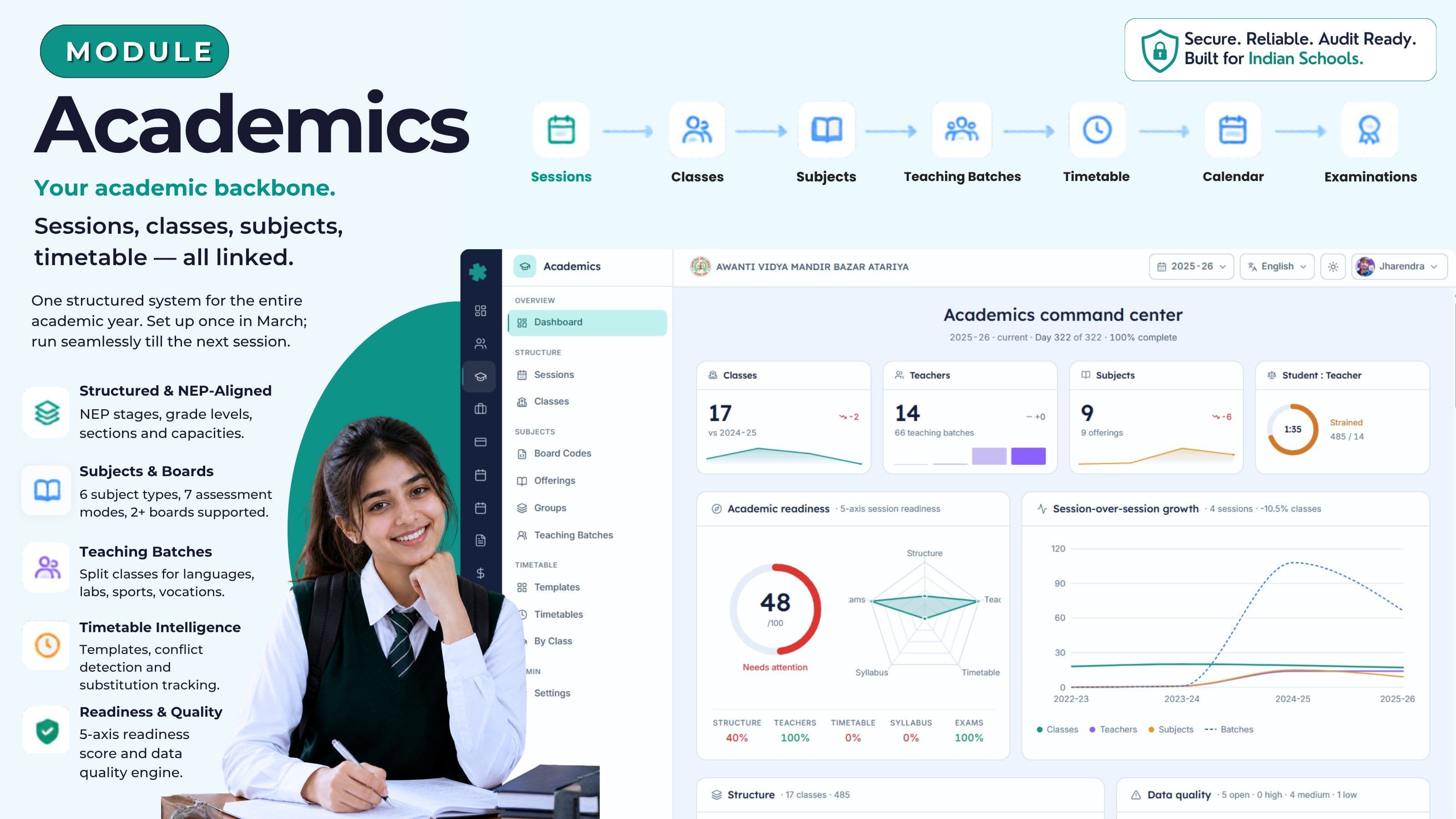
आपका शैक्षणिक आधार। सत्र, कक्षाएँ, विषय, समय-सारणी — सब एक साथ जुड़े।
सत्र, कक्षाएँ, अनुभाग, विषय, बोर्ड कोड, टीचिंग बैच, समय-सारणी और एक रोज़ का readiness score — भारतीय स्कूल वर्ष के लिए एक जुड़ा हुआ आधार। मार्च में एक बार setup कर लीजिए; और हर CBSE, ICSE, IB, IGCSE और State Board वर्ष चलाइए — हर अप्रैल में नए सिरे से बनाने की ज़रूरत नहीं।
भारतीय स्कूलों में आज academics कैसे चलता है
मार्च का तीसरा हफ़्ता है। दाख़िले धीमे पड़ रहे हैं, परिणाम दर्ज हो रहे हैं, और भोपाल के एक upper-primary CBSE स्कूल की प्रिंसिपल की मेज़ पर "अगले सत्र में कौन-कौन सी कक्षाएँ चलेंगी" के चार version पड़े हैं। कक्षा-शिक्षकों का Excel master — तीन साल पहले मेल हुआ था और हर अप्रैल में संशोधित होता है — उसमें अनुभाग सूची है। परीक्षा-समन्वयक के printout में विषय-मानचित्र है, पर सिर्फ़ कक्षा 8 के बाद का। समय-सारणी प्रभारी staff-room photocopier के पास whiteboard pin किए रखती हैं; एक column सात बार मिटाया जा चुका है। CBSE affiliation cell call पर पूछती है कि स्कूल ने 2024-25 में Hindi के कितने periods पढ़ाए। किसी का जवाब एक नहीं है।
अप्रैल के दूसरे हफ़्ते तक स्कूल Excel पर पूरी तरह नई समय-सारणी बना चुका होता है। एक टीचर जो जनवरी में leave कर गई थीं — वो अभी भी तीन slots में हैं। कक्षा 9 का अनुभाग C 18 over-strength दाख़िलों के लिए जोड़ा गया है, पर bus route, library category और attendance app catch नहीं कर पाए — तीन अलग staff parents को फ़ोन करके "बस एक बार और confirm कर लीजिए" बोल रहे हैं। UDISE+ submission अक्टूबर में आती है और कोई class-wise विषय सूची साप्ताहिक घंटों के साथ माँगता है। दो दिन लगते हैं — और पिछले office assistant को फ़ोन, जो अब इंदौर शिफ़्ट हो चुकी हैं।
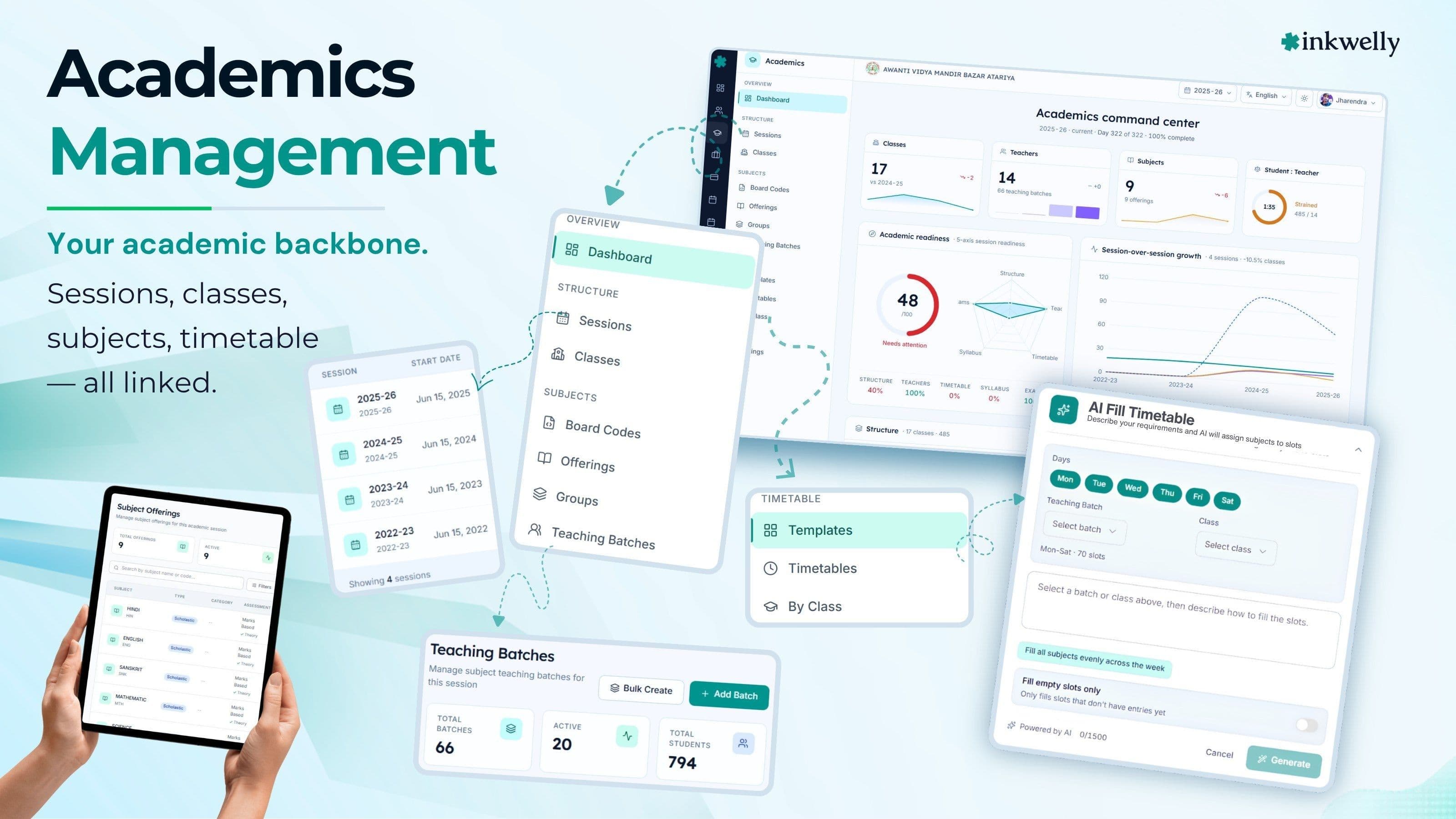
Inkwelly का Academics module इसे एक जुड़े हुए आधार से बदल देता है। सत्र, कक्षाएँ, विषय, बोर्ड कोड, टीचिंग बैच, समय-सारणी, परीक्षाएँ और शैक्षणिक कैलेंडर — सब एक ही ढाँचे में रहते हैं। एक अनुभाग में बदलाव कीजिए — और समय-सारणी, attendance roster, fee ledger, library category, parent app और bus route — सब एक ही बदलाव पढ़ते हैं। दूसरी बार entry नहीं, Friday-night sync नहीं।
हमने इसकी जगह क्या बनाया
Inkwelly का Academics एक रोज़ के readiness number के इर्द-गिर्द बना है। Dashboard पाँच चीज़ें जाँचता है — क्या कक्षाओं और अनुभागों का ढाँचा बना है, क्या हर कक्षा का कक्षा-शिक्षक नियुक्त है, क्या समय-सारणी प्रकाशित है, क्या विषयों के साथ सिलेबस load है, और क्या term-wise परीक्षाएँ scheduled हैं। नतीजा एक 0-100 score है — जो प्रिंसिपल बिना presentation बनाए ट्रस्टीज़ को दिखा सकती हैं।
Dashboard के नीचे नौ sub-systems हैं जो आप और आपका office staff रोज़ काम में लाते हैं: शैक्षणिक सत्र, NEP grade-ढाँचे से जुड़ी कक्षाएँ, हर भारतीय बोर्ड के लिए assessment modes वाली विषय-लाइब्रेरी, बोर्ड-specific विषय कोड, streams और electives के लिए subject groups, split-section delivery के लिए टीचिंग बैच, reusable templates और live conflict alerts वाली समय-सारणी, terms और छुट्टियों वाला शैक्षणिक कैलेंडर, और एक data-quality engine जो विशिष्ट समस्याएँ flag करता है — जैसे 'इस कक्षा की समय-सारणी अभी नहीं बनी' या 'इस टीचर के मंगलवार 11:30 पर दो batches हैं' — किसी vague 'कुछ ठीक नहीं है' badge की जगह।
Academics module में आपको क्या मिलता है
- शैक्षणिक सत्र — start date, end date और 'current session' flag के साथ। April-March, January-December या आपके बोर्ड के किसी भी custom calendar पर चलते हैं
- कक्षा-ढाँचा — grade level, section, capacity और माध्यम के साथ। Pre-Primary से कक्षा XII तक, NEP 2020 stages (Foundational, Preparatory, Middle, Secondary) के अनुसार mapped
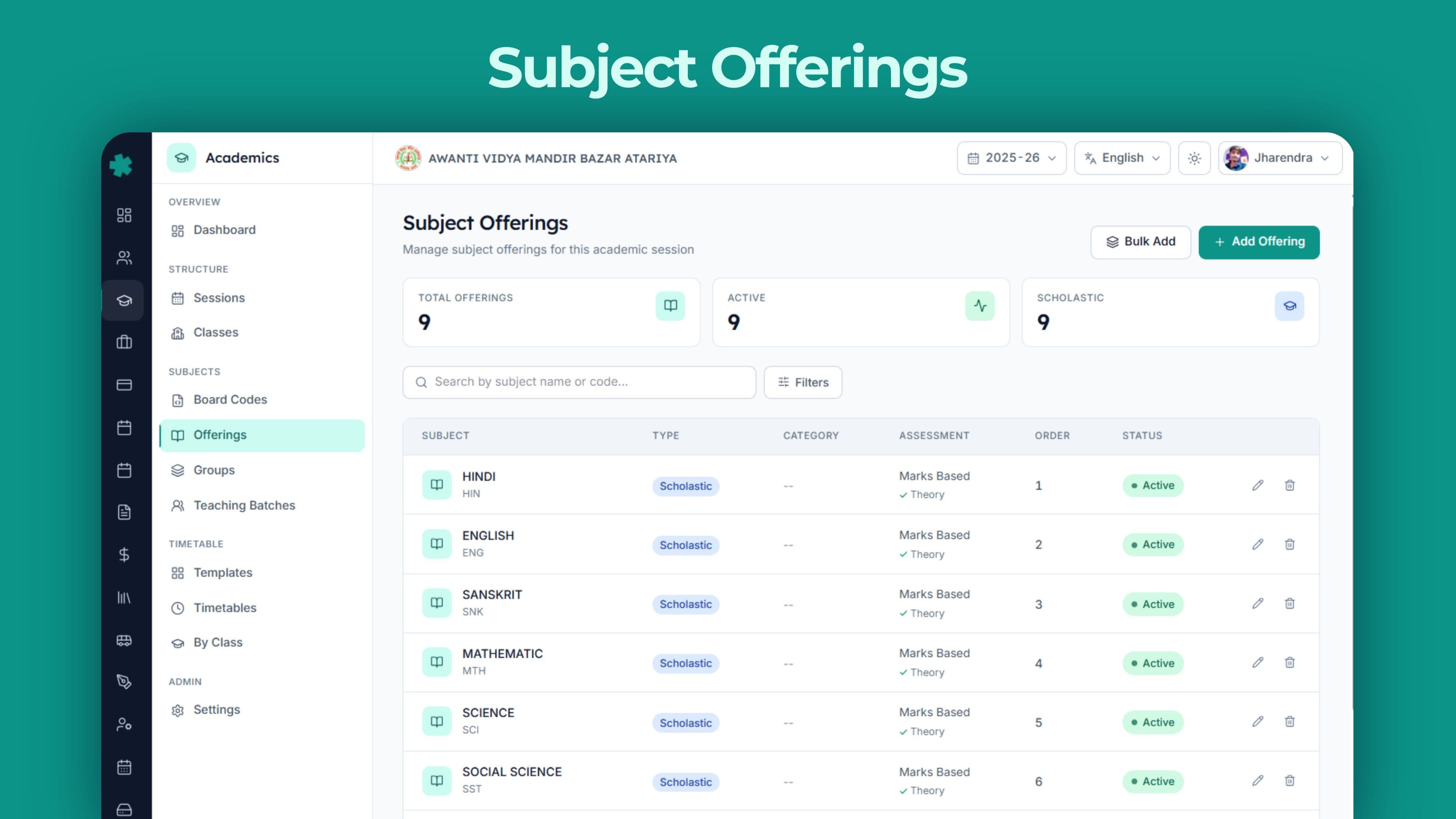
- विषय-लाइब्रेरी — छह subject types (academic, co-scholastic, health and physical education, art education, work education, vocational) और छह assessment modes (सीधे marks, grade-only, rubric, portfolio, descriptive, competency-based) के साथ
- 23 भारतीय और international बोर्ड्स के लिए बोर्ड-कोड mapping — CBSE, ICSE, ISC, हर बड़ा State Board (UP, Maharashtra, Karnataka, Tamil Nadu, Kerala, Gujarat, Rajasthan, MP, West Bengal, Bihar, Andhra, Telangana, Odisha, Assam, Jharkhand, Chhattisgarh, Haryana, Punjab), IB और Cambridge IGCSE — और जो बोर्ड इस सूची में नहीं है, उसके लिए एक custom slot
- Subject groups — streams, language groups, electives और mandatory groups के लिए — पाँच selection rules के साथ: free choice, एक pick, सभी ज़रूरी, range में pick, या rule-based
- टीचिंग बैच — batch code, name, साप्ताहिक periods और capacity के साथ। कक्षा को भाषाओं, labs, sports या vocational sessions के लिए split कीजिए
- Vocational विषय — NSQF level (1-10), NSDC code, ज़रूरी practical घंटे, industry-partner flag और certification body (NIELIT, Sector Skill Council, इत्यादि) के साथ। CBSE Skill Subjects और NEP vocational pilots के लिए बना
- Credits support — हर विषय पर credits, credit type और credit hours जोड़ सकते हैं। APAAR और Academic Bank of Credits (ABC) के लिए ready
- Per NEP stage समय-सारणी templates — आठ slot types (teaching, break, lunch, assembly, activity, homeroom, zero period, remedial) और per-day slot configuration के साथ
- Conflict detection — एक टीचर दो जगह, एक कमरा दो बार बुक, एक कक्षा में दो overlapping entries — समय-सारणी publish होने से पहले flag होते हैं — parents के call आने के बाद नहीं
- Substitution overrides — substitute teacher, period cancel, extra class, room change — हर बदलाव अपने reason और audit trail के साथ
- हर विषय के learning outcomes Bloom's levels के साथ tagged — curriculum auditors के लिए
- Data-quality alerts severity-grading के साथ — हर alert सीधे उस screen से link है जहाँ fix एक click पर है
Live देखिए
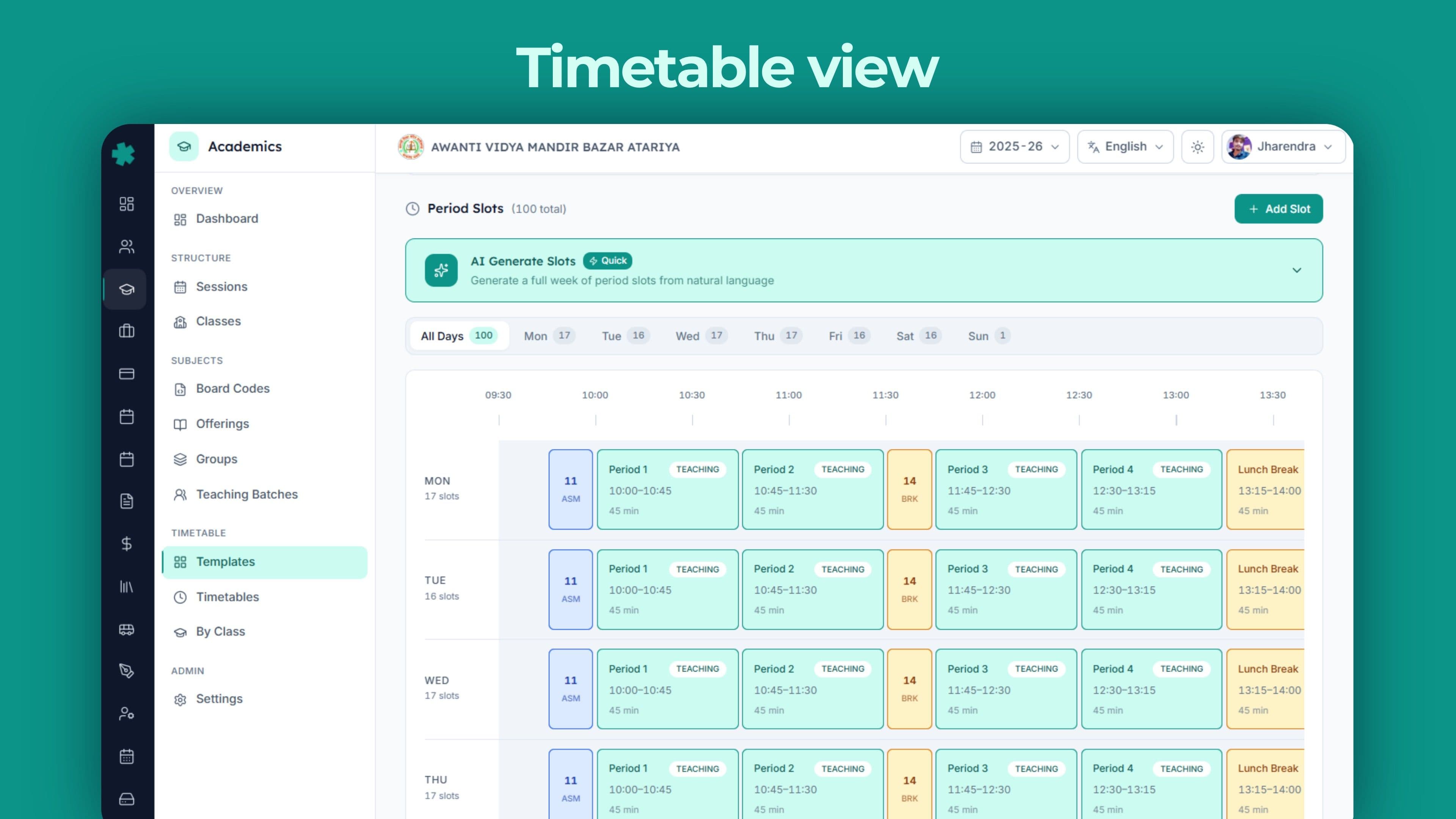
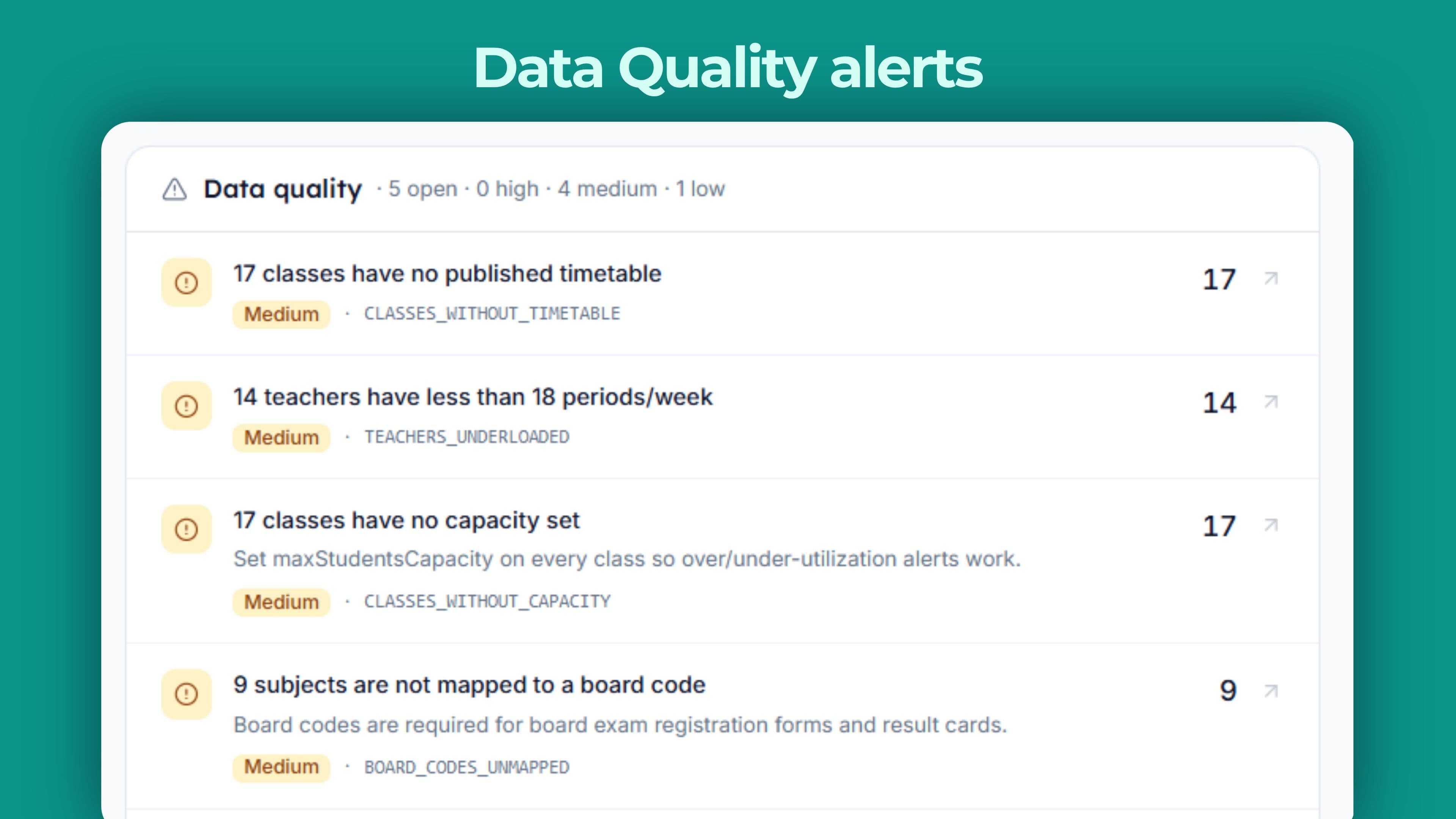
पूरा शैक्षणिक वर्ष — एक ही page पर
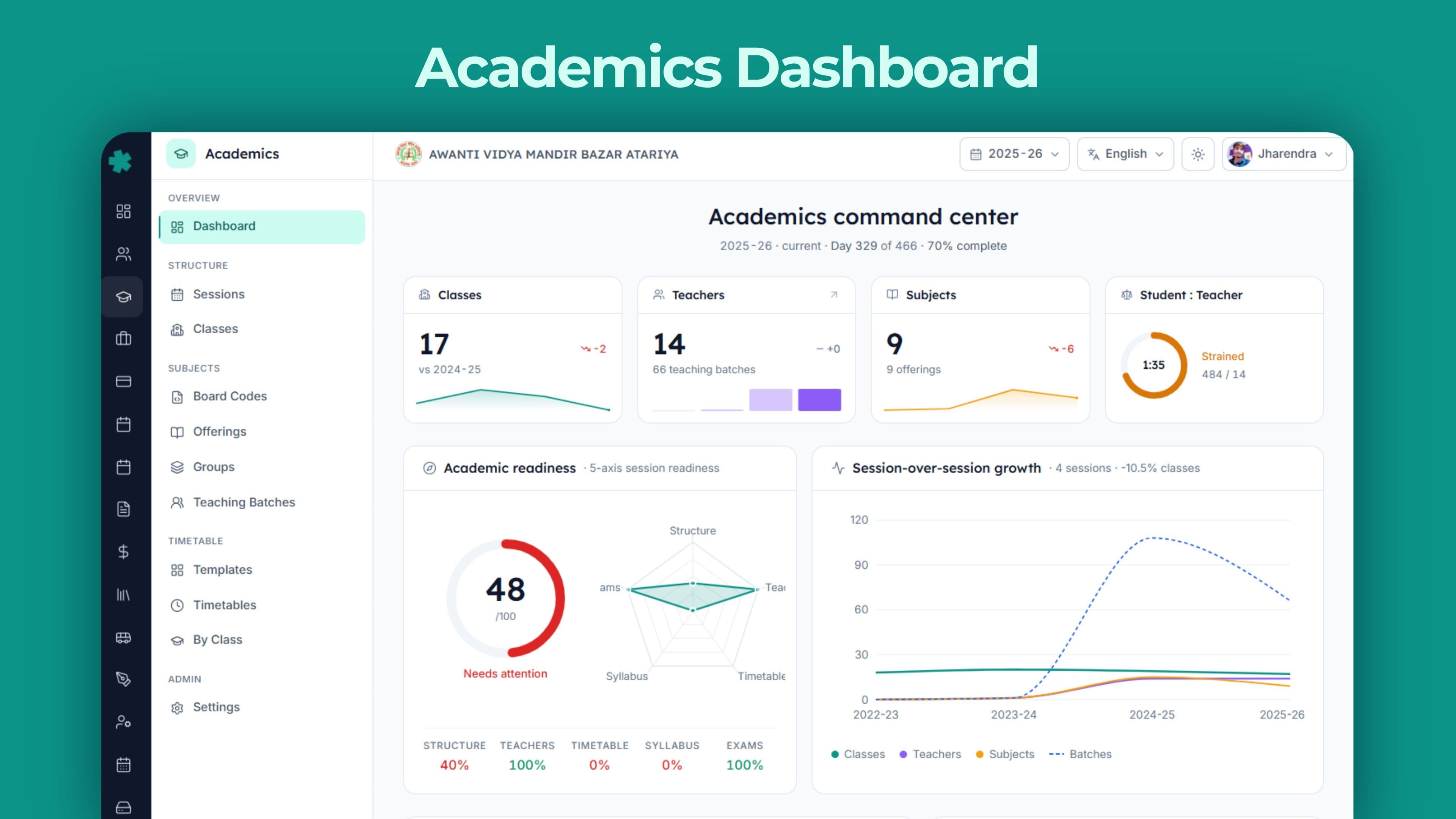
Academics dashboard जान-बूझकर dense है। ये marketing screen नहीं है — ये वो screen है जो प्रिंसिपल सुबह 8:15 बजे खोलती हैं और शाम 4:30 बजे बंद करती हैं। हर card school operations का एक असली टुकड़ा track करता है — और सीधे उस screen पर ले जाता है जहाँ data दर्ज होता है।
नीचे हर card का breakdown है। ये vanity metrics नहीं हैं; हर एक एक ऐसा सवाल answer करता है जो CBSE inspector, UDISE submission, WhatsApp पर call कर रहे parent, या quarterly meeting में एक trustee — कोई-न-कोई किसी दिन पूछेगा। अधिकांश school ERP पाँच-छह dashboard cards दिखाते हैं — क्योंकि बस इतने ही sales screenshot में fit होते हैं। Inkwelly बारह दिखाता है — क्योंकि एक असली CBSE upper-primary चलाने में इतने ही चाहिए।
Dashboard पर बारह cards — सब असली
Hero KPIs
Classes, teachers, subjects और student-teacher ratio — पिछले सत्र की तुलना में growth के साथ। CBSE, ICSE और RTE benchmarks के against हर को Healthy, Acceptable, Strained या Critical में tag किया गया।
Readiness Score
Five-axis 0-100 score — ढाँचा, कक्षा-शिक्षक नियुक्ति, समय-सारणी प्रकाशन, सिलेबस और परीक्षा scheduling पर। प्रिंसिपल को एक नंबर में बताता है कि स्कूल वर्ष शुरू करने को तैयार है या नहीं।
Structure
NEP-stage stacked bar (Foundational, Preparatory, Middle, Secondary), grade-level breakdown, माध्यम, streams, और over-capacity एवं under-utilised कक्षाएँ flag।
Subjects
Subject type-wise donut, top पाँच enrolment के अनुसार, बोर्ड-कोड coverage percentage, mandatory coverage। 23 भारतीय और international बोर्ड्स pre-loaded।
Teachers
18-24 साप्ताहिक periods benchmark के against load distribution, top पाँच most-loaded — कक्षा-शिक्षक badge, qualification match, gender mix और पिछले 30 दिनों के substitutions count के साथ।
Timetable
Class coverage percentage, classes × days का daily-load heatmap, conflict count — teacher और room double-bookings में बँटा।
Curriculum
हर विषय के learning outcomes — Bloom levels tagged के साथ, सिलेबस coverage status और lesson-plan publish rate।
Examinations
Term परीक्षाएँ status-wise, अगली परीक्षा date और class सूची के साथ, और term-wise marks-entry progress।
Calendar
सत्र की प्रगति percentage, हर term की प्रगति status के साथ, working-day projection, और अगले 30 दिनों के events affected-class counts के साथ।
Data-Quality Alerts
विशिष्ट समस्याएँ severity-grading के साथ — समय-सारणी न होना, कक्षा-शिक्षक न होना, teacher conflict, electives unfilled, mandatory विषय न होना — हर एक से fix screen पर one-click jump।
Growth
Enrolment, class count, subject offerings और टीचिंग batches का session-over-session trend। Trustee meetings और CBSE renewal forms के लिए useful जो तीन साल का movement माँगते हैं।
Activity
हाल की शैक्षणिक actions का audit log — session promote, विषय offering add, टीचिंग batch बनाई गई, समय-सारणी override — user, timestamp और affected entity के साथ।
सत्र और भारतीय स्कूल वर्ष
शैक्षणिक सत्र हर शैक्षणिक record की जड़ है। इसमें एक start date, एक end date, एक 'current session' flag और एक slug रहता है — जैसे 2025-26 या 2026-27। ढाँचा April-March मानकर नहीं चलता: IB या IGCSE के January-December calendar पर चलने वाले स्कूल अपने सत्र इसी तरह configure करते हैं — और एक multi-school trust एक स्कूल को April-March पर और दूसरे को January-December पर बिना किसी झमेले के एक ही organisation में चला सकता है।
जब अगला सत्र शुरू होता है, प्रिंसिपल एक switch से उसे current mark कर देती हैं। पिछला सत्र delete नहीं होता — उसके records उसी database में, उन्हीं identifiers के साथ रहते हैं, और query-able बने रहते हैं। तीन साल बाद, जब वही student किसी foreign university के लिए apply करता है और admissions office verification के लिए call करता है — 2022-23 का record एक search दूर है, steel almirah में नहीं।
एक ही स्कूल में दो बोर्ड? Handle हो जाते हैं।
बहुत से भारतीय स्कूल parallel में दो बोर्ड चलाते हैं — main wing पर CBSE और senior wing पर IGCSE, या अनुदानित pre-primary section में CBSE plus State Board। Inkwelly इसे दो systems force किए बिना handle करता है। हर कक्षा को अपने बोर्ड से tag किया जा सकता है; विषय offerings, बोर्ड कोड, परीक्षा patterns और समय-सारणी बोर्ड-wise अलग रहते हैं — जबकि student list, fee ledger और staff directory एक ही रहते हैं।
CBSE कक्षा 8 और IGCSE कक्षा 9 में split एक sibling group — parent communication, fee discounts और address बदलाव में एक family की तरह दिखती है। Accountant दो student rosters नहीं रखता; प्रिंसिपल को दो systems में login नहीं करना पड़ता। एक स्कूल, दो बोर्ड, एक operational view।
Mid-session बदलाव — restart की ज़रूरत नहीं
अगस्त का तीसरा हफ़्ता है। कक्षा 9 के दाख़िले अनुभाग C overflow कर चुके हैं और स्कूल को कक्षा 9-D चाहिए — आज से बारह दिन में। अधिकांश ERPs में इसका मतलब है vendor को 'data correction request', दो हफ़्तों की follow-up calls, और एक Friday-night data import जो तीन कक्षाओं के लिए parent app तोड़ देता है।
Inkwelly में, अनुभाग जोड़ना दो minute की screen है। Grade level, अनुभाग, capacity और माध्यम set कीजिए; कक्षा-शिक्षक नियुक्त कीजिए; नई कक्षा अगले page load पर समय-सारणी, attendance roster, fee ledger और parent app में दिख जाती है। कक्षा 6 के लिए mid-year में एक optional language जोड़िए, टीचिंग batch के साप्ताहिक periods बदलिए, कमरा swap कीजिए — सब बिना system lock किए। स्कूल वर्ष day-one पर perfect होने की ज़रूरत नहीं।
पिछले सत्र query-able रहते हैं, archive में नहीं जाते
Inkwelly में सत्र बंद करने का मतलब उसे किसी अलग system या offline backup में push करना नहीं है। Records वहीं रहते हैं — और search-able बने रहते हैं। एक टीचर जो जून 2024 में leave कर गई — उसकी exact teaching assignments अभी भी 2025-26 के records में दिखती हैं। काम का तब, जब कोई पुराना student तीन साल बाद Bonafide Certificate के लिए वापस आता है, या CBSE inspector भाषा-शिक्षण घंटे verify करने के लिए 2022-23 की समय-सारणी माँगता है।
इसी से Academics CBSE renewal cycle survive करता है। Affiliation paperwork अक्सर तीन साल का movement माँगती है — विषय offerings, teacher load, student strength का। पिछले सत्र query-able होने से जवाब एक click का export है — पुरानी Excel और मौजूदा ERP के बीच चार दिन की reconciliation नहीं।
कक्षाएँ, अनुभाग और NEP-stage ढाँचा
Inkwelly में एक कक्षा में एक grade level, एक अनुभाग, एक capacity, एक live enrolment count, एक माध्यम और एक नाम रहता है — certificates और marksheets के लिए optional regional-script variants के साथ। Grade-level taxonomy National Education Policy 2020 के साथ aligned है — हर grade अपने NEP stage के साथ आता है (Pre-K से कक्षा 2 के लिए Foundational, कक्षा 3 से 5 के लिए Preparatory, कक्षा 6 से 8 के लिए Middle, कक्षा 9 से 12 के लिए Secondary) — age range और grade number के साथ।
ये क्यों मायने रखता है: समय-सारणी templates, परीक्षा patterns, attendance rules और assessment modes per NEP stage configure होते हैं — per कक्षा नहीं। एक Foundational template एक बार setup कीजिए — और हर Pre-Primary, कक्षा 1 और कक्षा 2 उसे inherit कर लेगी। Secondary stage के लिए assessment mode बदलिए — कक्षा 9 से 12 एक साथ update हो जाती हैं। काम स्कूल बढ़ने के साथ sub-linearly scale करता है।
Pre-Primary से कक्षा XII तक — NEP-aligned stages के साथ
कक्षा-ढाँचा Pre-Primary (Nursery, LKG, UKG), कक्षा 1 से 12, और कक्षा 11 एवं 12 की Science, Commerce और Humanities streams support करता है — सब structure card में per NEP stage stacked bars के साथ। पुणे का एक स्कूल जो CBSE Pre-Primary से XII चलाता है — चार-segment stack देखता है (Foundational, Preparatory, Middle, Secondary); बहराइच का एक Tier-3 स्कूल जो सिर्फ़ कक्षा 1 से 8 चलाता है — तीन देखता है; एक अनुदानित Madrasa upper-primary दो देखती है।
Grade levels per बोर्ड add या modify किए जा सकते हैं: एक Cambridge IGCSE स्कूल Cambridge Lower Secondary को Middle और IGCSE को Secondary पर map करता है; एक IB स्कूल PYP, MYP और DP को UDISE compliance के लिए उसी NEP frame पर map करता है। Inkwelly स्कूल के अपने labels और NEP-mapped category — दोनों store करता है। बाद वाला UDISE+, RTE reports और trustee dashboards इस्तेमाल करते हैं।
Capacity, माध्यम और कक्षा-शिक्षक
हर कक्षा में एक capacity और एक live enrolment count है। Over-capacity कक्षाएँ structure card में flag होती हैं; configured threshold (आमतौर पर 40 percent) से नीचे under-utilised कक्षाएँ भी। Trustees और affiliation team के लिए — यही एक screen है जो 'स्कूल कितना भरा है' का जवाब बिना database query के देती है।
कक्षा-शिक्षक नियुक्ति एक first-class workflow है। Employee चुनिए, उन्हें primary mark कीजिए; secondary कक्षा-शिक्षक (अक्सर एक co-teacher या wing in-charge) भी जोड़े जा सकते हैं। Class-teacher coverage percentage teachers card पर दिखता है — और जिस किसी कक्षा में primary teacher नहीं है, वो alerts feed में दिख जाती है — शैक्षणिक वर्ष शुरू होने से पहले।
विषय, बोर्ड कोड और विषय-लाइब्रेरी
Inkwelly में एक विषय marksheet पर सिर्फ़ एक नाम नहीं है। हर विषय अपने broad type (academic, co-scholastic, health and physical education, art education, work education, या vocational), अपने academic परिवार (language, mathematics, science, social science, computer, commerce, humanities, physical education, arts, vocational skill, या other), और अपने assessment तरीक़े (सीधे marks, सिर्फ़ grade, rubric-based, portfolio, descriptive, या competency-based) से classified है। Language flags first-language, second-language और third-language paperwork संभालते हैं — जो हर UDISE submission और CBSE renewal माँगती है।
हर विषय एक या एक से ज़्यादा बोर्ड कोड से map हो सकता है — Inkwelly के internal label ('Hindi Course-A') और बोर्ड के official code ('CBSE 002') के बीच पुल। Mapping में theory marks, practical marks, internal marks, pass marks और weightages रहते हैं — exactly वो जो marksheet generator को बोर्ड-compliant result निकालने के लिए चाहिए, बिना किसी के calculator छूने के।
छह subject types, छह assessment modes — हर भारतीय बोर्ड fit
भारतीय स्कूल के विषय एक column में fit नहीं होते। Mathematics academic और marks-based है; Yoga health-and-physical-education और rubric-based; Art art-education और portfolio; SUPW work-education और descriptive; एक NEP-aligned Bagless Day project co-scholastic और competency-based है। CBSE के CCE-era schools, art के लिए rubrics चलाने वाले ICSE schools, portfolios use करने वाले IB schools, और marks-and-grades mix करने वाले State Boards — सब इन dimensions पर cleanly map हो जाते हैं — बिना हर विषय पर एक assessment style force किए।
इसी से Inkwelly को अलग 'CCE module' या 'rubrics module' की ज़रूरत नहीं। Assessment shape विषय पर ही रहती है; marks-entry और report-card screens उसे सीधे पढ़ती हैं। Theory marks plus एक practical component (Computer Science और Sciences में आम) बोर्ड-specific component configurations से संभाले जाते हैं — per-subject hacks के बिना।
23 भारतीय और international बोर्ड्स के लिए बोर्ड कोड
23 बोर्ड box-out-of-the-box pre-loaded आते हैं — CBSE, ICSE, ISC, International Baccalaureate, Cambridge IGCSE, plus हर बड़ा State Board: Maharashtra, Karnataka, Tamil Nadu, Kerala, Gujarat, Rajasthan, UP Board, West Bengal, Bihar, MP Board, Andhra Pradesh, Telangana, Odisha, Assam, Jharkhand, Chhattisgarh, Haryana और Punjab। एक custom 'Other' slot किसी भी ऐसे बोर्ड के लिए है जो इस सूची में नहीं — minority, NIOS, madrasa, कुछ भी — आपके end पर rebuild की ज़रूरत नहीं।
हर बोर्ड के लिए, विषय का code, बोर्ड का official विषय नाम (अक्सर स्कूल के label से अलग), theory marks, practical marks, internal marks, pass marks और weightages एक बार store होते हैं। Marksheet template, transcript export, APAAR-linked transcript और migration certificate — सब इसी एक source से पढ़ते हैं। Result publication की रात CBSE code 086 बनाम 087 के लिए 'printed circular check' करने की ज़रूरत नहीं।
Vocational विषय — NSQF level और NSDC code के साथ
NEP 2020 ने vocational education को side-stream से core requirement तक push किया। Inkwelly इसे built-in रखता है। Vocational विषयों में एक category रहती है (IT-ITeS, Healthcare, Agriculture, Retail, Tourism, Beauty & Wellness, Banking & Finance, Construction, Automotive, Electronics, Apparel, Media, Food Processing, Logistics, Manufacturing, Sports & Fitness, Telecom, Security, Plumbing, Electrical, या Other), 1 से 10 तक का NSQF level, National Skill Development Corporation qualification pack के लिए एक NSDC code, एक required practical-hours count, एक industry-partner-required flag, और एक certification body (NIELIT, सम्बंधित Sector Skill Council, इत्यादि)।
जब CBSE पूछता है 'इस सत्र में IT-ITeS में Level 2 NSQF कितने students ने पूरा किया' — जवाब एक-screen filter है, vocational coordinator को फ़ोन नहीं। जब DGT या NSDC practicum-hour return माँगते हैं — एक click का export है। CBSE Skill Subjects, ITI integration या NEP vocational pilots चलाने वाले स्कूलों को ये अलग vocational ERP के बिना मिल जाता है।
Credits और Academic Bank of Credits (ABC)
NEP 2020 भारतीय शिक्षा को Academic Bank of Credits से बाँधता है — हर learning experience, चाहे एक regular विषय हो, एक online course हो, या community-service का अनुभव — credits carry कर सकता है जो student के साथ संस्थान बदलने पर भी चलते हैं। Inkwelly इसे built-in रखता है। हर विषय credits, credit type (academic, vocational, experiential, community service, co-curricular, या online course) और credit hours carry कर सकता है।
जब CBSE या आपका बोर्ड APAAR-linked credit transfers enable करता है — और करेगा — आपके records पहले से तैयार हैं। Marksheets credit summaries दिखा सकती हैं, transcripts APAAR-linked ABC framework में stream कर सकते हैं, और vocational एवं co-curricular contributions academic वालों के साथ-साथ दिखते हैं — पीछे एक अलग annexure में दबे नहीं।
“अगर आपके स्कूल वर्ष का ढाँचा एक जगह नहीं है — तो वो आपका स्कूल वर्ष नहीं है। वो चार लोगों की उसकी interpretation है।”
Inkwelly Academics से पहले और बाद
Subject groups और टीचिंग batches — NEP-aligned delivery का दिल
भारतीय स्कूल के विषय एक global rule follow नहीं करते। CBSE मुंबई के एक स्कूल में कक्षा 9 के students आमतौर पर एक ही period में तीन भाषाओं में से एक choose करते हैं (Hindi, Sanskrit, French)। कक्षा 11 Science के students चौथे scholastic subject में Mathematics या Biology pick करते हैं। NEP-aligned स्कूल कक्षा 5 के एक PE period को individual / pair / team batches में split करते हैं — सब parallel चलते हैं। ये कुछ भी एक single 'कक्षा के पास विषय हैं' table में fit नहीं होता।
Inkwelly इन सबको दो linked चीज़ों से handle करता है — एक subject group (जो rule define करता है) और एक टीचिंग batch (जो असली delivery है)। Subject groups में एक type (stream, language group, elective group, mandatory group) और एक selection mode (free choice, mandatory one, mandatory all, mandatory range, conditional) रहता है — plus optional minimum और maximum counts, एक mutually-exclusive flag और branching electives के लिए एक prerequisite link। Combination CBSE, ICSE, IB और हर State Board के elective rule को cleanly express कर देता है।
Streams, electives, language groups — एक model सबके लिए
एक कक्षा 11 Science stream — stream group है mandatory-range selection के साथ (चार pick, पाँच की अनुमति) — Physics, Chemistry, Mathematics, Biology, Computer Science और Physical Education में से। एक कक्षा 9 third-language group — language group है mandatory-one selection के साथ — Hindi, Sanskrit, French, या German में से। एक कक्षा 6 art elective — elective group है free choice और mutually-exclusive flag के साथ — student dance, drama, music, या visual art में से एक pick करता है।
Selection rules chain हो सकते हैं। एक prerequisite link कह सकता है: सिर्फ़ वही students जिन्होंने कक्षा 9 में Biology लिया था — कक्षा 11 में Bio-tech stream के लिए eligible हैं। Conditional rules बोर्ड-specific quirks handle करते हैं — जैसे CBSE का rule कि जो students कक्षा 9 में Mathematics opt-out करते हैं — उन्हें एक vocational विषय लेना ज़रूरी है। System rule enrolment पर enforce करता है — marks दर्ज होने के बाद नहीं।
टीचिंग batches — असली delivery unit
एक subject group rule है; एक टीचिंग batch room है। हर batch एक code, एक नाम, जो विषय वो deliver करता है, grade level, एक capacity, एक current strength, एक साप्ताहिक periods count और एक preferred कमरा carry करता है। तीन language batches parallel में चलाने वाली कक्षा 9 — तीन टीचिंग batches हैं; कक्षा 11 Science stream — हर विषय के लिए एक batch; एक co-scholastic art कक्षा दो batches के साथ (हर section के लिए एक) — दो batches।
Teacher नियुक्ति अलग है — एक batch में एक primary teacher plus एक या एक से ज़्यादा assistant teachers हो सकते हैं। नया सत्र setup करने वाले स्कूलों के लिए bulk-create supported है — कक्षा × विषय pairs की एक सूची paste कीजिए और batches generate हो जाते हैं — teacher नियुक्ति के लिए ready। साल ख़त्म होने पर bulk-delete उसी तरह काम करता है।
Inkwelly Academics बनाम generic भारतीय school ERPs
समय-सारणी — templates, conflicts, substitutions
Inkwelly एक समय-सारणी template और एक समय-सारणी instance के बीच एक स्पष्ट रेखा खींचता है। Template एक reusable period structure है जो एक NEP stage से जुड़ा है — मसलन, एक 'Primary Template' जिसमें per day आठ teaching periods, mid-morning recess, slot 5 पर lunch, और Friday के अंत में एक homeroom period हो। Template में per-day period slots रहते हैं — हर एक के साथ एक slot number, एक slot type (teaching, break, lunch, assembly, activity, homeroom, zero period या remedial), एक start time, एक end time, एक duration और एक 'schedulable' flag।
समय-सारणी एक actual instance है — आमतौर पर per कक्षा per सत्र एक, optionally per academic term। ये Draft से Published से Archived तक चलती है। समय-सारणी के अंदर हर entry बताती है कि एक slot में क्या होगा — एक batch entry एक टीचिंग batch schedule करती है (सबसे common case), एक class entry class-wide events जैसे assembly या activity schedule करती है, और एक school entry school-wide events जैसे Independence Day या sports day सभी कक्षाओं में एक साथ schedule करती है।
Per NEP stage reusable templates
अधिकांश ERPs schools से कहते हैं कि हर अप्रैल में per कक्षा समय-सारणी फिर से बनाओ। Inkwelly इसे उल्टा कर देता है — templates सत्र से ज़्यादा देर तक चलते हैं। एक 'Foundational Stage Template' (जिसमें छोटे periods और एक लंबा activity slot हो) हर 2025-26 Pre-Primary कक्षा के लिए reuse होता है, हर 2026-27 Pre-Primary कक्षा के लिए, और हर 2027-28 Pre-Primary कक्षा के लिए — जब तक स्कूल day-structure revise करने का decide नहीं करता।
Per day-of-week period structure पूरी तरह supported है। शनिवार एक half-day पर पाँच periods के साथ चल रहा है — आठ की जगह — वो उसी template के अंदर एक अलग day-row है, अलग template नहीं। एक Madrasa स्कूल जो moral instruction के लिए अतिरिक्त Friday classes चलाती है — एक Friday-only slot type जोड़ देती है। Day-structure decision per stage एक बार होता है — per कक्षा per सत्र नहीं। नए सत्र inherit करते हैं; नई कक्षाएँ adopt करती हैं।
तीन तरह के conflicts — सब publish से पहले flag
समय-सारणी engine तीन categories के conflicts पकड़ता है। Teacher double-booking — एक ही teacher दो simultaneous batches पर scheduled। Room double-booking — एक ही physical कमरा दो simultaneous classes के लिए booked। Class overlap — एक ही कक्षा दो distinct entries पर एक period में scheduled (अक्सर copy-paste error)।
हर conflict दिखाता है exactly कौन सी दो entries collide कर रही हैं। Dashboard एक conflict count breakdown के साथ दिखाता है — मसलन तीन teacher double-bookings और एक room double-booking — और समय-सारणी view offending cells लाल में mark कर देता है। Publish से पहले conflicts clear होने ज़रूरी हैं, तभी समय-सारणी की status Draft से Published पर जा सकती है। नए सत्र के तीसरे दिन ये पता नहीं चलता कि Maths teacher August से हर मंगलवार 11:30 पर दो कक्षा 8 sections के लिए booked है।
Substitution overrides — चार actions, पूरा audit
एक teacher शुक्रवार को दो दिन की leave apply करती हैं। अधिकांश ERPs में स्कूल का response होता है समय-सारणी printout के पीछे substitute schedule scribble करना — और भूल जाना। Inkwelly में response है उस date पर override record कर देना — action चुनिए (substitute, cancel, extra class, या room change), substitute teacher (अगर ज़रूरत हो), एक optional नया कमरा, और एक reason।
हर override carry करता है — जिस user ने create किया, timestamp, reason और optional remarks। हाल के overrides action-wise, class-wise या teacher-wise pull किए जा सकते हैं — leadership देख सकती है कि कहीं कोई एक wing लगातार substitutes पर तो नहीं चल रहा।
ये क्यों मायने रखता है: जब नवंबर में एक parent call करके पूछता है कि उनके बच्चे की Hindi कक्षा 15 अक्टूबर को क्यों नहीं हुई — जवाब एक row है। Substitute teacher का नाम, reason, और जिस time पर override log हुआ था।
हर student की अपनी समय-सारणी
एक single-section स्कूल में, कक्षा की समय-सारणी ही student की समय-सारणी होती है। पर जैसे ही electives, streams या language groups आते हैं — हर कक्षा 11 student का हफ़्ता अलग दिखता है — एक के पास Physics-Chemistry-Maths-Biology है, दूसरे के पास Physics-Chemistry-Maths-Computer Science, तीसरे के पास Commerce — Economics की जगह Maths के साथ।
Inkwelly हर student के लिए एक personal समय-सारणी बनाता है जो उनकी batch choices reflect करती है। Student app सही period सही time पर, सही teacher, सही कमरा दिखाता है। Parents को भी वही दिखता है। जब उनमें से एक batch के लिए substitute record होता है — सिर्फ़ affected students की समय-सारणी में बदलाव दिखता है — हर कक्षा 11 student की नहीं।
Readiness, data quality, calendar, परीक्षाएँ — operational dashboard
Academics dashboard वो screen है जो प्रिंसिपल हर सुबह खोलती हैं। Top-right पर five-axis readiness score; center में structure card; अगली row में teachers, subjects और timetable cards; नीचे curriculum, examinations, calendar, alerts, growth और activity।
Data-quality alerts feed सबसे underrated piece है। ये specific समस्याएँ surface करता है — एक कक्षा जिसकी समय-सारणी अभी नहीं बनी, एक कक्षा जिसमें कक्षा-शिक्षक नहीं है, एक कक्षा जो enrolment capacity से ऊपर है, एक विषय जिसमें बोर्ड कोड नहीं, एक mandatory विषय जो किसी grade को offer नहीं हो रहा, एक elective group जिसमें कोई student नहीं, एक teacher जिसके दो conflicting batches हैं, एक कमरा जो दो बार booked है, एक विषय जो अपने ज़रूरी साप्ताहिक periods से कम schedule हुआ है — हर एक उच्च, मध्यम या निम्न severity के साथ marked और हर एक fix screen से link। 9 बजे office assistant के पहुँचने से पहले प्रिंसिपल सुबह के alerts साफ़ कर चुकी होती हैं।
Inkwelly Academics बनाम imported global SIS tools
Excel, Fedena, Entab या Campus Care से migrate करना
Inkwelly पर switch करने वाले अधिकांश स्कूल nothing से switch नहीं कर रहे — वो Excel का combination, एक पिछला ERP जो last pandemic survive नहीं किया, और कक्षा-शिक्षक की intimate knowledge जो कहीं लिखी नहीं है — इन सबसे switch कर रहे होते हैं। Migration इसी reality के around structured है।
Excel और CSV imports default हैं — अपनी class list, विषय list, teacher roster paste कीजिए, और system columns को Inkwelly fields पर preview के साथ map कर देता है। दूसरे भारतीय ERPs से (Educomp, Campus Care, MyClassCampus, Vidyalaya, Teachmint) हम standard export accept करते हैं और स्कूल के data team के साथ column-mapping pass करते हैं। अधिकांश स्कूल 95 percent mapping rate और बाक़ी के लिए एक manual cleanup pass देखते हैं। 1,000-student स्कूल के लिए end-to-end आमतौर पर दो हफ़्ते।
Excel और printed registers से
सबसे common starting point। स्कूल के पास Excel में एक class master है, दूसरी sheet में विषय list, तीसरी में teacher roster, और staff-room की दीवार पर एक printed समय-सारणी taped है। Inkwelly की onboarding team Excel files से शुरू करती है — वो printed register से map करने में आसान होती हैं — पर register उन विषयों और electives को catch करता है जो spreadsheet ने miss किए।
एक typical migration order: सत्र और grade levels पहले; फिर classes और अनुभाग; फिर विषय अपने type और assessment mode के साथ; फिर बोर्ड code mapping (हम बड़े बोर्ड्स के लिए pre-loaded codes ship करते हैं — उन्हें pass through कीजिए); फिर per-class विषय offerings; फिर टीचिंग batches; फिर teacher नियुक्तियाँ; फिर समय-सारणी templates और instances। 1,000-student स्कूल के लिए दो हफ़्ते median है।
Educomp, Campus Care, MyClassCampus, Vidyalaya, Teachmint से
ये पाँच लगभग 70 percent उन स्कूलों को cover करते हैं जो हमारे पास एक मौजूदा ERP के साथ आते हैं। हमने हर एक के लिए migration mapping कर ली है। Campus Care से, typical export class, section, विषय और teacher data एक clean CSV में drop करता है जो लगभग cleanly map हो जाता है। Educomp से, export modules में बँटा होता है — पर विषय-to-class relationship survive करता है। MyClassCampus और Teachmint से, समय-सारणी export friction point होता है — वो tools schedules को slot-by-slot format में store करते हैं जिसे हमारे period-by-period structure में translate करना पड़ता है।
हर migration में, team subject group rules (electives, languages, streams) को इस आधार पर reconstruct करती है — कौन students कौन विषयों में enrolled हैं। यही वो हिस्सा है जिसमें स्कूल का input चाहिए — पर ये एक structured conversation है — छह महीने का consulting engagement नहीं।
अपना शैक्षणिक वर्ष live setup होते देखिए
20-minute walkthrough — सत्र, विषय offerings, टीचिंग batches, समय-सारणी और readiness dashboard — एक असली CBSE स्कूल dataset के साथ।
भारतीय स्कूलों के लिए बना — Tier-1 से Tier-3 तक
Inkwelly Academics CBSE स्कूलों के लिए design किया गया है जो कक्षा 6 से 12 चलाते हैं — 800 से 2,500 students के साथ; ICSE और ISC स्कूल जो छोटे और धीमे चलते हैं — पर बोर्ड कोड पर सख़्त हैं; State Board स्कूल जो count में सबसे ज़्यादा और price-sensitive हैं; और IB एवं IGCSE स्कूलों की एक छोटी पर बढ़ती tail जिन्हें multi-board model चाहिए। Screen, workflows और alerts feed एक जैसे दिखते हैं। नीचे का data काम करता है।
Academics module में क्या-क्या शामिल है
- शैक्षणिक सत्र — April-March, January-December और custom calendars; multi-school trust support
- कक्षा-ढाँचा NEP stages (Foundational, Preparatory, Middle, Secondary), grade levels Pre-Primary से कक्षा XII, अनुभाग, capacity और माध्यम के साथ
- विषय-लाइब्रेरी — छह types, छह assessment modes, language flags, vocational fields (NSQF level, NSDC code, NIELIT या Sector Skill Council certification, practical hours)
- 23 भारतीय और international बोर्ड्स के लिए बोर्ड code mapping — CBSE, ICSE, ISC, IB, IGCSE और हर बड़ा State Board — और जो list में नहीं उनके लिए एक custom slot
- Subject groups — streams, languages, electives, mandatory — पाँच selection modes और prerequisite chaining के साथ
- टीचिंग batches — bulk-create, primary और assistant teacher नियुक्ति, capacity tracking और साप्ताहिक periods count के साथ
- Credits, credit type और credit hours हर विषय पर — APAAR और Academic Bank of Credits ready
- Per NEP stage समय-सारणी templates — आठ slot types (teaching, break, lunch, assembly, activity, homeroom, zero period, remedial) और पहले-draft के लिए AI helper के साथ
- Conflict detection — teacher double-booked, room double-booked, class overlap — publish से पहले flag
- Substitution overrides — चार actions और हर बदलाव पर पूरा audit trail के साथ
- Per-student personal समय-सारणी — जो हर student की elective और batch choices reflect करती है
- Five-axis readiness score — जो बताता है कि शैक्षणिक वर्ष शुरू करने को तैयार है या नहीं
- Data-quality alerts feed — named issues, severity grading और fix screens पर one-click navigation के साथ
- हर विषय के learning outcomes Bloom levels के साथ tagged
- Academic terms, छुट्टियाँ, working-day projection और 30-day upcoming events feed
- परीक्षाएँ — status tracking, marks-entry progress, admit-card generation और grading scales के साथ
- Hindi और regional language UI — staff के लिए जो pasand करते हैं; certificates और marksheets के लिए class, section और विषय names का multi-language storage
Inkwelly Academics पर अपना स्कूल वर्ष चलाइए
अधिकांश CBSE स्कूल दो हफ़्तों में live हो जाते हैं। Excel, Educomp, Campus Care, MyClassCampus, Vidyalaya या Teachmint से migration पहले 200 students के लिए free है।
अक्सर पूछे गए सवाल
12 सवालYear-end promotion कैसे काम करता है?
पिछला सत्र खोलिए, Promote click कीजिए। Source और destination सत्र pick कीजिए, auto-suggested retention list (वो students जो fail हुए या attendance threshold से नीचे हैं) review कीजिए, per-student overrides apply कीजिए, confirm कीजिए। हर active student अगली कक्षा पर अपनी fee profile, transport route, library category और parent links carry-forward के साथ move हो जाता है। पिछले सत्र के marks, attendance और certificates office में query-able रहते हैं — verifications, transfer certificates और CBSE renewal के लिए।
क्या हम एक ही स्कूल में दो बोर्ड (CBSE + IGCSE या CBSE + State Board) चला सकते हैं?
हाँ। हर कक्षा को अपने बोर्ड से tag किया जा सकता है — अपनी विषय offering, अपनी समय-सारणी और अपने परीक्षा pattern के साथ। Student list, fee ledger और staff directory shared रहते हैं — CBSE कक्षा 8 और IGCSE कक्षा 9 में split एक sibling group parent communication और fee discounts के लिए एक family की तरह दिखती है।
क्या समय-सारणी auto-generation teacher availability respect करता है?
हाँ। AI helper हर teacher का साप्ताहिक load cap, off-day, language qualifications, और कोई blocked slots (department meetings, prayer assembly) ध्यान में रखता है। Publish से पहले conflicts flag होते हैं — एक visual indicator के साथ जो दिखाता है कौन सा teacher double-booked है। Manual edits available रहते हैं — auto-generation एक starting point है, lock नहीं।
क्या हम mid-session में विषय offerings बदल सकते हैं या एक अनुभाग जोड़ सकते हैं?
हाँ। August में कक्षा 9-D अनुभाग जोड़िए क्योंकि admissions ने अनुभाग C overflow कर दिया — students, समय-सारणी, attendance और parent app बिना restart update हो जाते हैं। कक्षा 6 के लिए एक नया optional language जोड़िए — वो अगले परीक्षा cycle से marks entry के लिए available हो जाती है। System आपको structural mistakes ठीक करने के लिए नए सत्र का wait कभी force नहीं करता।
क्या ये April-March के अलावा सत्र calendars support करता है?
हाँ। सत्र कोई भी start और end date accept करते हैं। IGCSE और Christian-administered स्कूल आमतौर पर January-December चलाते हैं, कुछ pre-primary wings जून-अप्रैल — सब supported। एक multi-school trust एक स्कूल को April-March पर और दूसरे को January-December पर बिना किसी conflict के चला सकता है।
क्या CBSE, ICSE और State Board विषय codes pre-loaded हैं?
हाँ। CBSE official विषय codes (041 Mathematics, 086 Science, 087 Social Science, 184 English Communicative, इत्यादि), ICSE / ISC codes, और बड़े State Board codes — system के साथ ship होते हैं। वो सीधे marksheets, transcripts और APAAR-linked transcripts में flow होते हैं — manual lookup या template patching नहीं।
क्या हम UDISE+ class-wise विषय offering report generate कर सकते हैं?
हाँ। UDISE+ class-wise list of subjects taught, साप्ताहिक घंटे, माध्यम और per विषय teachers की संख्या माँगती है। Inkwelly इसे सीधे आपके विषय offering और समय-सारणी data से produce करता है — October submission window से पहले एक click पर UDISE-compatible Excel के रूप में exportable।
Substitute teacher coverage कैसे काम करता है?
जब एक teacher leave apply करती हैं — समय-सारणी view दिखाता है कौन सा period vacant हुआ है — साथ में बाकी staff का live free-period view। एक substitute pick कीजिए — system class roster update करता है, substitute को WhatsApp note भेजता है, और audit trail में swap log करता है। फ़ोन calls नहीं, last-minute scrambles नहीं।
टीचिंग batches — कक्षा को languages या sports के लिए split करना कैसे होता है?
हर कक्षा को किसी भी विषय के लिए कई टीचिंग batches में split किया जा सकता है। एक typical कक्षा 9 जिसमें तीन language options (Hindi, Sanskrit, French) हैं — एक ही period पर तीन parallel टीचिंग batches चलाती है — सब समय-सारणी, attendance roster और marks entry में reflect होते हैं। Sports periods और activity slots इसी तरह model होते हैं।
क्या electives वाले हर student को अपनी अलग समय-सारणी मिलती है?
हाँ। जैसे ही electives, streams या language groups आते हैं — हर कक्षा 11 student का हफ़्ता अलग दिखता है। Inkwelly हर student के लिए एक personal समय-सारणी बनाता है — उनकी batch choices के आधार पर। Student app और parent app — दोनों सिर्फ़ वो periods दिखाते हैं जो उस student के हैं। जब उनमें से किसी एक batch के लिए substitute record होता है — सिर्फ़ affected students की समय-सारणी में बदलाव दिखता है।
क्या credits और Academic Bank of Credits (ABC) काम करता है?
हाँ। हर विषय credits, credit type (academic, vocational, experiential, community service, co-curricular या online course) और credit hours carry कर सकता है। जब CBSE या आपका बोर्ड APAAR-linked credit transfers enable करता है — आपके records ready हैं, आपके end पर rebuild की ज़रूरत नहीं।
क्या हम interface को Hindi या अपनी regional language में चला सकते हैं?
हाँ। Inkwelly interface English और Hindi में available है — regional language packs (Bengali, Tamil, Telugu, Kannada, Marathi, Gujarati, Punjabi) staff के लिए जो pasand करते हैं। Subject names, class names और section names English plus आपकी regional script में store हो सकते हैं — certificates और marksheets में use के लिए।
आपको ये भी पसंद आ सकता है
4 लेखInkwelly आपके स्कूल पर — खुद देखें
30 मिनट का डेमो। आपके मौजूदा ERP को आपके साथ खोलकर, कॉल पर ही आपका डेटा Inkwelly में लोड करते हैं। कॉल ख़त्म होते-होते एक तय तारीख़ का गो-लाइव प्लान आपके हाथ में।