गलती से teacher delete हो गए? सुरक्षित वापस लाएँ।
हर delete किया गया employee record Trash में चला जाता है — कभी खोता नहीं, कभी मिटता नहीं। सही teacher या staff member को optional audit remarks के साथ restore करें, और जब payroll history मौजूद हो तब permanent delete हमेशा block रहता है। भारतीय school HR की असली मुश्किलों के लिए बना — exit formalities, EPF/ESI compliance, TDS deadlines, और May payroll cleanup में होने वाली एक wrong-row click।
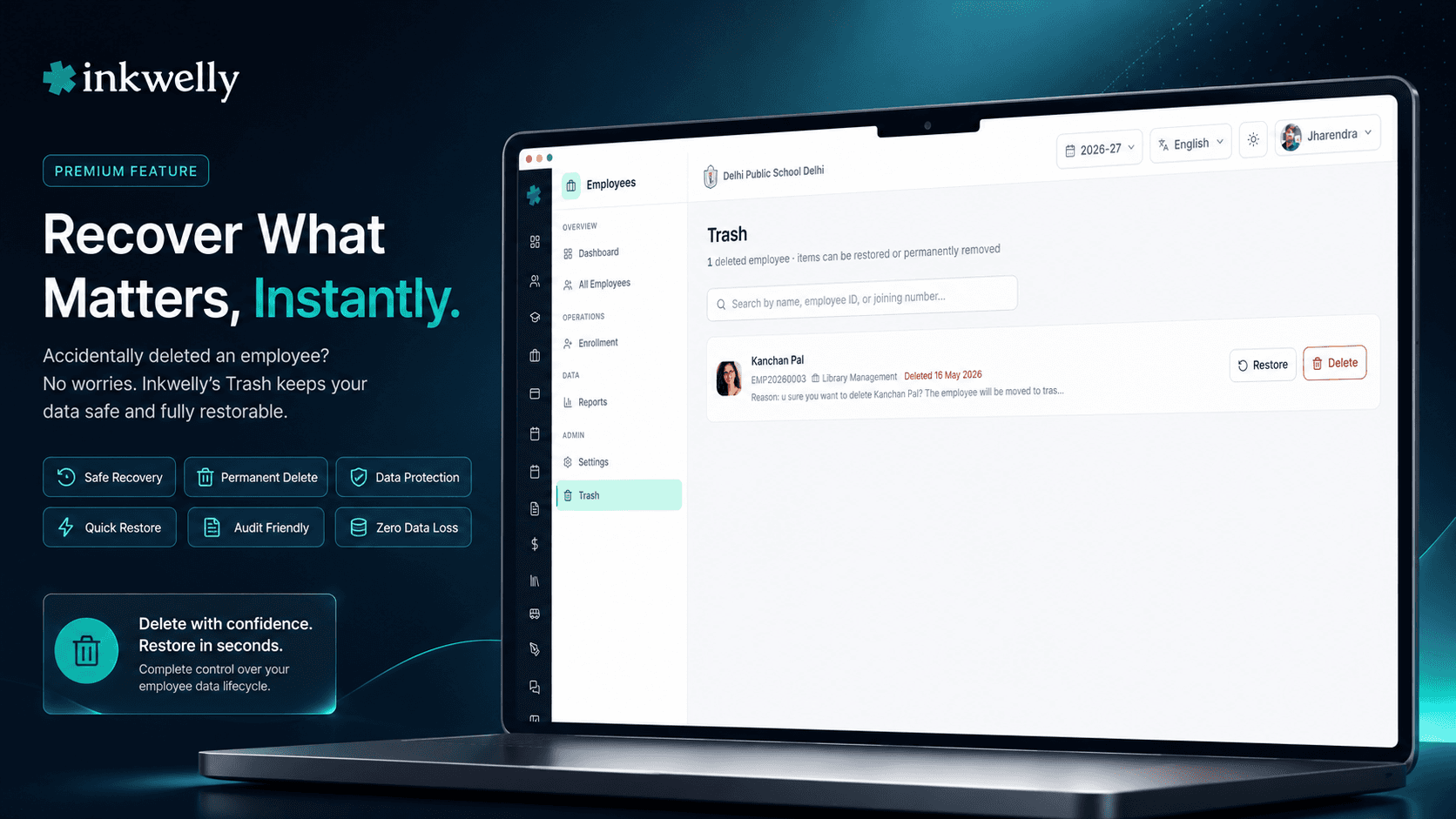
हर भारतीय स्कूल office को Employee Trash bin क्यों चाहिए
28 May 2026। Indore के एक CBSE day school का accountant April payroll close करने की race में है — EPFO challan deadline से पहले। साथ-साथ employee list साफ कर रहा है — exit हुए teachers को inactive mark कर रहा है, March interview rounds में बने placeholder records delete कर रहा है, board exam season के बाद contracts खत्म हो चुके substitute teachers को deactivate कर रहा है। वह तेज़ है, थका हुआ है, और यह काम salary slip generation और 4 PM की parent meeting के बीच कर रहा है। 3:42 PM पर वह गलत row पर delete click कर देता है। एक असली teacher। Class 9 English। Joining number EMP-2022-0048। Active employee list से गायब।
ज़्यादातर भारतीय school ERPs में, यह एक गलती कई दिनों की disaster बन जाती है। Teacher की May की salary slip अभी भी generate होनी है। उसकी EPF contribution 15 तारीख तक EPFO ECR file में report होनी है। उसका Q4 का TDS 31 तारीख तक due है। June में issue होने वाले Form 16 में उसका नाम होना चाहिए। System में उसके record के बिना, हर compliance step टूट जाता है। Accountant support को call करता है, database restore के पैसे देता है, उम्मीद करता है कि कुछ और नहीं बिगड़ा, और EPFO portal late filing accept कर ले इसके लिए हाथ जोड़ता है।
हमने Employee Trash ठीक इसी moment के लिए बनाया है। आप जो भी employee delete करते हैं वह Trash में चला जाता है — एक soft-delete bin जो पूरा record रखता है: profile, joining details, department, designation, qualification, salary structure, payroll history, EPF / ESI numbers, TDS history, leave balance, document trail। एक click में restore। Teacher employee directory में सब कुछ intact के साथ वापस आ जाते हैं। और अगर आप किसी ऐसे employee को permanently delete करने की कोशिश करते हैं जिसकी payroll history है, Inkwelly मना कर देता है — system उन records को बचाता है जिन्हें EPFO, ESIC और Income Tax Department आपको legally रखने को कहते हैं।
Employee Trash कैसे काम करता है
जब भी delete permission वाला कोई व्यक्ति active list से employee हटाता है, record soft-delete होता है — deletedAt timestamp के साथ Trash में जाता है, delete के समय कैप्चर किया गया deletion reason record होता है, और जो user ने यह action किया वह audit log में दर्ज होता है। Active employee directory में वह row नहीं दिखती। Attendance dashboards, current payroll runs, timetable assignment view, और Employee Payroll processing queue उसे count करना बंद कर देते हैं। हर active angle से वह employee गायब लगता है।
लेकिन record पूरा सुरक्षित रहता है। Employee Information sidebar से /employees/trash खोलें। View एक बार में 100 deleted employees load करता है, deletion date के हिसाब से sorted (सबसे नया पहले)। हर row में पूरा नाम, system employee ID, last department, profile photo, delete होने की तारीख और deletion reason दिखता है। ऊपर एक search box है जो सभी pages में नाम, employee ID या joining number से filter करता है।
हर row पर दो actions: Restore और Delete permanently। Restore एक dialog खोलता है जो optional audit remarks माँगता है — टाइप करें कि आप क्यों restore कर रहे हैं (उदा., 'गलती से delete हो गया, contract 30 June तक active है') और Restore click करें। Profile directory में वापस आ जाती है, पर employment status inactive ही रहता है — by design — ताकि HR explicitly EPF/ESI status, salary continuation और reporting line review करके employee को reactivate करे। Delete permanently एक अलग dialog खोलता है — यह आपसे employee का पूरा नाम टाइप करने को कहता है। और सबसे ज़रूरी बात — अगर उस employee की कोई payroll record है — एक भी historical salary slip, एक भी PF contribution row, एक भी TDS entry — system permanent delete मना कर देता है और exact reason बताता है।
Employee को Trash में भेजने पर क्या-क्या सुरक्षित रहता है
- पूरी profile — आपके school की हर language में first/middle/last name, gender, date of birth, blood group, religion, nationality, mother tongue।
- Joining record — employee ID, joining number, joining date, last working day (अगर exit हो चुके), वह department और designation जिसमें वह आख़िरी थे।
- Government identifiers — Aadhaar, PAN, mobile, personal email, EPF UAN, ESIC IP number, bank account, IFSC — हर वह identity field जो EPFO, ESIC और TDS systems को चाहिए।
- Salary structure — basic, HRA, special allowance, conveyance, custom heads, deductions, gross और net history per month — exactly जैसा Employee Payroll re-runs के लिए चाहिए।
- Payroll history — generate हुआ हर payslip, हर PF contribution, हर ESI contribution, हर TDS deduction, school द्वारा issue किया हर Form 16।
- Attendance और leave — Employee Attendance में marked हर दिन की attendance, पूरा leave balance, leave history, sandwich-leave / loss-of-pay records।
- Documents — uploaded appointment letter, qualification certificates, Aadhaar / PAN scans, joining KYC, bank cancelled cheque, character certificates — सब आपकी school media library में सुरक्षित।
- Audit log — किसने delete किया, कब, deletion reason; restore पर: किसने restore किया, कब, कौन-से audit remarks डाले; permanent delete पर: authorised destruction का controlled trail।
One-click restore — पर employment intentionally inactive रहता है
Restore dialog जान-बूझकर छोटा है। Trash list आपको पहले से employee का नाम, employee ID, last department और deletion reason दिखा रही है। आपको दोबारा confirm नहीं करना कि आप क्या restore कर रहे हैं — आपको सिर्फ़ यह record करना है कि क्यों।
एक optional audit remarks input — 1-3 वाक्य टाइप करें ('May payroll cleanup में गलती से delete हो गया; contract 30 June तक active है, parent committee ने अभी extension की पुष्टि की') और Restore click करें। Profile तुरंत active directory में वापस आ जाती है। पर — और यह बात important है — employment status inactive रहता है। यह deliberate है। Record restore करना एक decision है; employee को rehire करना दूसरा। HR profile खोलता है, EPF/ESI continuation, salary structure, reporting line और joining-date semantics review करता है, और फिर explicitly 'Activate employment' click करता है। Two-step on purpose, क्योंकि भारत में re-employment Provident Fund continuation, ESI eligibility, gratuity tenure और TDS computations सब को एक साथ छूता है।
Payroll history हो तो permanent delete block — by design
यह Employee Trash का सबसे ज़रूरी safety net है। अगर आप किसी ऐसे employee को permanently delete करने की कोशिश करते हैं जिसकी एक भी payroll history row है — एक भी salary slip, एक EPF contribution, एक ESI deduction, एक TDS entry — Inkwelly मना कर देता है। Dialog clear error देता है: 'Permanent deletion blocked: this employee has payroll records (salaries, payslips, PF/ESI contributions). Soft-delete keeps the record in Trash. Permanent deletion is only allowed for employees with no financial history.'
यह bug नहीं है। यह design है। EPFO हर member के पूरे employment lifecycle के PF records रखने को कहता है। Income Tax Department Form 16 records कम से कम 8 साल रखने को कहता है। ESIC member welfare claims के लिए contribution history चाहिए जो सालों बाद भी raise हो सकते हैं। Labour Department audits, gratuity disputes, full-and-final settlement reviews — हर एक intact employee records पर depend करते हैं। हम उन records को accidental destruction से बचाते हैं, period।
जिन employees की कोई payroll history नहीं है — placeholder records, interview-round entries, draft profiles जो कभी activate नहीं हुए — उनके लिए typed-name confirmation dialog second guard के रूप में काम करता है। नाम exactly टाइप करें। फिर वह चला जाता है। बाक़ी सब के लिए, soft-delete bin ही सही और एकमात्र path है।
Search और pagination — किसी भी deleted employee को तुरंत ढूंढें
8 साल से चल रहा एक mid-sized CBSE day school 60-150 trashed employee records जमा कर लेता है — पिछले sessions के exited teachers, retired clerical staff, contract substitutes जिनके contracts ख़त्म हुए, interview rounds में बने placeholder profiles। Employee Trash view 100 rows प्रति page paginate करता है, deletion date के हिसाब से sorted (नवीनतम पहले), previous/next controls और 'Page 2 of 3 · 247 deleted employees' counter के साथ।
ऊपर का search box सभी pages में पूरे नाम, employee ID या joining number से filter करता है। 'EMP-2022' टाइप करें — 2022-23 joining cohort से delete हुए सभी employees मिलेंगे। 'Sharma' टाइप करें — कभी भी delete हुए हर Sharma मिलेंगे। Exact joining number टाइप करें — सीधे उस row पर पहुँचें। Result list filter करते-करते update होती है, और page 1 पर reset हो जाता है ताकि नए matches पुराने के नीचे न दब जाएं।
हर delete और restore Labour audit के लिए audit-logged है
Employee Trash workflow उसी audit log में लिखता है जिसमें Employee Information के बाक़ी सभी changes लिखे जाते हैं। हर delete record करता है: किसने delete click किया, timestamp, IP address, delete के समय का deletion reason। हर restore record करता है: किसने restore click किया, timestamp, IP address, और audit remarks। हर permanent delete (जो सिर्फ़ बिना payroll history वाले employees के लिए ever होता है) controlled trail record करता है।
Audit log school admin panel से PDF या CSV में export किया जा सकता है — Labour Department audits, EPFO inspections, gratuity dispute documentation, internal HR reviews, और CBSE / ICSE renewal filings के लिए useful जहाँ inspector employee data discipline का evidence माँगता है। Role-based access का मतलब department head सिर्फ़ अपने department के events देखता है; principal और HR सब देखते हैं। Audit log entry delete करने का कोई तरीक़ा नहीं — वह employee record मिटने के बाद भी ज़िंदा रहती है, by design।
“May ke payroll close week mein ek substitute teacher ko galti se delete kar diya tha — uski ESI contribution May ki ECR mein chahiye thi. Pehle aise haalat mein support ko phone karte the, EPFO portal pe extension request karte the. Ab Trash khola, naam search kiya, Restore kiya — 30 second mein wapas active list mein aa gayi, ESI challan time pe file ho gaya. HR aur accountant dono ka pressure 80 percent kam ho gaya।”
Real-world HR routines जो 30-second tasks बन जाती हैं
पाँच routine school office mistakes जो traditionally घंटों का HR और payroll work माँगती हैं:
1. May payroll cleanup में wrong-row delete। Accountant academic session ख़त्म होने के बाद 6 exited teachers को inactive mark कर रहा है। एक असली, currently-active substitute teacher गलती से click हो जाता है। Trash के बिना: ECR file fail, EPFO challan delayed, payroll team weekend काम करती है। Trash के साथ: Trash खोलें, joining number से search करें, Restore click करें। Salary slip और PF contribution normally generate। 30 second के अंदर।
2. Recruitment के दौरान बने interview-round placeholder entries। March-April hiring cycle में, school 20+ interview candidates को placeholder employees के रूप में add करता है ताकि HR system में CVs compare कर सके। उनमें से 4 hire होते हैं; 16 cleanup चाहिए। Trash के बिना: कोई इन्हें delete करता है पर गलती से एक असली probationary teacher भी delete हो जाता है। Trash के साथ: 16 placeholders Trash में जाते हैं। क्योंकि उनकी zero payroll records हैं, आप typed-name confirmation से permanent-delete कर सकते हैं। जो probationary teacher accidentally पकड़ा गया था वह एक click में Trash से restore।
3. Substitute / contract teacher जिसका extension late approve हुआ। Contract 30 April को end होना था। Accountant ने teacher को 2 May को inactive mark कर delete कर दिया। 5 May को principal HR को बताते हैं कि contract summer remedial classes के लिए 30 June तक extend हुआ है। Trash के बिना: scratch से employee बनाओ, joining date खो जाए, EPF UAN linkage खो जाए, parent committee complain करे। Trash के साथ: Trash खोलें, restore। EPF UAN intact, joining date intact, contract cleanly continue।
4. Session-close cleanup में bulk filter mistake। एक school admin ऐसे bulk operation को चलाता है जो उन सभी employees को deactivate करे जिन्होंने इस month कोई class नहीं ली, irade substitute / on-leave staff flag करना था। Filter गलती से summer vacation पर 18 active teachers को catch कर लेता है। Trash के बिना: घबराहट, vendor escalation, payroll late। Trash के साथ: Trash खोलें, आज के हिसाब से sort करें, हर पर 'Restore' click करें। 5 minute में सभी 18 employees directory में वापस — और क्योंकि restore पर employment status inactive रहा, HR quick review के बाद explicitly reactivate करता है।
5. Departing employee DPDP right-to-erasure invoke करते हैं। एक teacher जो पूरी तरह exit कर चुके हैं (full and final settlement complete, gratuity paid, Form 16 issued, सब dues clear) DPDP Act 2023 के तहत permanent deletion request करते हैं। Controlled flow के बिना: office raw SQL चलाता है, सारे risks के साथ — और शायद EPFO retention rule violate कर देता है। Trash + payroll-history-aware permanent delete के साथ: system खुद enforce करता है — 'नहीं, आप इस employee को permanent-delete नहीं कर सकते — payroll history मौजूद है, क़ानून आपको इसे retain करने को कहता है।' Soft-delete DPDP minimisation principle satisfy करता है साथ ही EPFO retention duty honour करता है। Employee record active dashboards से छुपा रहता है पर legally retained।
Indian school HR हर महीने Employee Trash पर ये common operations चलाती है
- Wrong-row deletes restore करें April-May payroll cleanup और session-end exits के दौरान।
- Interview-round placeholders permanently हटाएँ जो कभी hire नहीं हुए और जिनकी कोई payroll history नहीं।
- Substitute / contract teachers restore करें जिनके extensions उनके contracts technically end होने के बाद approve हुए।
- Wrong filter के बाद bulk-restore करें routine deactivation script में — सभी profiles HR review के लिए inactive return होती हैं।
- Compliance के लिए deleted employees audit करें EPFO / ESIC / Labour Department inspections से पहले।
- Unusual deletions investigate करें user, date, deletion reason से — full audit export PDF या CSV में।
- Full-and-final settlement closure validate करें recently trashed employees में deletion-reason field review करके।
- Academic year migration से पहले cleanup — Trash review करें, तय करें कौन-से placeholders permanent जाएं और retention rules के तहत कौन-से exited staff soft-deleted रहें।
Employee Trash 30 minute में live देखें
3 routine HR deletion mistakes लाइए जो आपने की हैं (या होने का डर है)। Demo के दौरान आपके school के departments और sample salary structure set up करेंगे, realistic payroll data पर workflows live चलाएंगे और दिखाएंगे कि हर एक कैसे one-click restore — या payroll-locked safe block — बन जाता है।
Limits, safety और small print
Soft-delete default है। Active employee directory से हर delete record को Trash में भेजता है। Trash को bypass करके active list से एक step में permanently delete करने का तरीक़ा बिल्कुल नहीं है — वह path मौजूद ही नहीं।
Payroll-history hard block। एक भी payroll record वाले किसी भी employee के लिए permanent delete refuse होता है। यह server-side enforce होता है, सिर्फ़ UI में नहीं छुपा हुआ — इसे configuration या किसी और तरीक़े से turn off नहीं किया जा सकता। Auditors, principals और labour officers इस guarantee पर भरोसा कर सकते हैं कि financial history वाला कोई employee silently destroy नहीं हो सकता।
Restoration profile को inactive employment के रूप में वापस लाता है। यह design है, bug नहीं। भारत में re-employment Provident Fund continuation, ESI member status, gratuity tenure और TDS computations सब को एक साथ छूता है। HR review करता है और restore के बाद explicitly 'Activate employment' click करता है — हर compliance decision deliberate रखते हुए।
Restoration joining number, EPF UAN, ESIC IP और PAN linkage सुरक्षित रखता है। Employee restore होने पर original employee ID, joining number, EPF UAN, ESIC IP number, PAN, salary structure, और पूरा payroll trail वैसे ही वापस आ जाते हैं। Employee 'rehired' नहीं होते — restore होते हैं। पिछले payroll periods की reports correct रहती हैं।
100 trashed employees per page तक। हज़ारों trashed records जमा करने वाले बड़े स्कूल previous/next controls से page through करते हैं। Search सभी pages को filter करता है।
Permanent delete (जब allowed हो) irreversible है। Zero payroll history वाले employee (placeholder, never-employed records) के लिए, typed-name-confirm permanent delete record को database से हटा देता है। Audit log entry बची रहती है — यह याद रखती है कि deletion हुई, किसने की, कब, और original employee ID — पर personal data चला गया।
Role-based access। Default में सिर्फ़ school admin, principal और HR roles को Trash दिखता है और restore या permanent-delete की permission होती है। Department heads सिर्फ़ अपने department के exits audit log में देखते हैं; class teachers Trash बिल्कुल नहीं देखते। हर role की exact permissions Identity & Access Management settings से configure करें।
Multi-tenant isolation। हर Inkwelly module की तरह, Trash strictly आपके school के अंदर operate करता है। Multi-school trusts हर school का independent Trash view चलाते हैं — कोई cross-tenant access नहीं। School A का trashed teacher School B को नहीं दिखता, even within the same organisation।
Backups still apply। Soft-delete plus payroll-history block आपकी रोज़ की safety net है। Inkwelly की nightly database backup नीचे की disaster recovery layer है। Combination का मतलब compliance-critical employee data का catastrophic accidental destruction सिर्फ़ unlikely नहीं — structurally prevented है।
किस मॉड्यूल का हिस्सा
1 moduleअक्सर पूछे गए सवाल
8 सवालRestored employment fully active होने की बजाय inactive क्यों रहता है?
By design। Record restore करना एक decision है; employee को rehire करना दूसरा। भारत में re-employment Provident Fund continuation, ESI member status, gratuity tenure, और TDS computations सब को एक साथ छूता है। Restore के बाद, profile directory में वापस है पर employment inactive है — HR profile खोलता है, EPF/ESI continuation, salary structure और reporting line review करता है, और फिर explicitly 'Activate employment' click करता है। यह two-step intentional है, extra friction नहीं।
'Permanent delete blocked due to payroll history' का exact मतलब क्या है?
मतलब Inkwelly किसी employee record को permanently destroy करने से मना करता है अगर उनके लिए कोई भी payroll data exist करता है — एक भी historical salary slip, एक EPF contribution row, एक ESI deduction, एक TDS entry। EPFO हर member के पूरे lifecycle के PF records रखने को कहता है। Income Tax Department payroll records कम से कम 8 साल रखने को कहता है। ESIC को member welfare claims (जो सालों बाद भी raise हो सकते हैं) के लिए contribution history चाहिए। Labour audits और gratuity disputes इन records पर depend करते हैं। हम protection server-side enforce करते हैं ताकि कोई admin accidentally — या deliberately भी — compliance-critical employee data destroy न कर सके।
क्या मैं interview-round placeholder employees को permanently delete कर सकता हूँ?
हाँ। अगर March-April hiring rounds में बना एक placeholder employee record कभी active employee में convert नहीं हुआ — मतलब zero salary slips, zero PF contributions, zero TDS entries — typed-name-confirm permanent delete काम करता है। System action allow करने से पहले payroll history check करता है। Financial trail वाले records cleanly हटाए जा सकते हैं; एक भी payroll row वाले records protected रहते हैं।
Auto-delete होने से पहले employees Trash में कितने समय तक रहते हैं?
Auto-delete नहीं होते। Soft-deleted employees Trash में indefinitely रहते हैं जब तक सही permission वाला कोई या तो उन्हें restore न करे या — सिर्फ़ अगर payroll history नहीं है — typed-name confirmation से permanently delete न करे। हम जान-बूझकर auto-purge नहीं करते, क्योंकि भारतीय स्कूलों को exited employees के records अक्सर 1-8 साल बाद EPFO claims, gratuity calculations, Form 16 reissues, Labour Department audits और personal references के लिए चाहिए होते हैं। Auto-deletion फ़ायदे से ज़्यादा compliance problems पैदा करता।
Employee restore करने पर क्या EPF, ESI, salary slips और TDS history वापस आ जाती है?
हाँ — पूरी तरह। Restore original employee ID, joining number, EPF UAN, ESIC IP number, PAN, salary structure, generate हुआ हर payslip, हर PF/ESI/TDS entry, issue किया हर Form 16, leave balance, attendance trail और uploaded documents सब सुरक्षित रखता है। Employee नए entry के रूप में rehire नहीं होते; original record reactivate होता है। Restore के बाद पिछले payroll-period reports correct रहती हैं।
क्या department heads अपने department के deleted employees देख और restore कर सकते हैं?
Default में नहीं। Trash access school admin, principal और HR roles तक limited है। Department heads सिर्फ़ अपने assigned department के अंदर active employee list देखते हैं, और delete permission accordingly scoped है। उनके deletes Trash में जाते हैं जहाँ सिर्फ़ authorised roles act कर सकते हैं। अगर आपका school चाहता है कि department heads को अपने department के लिए Trash visibility मिले, यह school की Identity & Access Management settings से configurable है।
क्या Employee Trash EPFO और Labour Department audits में मदद करता है?
हाँ — directly। Audit log हर delete, हर restore, हर permanent delete, हर audit remark को user, timestamp और IP address के साथ record करता है। Log school admin panel से PDF या CSV में export होता है। Soft-delete plus payroll-history hard block मिलकर prove करते हैं कि school compliance-critical employee data destroy कर ही नहीं सकता — और किया नहीं है। EPFO inspectors और Labour Department auditors increasingly इस तरह के structural evidence माँगते हैं; Inkwelly इसे बिना extra paperwork के produce करने के लिए designed है।
क्या Trash employees के लिए DPDP Act 2023 retention और erasure requirements satisfy करता है?
Soft-delete दोनों sides support करता है। DPDP Act भारतीय स्कूलों से employee records को prescribed periods तक रखने की माँग करता है, even after exit; Trash record को India में encrypted at rest रखता है, सिर्फ़ authorised roles को accessible — retention satisfy होती है। जब fully-exited employee right to erasure invoke करते हैं, आपका school permanent-delete सिर्फ़ तभी कर सकता है जब payroll history बिल्कुल न बची हो — जो full-time staff के लिए rarely होता है पर never-hired interview placeholders के लिए common है। Payroll history वाले employees के लिए, EPFO, ESIC और Income Tax Act की retention obligations DPDP erasure right को override करती हैं; यह documented और enforced है। आपके school का data protection officer हर role और statute के exact retention periods confirm करे।
आपको ये भी पसंद आ सकता है
2 लेखInkwelly आपके स्कूल पर — खुद देखें
30 मिनट का डेमो। आपके मौजूदा ERP को आपके साथ खोलकर, कॉल पर ही आपका डेटा Inkwelly में लोड करते हैं। कॉल ख़त्म होते-होते एक तय तारीख़ का गो-लाइव प्लान आपके हाथ में।