हर student document — tracked, required, audited. Aadhaar, TC, RTE — कभी missing नहीं।
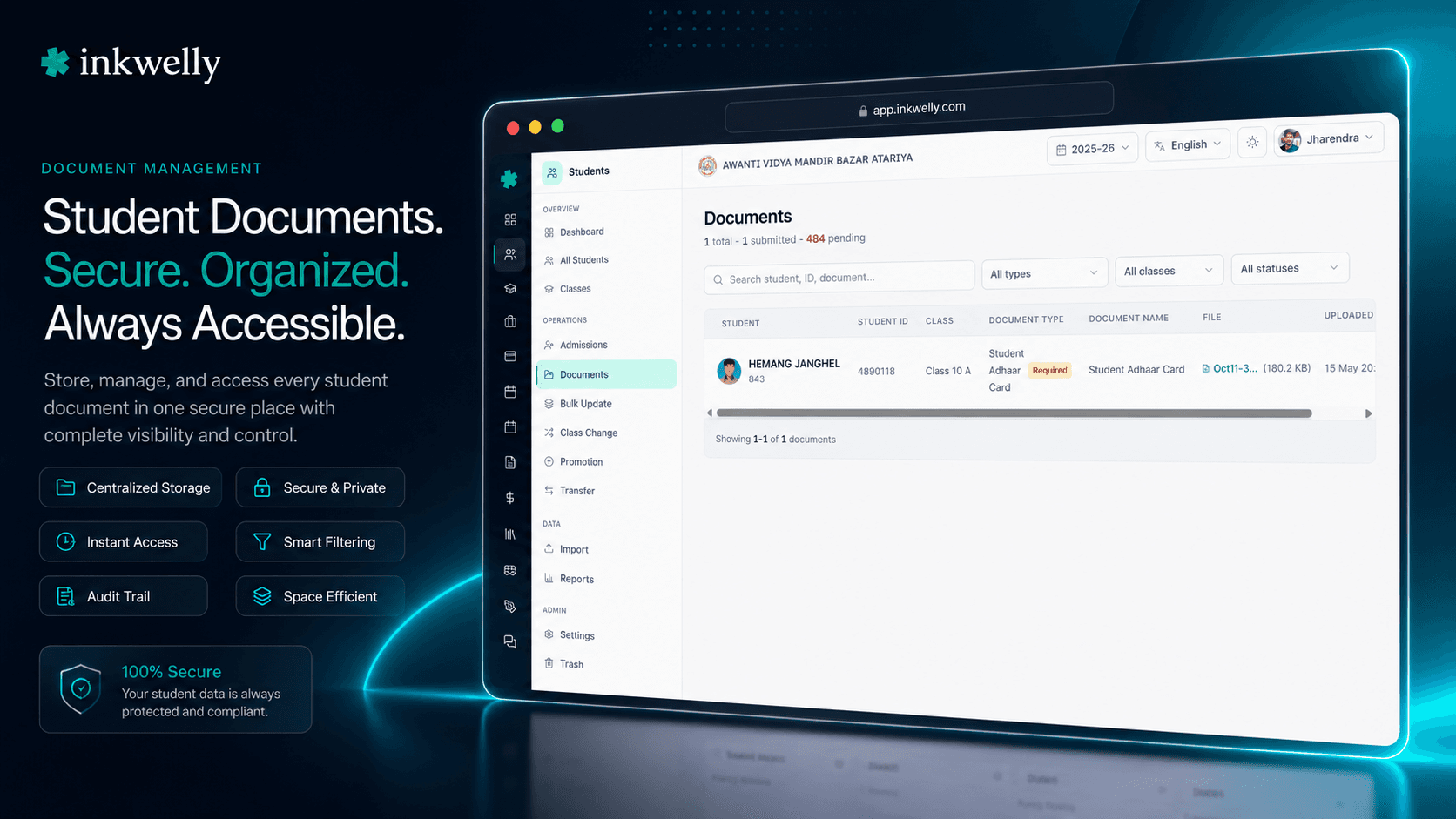
हर student profile के अंदर एक complete document store, और पूरे session में school-wide compliance view। हर student के required documents एक नज़र में submitted vs missing दिखते हैं। Class-level filters audit का सवाल — किसके पास क्या नहीं है — 5 second में answer कर देते हैं। हर upload, edit और delete audit-logged है।
Indian schools की नींद student documents पर क्यों खराब होती है
Mangal को subah CBSE renewal inspection आ जाती है। Inspector Class 1 से Class 8 तक के 847 students की Aadhaar copies माँगता है। Office assistant के पास हैं — कहीं तो हैं। कुछ Google Drive में scanned PDFs हैं। कुछ principal के phone पर photographs हैं। कुछ front desk के पीछे एक मोटी physical folder में हैं। कुछ parents के WhatsApp messages में हैं। 40 तो बिल्कुल missing हैं। Inspector school को 48 hours देता है — क्लास-wise clean list बनाओ कि किसके पास Aadhaar है और किसके पास नहीं।
Office assistant पूरी रात काम करती है। Wahi 847 student profiles एक-एक करके school ERP में खोलती है, photos tab, documents tab, notes tab — हर जगह check करती है। साथ में एक parallel Excel sheet maintain करती है कि कौन-कौन से documents missing हैं। Friday morning तक list 30 students से wrong है क्योंकि तीन classes की Aadhaar copies wrong document type के नीचे file हो गई थीं। Inspector sign off तो कर देता है, पर school का renewal flagged for follow-up हो जाता है। Principal को 9 hours की नींद नहीं आती — एक problem के लिए जो 5-second की query होनी चाहिए थी।
हमने सोचा: क्या होगा अगर हर student document — Aadhaar, birth certificate, Transfer Certificate, EWS certificate, caste certificate, medical record — एक structured store में रहे, हर student की required checklist के साथ, class-level compliance dashboard के साथ, और हर upload का audit log रखे? तो हमने Student Documents Management बनाया, Student Information module के अंदर। हर CBSE inspector का सवाल — Class 5 A में Aadhaar किसका missing है? — अब filter है, all-nighter नहीं।
Inkwelly Student Documents कैसे काम करता है
Inkwelly में document storage दो levels पर है — एक office staff के लिए जो एक student के साथ काम करते हैं, एक principal या admin के लिए जिसे पूरे school की compliance status देखनी है। दोनों views same underlying records से पढ़ते हैं।
Per-student view — /students/<id>?tab=documents. किसी भी student का profile खोलें, Documents tab पर click करें। View दो sections में बँटता है: Required documents (हर वो document type जिसे आपकी organisation ने isMandatory: true mark किया हो — typically Aadhaar, birth certificate, पिछले school की TC, photo, parent ID proof) और Other documents (सब optional — caste certificate, EWS certificate, medical fitness, scholarship forms, पुराने schools के character certificates)। Required documents uploaded होने पर हरा ✓ और missing होने पर लाल ! दिखाते हैं। Header दोनों count करता है — 4 of 5 required documents submitted एक नज़र में पढ़ने में आ जाता है।
School-wide view — /students/documents. Students module खोलें, Documents पर click करें। एक table पूरे academic session की हर upload list करती है — student name, admission number, current class, document type, file name, file size, upload date। Class से filter करें (Class 5 A, Class 8 Science), document type से (Aadhaar, Birth Certificate), या free-text student-name search से। Header live stats दिखाता है — total documents on file, total submitted across required types, total students still pending। Pagination 100 records per page पर cap है — 2,000-student school पर भी fast रहता है। किसी row पर external-link icon click करें — सीधे उस student का documents tab खुल जाता है।
Upload flow. दोनों views से Upload click करें। Dialog पूछता है document type (आपके school के configured types का dropdown, mandatory वाले flagged), optional document name (default file name), optional remarks, और file। Files Inkwelly के MediaPicker से जाती हैं — PDFs, JPEG, PNG, HEIC accepted हैं। File आपके school के encrypted media store पर upload होकर student के document record से link हो जाती है। Save click करें — per-student view की required checklist तुरंत update हो जाती है। Edit से file swap या type change कर सकते हैं। Delete record और underlying media file दोनों remove कर देता है (audit-logged)।
हर student documents tab में क्या track होता है
- Aadhaar number copy — 12-digit photo-side scan, हर Indian school student के लिए mandatory under DigiLocker / NEP 2020 requirements।
- Birth Certificate — corporation/panchayat-issued original जो admission पर date of birth verify करता है (student profile की DOB से match होना चाहिए)।
- Transfer Certificate (TC) — पिछले school की TC, especially class change admissions और CBSE / state-board affiliation audits के लिए critical।
- Caste Certificate — OBC, SC, ST और EWS students के लिए और सभी state scholarship applications via NSP और state portals जैसे UP UPSDM, Maharashtra Mahadbt, Karnataka SSP।
- EWS / Income Certificate — RTE 25% reservation admissions, scholarship claims और fee waiver applications के लिए।
- Photo (passport size) — current academic-year photo जो ID cards, marksheets, parent app और Bonafide Certificates पर use होती है।
- Parent ID Proof — father और mother का Aadhaar / PAN / Voter ID, inspections और school fees के लिए bank account opening पर increasingly माँगी जाती है।
- Migration Certificate / Character Certificate — boards या states के बीच transfer हो रहे new admissions के लिए; usually Class 9, 10, 11, 12 admissions पर mandatory।
- Medical Fitness Certificate — residential / hostel schools और कई CBSE day schools admission पर माँगते हैं।
- Scholarship application forms — NSP, NMMSS, Pre-Matric / Post-Matric SC/ST/OBC scheme applications per student saved।
- Disability / divyangjan certificate — inclusive education tracking और central / state benefits के लिए।
- APAAR ID / ABC ID enrollment record — नए NEP 2020 academic identifiers; issued ID की copy on file।
- School-specific documents — आपकी organisation
/students/settingsसे कोई भी custom document type add कर सकती है और required या optional mark कर सकती है।
Required vs Optional — कभी confuse न हों
हर school की अपनी mandatory documents की list है। CBSE day schools चाहिए Aadhaar, birth certificate, TC, photo। Residential boarding schools medical fitness, parental consent, blood-group certificate add करते हैं। State-board schools admission पर caste certificate और migration certificate collect करते हैं। हम कोई list hardcode नहीं करते — आपका organisation administrator इसे /students/settings पर एक बार configure करता है, हर type को isMandatory: true या false mark करता है, और per-student tab automatically right checklist के साथ Required documents section render कर देता है।
Missing required documents लाल ! icon और inline Upload button के साथ दिखती हैं — office assistant को exactly पता चल जाता है कि कौन-सा बच्चा क्या miss कर रहा है, 2 clicks में fix। Optional documents (caste certificate, scholarship forms, character certificates) नीचे Other documents section में रहते हैं और missing-document warning trigger नहीं करते।
Class-level compliance, 5 second में
School-wide documents view /students/documents inspection scenario के लिए ही बना है। खोलें, dropdown से एक class pick करें — Class 5 A — और table केवल उस section के documents तक reduce हो जाती है। Document type pick करें — Aadhaar number copy — और table अब Class 5 A के 41 students दिखाती है जिन्होंने Aadhaar upload किया है, alphabetically student name से sorted। Header पढ़ता है: 47 total students · 41 submitted · 6 pending.
Pending count पर click करें और per-student view के Required documents tab पर switch करें — हर missing student दिख जाता है। जो all-nighter था — 847 profiles खोलना, folders photograph करना, Excel sheets बनाना — अब 5-second की query है। CBSE inspections, ICSE re-affiliation visits, RTE compliance audits, state-board renewal — सब same workflow।
Configurable document types — हर Indian board के लिए
Indian boards इस पर agree नहीं करते कि क्या mandatory है। CBSE चाहिए Aadhaar + birth certificate। ICSE additionally पिछले school का character certificate चाहिए। State boards caste certificate और migration certificate add करते हैं। International schools (IB, IGCSE) passport, visa, parent employment letter चाहिए। Residential schools medical fitness, blood-group certificate, vaccination record add करते हैं।
Inkwelly एक list pick करके आप पर force नहीं करता। आपका organisation administrator /students/settings खोलता है, Add document type click करता है, name type करता है (Migration Certificate, Vaccination Record, Cambridge Passport Copy), isMandatory: true / false pick करता है, और type next page load से हर student के documents tab पर live हो जाता है। School-wide view का document-type filter dropdown उसे automatically pick कर लेता है। CBSE, ICSE, IB, IGCSE, NIOS या state-board document lists के बीच switch करना settings change है — कभी developer ticket नहीं।
Files एक secure store में — WhatsApp नहीं, Drive नहीं, phones नहीं
आज ज़्यादातर Indian schools student documents 3-4 जगह store करते हैं — एक physical folder, principal का WhatsApp, office assistant का Google Drive, IT teacher का pen drive। जिसने यह set up किया वो leave कर जाए तो आधे documents unfindable हो जाते हैं। हम यह tolerate नहीं करते।
हर document upload Inkwelly के encrypted MediaPicker से होकर आपके school की media library में जाता है — AES-256 at rest, TLS 1.3 in transit, Indian servers (Mumbai region) पर hosted। PDFs, JPEG, PNG, HEIC सब accepted हैं। File metadata (name, size, MIME type) document record के साथ store होती है। View link signed URL से file को new tab में खोलता है। कोई भी file आपके school के tenant से बाहर नहीं जाती। Teacher leave करे तो आपके documents नहीं जाते — वो उसके laptop पर थे ही नहीं।
“CBSE inspection mein inspector ne Aadhaar list maanga. Pehle hum 800 students ki files dhundhte the. Ab `/students/documents` open kiya, Class filter pe Class 1-8 select kiya, Aadhaar document type filter kiya, list 5 second mein mil gaya. 23 students missing the — 2 din mein parents ko WhatsApp karke upload kara liya. Inspection clean ho gaya.”
School year में यह कब काम आता है
March – April: admission week. New admission पर office हर new student की birth certificate, Aadhaar, पिछले school की TC, parent ID proofs और photo collect करता है। Inkwelly की required-documents checklist admission के दौरान visible होने से office assistant admission complete तब तक mark नहीं कर सकता जब तक mandatory set upload न हो — वो gap close होता है जो 6 month बाद inspection findings पैदा करता है।
May – June: RTE 25% reservation verification. District Education Officer (DEO) आते हैं RTE-admitted students की EWS / income certificates verify करने। /students/documents खोलें, document type filter EWS Certificate लगाएँ, class filter लगाएँ — हर uploaded EWS proof एक view में inspection-ready है। Rejected applications पर ! flag वापस आ जाता है; आप parent को call करके re-upload करा देते हैं।
July – August: CBSE / ICSE re-affiliation inspection. Inspector सभी classes में Aadhaar coverage, birth certificate coverage, TC coverage पूछता है। Documents view पर तीन filter operations तीनों सवालों का answer देती हैं। Pending count exactly बता देता है कि आपको कितने students chase करने हैं — rough estimate नहीं।
October: UDISE+ submission. UDISE+ per-student Aadhaar / APAAR / ABC ID coverage stats माँगता है। School-wide documents view का हर ID type के लिए filter एक click में count produce करता है। School admin Monday को report run करता है, Tuesday तक UDISE+ submission complete — usual 2-week scramble की जगह।
February – March: TC issuance & graduation. जैसे-जैसे students transfer out या graduate होते हैं, office TCs और Bonafide Certificates issue करता है जो original birth certificate, caste certificate, character record reference करते हैं। Document store student profile के अंदर होने से TC clerk हर reference document एक tab से खींच लेता है — 3 folders और एक WhatsApp chat से नहीं।
Indian school offices इस पर ये common operations करते हैं
- Inspection-day Aadhaar coverage report — class filter + Aadhaar type filter, 5 second में।
- Missing-Aadhaar chase list — per-student view खोलें, Required documents section scroll करें, लाल ! rows identify करें, parents को batch-WhatsApp upload के लिए।
- RTE EWS certificate verification packet — DEO visit के लिए class filter +
EWS Certificatedocument type filter। - TC issuance prep — leaving student का documents tab खोलें, birth certificate + पिछली TC + character certificate references सीधे new TC draft पर copy करें।
- State scholarship application packets — caste certificate + income certificate + photo per student, NSP submission के लिए साथ download।
- APAAR / ABC ID backfill audit —
APAAR IDऔरABC IDके लिए document type filter, हर student list करें जिसके पास नए NEP 2020 identifiers missing हैं। - UDISE+ submission readiness — Aadhaar / APAAR coverage के pending counts documents header stats से produce।
- Mid-year new students onboarding — new student के profile पर required-documents checklist ensure करती है कि admission rush में कोई document forgotten न हो।
- Legal / parent dispute responses — कोई parent withdrawal dispute raise करे, school admin seconds में audit log खींच लेता है — किसने क्या और कब upload किया।
- Withdrawal / class change — leaving student के record पर required documents auto-shown — office withdrawal close ही नहीं कर सकता बिना copies on file।
- Inspection follow-up tracking — last inspection से flagged students filtered, chased, uploaded और cleared mark — same view से।
अपने school के data पर Documents Management देखें, live 30 minutes में
5 sample student folders ले आइए — Aadhaar copy, birth certificate, TC, EWS, photo। हम demo के दौरान आपके document types set up करेंगे और दिखाएँगे कैसे per-student checklist + class compliance dashboard आपके real student list पर काम करते हैं।
Limits, safety और small print
File size. Individual file uploads MediaPicker की standard limit पर capped हैं (typically 10 MB per file — एक high-resolution scanned PDF या certificate photo cover करता है)। बड़े scans को downsample या split करना चाहिए। Limit hit होने पर MediaPicker clear error message दिखाता है; silent truncation कभी नहीं।
Supported formats. PDF, JPEG, PNG, HEIC, WEBP। Parent के iPhone (HEIC) और office scanner (PDF) के documents बिना conversion friction के coexist करते हैं। Inkwelly uploaded files OCR नहीं करता — document record file store करता है, उसका text content नहीं। (OCR v2 के roadmap पर है।)
Per-student record limits. Documents per student पर कोई hard cap नहीं — Aadhaar + birth certificate + TC + caste certificate + medical + photo + 6 scholarship forms fine है। Per-student tab लंबी lists पर Other documents section paginate करता है performance के लिए।
Required vs optional changes. जब कोई document type optional से required बदले, जिन students ने पहले से upload किया था वो new required slot में ✓ दिखाते हैं — कोई migration नहीं। जिन्होंने नहीं किया वो tab next time load होने पर ! दिखाते हैं। Reverse change (required → optional) type को required checklist से बाहर move करता है, underlying records को touch किए बिना।
Multi-tenant isolation. Document records और underlying media files multi-school organisations के अंदर strictly per-school scoped हैं। Same trust के दो different schools में दो बच्चे हैं तो parent अपने बच्चों के documents दो separate views में देखता है — कभी co-mingled नहीं।
Audit log. Uploads, edits, deletes और document-type changes सब school audit log पर लिखे जाते हैं — user, timestamp, IP address, document type, file name, action verb। Audit log school admin panel से exportable है और student के full lifecycle तक retained।
Role-based access. Document upload, edit और delete by default school admin और office staff roles पर gated हैं। Class teachers अपने assigned section के documents view कर सकते हैं पर delete नहीं। Parents अपने बच्चों के documents parent app से देख सकते हैं पर delete या edit नहीं। यह सब Identity & Access Management module से per role configurable है — आपका school policy decide करता है।
Soft-delete documents के लिए default नहीं है. Document delete करने से record और underlying media file permanently remove हो जाती है। यह intentional है — DPDP Act के तहत documents personal data हैं, और parents के पास right to deletion है। अगर permanent deletion से पहले 'safety net' चाहिए, तो role policy configure करें कि सिर्फ़ 1-2 designated admins delete कर सकें, और confirmation step required हो। (Soft-delete with restore window v2 के roadmap पर है, opt-in setting के रूप में।)
किस मॉड्यूल का हिस्सा
1 moduleअक्सर पूछे गए सवाल
8 सवालक्या हम अपने document types configure कर सकते हैं — CBSE, ICSE, IB, state boards सब अलग lists चाहिए?
हाँ। Organisation administrator /students/settings खोलता है, Add document type click करता है, name type करता है (Migration Certificate, Vaccination Record, Cambridge Passport Copy), और Required या Optional pick करता है। Type हर student के Documents tab और school-wide filter dropdown में तुरंत appear हो जाता है। कोई hardcoded list नहीं — Inkwelly हर Indian board और international school structure के लिए काम करता है।
School-wide compliance view CBSE inspection में कैसे help करता है?
/students/documents खोलें, class filter pick करें (Class 1–8), document type filter pick करें (Aadhaar number copy)। Table 5 second में उन students के Aadhaar uploads तक reduce हो जाती है। Header total students vs submitted vs pending count करता है। Document type Birth Certificate पर switch करें, repeat। जो all-night exercise था — 800 profiles खोलना, Excel बनाना — अब तीन filter operations है।
कौन-से file formats accepted हैं? Indian parents कई formats में scans भेजते हैं।
PDF, JPEG, PNG, HEIC और WEBP सब accepted हैं। Office scanners की scanned PDFs, parent के WhatsApp की JPEG photos, iPhone की HEIC सब बिना conversion upload होती हैं। हर file का size, name और MIME type document record के साथ दिखता है। कोई silent format conversion नहीं — जो आप upload करते हैं वही stored है।
Actual files कहाँ store होती हैं? क्या student data India से बाहर जाता है?
Files आपके school की encrypted media library में store होती हैं, Indian servers (Mumbai region) पर hosted — DPDP Act 2023 compliant। Encryption AES-256 at rest और TLS 1.3 in transit। Files Inkwelly tenant से कभी बाहर नहीं जातीं; signed URLs से serve होती हैं जो on-demand expire होती हैं। Compliance posture बाकी Inkwelly data जैसा है — documents के लिए कोई special handling नहीं।
Student transfer out या graduate करे तो उसके documents का क्या होता है?
Documents student record से full retention lifecycle तक attached रहते हैं — आपके school की policy के मुताबिक। जब आप Transfer Certificate issue करें, underlying birth certificate / TC / character certificate references सीधे documents tab से read होते हैं — re-uploading नहीं। Retention period के बाद student permanently delete होने पर documents और underlying files record के साथ delete हो जाते हैं।
क्या कोई audit log है — किसने कौन-सा document upload, edit, या delete किया?
हाँ। हर upload, edit, type change और delete school audit log पर लिखे जाते हैं — user, timestamp, IP address, document type, file name, action। Audit log school admin panel से exportable है और full student lifecycle तक retained। खासकर जब parent किसी missing या deleted document पर dispute raise करे — आप उन्हें exactly दिखा सकते हैं कि कब और किसने upload किया।
क्या class teachers अपने section के students के documents देख और upload कर सकते हैं?
By default class teachers अपने assigned section के documents view कर सकते हैं पर delete नहीं (delete school admin और office staff पर gated है)। अगर आप class teachers को upload भी करने देना चाहते हैं — parent–teacher meetings के दौरान missing documents collect करते वक्त useful — तो वो per-role permission Identity & Access Management module से configurable है। ज़्यादातर schools class teachers के लिए upload enable करते हैं पर delete admin-only रखते हैं।
क्या parents अपने बच्चे के documents parent app से देख सकते हैं?
हाँ। Parents अपने बच्चे का Documents tab parent app में देखते हैं — required documents checklist (ताकि उन्हें exactly पता चले क्या missing है) और optional documents on file दोनों। Parents delete या edit नहीं कर सकते; parent side से uploads school-approval workflow से जाते हैं live होने से पहले। यह role से configurable है — जो schools नहीं चाहते कि parents documents देखें, parent-app view disable कर सकते हैं।
आपको ये भी पसंद आ सकता है
2 लेखInkwelly आपके स्कूल पर — खुद देखें
30 मिनट का डेमो। आपके मौजूदा ERP को आपके साथ खोलकर, कॉल पर ही आपका डेटा Inkwelly में लोड करते हैं। कॉल ख़त्म होते-होते एक तय तारीख़ का गो-लाइव प्लान आपके हाथ में।