आपके school से exactly match करती classes. Grade × section, 15 mediums, NEP-ready.
Inkwelly में class एक real classroom है — Grade 5 Section A, English medium, capacity 40, Mrs Verma primary class teacher aur Mr Singh co-teacher। हर class single academic session के अंदर रहती है, 15 mediums of instruction (Hindi, Tamil, Marathi, Bengali, Urdu, Sanskrit समेत) support करती है, aur NEP 2020 vocational streams एक toggle से unlock करती है। Bilingual class names English aur Devanagari (या आपकी enabled regional script) दोनों में transfer certificates, ID cards aur report cards पर render होते हैं।
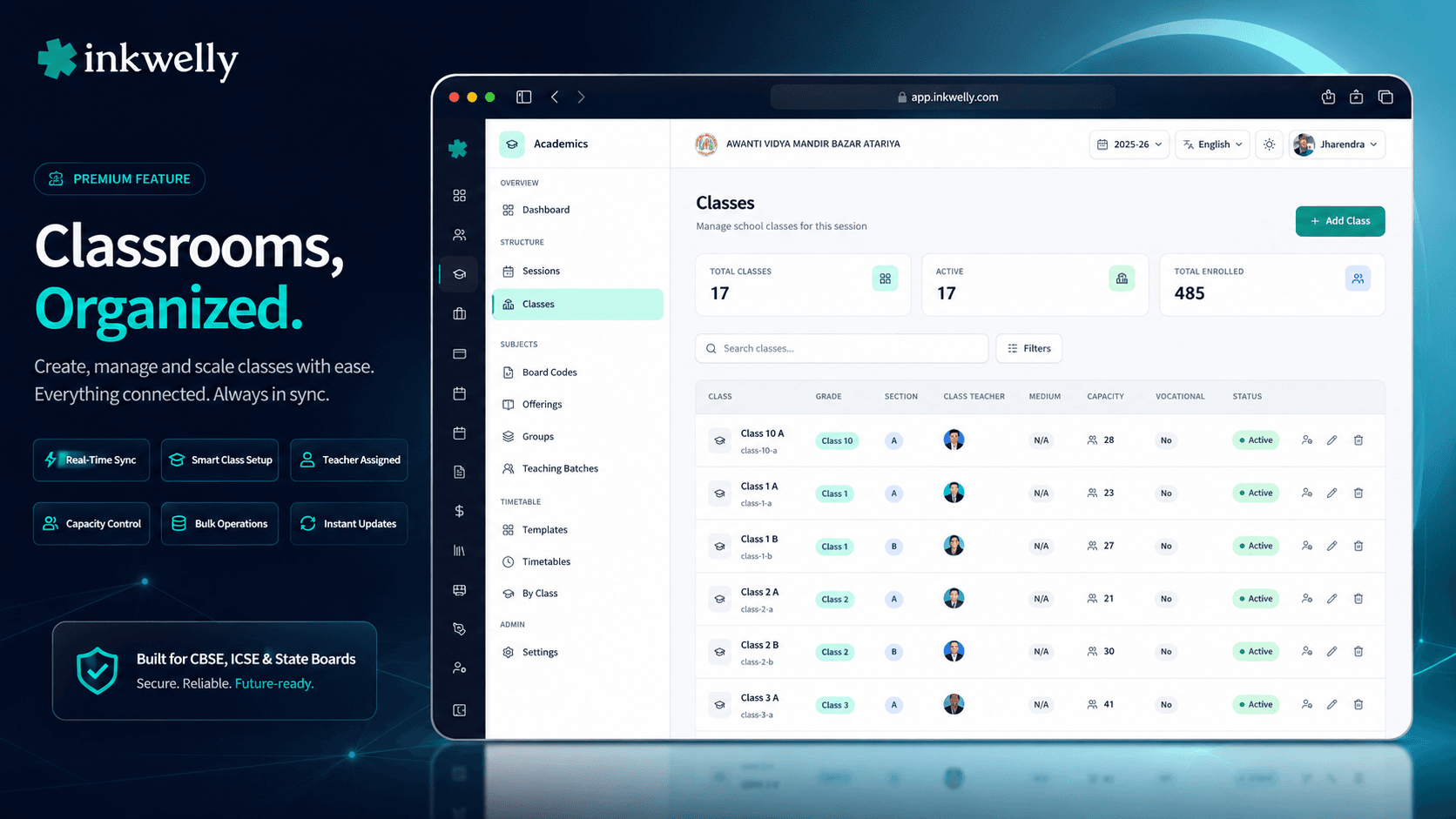
जिस class setup पर बाक़ी सब कुछ depend करता है
March का आखिरी हफ्ता, Indore के एक CBSE Tier-2 school में। Principal को 19 sections नई session के लिए confirm करनी हैं — Class 1 की 4 sections, Class 2 की 3, Class 3-8 की 2-2, plus Class 9 'A' जो नई NEP vocational track चलाएगी। Class teacher list पिछले साल के Word document में है। Medium of instruction — main school में English but State Board boarding side में Hindi — सिर्फ office assistant के दिमाग़ में। Exam coordinator पूछ रहे हैं कि Class 5 B में late admissions के लिए कितनी seats bachi हैं — दो parents reception पर खड़े हैं। किसी के पास jawab नहीं।
ज़्यादातर school ERPs में यह हर April repeat होता है। 'Class' एक flat string है — textbox में 'V-A' type करो, save, उम्मीद करो कि marksheet template recognize करे। Grade level aur section concept अलग नहीं, medium tied नहीं, capacity नहीं, class teacher relationship नहीं, NEP 2020 vocational flag नहीं। Principal जब पूछे 'Class 5 सब sections में' system clean answer नहीं दे सकता — क्योंकि Class 5 सिर्फ 'V-A', 'V-B', 'V-C' strings में छुपा है।
हमने Class Management इसी लिए बनाया — कि वो string एक structured, multi-attribute object बन जाए। Grade Level (Class 5) aur Section (A) org level पर अलग first-class entities हैं। Class जो इन्हें session के अंदर join करती है, medium of instruction, capacity, NEP vocational flag, class teacher list, aur localised name (English aur regional script दोनों में) add करती है। Inkwelly का हर दूसरा module — Students, Fees, Examinations, Attendance, Timetable — इसी structure से hang करता है।
Class create कैसे होती है
Academics → Classes → Add Class click करें। Dialog खुलता है एक structured form के साथ — single textbox नहीं।
Step 1 — Grade Level. Org-level list से pick करें: Pre-Nursery, Nursery, LKG, UKG, Class 1 से Class 12, plus अगर school कोई custom grade run करता है (Pre-K, Foundation, NIOS Year 1)। Grade levels centrally managed होते हैं — multi-school trust में हर campus same list use करता है।
Step 2 — Section. Org-level Sections list से pick करें — English-medium schools में typically A, B, C, D; IB schools में alpha, beta; Class 11/12 में Science, Commerce, Arts। Sections भी org-managed हैं।
Step 3 — Class Name. Grade Level + ' - ' + Section से auto-fill (e.g., 'Class 5 - A')। Editable on create। LocalizedTextInput field में one-click transliteration से Hindi/regional script translations add कर सकते हैं। Same class Devanagari report cards पर 'कक्षा 5 - A' के रूप में render होती है।
Step 4 — Slug. Lowercase name से auto-generate (class-5-a)। URLs aur CSV exports drive करती है। Editable अगर short handle चाहिए।
Step 5 — Medium of Instruction. 15 options pick करें: ENGLISH, HINDI, TAMIL, TELUGU, MARATHI, BENGALI, GUJARATI, KANNADA, MALAYALAM, PUNJABI, URDU, ASSAMESE, ODIA, SANSKRIT, OTHER। Medium marksheet language defaults, parent app language hints, question-paper language, aur ID-card text orientation (Urdu में RTL) drive करता है।
Step 6 — Max Capacity. Optional integer (40, 45, 50)। Empty means no enforced limit। Students module admission पर capacity check करता है — March admission rush में useful जब 60 parents Class 1 A की 4 last seats माँग रहे हों।
Step 7 — NEP Vocational Toggle. Single switch — 'Does this class offer vocational courses?'. Class 9-12 NEP 2020 vocational tracks (Beauty & Wellness, IT, Retail, Agriculture, etc.) के लिए ON करें। Subjects module academic subjects के साथ vocational catalogue open करता है।
Step 8 — Active toggle. New classes default Active होती हैं। Inactive class new student enrollments refuse करती है — mid-year section close या पुरानी को reopen करने में useful।
Create-class form का हर field, aur वो क्या drive करता है
- Grade Level (org-level entity) — academic level (Class 5) aur section letter (A) alag। Promotion logic, fee structure mapping, syllabus assignment drive करता है।
- Section (org-level entity) — letter या stream tag। Roll number scope, class teacher allocation, attendance register generation drive करता है।
- Class Name (multi-language) — product में दिखाई देने वाला human-readable name। English aur
nameI18n(locale → translation) दोनों store। 'कक्षा 5 - A' Devanagari में, Tamil/Marathi/Bengali में भी। - Slug (auto-generated) — URL handle, CSV reference, sortable।
class-5-acanonical handle। - Medium of Instruction (15 options) — ENGLISH, HINDI, TAMIL, TELUGU, MARATHI, BENGALI, GUJARATI, KANNADA, MALAYALAM, PUNJABI, URDU, ASSAMESE, ODIA, SANSKRIT, OTHER।
- Max Students Capacity — admission validation। Students module 'X / Y seats filled' surface करता है।
- Enables Vocational Education (NEP 2020 toggle) — Subjects module का vocational catalogue unlock। Beauty & Wellness, IT, Retail, Agriculture, Health Care, Banking & Finance।
- Active flag — new admissions accept करनी है या नहीं। Inactive classes भी student roster, attendance, exam history hold करती हैं — closed for writes, not deleted।
- Class Teachers (separate dialog) — multiple teachers per class। Exactly एक 'Primary' (Crown badge) — report cards, transfer certificates, parent-meeting notes के default signatory।
- Enrolled Student Count (computed) — read-only, live update। Classes table aur dashboard tiles पर surface।
15 mediums of instruction — सिर्फ English aur Hindi नहीं
ज़्यादातर school ERPs दो mediums offer करते हैं: English aur Hindi। वो Bhopal के CBSE day school के लिए thik है but Coimbatore के Tamil Medium State Board school, Pune के Marathi Medium SSC school, Kolkata के Bengali Medium Madhyamik school, Hyderabad के Urdu Medium Madrasa school, Varanasi के Sanskrit Pathshala, Bhubaneswar के Odia Medium school के लिए नहीं।
Inkwelly 15 mediums out of the box ship करता है: ENGLISH, HINDI, TAMIL, TELUGU, MARATHI, BENGALI, GUJARATI, KANNADA, MALAYALAM, PUNJABI, URDU, ASSAMESE, ODIA, SANSKRIT, OTHER। हर एक class में default language drive करता है — question paper language, parent app interface, marksheet text, ID card text orientation (Urdu में RTL)। Multi-medium schools में हर section अलग medium carry कर सकती है — Class 5 A English, Class 5 B Hindi, Class 5 C Marathi — same school, same Inkwelly install।
Class names आपके school की actual language में render होते हैं
Hindi-medium UP schools में issued transfer certificates पर class 'कक्षा 5 - A' दिखानी चाहिए — Devanagari Bonafide Certificate अगर 'Class 5 - A' Latin script में हो तो Bahraich या Gorakhpur के next school के admission desk पर reject हो जाएगी।
Inkwelly का class name field LocalizedTextInput use करता है one-click transliteration के साथ। English name type करें, Languages icon click करें, Inkwelly Devanagari/Tamil/Bengali/Marathi version auto-suggest करता है। Edit करें अगर ज़रूरत। Save once। Reports, marksheets, ID cards, parent app, attendance registers parent की preferred language per right script auto-pick करते हैं। 'कक्षा 5 - A' Devanagari marksheet पर, 'Class 5 - A' English-medium ID card पर — same record, two scripts, no duplicate data entry।
NEP 2020 vocational toggle — एक switch, vocational subjects unlocked
NEP 2020 mandate करती है कि 50 percent CBSE schools 2025 तक एक vocational subject offer करें। Class 9-12 vocational tracks — Beauty & Wellness (BW), Information Technology (IT), Retail, Agriculture, Health Care, Banking & Finance, Tourism & Hospitality, Multimedia — हर एक का अपना theory + practical + internal split, board codes, capacity limits aur lab requirements हैं।
Vocational Education toggle relevant class पर ON करें (typically Class 9 से आगे)। Subjects module academic subjects के साथ vocational catalogue open करता है। Exam coordinator को right max-marks split (often 30 theory + 50 practical + 20 internal); timetable in-charge को vocational period slots; report card generator NEP-compliant marksheets emit करता है जो CBSE Regional Office accept करती है। Schools जो vocational tracks नहीं चलाते toggle off रखते हैं — UI clean रहती है।
Class teacher assignment — multiple teachers, एक Primary
ज़्यादातर CBSE primary sections में एक class teacher। CBSE secondary sections में दो — primary class teacher aur co-teacher। International schools में तीन — homeroom, mentor, advisor। Data model को तीनों support करने चाहिए।
Manage Teachers icon class row पर click करें — dialog current teacher list के साथ खुलता है। किसी भी active employee को name, employee ID, mobile या email से search करें; picker employee photos, full names, department दिखाता है। Click करके assign। Exactly एक teacher को Primary (Crown badge) mark करें — वो teacher report cards, transfer certificates, parent-meeting notes की default signatory बन जाती है aur parent app में 'class teacher' contact के रूप में दिखाई देती है।
Crown को दूसरे teacher पर toggle करके re-assign। Trash icon से teacher remove (audit log record करता है किसने, कब, क्यों)। Primary हमेशा exist करतe है — last Primary remove करने से पहले दूसरे teacher को promote करना होगा — dialog cleanly block करता है।
“Pehle har section ke liye Excel mein 'V-A', 'V-B' likhna padta tha, aur class teacher ka naam alag-se Word document mein। NEP vocational shuru kiya toh ek aur Excel। Inkwelly mein ek dialog — Class 9 A, English medium, capacity 35, Mrs Sharma primary teacher, vocational ON — ho gaya। Hindi medium ke parents ke liye class name 'कक्षा 9 - A' bhi automatic।”
Real classroom scenarios जिनमें यह structure महत्वपूर्ण है
1. Mid-year admission overflow. Class 1 A capacity 40 पर है। July 12th को parent EWS certificate के साथ आते हैं। Office assistant student enroll करने की कोशिश करती है — Inkwelly cap check करता है, '40 / 40 seats filled' warning surface करता है, Class 1 B (32 / 40) suggest करता है।
2. Class 9 में NEP vocational launch. May 2026 में school decide करता है कि Class 9 की एक section Beauty & Wellness vocational track के साथ open करनी है। Principal Classes खोलती हैं → Class 9 B find → Enables Vocational Education ON। Subjects module BW vocational subjects surface करता है।
3. Bengali Medium State Board section. Kolkata school CBSE English Medium classes A, B, C aur Madhyamik Bengali Medium classes D, E run करता है। हर section की medium independently set। Same school, same Inkwelly install, no module switching।
4. CBSE renewal inspection. CBSE Regional Officer पूछता है: '2024-25 में Class 8 की कितनी sections, medium, class teacher?' Principal Academic Sessions → 2024-25 switch → Classes → Grade Level = Class 8 filter — चार rows, हर एक section, medium, primary class teacher, enrolled count। Screenshot → attach → done।
5. Class teacher mid-year exit. October में Mrs Sharma resign करती हैं। वो Class 5 A की primary class teacher थीं। Class Teachers dialog → Mr Singh को Primary पर promote (Crown moves) → Mrs Sharma remove। Next report card automatic Mr Singh को signatory दिखाता है।
अपने school के grade और section list पर class management देखें
30-minute walkthrough — हम आपकी real grade levels aur sections layेंगे, next session की classes live setup करेंगे, aur दिखाएँगे कैसे हर module — fees, attendance, marksheets — structure inherit करता है।
Limits, safety aur small print
Grade Level aur Section org-managed हैं, school-managed नहीं। Multi-school trust जो 7 schools run करता है — same Grade Level (Class 5) aur Section (A) हर campus में same meaning carry करना चाहिए। Custom grade ('Pre-K Foundation') या special section ('Beta') add करने के लिए org admin org-level list एक बार update करता है, हर school reference कर सकता है।
Class name auto-sync sirf create mode में. Create में Grade या Section change करने पर name aur slug auto-regenerate। Edit mode में name preserve — manually-tuned 'Class 5 - Section Alpha' वैसे ही stays।
Per session slug uniqueness. Same session में दो classes same slug share नहीं कर सकतीं। Validator CLASS_ALREADY_EXISTS return करता है।
Capacity soft-warn है, hard block नहीं। Capacity exceed होने पर Students module warning दिखाता है but override allow करता है (audit log)। Indian schools की reality — sibling, RTE-EWS candidate, board-mandated transfer के लिए principal extra admission accept कर सकती हैं।
Multi-language name field LocalizedTextInput require करता है। Custom translations nameI18n (locale → translation record) में live करती हैं। Latin digits Latin ही रहते हैं Hindi names में भी ('कक्षा 5 - A', not 'कक्षा ५ - A') — validator enforce करता है।
Class teacher Primary mandatory. Class कितने भी teachers carry कर सकती है but exactly एक Primary चाहिए। Dialog 'last Primary remove' block करता है — पहले दूसरे को promote करें।
हर class-level change पर audit log. Create, update, delete, teacher add/remove, primary promotion, vocational toggle — हर एक audit log में write user, timestamp, IP, previous value, new value के साथ। CBSE / ICSE / State Board audits aur parent disputes के लिए exportable।
Soft delete with 90-day restore. Class delete soft-deleted state में move करती है — row default views से hide but 90 days तक restorable। 90 days के बाद system permanently archive करता है।
Multi-tenant strict isolation. Classes आपके school within organisation के scoped हैं। Cross-tenant writes never possible — API guard layer पर enforced।
किस मॉड्यूल का हिस्सा
1 moduleअक्सर पूछे गए सवाल
8 सवालक्या same school में multiple mediums of instruction चला सकते हैं?
हाँ। हर class अपनी medium independently carry करती है। एक school Class 5 A English में, Class 5 B Hindi में, Class 5 C Marathi में simultaneously चला सकता है — same school, same Inkwelly install। Medium उस class के question papers, marksheets, parent app interface, aur ID card text orientation की default language drive करता है। एक section का medium change करना दूसरी section को नहीं बदलता।
Vocational toggle Subjects module से कैसे interact करता है?
जब Enables Vocational Education किसी class के लिए ON करते हैं (typically Class 9 से आगे), Subjects module NEP 2020 vocational catalogue surface करता है — Beauty & Wellness, Information Technology, Retail, Agriculture, Health Care, Banking & Finance, Tourism & Hospitality, Multimedia — academic subjects के साथ। हर vocational subject CBSE NEP guidelines per right theory + practical + internal max-marks split के साथ ship होता है। Schools जो vocational tracks नहीं चलाते toggle off रखते हैं।
नई session शुरू होने पर पिछले साल की classes का क्या होता है?
कुछ destructive नहीं। पिछले साल की classes previous session के scope में रहती हैं — rosters, class teachers, attendance records, marksheets aur report cards सब preserved। नई session empty शुरू होती है; उसके लिए new classes बनाएँ (या Promotion module से last session की class structure forward map करें in one batch)। दोनों sessions side by side queryable रहती हैं — CBSE renewal audits aur past Transfer Certificates re-issue के लिए essential।
क्या एक class को एक से ज़्यादा teachers assign कर सकते हैं?
हाँ। Class Teachers dialog any number of teachers per class support करता है। Exactly एक को Primary (Crown badge) mark करना पड़ता है — वो report cards, transfer certificates aur parent-meeting notes का default signatory होता है। Co-teachers, mentors, advisors, NEP vocational coordinators — जितने चाहिए add करें। Primary कभी भी re-promote हो सकता है किसी और teacher पर Crown toggle करके।
क्या multi-language class name report cards पर automatic दिखता है?
हाँ। जब parent की preferred language Hindi (या enabled regional) पर set होती है, Inkwelly का हर generated document — marksheets, transfer certificates, ID cards, parent-meeting invites, fee receipts — `nameI18n` से localized class name automatic pick करता है। English-medium ID card 'Class 5 - A' print करता है; Devanagari Bonafide Certificate 'कक्षा 5 - A' — same record, two scripts। Latin digits (5) scripts के बीच preserved रहते हैं Inkwelly की product-wide convention के अनुसार।
क्या class capacity admissions पर hard limit है?
नहीं — warning है, block नहीं। Students admission UI capacity admission time पर check करता है aur 'X / Y seats filled' surface करता है ताकि office incoming requests triage करे। Principal capacity के बाद admission accept कर सकती हैं (override audit-logged) — sibling admissions, RTE 25% reservation candidates, board-mandated transfers के लिए important। Capacity guidance tool है, regulatory cap नहीं।
Admissions होने के बाद class delete कर सकते हैं क्या?
Soft-delete only। Class hidden state में move होती है but 90 days तक restorable रहती है, aur उसका student roster, attendance history, fee records aur exam results intact रहते हैं। 90 days के बाद system permanently archive करता है। Class में new admissions रोकने के लिए history खोए बिना — Active off toggle करें — class read-only हो जाती है but data fully queryable रहता है।
Classes कौन create या edit कर सकता है?
Default में, principal aur school admin roles। Class teachers अपनी assigned class details देख सकती हैं but दूसरी classes create या edit नहीं कर सकतीं। Per-role permissions school IAM settings से configurable — जैसे academic coordinator को class create/edit rights दे सकते हैं full admin access दिए बिना। हर class change audit-logged regardless of role।
आपको ये भी पसंद आ सकता है
3 लेखInkwelly आपके स्कूल पर — खुद देखें
30 मिनट का डेमो। आपके मौजूदा ERP को आपके साथ खोलकर, कॉल पर ही आपका डेटा Inkwelly में लोड करते हैं। कॉल ख़त्म होते-होते एक तय तारीख़ का गो-लाइव प्लान आपके हाथ में।