Classes that match your school, exactly. Grade × section, 15 mediums, NEP-ready.
A class in Inkwelly is a real classroom — Grade 5 Section A, English medium, capacity 40, with Mrs Verma as the primary class teacher and Mr Singh as the co-teacher. Every class lives inside a single academic session, supports 15 mediums of instruction including Hindi, Tamil, Marathi, Bengali, Urdu and Sanskrit, and unlocks NEP 2020 vocational streams with one toggle. Bilingual class names render in both English and Devanagari (or your enabled regional script) on transfer certificates, ID cards and report cards.
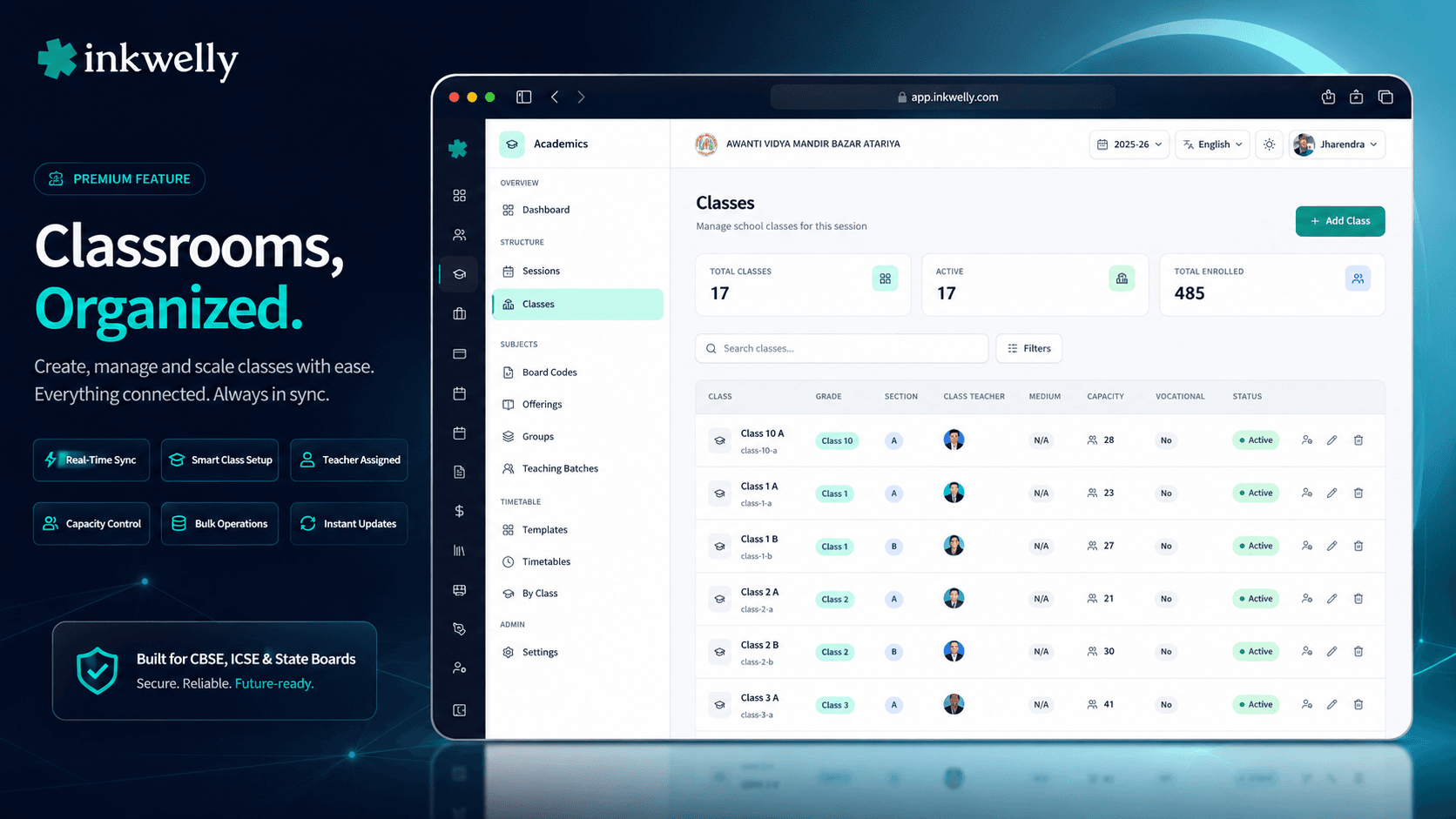
Why class setup is the foundation everything else depends on
It is the last week of March in a CBSE Tier-2 school in Indore. The principal has 19 sections to confirm for next session — 4 sections of Class 1, 3 of Class 2, 2 each from Class 3 through Class 8, plus the Class 9 ‘A’ group running the new NEP vocational track. The class teacher list still has last year's allocations from a Word document. The medium of instruction — English for the main school but Hindi for the State Board boarding side — lives in the office assistant's head. The exam coordinator is asking how many seats are left for late admissions in Class 5 B because two parents are waiting at reception. Nobody has the answer.
In most school ERPs, this scramble repeats every April. The 'class' is a flat string — type 'V-A' in a textbox, save, hope the marksheet template recognises it, hope the report card template handles the hyphen. There is no concept of a grade level separate from a section, no medium of instruction tied to the class, no capacity, no class teacher relationship, no vocational flag for the NEP 2020 stream. When the principal asks for 'Class 5 across all sections', the system cannot give a clean answer because Class 5 is not a thing — only the strings 'V-A', 'V-B', 'V-C' exist.
We built Class Management to replace that string with a structured, multi-attribute object. Grade Level (Class 5) and Section (A) are separate first-class entities at the org level. A class joins them inside a session, adds medium of instruction, capacity, NEP vocational flag, class teacher list, and a localised name that renders in English and your regional script. Every other Inkwelly module — Students, Fees, Examinations, Attendance, Timetable — hangs off this structure.
How class creation works
Open Academics → Classes → click Add Class. The dialog opens with a structured form, not a single textbox.
Step 1 — Grade Level. Pick from the org-level list: Pre-Nursery, Nursery, LKG, UKG, Class 1 through Class 12, plus any custom grades your school runs (e.g., Pre-K, Foundation, NIOS Year 1). Grade levels are managed centrally so a multi-school trust uses the same list across every campus.
Step 2 — Section. Pick from the org-level Sections list — typically A, B, C, D for English-medium schools; A, B, C, alpha, beta for IB schools; Science, Commerce, Arts for Class 11/12. Sections are also org-managed so the same letter means the same thing across schools.
Step 3 — Class Name. Auto-fills from Grade Level Name + ' - ' + Section Name — e.g., 'Class 5 - A'. Editable on create. Adds Hindi/regional script translations via the LocalizedTextInput field with one-click transliteration. The same class renders as 'कक्षा 5 - A' on Hindi-medium parent app screens and Devanagari report cards.
Step 4 — Slug. Auto-generated as the lowercased name (class-5-a). Drives URLs and CSV exports. Editable if you want a shorter handle.
Step 5 — Medium of Instruction. Pick from 15 options: ENGLISH, HINDI, TAMIL, TELUGU, MARATHI, BENGALI, GUJARATI, KANNADA, MALAYALAM, PUNJABI, URDU, ASSAMESE, ODIA, SANSKRIT, OTHER. The medium drives marksheet language defaults, parent app language hints, the question-paper language for assessments, and ID-card text orientation for RTL scripts (Urdu).
Step 6 — Max Capacity. Optional integer (e.g., 40, 45, 50). Empty means no enforced limit. The Students module checks capacity at admission time and warns if a section is full — helpful when March admission rush has 60 parents asking for the last 4 seats in Class 1 A.
Step 7 — NEP Vocational Toggle. A single switch — 'Does this class offer vocational courses?'. Turn it on for the Class 9-12 NEP 2020 vocational tracks (Beauty & Wellness, IT, Retail, Agriculture, etc.) so the Subjects module opens its vocational catalogue alongside the standard academic subjects.
Step 8 — Active toggle. New classes default to Active. An inactive class refuses new student enrollments — useful for closing a section mid-year or reopening one previously closed.
Every field on the create-class form, with what it actually drives
- Grade Level (org-level entity) — separates the academic level (Class 5) from the section letter (A). Drives promotion logic, fee structure mapping, syllabus assignment.
- Section (org-level entity) — the letter or stream tag. Drives roll number assignment scope, class teacher allocation per section, attendance register generation.
- Class Name (multi-language) — the human-readable name shown across the product. Stored as both English and
nameI18n(a record of locale → translation) so 'कक्षा 5 - A' or 'Tamil', 'Marathi', 'Bengali' versions render automatically. - Slug (auto-generated) — URL handle, exportable CSV reference, sortable across modules.
class-5-ais the canonical handle for the class. - Medium of Instruction (15 options) — ENGLISH, HINDI, TAMIL, TELUGU, MARATHI, BENGALI, GUJARATI, KANNADA, MALAYALAM, PUNJABI, URDU, ASSAMESE, ODIA, SANSKRIT, OTHER. Drives default question-paper language, marksheet language, parent app language for the class.
- Max Students Capacity — admission validation. The Students module surfaces 'X / Y seats filled' across Class 5 sections, helping the office triage admission decisions in March.
- Enables Vocational Education (NEP 2020 toggle) — unlocks the vocational subjects catalogue inside the Subjects module: Beauty & Wellness, IT, Retail, Agriculture, Health Care, Banking & Finance, etc.
- Active flag — controls whether the class accepts new admissions. Inactive classes still hold their student roster, attendance and exam history — they're closed for writes, not deleted.
- Class Teachers (separate dialog) — multiple teachers can be assigned per class. Mark one as 'Primary' (Crown badge in the UI) — the primary class teacher is the default signatory on report cards, transfer certificates and parent-meeting notes.
- Enrolled Student Count (computed) — read-only, updated live as admissions and exits happen. Surfaced on the Classes table and on every dashboard tile the principal opens.
15 mediums of instruction — not just English and Hindi
Most school ERPs offer two mediums: English and Hindi. That covers the CBSE day school in Bhopal but not the Tamil Medium State Board school in Coimbatore, the Marathi Medium SSC school in Pune, the Bengali Medium Madhyamik school in Kolkata, the Urdu Medium Madrasa school in Hyderabad, the Sanskrit Pathshala in Varanasi, the Odia Medium school in Bhubaneswar.
Inkwelly ships 15 mediums out of the box: ENGLISH, HINDI, TAMIL, TELUGU, MARATHI, BENGALI, GUJARATI, KANNADA, MALAYALAM, PUNJABI, URDU, ASSAMESE, ODIA, SANSKRIT, OTHER. Each one drives the default language across the class — question paper language, parent app interface, marksheet text, ID card text orientation (RTL for Urdu, LTR for everyone else). For schools that run multiple mediums, each section can carry a different medium: Class 5 A in English, Class 5 B in Hindi, Class 5 C in Marathi — all in the same school, all in the same Inkwelly install.
Class names render in your school's actual language
Transfer certificates issued in Hindi-medium UP schools must show the class as 'कक्षा 5 - A' — a Devanagari Bonafide Certificate that says 'Class 5 - A' in Latin script will be rejected at the next school's admission desk in Bahraich or Gorakhpur.
Inkwelly's class name field uses LocalizedTextInput with one-click transliteration. Type the English name, click the Languages icon, and Inkwelly auto-suggests the Devanagari, Tamil, Bengali, Marathi version (whichever your school has enabled). Edit if needed. Save once. Reports, marksheets, ID cards, parent app, and attendance registers auto-pick the right script per parent's preferred language. The class name 'कक्षा 5 - A' shows on a Devanagari marksheet, while 'Class 5 - A' shows on the school's English-medium ID card — same record, two scripts, no duplicate data entry.
NEP 2020 vocational toggle — one switch, vocational subjects unlocked
The National Education Policy 2020 mandates that 50 percent of CBSE schools offer at least one vocational subject by 2025. The Class 9-12 vocational tracks — Beauty & Wellness (BW), Information Technology (IT), Retail, Agriculture, Health Care, Banking & Finance, Tourism & Hospitality, Multimedia — each have their own theory + practical + internal split, board codes, capacity limits and lab requirements.
Flip the Vocational Education toggle on for the relevant class (typically Class 9 onwards). The Subjects module opens its vocational catalogue alongside the standard academic subjects. The exam coordinator gets the right max-marks split (often 30 theory + 50 practical + 20 internal); the timetable in-charge sees vocational period slots; the report card generator emits NEP-compliant marksheets that the CBSE Regional Office accepts. Schools that do not run vocational tracks leave the toggle off — their UI stays clean, no extra fields appear.
Class teacher assignment — multiple teachers, one Primary
Most CBSE primary sections have one class teacher. Most CBSE secondary sections have two — a primary class teacher and a co-teacher. Most international schools have three — homeroom, mentor, advisor. The data model has to support all three.
Click the Manage Teachers icon on a class row — a dialog opens with the current teacher list. Search for any active employee by name, employee ID, mobile or email; the picker shows employee photos, full names and department. Click to assign. Mark exactly one teacher as Primary (Crown badge) — that teacher becomes the default signatory on report cards, transfer certificates, parent-meeting notes, and the 'class teacher' contact shown to parents in the parent app.
Re-assign by toggling the Crown to a different teacher. Remove a teacher with the Trash icon (audit log records who, when, why). The Primary always exists — you cannot remove the last Primary without first promoting another teacher — the dialog blocks that operation cleanly.
“Pehle har section ke liye Excel mein 'V-A', 'V-B' likhna padta tha, aur class teacher ka naam alag-se Word document mein। NEP vocational shuru kiya toh ek aur Excel। Inkwelly mein ek dialog — Class 9 A, English medium, capacity 35, Mrs Sharma primary teacher, vocational ON — ho gaya। Hindi medium ke parents ke liye class name 'कक्षा 9 - A' bhi automatic।”
Real classroom scenarios where this structure earns its keep
1. Mid-year admission overflow management. Class 1 A is at capacity 40. A parent walks in on July 12th with the EWS certificate ready. The office assistant tries to enroll the student — Inkwelly checks the cap, surfaces the warning '40 / 40 seats filled', and suggests Class 1 B (currently 32 / 40). Conversation with the parent happens in 30 seconds; admission moves forward in Class 1 B without manual seat-counting.
2. NEP vocational launch in Class 9. The school decides in May 2026 to open one Class 9 section with the Beauty & Wellness vocational track. The principal opens Classes → finds Class 9 B → toggles Enables Vocational Education to ON. The Subjects module immediately surfaces the BW vocational subjects under that class. The exam coordinator runs the new term's assessment plan with the right theory/practical/internal split. CBSE renewal paperwork next year shows the school is NEP-compliant.
3. Bengali Medium State Board section. A Kolkata school runs CBSE for English Medium classes A, B, C and Madhyamik (West Bengal Board) for Bengali Medium classes D, E. Each section's medium is set independently. The class teacher for Section D types her notes in Bengali, the parent app surfaces in Bengali for those parents, the report card prints in Bengali for them — while Sections A-C operate in English. Same school, same Inkwelly install, no module switching.
4. CBSE renewal inspection. The CBSE Regional Officer asks: 'How many sections of Class 8 ran in 2024-25, what was the medium for each, and who was the class teacher?' The principal opens Academic Sessions → switches to 2024-25 → opens Classes → filters to Grade Level = Class 8 — four rows appear, each with section, medium, primary class teacher and enrolled student count. Screenshot → attach → done.
5. Class teacher exit handling. Mrs Sharma resigns in October. She was the primary class teacher for Class 5 A. Open Class Teachers dialog → promote Mr Singh to Primary (Crown moves) → remove Mrs Sharma. The next report card automatically shows Mr Singh as the signatory; the parent app updates the 'class teacher' contact card overnight. No paperwork, no missed handover.
Common operations Indian schools run on classes through the year
- March promotion week — last year's Class 4 A becomes this year's Class 5 A; Inkwelly's Promotion module maps students into the new session's classes in one batch.
- April section creation — add a new section (Class 1 D, Class 5 C) when admissions exceed capacity in the existing sections.
- May vocational toggle — enable Vocational Education for Class 9 sections opening NEP tracks for the new academic year.
- June primary teacher reassignment — confirm the year's class teacher allocations after the May staff appraisal cycle.
- July admission overflow — capacity-aware admission UI surfaces 'X / Y seats filled' to triage incoming admission requests.
- October mid-year teacher exit — promote co-teacher to Primary and remove exiting teacher; report cards update automatically.
- November parent-teacher meeting prep — export class roster + class teacher contact + parent contact in one CSV per class.
- February late-year inactive flag — close Class 12 sections to new admissions after final exams while keeping all academic history intact.
- March CBSE renewal export — prior-year section list + class teacher allocation + medium + capacity, exportable for affiliation paperwork.
- April class deletion / archive — sections that did not run can be marked inactive (preserving history) rather than deleted.
See class management on your school's grade and section list
30-minute walkthrough — we'll bring up your real grade levels and sections, set up next session's classes live with you, and show how every other module — fees, attendance, marksheets — inherits the structure.
Limits, safety, and the small print
Grade Level and Section are org-managed, not school-managed. This is intentional. A multi-school trust running 7 schools needs the same Grade Level (Class 5) and the same Section (A) to mean the same thing across every campus, so cross-school reports add up correctly. To add a custom grade like 'Pre-K Foundation' or a special section like 'Beta', the org admin updates the org-level list once, and every school can reference it.
Class name auto-syncs in create mode only. When you change Grade or Section during create, the name and slug auto-regenerate. In edit mode, the name is preserved — so a manually-tuned 'Class 5 - Section Alpha' stays as you wrote it.
Slug uniqueness per session. Two classes in the same session cannot share a slug. The validator returns CLASS_ALREADY_EXISTS if the combination is duplicate — the dialog surfaces 'This class combination already exists for this session.' Edit the slug or pick a different section.
Capacity is a soft warn, not a hard block. When admission exceeds capacity, the Students module shows a warning but allows the override (with audit log). This matches the reality of Indian schools — the principal sometimes accepts an extra admission for a sibling, an EWS-RTE candidate, or a board-mandated transfer.
Multi-language name field requires LocalizedTextInput. Custom translations live in nameI18n (a record of locale → translation). The component handles transliteration suggestions on first edit. Latin digits stay Latin even in Hindi names ('कक्षा 5 - A', not 'कक्षा ५ - A') — enforced by the validator.
Class teacher Primary is mandatory. A class can have any number of teachers, but exactly one must be Primary. The dialog blocks 'remove last Primary' — first promote another teacher.
Audit log on every class-level change. Create, update, delete, teacher add/remove, primary promotion, vocational toggle — each writes to the audit log with user, timestamp, IP, previous value, new value. Exportable for CBSE / ICSE / State Board audits and parent disputes.
Soft delete with 90-day restore. Deleting a class moves it to a soft-deleted state — the row hides from default views but remains restorable for 90 days. After 90 days the system permanently archives. Useful when the principal accidentally deletes 'Class 11 Commerce' instead of 'Class 11 Science'.
Multi-tenant strict isolation. Like every Inkwelly module, classes are scoped to your school within your organisation. A multi-school trust admin can view (not mutate) cross-school class lists from the org dashboard for consolidated reporting. Cross-tenant writes are never possible — enforced at the API guard layer.
Belongs to
1 moduleFrequently asked
8 questionsCan I run multiple mediums of instruction in the same school?
Yes. Each class carries its own medium independently. A school can run Class 5 A in English, Class 5 B in Hindi, Class 5 C in Marathi simultaneously — same school, same Inkwelly install. The medium drives the default language for that class's question papers, marksheets, parent app interface, and ID card text orientation. Changing one section's medium does not affect any other section.
How does the vocational toggle interact with the Subjects module?
When you turn on Enables Vocational Education for a class (typically Class 9 onwards), the Subjects module surfaces the NEP 2020 vocational catalogue — Beauty & Wellness, Information Technology, Retail, Agriculture, Health Care, Banking & Finance, Tourism & Hospitality, Multimedia — alongside the standard academic subjects. Each vocational subject ships with the right theory + practical + internal max-marks split per CBSE NEP guidelines. Schools that don't run vocational tracks leave the toggle off; the UI stays clean.
What happens to last year's classes when the new session starts?
Nothing destructive. Last year's classes remain in the previous session's scope — the rosters, class teachers, attendance records, marksheets and report cards are all preserved. The new session starts empty; you create new classes for it (or use the Promotion module to map last session's class structure forward in one batch). Both sessions remain queryable side by side, which is essential for CBSE renewal audits and re-issuing past Transfer Certificates.
Can I assign more than one class teacher to a class?
Yes. The Class Teachers dialog supports any number of teachers per class. Exactly one must be marked Primary (Crown badge) — that teacher is the default signatory on report cards, transfer certificates and parent-meeting notes. Co-teachers, mentors, advisors, NEP vocational coordinators — add as many as needed. The Primary can be re-promoted at any time by toggling the Crown to a different teacher.
Does the multi-language class name show up automatically on report cards?
Yes. When a parent's preferred language is set to Hindi (or your enabled regional language), every Inkwelly-generated document for that parent — marksheets, transfer certificates, ID cards, parent-meeting invites, fee receipts — picks the localized class name from `nameI18n` automatically. The English-medium ID card prints 'Class 5 - A'; the Devanagari Bonafide Certificate prints 'कक्षा 5 - A' — same record, two scripts. Latin digits (5) are preserved across scripts to match Inkwelly's product-wide convention.
Is class capacity a hard limit on admissions?
No — it's a warning, not a block. The Students admission UI checks capacity at admission time and surfaces 'X / Y seats filled' so the office triages incoming requests. The principal can override and accept an admission past capacity (every override is audit-logged) — important for sibling admissions, RTE 25% reservation candidates, or board-mandated transfers. Capacity is a guidance tool, not a regulatory cap.
Can I delete a class after admissions have happened?
Soft-delete only. The class moves to a hidden state but remains restorable for 90 days, and its student roster, attendance history, fee records and exam results stay intact. After 90 days the system permanently archives. To stop new admissions to a class without losing its history, toggle Active off instead — the class becomes read-only across the product but its data stays fully queryable.
Who can create or edit classes?
By default, the principal and school admin roles. Class teachers can view their assigned class details but cannot create or edit other classes. Per-role permissions are configurable from school IAM settings — for example, an academic coordinator can be granted class create/edit rights without granting full admin access. Every class change is audit-logged regardless of role.
You might also like
3 readsSee Inkwelly on your school
30-minute demo. We open your current ERP with you and load your data into Inkwelly on the call. Dated go-live plan by the end of it.