Student Information System: Every student. One record.
From admission day to the day they pass out — details, family, documents, class history and Transfer Certificate, in one place your whole school trusts.
 New admission savedAnanya Verma · Class 2TC ready to printApproved by the principalAny child, in secondsSearch by name or mobile


What is a student information system?
One record for every student.
A student information system (SIS) is school software that keeps one complete record for every student — admission details, family, documents, government IDs like APAAR and PEN, class history, promotion and Transfer Certificate. In Inkwelly, the office, the principal, teachers and parents all work from the same record.
Also called a student management system, student record system or student database software.
- Admission details02 Apr 2024
- Family & siblingsFather, mother · 1 sibling
- Documents4 of 5 verified
- Government IDsAPAAR · PEN · Aadhaar
- Class historyLKG → Class 6-B
- Transfer CertificateReady when needed
What Inkwelly Student Information System includes
- One record per student: admission details, family, siblings, documents and class history
- Search by student name, father's or mother's name, mobile, admission number, Aadhaar, APAAR or PEN
- APAAR ID, PEN and ABC ID fields, with a UDISE+ match check
- RTE 25%, category, CWSN and BPL tracking
- Document checklist with verified, to-verify and missing status
- Admission, class change, promotion, transfer and TC, re-admission and graduation in one history
- AI auto-fill of the admission form from a parent's WhatsApp message
- Parents send profile corrections from the app; the school approves them
- School-defined custom fields and admission-number rules
- Student reports with spreadsheet export
- Inkwelly AI: ask about student data in English or Hindi
- Import from Excel or another school ERP
Updated
Why schools move to a student information system
Registers. Files. Excel. Or one record.
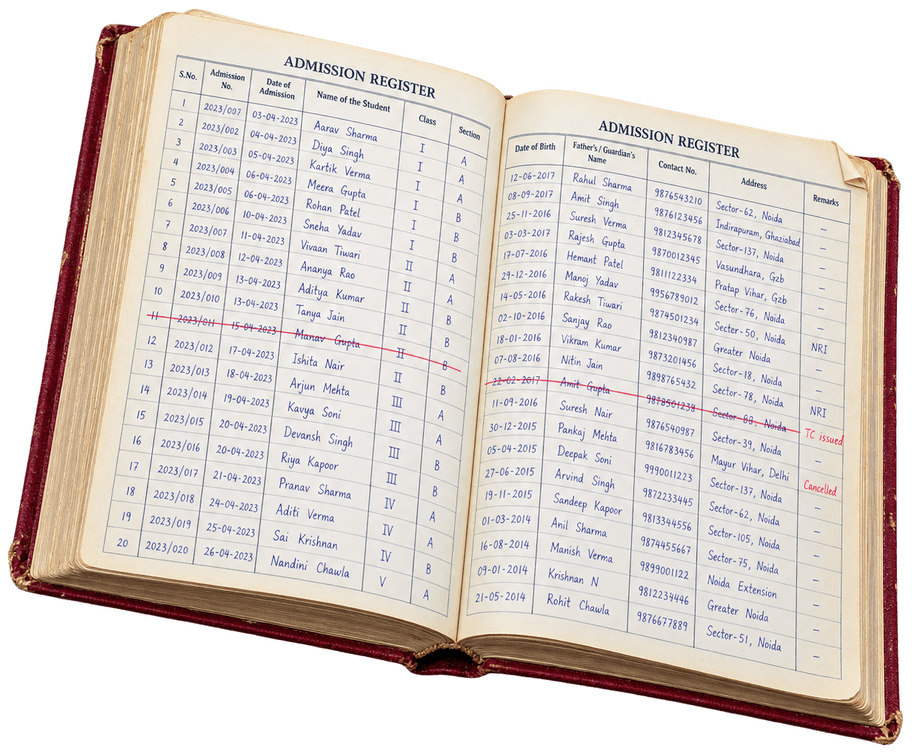
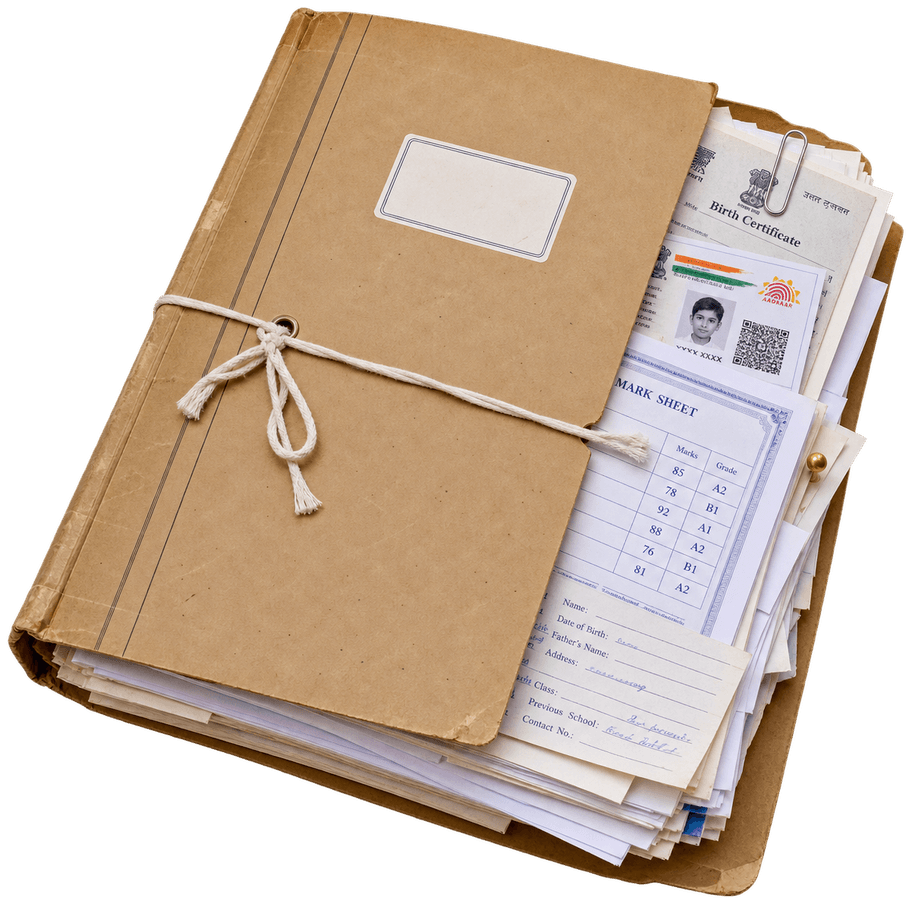
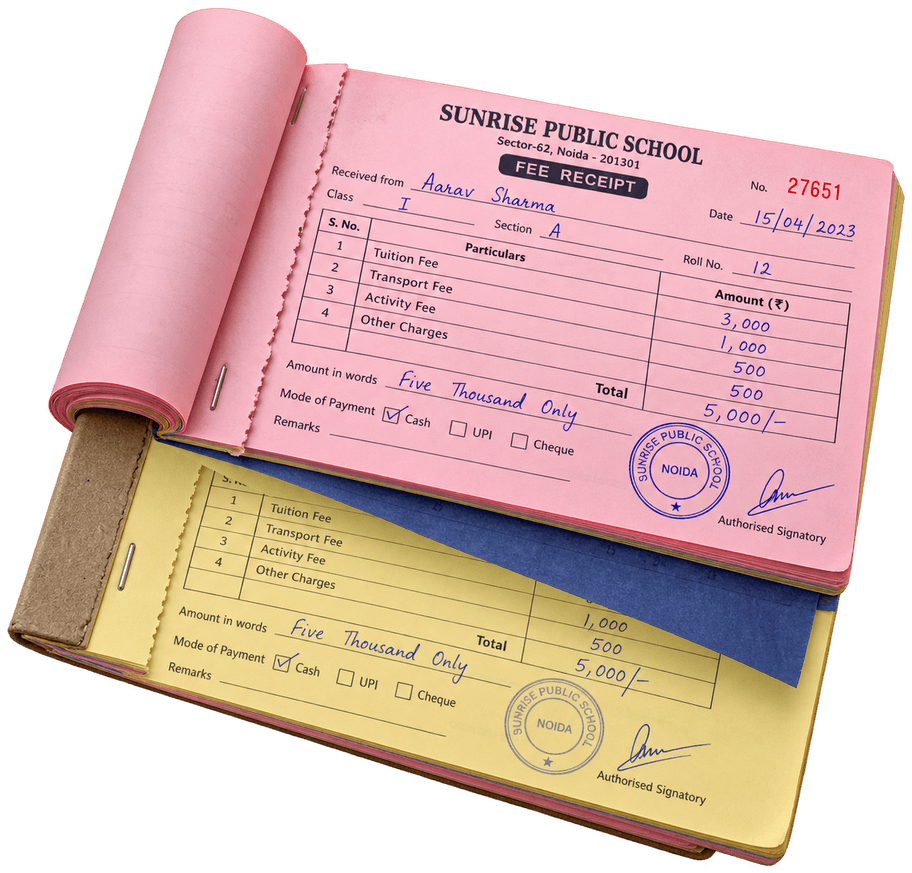
Most schools keep a child's story in five places. Inkwelly keeps it in one.
How most schools do it today
Sir, mera naya number 98765 12345 hai. Please update kar dijiye 🙏9:12 am
Aur Aarav ka TC ready hai kya? Agle hafte shift ho rahe hain9:13 am
Register check karke batata hoon11:47 am
Five places. Typed again and again. Days for a TC.
- Admission register in one cupboard, documents in another
- The same details typed again for fees, exams and ID cards
- Finding a child means flipping registers or scrolling Excel
- A TC takes days because the history is scattered
- A parent's new number reaches the office last
With Inkwelly
 Aarav SharmaActive
- Admission02 Apr 2024
- FatherRakesh Sharma
- Documents4 of 5 verified
- Fees₹5,000 paid
- APAAR · PENLinked
- TCOne click
One record. Typed once. Every module uses it.
- One record per child — details, family, documents and history
- Typed once at admission. Fees, attendance, exams and ID cards use it
- Any child found by name, father's name or mobile in seconds
- TC printed from the record after one approval
- Parents send corrections from the app. You approve them
Student search by name, father's name or mobile
Find any child. In seconds.
Type a child's name, a parent's name, a mobile number or an admission number. Two words work too — “aarav rakesh” finds the Aarav whose father is Rakesh. The right child shows up as you type.
 Aarav Sharma6-B2024/0412
 Aarav Gupta3-A2022/0187
 Diya Sharma3-A2023/0298
 Mohammed Faiz Khan9-C2019/0105
 Ishita Singh7-A2020/0451
Sample data. In your school, search also covers mothers' and guardians' names, every parent's mobile, registration numbers, Aadhaar, APAAR and PEN.
The student profile: family, documents, APAAR, PEN and UDISE+
Everything about a child. On one screen.
Built the way Indian schools keep records — family, siblings, documents and government IDs, exactly where your office expects them.
Father, mother or guardian, with one primary contact. Brothers and sisters are linked, so you see the whole family at once.
Upload, then mark verified or rejected. See which required papers are missing — for one child or the whole school.
Aadhaar, APAAR ID, PEN and ABC ID have their own fields. A UDISE+ section shows where your record and the government's differ.
A meter shows how complete each record is, and exactly what is missing.
Add the extra fields your school needs, in your own sections. No need to ask us.

Student profile
Aarav Sharma
Family
Documents
Government IDs
Your school's fields
From admission and promotion to Transfer Certificate (TC)
A record that grows up with the child.
Every class change, promotion and TC is added to the same record, year after year. Suspensions and deactivations are recorded too.
- Apr 2019Admitted · LKG-A
Admission
Fill the form, or let AI fill it from a parent's message. Student ID and admission number follow your own rules.
How it works — Admission - Jul 20211-A → 1-B
Class change
Move one child or a whole group to another section mid-year, in one go.
How it works — Class change - Every MarchPromoted · Class 2 → 3
Promotion
Promote the whole school at session end: check who is eligible, place students, carry forward fees and transport, approve. Made a mistake? Undo it.
How it works — Promotion - Mar 2023TC issued · moved to Pune
Transfer and TC
Transfer, withdrawal or migration, with an approval step. Then print the TC in your board's design.
How it works — Transfer and TC - Apr 2024Re-admitted · 4-B
Re-admission
A child who left comes back? Re-admit them with their old history intact.
- Today · 6-B
- 2033Graduated · Class 12
Graduation
When they pass out, the record stays — marked graduated, never deleted.
AI auto-fill for the student admission form
Paste a message. Get a filled form.
A parent sends the details on WhatsApp. Paste the message into the admission form and AI fills the fields. You check, then save.
New admission
AI auto-fillPasted from WhatsApp
Namaste ma'am 🙏 Admission ke liye details: Beti ka naam Ananya Verma, DOB 14/03/2018. Class 2 me admission chahiye. Papa – Manoj Verma, 99580 •••74. Mummy – Pooja Verma. Address: B-42, Sector 19, Noida. Abhi Little Flowers School, Noida me padhti hai.
10 fields filled — please review
Nothing is saved until you press Save.
APAAR, PEN, UDISE+ and RTE compliance for Indian schools
Made for Indian schools. And their paperwork.
The fields, lists and certificates that boards, UDISE+ and inspections ask for — already there.
APAAR, PEN and ABC ID
Every government ID has its own field. List the children still missing one in a click.
UDISE+ match
See where your record and UDISE+ differ, child by child, and choose which one is right.
RTE 25%
Mark RTE admissions, then count or list them for any class.
Category, CWSN and BPL
Recorded the way government forms ask for them, ready for every report.
Scholarships
Scholarships stay attached to the child and carry forward at promotion.
TC in your board's design
TC designs for CBSE, ICSE and State Boards. Duplicate and cancelled TCs stay on record.
Student management for the office, principal, teachers and parents
One record. Everyone on the same page.
Each person sees what their role allows — nothing more.
Front office
Admissions, documents and TCs — and finding a child the moment a parent walks in.
Principal
Class strength, RTE and category counts, and every approval: promotions, transfers and changes.
Class teacher
Their class's students and parents' phone numbers, on the Inkwelly app.
Parents
See their child's details in the app and ask for a correction. The office approves each change.
Ask Inkwelly AI about your student data, in English or Hindi
Ask in plain words. Get the list.
Ask in English, Hindi or Hinglish. Inkwelly AI reads your student records and answers with names and numbers — then makes the Excel, or does the work once you approve.


It answers. It also does the work.
- Act
Admit a student in one message.
It shows exactly what will happen. Nothing changes until you tap Approve.
- Reports
Excel or PDF, in seconds.
Ask for any list or summary and download it as a file.
- Cards
A child's card, in the chat.
Photo, class, family and documents — with a button to the full profile.
- Letters
Bonafide, on your letterhead.
It drafts the letter, you check it, then it issues the PDF with a serial number.
- How-to
“How do I issue a TC?”
Clear steps for any task, with a button to the right page.
- Safe by design
Your data. Your rules.
You approve every changeFollows each person's roleEvery question and action loggedNever used to train AI - AI Connect
Also in Claude and ChatGPT.
Ask about your students right inside Claude or ChatGPT — same permissions, same approvals.


See everything Inkwelly AI can do
Inkwelly AI and AI Connect come with the Premium plan. Answers above are from a sample school.
One student database for fees, attendance, exams and ID cards
Type it once. Every module uses it.
Fees, attendance, exams, ID cards and transport all read the same student record. Change a phone number once — it's right everywhere.
Student record
One profile per child. Student 360 puts fees, attendance and marks on one page.
Fees
Fee plans and dues follow the child.Attendance
Class lists come straight from the record.Exams
Report cards print the right name and roll.ID cards
Photo and details, ready to print.Transport
Bus stop and route on the profile.Library
Every student is already a member.Hostel
Rooms for boarders, from the same record.Admissions
Enquiries and applications before a child joins.Student information system features
Every feature, explained.
Each part of Student Information has its own page, with screens and steps.
AI auto-fill for admissions
Paste a parent's message, get a filled admission form.Read moreBulk import
Bring every student in from a CSV — one row makes a full record.Read moreBulk update
Fix one field for hundreds of students in one sitting.Read moreDocuments
Upload, verify and track required documents.Read moreClass change
Move students between sections mid-year.Read morePromotion
Promote the whole school at session end, with undo.Read moreTransfers and TC
Approvals, TC printing and a register of every TC.Read moreStudent reports
Build your own reports once and reuse them.Read moreTrash and restore
Deleted by mistake? Bring the record back.Read more
Switching from your current school ERP or Excel
Switching from another ERP? We move your students.
Most schools come to us from another software. Moving your student records is our job, not yours.
Extract
Students, parents, addresses and class history — from an export, your Excel sheets or whatever route works. If your vendor won't share, we work from what you have.
We do thisClean
Duplicate siblings, dead phone numbers, students who left. You only answer a short list of questions.
We do thisStage
Your students in a real school you log into and check, class by class, before anything goes live.
We do thisPick a date
You approve and choose the day. Go-live can be the next working day.
You do this
- ₹0
To move
₹0 migration, ₹0 training, ₹0 setup. Data extraction from your current system — or from Excel if the vendor won't cooperate — is on us.
- Next day
Go-live
Go-live can be the next working day. You pick the date; we don't need months of parallel running to get there.
- 90 days
Pilot
90-day paid pilot on your real data. If it isn't working at day 90, pro-rata refund and your data back in standard formats.
- India
Your data
Your data is stored in India, with daily database backups and role-based access on every screen.
Compare Inkwelly with other school softwareHow switching worksSee pricing
Student information system: questions schools ask.
A student information system (SIS) is school software that keeps one complete record for every student — admission details, family, documents, government IDs like APAAR and PEN, class history, promotion and Transfer Certificate. It is also called a student management system or student record system. In Inkwelly, the office, principal, teachers and parents all work from the same record.
A student information system (SIS) holds the student record — admission, family, documents, class history and TCs. A school ERP runs the whole school: fees, payroll, transport, exams and more. In Inkwelly, the SIS is one module of the full school ERP, so fees, attendance and exams all read the same student record.
Yes. Students come in through a CSV import where one row creates the full record — child, class, parents and address. Send us an export from your current software or your Excel sheets and we'll do the import for you, at no cost.
Yes. APAAR ID, PEN and ABC ID have their own fields, and you can list the children still missing any of them. Each record also has a UDISE+ section that shows where your data and the government's differ.
Yes. Mark a child as RTE, then count or list RTE students for any class. Caste category, CWSN and BPL are recorded too.
Start a transfer, withdrawal or migration from the student's record. Once it's approved, print the TC in your board's design. Every TC you issue stays on record, including duplicates and cancelled ones.
A guided wizard: pick the classes, check who is eligible, place students in their new sections, carry forward fees, transport and scholarships, then approve. If something goes wrong, you can undo it.
Parents can ask for a change from the Inkwelly app — personal details, parent details, address or bank details. The office sees the old and new value side by side and approves or rejects each one.
Yes. Siblings are linked on each record, so you see the whole family, and you can list the students who have a brother or sister in the school.
The record stays, marked transferred, withdrawn or graduated, with its full history. If a child comes back, you re-admit them with that history intact.
Your data is stored in India, with daily database backups and role-based access on every screen. Every module exports to standard CSV, Excel or PDF — including a full financial year for your accountant — and if you leave, we extract everything for you in those same formats. Staff see only what their role allows, and a deleted record goes to Trash first, so it can be restored.
Yes. Inkwelly works in English and Hindi.
Yes. One trust can run several schools in Inkwelly, each with its own students, and the people who manage more than one can switch between them.
Yes. The student record and the Transfer Certificate designs work for CBSE, ICSE and State Boards, and you can add any extra fields your board or state asks for.
On plans with Inkwelly AI, ask “Which students have no APAAR ID?” and get the names with their parents' numbers. Schools using the UDISE+ module also get a board of every student missing an Aadhaar, APAAR ID or PEN, with reminders to parents.
Once your UDISE+ data is synced, each student record has a UDISE+ section that shows, field by field, where your data and UDISE+ differ. For each field, use the UDISE+ value or keep yours, and the record is corrected.
Yes. The quick import takes one Excel sheet per class — profile, address, father, mother and bank details on the same row — and can download each child's photo from a link in the sheet. Every row is checked first, so you see problems before anything is saved.
Yes. Add the extra fields your school needs — house, bus stop, previous board or anything else — in your own sections of the profile, without asking us.
By your own rules. Set the format and prefix for admission numbers and student IDs once, and every new admission gets the next number in your series.
Yes. Pick the columns you need — class, parents, mobile, category and more — save the report as a template for next time, and download it as a spreadsheet. Inkwelly AI can also make the Excel for you from a plain question.
Student Information is included in every plan, from Lite at ₹49 per student per year (GST extra). Plans run ₹49–₹199 per student per year, with ₹0 migration, training and setup.
See your students in Inkwelly.
A free 30-minute demo on the real product. Ask anything — we'll show it live.