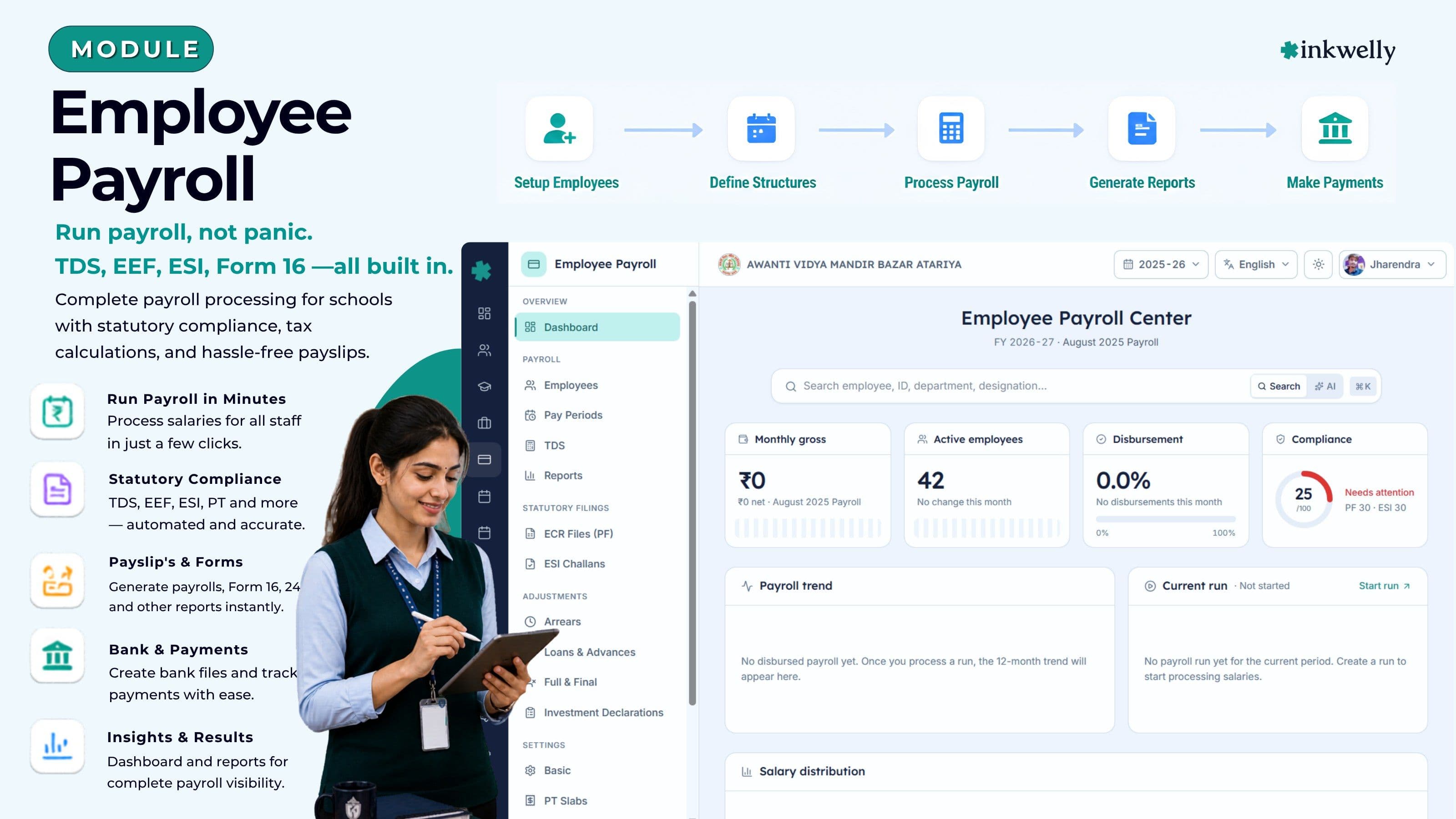
Run payroll, not panic. TDS, EPF, ESI, Form 16 — all built in.
One module to run monthly salaries for every teacher and staff member — with TDS deductions, EPFO ECR files, ESI challans, Professional Tax slabs, Form 16 generation, arrears, loans and full-and-final settlements. Built for the way Indian schools actually pay people.
How most Indian schools run payroll today
The accountant opens a salary register from the previous month, copies the rows into a fresh Excel sheet, manually adjusts for new joiners, increments, leave-without-pay, late marks, loan deductions, and 'sir said add ₹2,000 special allowance for the music teacher this month'. He cross-checks against the attendance register that the office assistant maintains in a separate notebook. He calls the EPFO consultant on WhatsApp because the ECR file generator stopped working. He runs Computax for TDS calculations. He prints fifty-three payslips, signs each one, hands them to the principal for counter-signature, and then the bank file refuses to upload because one IFSC code has a typo.
This is how every salary cycle ends in most Indian schools — twenty hours of manual work, three different software tools, two consultants, and one mistake away from an EPFO 14B notice or a TDS default that the school will discover six months later when Form 26AS doesn't reconcile.
The cost is not the twenty hours. The cost is the ₹50,000 EPFO penalty for a delayed challan. The accountant who quits because every month is a fire drill. The teacher who doesn't get her arrears for three months because no one knows how to back-compute them. The audit query that arrives in October about the Form 16s issued in May.
What we built instead
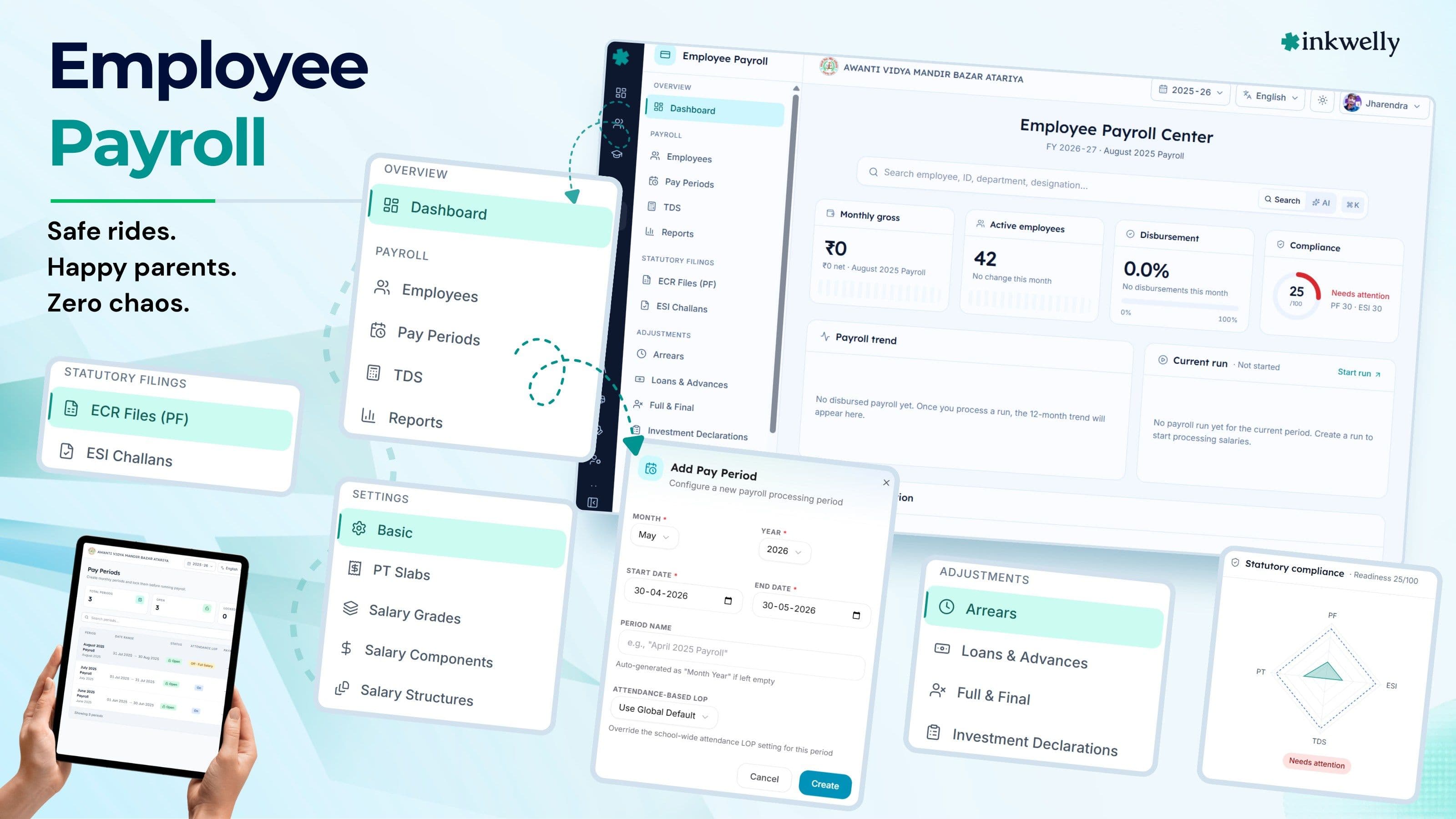
Inkwelly's Employee Payroll module is a complete, statutory-compliant payroll engine designed specifically for the way Indian schools pay teachers and staff. It is not a generic Indian payroll tool repurposed for schools, and it is not a school ERP that learned to do payroll as an afterthought. It is the specific intersection — built from the ground up.
It understands that your salary structure has Basic, DA, HRA, Conveyance, Special Allowance, and a 'Saturday class incentive' that varies per teacher. It understands that for a CBSE school, the 7th Pay Commission may or may not apply depending on whether you are aided. It understands that your accountant prints payslips on a specific letterhead. It understands that EPFO accepts ECR files in a very specific format, that ESI challans are due by the 15th of every month, and that Professional Tax slabs are different for Maharashtra, Karnataka, West Bengal and Telangana.
It also understands the moments most payroll systems break — the day a teacher resigns mid-month, the day DA arrears for the last six months need to be processed, the day a loan advance has to be deducted in five EMIs, the day Form 16 generation falls on the 31st of May with the principal in a wedding.
Most importantly, it ties every salary back to the Employee Information module — so bank details, PAN, UAN, qualifications and joining dates flow automatically into payroll. No double entry. No mismatched IFSC codes.
Highlights
- Monthly payroll run for any number of staff — teaching, non-teaching, admin, support — in under thirty minutes from cut-off to bank file, including statutory deductions and payslip generation.
- TDS computation under Section 192 with both old and new tax regimes, FY 2025-26 slabs, standard deduction, Section 80C, 80D, 24(b) deductions, HRA exemption logic, and quarter-wise Form 24Q output ready for TRACES.
- EPF compliance end-to-end — UAN management, monthly ECR file (Electronic Challan-cum-Return) generation in the exact EPFO format, Form 11, Form 5, Form 10, Form 3A and Form 6A inputs, employer plus employee 12% contributions, EPS bifurcation.
- ESI compliance — 0.75% employee plus 3.25% employer contributions for staff under the wage threshold, monthly ESI challan generation, half-yearly return inputs, IP number tracking.
- Professional Tax support across every PT-applicable state — Maharashtra, Karnataka, West Bengal, Andhra Pradesh, Telangana, Gujarat, Madhya Pradesh, Tamil Nadu, Kerala, Odisha, Assam, Sikkim — with state-specific slabs and remittance schedules.
- Investment declarations for every employee — Section 80C (PPF, ELSS, LIC, principal repayment), 80D (medical insurance), 80E, 80G, 80TTA, 24(b) home loan interest, HRA city tier — captured digitally with proof uploads.
- Form 16 and Form 16A generation at year-end with TRACES-compatible PDF output, Part A and Part B, digitally signable, ready to email or print on school letterhead.
- Arrears, loans, advances, and full-and-final settlements — rare-but-critical transactions that break most school payroll, modelled as first-class workflows with audit trails.
- Pay periods, salary structures and salary grades configurable per school — your basic-DA-HRA structure, your grade-wise minimums, your custom components — without writing code.
- Hosted in India (Mumbai region), DPDP Act 2023 ready, with role-based access, full audit log, and soft-delete restore — because salary data is the most sensitive data in your school.
See the product
Everything an Indian school payroll actually needs, in one module
Most generic payroll tools cover salary calculation and statutory deductions. That is roughly 40% of what a school accountant actually does in a month. The rest — arrears for a back-dated DA hike, a teacher who needs an advance against next month's salary, the F&F for a teacher resigning on the 17th, the investment declaration revision when the deadline is the 31st of January — is where most tools force you back to Excel.
We built every one of these as a first-class part of the module. Twelve interconnected pieces, all sharing one staff record, one salary structure, one set of statutory rules.
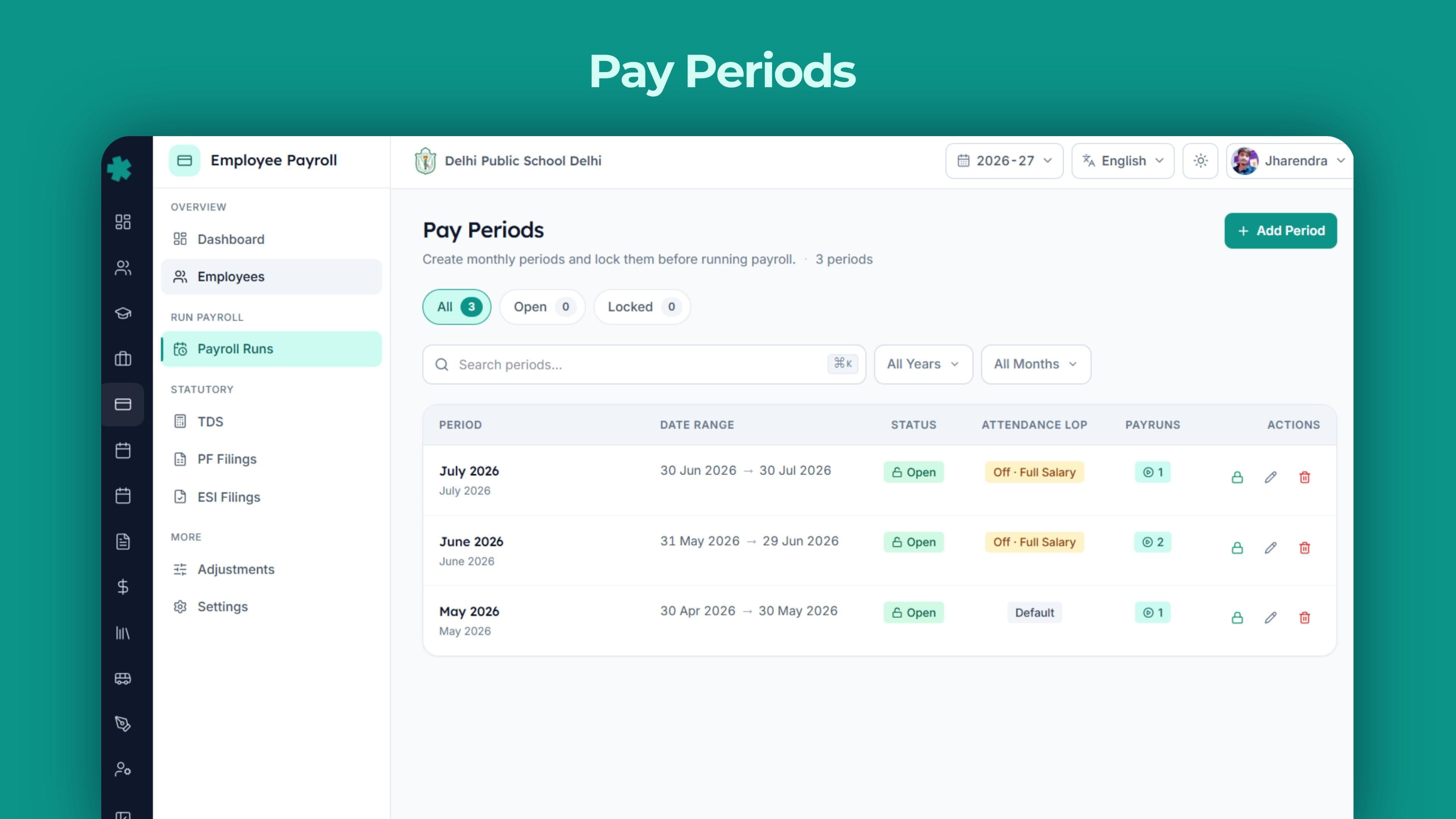
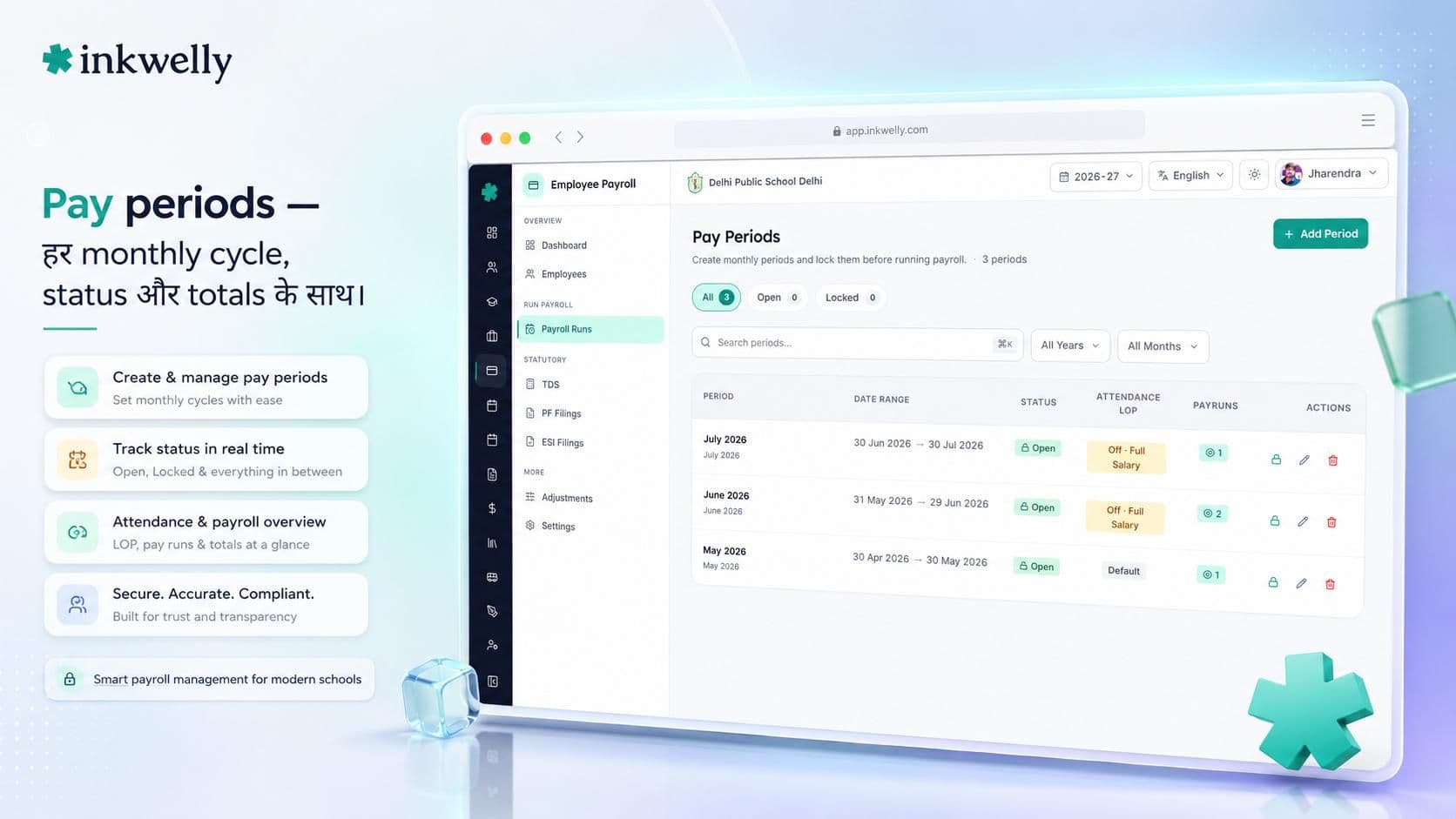
Pay Periods
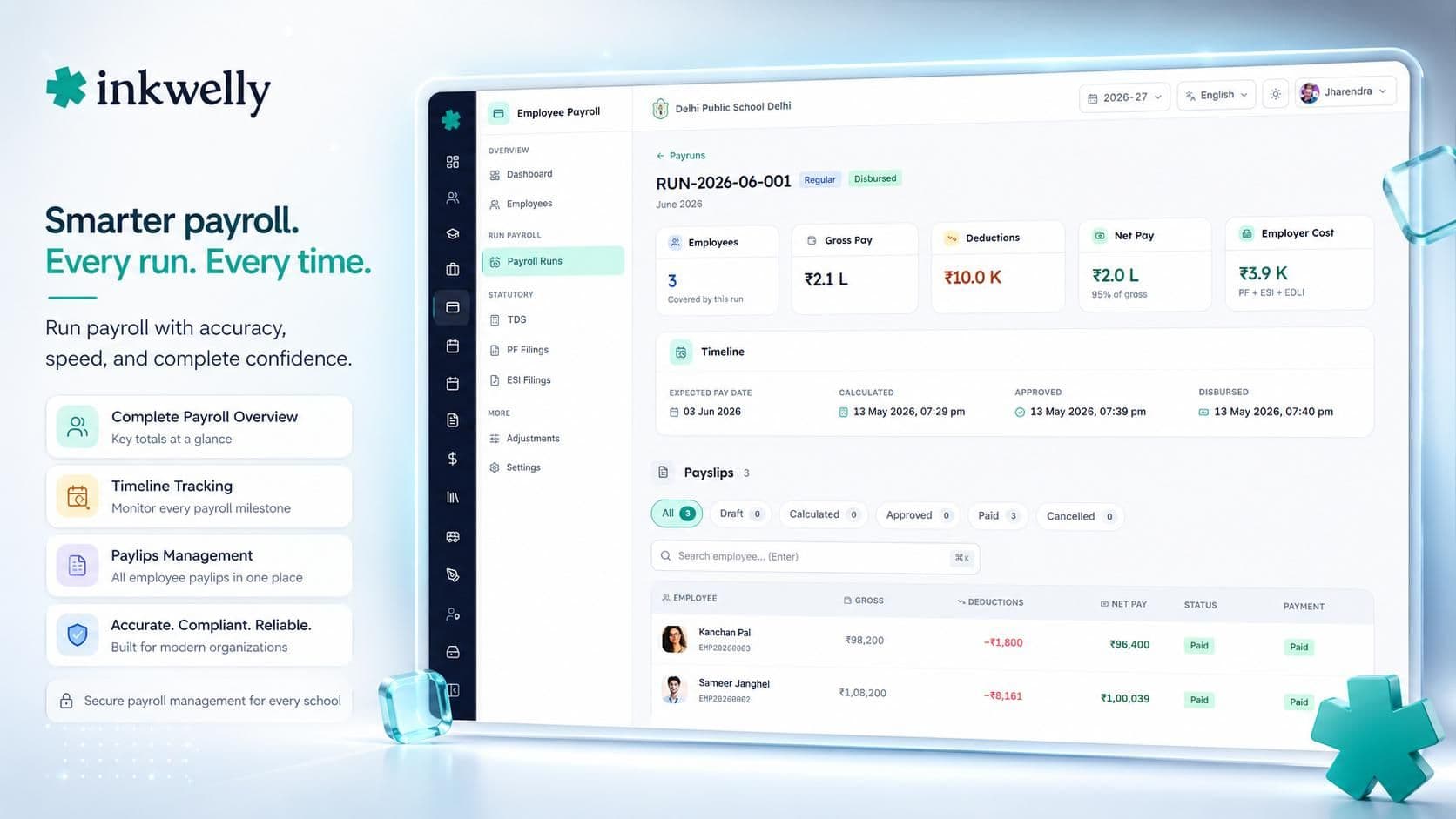
Monthly payroll cycles with cut-off dates, attendance windows, run status (Draft, Calculated, Approved, Disbursed), headcount and total disbursement. Re-open a closed period for corrections; we keep an audit trail.
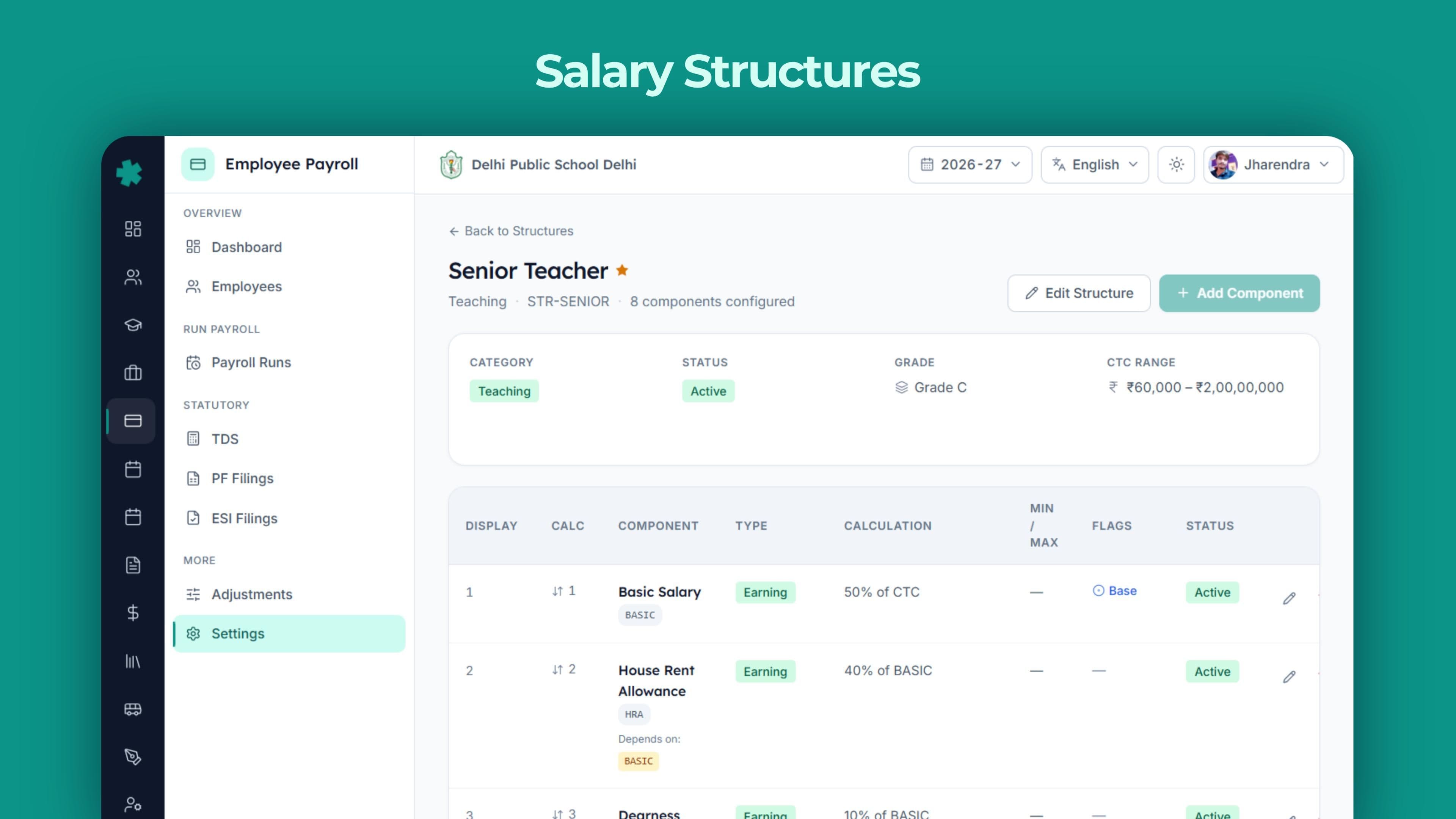
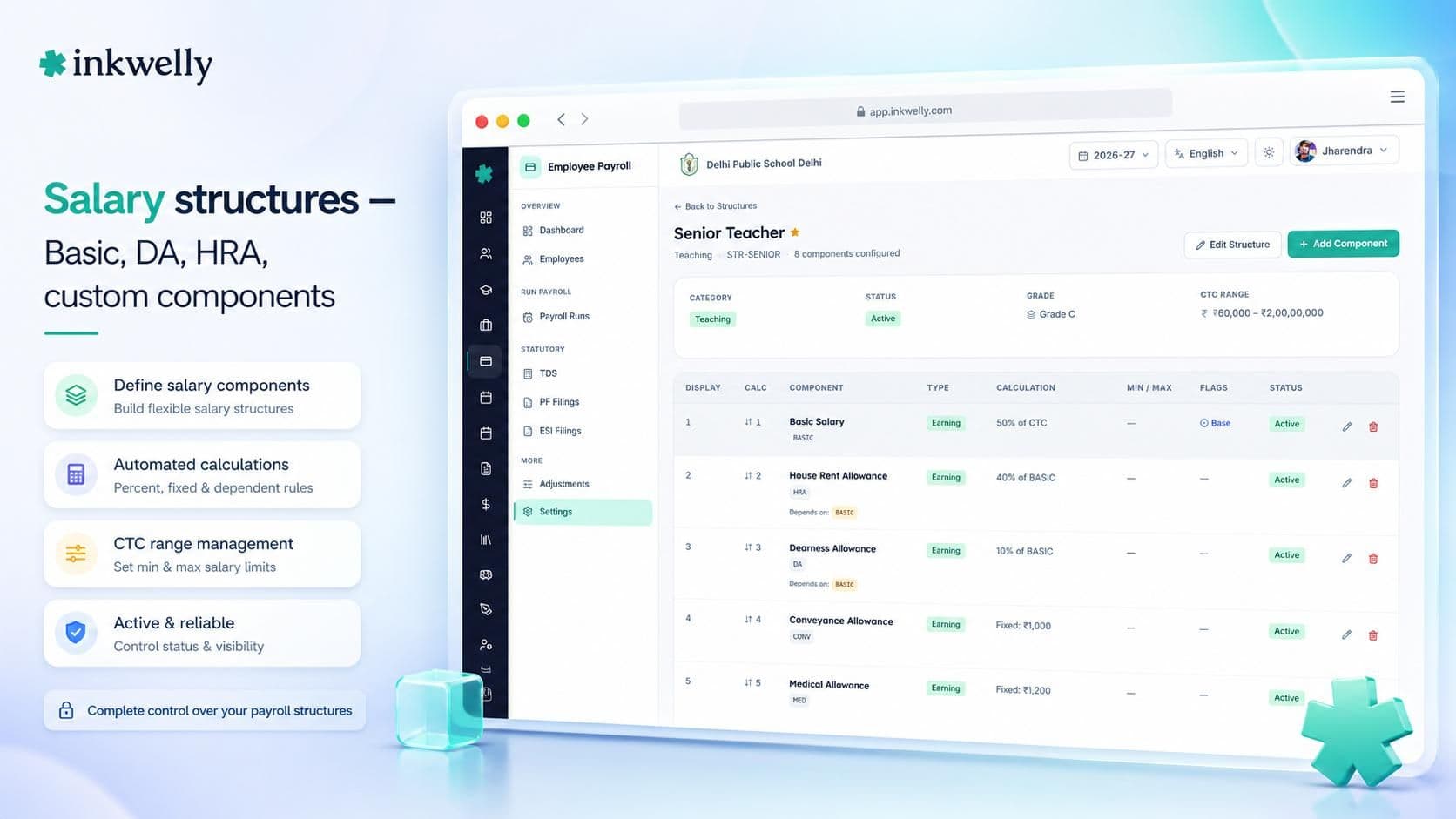
Salary Structures
Build CTC the way your school actually structures it — Basic, DA, HRA, Conveyance, Special Allowance, Children Education Allowance, custom components. Define formulae for percentage-based components. Apply structures by grade or per teacher.
Salary Components
Earnings, deductions, reimbursements, perquisites, employer contributions. Each component is configured for taxability under the Income Tax Act, PF eligibility, ESI eligibility, and how it appears on the payslip.
Salary Grades
Grade-wise pay matrices with minimums, maximums, increment cycles. Useful for state-aided schools following 7th Pay Commission grades, or private schools running their own grade structure.
TDS
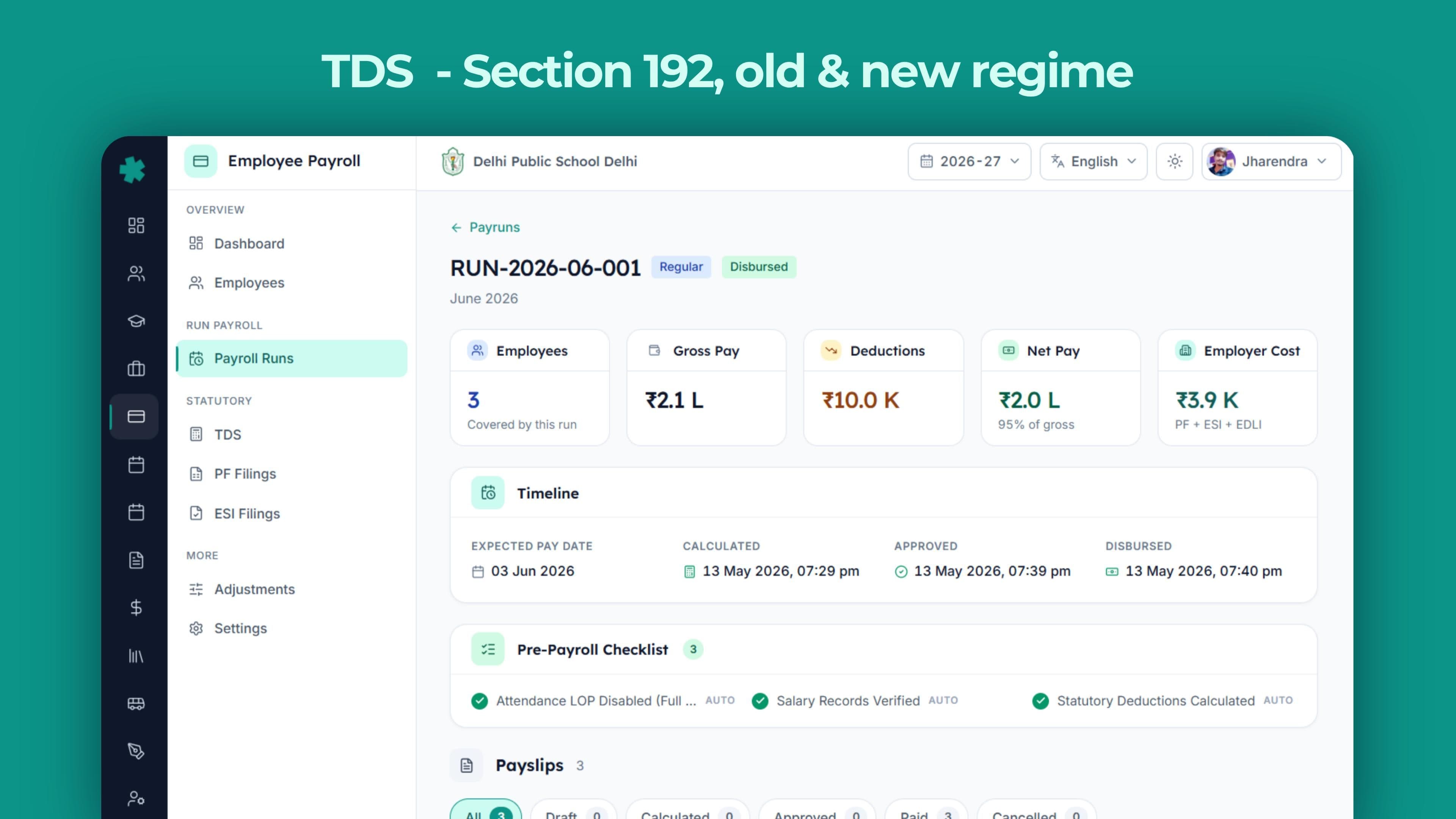
Section 192 TDS computation with both old and new tax regimes for FY 2025-26. Standard deduction, Section 80C, 80D, 24(b), HRA exemption, LTA, savings interest. Quarter-wise Form 24Q ready for TRACES.
EPF / ECR Files
Monthly Electronic Challan-cum-Return file in the exact EPFO format, validated against UAN database, with employer 12% (3.67% EPF + 8.33% EPS) and employee 12% bifurcation. Form 11, Form 5, Form 10 inputs included.
ESI Challans
Monthly ESI challan generation for staff under the wage threshold — 0.75% employee + 3.25% employer contributions, IP-number tracking, half-yearly return inputs. Generated as per ESIC portal format.
Professional Tax
State-wise PT slabs for every applicable state — Maharashtra, Karnataka, West Bengal, Andhra Pradesh, Telangana, Gujarat, Madhya Pradesh, Tamil Nadu, Kerala, Odisha, Assam, Sikkim. Monthly or annual remittance, as your state requires.
Investment Declarations
Digital declarations for every employee — Section 80C (PPF, ELSS, LIC, principal repayment), 80D, 80E, 80G, 80TTA, Section 24(b) home loan interest, HRA city tier — with proof uploads, deadline reminders, and revision workflow.
Arrears
Back-pay for DA hikes, increment revisions, 7th Pay Commission arrears, retrospective component additions. Computed across past pay periods, taxed correctly under Section 89(1) relief, paid in the next run.
Loans & Advances
Salary advances, festival advances, education loans, vehicle loans — with EMI scheduling, interest calculation if applicable, automatic deduction from monthly salary, balance tracking till closure.
Full & Final Settlement
On resignation or termination — pro-rata salary, leave encashment, gratuity (Payment of Gratuity Act 1972), notice pay or recovery, loan recovery, final TDS true-up, F&F payslip and statement.
The complete payroll lifecycle, modelled inside Inkwelly
A school payroll run is not 'click run, get salaries'. It is a sequence of dependent steps — each one a place where most tools either force a manual workaround or break entirely. We modelled every step as a first-class workflow inside the module, with status tracking, role-based approval, and full audit visibility.
Pay periods — the spine of every payroll cycle
Every salary month is a Pay Period inside Inkwelly — with a defined start date, end date, attendance cut-off, expected headcount and target disbursement window. The period moves through Draft → Calculated → Reviewed → Approved → Disbursed → Closed states, and at every state, the right roles see the right things.
Your HR coordinator imports the attendance summary from Employee Attendance. Your accountant runs calculations, applies arrears or loan deductions, and submits for approval. Your principal reviews and signs off. The bank file is generated and uploaded to your bank's corporate portal. Payslips are emailed to every staff member's registered email. Each step writes to the audit log, with timestamps and user identifiers — so when an inspector or auditor asks 'who approved the November payroll?', you have an answer in seconds.
Reopening a closed period is allowed but logged. Corrections after disbursement create an arrears entry in the next period. Nothing happens silently.
Salary structures and grades — your CTC, your way
Indian school salary structures are not standardised. A CBSE private school in Bangalore might pay Basic + DA + HRA + Conveyance + Special Allowance + Internet Reimbursement. A state-aided school in UP follows a 7th Pay Commission grade pay structure. A budget school in Lucknow pays a flat figure with PF carved out. Inkwelly handles all three.
Define your salary components — earnings, deductions, reimbursements, perquisites, employer contributions — once. Mark each component for its taxability under the Income Tax Act, PF eligibility, ESI eligibility, and how it appears on the payslip. Build salary structures by combining components with formulae (₹15,000 Basic, 50% of Basic as DA, 40% of Basic as HRA, ₹1,600 fixed Conveyance, balance as Special Allowance to reach ₹40,000 CTC).
Apply structures by salary grade (PGT-1, TGT-2, PRT-3) or override per teacher. Increments, revisions, mid-year changes — all tracked, all auditable.
The run pipeline — calculation to bank file
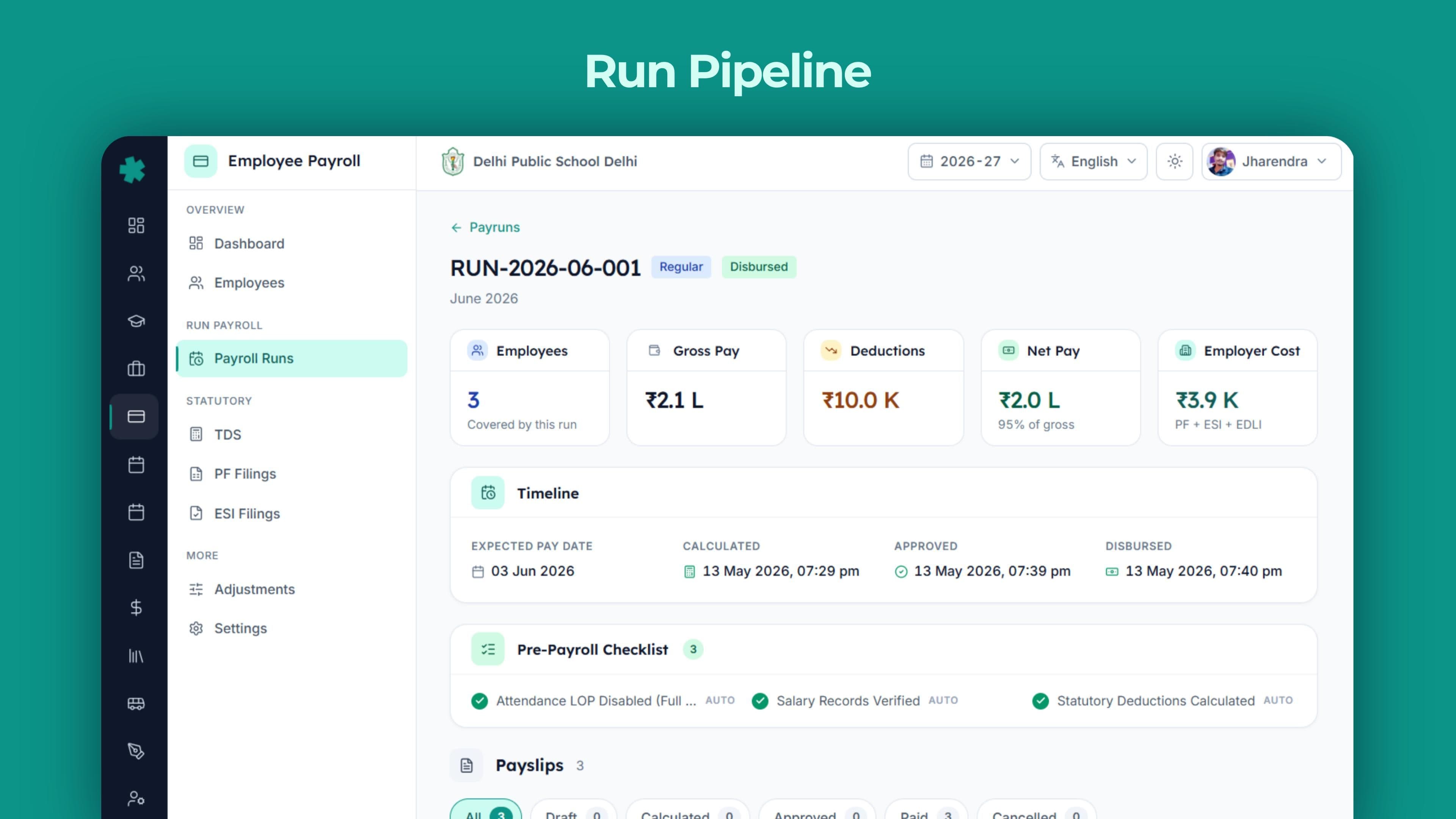
When the accountant clicks 'Run' on a Pay Period, Inkwelly executes a deterministic pipeline — the same one, every month, in the same order. First, attendance is imported from Employee Attendance: present days, half-days, late marks, leave-without-pay days. Second, salary structures are applied per teacher to compute gross earnings. Third, arrears, loan EMIs, and special transactions are added. Fourth, TDS is computed monthly under Section 192 using year-to-date logic. Fifth, EPF, ESI and Professional Tax are calculated and deducted. Sixth, net pay is finalised.
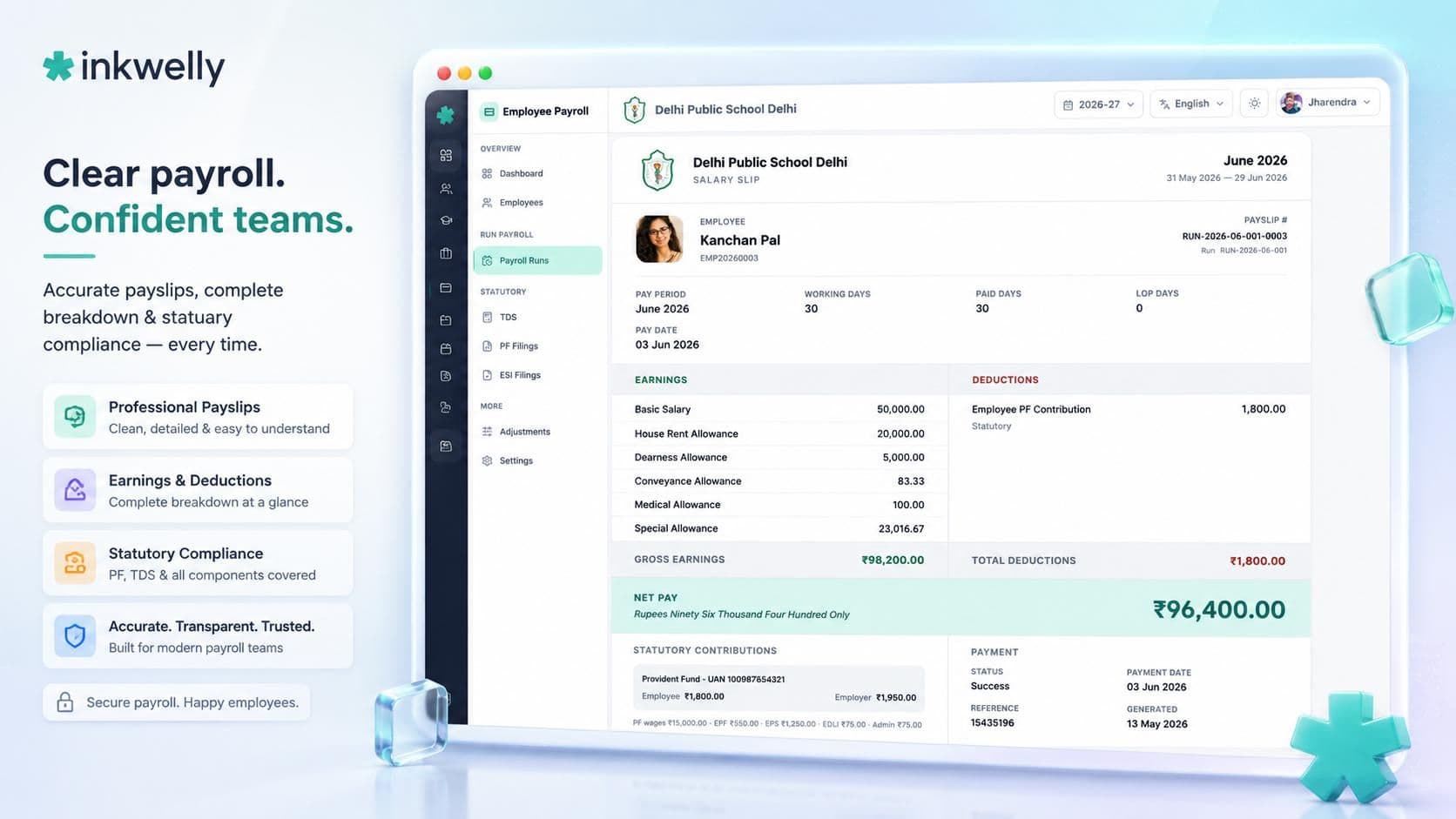
Every step is logged. Every calculation can be drilled into — click on a teacher's net pay, see the entire computation tree, every component, every deduction, every formula, every override. No black box. No 'we'll have to email the payroll vendor'.
Once calculated, the run is submitted for review and approval. The approved run produces a bank file (NEFT or in your bank's corporate format), individual payslips, and statutory output files.
Approval workflow — the principal's signature, digitised
In Indian schools, payroll never disburses without the principal's approval. We made that approval native, fast, and auditable. The accountant submits the calculated run; the principal sees a single review screen — total disbursement, headcount, exceptions (anyone earning more than 1.5× their last month, anyone with negative net pay, anyone with missing bank details), variance vs the previous run.
The principal can approve in one click, request changes with a comment, or drill into any individual teacher's payslip before signing. Every approval is timestamped, IP-logged, and tied to the user account. When the accountant tells the auditor 'principal sahab ne sign kiya tha', the audit log proves it.
Multi-step approval is supported — accountant submits, HR reviews, principal approves, trustee acknowledges. Configure the chain as your school's governance requires.
Statutory compliance, the way Indian payroll actually works
A payroll module that does not generate the EPFO ECR file is not a payroll module. A payroll module that does not compute Section 192 TDS correctly under both regimes is not built for Indian payroll. A payroll module that does not handle Professional Tax slabs by state is not built for India.
We built every statutory deduction, every challan, every return, every form — to the exact specifications of the Indian government portals (EPFO Member Portal, ESIC Portal, TRACES, state PT departments). When the deadline arrives, the file is ready. When the inspector arrives, the records reconcile. When the audit arrives, the proof is on file.
TDS under Section 192 — both regimes, every slab
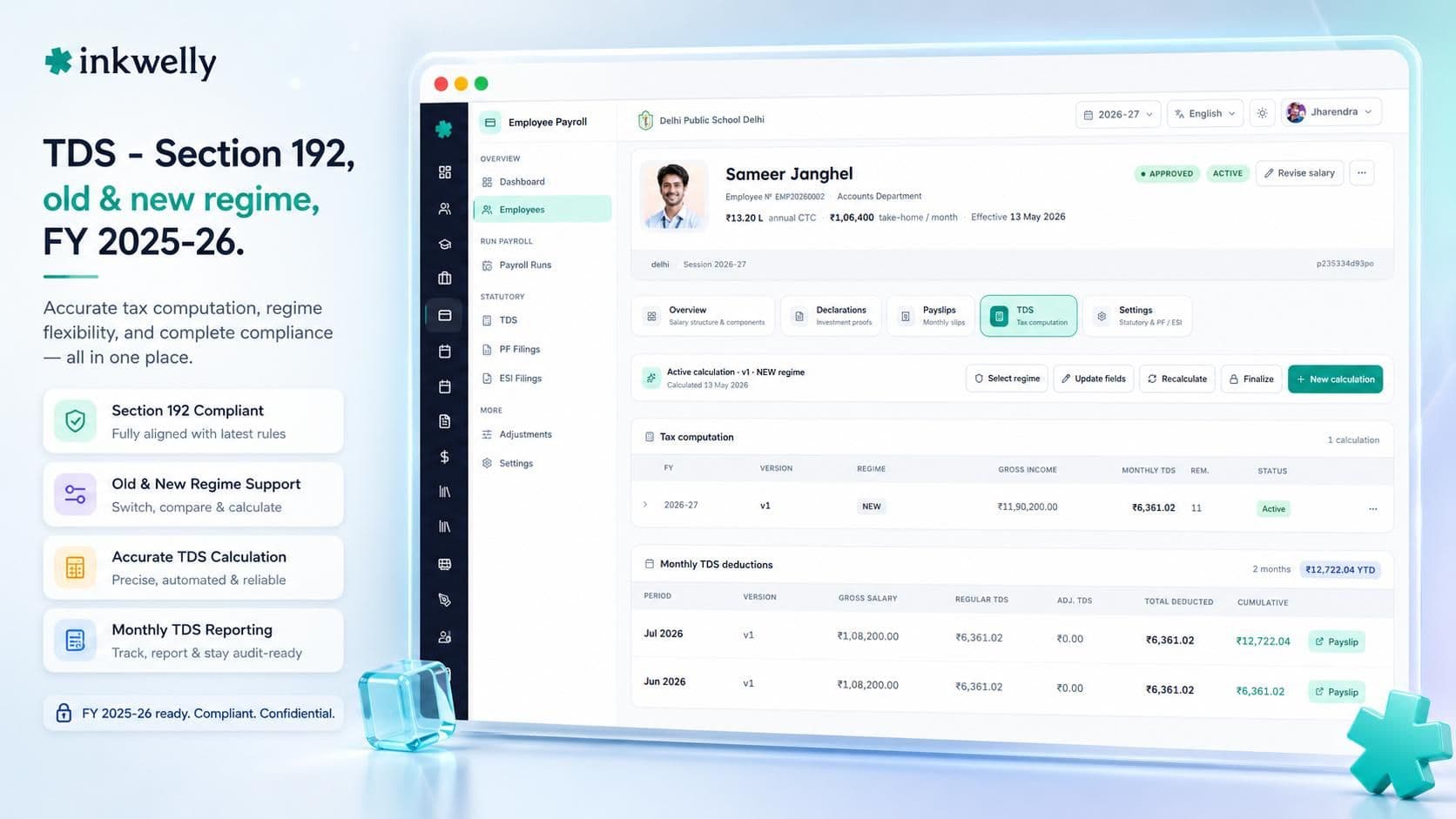
Income Tax on salary is computed under Section 192 of the Income Tax Act 1961. The Finance Act 2023 introduced the new tax regime as the default for FY 2023-24 onwards, with the option for employees to elect the old regime. Inkwelly handles both — at the employee level, at the school level, recalculated whenever the employee changes their declaration.
We compute TDS monthly using the year-to-date method — projecting annual income, applying applicable exemptions and deductions, computing annual tax, dividing by remaining months. Standard deduction of ₹50,000 (or ₹75,000 under the new regime from FY 2024-25) is applied automatically. Section 80C investments up to ₹1.5 lakh, Section 80D medical insurance, Section 24(b) home loan interest up to ₹2 lakh, Section 80E education loan interest, HRA exemption (lower of actual HRA, rent paid minus 10% of basic, 50% of basic for metros) — all factored.
Quarter-wise Form 24Q is generated in the TRACES-compatible format with all challan details, deductee details, and salary annexure. At year end, Form 16 Part A and Part B are generated for every employee.
EPF — the ECR file the EPFO portal accepts
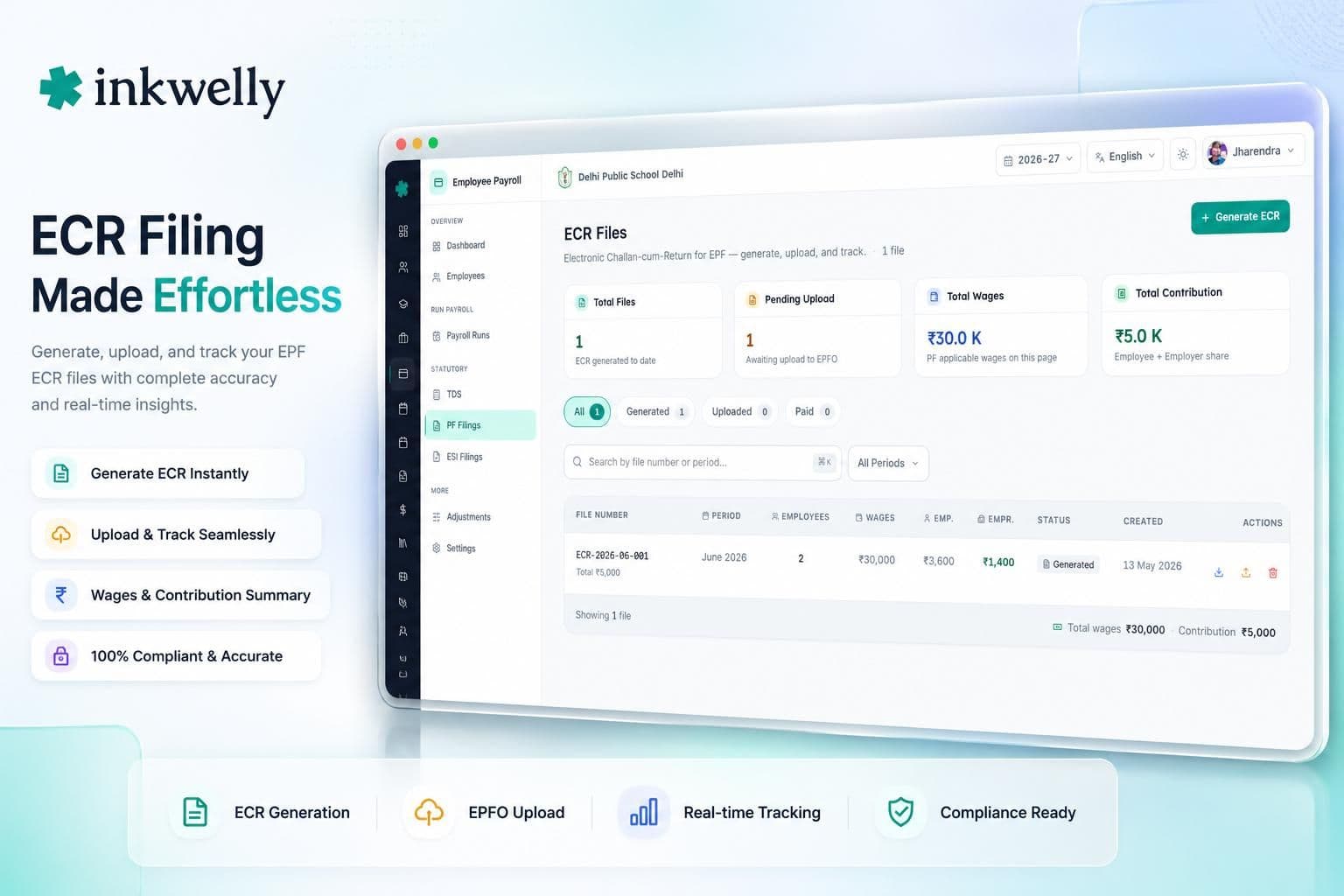
The Employees' Provident Fund Organisation requires every employer with twenty or more employees to file a monthly Electronic Challan-cum-Return (ECR) — a fixed-format text file uploaded to the EPFO Member Portal that drives the PF contribution challan. Most schools use external consultants because their ERP cannot generate ECR in the right format. Inkwelly does it natively.
For every staff member with a UAN, we compute employer 12% (split into 3.67% EPF and 8.33% EPS, capped at ₹15,000 wage ceiling for EPS), employee 12%, and admin charges (0.5% EPF Administration, 0.5% EDLI). The ECR file is produced in the exact EPFO format — Member ID, UAN, Gross Wages, EPF Wages, EPS Wages, EDLI Wages, NCP Days, Refund of Advance — validated for UAN format, Aadhaar seeding status, and active membership.
Form 11 (declaration for new joiners), Form 5 (employees joined during the month), Form 10 (employees left during the month), Form 3A (annual contribution card per member), Form 6A (annual consolidated return) inputs are all generated alongside.
ESI — challans for staff under the wage threshold
Employees' State Insurance covers staff earning under the wage threshold (currently ₹21,000 per month, ₹25,000 for persons with disabilities) — typically the school's helpers, drivers, conductors, junior office staff, and some non-teaching staff. Both employee (0.75%) and employer (3.25%) contributions are deducted from gross wages and remitted by the 15th of the next month.
Inkwelly identifies eligible staff automatically based on monthly wages, computes both contributions, and generates the monthly ESI challan in the format the ESIC portal accepts. IP (Insured Person) numbers are tracked per employee. Half-yearly returns (April-September and October-March) inputs are generated for filing on the ESIC Portal.
When a staff member's wages cross the threshold mid-year, ESI continues until the contribution period ends — we handle the transition automatically, so contributions don't stop in the wrong month.
Professional Tax — every state, every slab
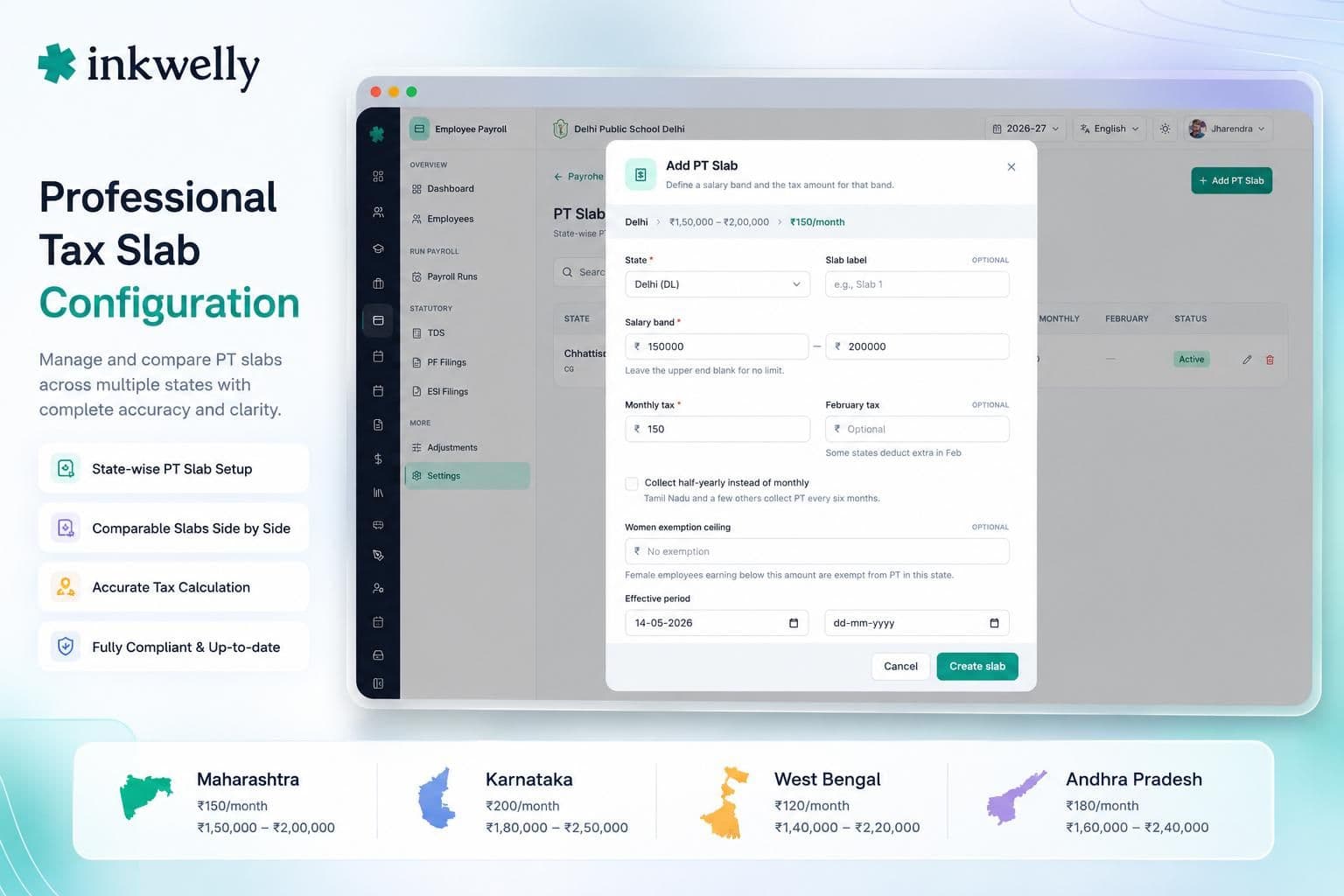
Professional Tax is a state-level levy with completely different slabs, exemptions, and remittance schedules per state. A school operating in Maharashtra deducts up to ₹2,500 per year per employee under the Maharashtra State Tax on Professions Act 1975. A school in Karnataka follows the Karnataka Tax on Professions Act 1976 with its own slab structure. West Bengal, Andhra Pradesh, Telangana, Gujarat, Madhya Pradesh, Tamil Nadu, Kerala, Odisha, Assam and Sikkim each have their own.
Inkwelly ships pre-configured slab structures for every PT-applicable state. Each school's location determines which slab applies. Female employees are exempted in some states (Karnataka up to ₹50,000 monthly), senior citizens are exempted in others. We model these exemptions natively. The monthly PT deduction appears on the payslip; the remittance schedule (monthly, quarterly, or annual depending on the state) is on the compliance calendar.
Multi-school trusts operating across states are handled correctly — each school deducts as per its own state, with consolidated reporting at the trust level.
Investment Declarations — digital, deadline-aware, revision-friendly
For TDS to be computed correctly, every employee must declare their planned investments at the start of the financial year — Section 80C (PPF, ELSS, LIC premiums, principal repayment of home loan, tuition fees), Section 80D (medical insurance for self and parents), Section 80E (education loan interest), Section 80G (donations), Section 80TTA (savings interest), Section 24(b) (home loan interest up to ₹2 lakh), HRA (rent paid for the city tier).
Inkwelly captures every declaration digitally — the employee logs into her employee portal at /e/<id>, enters her declarations, uploads proofs (LIC receipt, PPF passbook, rent agreement, medical insurance receipt). The accountant reviews and approves. The TDS calculation immediately reflects the new declarations.
Two critical features no spreadsheet can offer: deadline reminders push automatically before the 31st of January (the deadline for proof submission for the current FY); and revisions create an audit trail — when the employee adds a ₹50,000 ELSS investment in March, the system records who changed what, when, and recomputes TDS for the remaining months.
Form 16 — generated, signed, sent
Under Section 203 of the Income Tax Act, every employer who deducts TDS on salary must issue Form 16 to every employee by the 15th of June of the following financial year. Part A is downloaded from TRACES (the TDS Reconciliation Analysis and Correction Enabling System portal). Part B is the salary annexure — gross salary, exemptions, deductions, tax payable, tax deducted, refund or balance.
Inkwelly generates Form 16 Part B in the TRACES-compatible format, ready to merge with Part A downloaded from TRACES, and produces the final PDF per employee. The PDF can be digitally signed by the principal or trustee, or printed on school letterhead and physically signed.
Form 16A (for non-salary TDS, e.g., contractor payments, audit fees) is also generated where applicable. Both can be emailed in bulk to every staff member's registered email at the click of a button. No more 'sir, I have not received my Form 16' on June 14th.
“Pehle har mahine humein twenty hours lagte the salary close karne mein. Ab thirty minutes mein ho jaata hai, aur Form 16 toh ek click pe ban jaata hai.”
Inkwelly vs Excel + Tally + EPF consultant
Beyond the monthly run — the moments payroll actually breaks
Most payroll tools handle the routine month. The exceptional months — DA arrears for the last six months, a teacher requesting a festival advance, a teacher resigning on the 17th — are where most schools end up back in Excel. We modelled every one of these as a first-class workflow.
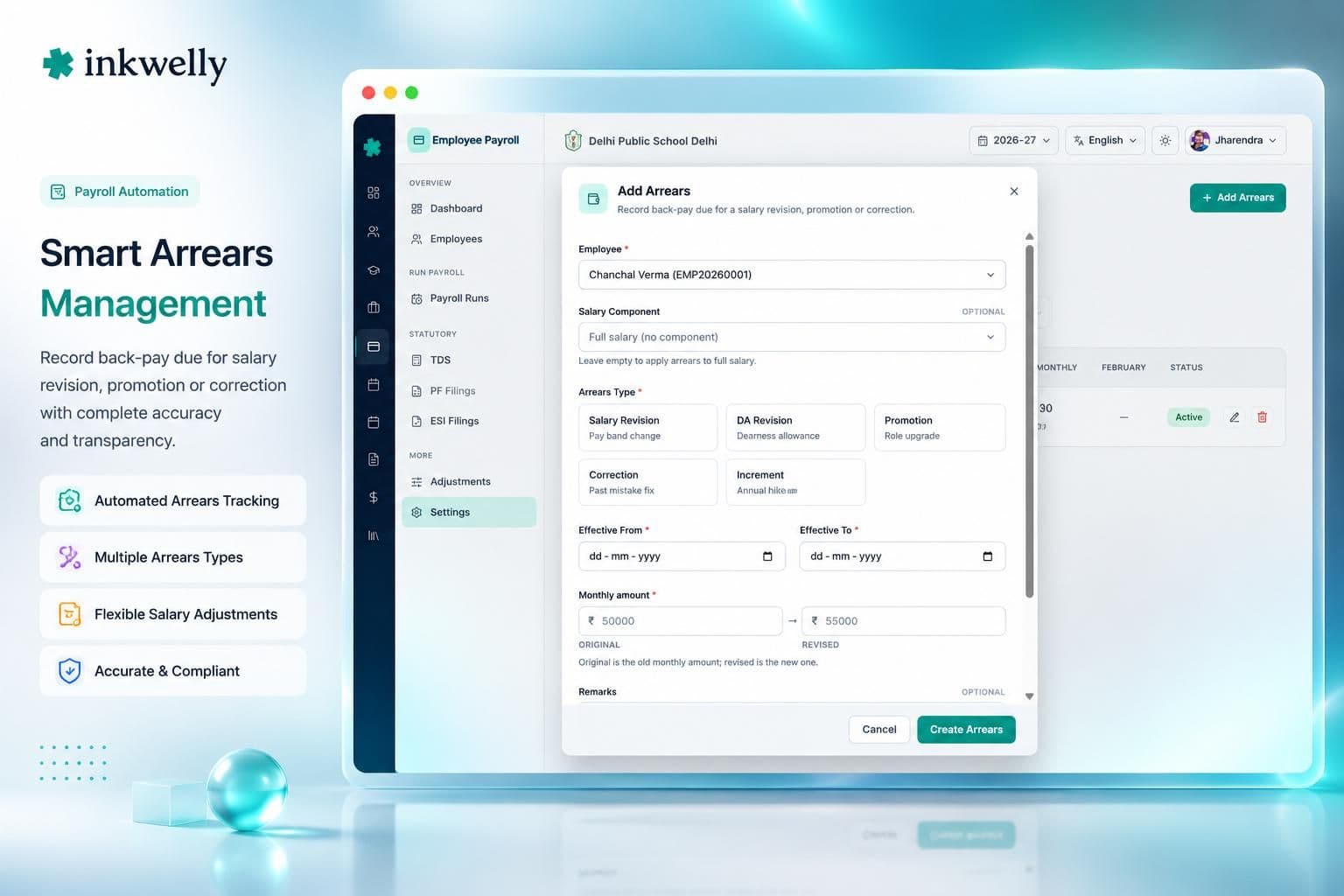
Arrears — back-pay, computed correctly
DA was revised retrospectively from January, and it is now June. Six months of arrears have to be paid. Inkwelly's Arrears workflow recomputes salaries for the affected past pay periods (Closed periods are read-only; arrears compute against them without reopening), aggregates the difference, applies Section 89(1) relief if the employee elects to spread the tax impact, and adds the arrears amount as a one-time component in the next pay period.
The payslip clearly shows the arrears component, the period it applies to, the tax impact (with or without Section 89(1) relief), and the final net pay. Form 24Q for the relevant quarter reflects the arrears correctly. When the employee asks 'why is my net pay higher this month?', the payslip explains it — without the accountant having to write a separate email.
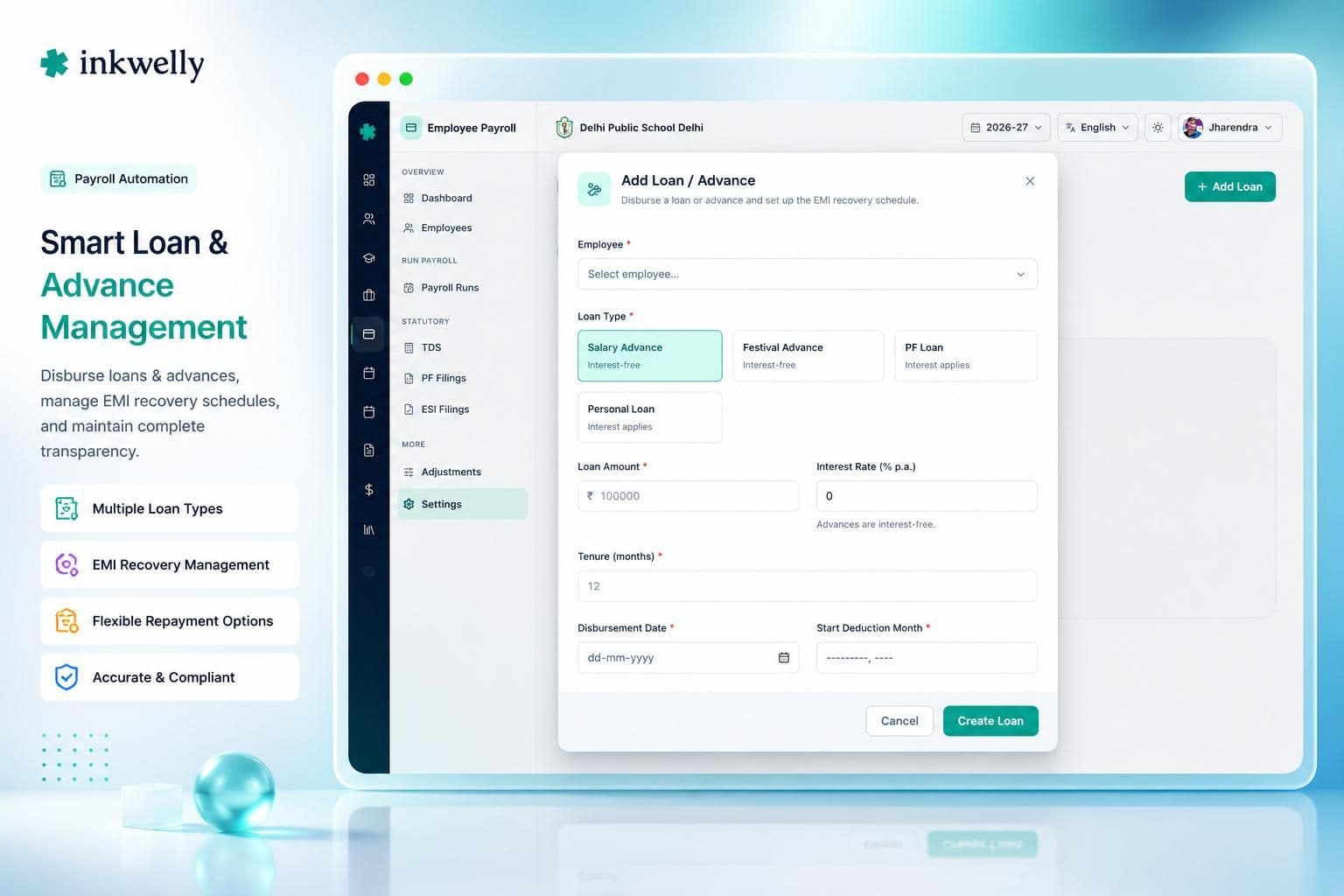
Loans and Advances — modelled, not hacked
Schools regularly extend salary advances, festival advances, education loans, and vehicle loans to teachers. In most ERPs, this becomes a 'one-time deduction' the accountant has to remember to apply every month. In Inkwelly, a Loan or Advance is a first-class entity with principal, interest rate (if any), EMI schedule, start period, end period, and outstanding balance.
When the loan is disbursed, the principal amount appears as a non-taxable receipt on that month's payslip (or a separate disbursement note). EMIs are auto-deducted from monthly salary till closure. The accountant can prepay, restructure, or write off — every event logged. The Outstanding Ledger card on the dashboard shows the school's total loan exposure at a glance.
Full and Final Settlement — every component, none missed
A teacher resigns on the 17th of the month. The F&F has to compute pro-rata salary for 17 days, leave encashment for unused privileged leave, gratuity if she has completed five years (Payment of Gratuity Act 1972), notice pay or recovery, recovery of any outstanding loan balance, final TDS true-up against year-to-date income, and a clear F&F statement that she signs.
Inkwelly's F&F workflow handles every component. Pro-rata salary is computed against the partial month's attendance. Leave encashment uses the latest leave balance from [Leave Management]. Gratuity is computed at 15 days' Basic + DA per completed year of service, capped at ₹20 lakh under the Gratuity Act. Notice pay is recovered if the employee leaves before the notice period; or paid out if the school waives it. Outstanding loan principal is recovered. TDS is trued up so the year-end Form 16 reflects the final settlement.
The F&F statement is signed digitally or printed on school letterhead, archived to the Employee Information profile, and the staff record moves to Resigned status — keeping every detail on file for future reference checks.
Built for India — every state, every board, every school size
Indian school payroll is not one problem. It is hundreds of small problems compounded — different state PT, different boards' DA structures, different trust governance models, different bank file formats. We did not build a thin layer over a US payroll engine. We built India's payroll from the bottom up.
Statutory and state-specific support
- Income Tax (Section 192) — old and new tax regimes, FY 2025-26 slabs, standard deduction, full Section 80C/80D/24(b)/80E/80G/80TTA support, HRA exemption logic, Section 89(1) relief on arrears.
- EPF/EPFO — UAN management, monthly ECR file, Form 11/5/10/3A/6A inputs, EPS bifurcation up to ₹15,000 wage ceiling, EDLI, Admin charges, employee voluntary contribution.
- ESI/ESIC — automatic eligibility based on wage threshold, monthly challan, half-yearly return inputs, IP number tracking, contribution period transitions handled.
- Professional Tax — Maharashtra, Karnataka, West Bengal, Andhra Pradesh, Telangana, Gujarat, Madhya Pradesh, Tamil Nadu, Kerala, Odisha, Assam, Sikkim — with state-specific slabs, exemptions and remittance schedules.
- Gratuity — Payment of Gratuity Act 1972 — 15 days' Basic+DA per year of service, ₹20 lakh cap, computation on F&F.
- Bonus — Payment of Bonus Act 1965 — 8.33% minimum to 20% maximum based on allocable surplus, eligible employees identified, paid as a separate run.
- Leave Encashment — earned leave encashment on resignation/retirement, taxability per Section 10(10AA).
- Form 16, Form 16A, Form 24Q — TRACES-compatible quarterly Form 24Q, year-end Form 16 Part A + Part B, Form 16A for non-salary TDS.
- 7th Pay Commission support for state-aided schools — grade pay matrix, level-wise increments, dearness allowance revisions tracked across pay periods.
- Multi-school / multi-state trusts — each school deducts as per its own state and rules; consolidated reporting at the trust level.
Multi-school trusts and group institutions
Many Indian school groups operate across multiple states under a single trust — a Maharashtra branch, a Karnataka branch, a Delhi branch. Each school has its own staff list, its own salary structures, its own state PT, its own ESI region. But the trust treasurer wants consolidated salary expense, total TDS deposited, and a single Form 24Q.
Inkwelly handles this natively. Each school operates its own payroll runs with the right state-specific rules. The trust dashboard rolls up every school's disbursement, TDS, EPF and ESI contributions, and outstanding loan balance. Form 24Q is filed per TAN — usually one TAN per school for TDS, but supported either way. EPFO and ESIC filings are per school (each school has its own establishment code).
Access control is per school — the Mumbai accountant cannot see Bangalore salaries; the trustee can see both. One platform, every school, fully isolated.
Inkwelly vs generic school ERPs
The salary signals your principal actually wants
A payroll tool's job is to run salaries. A great payroll tool's job is to tell the principal — at a glance, every Friday morning — exactly what the school's salary health looks like, where the risks are, and what is due next week. We built the dashboard for that conversation, not for the run.
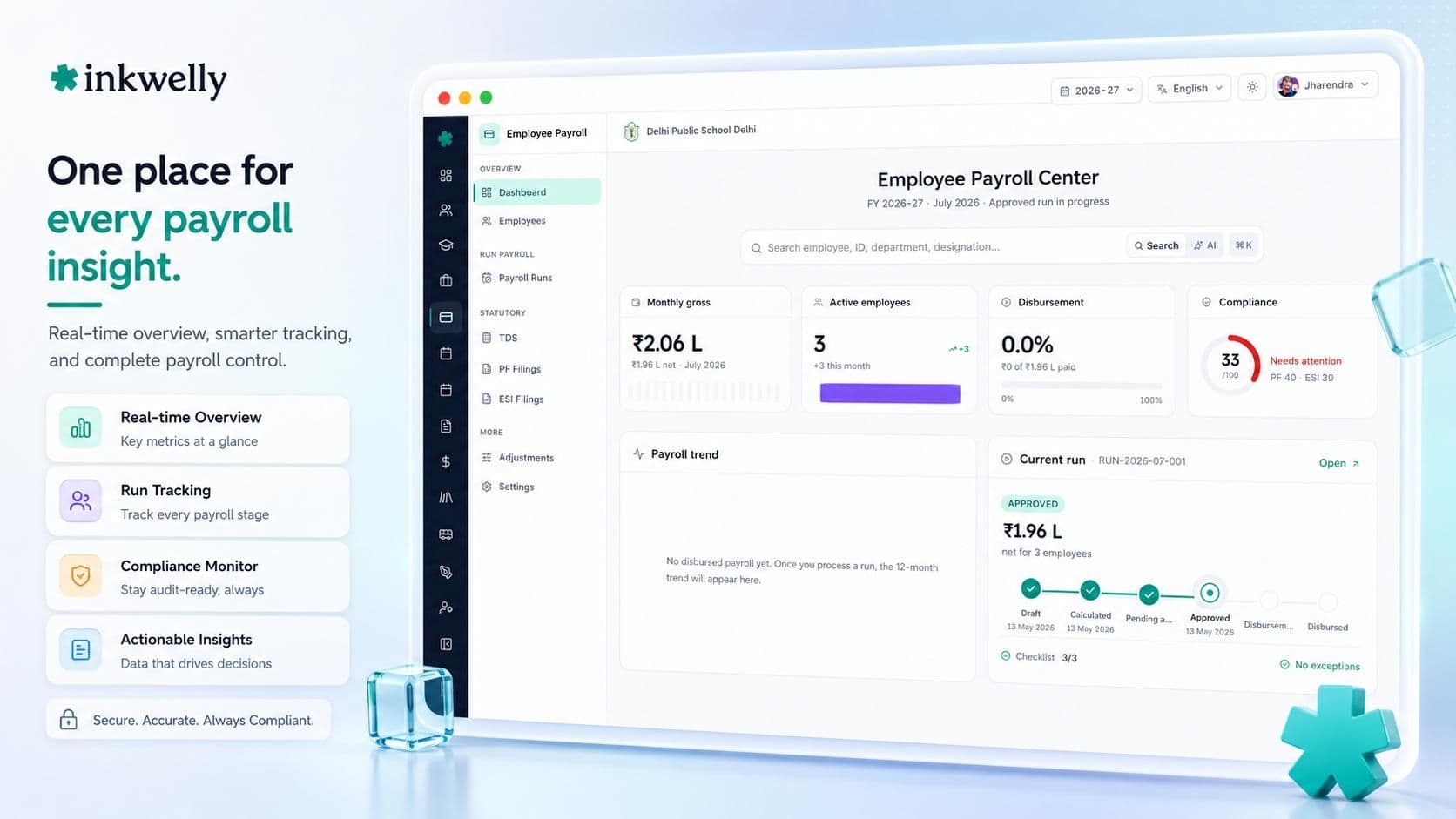
What you see on the dashboard
- Hero KPIs — current month gross, net, deductions; YTD totals; staff count; average CTC; variance vs last month.
- Current Run Pipeline — where the in-flight payroll is in its lifecycle (Draft, Calculated, Reviewed, Approved, Disbursed); what is blocking it.
- Compliance Calendar — TDS challan due dates, EPF challan due, ESI challan due, PT remittance due, Form 24Q quarterly filing, Form 16 issue, half-yearly ESI return — colour-coded by urgency.
- Payment Health — bank file generated, uploaded, transactions successful, transactions failed (with retry), pending payments.
- Outstanding Ledger — total loans outstanding, advances outstanding, recoveries due, F&F pending.
- Payroll Trend Chart — last 12 months' gross, net, headcount, average CTC. Identify drift before it becomes a question.
- People Movement — new joiners this month with first-payroll status, leavers with F&F status, mid-month corrections.
- Salary Structure — distribution of staff across grades, components, structures. Useful for benchmarking and HR planning.
- YTD Snapshot — total disbursement YTD, total TDS deposited YTD, total EPF deposited YTD, total ESI deposited YTD.
- Exceptions — anyone with negative net pay, missing PAN, missing UAN, missing bank details, abnormal variance vs last month, before disbursement.
- Activity Feed — last 50 actions on the payroll module — who calculated, who approved, who reopened, who disbursed.
- Compliance Card — the green/amber/red signal for every statutory deduction, this period and YTD.
How payroll connects to the rest of Inkwelly
Payroll is not a silo. It is the financial expression of Employee Information (who you employ), Employee Attendance (how much they worked), Leave Management (when they were away) and IAM Permissions (who can see what). A change to any of these flows automatically into the next payroll run.
One staff record. One source of truth.
Employee Information holds the master record — bank details, PAN, UAN, joining date, salary structure assignment. Payroll reads this every run; no double entry, no IFSC typos. [Employee Attendance] feeds present days, half-days, late marks, leave-without-pay days. Leave Management feeds approved leaves. IAM Permissions ensures the accountant sees gross pay, the principal sees totals, the teacher sees only her own payslip.
When a teacher's department changes in Employee Information, her access to payroll changes accordingly. When attendance is finalised for the month, payroll calculation becomes available. When the principal approves a run in Payroll, payslips become available in the teacher's Employee Portal at /e/<id>. One change, every module updated.
Migration — bring your existing payroll over
Most schools come to us already running payroll somewhere — Tally, GreyTHR, Zoho Payroll, Razorpay Payroll, an in-house Excel macro that an accountant in 2014 built and which has since been edited fourteen times. Migration is the part schools fear, so we own it. Free for your first 50 staff records, on us.
From Excel + Tally
Most Indian schools running payroll on Excel + Tally have YTD salary registers, statutory deduction summaries, and Form 16 archives spread across folders, sub-folders and accountant laptops. Send us the current FY's salary register, the last quarterly Form 24Q, and the latest ECR file. We map your salary components to Inkwelly components, validate against your bank file, and load the YTD figures so your next month's run continues seamlessly. TDS YTD computations remain consistent. Form 16 at year-end covers the entire FY, Inkwelly + pre-Inkwelly months.
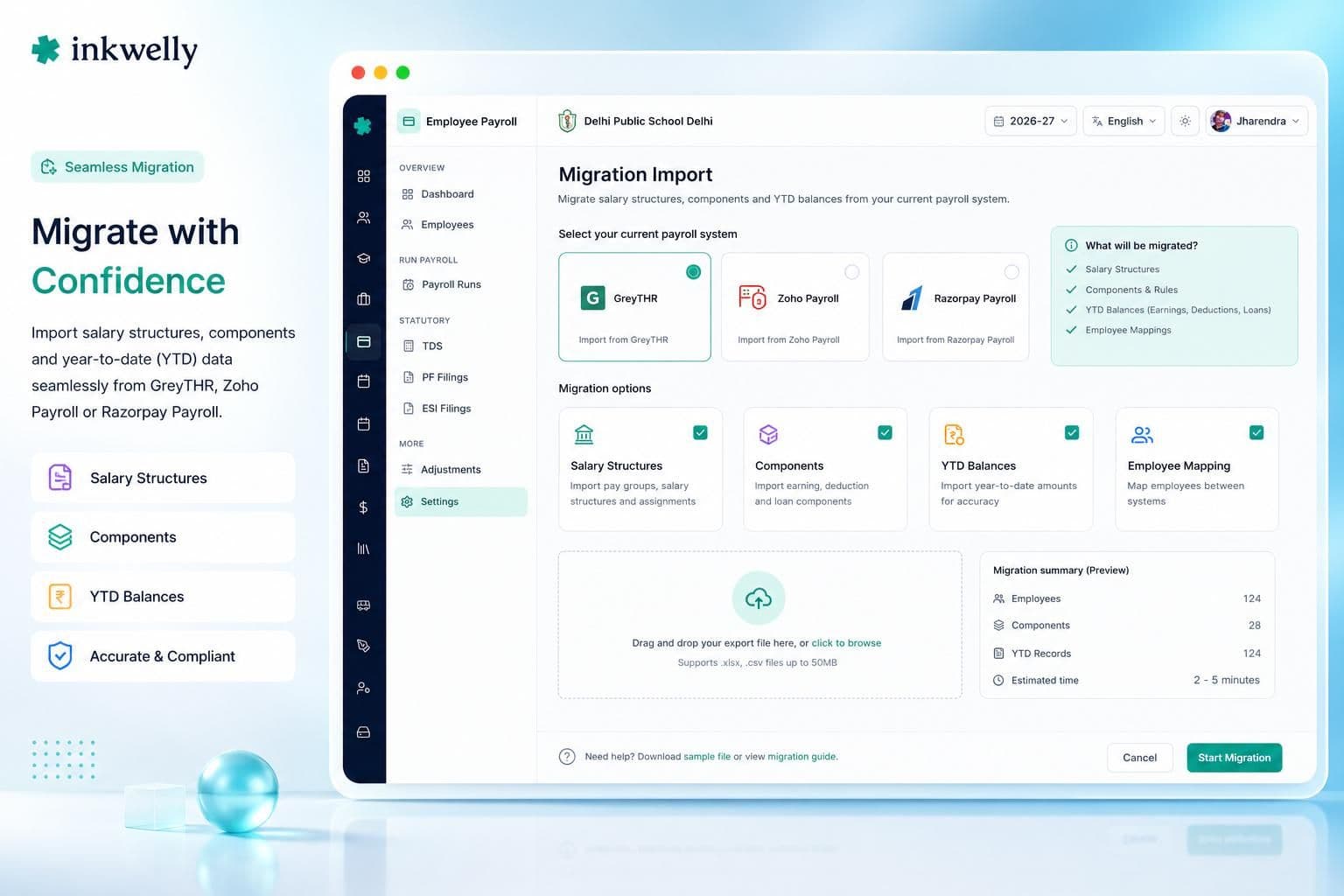
From GreyTHR, Zoho Payroll, Razorpay Payroll, Keka
We have migrated schools off most major Indian payroll tools. Export your salary structures, employee master, YTD figures, investment declarations, loans outstanding, and TDS computation in their standard formats — we map every field to Inkwelly. Most schools are live in under two weeks, including parallel-run validation with your previous month's data to confirm zero deviation. After cutover, you stop paying for two systems.
See your school's payroll, run end-to-end in 30 minutes
Bring your last month's salary register to the demo. We will set up your salary structures, components, and statutory rules during the call, and run a sample payroll on your real data. By the end, you will see exactly what Inkwelly does that your current system does not.
“A school payroll system that does not generate the EPFO ECR file is not a payroll system. A school payroll system that does not handle Section 89(1) on arrears is not built for India. We built both — because every Indian school accountant has been burned by the absence of either.”
What an Indian school payroll run actually looks like inside Inkwelly
Five screenshots, real flow, no marketing collage. From the moment the accountant sets the cut-off date to the moment the bank file is generated and payslips are emailed.
Inkwelly vs imported global HR/payroll tools
What's included with Employee Payroll
- Unlimited monthly payroll runs for any number of staff.
- Salary structures, components, grades — fully configurable per school.
- TDS computation under Section 192, both regimes, with quarterly Form 24Q.
- EPF compliance — UAN management, monthly ECR file, Form 11/5/10/3A/6A inputs.
- ESI compliance — monthly challan, half-yearly return inputs, IP-number tracking.
- Professional Tax across every PT-applicable state with state-specific slabs.
- Investment declarations with deadline reminders and proof uploads.
- Form 16 and Form 16A generation, TRACES-compatible PDFs.
- Arrears with Section 89(1) relief, loans/advances with EMI scheduling, full and final settlements with every statutory component.
- Multi-school / multi-state trust support with per-school rules and consolidated trust roll-up.
- Migration from Excel, Tally, GreyTHR, Zoho Payroll, Razorpay Payroll, Keka.
- Hosted in India (Mumbai), DPDP Act 2023 ready, role-based access, full audit log.
Ready to run payroll in 30 minutes, every month?
Book a demo. Bring last month's salary register. We will set up your school's payroll structure live during the call and show you exactly what your next month will look like — TDS, EPF, ESI, Form 16, all of it.
Frequently asked
12 questionsDoes Inkwelly compute TDS under both old and new tax regimes?
Yes. Section 192 TDS is computed monthly under both old and new tax regimes for FY 2025-26. The choice is per-employee — each staff member elects her regime through the employee portal at /e/<id>. The system applies the correct slabs, standard deduction (₹50,000 old / ₹75,000 new), and applicable Section 80C/80D/24(b)/80E/80G/80TTA deductions. Year-to-date computation ensures the right amount is deducted every month, with year-end true-up at Form 16 issue.
Can it generate the EPFO ECR file?
Yes — natively, in the exact EPFO format the Member Portal accepts. We compute employer 12% (3.67% EPF + 8.33% EPS, with EPS capped at the ₹15,000 wage ceiling), employee 12%, EDLI, EPF Admin, and produce the monthly Electronic Challan-cum-Return file ready to upload. UAN is validated against the EPFO database. Form 11 (declaration for new joiners), Form 5, Form 10, Form 3A and Form 6A inputs are generated alongside.
What about ESI for staff under the wage threshold?
Inkwelly identifies eligible staff automatically based on the current wage threshold (₹21,000 per month, ₹25,000 for persons with disabilities), computes employee 0.75% and employer 3.25% contributions, and generates the monthly ESI challan in the format ESIC accepts. Half-yearly return (April-September and October-March) inputs are produced for filing on the ESIC portal. IP numbers are tracked per employee.
Does it handle Professional Tax across different states?
Yes. Inkwelly ships pre-configured PT slabs for every PT-applicable Indian state — Maharashtra, Karnataka, West Bengal, Andhra Pradesh, Telangana, Gujarat, Madhya Pradesh, Tamil Nadu, Kerala, Odisha, Assam, Sikkim — with state-specific exemptions (e.g., Karnataka female employees up to ₹50,000 monthly) and remittance schedules (monthly, quarterly, or annual depending on state).
Can it generate Form 16 for all teachers in one click?
Yes. At year-end, Form 16 Part B is generated in the TRACES-compatible format for every employee with TDS deducted during the FY. The accountant downloads Part A from TRACES, merges with Part B, and the final PDF can be digitally signed or printed on school letterhead and emailed in bulk. Form 16A for non-salary TDS (contractor payments, audit fees) is also supported.
How are arrears handled if DA is revised retrospectively?
Arrears for past pay periods are computed by re-running salaries for the affected closed periods (without reopening them), aggregating the differential, applying Section 89(1) relief if the employee elects, and adding the arrears as a one-time component in the next pay period. The payslip clearly shows the arrears, the period, the tax impact, and the final net pay. Form 24Q reflects the arrears in the relevant quarter.
Does it support full and final settlement on resignation?
Yes. F&F is a first-class workflow. On resignation, Inkwelly computes pro-rata salary for the partial month, leave encashment based on the latest leave balance, gratuity (15 days' Basic+DA per completed year of service, capped at ₹20 lakh under the Payment of Gratuity Act 1972), notice pay or recovery, outstanding loan recovery, final TDS true-up, and produces the F&F statement for signature. The staff record moves to Resigned status; full history is retained.
Can teachers see their own payslips?
Yes. Every staff member has access to the employee portal at /e/<id>, where they can see all past payslips, current YTD figures, their investment declarations, loan balances, leave balances, and Form 16 (when issued). Teachers see only their own data; access to others' salaries is restricted to the accountant and principal.
Does it work for multi-school trusts operating across states?
Yes. Each school operates its own payroll runs with the right state-specific PT, ESI region, and EPFO establishment. The trust dashboard rolls up disbursement, TDS deposited, EPF/ESI contributions, and outstanding loans across schools. Access is per school — the Mumbai accountant cannot see Bangalore salaries; the trustee can see both. One platform, every school, fully isolated.
How does payroll connect to attendance and leaves?
Tightly. Payroll reads finalised attendance from Employee Attendance — present days, half-days, late marks, LWP days — and approved leaves from Leave Management. The pay period cannot be calculated until attendance is finalised, ensuring no payroll runs against stale data. When a teacher's salary structure or department changes in Employee Information, the next run reflects it automatically.
What happens to past data when we migrate from another payroll system?
We import YTD figures so the FY's TDS, EPF, ESI and component-wise totals are continuous. Investment declarations, loan balances, and leave balances are loaded. Form 16 at year-end covers the full FY — pre-Inkwelly months and Inkwelly months — so your teachers receive one Form 16 for the year, not two. Migration support is free for the first 50 staff records.
Is salary data secure? Where is it hosted?
All payroll data is encrypted at rest with AES-256 on PostgreSQL, in transit with TLS 1.3, hosted in Indian regions (Mumbai). Role-based access ensures only the accountant and principal see net pay; teachers see only their own. Per-record audit log captures every view and edit. DPDP Act 2023 compliance — consent, purpose limitation, deletion-on-request, breach notification — is built in.
You might also like
1 readsSee Inkwelly on your school
30-minute demo. We open your current ERP with you and load your data into Inkwelly on the call. Dated go-live plan by the end of it.