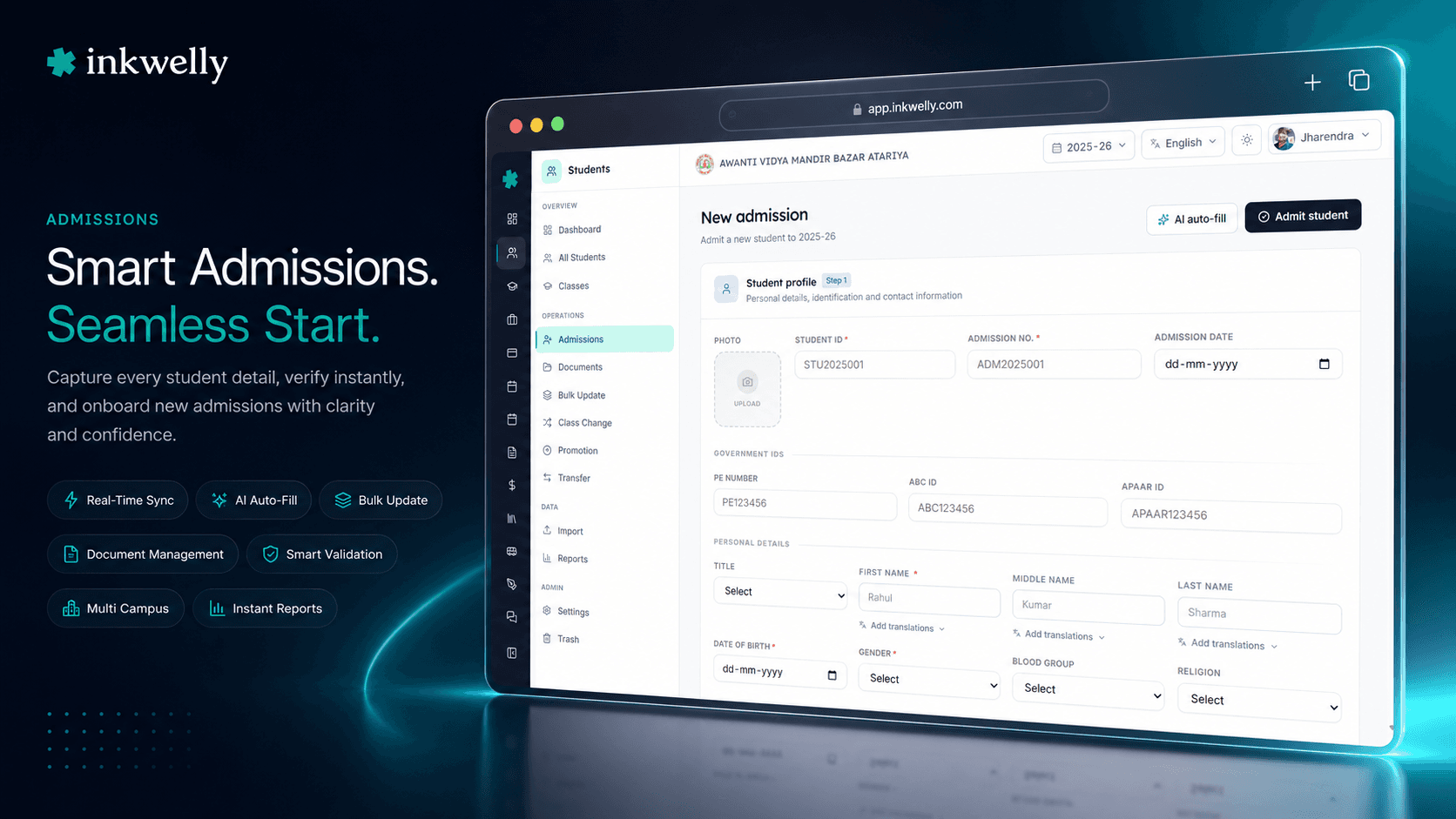
Admission form, filled in 6 seconds. Just paste. AI does the rest.
Paste a parent's WhatsApp message, an admission slip, or your own notes — and Inkwelly's AI parses 14 student admission fields automatically. Names in Title Case, dates in YYYY-MM-DD, blood group enumerated, Aadhaar cleaned of spaces, class auto-mapped to your school's class list. End the office bottleneck during the March admission rush.
Why this exists — and why most ERPs don't have it
March – April — the admission window in every Indian school. The office assistant is filling forms eight hours a day, six days a week. A parent walks in with a hand-written admission slip and reads out their child's details. The accountant types the same data into Excel for the fee receipt. Three weeks later, the office has admitted 60 new students, double-entered every record, and made small mistakes on at least 15 of them — a wrong DOB here, an Aadhaar typo there, a class section assigned to the wrong child.
The office assistant is not slow. The system is. Indian school admission forms have 14 to 20 fields each — first name, middle name, last name, date of birth, gender, blood group, religion, caste category, nationality, mother tongue, Aadhaar number, mobile, email, target class — and most are typed manually for every single child.
We asked: what if your office assistant could just paste the parent's WhatsApp message into a box, and have AI fill all 14 fields in under 10 seconds, correctly formatted, validated against your school's actual class list? So we built it. It runs on every admission form in Inkwelly, every day. It works for English, Hindi, Hinglish, and the way Indian parents actually share information.
How it works
Open any Student Admission form in Inkwelly. The header has a Sparkles button labelled 'Auto-fill with AI'. Click it — a dialog opens with a single paste box.
Paste any text — up to 500 characters — that contains the student's information. It can be a parent's WhatsApp message, a hand-typed note from the admission counter, an OCR'd admission slip, your own typed summary. Click 'Fill form'. The dialog shows a four-stage progress indicator (Reading → Extracting → Formatting → Almost there) while the AI parses the text.
In 4 to 8 seconds, the dialog closes and your admission form is populated — with the right field in the right format. You review what was extracted, correct anything that looks off, fill the few fields the AI couldn't infer (parent details, address, photo), and click Admit. What used to take the office assistant 6 minutes per child now takes 90 seconds.
What the AI extracts in one paste
- First name, middle name, last name — normalised to Title Case (
rajendra a verma→Rajendra A Verma). - Date of birth — parsed from any common Indian format and normalised to YYYY-MM-DD (
15/03/2010,15-03-2010,15 March 2010,15 Mar 2010all work). - Gender — mapped to MALE, FEMALE or OTHER.
- Blood group — mapped from common shorthand (
A+,B+,O-,AB+) to the standardised values your school uses internally (A_POSITIVE,B_POSITIVE,O_NEGATIVE,AB_POSITIVE). - Religion — mapped to HINDU, MUSLIM, CHRISTIAN, SIKH, BUDDHIST, JAIN, OTHER.
- Caste category — mapped to GENERAL, OBC, SC, ST, EWS, OTHER (critical for RTE 25% reservation tracking).
- Nationality — normalised to Title Case (
indian→Indian). - Mother tongue — normalised to Title Case (
hindi→Hindi). - Aadhaar number — 12-digit cleanup; spaces, dashes, dots all stripped (
1234 5678 9012→123456789012). - Mobile number — country code preserved if present,
+91prepended by default (9876543210→+919876543210). - Email — normalised to lowercase.
- Target class — the AI takes your school's actual class list (
Nursery,LKG,UKG,Class 1 A,Class 1 B, ...) and matches the parent's free-text reference ('class 5 A','5th A','Std 5 A','5A') to the rightclassId. Wrong section never gets assigned.
Hinglish, English, broken English — all parsed
Indian parents share their child's details the way Indian parents talk. 'Aman Kumar Verma, dob 12-08-2011, male, A positive, hindu, OBC, mobile 9876543210, admission Class 5 A, mother tongue hindi'. Or in pure broken style: 'aman 12/8/2011 boy class 5 a 9876543210'.
The AI parses both. It applies Indian-specific rules: dob/date of birth/born/d.o.b./DOB all map to date-of-birth. boy/male/m/son/b/o/bachcha all map to MALE. hindu/hindū/hinduism all map to HINDU. obc/Other Backward Class/backward class all map to OBC. class 5 A/5A/5th A/Std 5 A/fifth A all match your Class 5 A entry in your school's class list.
Every Indian date format — one normalised output
Dates of birth come in 12 different formats from Indian parents. 15/03/2010, 15-03-2010, 15.03.2010, 15 March 2010, 15 Mar 2010, 15th March, 2010, March 15 2010, 2010-03-15, even 15 maarch 2010. Aadhaar prints DOB as 15/03/2010. School transfer certificates print it as 15-Mar-2010. The parent's WhatsApp message says 15.3.2010.
The AI handles every format and normalises to YYYY-MM-DD — 2010-03-15 — the format your database stores. Day-month-year ambiguity is resolved using Indian convention (DD/MM/YYYY by default, not US-style MM/DD/YYYY).
Class names — mapped to YOUR school's class list
Most AI form-fillers stop at extraction — they pull 'Class 5 A' as text. Useless when your database expects a classId. We ship the school's actual class list to the AI as part of the prompt, and ask it to match the free-text class reference to the closest entry.
Your school has Pre-Nursery, Nursery, LKG, UKG, Class 1 A, Class 1 B, ..., Class 12 Commerce. Parent writes 'admission to class 5 section A' — AI returns the classId for Class 5 A. Parent writes '5th' (no section) — AI returns the first matching Class 5 * (or empty if ambiguous, so the office assistant picks the section). Parent writes 'KG' — AI maps to LKG if it's the only KG class, or returns empty for the office to pick between LKG and UKG. Never guesses across grades.
Aadhaar, mobile, email — cleaned up automatically
Indian parents rarely paste a clean Aadhaar number. They paste 1234 5678 9012, or 1234-5678-9012, or 1234.5678.9012, or 1234 5678 9012 (Aadhaar of son). The AI extracts the 12 digits, strips everything else, validates length, returns 123456789012. Same for mobile — 98765 43210, +91 98765 43210, 9876543210, 91-9876543210 all normalise to +919876543210. Email is lowercased automatically (Aadhaar enrollment counters are inconsistent about case).
“Pehle ek admission form bharne mein 6-7 minute lagte the. Ab parent ka WhatsApp message paste kiya, AI ne 6 second mein form bhar diya. March mein admission rush mein humne 1 din mein 80 admission kar liye — jo pehle 3 din lagte the.”
During the March admission rush
The admission window is 4-6 weeks long for most Indian schools. In a private CBSE day school admitting 60 to 200 new students, the office staff is the bottleneck — not the principal, not the admission decision, not the fee. The clerical work of typing 60 to 200 admission forms, each with 14 to 20 fields, becomes the gating constraint on how fast the school can move.
The AI auto-fill cuts that clerical time by 75 to 85 percent. Pasting a parent's WhatsApp message takes 5 seconds. AI parsing takes 4 to 8 seconds. Reviewing and correcting takes 30 to 60 seconds. Filling the remaining fields the parent didn't share (parent occupation, permanent address, photo) takes another 60 seconds. Total: under 90 seconds per admission, vs. 6 to 7 minutes manually — a 4× to 5× throughput improvement when it matters most.
For a school admitting 150 students in a 30-day window, that's 10 to 12 hours saved per week at the admission counter. Time the office can spend on the things AI can't do — verifying documents in person, talking to anxious parents, organising the admission ceremony for the new joiners.
Formatting rules the AI applies automatically
- Names — Title Case across first, middle, last (
rajendra→Rajendra,a→A,verma→Verma). - Nationality — Title Case (
indian→Indian). - Mother tongue — Title Case (
hindi→Hindi). - Email — lowercase (
[email protected]→[email protected]). - Date of birth — YYYY-MM-DD output regardless of input format (Indian DD/MM/YYYY default).
- Aadhaar — 12 digits only, no separators.
- Mobile — with country code;
+91prepended if absent. - Gender — enumerated to MALE / FEMALE / OTHER.
- Blood group — mapped from common shorthand (
A+) to internal codes (A_POSITIVE). - Religion — mapped to HINDU / MUSLIM / CHRISTIAN / SIKH / BUDDHIST / JAIN / OTHER.
- Caste category — mapped to GENERAL / OBC / SC / ST / EWS / OTHER — important for RTE 25% reservation tracking.
- Class — free-text class reference matched to your school's actual class list and returned as a
classId— never assigned across grades, never silently guessed across sections.
See AI auto-fill on your school's classes, live in 30 minutes
Bring 5 sample admission notes — hand-written, WhatsApp messages, anything you actually receive — to the demo. We'll set up your class list during the call and show the AI parse them on screen.
Limits, safety, and the small print
Input limit: 500 characters per paste. This is enough for 95% of Indian admission notes (a typical parent message is 80 to 250 chars). Longer slips can be split across two passes — paste the student details first, then paste address details on the address tab.
Per-school feature flag: The auto-fill is gated by student-admission-autofill in your school's feature settings. Disable it for offices that don't want AI in their workflow.
Per-organisation AI master switch: Org admins can disable all AI features in the organisation with one toggle. Defaults to ON for new organisations.
Quota & rate limits: AI calls are rate-limited per school to prevent abuse. Quota exhaustion returns a clear error message; calls fall back to manual entry. The office assistant is never blocked.
Audit log: Every AI call logs the user, the school, the input length (not the input itself), the response success or error code, and the timestamp — retrievable from the audit log for the school admin.
Not stored: The raw paste text is sent to the AI, parsed, and discarded. Only the structured output (the 14 fields) gets stored — in the same admission record any office assistant would create manually.
Belongs to
1 moduleFrequently asked
7 questionsWhat if the AI gets a field wrong?
The form is fully editable after auto-fill. The office assistant reviews the populated fields, corrects anything off, fills the missing ones (parent details, address, photo) and clicks Admit. AI is a starting point — not a replacement for review. In our internal testing across 200+ Indian admission notes, the AI correctly extracts 11 of 14 fields on average, with name and date-of-birth being the most reliable.
Does it work in Hindi, Hinglish, or only English?
All three. The AI handles English (`'Rajendra Verma, born 15 March 2010'`), Hinglish (`'Rajendra Verma, dob 15/3/2010, mobile 9876543210, class 5 A'`), and Devanagari Hindi (`'राजेन्द्र वर्मा, जन्म 15/3/2010'`). It also handles common Indian abbreviations — dob, d.o.b., m/o (son of), s/o, b/o (born of), and the various ways parents specify class (5th, V, Std 5, Class 5).
Can it fill fields the parent didn't share?
No. The AI only extracts what's in the input text. If the parent's WhatsApp message has the student's name, DOB, blood group and class — only those four fields populate. Fields not in the input remain empty for the office assistant to fill manually. The AI never invents a value.
How accurate is class auto-mapping when section isn't specified?
When the parent says `'class 5'` without a section, the AI returns empty if multiple sections exist — it never guesses across sections. The office assistant picks. When the parent says `'class 5 A'` and your school has exactly one `Class 5 A`, the AI returns that class's ID. The dropdown opens with the right class pre-selected.
Can we disable AI auto-fill for our school?
Yes — from the school's feature settings. Set `student-admission-autofill` to OFF, and the Sparkles button disappears from the admission form. The org-level master switch is also available; turning that off disables every AI feature across every school in your organisation. AI in Inkwelly is opt-out by default for new organisations.
Is the parent's data sent to a third-party AI provider?
AI processing routes through Inkwelly's controlled AI infrastructure — the AI provider configuration is per school, set by your organisation administrator. Default Indian deployments route through providers with India-region data hosting where available. Aadhaar and personal data are encrypted in transit (TLS 1.3) and never stored at the AI provider — only the structured output is persisted on Inkwelly's servers in Mumbai. Auto-fill is fully optional and audit-logged.
Does it support all CBSE / ICSE / State Board class structures?
Yes. The AI takes whatever class list your school has configured — `Pre-Nursery` through `Class 12`, science / commerce / arts streams, vocational classes, NIOS classes, hostel-block-specific classes, even non-standard names — and matches against the free-text class reference. Works for CBSE day schools, ICSE residential schools, IB primary years programmes, IGCSE secondary schools, NIOS, and every Indian state board.
You might also like
2 readsSee Inkwelly on your school
30-minute demo. We open your current ERP with you and load your data into Inkwelly on the call. Dated go-live plan by the end of it.