Run school transport without the daily phone calls. without the daily phone calls
Routes, stops, vehicles, drivers, fitness papers, transport fees, concessions, refunds and parent complaints — every part of school transport, in one connected workspace built for Indian schools.
How most Indian schools run transport today
In most schools, transport is the office's loudest pain. The transport in-charge keeps a printed route sheet on his desk that was last updated in April. Parents call the school office at 7:42 a.m. asking why the bus is late, and the receptionist has no answer because she has no link to the bus. The accountant maintains a separate Excel sheet for transport fees, which never matches the tuition fee register. When a parent asks for a transport fee receipt for ITR, two clerks search three folders for ten minutes. By the time the principal hears about the broken stop sign or the driver who missed a turn, half the parents already know.
The cost is rarely measured but always paid. Parents who get five "bus is on the way" calls per week eventually withdraw their child, citing "poor coordination". RTO insurance and fitness renewals are missed because nobody owns the calendar — and an expired fitness certificate during a road check costs the school both a penalty and a press-worthy headline. Transport fee leakage of even ₹500 per child per term across 200 students is ₹2 lakh quietly lost every year. And the transport in-charge, who was meant to focus on driver training and route optimisation, becomes a full-time call-centre.
If you recognised three of those scenes, you already know why transport software is on your shortlist this year. The question is not whether you need it. The question is whether the system you pick handles routes, vehicles, fees, complaints and statutory paperwork in ONE place, or asks you to glue four tools together. Inkwelly Transport is built as the single workspace your office already wished it had.
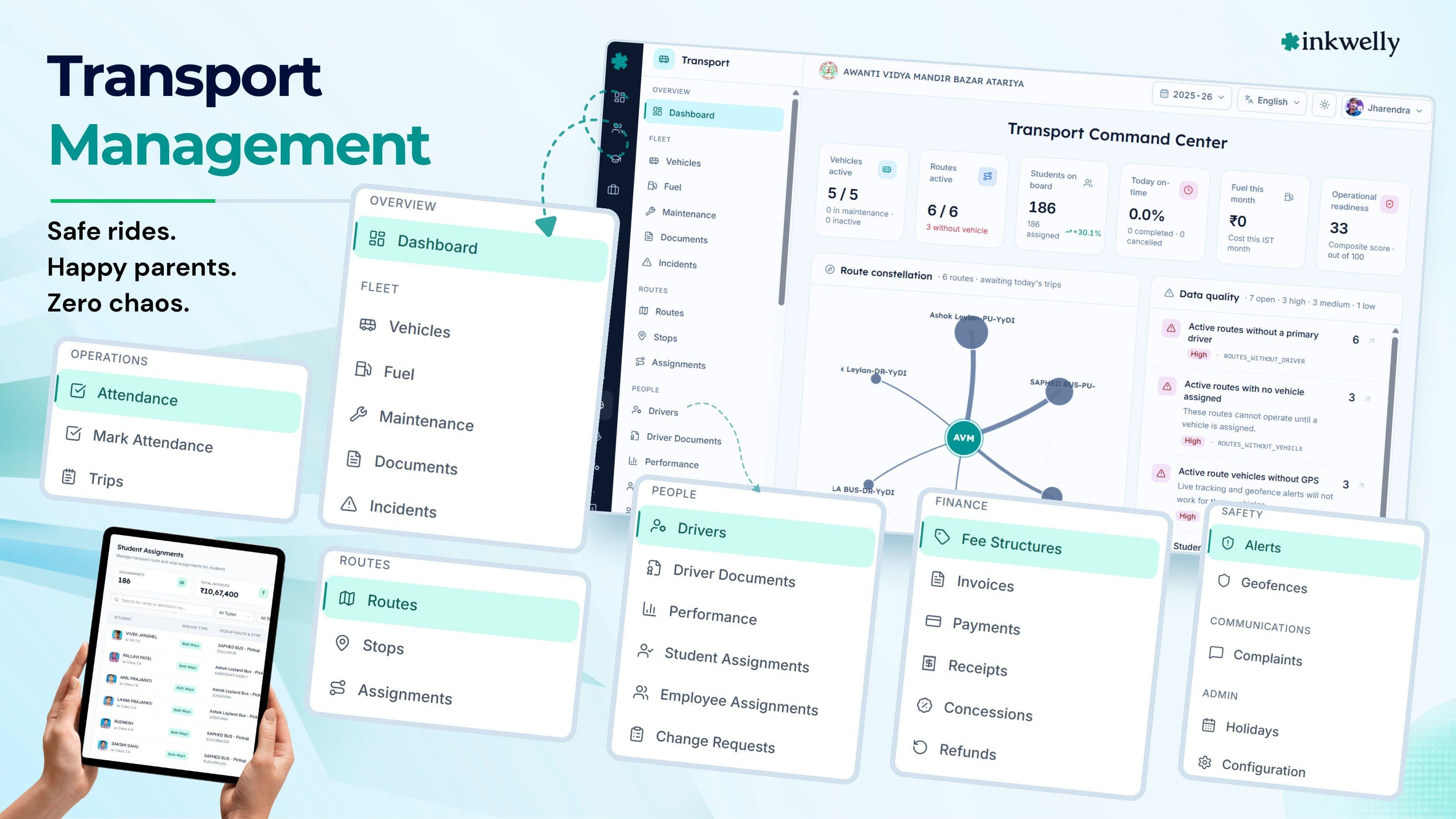
What Inkwelly Transport actually replaces
Inkwelly Transport is the operations layer for your entire fleet — owned buses, vendor buses, vans, autos and even cabs used for boarding-school airport runs. Routes and stops are drawn once. Vehicles are listed once with full statutory papers. Drivers and conductors are added once with licence and contact details. Students are assigned to a stop once, and from that single click, the parent gets the route confirmation, the transport fee appears in the student's fee ledger, the accountant sees the new invoice, and the driver app shows one more name on his stop list.
From that point on, every change is propagated automatically. A student switches stop mid-year — fee adjusts pro-rata, the old driver loses the name, the new driver gains it, the parent receives a confirmation. A vehicle goes for service — the substitute bus is recorded, the in-charge sees the impact, the route is reassigned in two clicks. A fitness certificate is 30 days from expiry — the system reminds the in-charge in the dashboard and on WhatsApp until renewal. Nothing slips because the system, not memory, owns the calendar.
Everything Indian schools actually do with transport, covered
- Route and stop builder — name routes, list stops in order, set timings for morning and afternoon shifts, mark direction (pickup vs drop)
- Vehicle master with full statutory documents — RC, insurance, fitness certificate, permit, PUC, road tax — each with expiry alerts
- Vehicle incidents and maintenance log — accidents, breakdowns, scheduled servicing, with cost tracking per vehicle
- Operator management — both in-house buses and third-party vendor contracts, with separate billing visibility
- Driver and conductor records — licence number, expiry, blood group, emergency contact, photograph
- Student-to-stop assignments — single, sibling group or class-wise, with transfer history
- Transport fee structures — flat per route, distance-tier or per-stop, with sibling and staff concessions
- Transport invoices, payments, receipts, concessions and refunds — separate from tuition fee, fully reconciled
- Holiday calendar specific to transport — bus does not run, fee does not apply for that day
- Complaints intake from parents — categorised, assigned to the in-charge, status tracked to closure
- Reports — route-wise occupancy, vehicle-wise revenue, document expiry, complaints SLA
A complete transport operations toolkit
This is not transport "as a feature inside a generic ERP". It is the operating system for your transport department. Below is the surface area — every tab the transport in-charge will live in, every workflow the office runs once a day or once a term, every report the principal asks for in a board review.
Every tab the transport in-charge will use
Routes & Stops
Build routes once, list stops in order, set morning and afternoon timings. Reorder stops with a drag, change a timing in one field. Re-publishes to driver and parent apps automatically.
Vehicle Master
All vehicles — owned and vendor — in one register. Registration number, model, capacity, fuel type, ownership and current route assignment, on a single screen.
Vehicle Documents
RC, fitness certificate, insurance, permit, PUC, road tax. Each with expiry, renewal reminder, scanned copy attached. RTO inspection becomes a 5-minute job.
Incidents & Maintenance
Log accidents, breakdowns, late arrivals, planned servicing. Cost is auto-attributed to the vehicle for end-of-year cost-per-bus reporting.
Operators
Manage both in-house operations and third-party vendor contracts. Separate billing, separate driver pool, single dashboard for the principal.
Drivers & Conductors
Licence number, validity, blood group, emergency contact, photograph, route assignment. License-expiry alerts hit the in-charge automatically.
Student Assignments
Assign a student, a sibling group or an entire class to a stop. Transfer history is preserved for fee reconciliation and audits.
Transport Fees
Per-route, per-stop or distance-tier pricing. Concessions for siblings, staff or scholarship students. Refunds when a child stops using transport.
Invoices & Receipts
Auto-generated transport invoices alongside tuition. Parents pay online via UPI or Razorpay; receipts mail straight to the parent's WhatsApp.
Transport Holidays
Some schools run buses on Saturdays, others don't. Set a transport-specific holiday calendar so fees and routes match reality.
Complaints
Parents raise a complaint from the parent app. It is categorised, assigned to the in-charge, and tracked to closure with full audit trail.
Reports
Route occupancy, revenue per route, document expiry queue, complaints SLA, driver utilisation, vendor cost per term — all exportable.
Routes and stops — the foundation of everything
Routes and stops are the spine of the transport module. Every other entity — vehicle, driver, student, fee, invoice, complaint — references a route and a stop. Inkwelly insists on doing this once, doing it carefully, and never asking you to do it again.
Build a route in under five minutes
Give the route a name ("Route 4 — Sector 18 to Bazar Atariya"). Add stops in order with name, landmark and pickup time. Mark which shift (morning, afternoon, both) the route runs in, and which days. Pin a vehicle and a driver. The route is live the moment you save it.
When the route changes — a new colony added, a stop removed because a child moved — make the edit on the same screen. Versioning preserves the old route for fee reconciliation. Drivers and parents see the change on the next refresh of their app, no manual notification needed.
Stops carry weight, not just dots on a map
A stop is not a label — it is the unit of fee, the unit of student assignment, and the unit of parent communication. Each stop carries: a landmark, a pickup time for the morning shift, a drop time for the afternoon shift, a fee tier (if you price by distance), and the count of students currently assigned.
Drag-and-drop reorder when stops change. Add a sub-landmark ("Bazar Atariya — opp. SBI ATM") for parent clarity. Mark a stop as inactive for a season instead of deleting it, so historical fees and receipts remain intact. Audit-friendly by default.
Vehicles and the statutory paperwork no one wants to track
Indian school transport is regulated. The Motor Vehicles Act, state RTO rules and CBSE School Bus Safety Guidelines all converge on the same checklist — RC valid, fitness valid, insurance valid, permit valid, PUC valid, speed governor working, GPS fitted, driver in uniform with valid licence. Inkwelly turns this checklist into living data, not a folder of scanned PDFs nobody opens until the day of the inspection.
A document register that warns you before the RTO does
Each vehicle has a documents tab that lists RC, fitness certificate, insurance, permit, PUC, road tax and any state-specific paper. Each entry has an issue date, an expiry date, and a scan attached. The system colour-codes anything within 30 days of expiry as amber, anything within 7 days as red, and notifies the transport in-charge by WhatsApp.
When the RTO arrives for a surprise check, you do not search a cupboard. You open the vehicle profile, hit Print, and hand the inspector a single-sheet summary with thumbnails of every active document. The same screen shows pending renewals so you can show the inspector that the next renewal is already booked.
Maintenance and incidents — cost-per-bus that finally makes sense
Log every service visit with date, odometer reading, work done and cost. Log every incident — minor breakdown, late arrival, accident — with a date, severity and resolution note. Over a term, the vehicle profile shows total cost-of-ownership, mean time between breakdowns and incident count.
This is the data the principal needs at term-end review. Which buses are profitable? Which vendor's vehicles break down twice as often as the rest? Should we replace the 14-year-old bus or extend by one more year? Without this log, the conversation is opinion. With it, the conversation is numbers.
Operators — your fleet is half-owned, half-vendor, fully tracked
Most Indian schools run a hybrid fleet. Two or three buses are school-owned. Three more come from a vendor on a per-trip or per-month contract. One additional van is hired during exam season. Each operator has its own billing terms, driver pool and accountability standards. Inkwelly treats operators as first-class entities so the principal sees the whole picture, not a fragmented one.
In-house and vendor in one workspace
Create operators with type marked as in-house or vendor. Attach a contract document, a billing rate (per route, per trip or per month), a contact person and GST details. Vehicles list the operator they belong to. The vehicle profile rolls up vendor cost into the maintenance ledger.
At month-end, generate a vendor invoice from the system itself — Inkwelly knows how many trips each vendor's bus ran, how many incidents were logged, and what the contract rate is. The accountant cross-checks the vendor's bill against this report. Disputes drop, payment cycles tighten, and the school stops paying for trips that never happened.
Student-to-stop assignment — the single source of truth
The student assignment screen is where transport meets student records. One click here means: the student is on this stop, on this route, on this vehicle, with this driver. The transport fee for that route is added to the student's fee ledger. The parent receives a route confirmation. The driver app updates.
Assign one student, one sibling group, or a whole class
For a single child — open the student profile, pick the route and stop, set a start date, save. For sibling groups — assign the elder sibling and the system suggests applying the same route to the younger one. For brand new admissions across a class — bulk-assign by selecting the class, picking the route, and resolving any stop preferences in a single sheet.
Mid-year transfers are handled cleanly. Pick a transfer date, the new route and stop, and the system pro-rates the fee, refunds any unused portion, and notifies the parent. The transfer is logged with a reason — "shifted residence", "vendor route changed", "requested change of stop" — for future audits.
Transport fees — separate from tuition, never out of sync
Transport fees are a different beast from tuition. They depend on which route the child takes, change mid-year if the child shifts stop, attract sibling concessions, are paused during long vacations, and need to be refunded when a child leaves transport. Inkwelly models all of this without asking the accountant to keep a parallel register.
Fee structures the way Indian schools actually price transport
Set up fee structures per route, per stop, per distance tier, or a flat rate for the whole school. Add a sibling concession (e.g. 25% off second child). Add a staff-child concession. Mark certain months as no-charge (May vacation in CBSE schools, October Durga Puja in West Bengal schools). The structure is reusable across routes — change it once, every assigned student updates next billing cycle.
Part-month joiners are pro-rated automatically. Mid-month leavers get a refund line item without a manual journal entry. The accountant's quarterly reconciliation shrinks from two days to two hours.
Invoices, payments, receipts, concessions, refunds — under one roof
Every student on transport has a transport invoice generated alongside their tuition invoice. The parent sees one combined fee bill in the parent app, with tuition and transport listed as separate line items so the receipt is clear. Online payment via UPI or Razorpay reconciles to both ledgers in one transaction.
Receipts carry the school letterhead, the GST number if applicable, the route and stop, the billing period, and a QR code for verification. Concessions, refunds and adjustments are first-class entries with a reason and an approver, not Excel notes that vanish at audit. ITR season requests for past receipts are answered in 30 seconds, not 30 minutes.
Before and after Inkwelly Transport
“Earlier my receptionist used to take 18-20 calls every morning from parents asking where the bus is. Now those calls have nearly stopped — parents see it in their app. The biggest change is that my transport in-charge actually has time for safety drills now.”
Built for every person who touches transport
A transport workspace is not used by one person. The principal needs the term review. The transport in-charge runs the day. The accountant reconciles the fee. The parent wants a receipt and a complaint channel. Each role gets a screen tuned to their need — but all of them work on the same data.
For the Principal
A single dashboard with the numbers a board meeting cares about — route occupancy, revenue per route, vendor cost per term, document-expiry queue, complaints open vs closed, average complaint resolution time. No chasing the in-charge for spreadsheets. No surprises during board reviews. Drill into any number to see the underlying records. Approve refunds, concessions and vendor invoices that cross the in-charge's authority limit, all with a one-tap audit trail.
For the Transport In-charge
The daily worklist — buses on duty today, drivers absent, documents expiring this week, complaints open, students requesting transfer. One screen tells the in-charge what to do today, in the right order. Documents, incidents, vendor invoices and parent complaints are all routed here. The in-charge stops being the office's call-centre and starts being a real operations manager.
For the Accountant
Transport fees are presented exactly the way the accountant thinks — separated from tuition, with concessions and refunds as line items, with month-end reconciliation built in. Razorpay and UPI settlements are auto-matched to invoices. The day-end report shows what came in, what is pending, and which routes contributed how much. GST handling is explicit where applicable. Year-end audit is a single export — every transport invoice, payment, refund and concession with full traceability.
For the Parent
Inside the parent app the parent sees their child's route, stop, pickup time, drop time, current fee status and any due payment, plus a one-tap complaint button. Receipts arrive on WhatsApp. Route changes show up immediately. There is nothing to install separately — it is the same app the parent already uses for fee, attendance and result. This single change — a parent can self-serve the question "where is the bus?" and "is my fee paid?" — eliminates more than half of the daily phone traffic to the school office.
vs Excel and paper registers
One module, integrated with everything else
A transport system that does not talk to your fee, student and communication modules adds work — it doesn't reduce it. Inkwelly Transport is built to read from the same student database your admission and attendance modules use, write into the same fee ledger your accountant already trusts, and push messages through the same WhatsApp channel parents already receive their report cards on.
Safety, compliance and the data residency question
Indian school transport carries minor children. The bar for safety, compliance and data handling is therefore higher than for any other module. Inkwelly is engineered to make the school's job easier on every one of these axes — not just to claim compliance, but to provide the evidence trail that compliance authorities and worried parents both ask for.
Safety and compliance built in
- Driver licence number and validity captured at onboarding; expiry alerts to the in-charge
- Vehicle fitness, insurance, permit, PUC tracked with renewal reminders
- Speed governor and GPS device fields recorded per vehicle (CBSE School Bus Safety Guidelines)
- Conductor / female attendant assignment per route — POCSO-aligned safeguarding
- Complaint system with categorisation (delay, behaviour, safety, route, fee) and SLA tracking
- Parent acknowledgement on stop changes and route updates, captured digitally
- Incident log with severity tagging, root cause and corrective action
- Audit-friendly export of every safety and compliance artefact for board / inspection visits
Migration — moving from Excel, paper or another ERP
The biggest blocker every school flags is migration. "It will take three months", "my staff cannot learn new software in admission season", "data entry from scratch will break". Inkwelly's onboarding for transport is built around the opposite assumption — most schools should be live in two weekends, with the data they already have.
From Excel
If you already maintain routes, stops, students and fees in Excel — even three different Excel files — the Inkwelly team will give you a single template. You fill in the data you already have. We import routes, stops, vehicles, drivers, students and fee structures in one pass. You verify on a test instance. Two weekends, fully live. No data is keyed in twice. Sibling concessions, mid-year transfers and historical receipts are migrated with metadata, so a parent asking for last year's transport receipt sees it as if Inkwelly was always there.
From another ERP
If you are switching from Fedena, Entab, Campus, MyClassboard or any other ERP, we have done this migration enough times to make it boring. We export from your current system, map the fields, validate the data, import into Inkwelly. Vendor contracts, document scans, complaint history — all preserved. The school keeps the old ERP read-only for one term so historical lookups are still possible. By the second term, the old system is decommissioned.
From paper
Many schools run transport entirely on paper today — a register on the in-charge's desk, printed route sheets, manual receipts. Inkwelly's onboarding includes a one-day data entry assist by our team. We come on site (in-person for Tier-1/2 cities, remote-with-video for Tier-3), key in the routes, stops, vehicles and student assignments together with your in-charge. By the end of the day, the paper register is digitised, the staff has been trained on the workflow they will repeat, and the school is ready to issue its first digital transport receipt the next morning.
See Transport Management on a real school dataset
20-minute walkthrough on a working school. Bring your own pain points — we will show how each one is handled. No sales pitch.
vs imported global tools (HR/SIS suites)
What's included with Transport
- Unlimited routes, stops, vehicles, drivers and student assignments
- In-house and vendor operator management with contract storage
- Vehicle document register with auto expiry reminders
- Vehicle incident and maintenance log with cost-per-bus reporting
- Transport fee structures: per route, per stop, distance tier, sibling and staff concessions
- Online transport fee collection via UPI and Razorpay with auto-reconciliation
- Transport-specific receipts, refunds and concession line items in the parent ledger
- Parent app with route, stop, fee status and one-tap complaint
- Complaint intake, categorisation, in-charge assignment, SLA tracking
- Transport-specific holiday calendar separate from academic calendar
- Term-end reports — occupancy, revenue per route, vendor cost, complaints SLA
- Migration assist from Excel, paper or any existing school ERP
- Hindi parent communication and a Hindi version of the parent app
Stop the 7:42 a.m. phone calls
Twenty minutes. A real school dataset. Decide afterwards. We will not chase you with sales emails.
Frequently asked
12 questionsDoes Inkwelly Transport require us to buy GPS hardware for our buses?
No. Inkwelly uses the driver's Android smartphone as the GPS source via the Inkwelly Driver app. A basic ₹8,000 Android device is enough. If your school already has vehicle-mounted GPS trackers fitted to comply with state RTO rules, we can integrate those separately — please ask for the integration guide.
How does it handle a hybrid fleet with both school-owned and vendor buses?
Operators are first-class entities marked as in-house or vendor. Each operator has a contract document, a billing rate (per trip, per route or per month), a contact person and GST details. Vehicles list the operator they belong to, and Inkwelly auto-generates a vendor invoice at month-end based on actual trips logged — so vendor billing matches reality, not a sheet sent by the vendor.
Can transport fees be different for different routes or distances?
Yes. Fee structures support per-route, per-stop, distance-tier and flat-rate pricing in the same school. Sibling concessions, staff-child concessions and scholarship concessions can be applied per structure. Mid-year joiners are pro-rated automatically and mid-year leavers receive a refund line item without any manual journal entries.
Does it work in areas with poor internet connectivity?
Yes. The driver app caches the full route, stop list and student list offline. GPS pings are queued and synced when the connection returns. Parent alerts go out as soon as the device reconnects. There is no data loss in low-signal zones, which matters for routes that pass through Tier-3 outskirts.
How long does initial setup take for a school with around 15 buses?
Typically two weekends. Routes, stops, vehicles, drivers, student assignments and fee structures are entered in a guided template; Inkwelly imports them in one pass. By the second weekend the parent app is live, the first transport receipt is issued, and the school is in production.
Can parents pay transport fees online separately from tuition?
Parents see one combined bill in the parent app, with tuition and transport listed as separate line items. They can pay both together or transport-only via UPI or Razorpay. The receipt issued automatically separates the two amounts and is accepted for ITR submission as transport allowance proof.
Is the parent app a separate download from the regular Inkwelly parent app?
No. It is the same parent app the school uses for fee, attendance, results and notices. Transport sits as a tab inside it. Parents do not need a separate install or login, which removes a major reason parents otherwise abandon transport-tracking apps.
How does the system help during an RTO or board safety inspection?
Open the vehicle profile and hit Print. You get a single-sheet summary of every active document — RC, fitness, insurance, permit, PUC — with thumbnails of the scans and the next renewal date. Driver licence and conductor details are on the same page. The inspector usually finishes the verification in five minutes instead of an hour.
What happens to historical fee data when a student switches stop or leaves transport mid-year?
Old assignments are preserved with their date range. The fee for the prior period is unchanged on the receipt. The new period is pro-rated automatically. Refunds are first-class line items with reason and approver, so an audit trail is always available — no Excel adjustments to explain later.
Is student location data stored in India? What about parental consent?
All Inkwelly data, including GPS traces, is stored on servers in Mumbai and is compliant with India's Digital Personal Data Protection Act, 2023. Parental consent for transport tracking is captured digitally at admission and is auditable. GPS traces are retained for 30 days by default and can be purged earlier on written parent request.
Does it support Hindi for parents who prefer it?
Yes. The parent app, transport notifications and receipts are available in English and Hindi today. Parents can switch language from inside the app — the school does not need to maintain two parallel templates.
Can the in-charge handle parent complaints inside the same system?
Yes. Parents raise a complaint from the parent app with a category (delay, driver behaviour, safety, fee, route). It auto-routes to the transport in-charge with an SLA clock. Status changes — acknowledged, in-progress, resolved — are visible to the parent. The principal sees an SLA report at term-end with average days to closure per category.
You might also like
4 readsSee Inkwelly on your school
30-minute demo. We open your current ERP with you and load your data into Inkwelly on the call. Dated go-live plan by the end of it.