Deleted by mistake? Restore them in one click.
Every student record you delete is moved to Trash — never gone, never lost. Restore the right student in 5 seconds with optional audit remarks, or permanently delete with typed-name confirmation. Built for the everyday mistakes school office staff make under pressure during admission, promotion, and TC weeks.
Why every Indian school office needs a Trash bin
The morning of April 3rd, 2026. Promotion week. The office assistant in a Bahraich-based CBSE school is cleaning up the previous session's student list — marking transferred students inactive, deleting test entries created during admission practice runs, deactivating students whose families moved cities. She is fast, she is tired, and she is doing this between fee receipts and parent phone calls. At 11:47 AM, she clicks delete on the wrong row. A real student. Class 7 B. Admission number STD-2024-0142. Gone from the active list.
In most Indian school ERPs, that mistake means a 3-hour recovery operation — pulling the previous-session backup from the IT vendor's email, reading SQL out to the support engineer, paying ₹2,000 for a database restore, hoping nothing else got affected. Or worse, no backup, no recovery, and the office quietly recreates the student from the parent's admission slip — losing the original admission date, the receipts trail, the TC history.
We built Student Trash for this exact moment. Every student you delete moves to Trash — a soft-delete bin that holds the full record, the photo, the parent details, the fee history, the audit trail. One click to restore. The student reappears in the active list with everything intact — including the original admission number. No SQL, no support ticket, no panic.
How Student Trash works
When anyone with delete permission removes a student from the active list, the record is soft-deleted — moved to Trash with a deletedAt timestamp, the deletion reason captured at the time of delete, and the user who performed the action recorded in the audit log. The active student list no longer shows the row. Reports, attendance, fee dues, and exam dashboards stop counting them. From every other angle the student looks gone.
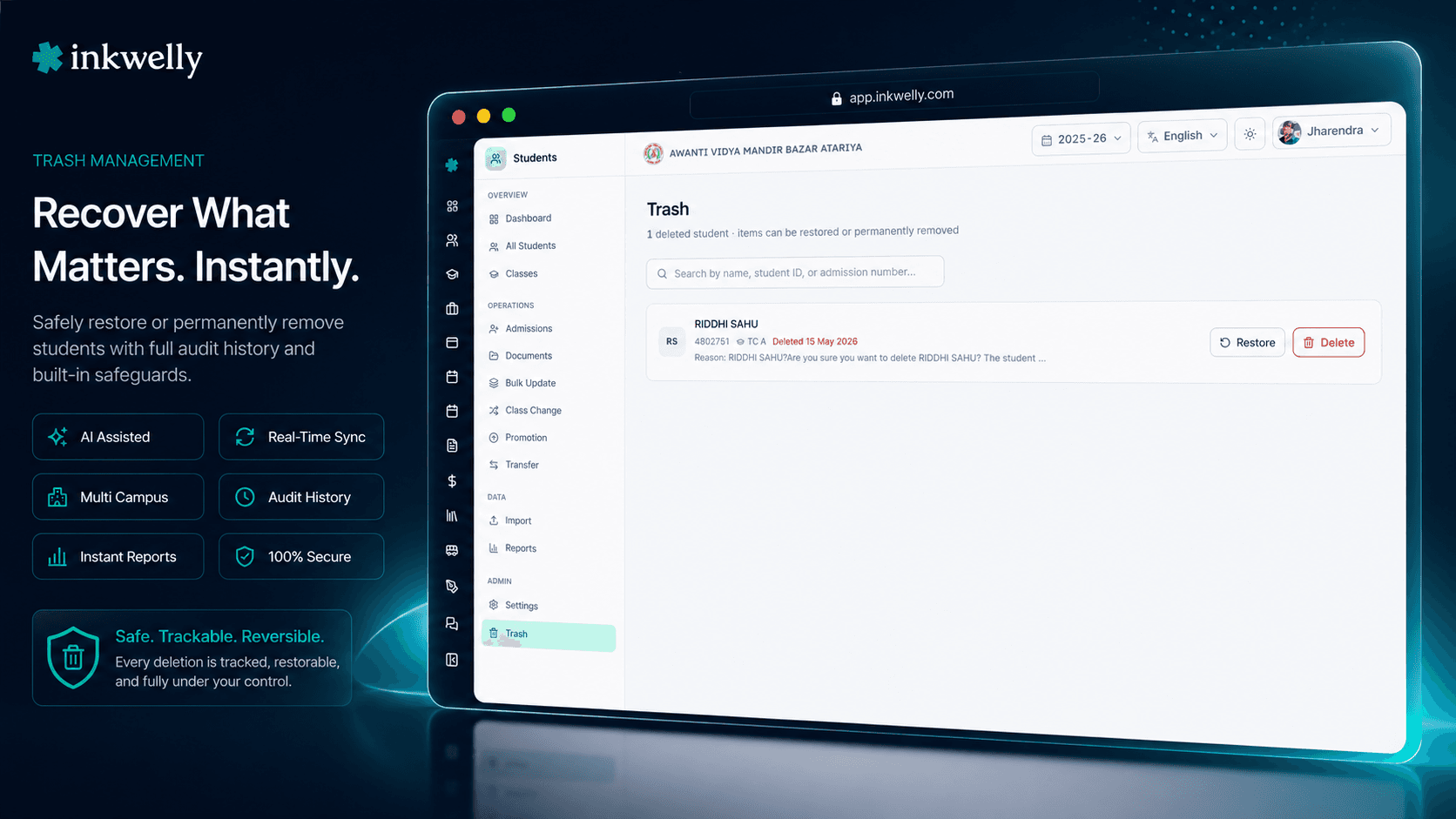
But the record is preserved in full. Open /students/trash from the Student Information sidebar. The view loads up to 100 deleted students at a time, sorted by deletion date with the most recently deleted first. Each row shows the full name (in your school's primary language), admission number, last class with grade level, profile photo, the date they were deleted, and the deletion reason your staff entered. A search box on top lets you find by name or admission number across all pages of trashed records.
Two actions per row: Restore and Delete permanently. Restore opens a small dialog asking for optional audit remarks — type why you are restoring (e.g., 'Wrongly deleted, parent confirmed admission is active') and click Restore. The student reappears in the active list with the original admission number, fee history, attendance trail, and parent links intact. Delete permanently opens a different dialog — it asks you to type the student's full name to confirm, and only enables the destructive button after the typed name matches exactly. The student is then removed forever — that record cannot be recovered.
What's preserved when a student is sent to Trash
- Full profile — first/middle/last name in every language your school maintains, gender, blood group, religion, caste category, mother tongue, nationality.
- Admission record — admission number, registration number, original admission date, the class and section they were last in.
- Identifiers — Aadhaar, mobile, email, ABC ID, APAAR ID, PE Number — all the identity fields stay attached.
- Parent links — father, mother and guardian profiles linked to the student stay linked. Restoring the student restores the relationship cleanly.
- Fee history — collected receipts, pending dues, fine entries, transport fee assignments. Nothing in the Student Fee ledger is dropped or re-numbered.
- Attendance trail — every day of marked attendance under Student Attendance is retained. Re-running an old report still shows the student's record correctly.
- Documents and photos — profile photos in your school's media library, uploaded TC, birth certificate scans, Aadhaar scans, character certificates — all preserved.
- Audit log — who deleted, when, deletion reason, and on restore: who restored, when, and the audit remarks they entered.
One-click restore with audit remarks
The restore dialog is intentionally short. The Trash list already shows you the student's name, admission number, class and deletion reason. You don't need to re-confirm what you're restoring — you just need to record why you're restoring it.
The single optional input is audit remarks. Type 1-3 sentences: 'Mistakenly deleted during April promotion week — parent confirms STD-2024-0142 is active in Class 7 B.' Click Restore. The dialog closes, a success toast appears, the student reappears in the active list with their original admission number. The remarks land in the audit log alongside the user, timestamp and IP address — a permanent record of why this restore happened, in case the principal asks during a board audit six months later.
Type the name to permanently delete — no accidental wipes
Permanent delete is destructive and irreversible. We refuse to let it happen by mis-click. The dialog shows the student's full name in red, with a clear warning that this action cannot be undone, and asks you to type the exact full name into a confirmation field. The destructive button stays disabled until what you type matches the student's firstName lastName exactly — case sensitive, character for character.
This pattern is the same one GitHub uses to confirm repository deletion, and the same one your bank uses to confirm a high-value transfer. It adds 8 seconds of friction. Those 8 seconds prevent the wrong-row mis-click that would otherwise destroy a real student's record forever. Schools doing audit cleanups for old test entries do this once per row, deliberately. Schools doing routine work never reach this dialog at all.
Search and pagination — find any deleted student fast
A mid-sized CBSE school running for 5 years accumulates 200-400 trashed records — students who transferred out, families who relocated, test entries from admission practice. The Trash view paginates 100 rows per page sorted by deletion date (newest first), with previous/next controls and a counter showing 'Page 2 of 4 · 387 deleted students'.
The search box at the top filters across all pages by name (in any language your school maintains) or admission number. Type 'STD-2024' to find every deleted admission from session 2024-25. Type 'Aman' to find every Aman ever deleted. Type the exact admission number to jump straight to the row. The result list updates as you filter, and the page resets to page 1 so you don't miss recent matches buried under old ones.
Every delete and restore is audit-logged
The Trash workflow writes to the same audit log as every other change in Student Information. Each delete records: the user who clicked delete, the timestamp, the IP address, the deletion reason captured at delete time. Each restore records: the user who clicked restore, the timestamp, the IP address, the audit remarks entered. Each permanent delete records the same — plus a flag that the record is gone forever.
The audit log is exportable from the school admin panel as PDF or CSV — useful for board audits, CBSE renewal filings where the inspector asks for evidence of data discipline, and legal compliance under the DPDP Act. Role-based access means class teachers see only their own section's events; office staff and the principal see everything. There is no way to delete an audit log entry — it survives the destruction of the student record itself.
“April mein promotion ke time ek student ko galti se delete kar diya tha — Class 6 B ka. Pehle aise haalat mein support ko phone karte the, 2-3 ghante ka kaam tha. Ab Trash khola, naam search kiya, Restore kiya — 30 second mein wapas active list mein aa gaya, fee receipts bhi sab safe। Office staff ka pressure 90 percent kam ho gaya।”
Real-world office routines this turns into 30-second tasks
Five routine school office mistakes that traditionally cost hours of recovery work:
1. Wrong-row delete during April promotion cleanup. Office is marking 30 transferred students inactive after the session ends. One real, currently-enrolled student gets clicked instead. Without Trash: 3-hour database restore, ₹2,000 vendor charge, anxiety for the parent. With Trash: open Trash, search the admission number, click Restore. Under 30 seconds.
2. Test admission entries created during demo. A new IT vendor or a Inkwelly trial week generates 5-8 fake students with names like 'Test Student' or 'ABC Demo'. After the trial, these need permanent removal. Without Trash with confirmation: someone deletes them but accidentally also deletes a real student named 'Test Aman'. With Trash: bulk-trash the test entries, then permanent-delete each one with typed-name confirmation. Zero risk to real records.
3. TC issued in error. A class teacher requests TC for a student whose family was supposed to leave but changed their mind at the last moment. The student was already marked left and deleted. Without Trash: re-create the student from scratch, lose admission date, lose receipts, parent complains about new admission number. With Trash: restore from Trash. Admission number preserved, fee history intact, TC withdrawn cleanly.
4. Bulk delete by mistake during data cleanup. A school admin runs a bulk operation to deactivate students from a previous session and selects the wrong filter. 40 active Class 8 students get deleted in one click. Without Trash: panic, escalate to vendor, hours lost. With Trash: open the Trash list, sort by today, click 'Restore' on each — or run a bulk-restore script via the support team. All 40 students back in the active list within 5 minutes, no data lost.
5. Parent invokes DPDP right-to-erasure. A parent who has withdrawn their child requests permanent deletion under the DPDP Act 2023. Without a controlled permanent-delete: the office runs raw SQL, with all the risk that implies. With Trash: open Trash, find the student, type-name-confirm permanent delete. The parent gets a documented, auditable confirmation; the school stays compliant.
Common operations Indian schools run on Trash every month
- Restore wrong-row deletes during April promotion / session-end cleanup.
- Permanently remove test entries created during ERP trials, demos and admission practice.
- Restore mistakenly-deleted students when a parent changes their mind about TC withdrawal.
- Bulk-restore after a wrong filter in a routine deactivation script.
- Audit deleted students for compliance before CBSE / ICSE / state board renewal inspection.
- Permanent delete under DPDP right-to-erasure with typed-name confirmation and audit log evidence.
- Cleanup before academic year migration — review Trash, decide what stays soft-deleted vs. permanently removed.
- Investigation support for unusual deletions — search by user, by date, by deletion reason in the audit export.
See Student Trash live in 30 minutes
Bring 3 routine deletion mistakes you have made (or are afraid of making). We'll set up your school's classes during the demo, run the workflows live with your real data, and show how each becomes a one-click restore.
Limits, safety and the small print
Soft-delete is the default. Every delete from the active student list moves the record to Trash. There is no way to bypass Trash and permanently delete in one step from the active list — that path simply does not exist. The only route to permanent removal is via Trash → typed-name confirmation. This is intentional and not configurable: the cost of an irrecoverable wrong-click is too high to allow any shortcut.
Up to 100 trashed students per page. Larger schools accumulating thousands of trashed records page through with previous/next controls. Search filters across all pages, so a 4,000-student trash is still navigable in one query. Sort defaults to most recently deleted first.
Restoration preserves admission number. When a student is restored, the original admission number, registration number, admission date, fee receipts, attendance records, and parent links return as they were. The student is not 're-admitted' — they are restored. Reports run against past sessions stay correct.
Permanent delete is irreversible. Once you typed-name-confirm permanent delete, the student record is removed from the database. The audit log entry survives — it remembers that the deletion happened, who did it, when, and the original admission number — but the personal data is gone. There is no recovery path. We do not keep a hidden 'super-trash'.
Role-based access. By default, only school admin and principal roles see Trash and have permission to restore or permanent-delete. Class teachers and other staff see only the active student list with delete permission gated to their assigned section, and their deletes go to Trash where only authorised roles can act on them. Configure exact permissions per role from the Identity & Access Management settings.
Multi-tenant isolation. Like every Inkwelly module, Trash operates strictly within your school. Multi-school trusts run independent Trash views per school — there is no cross-tenant access. A trashed student in School A is invisible to School B's office, even within the same organisation.
Backups still apply. Soft-delete is your day-to-day safety net. Inkwelly's nightly database backup is your disaster recovery layer underneath. If you have permanently deleted something and discover the mistake within the backup window, support can restore from backup — but the typed-name confirmation flow exists precisely so this is rarely needed.
Belongs to
1 moduleFrequently asked
7 questionsHow long do students stay in Trash before being auto-deleted?
They don't auto-delete. Soft-deleted students stay in Trash indefinitely until someone with the right permission either restores them or permanently deletes them with typed-name confirmation. We deliberately don't auto-purge — Indian schools regularly need access to records of withdrawn students 1-3 years later for TC re-issues, board verifications, RTE audits and parent enquiries. Auto-deletion would create more problems than it solves.
Will fee receipts and attendance history come back when I restore a student?
Yes — completely. Restore preserves the original admission number, registration number, the entire fee receipts trail, every day of attendance ever marked, parent links (father, mother, guardian profiles), exam marks, and uploaded documents. The student is not re-admitted as a new entry; they are reactivated as their original self. Reports run against past sessions remain correct after a restore.
Can a class teacher see and restore deleted students from their section?
By default, no. Trash access is gated to school admin and principal roles. Class teachers see only the active student list with delete permission scoped to their assigned section. Their deletes go to Trash where only authorised roles can act. If your school wants class teachers to have Trash access for their section, that's configurable via the school's Identity & Access Management settings.
What happens to fee dues if I permanent-delete a student?
Permanent delete removes the student record but preserves the audit-log evidence — including admission number and the historical fee aggregate at the time of deletion. Outstanding dues attributable to that student stop appearing in active dues reports. For accounting compliance, the prior fee receipts (before deletion) remain in the school's financial records as long as those receipts were already issued and reconciled. We strongly recommend writing off or settling dues before permanent-delete and capturing the resolution in the typed-name dialog's reason field.
Is permanent delete reversible from a backup?
Inkwelly takes nightly encrypted backups as a disaster-recovery layer. If you discover a wrongful permanent delete within the backup window, support can attempt a backup restore — but this is a manual, time-bound, all-or-nothing operation that affects more than just the one student. The typed-name confirmation flow exists so backup recovery is the rare last resort, not the routine remedy. For everyday mistakes, Trash is the recovery path; backup is for catastrophic situations.
Does Trash satisfy the DPDP Act 2023 retention and erasure requirements?
Soft-delete supports both sides. The DPDP Act requires schools to retain certain student records for legally prescribed periods even after the student exits — Trash holds the record encrypted at rest in India, accessible only to authorised roles, satisfying retention. When a data principal (parent or eligible student) invokes the right to erasure, your school can fulfil it through the typed-name permanent-delete flow, and the audit-log evidence proves the request was honoured. Your school's data protection officer should confirm exact retention periods per board and state regulations.
Can I bulk-restore many students at once?
The standard UI restores one student at a time with audit remarks per restore — that's intentional, since each restore should have a why-recorded. For exceptional situations like a wrong-filter bulk delete that took down 40 records at once, our support team can help with a controlled bulk-restore via the audit-logged backend script. Reach out via WhatsApp or the in-app help and have the date/time of the wrong delete ready.
You might also like
3 readsSee Inkwelly on your school
30-minute demo. We open your current ERP with you and load your data into Inkwelly on the call. Dated go-live plan by the end of it.