Last year's dues, never lost. Carried forward, collected once, forgiven only with a reason.
Inkwelly moves every student's unpaid school fees from the old session into the new one as a clearly labelled opening balance — at promotion, or the moment you set up next year's fees. The old invoice is frozen so nobody collects twice, write-offs need a written reason, and each child's fee ledger explains every rupee for CBSE, ICSE and state-board schools across India.
How most Indian schools carry forward fee dues today
It is the first week of April in a CBSE school in Lucknow. Results are out, the promotion list is up on the notice board, and the accountant has a second job nobody sees: finding every child who still owes fees from last year. The old session shows the pending list. The new session is empty. So she prints the defaulter list, opens Excel and starts typing balances into next year by hand — ₹4,200 for a Class 6 child, ₹18,600 for a Class 9 child whose father lost his job in December. That same week, three parents clear their old dues at the counter against last year's invoices. Nobody updates the sheet.
By July the two years disagree. A parent holds up a receipt for money the new session still says is pending. Another family's ₹11,000 never made it across at all, and nobody notices until the father asks for a Transfer Certificate the following March. A trustee forgives a widow's dues in a WhatsApp message that no auditor will ever read. The lost ₹11,000 hurts, but the most expensive cost is the parent who was asked to pay twice and tells four other parents that the school's fee office makes mistakes with money.
If your previous-year dues live in a register, an Excel file or one accountant's memory, you have lived some version of this. Inkwelly's Student Fee module makes the move from one session to the next part of the system: carry-forward fee dues that travel on their own, a clear record of every write-off, and one fee ledger per student that explains every rupee.
How carry-forward fee dues work in Inkwelly
Inkwelly treats the change of session as a money event, not a typing exercise. This is what happens, in the order your fee office sees it.
- Promote the class. In the promotion wizard, the carry-forward step has a section for school fee dues. Leave it on Carry as opening balance, which is the default, or choose to hold back students who still owe fees.
- Set up next year's fees. The moment a student's fee profile exists in the new session — created during promotion or later when you onboard fees — Inkwelly looks at last session's unpaid and part-paid invoices for that child.
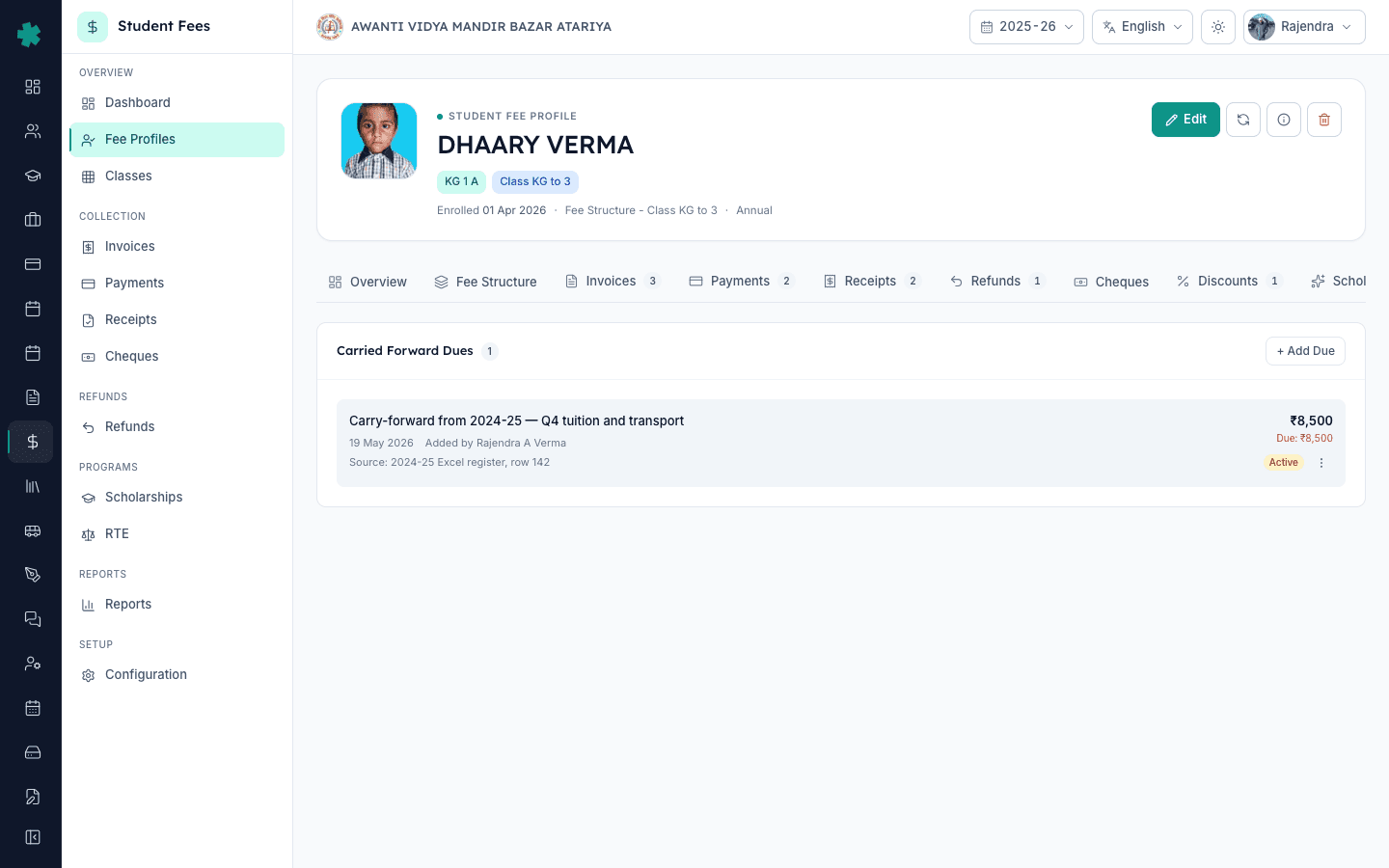
- The balance moves as an opening balance invoice. Whatever is still unpaid becomes an Opening Balance invoice in the new session, numbered in its own series and labelled with the session and the old invoice it came from.
- The old invoice is frozen. Last year's invoice is marked Carried Forward. It can no longer take a payment, fee reminders stop for it, and it drops out of last year's defaulter figures.
- Collect once. The parent pays the opening balance like any other fee invoice — at the counter, or through the payment link you send. The previous-year due marks itself part-paid or paid as the money comes in.
- Handle the exceptions. The office can write off all or part of a due with a written reason, cancel one added by mistake, or add a due by hand for a child whose history lives outside Inkwelly.
The family sees the same number your office does. In the Inkwelly app, the amount appears as Previous dues in the child's fee breakdown, right under this year's fees, so there is no surprise when the first invoice of the session arrives.
What carries forward, and what stays behind
- Every unpaid or part-paid school fee invoice from last session — only the balance still owed moves, never the original invoice amount.
- Each opening balance invoice names its origin, such as the old session and invoice number, so a parent or auditor can trace it in seconds.
- Opening balance invoices get their own number series, separate from regular fee invoices, so they stand out in the invoice register.
- Advance fees a family paid last year come across as carried-forward credit and reduce what they owe in the new session.
- Students admitted under the RTE Act 25% quota are skipped — their fees are waived, so no old balance is raised against them.
- The frozen old invoice prints with a CARRIED FORWARD watermark, and scanning its QR code shows that the balance moved to the next session.
- A child is never carried twice from the same session, even if next year's fee profile is set up again.
- Transport dues follow their own choice on the same promotion screen — carrying the bus route brings unpaid transport dues across as one opening balance.
- Staff can add a previous-year due by hand with a description, amount and internal remarks — the route for schools moving from another ERP or Excel.
- Write-offs can be full or partial, always need a reason, and record the staff member's name and the time.
- An opening balance can be edited, cancelled or deleted only while nothing has been paid against it; after that, write-off is the only route.
- The Student Fee dashboard shows previous-year dues school-wide, alongside this year's billing and collections.
The screens your fee office will use
At promotion, decide what happens to unpaid fees
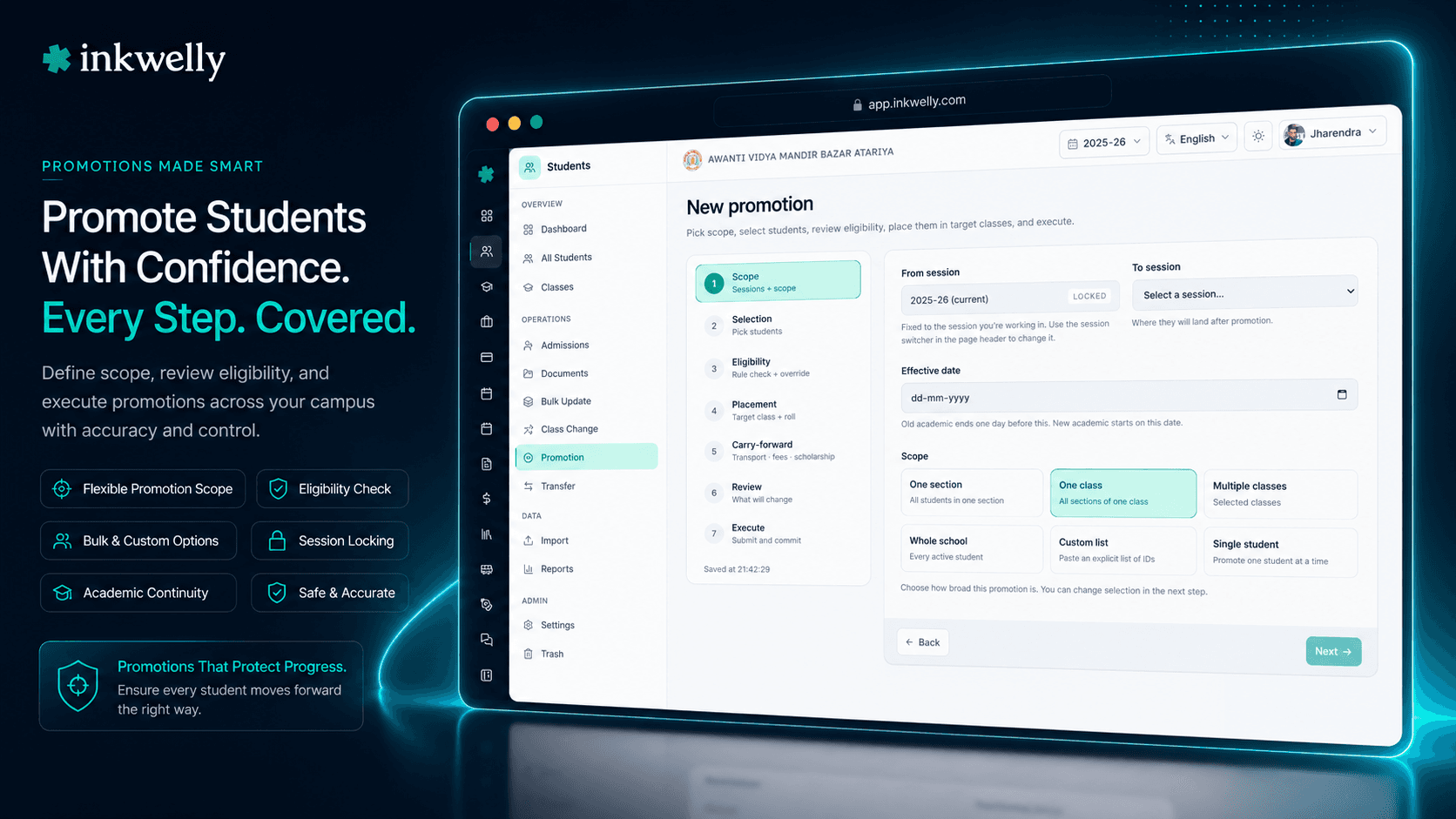
Promotion week is when dues usually go missing, so that is exactly where Inkwelly asks the question. The promotion wizard has a carry-forward step with a section for school fee dues, and the choice you make there applies to the whole promotion run.
Most schools keep the default, Carry as opening balance. Last year's unpaid school fees become this year's opening balance, payable through the normal fee flow. If a student's new fee profile is not ready yet, Inkwelly does not guess — it records the carry and applies the opening balance automatically the moment you onboard that child's fees.
Some schools, usually for senior classes, prefer Hold promotion. Any student who still has unpaid school fees is held back with a clear note showing the outstanding amount, while the rest of the class goes through. Clear the dues, re-run promotion for that one student, and they move up.
If a promotion run has to be undone, the carry is reversed with it, and last year's invoices are owed again exactly as they were.
Write-offs your auditor can actually read
Every school forgives some dues — a family that lost its earning member, a long-serving staff member's child, a trustee's decision after a difficult meeting. The problem is not the decision. It is that the decision usually lives in a WhatsApp chat.
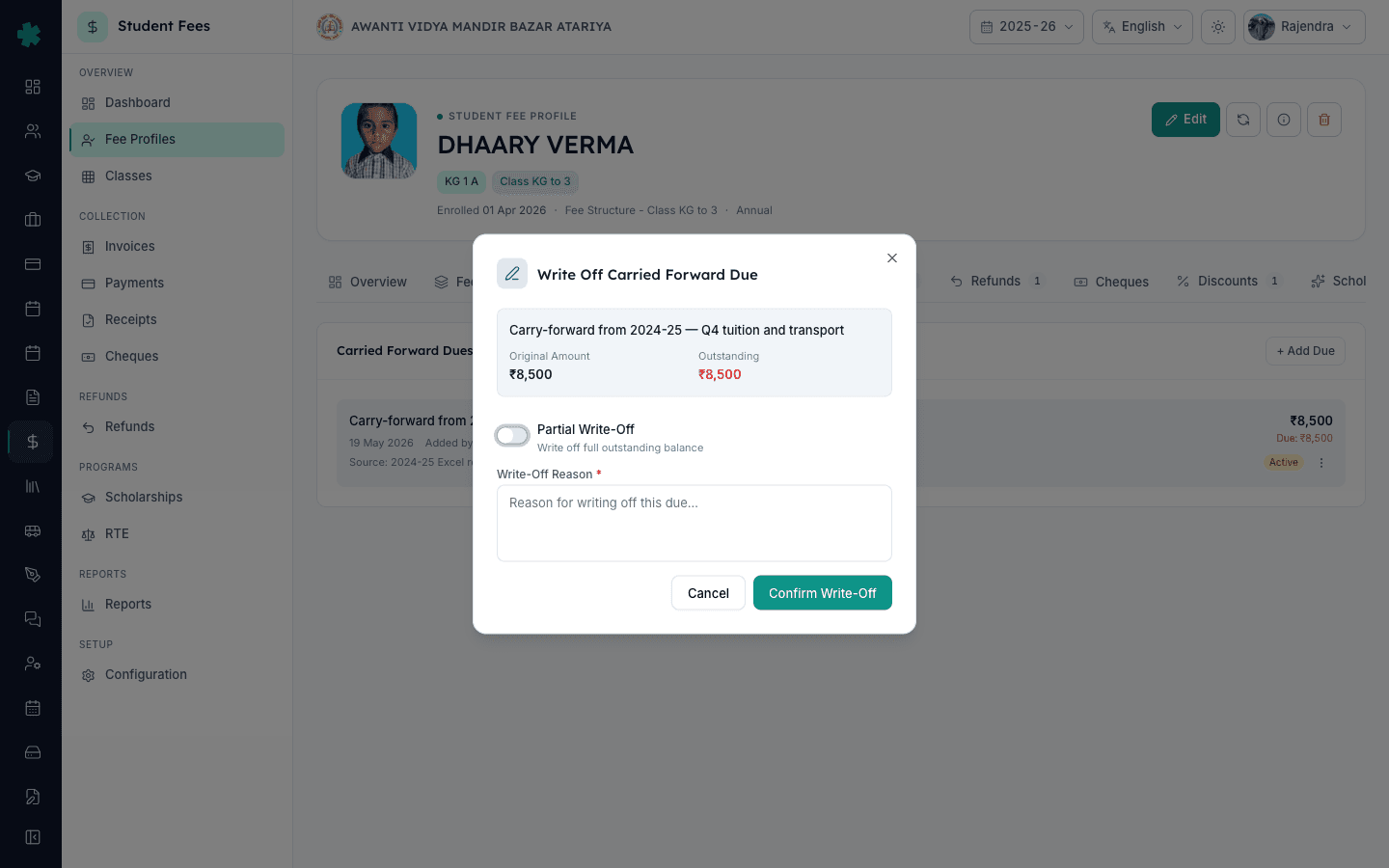
In Inkwelly a write-off is part of the due itself. Open the previous-year due, choose to write off the full outstanding balance or a specific amount, and type the reason — the form will not save without one. Inkwelly will not let a write-off exceed what is still owed. It records who wrote it off and when, lowers the opening balance invoice to match, and keeps the original amount visible, so the record shows what was owed, what was forgiven and what was paid.
A due entered by mistake is handled differently. While nothing has been paid against it, it can be cancelled, which cancels its invoice too. Once a single rupee has been collected, a write-off with a reason is the only way to reduce it, so the receipt trail stays whole.
Only staff you give fee-adjustment rights to can add, change or write off old dues.
One fee ledger per student, from first charge to closing balance
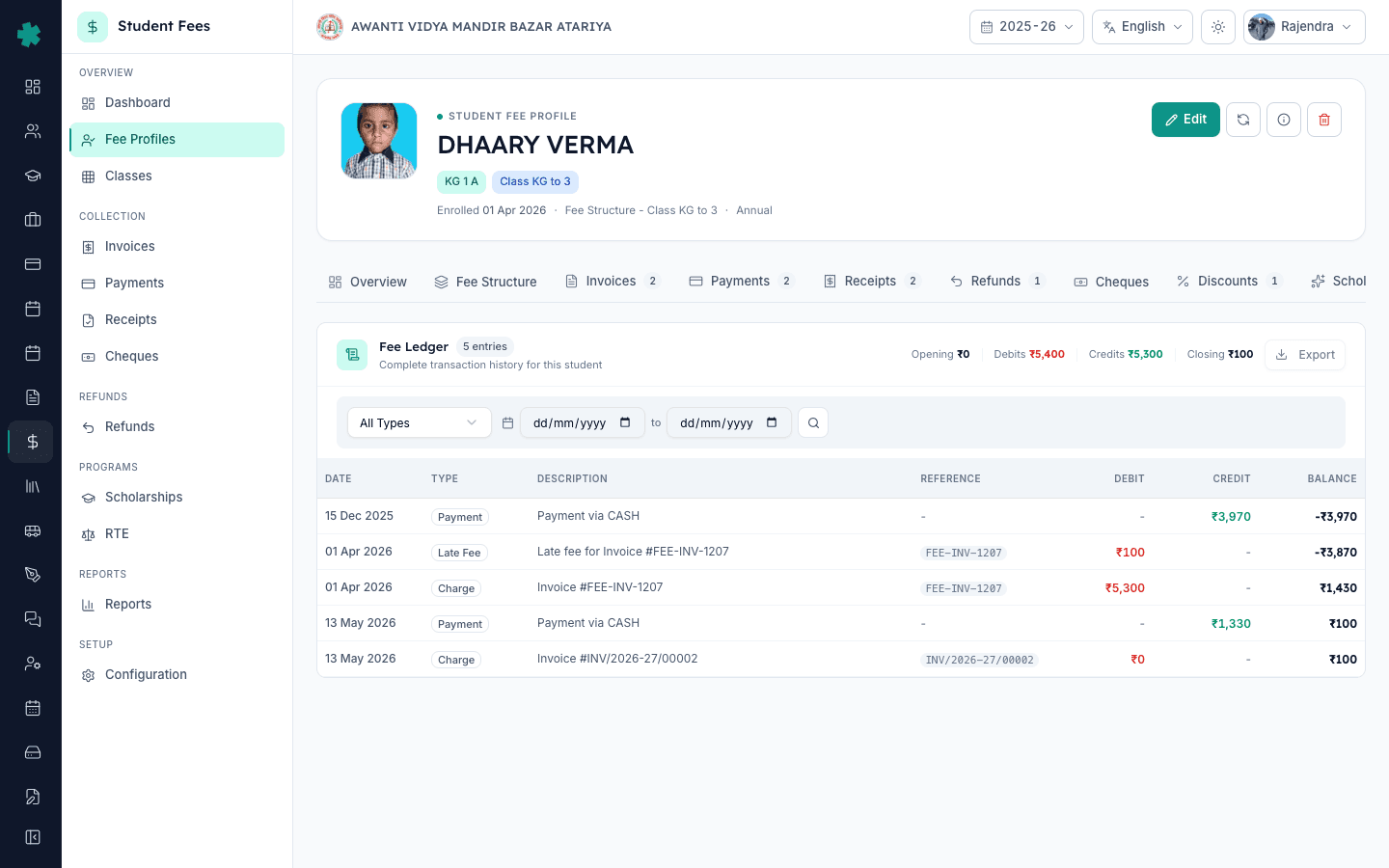
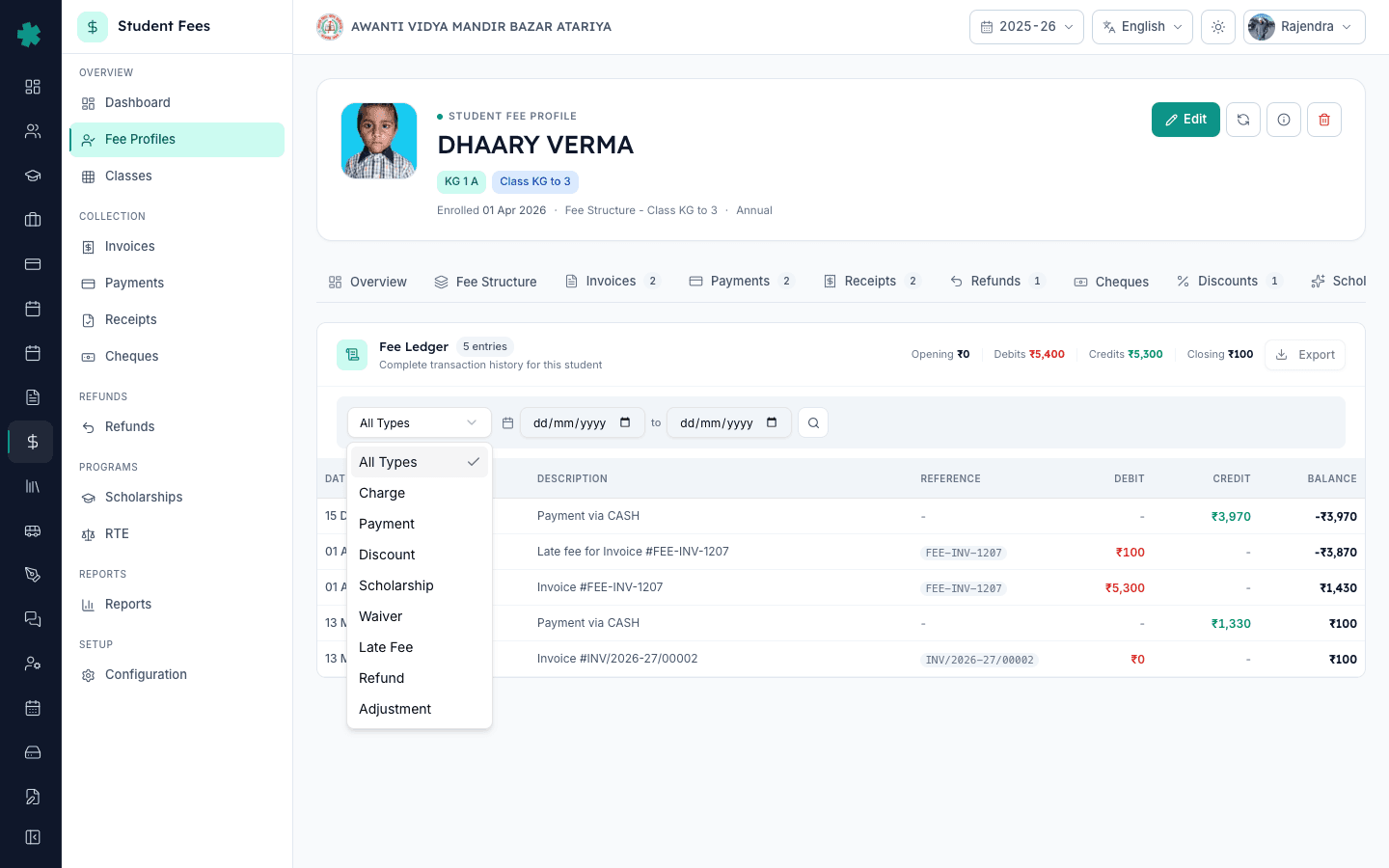
When a father stands at the counter saying I already paid this, the office needs one screen, not four registers. Every student's fee profile has a Ledger tab that lays the whole session out in date order: each invoice, including last year's opening balance, each payment, each approved discount and scholarship, each waiver and each late fee.
Every line shows the date, the type, a description, the reference number, the amount charged or credited, and the running balance after it. The top of the ledger adds up total debits and total credits and shows the closing balance — what the family owes today. Filter by type to answer a narrow question, such as why a late fee appeared, or pick a date range to talk a parent through a single term.
Because the opening balance is an ordinary charge line on this year's ledger, the previous-year story is right there: the balance arrived at the start of the session, and the payments that cleared it sit underneath. Nobody has to open last year's books to explain this year's number.
Advance fees and credits come across too
Dues are only half of the rollover. Plenty of Indian parents pay ahead — a full year's tuition in one cheque in March, or an extra ₹2,000 at the counter because the change was not available. That money belongs to the family, and it should not vanish when the session changes.
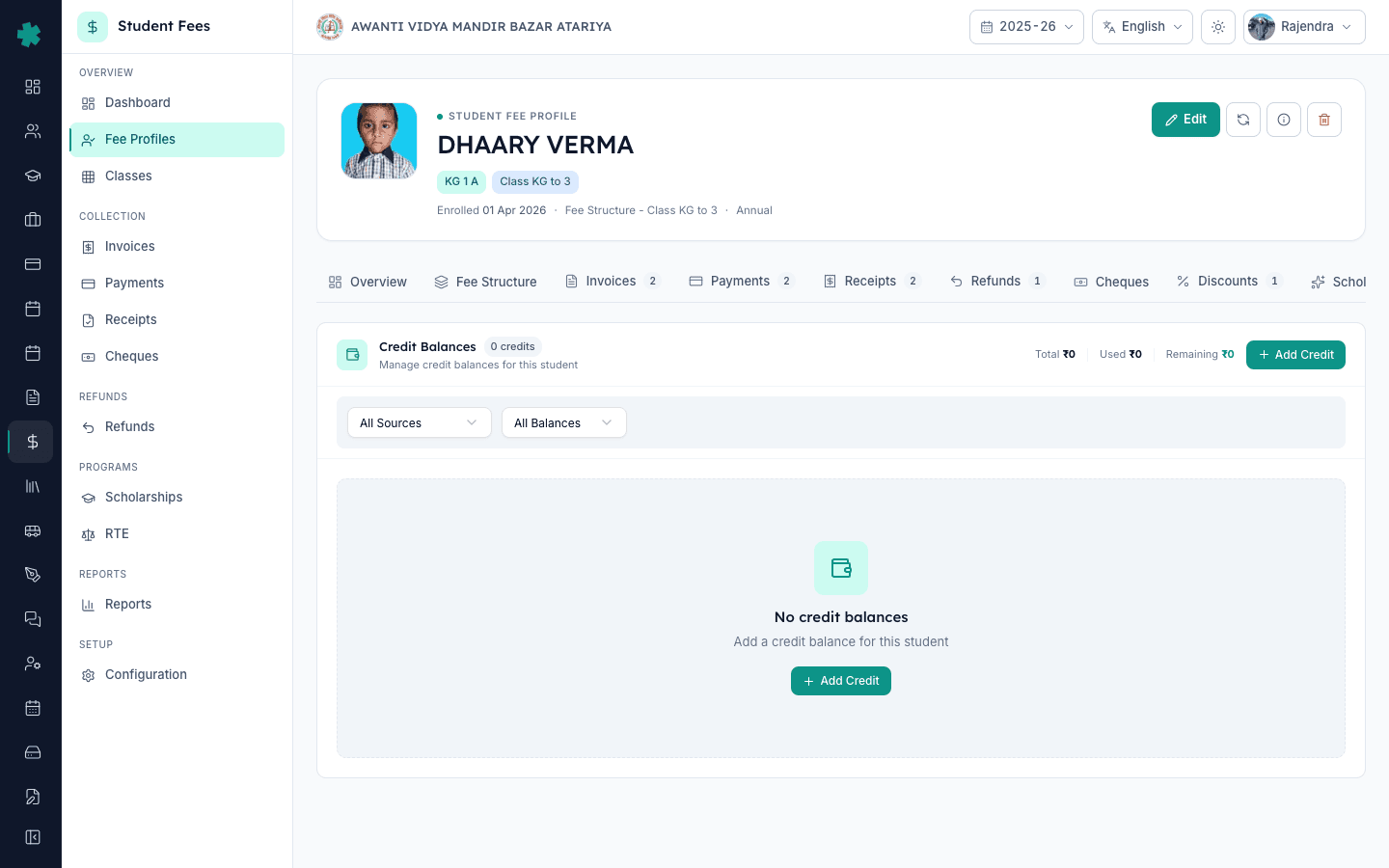
When a student's new fee profile is created, any advance left on last year's profile comes across as carried-forward credit and reduces what the family owes this year. For everything else, each student has a Credit Balances page. Record a credit with its source — an overpayment, a refund kept as credit, an adjustment or a carried-forward amount — add remarks and, if your fee circular says unused credit lapses, an expiry date.
The page keeps a running total of credit given, used and remaining, and the student's still-due figure takes the remaining credit into account. Your office records when a credit is used against a fee, so the family's statement and your books tell the same story.
Built so nobody collects the same rupee twice
Double billing is the fastest way to lose a parent's trust, so Inkwelly closes every door to it.
Once last year's balance moves, the old invoice is frozen. If someone at the counter tries to collect against it, Inkwelly refuses and points them to the new opening balance invoice instead. Automatic fee reminders stop for the frozen invoice, so a parent never receives two WhatsApp messages for the same money. Last year's defaulter list and revenue figures leave it out as well, so the previous session is not counted twice either.
Printed copies are covered too. A frozen invoice prints with a CARRIED FORWARD watermark, and anyone who scans the QR code on an old printout is told that the balance moved to the next session. Every fee receipt points to the invoice that actually took the money.
Pending fees do not disappear on 31 March. They only disappear from the register.
Five moments carry-forward fee dues are built for
- April promotion week. A school in Indore runs promotion for its whole senior wing in one sitting. The fee office does not type a single old balance: every child who owed money starts the new session with a labelled opening balance, and every frozen invoice from last year stops asking for payment.
- Switching from another school ERP. A school moving from its old software, or from an Excel register, brings pending dues across during migration — which costs ₹0, because extracting the data is on us. Each child's balance lands as a previous-year due with a note on where it came from, so the first parent meeting on Inkwelly starts with the right numbers.
- A hardship case. A Class 7 student in Bahraich owes ₹14,000 from last year after her father's accident. The management committee forgives ₹6,000. The accountant writes off exactly that amount with the committee's decision as the reason, and the family pays the remaining ₹8,000 in two parts.
- A Transfer Certificate request. A parent in Nashik asks for a TC in the middle of the year. Before the principal signs, the office opens the student's ledger and sees the opening balance from last session, what has been paid against it and what is still due — one screen, no phone call to the previous accountant.
- A disputed balance. A father insists he cleared last year's fees in March. The ledger shows his payment against the old invoice before the rollover, and the opening balance that followed covers only what was left. The conversation takes two minutes instead of a week spent searching receipt books.
Common situations, handled
- Student promoted with dues pending: the unpaid balance becomes an opening balance invoice in the new class and session.
- Fee profile created after promotion: Inkwelly applies the recorded carry automatically when you onboard that student's fees.
- Someone tries to collect against a carried invoice: blocked, with a prompt to collect against the new opening balance instead.
- Management forgives part of a due: a partial write-off with a mandatory reason, and the remaining balance stays payable.
- Due added with the wrong amount: edit or cancel it, as long as no payment has been taken against it.
- RTE quota student promoted: no previous-year dues are raised against the child.
- Family paid ahead last year: the leftover advance arrives as carried-forward credit on the new fee profile.
- Promotion run undone: the carry is reversed and last year's invoices are owed again.
- Parent scans the QR code on an old invoice: the verification page explains that the balance moved to the next session.
- Principal wants the school-wide picture: the Student Fee dashboard shows total previous-year dues next to this year's collections.
See last year's dues roll into a new session
A live walkthrough on a sample school — promotion, opening balances, a partial write-off and the student ledger — answered around your own questions.
Limits and small print
Carry-forward is built for school fee invoices from the immediately previous session. A few boundaries are worth knowing before your first rollover on Inkwelly.
- Only unpaid balances move. Instalments that were never invoiced last year do not come across; the new session bills from its own fee structure.
- A fee profile must exist on both sides. A child with no fee profile last session has nothing to carry. A child with no fee profile yet this session gets the opening balance when you onboard their fees.
- Transport dues are separate. They follow the transport choice on the promotion screen: carrying the route brings them across, while re-surveying or dropping transport leaves them in the old session.
- Editing has a cut-off. An opening balance can be edited, cancelled or deleted only while no payment has been recorded against it. After that, a write-off with a reason is the only way to reduce it, and a write-off can never exceed what is still owed.
- Manual entry is one student at a time. There is no spreadsheet upload for opening balances today. When you switch to Inkwelly, extracting balances from your old system or Excel is part of the free migration.
- The ledger is an on-screen statement. It has no download button yet; invoices and receipts, which have their own PDFs, are what you share with parents.
- Credits are recorded, not spent automatically. Your office marks when a credit is used against a fee; Inkwelly does not deduct it at the counter on its own.
These are not gaps in the money trail. They are the rules that stop the same rupee from being billed, forgiven or collected twice.
Part of
Frequently asked questions
8 questionsNo. When a student's fee profile is created in the new session — during promotion or when you onboard fees later — Inkwelly finds last session's unpaid and part-paid invoices and creates an opening balance invoice for whatever is still owed. The old invoice is frozen as carried forward, so the same money is never billed in two sessions.
It is frozen. It keeps its full history, prints with a CARRIED FORWARD watermark and cannot accept a new payment — anyone who tries is sent to the new opening balance invoice. Fee reminders stop for it, and it no longer counts in last year's defaulter or revenue figures, so neither session is double-counted.
Extracting data from your current system — or from Excel if your vendor will not cooperate — is part of Inkwelly's ₹0 migration. Each student's pending balance is added as a previous-year due with a description and internal remarks noting its source. From then on it behaves like any carried balance: an opening balance invoice the parent pays through the normal fee flow.
Yes. Open the previous-year due and write off a specific amount or the full outstanding balance. A reason is mandatory, the write-off cannot exceed what is still owed, and Inkwelly records who approved it and when. The opening balance invoice drops to match, and the family pays only the remainder.
Yes. In the promotion wizard, set school fee dues to Hold promotion. Any student with unpaid school fees is held back with the outstanding amount shown, and the rest of the class is promoted. Clear the dues and re-run promotion for that student. For Classes 1 to 8, check the RTE Act and your state's rules with your management before holding a child back — most schools carry dues forward instead.
No. Students admitted under the RTE Act 25% quota have their fees waived, so Inkwelly does not raise any previous-year balance against them when their new fee profile is created.
Any advance left on last year's fee profile comes across as carried-forward credit on the new profile and reduces what the family owes this session. Other credits — overpayments, refunds kept as credit or adjustments — are recorded on the student's Credit Balances page with their source, the amount used and the amount remaining.
Only staff whose role includes the fee-adjustment permission. You grant it role by role, so a clerk who collects fees at the counter cannot add, change or forgive a previous-year due. Every due records who added it, and every write-off records who approved it and when.