स्कूल library चलाइए, एक भी book खोए बिना। Catalog, issue, return, reserve, fine।
Multi-library system जिसमें copy-level accession, issue और return workflows, per-grade borrow rules वाली member categories, time-ordered reservations, holiday-aware fines और library health score वाला dashboard — सब एक ही जगह। भारतीय स्कूल अपनी reading rooms जैसे चलाते हैं, वैसे ही बना — CBSE, ICSE, IB, IGCSE और State Boards के लिए।
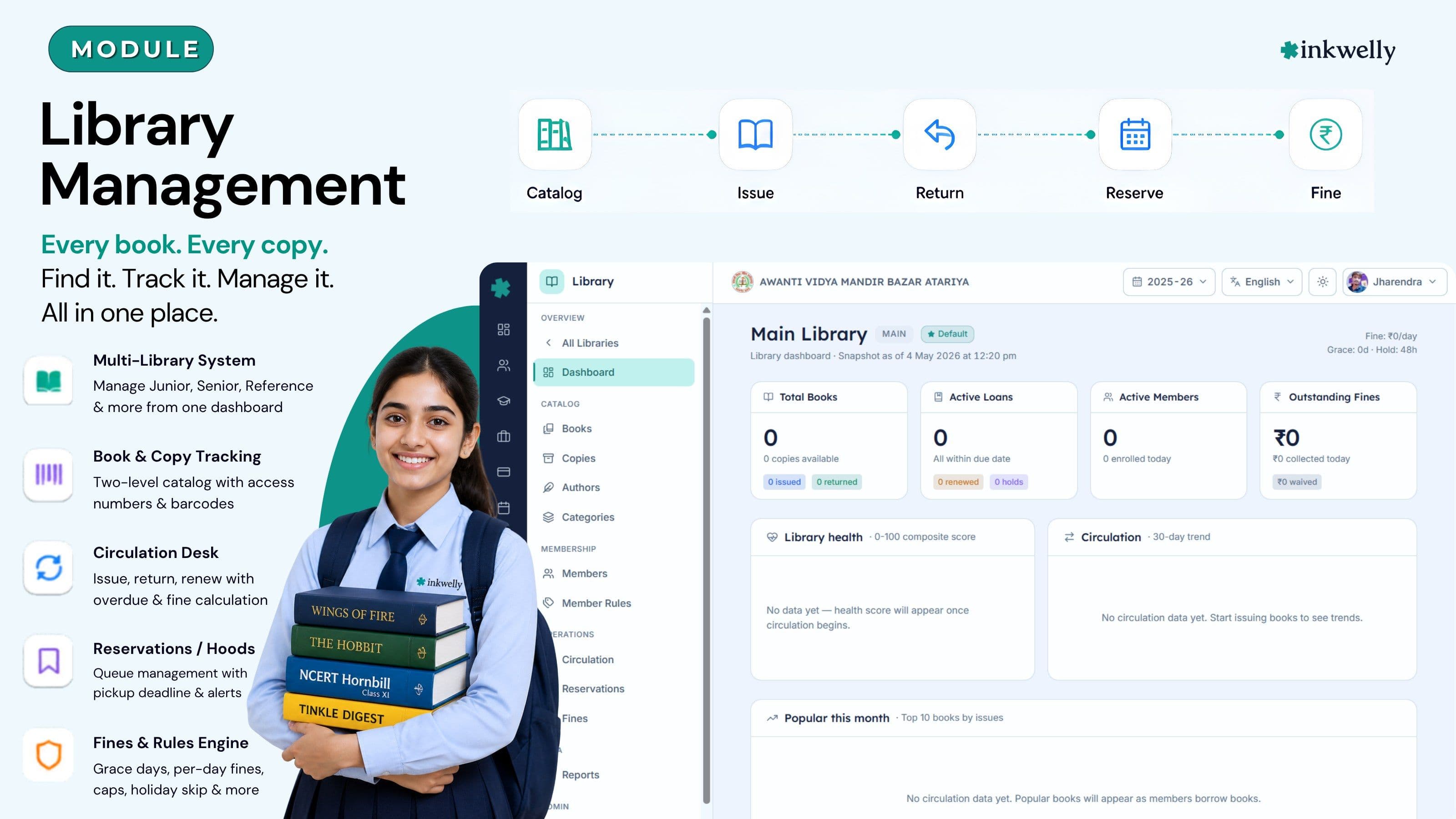
आज भारतीय स्कूल library कैसे चलाते हैं
जून का तीसरा हफ़्ता है। कानपुर के एक CBSE senior-secondary स्कूल में promotion हो चुका है, नया session अभी शुरू हुआ है, और librarian को सुबह से दो बार अपने room से बाहर निकलना पड़ा है — एक बार कक्षा 9 के लड़के के लिए Wings of Fire की missing copy ढूँढने, और एक बार उस parent के साथ बहस करने जो कह रही है कि उसकी बेटी ने फरवरी में book return की थी। Library का register एक मोटी hardbound book है जिसमें sticky tabs लगी हैं, issue cards लकड़ी की tray में कक्षा-wise रखे हैं, और पिछले साल के annual function के donated books का Excel sheet कभी catalog का हिस्सा नहीं बन पाया। नई NCERT Hornbill की तीन copies, जो मई में आई थीं, अभी भी sealed cardboard box में हैं क्योंकि accession number नहीं दिया गया।
नुकसान सिर्फ़ librarian के समय का नहीं है। कक्षा 7 का reading-period collapse हो जाता है क्योंकि English teacher को नहीं पता किस student के पास Tinkle Digest है। Principal का office CBSE inspection team को inventory list नहीं दे पाता। पिछले साल के तीन fines भूल जाते हैं क्योंकि किसी को due dates याद नहीं। एक parent जो स्कूल को दो friends को recommend करने वाली थी, वो fine claim के लिए PTA WhatsApp group में complaint डाल देती है। Term के अंत तक, library वो हिस्सा बन जाता है जिसे सब मानते हैं कि सुधरने की ज़रूरत है और किसी को नहीं पता कैसे।
यह page उस principal, librarian या office head के लिए है जिसने यह मानना छोड़ दिया है कि मौजूदा register काम करता है। Inkwelly Library उस register, लकड़ी की card tray और donated-books Excel को एक screen से बदल देता है जो जानता है हर book और हर copy कहाँ है, किसने ली है, कब तक return करनी है, और fine कितना होगा — एक library के लिए या कई के लिए।
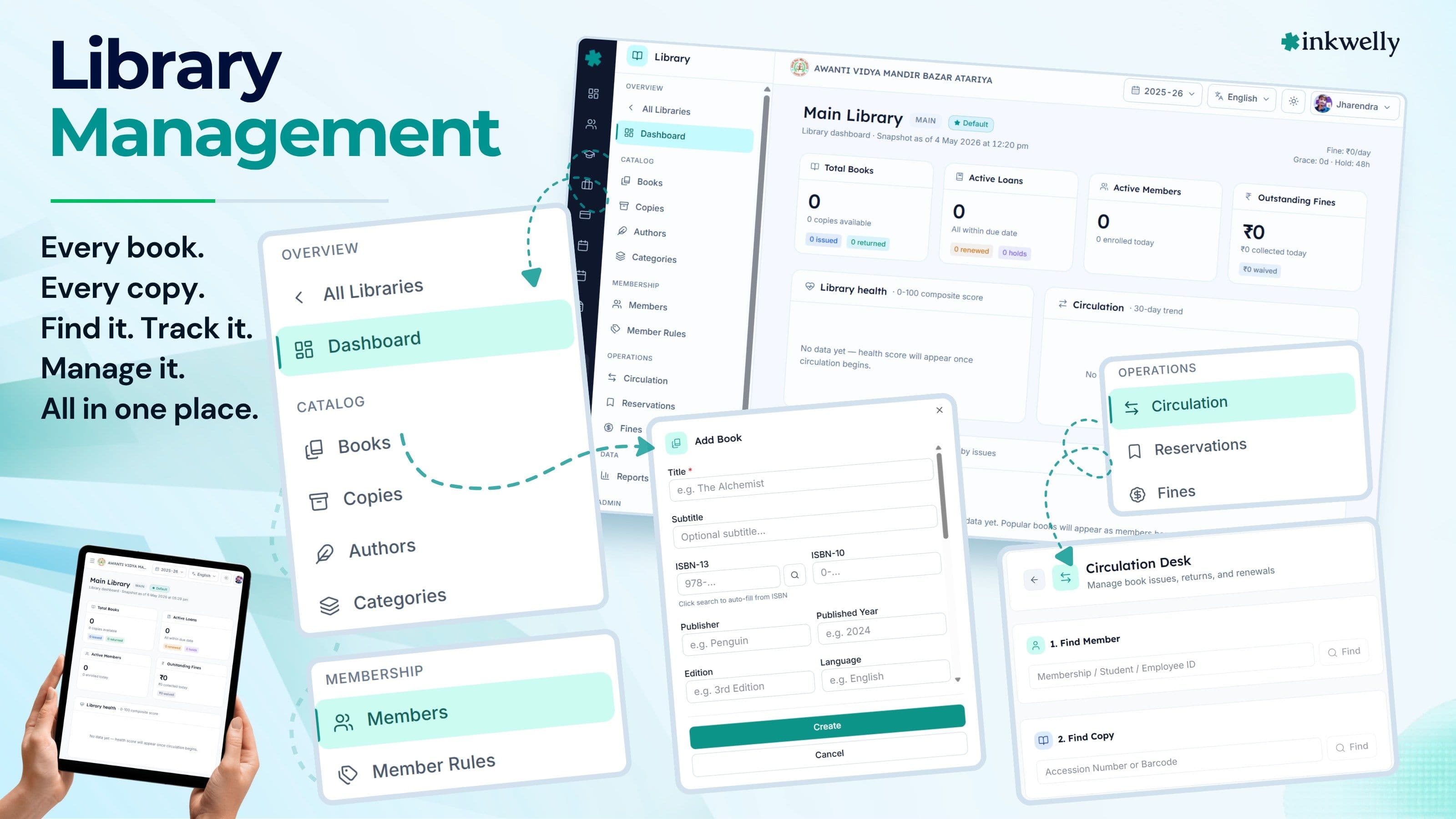
हमने इसके बदले क्या बनाया
भारतीय स्कूल की library सिर्फ़ एक shelf नहीं होती — अक्सर एक junior library होती है, एक senior library, शिक्षकों का reference room, कभी-कभी board-exam revision section, और donated books का एक ढेर जिसे अभी किसी ने accession नहीं किया। Inkwelly हर एक को अलग library मानता है — अपने code, location, in-charge employee और circulation rules के साथ — लेकिन school-level view में roll up करता है ताकि प्रिंसिपल एक ही dashboard पर पूरी reading life देख सके।
Nीचे, design अलग करता है books (title, ISBN, publisher, language, format, authors के साथ एक bibliographic record) और copies (shelf पर रखी physical items, हर एक अपने accession number, barcode और condition के साथ)। NCERT Hornbill Class 11 की तीन copies = एक book row + तीन copy rows। जब कक्षा 11A की शिक्षिका reading period set के लिए आती हैं, system available copies ढूँढ लेता है; जब एक copy bus में खो जाती है, सिर्फ़ वो copy Lost में move होती है, बाकी दो circulation में रहती हैं। यह register और असली catalog के बीच का फ़र्क़ है — और ऊपर का हर workflow इसी पर खड़ा है।
Day one से page पर क्या होता है
- Multi-library structure — Junior, Senior, Reference, Board Revision, हर एक का अपना code, location, in-charge employee और rules
- Two-level catalog — books ISBN-10, ISBN-13, publisher, language, format और edition के साथ; copies accession number, barcode, condition और current status के साथ
- Hierarchical categories — Fiction → Indian Writing in English → R K Narayan, display order और per-branch books-count के साथ
- Author records biography, nationality और books-count के साथ, एक स्कूल की सारी libraries में reusable
- Member categories grade level से जुड़ी (या staff pool से), अपने maximum books, borrow duration, maximum renewals, रोज़ाना fine और reservation quota के साथ
- Circulation desk — issue, return और renew एक ही screen पर, permanent overdue counter और accession-number lookup के साथ
- Time-ordered reservations pickup deadlines, automatic expiry, per-member quota और stale-hold alerts के साथ
- Holiday-aware fines — grace days, रोज़ाना rate, maximum cap, lost-and-damage replacement multipliers और renewal-block-on-fine toggle
- Auto-generated accession numbers configurable prefix और zero-padding के साथ (जैसे JLB-00001, JLB-00002)
- Bulk accession — एक नई NCERT title की दस copies एक ही screen में add कीजिए, हर एक को next accession number automatic apply होता है
- नौ reports out-of-the-box — defaulters, popular books, dead stock, circulation, member activity, accession register, lost-and-damaged, fine collection, overdue summary
- Live dashboard — library health score, circulation trend, popular-books panel, top-readers panel और activity feed
- हर issue, return, renewal, hold, fine collection और fine waiver पर audit trail — user और timestamp के साथ
- Books, copies, members और categories पर soft-delete — गलती से कुछ भी lost नहीं
भारतीय स्कूल library को जो चीज़ें असल में चाहिए
नीचे का grid module का backbone है। हर card एक real screen को represent करता है — vision deck नहीं। अगर feature इस grid पर है, तो आज ship हो चुका है; नहीं है तो roadmap पर है, demo में पूछ सकते हैं। हमने deliberately list को उन workflows तक limit रखा जो एक CBSE / ICSE / State Board librarian पहले महीने में चलाती हैं — लंबी fancy feature list की बजाय जो sales pitch में impressive लगती है पर इस्तेमाल नहीं होती।
Capabilities, एक नज़र में
Multi-library setup
Junior, Senior, Reference और Board-Revision sections को अलग libraries के रूप में चलाइए — हर एक के अपने code, location, in-charge employee और rules के साथ। School-level dashboard सब कुछ roll up कर देता है।
Books और copies
Books में ISBN, publisher, language, format, edition और authors store होते हैं। Copies में accession number, barcode, condition और status — Available, Issued, Reserved, In Transit, Lost, Damaged, Under Repair और Withdrawn के बीच move करता है।
Hierarchical categories
वो subject tree बनाइए जो आपका स्कूल असल में use करता है — Fiction, Hindi Sahitya, Bal Sahitya, Munshi Premchand। Reorder, rename, soft-delete। Books-count automatic roll up होता है।
Member categories
हर member group के लिए rules — कक्षा 6-8 के लिए सात दिन में दो books, no renewals; कक्षा 11-12 के लिए चौदह दिन में तीन books, एक renewal; शिक्षकों के लिए तीस दिन में पाँच। Grade levels से mapped।
Circulation desk
Issue, return और renew एक ही screen पर। Member और accession-number lookup, due date member की category से computed, और permanent overdue counter जो हमेशा visible रहता है।
Reservations और holds
Students वो book reserve करते हैं जो अभी issued है। Hold time-ordered queue में जाती है, return पर queue के next member को allocate होती है, और pickup deadline तक collect न होने पर auto-expire हो जाती है।
Holiday-aware fines
रोज़ाना rate, grace days, maximum cap, lost-replacement multiplier, damage multiplier, holiday-skip और renewal-block-on-fine — सब per library configurable। Collected, waived और outstanding fines अलग tracked।
Auto-accession numbers
Prefix और padding एक बार configure करिए — JLB-00001 onwards। हर नई copy को next number automatic मिलता है। जून में 'पिछले साल कहाँ रुके थे' वाला confusion नहीं।
Bulk accession
जब एक नई NCERT title की दस copies आती हैं, title एक बार catalog कीजिए और सारी दस copies एक ही screen में create कीजिए — हर एक को next accession number, साथ ही एक ही purchase date, vendor और price batch पर apply होता है।
नौ reports out-of-the-box
Defaulters, popular books, dead stock, circulation by class, member activity, accession register, lost-and-damaged, fine collection, overdue summary — हर report inspection files के लिए PDF या Excel में exportable।
Cataloging — वो layer जिस पर सब कुछ खड़ा है
अधूरा catalog किसी catalog से भी ख़राब है। अगर book system में नहीं है, student ढूँढ नहीं सकता; अगर copy system में है पर shelf पर नहीं, librarian को blame मिलता है। Inkwelly का catalog इस तरह बना है कि हर donation, हर NCERT bulk order और हर replacement copy उसी दिन system में आ जाए जिस दिन वो आती है — बिना तीन forms और Excel handoff के। Two-level model (books और copies) इसे practice में चलाता है। आप Hornbill — NCERT Class 11 एक बार catalog करते हैं; तीन copies को JLB-00114, JLB-00115, JLB-00116 के रूप में accession करते हैं। जब librarian title search करती हैं, एक row दिखती है 'available 1, issued 2'। जब वो copy JLB-00115 लुक-अप करती हैं, exactly दिखता है किस student के पास है और कब return होनी है।
Books और copies — वो distinction जो scale करता है
ज़्यादातर school registers इन दोनों को मिला देते हैं। Inkwelly नहीं करता। एक book bibliographic record है — title, sub-title, ISBN-10, ISBN-13, publisher, edition, year, language, format और एक या ज़्यादा authors। Format ख़ुद वो सब cover करता है जो भारतीय स्कूल library के shelves पर असल में होता है — hardcover और paperback, journals और magazines, newspapers, reference works, ebooks और audiobooks, कभी-कभार एक thesis, textbook के साथ आई CD या DVD, और पीछे room में रखा map। एक copy physical item है — accession number, barcode, condition, current status और स्कूल ने जो price pay की वो।
जब कक्षा 11 को reading period के लिए Hornbill की तीन copies चाहिए, librarian को एक book row और तीन copy rows दिखती हैं। जब एक copy bus में खो जाती है, सिर्फ़ वो copy Lost में move होती है — book circulation में रहती है। जब फटी हुई copy weed-out करनी हो, librarian उसे Withdrawn mark करती हैं; book record untouched। इस separation के बिना, ऊपर का हर workflow टूट जाता है।
Categories जो भारतीय librarians की सोच से match करें
Dewey Decimal technically ठीक है, practically भारतीय स्कूल library में कोई use नहीं करता। Inkwelly आपको वो tree बनाने देता है जो आपका reading-room असल में use करता है। Fiction → Indian Writing in English → R K Narayan। Hindi Sahitya → Bal Sahitya → Munshi Premchand। Reference → Competitive → CDS / NDA / SSC। Periodicals → Magazines → Tinkle। Categories में parent, display order, optional code, active flag और books-count होता है जो children को roll up करता है। एक branch soft-delete कर सकते हैं, books Uncategorised में चली जाती हैं — कभी ग़ायब नहीं होतीं। Books में Dewey number भी रख सकते हैं अगर affiliation paperwork के लिए चाहिए, पर वो वो नहीं है जिससे आपकी librarian book ढूँढती हैं।
Drag से reorder, inline rename, जो branch use नहीं हो रही उसे archive। Categories panel वही है जो प्रिंसिपल subject-wise inventory list print करने के लिए use करती हैं — तो librarian और inspection team हमेशा एक ही tree देखते हैं।
Circulation — वो desk जो library चलाता है
Issue, return, renew। तीन verbs। पूरी library इस बात पर चलती है कि ये तीन काम 10 second लेते हैं या तीन minute। Inkwelly में Circulation Desk एक ही screen है — कक्षा 4 की student Amar Chitra Katha return करके और कक्षा 12 का student NCERT Physics Part 1 return करके, दोनों एक ही तरह से जाते हैं। Member pick कीजिए, copy pick कीजिए, Issue या Return click कीजिए; due date member की category से compute होती है, page के top पर overdue counter recount होता है, और line में अगला student पहले से desk पर खड़ा है।
Issue: copy pick कीजिए, member pick कीजिए, done
Librarian copy को accession number या title से lookup करती हैं (या जहाँ barcode printed है और स्कूल का reader support करता है, वहाँ scan करती हैं)। Screen पर book और copy की details, plus इस copy के last few transactions दिखते हैं — useful जब वही कक्षा 8 का लड़का वही Premchand फिर से ले रहा हो। Member को नाम या membership number से pick करती हैं; system auto-fill करता है member की category, current outstanding loans maximum allowed के against, unpaid fines, और computed due date।
अगर member के पास पहले से तीन books हैं और category cap तीन है, system explicit message के साथ issue block कर देता है — silent allow नहीं। अगर renewal-block-on-fine setting on है और member के पास outstanding fine है, तो वो block भी यहीं enforce होता है। Desk हाँ तभी बोलता है जब rules हाँ बोलते हैं।
Return और renewal: एक ही screen, दो buttons
Return copy को Available पर डाल देता है, अगर overdue थी तो fine calculate करता है, और reason field के साथ waiver offer करता है। Librarian screen switch नहीं करतीं। Renewal due date को category के borrow duration से extend करता है, renewal counter को maximum allowed के against बढ़ाता है, और अगर cap hit हो गया या pending reservation है तो cleanly refuse करता है।
Page के top पर overdue counter permanent है — हर overdue loan +1 जोड़ता है, और एक click पर table सिर्फ़ वो loans दिखाता है। Librarian को याद रखने की ज़रूरत नहीं। कक्षा 6 की वो लड़की जो Matilda को 28 दिन से रखे है, ख़ुद surface हो जाती है।
Members — borrow rules जो कक्षाओं के पढ़ने के तरीक़े से match करें
कक्षा 4 के student को 600-page reference book 30 दिन के लिए नहीं मिलनी चाहिए। शिक्षक एक book सात दिन पर cap नहीं होनी चाहिए। Inkwelly की member categories हर cohort के लिए borrow rules set करने देती हैं — maximum books, borrow duration in days, maximum renewals, रोज़ाना fine और reservation quota — और उन्हें grade level (या शिक्षकों और admin staff के लिए staff pool) से tie करती हैं। कक्षा 4 की लड़की library में enroll होती है, Junior Wing category के rules inherit करती है; जब वो कक्षा 5 में promote होती है, आप उसे एक ही screen में अगली category में move करते हैं और rules अगले issue से update हो जाते हैं।
Member categories — एक बार set, सालों तक reuse
एक typical भारतीय स्कूल चार से छह member categories set करता है: Pre-Primary, Primary (1-5), Middle (6-8), Senior (9-10), Senior Secondary (11-12), Faculty। हर एक के अपने rules। Senior Secondary में change — board-exam term में maximum books को तीन से चार करना — हर उस member पर अगले issue में apply होता है जो उस category का है।
Member status एक छोटा पर powerful field है — Active, Suspended, Expired या Cancelled। Suspended member issue नहीं कर सकता, पर return कर सकता है। Expired membership का warning dashboard पर 14 दिन पहले आता है। Librarian को cohort renew करने का time मिलता है नया term break होने से पहले।
Reservations और fines — वो parts जो स्कूल आमतौर पर ग़लत करते हैं
Reservations और fines वो जगहें हैं जहाँ ज़्यादातर school libraries चुपचाप टूट जाती हैं। या तो reservations एक notebook में track होती हैं जो अगली librarian पढ़ नहीं पाती, या fines मन-मर्ज़ी से collect होती हैं। Inkwelly का reservation और fine logic वही है जो librarian और प्रिंसिपल देखते हैं — तो disputes 30 second में screenshot से resolve हो जाते हैं, 20-minute argument से नहीं।
Reservations: queue visible है
Student वो book reserve करता है जो अभी issued है। Hold reservation time के order में queue में जाती है। जब copy return होती है, system उसे queue के next member के लिए Reserved mark करता है और pickup deadline शुरू कर देता है (default 48 hours, configurable)।
अगर student time पर pickup नहीं करता, hold automatic expire हो जाती है और queue का next student allocation पाता है। Per-member reservation quota एक over-eager कक्षा 11 के लड़के को सब कुछ queue करने से रोकता है। Stale holds — वो reservations जो deadline के बाद unfulfilled बैठी हैं — dashboard पर दिखती हैं, librarian एक screen में chase कर सकती हैं, register page-by-page नहीं देखना पड़ता।
Fines: policy software में है, librarian के दिमाग़ में नहीं
रोज़ाना fine rate set करिए (Primary के लिए ₹2 common है, Senior के लिए ₹5), grace days (ज़्यादातर स्कूल एक से दो use करते हैं), maximum cap ताकि fine कभी book की MRP cross न करे, और decide करिए कि holidays fine accrual में count हों या नहीं। Lost या damaged books के लिए, replacement multipliers recorded copy price के against configure करिए — typical values 2× lost के लिए, 1.5× damaged के लिए।
Renewal-block-on-fine toggle वो lever है जो ज़्यादातर स्कूल भूल जाते हैं। यह on होने पर, unpaid fine वाला member renew नहीं कर सकता — desk पर dues clear करने पड़ते हैं। Fines collected और fines waived अलग tracked होते हैं, reasons के साथ, ताकि प्रिंसिपल paid और genuine reasons के लिए waived का फ़र्क़ देख सकें।
Inkwelly Library से पहले और बाद
Inkwelly Library बनाम generic ERPs जो 'library module भी रखते हैं'
उन लोगों के लिए बना जो library असल में चलाते हैं
Librarian एक ही इंसान हैं। Library का use कक्षा 5 का student, कक्षा 12 का board candidate, science teacher, प्रिंसिपल और inspecting officer करते हैं — हर एक के पास same data से अलग सवाल है। Inkwelly Library इस तरह बना है कि हर role को अपना जवाब अपने login से मिले, librarian को bother किए बिना।
Librarian — कम interruptions, ज़्यादा reading-period support
उनका दिन: सुबह circulation desk, bells के बीच में new arrivals accession, दोपहर में reservations और fines, और जब भी inspection सवाल आएँ उनका जवाब। Desk एक ही screen है। New arrivals को accession numbers automatic मिलते हैं। Reservations ख़ुद queue होती हैं। Fines policy से computed। वो reports जो Friday की दोपहर में compile करने में लगती थीं, एक button से exportable।
सबसे ज़रूरी — अगली librarian जो join करेंगी, system inherit करेंगी, एक hardbound register नहीं जो सिर्फ़ वही पढ़ सकती थीं। Continuity जो staff turnover survive करे — वो school library का सबसे बड़ा gain है।
कक्षा-शिक्षक — reading-period setup 30 second में
कक्षा 7 का reading period पहले मतलब था library तक चलना, librarian से कक्षा-7-friendly किसी चीज़ की पाँच copies ढूँढने को कहना, और तीन के साथ room में वापस। अब कक्षा-शिक्षक अपने laptop पर catalog खोलती हैं, language और category से filter करती हैं, देखती हैं आज कौनसी copies available हैं, librarian को एक line का message भेजती हैं ('5 copies of Wings of Fire, कक्षा 7 reading period, period 4'), और period 4 में जब room में जाती हैं, copies ready होती हैं।
उन्हें अपनी कक्षा के top readers dashboard पर मिलते हैं — वो तीन students जिन्होंने इस term 10 या ज़्यादा books पढ़ी हैं। PTM slide पर वही data जाता है। Data से grounded praise — भारतीय स्कूल का सबसे सस्ता student motivation tool।
प्रिंसिपल — accountability बिना nagging के
वो वो इंसान बनना नहीं चाहतीं जो librarian से inventory list के लिए chase करें। हफ़्ते में एक बार library dashboard खोलती हैं — library health score देखती हैं (on-time returns, copy availability, overdue percentage, fine collection rate और stale-hold count से computed), 30-day circulation trend, और top तीन alerts (long-overdue loans, expiring memberships, stale holds)। Score गिरा है तो conversation होती है; held है तो नहीं।
जब CBSE inspection visit होता है, inventory list, circulation report, fine summary और category-wise stock उनके अपने login से exportable हैं। माँगने की ज़रूरत नहीं — pull करती हैं। Library finally उन सवालों का जवाब देती है जो प्रिंसिपल से पूछे जाते हैं।
Member detail page — हर transaction एक जगह
किसी भी student या staff member का record खोलिए — उनकी पूरी library history दिखती है — current loans due dates और बाक़ी दिनों के साथ, पूरी transaction history (issue, return, renewal, lost, damaged), outstanding fines payment और waiver history के साथ, reservation queue positions, और audit trail कि किसने क्या कब किया।
कक्षा 11 का वो लड़का जो board-revision book return नहीं की, conversation से एक click दूर है — data screen पर है, register में नहीं। एक parent जो disputed fine पूछने आती है, receipt-style transaction record देखती हैं। जो dispute 20 minute लेता था, अब 30 second में closed।
Integrations — library silo नहीं है
वो school library जो नहीं जानती students कौन हैं, शिक्षक कौन हैं, और कौन सी कक्षाएँ चल रही हैं — आधा system है। Inkwelly Library Student Information और employee module से student और employee directories read करती है, इसलिए जब आप एक नया library member enroll करते हैं, मौजूदा roster से pick करते हैं — नाम फिर से नहीं टाइप करते। Categories Academics के grade levels से tie होती हैं, इसलिए जब आप कक्षा 1-5 के लिए Junior Wing category set करते हैं, membership rules उस grade range पर consistently apply होते हैं।
Security, privacy और audit
Library catalog छोटी चीज़ लगती है — जब तक यह याद नहीं आता कि borrowing record एक 14 साल के बच्चे ने क्या पढ़ा — उसकी list है। Inkwelly हर data read को privileged action मानता है। Role-based access Inkwelly के IAM से tied है — librarians अपनी library के सारे members देखती हैं; कक्षा-शिक्षक सिर्फ़ अपनी कक्षा; प्रिंसिपल पूरा स्कूल।
Security के लिए हम क्या करते हैं
- Per-school tenant isolation — same Inkwelly cluster पर दो स्कूल एक दूसरे का library data कभी नहीं देखते
- Role-based access — librarian, कक्षा-शिक्षक, प्रिंसिपल और admin staff, हर एक अपने scope में
- हर issue, return, renewal, hold, fine collection और fine waiver पर audit log — user और timestamp के साथ
- Books, copies, members और categories पर soft-delete — कुछ भी ग़लती से lost नहीं
- Library level पर configurable working days और holidays — जब चाहें holidays overdue counting से exclude
- Renewal audit log — हर renewal previous due date, new due date, renewing user और timestamp store करता है
- Data भारतीय servers पर store, offshore कभी नहीं
- Daily encrypted backups school-configurable retention के साथ
Migration — अगस्त की reading list खोए बिना Inkwelly पर आना
ज़्यादातर स्कूल term के बीच में software switch नहीं करते जब तक migration genuinely painless न हो। Inkwelly का library import उन तीन real states के लिए बना है जिनमें स्कूल का library data आमतौर पर होता है: paper register, Excel, या दूसरा ERP। एक चौथा state भी है — donated-books-still-in-cardboard — और उसका भी workflow है।
Paper register या Excel से
हमारा import template download कीजिए — books के लिए एक sheet, copies के लिए एक, members के लिए एक। जो आपके पास है वो भर दीजिए (जिन columns के लिए data नहीं है उनकी tension नहीं)। Upload कीजिए, auto-detected duplicates और accession-number conflicts review कीजिए, और Import click कीजिए। Typical 4,000-book library लगभग 90 minute में import हो जाती है including review।
Import के बाद जो donated copies आती हैं, regular accession workflow use करें। System next number से pick up करता है। Inkwelly use start करने के लिए 'clean' state का wait नहीं करना पड़ता — आज shelf पर जो है उससे start कीजिए, donations आते-आते accession करते रहिए।
दूसरे ERP से (Fedena, Entab, Tally Library, इत्यादि)
ज़्यादातर generic ERPs partial CSV export करते हैं — book title, ISBN, copies। हम उसे books और copies tables पर map करते हैं; missing fields (publisher, language, format, condition) catalog page पर पहले दो हफ़्तों में भर लेते हैं।
Member enrollment स्कूल के main student register से होती है, जो Inkwelly के पास पहले से है Student Information से। Librarian उन students को pick करती हैं जिन्हें library member होना है और हर एक को member category assign करती हैं — नाम फिर से नहीं टाइप होते। Migration time review से determine होता है, data entry से नहीं।
Library को असली भारतीय स्कूल dataset पर चलते देखिए
30-minute walkthrough — कक्षा 1-12 catalog, चार member categories और तीन हफ़्तों का circulation data। Sales pitch नहीं — हम दिखाते हैं, आप पूछते हैं।
“School library भारतीय स्कूल का सबसे सस्ता, सबसे कम use होने वाला educational intervention है। Software का सिर्फ़ एक काम है — वो चीज़ बनना बंद करना जो बीच में आती है।”
एक normal हफ़्ता, end to end
ऊपर के screenshots individual screens दिखाते हैं। नीचे का हफ़्ता दिखाता है ये सब कैसे connect होते हैं — Inkwelly Library स्कूल में असल में कैसे चलती है। ये ध्यान से पढ़िए अगर आप module को अपने current process के against evaluate कर रहे हैं — school ERP का test 'क्या features हैं' नहीं है, 'क्या मेरी Tuesday morning आसान होती है' है।
Inkwelly Library बनाम imported global tools (Koha, Destiny, इत्यादि)
Library के साथ क्या-क्या included है
- Multi-library setup codes, locations, in-charge employee और default-library flag के साथ
- Books ISBN-10, ISBN-13, publisher, edition, year, language, format और एक या ज़्यादा authors के साथ
- Copies accession number, barcode, condition और status (Available, Issued, Reserved, In Transit, Lost, Damaged, Under Repair, Withdrawn) के साथ
- Hierarchical categories parent, display order, code और rolled-up books-count के साथ
- Author records biography, nationality और books-count के साथ
- Member categories grade level से tied (या staff pool से) maximum books, borrow duration, maximum renewals, रोज़ाना fine और reservation quota के साथ
- Members status (Active, Suspended, Expired, Cancelled) और complete transaction history के साथ
- Circulation desk — issue, return और renew एक ही screen पर, permanent overdue counter के साथ
- Bulk accession — एक नई title की कई copies एक ही screen में add
- Reservations queue pickup deadlines, expiry hours, per-member quota और stale-hold alerts के साथ
- Holiday-aware fines — grace days, रोज़ाना rate, maximum cap और lost-and-damage multipliers
- Auto-accession numbers configurable prefix और zero-padding के साथ
- Renewal audit log — हर renewal previous और new due date, renewing user और timestamp store करता है
- नौ reports out-of-the-box — defaulters, popular books, dead stock, circulation, member activity, accession register, lost-and-damaged, fine collection, overdue summary
- Live dashboard — KPIs, library health score, hourly heatmap, popular books, top readers, alerts, activity feed
Library को hardbound register से चलाना बंद कीजिए।
30-minute walkthrough book कीजिए। अपने सवाल लाइए — CBSE inspection के बारे में, donated books, board-exam revision, parent disputes। हम real dataset पर जवाब देंगे।
अक्सर पूछे गए सवाल
12 सवालक्या हम एक स्कूल में कई libraries चला सकते हैं — Junior, Senior, Reference, Board Revision?
हाँ। हर library का अपना code, location, in-charge employee, accession-number prefix और circulation rules होते हैं। School-level dashboard सब कुछ एक view में roll up कर देता है। आपके स्कूल को जितनी libraries चाहिए, उतनी चला सकते हैं।
Inkwelly book और copy का फ़र्क कैसे handle करता है?
Book bibliographic record है — title, ISBN, publisher, language, format, authors के साथ। Copy shelf पर रखी physical item है — अपने accession number, barcode, condition और status के साथ। एक ही NCERT title की तीन copies = एक book row और तीन copy rows। Copy पर status Available, Issued, Reserved, In Transit, Lost, Damaged, Under Repair या Withdrawn में move करता है।
क्या accession numbers automatic generate होते हैं?
हाँ। आप एक बार prefix (जैसे Junior Library के लिए JLB) और zero-padding length (जैसे 5, जो JLB-00001 देता है) configure करते हैं। हर नई copy को next number automatic मिलता है। नए term की शुरुआत पर 'पिछले साल कहाँ रुके थे' वाला confusion नहीं।
क्या अलग-अलग कक्षाओं के लिए अलग borrow rules set कर सकते हैं?
हाँ। Member categories आपको प्रति group के लिए maximum books, borrow duration, maximum renewals, रोज़ाना fine और reservation quota set करने देती हैं, grade level से mapped। कक्षा 4-5, कक्षा 6-8, कक्षा 9-10, कक्षा 11-12 और Faculty typical groupings हैं — जितनी चाहिए उतनी रख सकते हैं।
Fines कैसे calculate होती हैं?
Per library आप रोज़ाना fine rate set करते हैं, grace days (कुछ दिन जिनमें fine accrue नहीं होती), maximum cap ताकि fine कभी book की MRP cross न करे, और ये choose करते हैं कि holidays overdue में count हों या नहीं। Lost या damaged books के लिए replacement multipliers recorded copy price के खिलाफ़ charges compute करते हैं। Outstanding fine होने पर renewals को block करने का option भी है।
Library से कौन से reports निकाल सकते हैं?
नौ reports out-of-the-box आती हैं: defaulters list, popular books, dead stock (एक chosen window में जो borrow नहीं हुईं), circulation statistics, member activity, accession register, lost-and-damaged register, fine collection summary और overdue summary। सब inspection files और trustee meetings के लिए exportable।
क्या students वो book reserve कर सकते हैं जो अभी issued है?
हाँ। Reservations time order में queue होती हैं। जब copy return होती है, system उसे queue के next member के लिए Reserved mark करता है और pickup deadline शुरू कर देता है। अगर member time पर pickup नहीं करता, hold automatic expire हो जाती है और queue का next member उसे पाता है। Per-member reservation quota queue को abuse होने से रोकता है।
क्या system bulk accession handle करता है जब 50 NCERT copies एक साथ आती हैं?
हाँ। एक बार title catalog हो जाए (जैसे Hornbill Class 11), bulk-accession action से carton में जितनी copies हैं एक ही screen पर create कर सकते हैं। हर copy को next accession number automatic मिलता है, अक्सर एक ही purchase date, vendor और price batch पर apply होता है।
Student promote होने पर library member data का क्या होता है?
Academics module में student का record promote होता है; उसकी library membership linked रहती है। Librarian एक बार member को अगली category पर move करती हैं (जैसे Middle से Senior) — borrow rules अगले issue से update हो जाते हैं। Categories grade-level link carry करती हैं, इसलिए ये तेज़ filter-and-update है, re-entry नहीं।
Paper register या Excel से migration में कितना समय लगता है?
Typical 3,000 से 5,000-book library के लिए, review साथ 1-2 घंटे expect करिए। Import template (books, copies, members) download कीजिए, जो आपके पास है वो भरिए, upload करिए, auto-detected duplicates और accession-number conflicts review कीजिए, और confirm करिए। बाद में आने वाली donated copies regular accession flow use करती हैं।
Library data कहाँ store होता है?
Inkwelly का सारा data, library borrowing history सहित, भारतीय servers पर store है — offshore कभी नहीं। Platform DPDP Act 2023 के लिए बनाया गया है — minors के लिए verifiable parental consent, हर record पर role-based access, हर transaction पर audit log, और principal-level deletion logged reason के साथ। Borrowing history स्कूल की private है।
क्या प्रिंसिपल किसी भी दिन inspection-ready inventory report निकाल सकती हैं?
हाँ। Inventory by category, circulation by class, fines collected बनाम waived by month, copy-status breakdown, popular books, top readers और category-wise stock — सब प्रिंसिपल के अपने login से PDF या Excel में exportable हैं। Librarian से compile करवाने की ज़रूरत नहीं।
आपको ये भी पसंद आ सकता है
3 लेखInkwelly आपके स्कूल पर — खुद देखें
30 मिनट का डेमो। आपके मौजूदा ERP को आपके साथ खोलकर, कॉल पर ही आपका डेटा Inkwelly में लोड करते हैं। कॉल ख़त्म होते-होते एक तय तारीख़ का गो-लाइव प्लान आपके हाथ में।