हर subject. हर component. हर lock. `totalMaxMarks` से `marksLockedAt` तक — एक configuration, एक audit trail।
Exam में subjects link करें, max और pass marks set करें, theory + practical + internal components define करें, marks entry deadline lock करें और देखें कि marks workflow DRAFT से PUBLISHED तक हर step पर full audit के साथ आगे बढ़ता है। CBSE 80+20, ICSE Section A/B/Internal, IGCSE coursework split और हर State Board pattern के लिए बनाया गया।
आज ज़्यादातर भारतीय schools exam में subjects कैसे configure करते हैं
Bhopal के एक CBSE स्कूल में Class 10 का pre-board season चल रहा है — February का तीसरा हफ़्ता। Exam coordinator को 4 sections में 11 subjects setup करने हैं — English, Hindi, Sanskrit, Mathematics, Science, Social Science, Information Technology, Physical Education, Art Education, Work Education और एक school-elective। जिस Excel sheet का use कर रही हैं उसमें 'max marks' column में हर subject के सामने '100' typed है, क्योंकि पिछली बार office assistant जो type कर रहा था उसे पता नहीं था कि CBSE Science 80+20 है, PE grade-only है, Art अलग pass mark के साथ 100 है, और Sanskrit का इस साल special pass-mark circular था।
खर्चा दो महीने बाद दिखता है, marksheet जाने वाले दिन। Class 10 Science की marksheet '/100' max दिखाती है, क्योंकि configuration ऐसा कहता है, और parent message group जल जाता है: 'मेरे बेटे को 78 में से 65 मिले, लेकिन marksheet पर 65 out of 100 लिखा है? ग़लत है!' Sanskrit का school circular में pass mark 36 था, पर configuration default 33 carry करती है; एक borderline बच्चा marksheet पर pass दिखता है जो fail दिखना चाहिए था। PE column में numeric grade है जहाँ CBSE format A/B/C/D descriptor expect करता है। ये सब typing mistakes नहीं हैं; ये configuration mistakes हैं जिन्हें कितनी भी careful marks entry से ठीक नहीं किया जा सकता।
यह खर्चा है 'subject configuration को spreadsheet rows समझने' का। Inkwelly का Examinations module हर exam के हर subject को एक structured config की तरह treat करता है — multi-component support, board-aware defaults, per-component deadline locks और एक explicit marks workflow जो DRAFT से SUBMITTED, VERIFIED, APPROVED, PUBLISHED होते हुए LOCKED तक चलता है। Marksheet सही है क्योंकि configuration सही है।
Inkwelly में exam subject configuration कैसे काम करता है
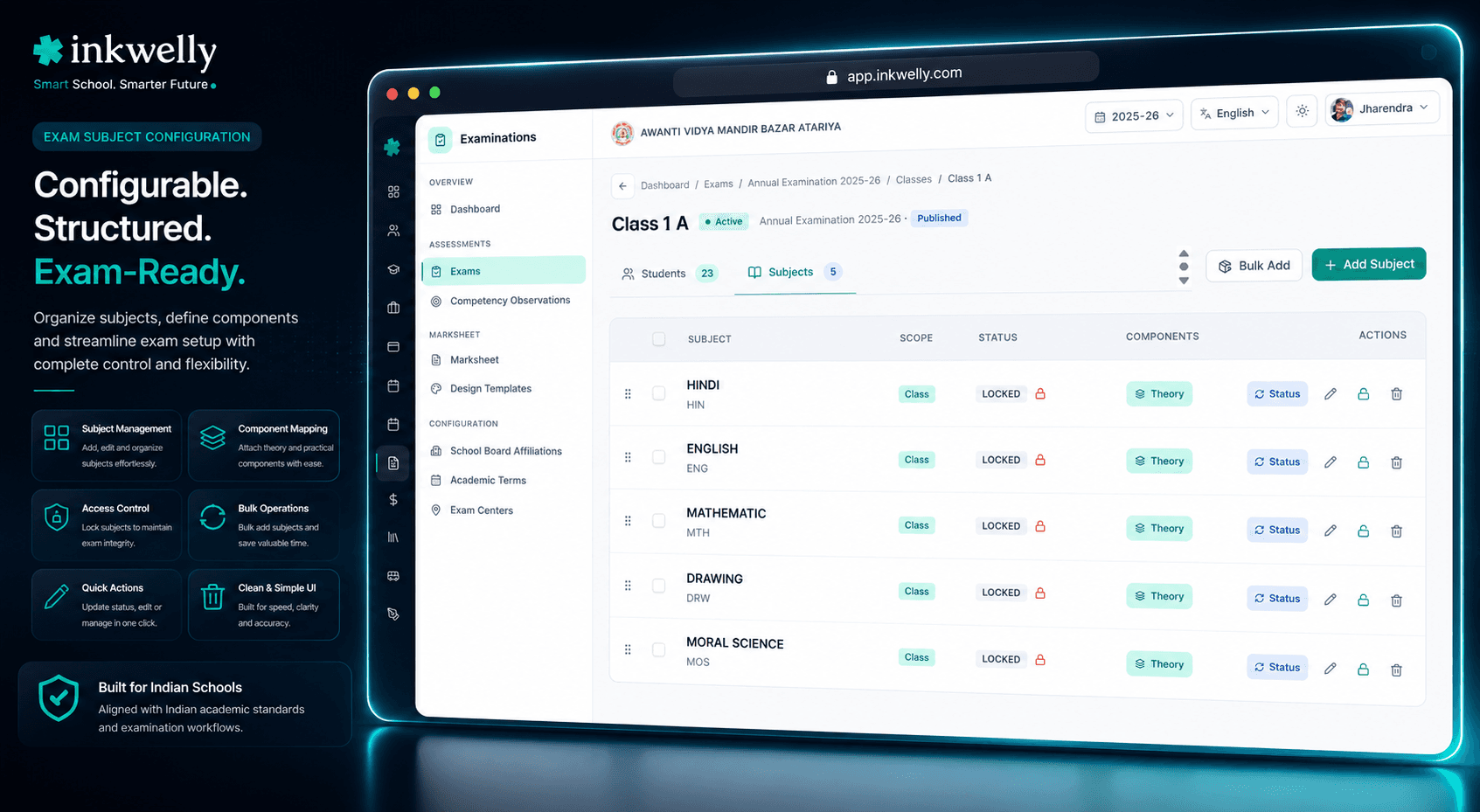
Coordinator जब Exam → Subjects screen खोलती हैं, एक sortable table दिखती है जिसमें इस exam के हर subject के लिए एक row है। हर row में subject name, subject code, grade level, linked class, totalMaxMarks, overallPassMarks, displayOrder (marksheet पर order), और एक marks-entry status badge — NOT_STARTED, DRAFT, SUBMITTED, VERIFIED, APPROVED, PUBLISHED या LOCKED — हर एक distinct colour में जो principal staff room से identify कर लेती हैं।
Subjects ख़ुद per-exam invent नहीं होते। ये Academics Module curriculum से आते हैं — एक single source of truth — कि स्कूल कौन-से subject codes teach करता है, कौन-से boards के हैं, कौन-से grade levels ले सकते हैं, और कौन-से language scripts में subject name render होता है। Exam subjects screen coordinator को curriculum से एक offering exam में link करने देती है, subjectOfferingId के साथ जो canonical subject को point करता है। Class 9 half-yearly का 'Hindi' वही Hindi है जो Class 9 Annual Exam का है; linkage components, grading scale और language rendering carry करती है।
हर linked subject के लिए, Inkwelly सिर्फ़ marks ceiling नहीं store करता बल्कि board-prescribed structural configuration store करता है। CBSE Class 10 Science में Theory (80) + Practical (20) है — दोनों के across combined overallPassMarks 33। ICSE Class 10 English Language में Section A (40) + Section B (40) + Internal Assessment (20)। IGCSE Class 9-10 में Paper components plus Coursework — separately-tracked weightage के साथ। Maharashtra State Board Class 10 में हर subject पर Written (80) + Internal (20) plus separate Physical Education और SUPW assessment। ये सब natively components system से model होते हैं — row पर एक JSON config block जो isBestOfEligible, graceMarksAllowed, scalingFactor और isOptional list करता है। Marks entry screen इस config से columns render करती है; marksheet इस config से breakdown render करती है; verification queue इस config से totals compute करती है।
Marks-entry status field screen का workflow heart है। सात statuses सिर्फ़ forward move करते हैं — NOT_STARTED से DRAFT जब subject teacher पहली बार entry screen खोलती हैं, DRAFT से SUBMITTED जब वो submit click करती हैं, SUBMITTED से VERIFIED जब class teacher verify करती हैं, VERIFIED से APPROVED जब principal sign करते हैं, APPROVED से PUBLISHED जब result-publish workflow चलता है, PUBLISHED से LOCKED session-end पर। Backwards transitions possible हैं पर हमेशा audited — class teacher VERIFIED को DRAFT पर वापस भेजती हैं तो user, timestamp और reason write होता है। Status colour code table पर principal का at-a-glance read है — entire exam के लिए।
Subject configuration क्या-क्या करता है
- Exam के हर subject की sortable table — subject name, code, grade level, class, max marks, pass marks, displayOrder और marks-entry status के साथ
- हर subject पर 7-stage marks workflow — NOT_STARTED, DRAFT, SUBMITTED, VERIFIED, APPROVED, PUBLISHED, LOCKED — हर distinct colour के साथ
- Multi-component model — Theory, Practical, Internal, Oral, Project — हर एक के अपने max marks, pass marks, weightage और exam date
- Per-subject
marksEntryDeadline— ISO timestamp; deadline आते ही entry screen freeze, कोई late edits नहीं - Per-subject JSON config flags —
isBestOfEligible,graceMarksAllowed,scalingFactor,isOptional— marks entry पर enforced marksLockedAtaudit timestamp — LOCKED reach होते ही set, affiliation cell PDF export पर exposedsubjectOfferingIdके through curriculum linkage — session के exams के across single source of truth- Subject name से search, marks entry status से filter,
displayOrderसे sort — marksheet rendering displayOrder follow करती है - Reason field के साथ unlock dialog — APPROVED या PUBLISHED status correct करता है, audit log में reason लिखता है, paper वापस MARKS_ENTRY पर भेजता है
- Audit के साथ marks entry deadline update — prior और new value के साथ logged
- Per-subject student count — Class assignment feature से computed
- ऊपर overall stats card — total subjects, completion percentage, locked count, in-flight count — principal के morning read के लिए
Multi-component subjects — board जैसा चाहता है, वैसे ही modeled
School ERP design की सबसे महँगी simplification है हर subject को 'one column of marks out of one max' समझना। Real भारतीय board syllabi ऐसी नहीं हैं। CBSE Class 10 Science में 80 marks Theory plus 20 marks Practical हैं, दोनों promotion के लिए required, combined pass 33 पर। CBSE Class 12 Physics में Theory 70 plus Practical 30 — separate pass thresholds के साथ। ICSE Class 10 English में तीन sections, हर एक के अपने marks। IGCSE Cambridge papers में multiple separately-graded papers plus coursework। Maharashtra State Board में internal 20 plus written 80 — internal portion project के रूप में। Karnataka PUC में हर subject group में variable component splits।
Inkwelly का component model इन सब को natively handle करता है। हर component carry करता है — category (WRITTEN, PRACTICAL, INTERNAL, ORAL, PROJECT), assessmentMode (MARKS_BASED, GRADE_ONLY, RUBRIC_BASED, PORTFOLIO, DESCRIPTIVE), max-marks और pass-marks pair, separate exam date और time, separate marks entry deadline और aggregation के लिए weightage। Marks entry teacher को जब वो type करती हैं live breakdown दिखता है; verification queue per-component totals compute करती है; marksheet board की prescribed layout match करने वाला breakdown render करती है।
Marks entry status — 7-stage workflow जो post-publish parent meetings रोकता है
सात statuses Kanban board पर show के labels नहीं हैं। ये actual workflow gates हैं। NOT_STARTED वो moment है जब subject exam में add होता है पर teacher ने अभी तक खोला नहीं। DRAFT जब teacher ने कम-से-कम एक row save किया पर submit नहीं किया। SUBMITTED teacher का final hand-off; system marksSubmittedAt timestamp लिखता है और class teacher को notify करता है। VERIFIED class teacher का sign-off — verification queue work through के बाद। APPROVED principal का signature — final review के बाद। PUBLISHED जब marksheet parent app और WhatsApp Business queue में चली गई। LOCKED session-end freeze, जिसके बाद सिर्फ़ audited unlock कुछ edit कर सकता है।
हर transition prior status, new status, user और timestamp को marks audit log में लिखती है। Forward transitions common हैं; backward transitions possible हैं पर reason चाहिए। Class teacher VERIFIED को DRAFT भेजती हैं तो 'Q3 marks में outlier needs re-check' लिखती हैं और affected subject teacher को notification मिलती है। Principal DRAFT में paper APPROVE नहीं कर सकते — workflow stage-skipping allow नहीं करता। Trustees पूछ रहे हैं 'publish के बाद Class 10 Sanskrit किसने unlock किया?' — 5 second में जवाब।
marksEntryDeadline — 11:58 PM rush को ख़त्म करने वाला lock
हर भारतीय स्कूल में हमने देखा है — एक subject teacher 11:58 PM को verification से एक रात पहले marks submit करती हैं। Class teacher सुबह 9 बजे verification के लिए आती हैं — एक sheet के साथ जो 4 घंटे पहले edit हुई थी और उन्हें लगता है ऊपर वाला paper वही है जो last night था। Almost वही है, सिवाय एक cell के जो 11:53 PM पर doubt के moment में बदला। Mistake malicious नहीं है; human है। पर ये mistake स्कूल बाक़ी term तक झेलता है।
Inkwelly का marksEntryDeadline एक explicit timestamp है, coordinator subject configuration के moment पर per subject set करती हैं। Marks entry screen page के top पर deadline display करती है और countdown करती है। Deadline second पर screen freeze हो जाती है — 60 second में नहीं, 5 second में नहीं, deadline second पर। Teacher 11:58 PM पर edit नहीं कर सकती अगर deadline 11:30 PM थी। अगर स्कूल को deadline extend करना है (network outage, teacher emergency), coordinator इस screen से update कर सकती हैं — prior और new values audit log में लिखे जाते हैं। Class teacher 9 AM पर एक frozen, deadline-stamped sheet के साथ आती हैं।
isBestOfEligible, graceMarksAllowed, scalingFactor, isOptional — छोटी flags जो बच्चे का promotion decide करती हैं
हर board में rules हैं जिनका कोई marketing site usually ज़िक्र नहीं करती — unit tests के लिए best-of-N, borderline pass cases के लिए grace marks, theory-vs-practical aggregation के लिए scaling factors, optional subjects जिनके marks promotion में count नहीं होते। Inkwelly का per-subject JSON config block हर एक को explicit flag के रूप में carry करता है।
isBestOfEligible subject को Academics level पर best-of-N policy का part mark करता है; marksheet header automatically '(Best 2 of 3)' read करता है। graceMarksAllowed principal को borderline cases पर one-or-two-mark adjustment करने देता है, separately stored from marksObtained — audit log के लिए reason field के साथ। scalingFactor स्कूल को CBSE-style 'theory-and-practical scaling to notional 100' apply करने देता है — report card aggregate के लिए। isOptional subject को marksheet पर visible रखता है पर promotion calculations से exclude करता है — music, third-language और computer-as-elective configurations के लिए useful। इन सबके लिए developer की ज़रूरत नहीं; subject row पर checkbox-and-number fields हैं।
“पिछली बार Class 10 Science का marksheet '/100' लिख के गया था — parents furious। इस बार Inkwelly में Theory + Practical अलग columns में हैं, marksheet पर '80 + 20' clearly print होता है। Zero parent complaints।”
Real-world scenarios — subject configuration कैसे play out होता है
-
Class 9 के लिए CBSE-mandated नया subject। Board Class 9 में elective के रूप में Artificial Intelligence introduce करता है। स्कूल half-yearly में add करना चाहता है। Coordinator Academics खोलती हैं, सही grade level के साथ subject offering create करती हैं, और इस screen से half-yearly exam में link करती हैं। Components: Theory 70 + Project 30, दोनों MARKS_BASED, combined pass 33। Marksheet template automatically नए subject का display order inherit करता है।
-
ICSE three-section English paper। Class 10 ICSE English में Section A (40), Section B (40) और Internal Assessment (20)। Coordinator subject add करती हैं, फिर components editor खोलती हैं और तीन components add करती हैं — हर एक WRITTEN category, MARKS_BASED, अपने max-marks और pass-marks के साथ। Marksheet template तीन-section breakdown verbatim render करती है। Marks entry teacher को तीन columns दिखाती है; verification per-section totals compute करती है।
-
Class 11 के लिए optional school-elective। स्कूल Class 11 में Photography elective offer करता है जो stream promotion के लिए count नहीं करता। Coordinator subject row पर
isOptional=truemark करती हैं। Marksheet marks दिखाती है पर aggregate exclude करती है; promotion logic subject को entirely skip करती है। -
Borderline बच्चे के लिए grace-mark adjustment। Class 10 का बच्चा Sanskrit में 32 score करता है; CBSE pass 33 है; principal 1-mark grace authorize करते हैं। Teacher 32 को
marksObtainedenter करती हैं, principal VERIFIED state में row खोलते हैं, grace-mark field 1 set करते हैं — reason 'principal discretion — first attempt' के साथ। Audit log user, timestamp और reason capture करता है। Marksheet 32 के साथ grace के footnote के साथ दिखती है। -
Regional bandh के दौरान subject deadline extension। Class 9 Hindi का marks-entry deadline के दिन regional bandh staff travel disrupt करता है। Coordinator subject row खोलती हैं,
marksEntryDeadline24 घंटे extend करती हैं — reason 'regional bandh in district' के साथ। Audit log change capture करता है; teacher new deadline देखती हैं; verification unaffected रहती है।
इस screen पर common operations
- Curriculum offering से link करके exam में subject add
- Subject components edit — Practical add, pass marks change, weightage change
- Per subject या per component
marksEntryDeadlineupdate — reason के साथ audit के लिए isOptional,isBestOfEligible,graceMarksAllowed,scalingFactortoggledisplayOrderपर drag-and-drop reorder — marksheet inherit करती है- Subject name से search और marks entry status से filter — हर paper जो deadline के बाद भी DRAFT में है ढूँढें
- Reason के साथ LOCKED subject unlock — notification के साथ वापस MARKS_ENTRY पर
- Per-subject student count देखें — useful जब class size mid-session change हो
- Subject row में drill करके component-level marks entry status और deadlines देखें
- Configuration का PDF export — staff briefing और trustees meeting के लिए
Subject configuration अपने school के data पर running देखें
25-minute walkthrough आपके existing subject offerings, आपके boards और आपके marks workflow के साथ। कोई sales pitch नहीं — सिर्फ़ screens।
Limits, safety और small print
Subject configuration changes marks-entry workflow status के under हैं। जब subject NOT_STARTED या DRAFT में है, configuration freely editable है। SUBMITTED के बाद सिर्फ़ marksEntryDeadline और displayOrder unlock के बिना change हो सकते हैं। VERIFIED या APPROVED के बाद structural changes — max marks, pass marks, components — reason के साथ unlock require करते हैं। Unlock prior config और new config audit log में लिखता है; दोनों versions हमेशा queryable रहते हैं।
Marks audit log हर cell write, हर status transition, हर flag toggle और हर deadline change capture करता है। Log affiliation cell visit, RTI requests और trustees five-year review के लिए PDF के रूप में exportable है। कोई soft-delete loophole नहीं; exam से removed subject audit log में removed दिखता है — removal पर captured reason के साथ। LOCKED तक पहुँचे subject configurations सिर्फ़ principal sign-off और two-factor authentication के साथ unlock हो सकते हैं।
Multiple grading scales चलाने वाली schools के लिए — CBSE Class 9-12 के लिए A1-E2, State Board Class 11-12 के लिए percentages, IGCSE के लिए 9-1 — subject configuration gradingScaleId carry करता है जो parent exam की scale override करता है। Class 10 Sanskrit subject Class 10 English subject से अलग pass threshold पर चल सकता है — अगर स्कूल का circular require करता है। Override subject row पर एक click है — prior scale और new scale audit log में लिखे जाते हैं। Maintain करने को कोई separate workflow नहीं; marksheet override के basis पर सही grade band render करती है।
किस मॉड्यूल का हिस्सा
1 moduleअक्सर पूछे गए सवाल
7 सवालक्या एक subject को दो practical components के साथ configure कर सकते हैं?
हाँ। Component model board-prescribed जितने components per subject accept करता है। Class 12 CBSE Biology paper — Theory + Practical 1 + Practical 2 + Internal Project — 4 components हैं; हर एक के अपने max marks, pass marks, exam date, weightage और marks entry deadline। Marksheet template चारों render करती है; verification queue per-component totals compute करती है।
Mid-session स्कूल pass mark change करे तो क्या होता है?
Inkwelly change को prior value, new value, user और timestamp के साथ log करता है। नया pass mark prospectively उन exams पर apply होता है जो अभी PUBLISHED नहीं हुए। PUBLISHED exams publish time पर effect में pass mark retain करते हैं। जिस बच्चे की marksheet old pass mark के साथ publish हुई वो published ही रहती है; audit log historical truth preserve करता है।
क्या same class की दो sections की अलग subject configurations हो सकती हैं?
हाँ। Subject configuration exam-subject-class link पर store होता है, subject पर नहीं। Class 9 A की same subject same exam में Class 9 B से अलग practical max marks हो सकती है — अगर स्कूल ने अलग practical formats run किए हैं। दोनों configurations audited हैं और per-class drill-down में visible हैं।
Unlock workflow PUBLISHED exams को कैसे handle करता है?
PUBLISHED exam unlock करना सिर्फ़ principal sign-off और two-factor authentication के साथ allowed है। Unlock एक re-print queue entry create करता है; original marksheet server-side invalidated होता है; parent app banner indicate करता है कि corrected marksheet तैयार हो रही है। Corrected marksheet full APPROVED → PUBLISHED workflow फिर से चलता है — दोनों copies parent app audit timeline में visible।
Per exam subjects की कोई limit है?
No hard limit। हमने 18 sections के across 24 subjects के साथ exams चलाए हैं (Pune के एक senior secondary CBSE स्कूल में)। Subjects table server-side paginate होती है और marks workflow tracker linearly scale करता है। Marksheet template auto-pagination के साथ long subject lists handle करती है।
क्या subject configuration multiple exams के across templated हो सकती है?
हाँ। स्कूल board affiliation पर एक 'subject configuration template' define कर सकता है — e.g., CBSE Class 9-10 Default — उस grade band के हर subject की standard component shapes के साथ। नए exams creation time पर template inherit करते हैं। Coordinator per exam override करती हैं अगर circular require करता है; override logged है।
Marks workflow PE जैसे grade-only subjects के लिए अलग चलता है?
हाँ। `assessmentMode = GRADE_ONLY` वाले subjects numeric marks entry screen skip करते हैं और configured grading scale के bands के साथ grade-picker screen पर route करते हैं। 7-stage workflow same है — NOT_STARTED, DRAFT, SUBMITTED, VERIFIED, APPROVED, PUBLISHED, LOCKED — पर entry UI grade picker है, numeric input नहीं। Marksheet grade band with descriptor render करती है।
आपको ये भी पसंद आ सकता है
1 लेखInkwelly आपके स्कूल पर — खुद देखें
30 मिनट का डेमो। आपके मौजूदा ERP को आपके साथ खोलकर, कॉल पर ही आपका डेटा Inkwelly में लोड करते हैं। कॉल ख़त्म होते-होते एक तय तारीख़ का गो-लाइव प्लान आपके हाथ में।