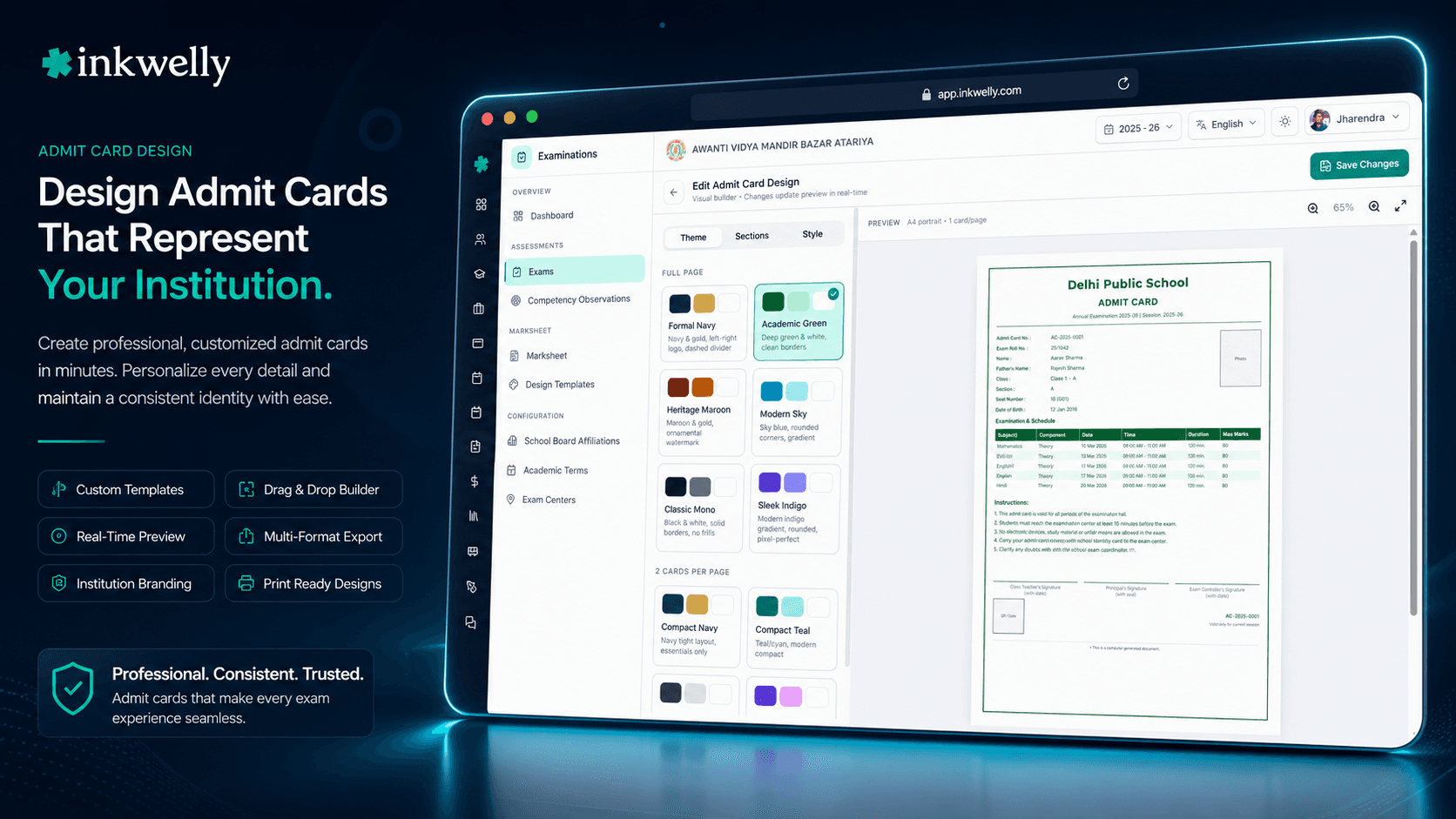
आपके school का admit card. आपके school का design. Logo, header, photo, schedule, footer, signature — हर element configurable।
Per exam admit card template एक बार configure करें, type करते ही live preview update होते देखें, और यह इस exam से generate होने वाले 412 admit cards पर apply हो। Custom logo, school name override, student photo placement, exam schedule columns, footer text, signature lines और bilingual name rendering — सब एक form से।
आज ज़्यादातर भारतीय schools अपने exam admit cards कैसे design करते हैं
Coimbatore के एक CBSE स्कूल में Class 10 pre-board से एक दिन पहले Tuesday है। Exam coordinator last year के drive folder से admit_card_2025.docx file खोलती हैं और edit शुरू करती हैं। ऊपर स्कूल logo आधा centimetre ज़्यादा left में है — क्योंकि पिछली coordinator ने dispatch के वक़्त drag किया था। स्कूल name अभी भी rebrand से पहले का old name दिखा रहा है। Signature line 'Mr. Ramachandran, Principal' कहती है पर Mr. Ramachandran May में retire हो गए। Footer का dress code note last year के pre-board pattern का है, नए CBSE circular का नहीं। आधे घंटे edit के बाद realise करती हैं कि schedule table में old subject codes हैं; नया IT/AI elective entirely missing है।
खर्चा सिर्फ़ Tuesday afternoon का नहीं है। Word file हर admit card के लिए master template बन जाती है जो स्कूल 2 साल तक issue करता है। हर mistake — misaligned logo, retired principal का नाम, ग़लत dress code — 1,200 admit cards पर 3 exams के across propagate करती है। Parents notice करते हैं। Trustees notice करते हैं। स्कूल की reputation, फिर से, छोटी पर real hit खाती है। अगला coordinator, 2 साल बाद, same file खोलता है और last year की सारी mistakes inherit करता है। Cycle repeats।
Inkwelly का Examinations module इसे fix करता है — admit card layout को structured configuration की तरह treat करके, Word file की तरह नहीं। स्कूल layout एक बार design करता है — logo, header, photo placement, schedule columns, footer, signature — एक form से with live preview। इस exam के under generate होने वाला हर admit card configured layout use करता है। जब कुछ change हो (नया principal, rebrand, नया dress code), स्कूल form एक बार update करता है और affected admit cards regenerate। Word file gone; configuration source of truth है।
Inkwelly में admit card setting कैसे काम करता है
Admit Card Setting screen form-based single page है — with live preview pane। Right पर form; left पर preview। Coordinator form में value change करती हैं, preview milliseconds में new value से re-render होती है। Preview real student का data दिखाती है (default Class 10 A का पहला student; picker से selectable) — ताकि layout actual content के against judge हो, Lorem-ipsum placeholder के against नहीं।
Form 7 sections में divided है। पहले, header — स्कूल logo upload (max 1 MB, recommended 800×240 pixels), school-name override (default स्कूल के master record से), board affiliation tag, exam name। दूसरे, student information block — photo placement (top-right, top-left, center), photo size (small, medium, large), shown data fields और order। तीसरे, schedule table — visible columns (subject, component, date, day, time slot, duration, room, building), column order, header style। चौथे, QR code — placement, size, label। पाँचवे, footer text (rich-text markdown)। छठे, signature lines — number और labels। सातवें, language settings — primary script English, secondary script Hindi/Tamil/Marathi/Bengali/Kannada — bilingual rendering के लिए।
Form पर हर field के sensible defaults हैं। पहली बार admit card चलाने वाला स्कूल सब defaults के साथ save कर सकता है और generated card professional दिखेगा — सही स्कूल logo, photo placement, schedule, principal name और verification QR के साथ। Customisation time के साथ आती है — first run के बाद स्कूल principal signature image add करता है, parent request के बाद regional-language secondary script add करता है, CBSE circular change पर footer text change करता है। हर change audit log में user, timestamp और prior versus new value के साथ captured।
Form save होने पर configuration exam ID के साथ stored होता है। उस exam के under generate होने वाला हर admit card configured layout use करता है। Admit Cards generation engine generation time पर layout configuration read करता है और PDF accordingly render करता है। Admit cards generate होने के बाद layout change करने के लिए regeneration step required है — Inkwelly silently existing cards re-render नहीं करता। Coordinator 'Regenerate all' click करती हैं, system existing cards invalidate करता है, नए admit-card numbers और नए QR tokens के साथ नए generate करता है, और parent-app notifications push करता है।
Admit card setting क्या-क्या configure करता है
- स्कूल logo upload (max 1 MB; recommended 800×240 pixels) — placement और sizing options के साथ
- स्कूल name override — जब स्कूल sub-brand या affiliated entity name के नाम से exam चला रहा हो
- Card पर student photo placement (top-right, top-left, center) और size (small, medium, large)
- Shown student information fields और order — name, roll, class, parent contact, date of birth
- Schedule table visible columns — subject, component, date, day, time slot, duration, room, building
- Schedule table header style — bold, underlined, coloured या plain
- QR code placement और size, optional label text के साथ
- Markdown support के साथ rich-text footer — instructions, dress code, do's और don'ts
- Signature lines — 1, 2 या 3 lines custom labels (Principal, Class Teacher, Exam Coordinator) के साथ
- Student name और स्कूल name के लिए bilingual rendering — English plus Hindi/Tamil/Marathi/Bengali/Kannada
- Live preview pane — हर form change milliseconds में card preview re-render करता है
- Configuration audit log — हर change user, timestamp, prior और new value के साथ captured
Logo upload — वो छोटा detail जिसकी हर स्कूल सबसे ज़्यादा परवाह करती है
Admit card पर स्कूल logo हर school exam document का सबसे ज़्यादा noticed element है। Pixelated logo, ग़लत proportion पर cropped logo, old स्कूल name लिखा हुआ logo — हर एक detail जिसे parent screenshot के साथ WhatsApp group में forward करता है। Inkwelly का logo upload real भारतीय schools के logos handle करने के way के लिए built है।
Upload PNG, JPEG और SVG accept करता है। Maximum 1 MB; landscape logos के लिए recommended 800×240 pixels और square logos के लिए 480×480 pixels। Uploader aspect ratio detect करता है और logo full resolution में store करता है; PDF generation पर card size पर render करता है — anti-aliasing applied के साथ — ताकि print 300 DPI पर crisp हो। स्कूल multiple logos upload कर सकता है और per exam एक pick — अलग brand identities के नाम से events चलाने वाले schools के लिए useful (half-yearly के लिए स्कूल का own name, special pre-board के लिए affiliated coaching brand)। Logo Cloudflare R2 में content-hashed URL के साथ stored; cache invalidation automatic।
Photo placement — default top-right, स्कूल की preference per configurable
भारतीय school admit cards का standardised expectation है photo placement का — ज़्यादातर CBSE schools photo top-right place करते हैं — student के नाम और roll number left में। ICSE schools often photo top-center place करते हैं। State Board schools vary करते हैं। Inkwelly का photo placement field top-right, top-left और top-center accept करता है, और size small (3×4 cm equivalent), medium (4×5 cm) और large (5×6 cm) accept करता है।
Photo source Student Information Module का profilePhotoMediaId field है। अगर बच्चे का photo अभी तक upload नहीं हुआ, card स्कूल के brand color में student के initials के साथ placeholder render करता है — parent app same placeholder दिखाता है। स्कूल की compliance team admit card generation के लिए photo upload को hard prerequisite require कर सकती है; उस case में बिना photo वाले बच्चे का card generate नहीं हो सकता, और screen affected children list करती है — office के लिए exam से पहले chase करने के लिए।
Schedule table columns — हर detail parent Friday सुबह से पहले पढ़ता है
Admit card पर schedule table parent का reference document है। बता देता है कि कौन-सा paper किस दिन, किस time, किस room में। हर भारतीय board का थोड़ा अलग convention है — कुछ 'Day' को 'Date' से separate column include करते हैं, कुछ building name include करते हैं जब स्कूल के multiple campuses हैं, कुछ hours में duration require करते हैं, कुछ minutes prefer करते हैं। Inkwelly का schedule table column-configurable है।
Configurable columns subject, component (Theory / Practical / etc.), date (ISO date), day of week, start time, end time, duration (hours या minutes), room और building हैं। स्कूल pick करता है कौन-से columns दिखाने हैं, किस order में, किस header style के साथ। CBSE school के लिए default subject, component, date, day, time, duration, room है। ICSE school के लिए default 'Building' add करता है multi-campus schools के लिए। Drag-and-drop column reorder सबसे used customisation है। Save moment पर audit log column configuration capture करता है।
Bilingual rendering — English plus Hindi/Tamil/Marathi/Bengali/Kannada
भारतीय schools से एक growing demand bilingual admit cards की है — student का नाम और स्कूल का नाम English और स्कूल के regional script दोनों में rendered। UP का Hindi-medium school चाहता है कि नाम Devanagari में English के साथ हो — ताकि Hindi-medium parent अपने preferred script में नाम पढ़े और office के पास board-level uploads के लिए English version हो। Coimbatore का Tamil-medium school Tamil चाहता है; Mumbai का Marathi-medium school Marathi।
Inkwelly का bilingual rendering Student Information Module से localised name fields (localizedFirstName, localizedMiddleName, localizedLastName) और स्कूल का regional script पढ़ता है। Configured होने पर admit card student name को एक line पर English में और next line पर regional script में दिखाता है — स्कूल name भी वैसे ही rendered। Board affiliation tag और exam schedule English में रहते हैं (क्योंकि invigilator का QR scan English read करता है)। Bilingual configuration per script एक toggle है — multiple regional scripts चलाने वाले schools (Hyderabad का school — Telugu और Hindi-medium sections के साथ) per exam अलग configure कर सकते हैं।
“पिछली बार admit card पर पिछले Principal sir का नाम था। Inkwelly के नए admit card setting form में एक बार update किया, सब cards एक साथ regenerate हो गए। Word file की समस्या ही नहीं रही।”
Real-world scenarios admit card setting के लिए
-
Mid-session नया principal join करता है। Retired principal का नाम स्कूल के default admit card layout पर है। नया principal Monday को join करता है। Office Admit Card Setting form खोलती है, principal नाम और signature image update करती है, Save click करती है। अगले exam के admit cards नए नाम के साथ generate होते हैं। Audit log change को timestamp के साथ capture करता है।
-
स्कूल के नाम का rebrand। स्कूल board affiliation change के बाद अपना registered नाम 'St. Mary's High School' से 'St. Mary's International School' change करता है। Office नया logo upload करती है, स्कूल नाम update करती है, 'Regenerate all admit cards' click करती है। 412 admit cards नए names और tokens के साथ fresh issued; parents notifications receive करते हैं।
-
Hindi-medium section के लिए regional script add। स्कूल existing English-medium sections के अलावा Class 1-3 के लिए Hindi-medium section open करता है। Hindi-medium parents bilingual admit cards request करते हैं। Office form में bilingual rendering toggle enable करती है, preview change दिखाती है, regenerate action नए cards issue करता है। English-medium section के cards English-only रहते हैं।
-
Pre-board day पर dress code के लिए specific instruction। स्कूल Class 10 pre-board के लिए formal school uniform (no PE shoes, no team jerseys) require करने का decide करता है। Office form के footer rich-text section में dress code के साथ footer paragraph add करती है। Preview नया footer दिखाती है; cards उसके साथ regenerate होते हैं। Smallest paper sizes पर footer 2 lines में wrap करता है।
-
Tighter card layout के लिए custom QR placement। Default QR position top-right है पर एक particular स्कूल का logo इतना wide है कि QR overlap करता है। Coordinator QR placement को bottom-right configure करती हैं via configuration form, preview update होता है, cards QR bottom में generate होते हैं। New placement match करने के लिए QR का size बढ़ाया गया।
इस screen पर common operations
- Logo configure — upload, position, size, multiple logos with picker
- Header configure — स्कूल name override, board tag, exam name
- Student information configure — photo placement, shown fields, order
- Schedule table configure — column visibility, column order, header style
- Footer configure — markdown के साथ rich-text, instructions, dress code
- Signature lines configure — 1/2/3 lines custom labels के साथ
- Language configure — primary English plus optional regional script
- Save as default — future exams configuration inherit करते हैं
- Affected cards regenerate — old invalidate, नए tokens के साथ new ones issue
- Configuration audit log देखें — हर change user और timestamp के साथ captured
अपने school के brand पर admit card layout designer running देखें
अपना स्कूल logo, principal की signature image और last year का admit card लाइए। हम 10 minute में layout configure करेंगे और नया admit card live दिखाएंगे।
Limits, safety और small print
Admit card layout configuration default per-exam है। 'Save as Default' option school-wide default create करता है जो नए exams inherit करते हैं। Per-exam overrides default से independently editable रहते हैं। Default change करने से existing exams silently update नहीं होते — हर exam की configuration अपनी row है, और admit cards की regeneration explicit action है।
Rich-text footer markdown का constrained subset accept करता है — bold, italic, bullet lists, line breaks, पर inline images नहीं, HTML नहीं, script tags नहीं। Constraint security choice है; printed admit card पर arbitrary HTML injection attacks का vector है। Footer PDF generation पर server-side render होता है — markdown sanitised के साथ। Footer length 800 characters पर capped है — unbounded card sizes prevent करने के लिए।
Logo upload 1 MB और PNG, JPEG या SVG पर constrained है। Larger files specific error के साथ upload time पर rejected। Uploader file Cloudflare R2 में content-hashed URL के साथ store करता है; cache invalidation automatic। एक स्कूल के logos उस स्कूल के tenant पर isolated; cross-school logo access API layer पर blocked। Executable content (embedded scripts वाला SVG) वाले logos storage से पहले sanitised; सिर्फ़ static graphics elements survive।
किस मॉड्यूल का हिस्सा
1 moduleअक्सर पूछे गए सवाल
7 सवालक्या अलग exams के लिए अलग admit card layouts हो सकते हैं?
हाँ। Configuration default per exam stored होता है। स्कूल का default layout exam creation पर inherited पर per exam override हो सकता है। Class 1 unit test simpler layout use कर सकता है (no QR, no signature) जबकि Class 10 pre-board full layout use करता है (logo, photo, QR, dual signatures, footer)। Per-exam overrides स्कूल default से independent हैं।
क्या layout change करने से existing admit cards automatically regenerate हो जाते हैं?
नहीं। Layout configuration change करने से existing admit cards silently re-render नहीं होते। Coordinator को explicitly 'Regenerate all' click करना पड़ता है — नए cards issue करने के लिए। Regenerate action old cards को invalidate करता है (उनके QR tokens verification fail करते हैं) और नए tokens के साथ नए cards issue करता है। Parents notifications receive करते हैं। Audit log regeneration capture करता है।
क्या custom watermark या background design include कर सकते हैं?
Custom watermarks optional 'Watermark Image' upload के through supported — transparent PNG जो card content के पीछे 10-15% opacity पर render करता है। Background colors और gradients form के 'Background' section के through supported। Custom CSS या HTML overlay supported नहीं — layout structured configuration है, arbitrary HTML नहीं।
Bilingual rendering long student names को कैसे handle करता है?
Card layout student name के लिए 2 lines reserve करता है — एक English के लिए, एक regional script के लिए। अगर नाम reserved width exceed करे, renderer automatically smaller font size apply करता है जब तक नाम fit ना हो। 100 characters से ज़्यादा वाले names किसी भी script में generation time पर 'name too long' warning trigger करते हैं, और coordinator को student record पर localised name field verify करने के लिए कहा जाता है।
क्या layout designer specific student का card preview कर सकता है?
हाँ। Preview pane में student picker है जो default first attached class के first student पर set है। Coordinator किसी भी student को pick कर सकती हैं — उनके actual data के साथ (photo, name, parent contact, schedule) — उनका card preview करने के लिए। Long names, missing photos या special characters वाले students के लिए layout correctly काम करता है verify करने के लिए useful।
क्या Inkwelly QR codes support करता है जो offline scanners में काम करें?
हाँ। QR data card का base64-encoded snapshot include करता है ताकि offline scanner verify कर सके कि card Inkwelly ने issue किया है — without network connection। Full live verification (latest photo, current schedule) network connection require करता है, पर offline snapshot poor-connectivity areas के exam centers पर invigilator-side identity verification के लिए sufficient है।
क्या layout configuration export करके दूसरे स्कूल के साथ share कर सकते हैं?
हाँ। 'Export Configuration' option JSON file produce करता है — entire layout configuration के साथ (logo excluded — जो school-specific है)। दूसरा स्कूल 'Import Configuration' के through JSON import कर सकता है, अपना logo upload कर सकता है, और 60 second में near-identical admit card layout पा सकता है। Multiple campuses के across unified branding चलाने वाली school chains के लिए useful।
आपको ये भी पसंद आ सकता है
2 लेखInkwelly आपके स्कूल पर — खुद देखें
30 मिनट का डेमो। आपके मौजूदा ERP को आपके साथ खोलकर, कॉल पर ही आपका डेटा Inkwelly में लोड करते हैं। कॉल ख़त्म होते-होते एक तय तारीख़ का गो-लाइव प्लान आपके हाथ में।