ऐसी marksheet जिस पर आपका स्कूल खुद sign-off कर सके। Verified, locked, और print के लिए तैयार।
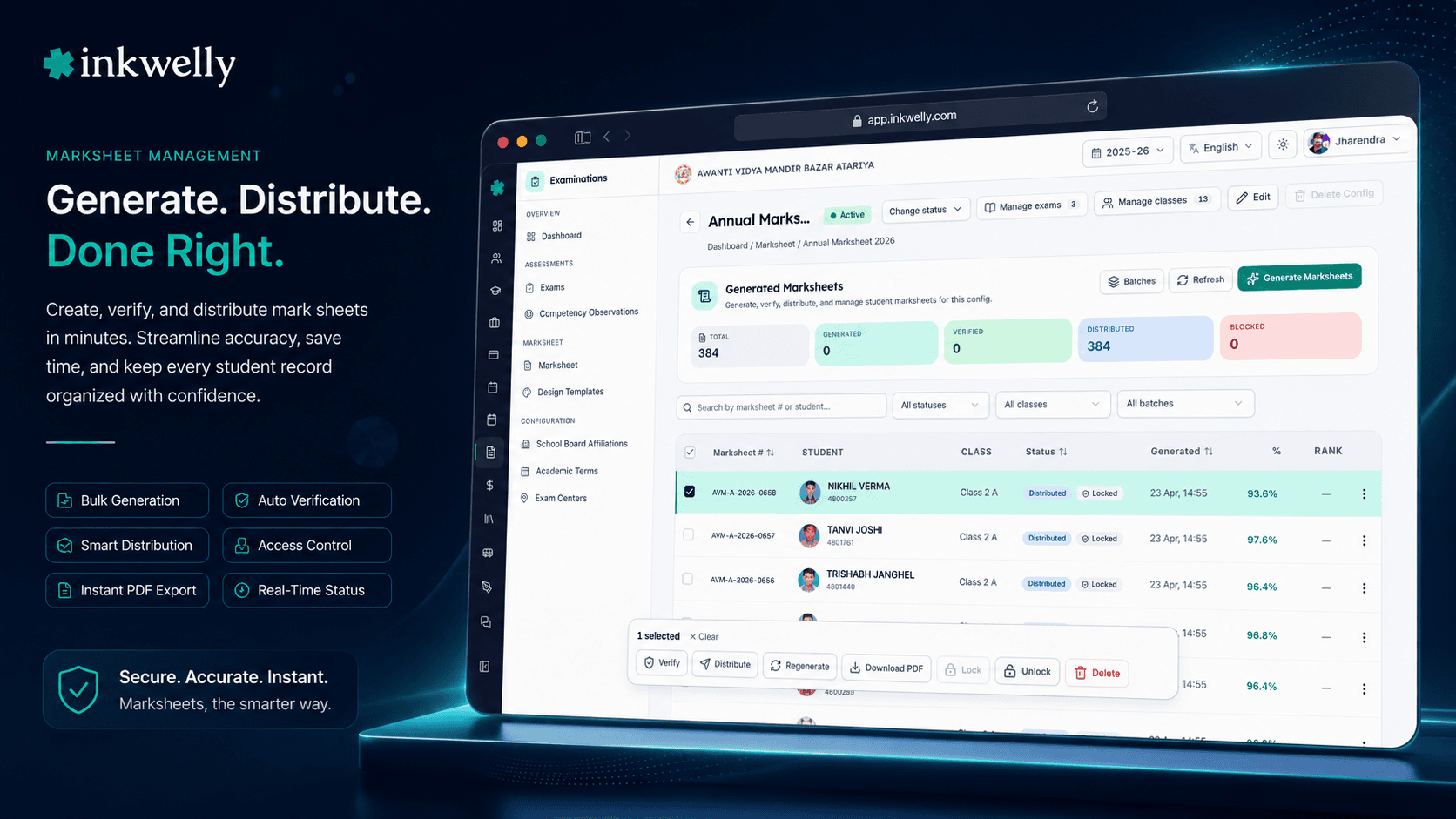
किसी भी class के लिए marksheets bulk में generate करें, multi-step verification workflow चलाएं, final PDF को lock करें, और parents को QR scan करके authenticity verify करने दें। Layouts CBSE, ICSE, ISC, IGCSE, IB और हर State Board के साथ adapt करते हैं। Co-scholastic Part 2, competency snapshots, attendance percentage और promotion status — सब एक ही sheet पर।
आज भारत के ज्यादातर स्कूलों में marksheets कैसे बनती हैं
मार्च का तीसरा हफ्ता है। Class 10 का pre-board दो दिन पहले खत्म हुआ है और Class 10 की coordinator Mrs Singh अपनी desk पर बैठी हैं — सात subject teachers से सात अलग formats में marks आ रहे हैं। Maths teacher ने email पर Excel sheet भेजी है जिसमें दो ही columns हैं। Hindi teacher ने printed register हाथ से थमाया है। Science teacher के marks WhatsApp message में हैं। Art और PE teacher ने एक shared sheet update की है जिसे कोई और edit नहीं कर सकता। Office assistant पुराने marksheet design पर report cards print कर रहा है — जो 2019 में MS Word में बना था और तब से बदला नहीं गया।
खर्च घंटों का नहीं है। खर्च है शनिवार सुबह की वो parent call जिसमें मां कहती है — 'मेरी बेटी का English mark 78 है, 87 नहीं।' खर्च है वो re-issue ceremony जब principal corridor में दूसरे parents के सामने एक parent से माफी मांगते हैं। खर्च है वो Class 10 marksheet जो छह साल बाद student के साथ college admission interview में जाती है, और एक decimal point की गलती पूरे स्कूल का उस family के साथ trust हमेशा के लिए तोड़ देती है।
भारत के हर स्कूल office को यह पता है — और ज्यादातर ने इसे सही करने की कोशिश छोड़ दी है, सिर्फ यह उम्मीद रखते हैं कि किसी की नज़र न पड़े। Inkwelly Marksheet इस सबको एक auditable record से replace करता है — हर student के लिए एक: आपके verified marks से generated, publish होते ही locked, उसी घंटे parents को distributed, और किसी भी phone पर QR scan से verify होने वाला।
Inkwelly Marksheet कैसे काम करता है — आठ-stage lifecycle
Marksheet अपने आप में नहीं बनती। यह उस exam lifecycle का अंतिम artefact है जो महीनों पहले शुरू होती है। Inkwelly इस lifecycle को आठ named stages में चलाता है, और हर stage तब तक अगले से locked रहती है जब तक पिछली पूरी न हो जाए:
- Schedule — exam dates, हर class के subjects और centre allocation publish होते हैं।
- Mark entry — subject teachers web app से marks enter करते हैं या offline registers से CSV upload करते हैं। Deadline lock back-dating रोकता है।
- Verification — exam coordinator verification report चलाते हैं (missing marks, out-of-range marks, अब भी open पड़ी classes) और हर mark cluster को approve या reject करते हैं।
- Generation — verify होने के बाद, पूरी class के लिए marksheets bulk में generate होती हैं। Subject marks, co-scholastic Part 2, attendance percentage, competency snapshot और promotion status — सब अपने आप aggregate हो जाते हैं।
- Block / unblock — generated sheets को retest, re-evaluation या scholarship correction के लिए individually block किया जा सकता है। Unblock करने से वे वापस restore हो जाती हैं।
- Distribution — sheets parents को email, WhatsApp या printed PDF से distribute होती हैं। हर parent को अपनी unique download link मिलती है।
- Lock — जब principal satisfied हों, sheet lock कर दी जाती है। Locked sheets immutable होती हैं। इसके बाद की कोई भी correction के लिए नई sheet number के साथ documented re-issue चाहिए।
- QR-verify — हर locked sheet पर QR होता है। कोई भी — parent, college, scholarship body — public Inkwelly URL पर बिना login के sheet की authenticity scan करके verify कर सकता है।
यही flow daily quiz, monthly test, half-yearly exam और final board pre-board — सब के लिए same है। स्कूल के size या board से structure नहीं बदलता।
एक marksheet पर क्या-क्या आता है
- Subject marks per component — written, oral, project, practical — grade और grade points के साथ
- Co-scholastic Part 2 — values education, work education, art, health और physical education
- Competency snapshot — इस term में tracked NEP competencies का proficiency level
- Attendance percentage — total working days, present days, late marks
- Promotion status — promoted, repeat, या conditional promote — स्कूल के अपने rule के हिसाब से
- Class teacher का term remark — board जिस wording में चाहे, उसमें translated
- School board affiliation, examination centre और board roll number — जहाँ applicable हो
- QR code — एक public verification page जिसे कोई भी बिना login के खोल सकता है
- Marksheet number — स्कूल के format pattern के हिसाब से — prefix, year, sequence, collision check के साथ
Verification, generation से पहले — बाद में नहीं
Marksheet errors की सबसे बड़ी वजह सबसे आसान fix भी है — unverified marks से generate करना। Inkwelly mark entry और generation के बीच एक verification step जरूरी कर देता है। Verification dashboard पर हर class, हर subject, हर component, और हर वो individual cell दिखती है जहाँ marks missing हैं, out of range हैं, या किसी ऐसे teacher ने enter किए हैं जो उस subject के assigned teacher नहीं हैं।
अगर सब clean दिखे तो coordinator एक click में पूरी class approve कर सकते हैं, या किसी एक cell में drill down करके देख सकते हैं कि किसने क्या और कब enter किया। Approval timestamp और user के साथ record होती है — वही audit trail जो कोई भी board affiliation team मांगेगी। सिर्फ verified clusters ही generation में जा सकते हैं; system partially verified class से generate करने से इनकार करता है।
एक बार Lock करें। हमेशा के लिए Verify करें।
जिस moment marksheet lock होती है, तीन चीज़ें एक साथ होती हैं: PDF के corner में QR आ जाता है, marks database में immutable हो जाते हैं, और एक public verification URL live हो जाती है। QR में एक लंबा random token encode होता है — guess करना possible नहीं है। QR वाला कोई भी sheet को बिना login के verify कर सकता है: parents, colleges, scholarship boards, छह साल बाद future employers।
Public verification page वही marks, वही grade, वही school seal दिखाता है — पर read-only और स्कूल का signed। Printed marksheet खो गई? QR अब भी काम करता है। Altered marks वाली colour photocopy मिली? QR mismatch दिखाएगा। इसी एक QR ने हमारी pilot schools में board fraud disputes को zero पर ला दिया।
हर sheet bulk में generate — parallel में
10 classes और हर में 40 students वाले स्कूल का half-yearly 400 marksheets पैदा करता है। Generic ERP पर, हर एक एक button click है। Inkwelly पर पूरी class एक job में generate होती है — Puppeteer-backed PDF pipeline चार pages parallel में चलाती है और एक class को दो minutes से कम में finish कर देती है।
Generation के दौरान system स्कूल के chosen marksheet design template, स्कूल के promotion rules, और स्कूल के number format pattern को apply करता है। Sequence numbers atomically issue होते हैं — अगर दो coordinators एक ही समय में दो classes के लिए generation start करें, marksheet number registry guarantee करती है कि कोई भी दो sheets का number कभी एक न हो।
Promotion rules — आपके board के, किसी और के नहीं
CBSE Class 9 के student को pass होने के लिए पाँच subjects में 33% चाहिए; IGCSE student 9-grade scale पर graded होता है जहाँ कोई fail नहीं होता; UP Board का aggregate अलग है। Inkwelly promotion criteria को data के रूप में रखता है, code के रूप में नहीं — minimum percentage, maximum failed subjects, grace marks, board-specific overrides — और marksheet class की affiliation से जुड़े rules का इस्तेमाल करके अपने आप promotion decide करती है।
Rules में compartment exams के लिए carry-over conditions और conditional promotion logic भी include हो सकती है। जब board अपना rule बदलता है (CBSE ने 2024 में Class 10 के लिए grace mark policy update की), स्कूल एक row update करता है और अगले batch की marksheets new rule reflect करती हैं।
Co-scholastic और competency — एक ही marksheet पर
NEP स्कूलों से सिर्फ academic marks ही नहीं, co-scholastic Part 2 (work education, art, health, values) और tracked NEP competencies का competency snapshot भी report करने को कहती है। ज्यादातर ERPs इन्हें अलग-अलग reports की तरह treat करते हैं — parent को term-end पर तीन अलग documents मिलते हैं और वे आपस में align नहीं होते।
Inkwelly तीनों को एक ही marksheet पर merge करता है। Co-scholastic के लिए aggregation logic पाँच strategies support करती है (latest, primary exam, best, average grade-point, all-terms) — principal वो pick कर सकते हैं जो board की wording से fit बैठे। Competency snapshot इस term के competency observations से proficiency level pull करता है। Parents को एक sheet दिखती है — paper का stack नहीं जो story नहीं बताता।
आपके school year में यह कहाँ-कहाँ काम आता है
Marksheet feature उन awkward moments से जज होता है, easy moments से नहीं। Inkwelly का marksheet flow उन चार moments में pressure-tested है जो स्कूलों को सबसे ज्यादा hurt करते हैं।
Term-end report card distribution. Standard run। 800 students, 12 classes, marksheets last paper के 48 घंटों के अंदर parents के हाथों में। Bottleneck generation नहीं है — verification है जो उससे पहले होती है। Inkwelly का verification dashboard स्कूल का pre-distribution time 5 दिन से 2 दिन कर देता है क्योंकि verification workflow में built-in है, बाद में bolt-on नहीं की गई।
Pre-board से board final. Class 10 और Class 12 के students फ़रवरी में pre-board देते हैं और मार्च में board final। Pre-board marksheet college applications, scholarship forms और counsellor recommendations के लिए internal evidence है। तीन हफ्ते बाद board का result आता है। Inkwelly दोनों को अलग-अलग locked sheets में अलग-अलग marksheet numbers के साथ रखता है — कोई overwriting नहीं, कोई confusion नहीं जब college 'latest वाली' मांगे।
Retest और re-evaluation. एक student half-yearly के दिन बीमार है। Retest दो हफ्ते बाद होता है। उस बच्चे की original marksheet block हो जाती है, retest mark missing वाला mark replace कर देता है, और एक fresh marksheet generate और lock हो जाती है। Blocked original reason ('retest pending') के साथ preserve रहती है और audit trail बरकरार है।
Scholarship और merit certificates. एक student नवंबर में scholarship जीतता है। स्कूल को 24 घंटे में scholarship body को letterhead पर marksheet चाहिए। Inkwelly के marksheet design templates — वही engine जो report cards drive करता है — same marks से scholarship certificate produce करता है — locked, QR-verifiable, स्कूल के letterhead पर।
Day-to-day operations जो team actually use करेगी
- एक student के लिए एक marksheet generate करें — transfer certificate requests के लिए useful
- पूरी class के लिए bulk-generate — term-end पर typical
- एक marksheet block करें — retest या re-evaluation के लिए, reason field के साथ
- Marksheet unblock करें — audit history खोए बिना verified state पर restore
- Distribution के लिए Lock — sheet immutable होती है और QR verification activate होता है
- Email और WhatsApp से bulk-distribute — हर parent को private link
- ZIP के रूप में bulk-download — printing, archival या auditor को भेजने के लिए
- QR से verify — किसी भी phone पर public URL खोलें, login की ज़रूरत नहीं
अपने स्कूल की marksheet Inkwelly पर देखें
हमें अपनी मौजूदा marksheet design का sample भेजिए। हम Inkwelly पर एक class के लिए sample run free में set up करेंगे और आपको पूरा flow दिखाएंगे।
Limits, safety, और हर स्कूल को पूछने चाहिए वो छोटी-छोटी बातें
Marksheet system जो invalid actions को 'no' नहीं कहता, वो ऐसा system है जिस पर आप board affiliation visit पर भरोसा नहीं कर सकते। Inkwelly का marksheet engine explicit prohibitions पर build है, defaults पर नहीं।
Locked sheets immutable होती हैं। एक बार lock होने के बाद, कोई भी admin user — principal भी — किसी mark को change नहीं कर सकता। Correction के लिए नई marksheet number, reason और original sheet preserve करते हुए documented re-issue चाहिए। यह CBSE की issued report cards वाली अपनी policy से match करता है।
कोई silent retroactive edit नहीं। Lock से पहले हर mark change timestamp और user-attributed होता है। Generation के बाद और lock से पहले भी अगर कोई edit करे, मौजूदा PDF invalidate हो जाती है और fresh एक regenerate होती है। ऐसा कोई तरीका नहीं है कि mark बदलें और original PDF रख लें।
Unverified data पर generation नहीं होती। अगर verification report में कोई open issue हो, system generation block कर देता है। कोई force flag नहीं है। यह block जानबूझकर है और configurable नहीं — एक बार गलत हो जाने का खर्च verification पहले finish करने की inconvenience से कहीं ज्यादा है।
QR verification URL में कोई PII नहीं है। Token random है; public page marksheet दिखाता है पर parent का phone number, address या email नहीं। Verification surface read-only है और crawl-by-token attacks रोकने के लिए rate-limited।
Distribution parents तक consent-aware है। अगर किसी parent ने DPDP Act के तहत email या WhatsApp consent न दी हो, distribution in-app download पर fall back करता है — उन्हें marksheet तब भी मिलती है, पर unsolicited message नहीं।
किस मॉड्यूल का हिस्सा
1 moduleअक्सर पूछे गए सवाल
6 सवालक्या यह marksheet CBSE / ICSE / state boards के पास evidence के रूप में accept होगी?
Inkwelly marksheets internal school marksheets हैं — वही legal status जो आज आपका स्कूल अपने letterhead पर issue करता है, साथ में verification के लिए एक QR। यह official board marksheet का substitute नहीं है (वह सिर्फ board ख़ुद issue कर सकता है)। CBSE, ICSE, ISC, IGCSE, IB और 8 state boards के स्कूल Inkwelly marksheets का इस्तेमाल term-end report cards, scholarship submissions, transfer certificates और college admission portfolios के लिए कर रहे हैं।
Marksheet lock होने के बाद अगर कोई mark correct करना हो तो?
Locked marksheets design से ही immutable हैं — कोई user locked sheet को directly edit नहीं कर सकता। Correction flow एक fresh re-issue है: original locked sheet 'corrected' status के साथ preserve होती है, नई marksheet नए sequence number और 'replaces #<old number>' reference के साथ generate होती है, और दोनों audit trail में store होती हैं। यह CBSE की issued report cards वाली अपनी policy से match करता है और board affiliation review के दौरान स्कूल को protect करता है।
Parent के लिए QR verification actually कैसे काम करती है?
हर locked marksheet के corner में एक QR code printed होता है। Parent किसी भी phone camera से उसे scan करते हैं — वह एक public Inkwelly URL खोलता है जो वही marksheet दिखाती है, read-only, स्कूल की seal के साथ signed। किसी login की ज़रूरत नहीं। QR में एक long random token encode होता है, इसलिए URL guess या brute-force करना possible नहीं। Verification page rate-limited है और search engine indexing से blocked, इसलिए private marks कभी leak नहीं होते।
क्या marksheet Hindi, English या दोनों side by side में हो सकती है?
हाँ। हर marksheet config में एक generation language (English या Hindi) और एक optional show-English-alongside toggle है। Hindi version pre-loaded Devanagari fonts use करती है — Mukta, Hind, और Tiro Devanagari Hindi — इसलिए स्कूल को fonts install करने या font licences pay करने की ज़रूरत नहीं। Numbers दोनों versions पर Latin (0-9) रहते हैं; CBSE, Inkwelly और Razorpay जैसे brand names English script में ही रहते हैं — जैसा कि Indian school standard है।
क्या यह हमारे fee receipts और admission records के साथ integrate होता है?
हाँ। Marksheet student का roll number, board affiliation, attendance percentage और class teacher का remark Inkwelly के बाकी हिस्सों से directly pull करती है। कोई double entry नहीं। अगर स्कूल mid-year में student की class बदले, अगली marksheet बिना manual override के updated class use करती है। Fee receipts, admission records और marksheets — सब वही एक student record share करते हैं — एक truth, तीन नहीं।
क्या मैं पूरी class की सारी marksheets एक ZIP में bulk-download कर सकता हूँ?
हाँ। Bulk-download endpoint एक ZIP बनाता है — हर student के लिए एक PDF, archival के लिए student के roll number से named। स्कूल इसका इस्तेमाल अक्सर printing के लिए करते हैं — ZIP एक upload में print shop को चली जाती है। Download permission-gated और audit-logged है, तो principal देख सकते हैं कि किसने और कब archive pull किया।
Inkwelly आपके स्कूल पर — खुद देखें
30 मिनट का डेमो। आपके मौजूदा ERP को आपके साथ खोलकर, कॉल पर ही आपका डेटा Inkwelly में लोड करते हैं। कॉल ख़त्म होते-होते एक तय तारीख़ का गो-लाइव प्लान आपके हाथ में।