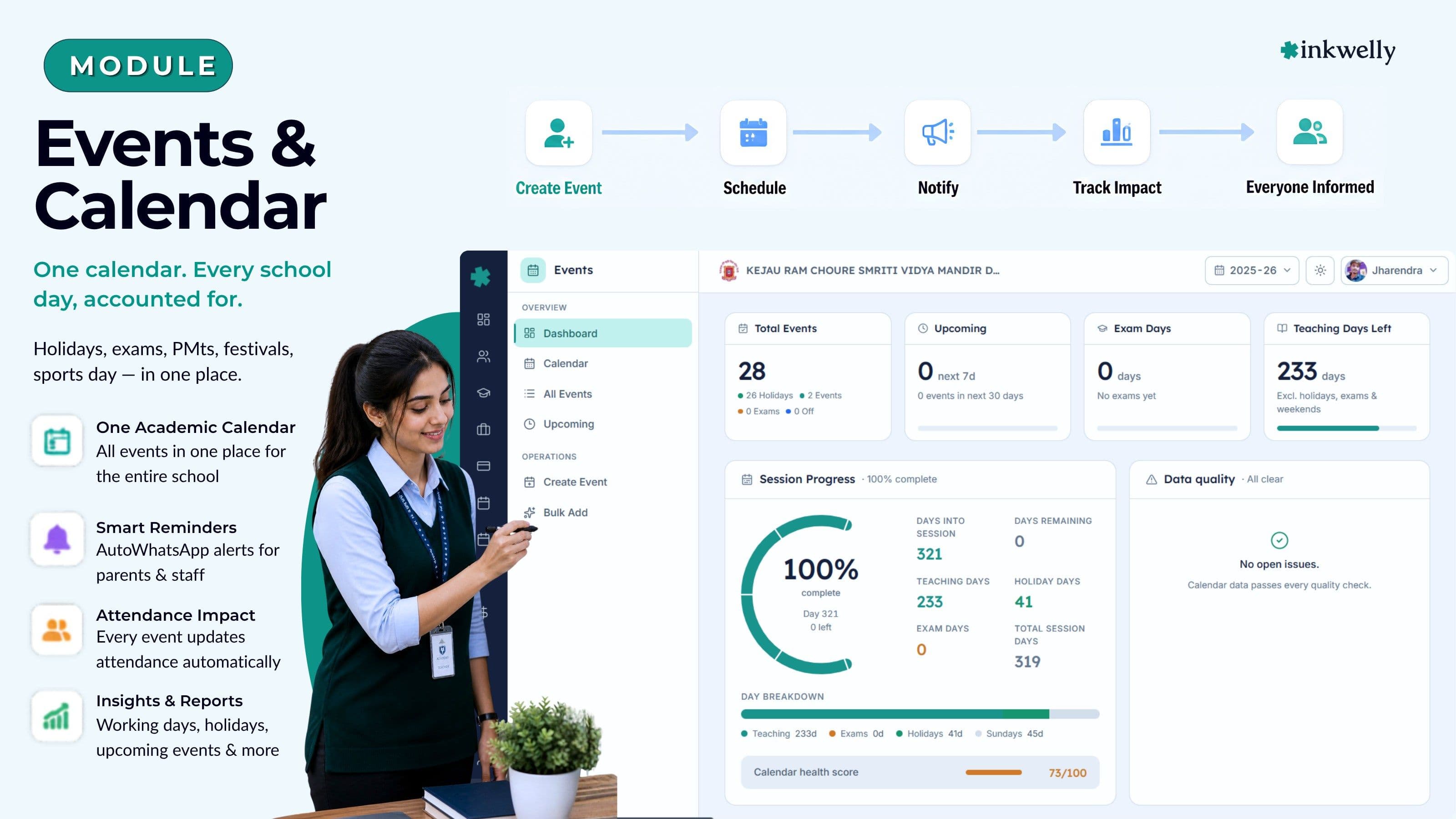
एक calendar। हर स्कूल दिन का हिसाब। Holidays, exam days, PTMs, festivals, sports day — सब एक जगह।
पूरे स्कूल के लिए एक academic calendar — holidays, exam days, parent-teacher meetings, sports day, festivals और student events। हर entry सही कक्षाओं से जुड़ी है, working-day total में गिनी जाती है, और एक ही screen पर प्रिंसिपल, office staff और शिक्षकों को दिखती है। भारतीय स्कूल वर्ष के लिए बना — CBSE, ICSE, IB, IGCSE और State Boards।
आज ज़्यादातर भारतीय स्कूल events कैसे चलाते हैं
इंदौर के एक CBSE स्कूल में जून का दूसरा हफ़्ता है। प्रिंसिपल 2025-26 का academic calendar एक Excel sheet में तैयार कर रही हैं जो पिछली प्रिंसिपल ने तीन साल पहले mail की थी। State government ने Eid के लिए दो extra working days notify किए हैं। Exam coordinator चाहते हैं कि Half-Yearly schedule जुलाई तक lock हो। PT teacher को Sports Day मानसून से पहले चाहिए। Accountant पूछ रहे हैं कि bus contractor invoice के लिए कौन सी dates 'school holiday' गिनी जाएँगी। चार लोग, चार documents, एक calendar जिसका पूरी तरह कोई owner नहीं।
अगस्त तक parents हर सोमवार सुबह office में call करके पूछते हैं कि स्कूल खुला है या नहीं। WhatsApp class groups 2023 के circular से ग़लत dates forward कर रहे हैं। Exam in-charge ने Class 10 pre-board उसी शनिवार पर रख दिया जब inter-school cricket final है — किसी ने notice नहीं किया क्योंकि दोनों calendars कभी एक साथ बैठे ही नहीं। दिसंबर तक प्रिंसिपल की calendar Excel में 14 versions हैं; parent app अगस्त वाला version दिखा रहा है क्योंकि किसी ने file re-upload नहीं की। UDISE+ working-day count माँगता है और चार staff चार अलग numbers देते हैं।
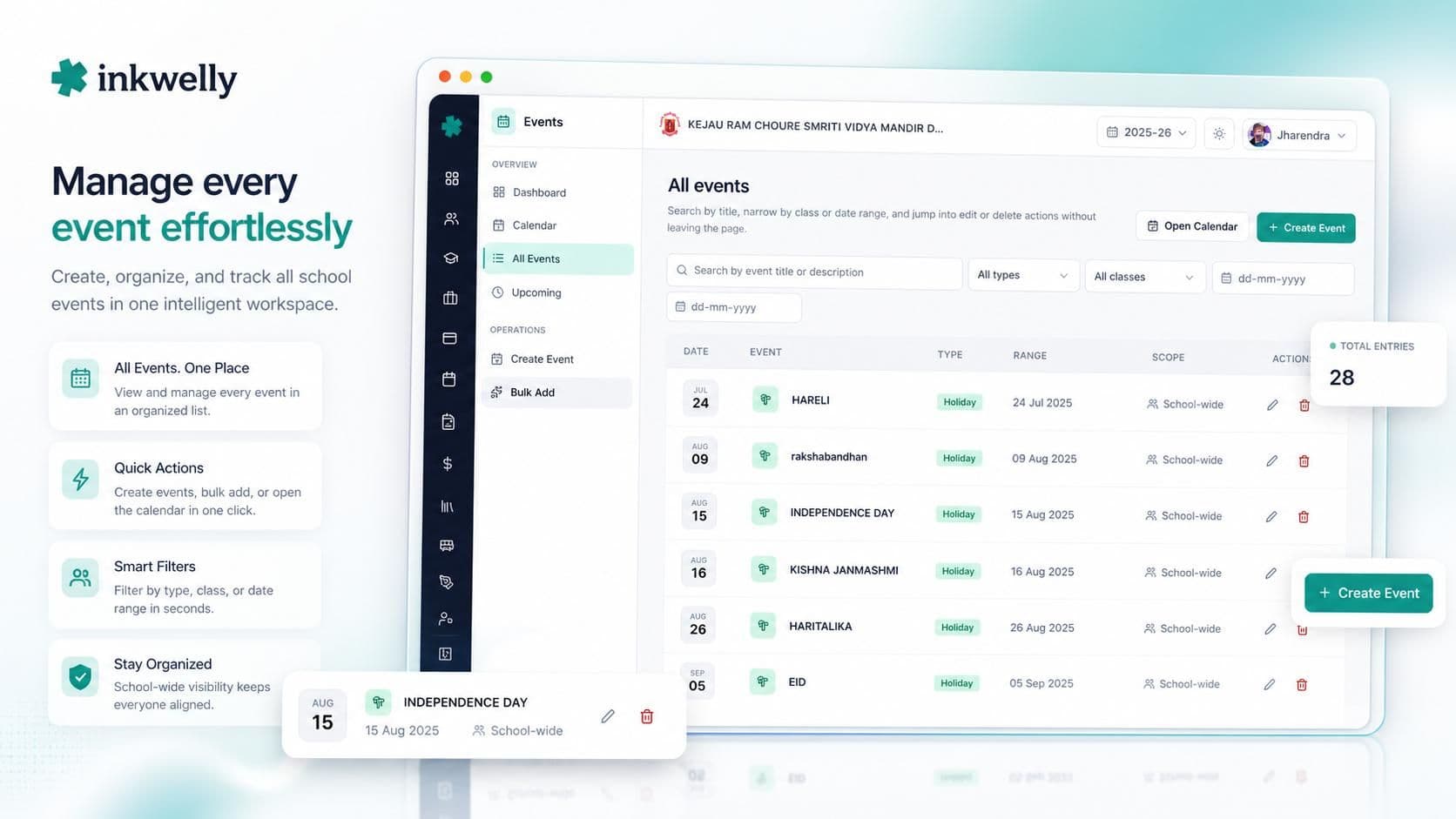
Inkwelly का Events module इसे एक academic calendar से बदल देता है। हर event — holidays, exam days, parent-teacher meetings, sports day, cultural festivals, student trips — एक row के रूप में रहता है, सही कक्षाओं से जुड़ा हुआ, working-day total में गिना जाता है, और एक ही screen पर प्रिंसिपल, office staff और शिक्षकों को दिखता है।
हमने इसकी जगह क्या बनाया
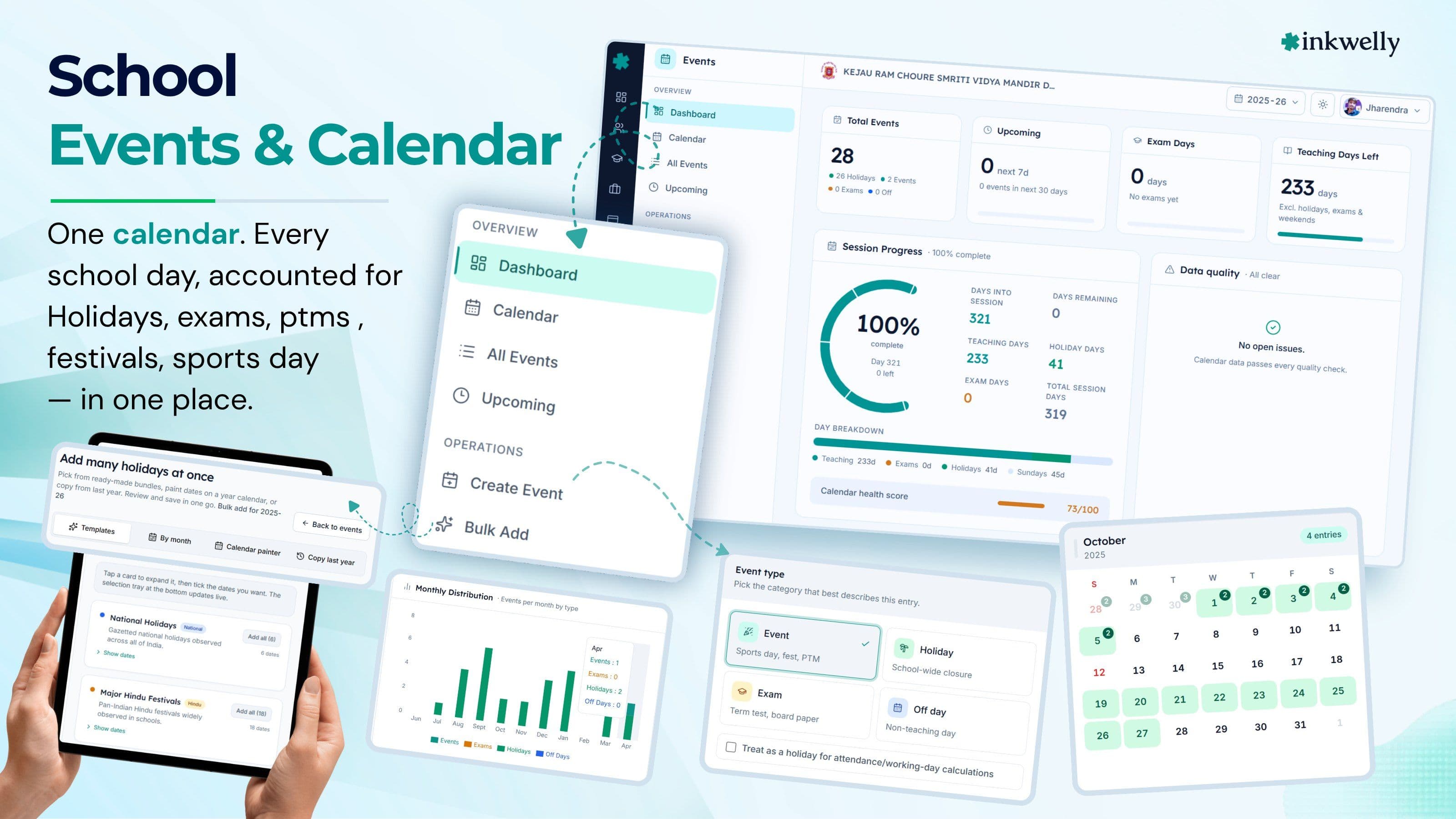
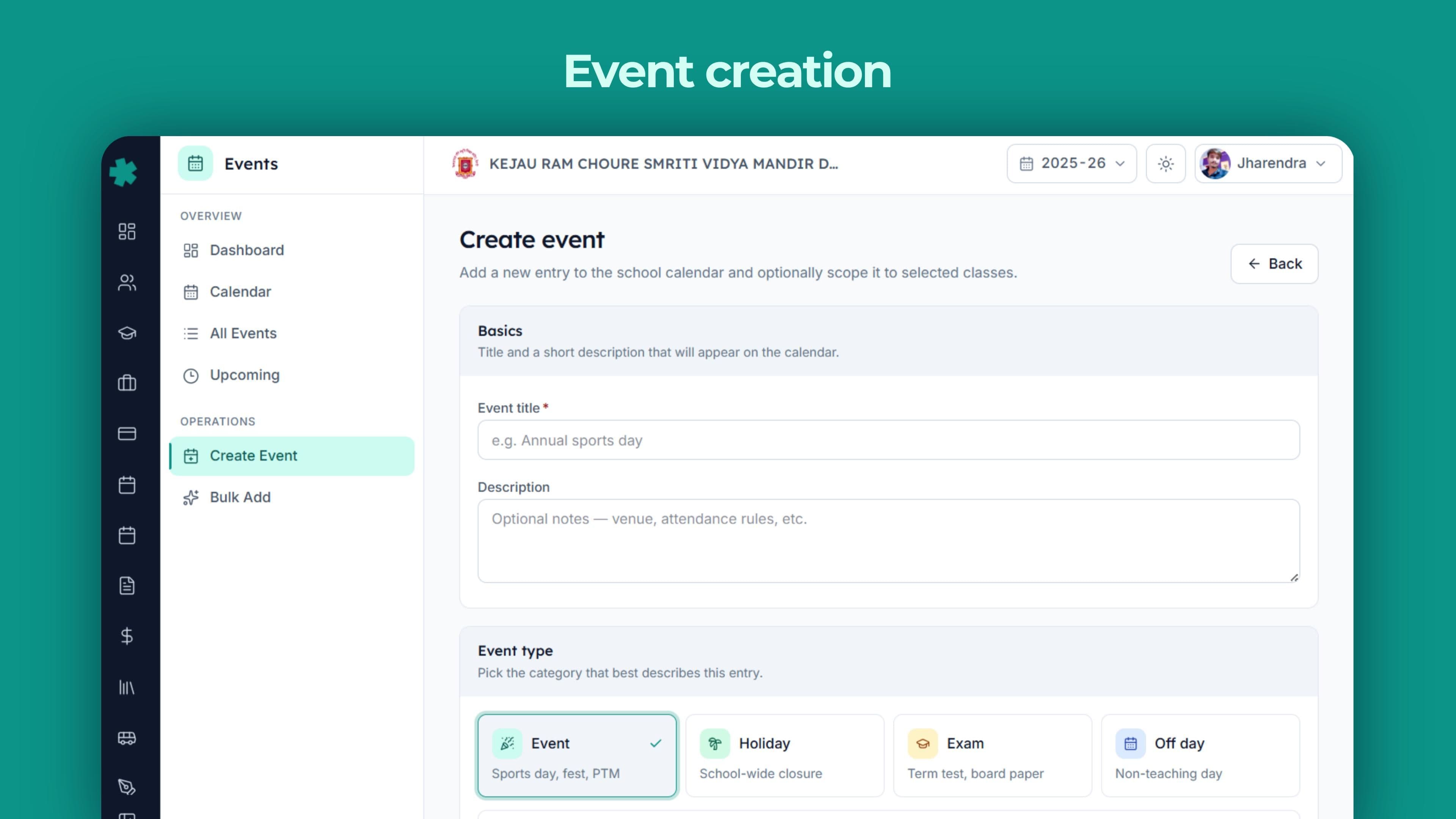
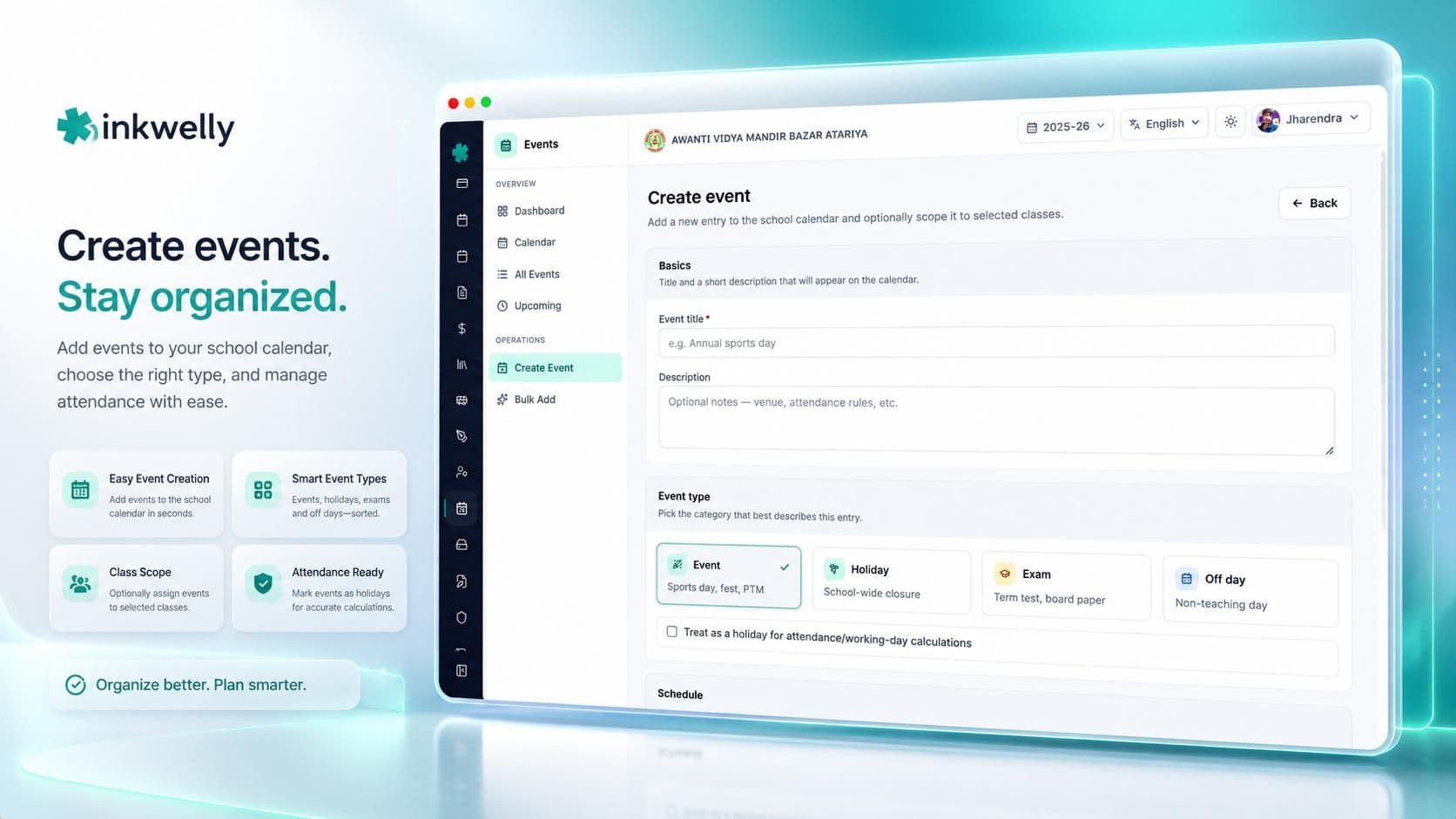
एक event row, एक जगह। हर event में एक title, एक description, एक start date, एक end date, एक type (holiday, school event, exam day या off-day) और एक optional list of classes रहती है जिन्हें वो affect करता है। अगर कोई कक्षा नहीं चुनी, तो event school-wide है; अगर कक्षाएँ चुनी हैं, तो सिर्फ़ उन्हीं कक्षाओं को वो teacher app में दिखेगा और सिर्फ़ उन्हीं की working day में गिना जाएगा।
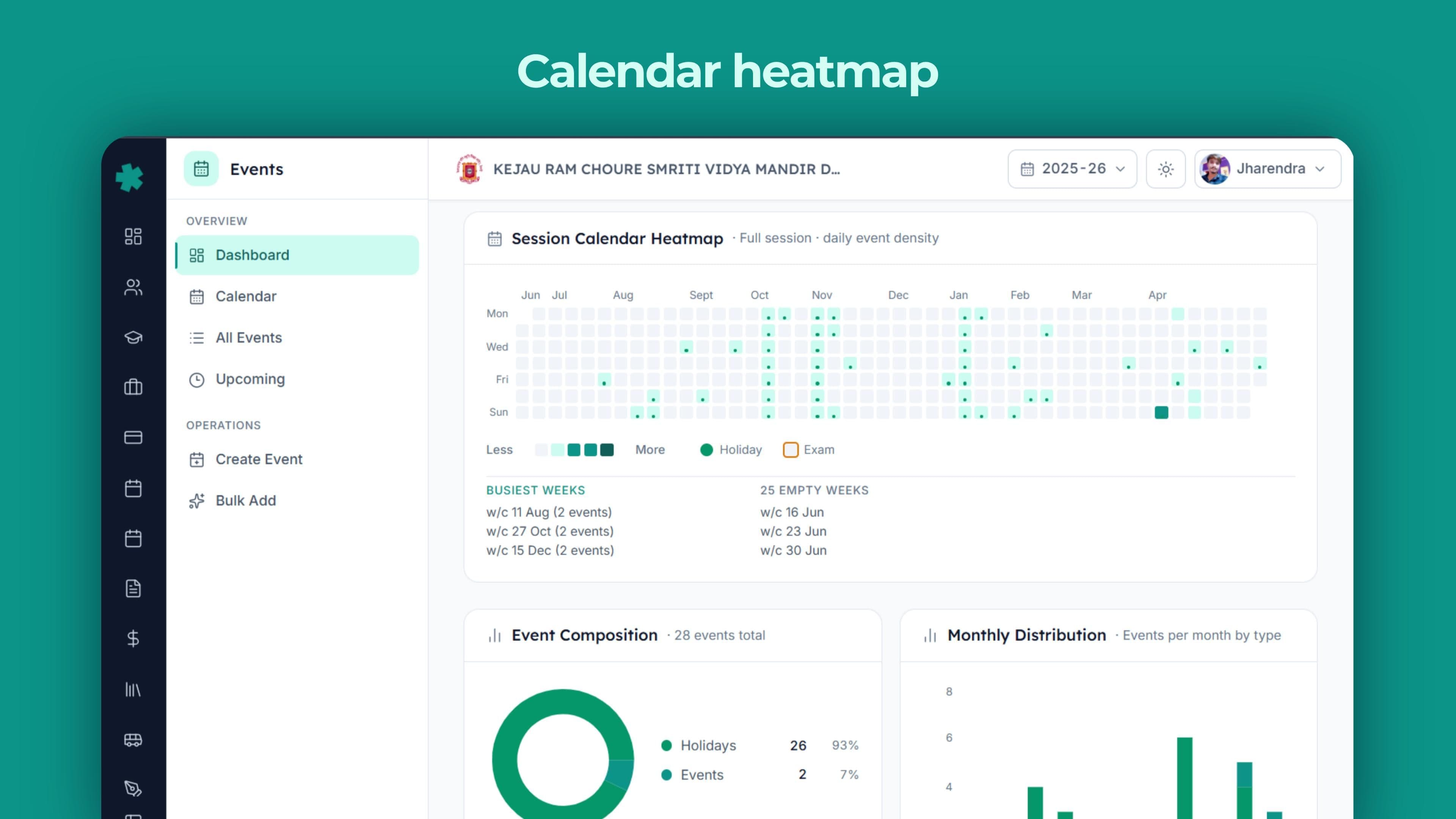
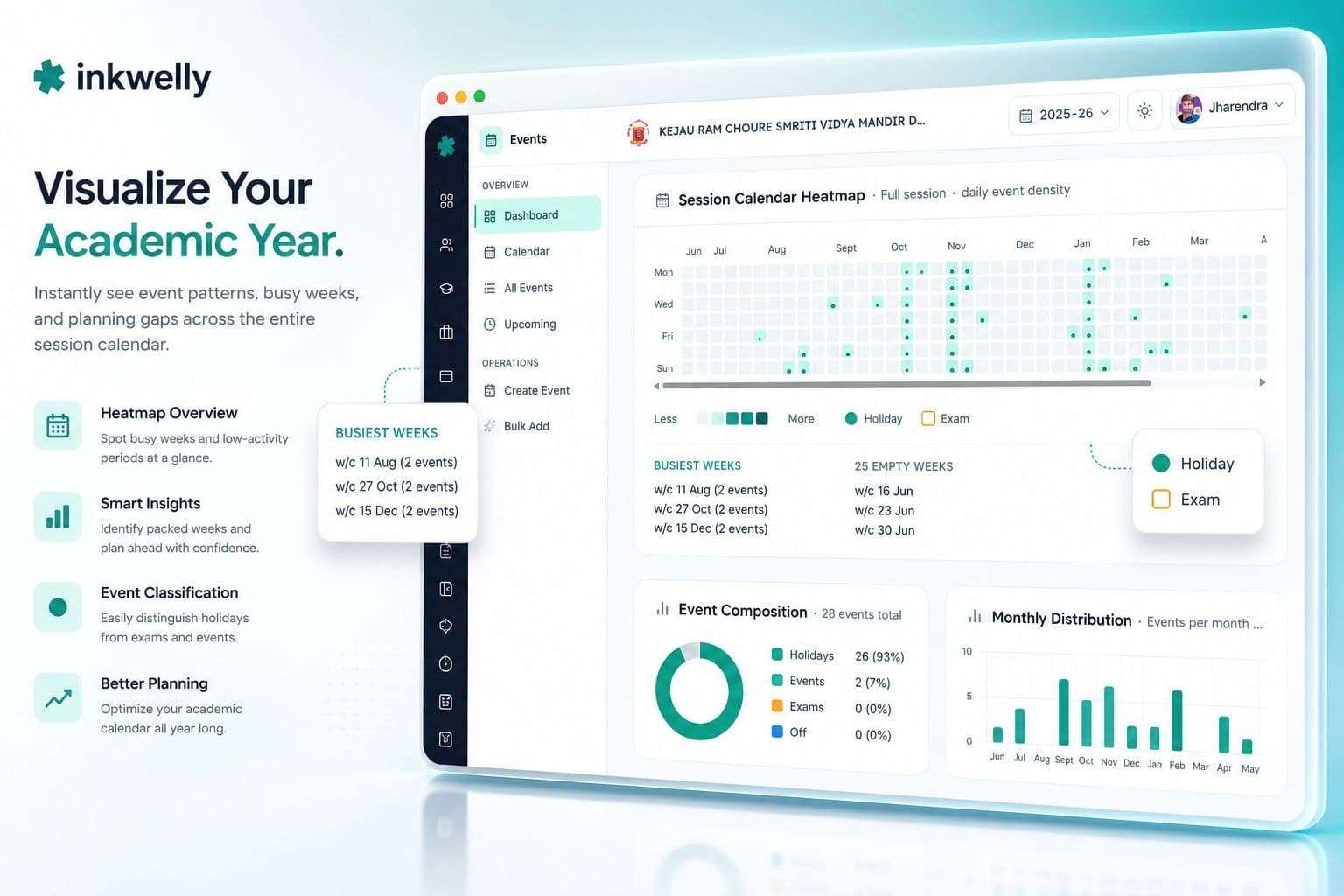
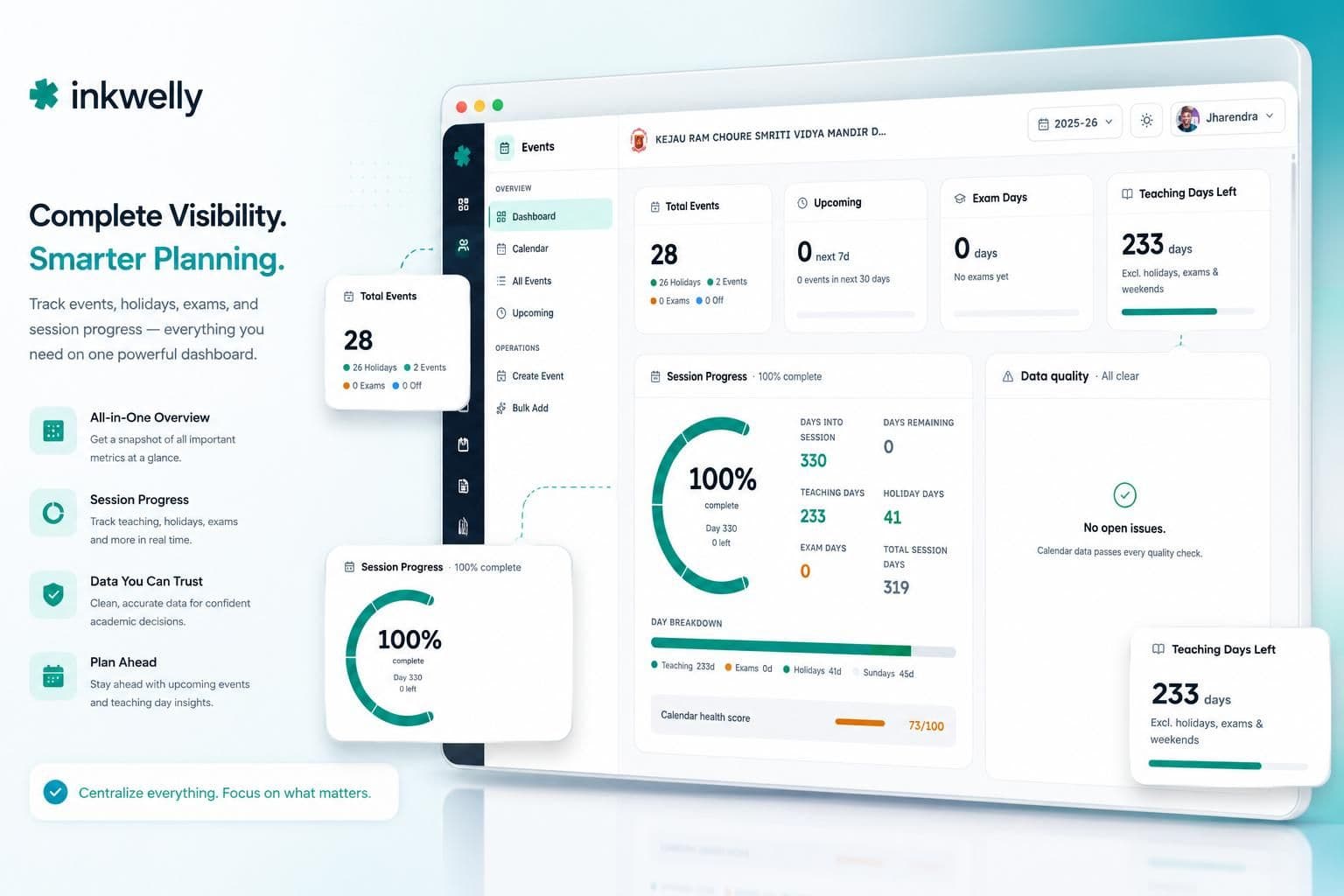
ऊपर एक dashboard है — top पर hero KPIs, एक session-progress bar और data-quality alerts feed, पूरे साल का calendar heatmap, composition और monthly stack views, upcoming timeline, exam-schedule card, holiday-impact card और class-impact card। हर card उन्हीं event rows से compute होता है। एक date बदलिए और हर card अगले page load पर update हो जाता है।
Events module में क्या-क्या है
- एक academic calendar आपके स्कूल के चालू session से जुड़ा — events session के अंदर रहते हैं और dashboard हर साल अपने आप reset हो जाता है
- चार event types — Holiday, Event (sports day, fest, PTM, trip), Exam day, Off-day — हर एक calendar पर visually अलग दिखता है
- Class-scoped events — Class 10 pre-board teacher app और working-day count में सिर्फ़ Class 10 को affect करता है; school-wide चुना sports day सबको
- Multi-day events — vacation block, inter-school sports week, या board exam window — start से end तक हर दिन calendar पर और count में फैलता है
- Working-day computation — effective teaching days = session length − weekends − holidays − exam days − off-days, overlap handling के साथ ताकि दो flag वाला दिन एक बार गिना जाए
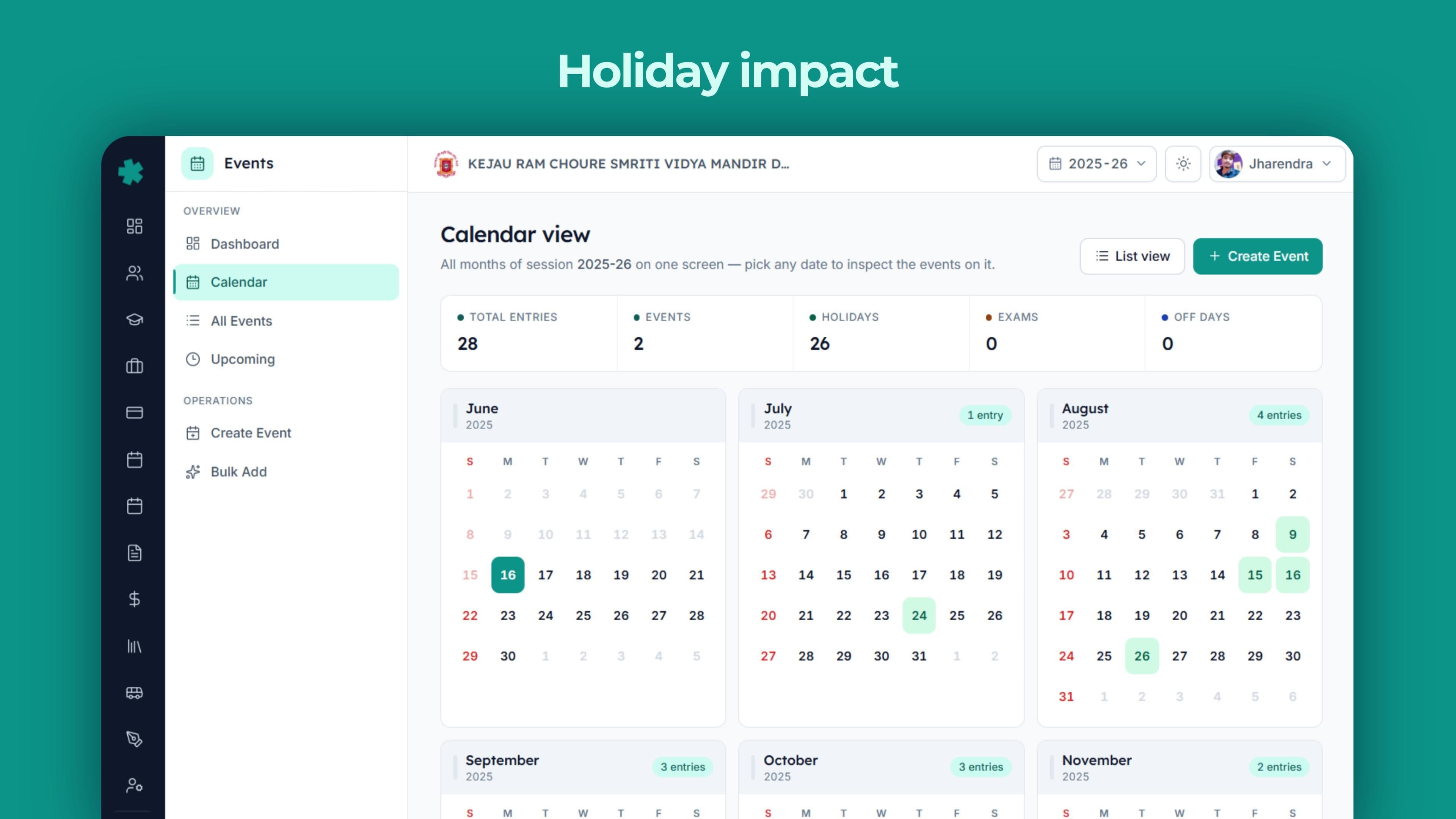
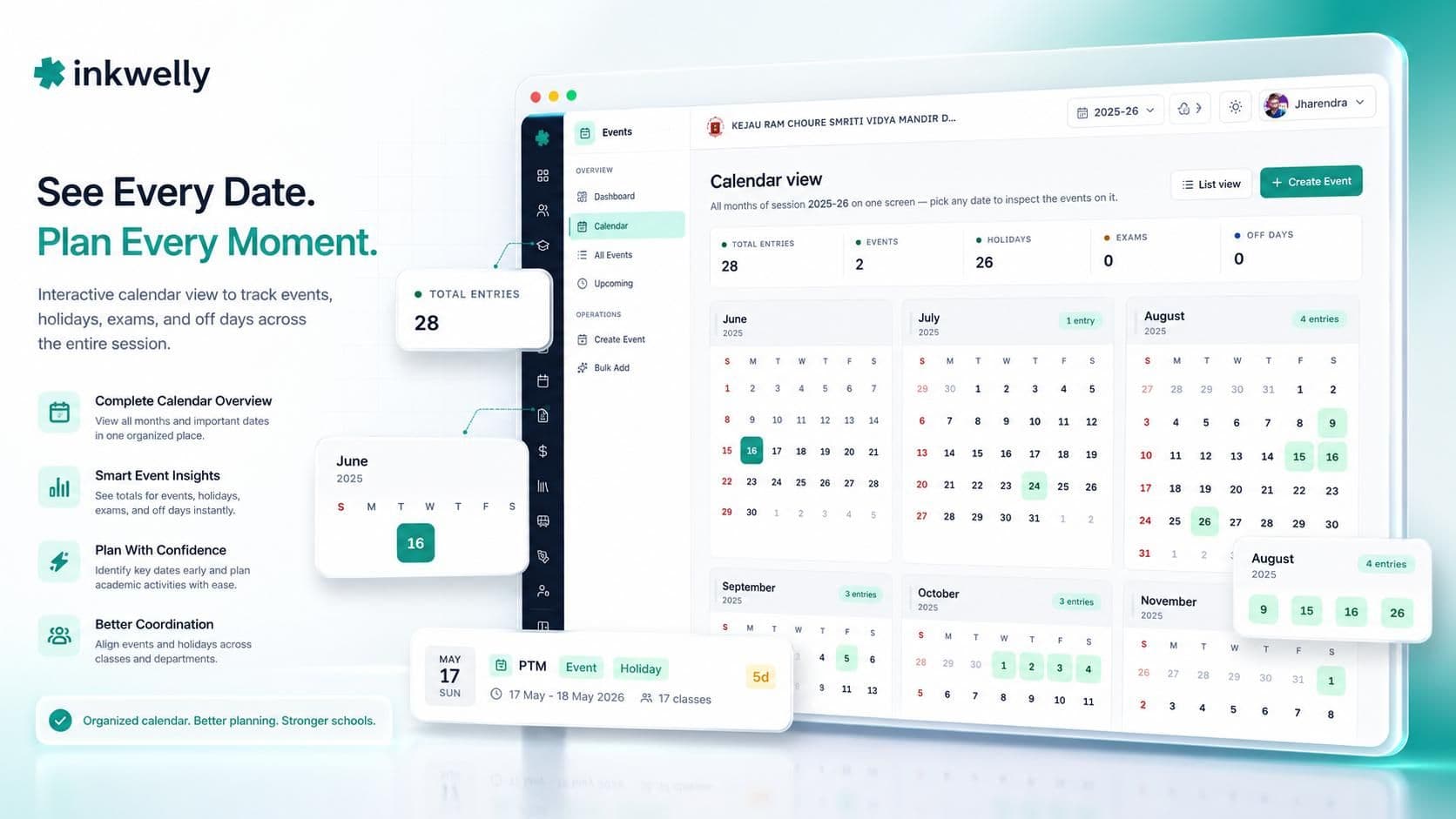
- Calendar heatmap — month-by-month grid, event density और type के हिसाब से colour-coded, पूरा साल एक screen पर
- Health score — एक 0-100 number जो coverage, spacing, exam density और holiday balance को मिलाकर बताता है कि साल का calendar कितना अच्छा बना है
- आठ dashboard cards — hero KPIs, session progress, data-quality alerts, calendar heatmap, composition donut, monthly stack, upcoming timeline, exam schedule, holiday impact, class impact — हर card सीधे उस screen पर ले जाता है जहाँ data दर्ज होता है
- चार methods से bulk event creation — calendar painter (visual calendar पर click और drag), copy-from-last-year, by-month planning, pre-built holiday और festival templates
- पाँच लगातार data-quality checks — end-date start-date से पहले होना, session boundary को cross करना, holiday-flag mismatches, बहुत लंबे events, और inactive कक्षाओं से जुड़े events — हर alert सीधे fix screen से link
- Growth comparison — dashboard चालू session के event count को पिछले session से compare करता है, leadership को planning trend दिखता है
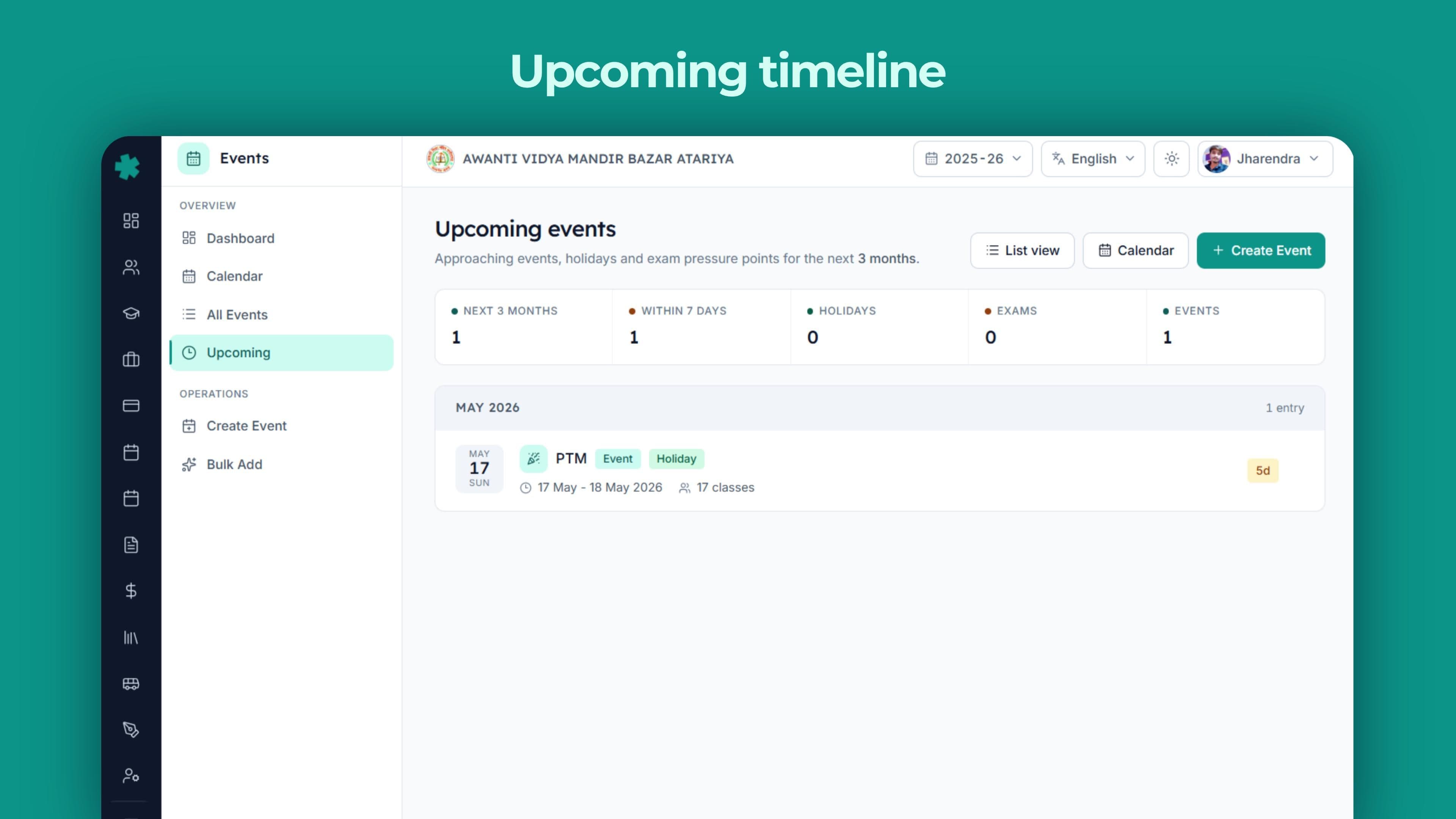
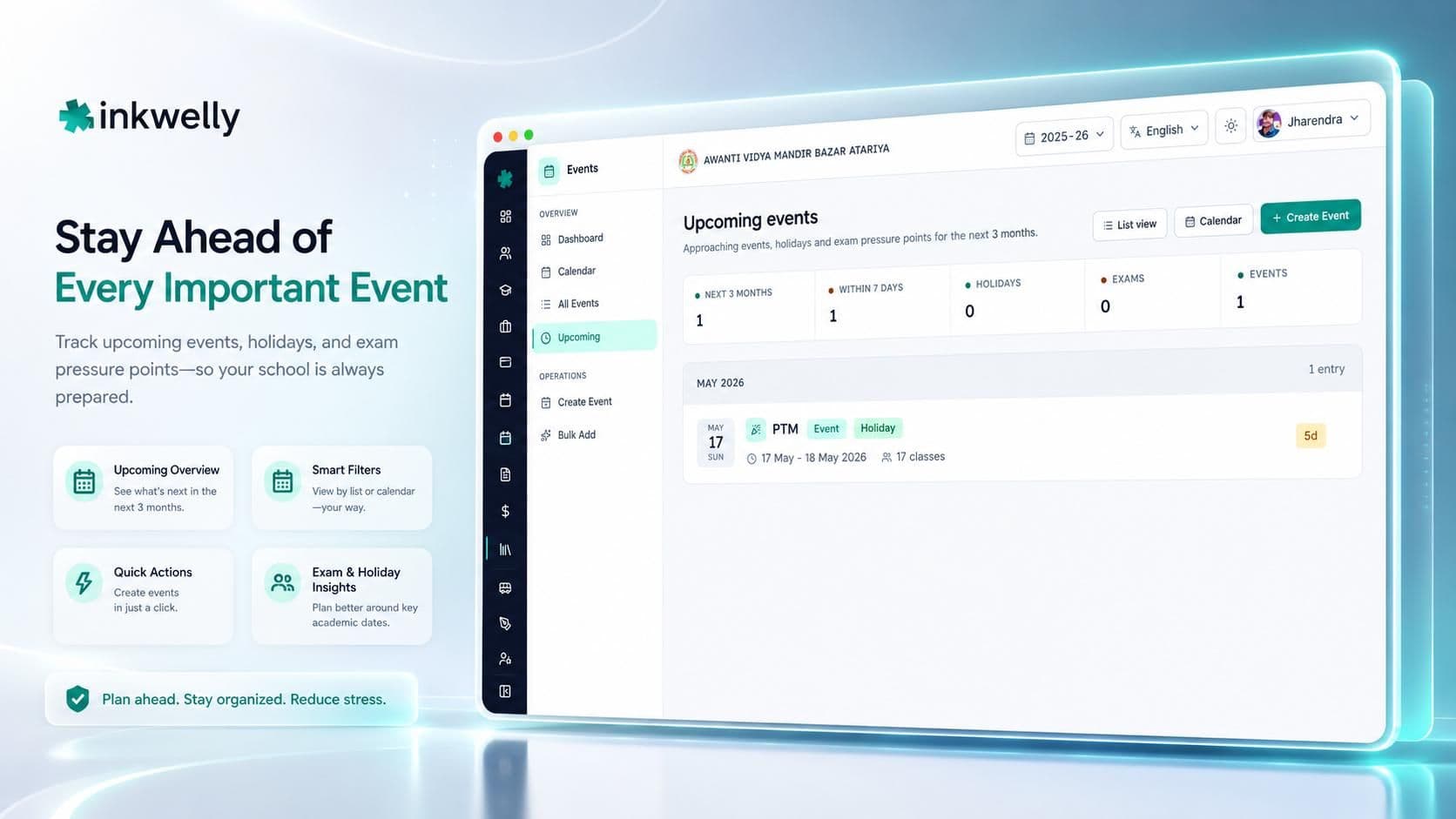
- Upcoming view — अगले तीन महीने का timeline, month के हिसाब से grouped, countdown badges के साथ — staff planning meetings के लिए perfect
- एक data source से कई views — list, full-year calendar, monthly calendar painter, three-month upcoming timeline, dashboard heatmap
देखिए कैसे काम करता है
भारतीय academic year के हिसाब से बना
Global calendar tools fixed Monday-to-Friday school week, दो long term breaks, और एक parent-teacher conference एक साल में assume करते हैं। भारतीय स्कूलों की reality अलग है — six-day week selectively-off Saturdays के साथ, three-term structure, कई state-notified holidays जो दो हफ़्ते पहले announce होते हैं, और एक calendar जो CBSE के pre-board windows, ICSE के coursework requirements और local district administration के election-day school closures के साथ coexist करे। Events module इन realities के आसपास बना है, US-school template के नहीं।
State-government holidays 90 second में add
UP government मंगलवार दोपहर एक state festival के लिए extra holiday notify करती है — प्रिंसिपल Inkwelly खोलती हैं, एक event add करती हैं, type Holiday set करती हैं, date pick करके save। Calendar heatmap recount होता है, upcoming timeline में entry आ जाती है, और working-day total एक से कम हो जाता है। Excel-and-WhatsApp workflow में हर dependent screen अलग update करना पड़ता है और तीन inevitably miss हो जाते हैं।
पाँच लगातार data-quality checks
Dashboard हर बार load होने पर आपके calendar के against पाँच quality checks चलाता है। Critical alert अगर किसी event की end date उसकी start date से पहले हो। Warning उन events के लिए जो session boundary को cross करते हैं — किसी ने पिछले session में जनवरी का event ग़लती से बना दिया। Warning अगर event holiday tagged है पर type Holiday नहीं, या उल्टा। Warning उन events के लिए जो तीस दिन से ज़्यादा चलते हैं — आमतौर पर date-entry की ग़लती। Informational alert अगर event एक ऐसी कक्षा को reference कर रहा है जो अब active नहीं। हर alert सीधे उस screen से link है जहाँ fix एक click पर है।
Working days, transparently compute
Dashboard तीन numbers दिखाता है जो हर प्रिंसिपल को कभी न कभी defend करने पड़ते हैं — session में कितने दिन हुए, कितने बाक़ी, और effective teaching days। तीसरा सबसे मुश्किल है: session length − weekends − holidays − exam days − off-days, overlap handling के साथ ताकि holiday और national festival दोनों flagged दिन एक बार गिना जाए। Dashboard पर जो number है वही UDISE+ पर जाता है — कोई parallel Excel नहीं, कोई दूसरी राय नहीं।

Calendar painter से bulk-create
एक साथ बहुत सारे events add करने के चार तरीक़े। Calendar painter — visual calendar पर dates पर click और drag, type चुनिए, और पूरा vacation block या festival cluster एक ही motion में land हो जाता है। Copy-from-last-year — पिछले session का calendar खींच लीजिए, जो dates shift हुई हैं उन्हें edit कीजिए, और अगले साल का ज़्यादातर काम हो गया। By-month — एक महीने की planning एक बार में, तब useful जब प्रिंसिपल किसी शांत शनिवार को term lay out करने बैठती हैं। Templates — national holidays और मुख्य भारतीय festivals के pre-built sets। ज़्यादातर स्कूल साल भर का calendar एक दोपहर में set कर लेते हैं।
Class-scoped, default पर school-wide नहीं
Class 10 pre-board Class 10 को affect करता है — Class 6 के lunch break या Class 12 के projects को नहीं। House A और B का drama rehearsal सिर्फ़ उन्हीं students को disrupt करता है। जब event पर affected classes चुनी जाती हैं, सिर्फ़ उन्हीं कक्षाओं को teacher view पर दिखता है, और सिर्फ़ उन्हीं की working day में गिना जाता है। Class-impact card dashboard पर बताता है कि कौन सी कक्षाएँ सबसे ज़्यादा events carry कर रही हैं और कौन सी पर एक भी नहीं — तब useful जब एक wing बहुत कर रही है और दूसरी कुछ नहीं।
एक dedicated upcoming view, तीन महीने आगे
Upcoming screen अपना अलग page है — dashboard के अंदर एक card नहीं। ये अगले तीन महीने के events दिखाता है, month के हिसाब से grouped, हर event पर एक countdown badge ('in 4 days', 'next week', 'on Monday')। प्रिंसिपल अगले तीस दिन seconds में scan करती हैं; office staff उसी page से सोमवार सुबह staff WhatsApp group को brief करती हैं। एक 'planning gap' warning दिखता है अगर स्कूल के पास सात दिन से ज़्यादा आगे calendar पर कुछ नहीं।
Inkwelly Events से पहले और बाद
कौन-कौन उपयोग करता है, और कैसे
एक normal week में चार अलग लोग Events module खोलते हैं। हर एक को exactly जो data चाहिए वही मिलता है।
प्रिंसिपल
हफ़्ते में एक बार dashboard खोलती हैं। Session-progress bar (कितने दिन हुए, कितने बाक़ी, effective teaching days), अगले तीन महीने के events, और कोई quality alerts दिखते हैं। नए circular का holiday दो clicks में add करती हैं। Growth-vs-last-session number देखती हैं — स्कूल पिछले साल से ज़्यादा कर रहा है या कम। Laptop बंद। Total time: 6 मिनट।
Office staff
ज़्यादातर data entry यहीं होती है। State-notified holidays, special-circumstance closures, sports-day blocks, vacation periods — सब उसी form में enter होते हैं। Bulk-create screens (calendar painter, copy-from-last-year, monthly, templates) साल की शुरुआत में बड़े batches का काम कर देते हैं — दिन-प्रतिदिन सिर्फ़ कभी-कभार एक-दो entry।
कक्षा-शिक्षक
Events list और calendar को अपनी कक्षा पर filter करती हैं। Class 6-A teacher Class 6-A के events और school-wide events pull करती हैं; upcoming view बताता है अगले हफ़्ते क्या है और उसके बाद वाले हफ़्ते क्या। Class 10 के शिक्षक pre-board के लिए तैयारी करते हुए exam-day block हफ़्तों पहले देखते हैं।
Wing in-charge
Class-impact card dashboard पर wing in-charge की favourite screen है। ये दिखाती है कौन सी कक्षाएँ सबसे ज़्यादा events carry करती हैं, कौन सी पर सबसे कम, और कौन से exam blocks कौन सी कक्षा को affect करते हैं। जब एक wing कहती है कि वो over-loaded है और दूसरी कहती है कि सब ठीक है — data एक card पर है।

बाक़ी Inkwelly से कैसे जुड़ता है
Events module एक academic session के अंदर बैठता है, इसलिए session की start और end dates वो boundary set करती हैं जिसके अंदर हर event रहता है। Exam type के events calendar पर और dashboard के exam-schedule card पर दिखते हैं; holiday और off-day events effective teaching-day total से घटते हैं जो dashboard के overview में जाता है। Academics से class structure वो classes देती है जिन्हें आप events scope करते हैं — इसलिए जब अगस्त में नया section जोड़ा जाता है, वो तुरंत अगले event पर select करने के लिए available हो जाता है।
अपने current setup से migration
ज़्यादातर स्कूल Inkwelly Events पर तीन जगहों से आते हैं — printed या Excel academic calendar, मौजूदा ERP का calendar feature, या no-system-at-all WhatsApp circulars। तीनों में migration छोटी है।
Excel या printed calendar से
सबसे common starting point। Calendar painter खोलिए, साल के holiday और vacation blocks पर drag कीजिए, national-holiday template apply कीजिए, अपने state के लिए festival dates accept कीजिए, फिर school-specific events (sports day, annual function, parent-teacher meetings) एक-एक करके add कीजिए। 1,000-student स्कूल आमतौर पर साल भर का calendar एक focused दोपहर में set कर लेता है।
मौजूदा ERP से
अगर आप Fedena, Entab, MyClassboard या किसी similar tool से आ रहे हैं — अपना calendar CSV में export कीजिए और हम columns को Inkwelly के event fields पर map कर देंगे। Ambiguous entries — जो row नहीं बताती कि वो holiday है या सिर्फ़ event — go-live से पहले प्रिंसिपल को confirm करने के लिए screen पर flag होती हैं।
No-system-at-all से
Tier-2 और Tier-3 स्कूलों का सबसे common starting point। स्कूल का calendar प्रिंसिपल के दिमाग़ में और WhatsApp circulars की chain में रहता है। हम academic structure (sessions, classes) तीस मिनट में set करते हैं, pre-built भारतीय holiday और festival templates apply करते हैं, और स्कूल school-specific events जैसे-जैसे साल में होते हैं add करता है।
पिछले साल का calendar आगे लाना
जब नई session शुरू होती है, copy-from-last-year screen पिछले calendar को नई session में draft के रूप में खींच लेती है। जो dates shift हुई हैं (Diwali, Holi, Eid) उन्हें edit कीजिए, बाक़ी accept कीजिए, save। जो events रहने ही हैं (Republic Day, Independence Day, स्कूल का अपना sports day) पहले से वहाँ हैं। पिछले साल का calendar अपनी session में query-able रहता है — किसी भी audit के लिए।
Inkwelly Events live देखिए
20-minute walkthrough एक असली CBSE dataset पर — calendar heatmap, event creation, bulk-create calendar painter, data-quality alerts feed और प्रिंसिपल का session-progress dashboard।
Security, privacy और data residency
Event data — dates, titles, descriptions, event जिन कक्षाओं को affect करता है — भारतीय servers पर store है, offshore कभी नहीं। हर event change उस user और timestamp के साथ logged होता है जिसने किया; audit trail साल ख़त्म होने पर delete नहीं होती। Role-based access का मतलब प्रिंसिपल पूरा स्कूल देखें, wing in-charge अपना stage देखें, और कक्षा-शिक्षक सिर्फ़ अपनी कक्षा। DPDP Act 2023 की obligations — minors के लिए verifiable parental consent, 30-day breach notification — platform में built-in हैं।
Events module में क्या-क्या included है
- Unlimited events, unlimited कक्षाएँ, unlimited multi-day events
- चार event types — Holiday, Event, Exam day, Off-day — हर view पर visually अलग
- Class-scoped या school-wide events — affected-classes selection working-day count और teacher app view को drive करता है
- चार methods से bulk event creation — calendar painter, copy-from-last-year, by-month और pre-built holiday templates
- Pre-built भारतीय holiday और festival templates — national days plus मुख्य festivals (Diwali, Holi, Eid, Christmas, Pongal, Lohri, regional celebrations)
- आठ cards वाला dashboard — hero KPIs, session progress, data-quality alerts, calendar heatmap, composition donut, monthly stack, upcoming timeline, exam schedule, holiday impact, class impact
- Health score — coverage, spacing, exam density और holiday balance का 0-100 composite
- पाँच लगातार data-quality checks — हर alert उस screen से link जहाँ fix एक click पर है
- Effective teaching-day computation overlap handling के साथ — dashboard पर जो number है वही UDISE+ पर जाता है
- Growth-vs-last-session comparison — trustee meetings और renewal forms के लिए useful जो तीन साल का movement माँगते हैं
- Dedicated upcoming view — अगले तीन महीने, month के हिसाब से grouped, countdown badges के साथ
- List view date-range और class filters के साथ — sortable columns, exportable
- Full-year calendar view — month-by-month grid किसी भी date पर click-to-inspect के साथ
- Data भारतीय servers पर store — DPDP Act 2023 ready
- Onboarding और training — दो sessions, setup में included
अगले academic year को एक calendar पर plan कीजिए
1 अप्रैल 2026 से पहले Excel और WhatsApp से एक audited calendar पर switch कीजिए। Setup एक हफ़्ते से कम में पूरा।
अक्सर पूछे गए सवाल
12 सवालक्या Events module short notice पर आए state-government-notified holidays handle कर सकता है?
हाँ — ये exactly इसी के लिए बना है। प्रिंसिपल या office staff event 90 second से कम में add करते हैं, और हर dependent screen — calendar, events list, upcoming timeline, working-day count और data-quality alerts feed — अगले page load पर update हो जाता है। Tuesday दोपहर state-notified holiday अब Wednesday morning की Excel re-upload की ज़रूरत नहीं है।
क्या ये हमारे six-day week को selectively-off Saturdays के साथ support करता है?
हाँ। Working-day calculation default पर Sunday को exclude करता है; जिस किसी शनिवार आप काम नहीं करते, उसे off-day type के साथ event जोड़ दीजिए — वो teaching day में नहीं गिना जाएगा। Four-Saturday-on, two-Saturday-off pattern एक बार calendar painter से bulk में add कीजिए और पूरे साल का काम खत्म।
Calendar exam days के साथ कैसे interact करता है?
Exam days exam type वाले events के रूप में record होते हैं। वो calendar, upcoming timeline और dashboard के exam-schedule card पर दिखते हैं; effective teaching-day total से holidays और off-days के साथ घटाए जाते हैं — इसलिए dashboard पर जो number है वही UDISE+ पर submit होता है।
एक साथ बहुत सारे holidays और festivals कैसे add करूँ?
चार तरीके हैं। Calendar painter — एक visual calendar पर dates पर click और drag करके chosen type के events paint कीजिए। Copy-from-last-year — पिछले सत्र का calendar उठाइए और edit कर लीजिए। By-month — एक महीने की planning एक बार में। Templates — भारतीय national और regional holidays के pre-built sets। अधिकांश स्कूल साल भर का calendar एक दोपहर में सेट कर लेते हैं।
क्या इसमें भारतीय holiday list integrated है या Diwali हर साल add करनी पड़ेगी?
Pre-built holiday templates national holidays (Republic Day, Independence Day, Gandhi Jayanti) और मुख्य festivals (Diwali, Holi, Eid, Christmas, Pongal, Lohri, regional celebrations) के लिए included हैं। Template apply कीजिए, अपने state और साल के लिए dates accept कीजिए, और calendar का बड़ा हिस्सा हो जाता है। स्कूल-specific events — sports day, annual function, vacation blocks — ऊपर जोड़िए।
Last minute पर event cancel या move होने पर क्या होता है?
Event row edit कीजिए — date बदलिए या हटा दीजिए। Calendar heatmap, upcoming timeline, working-day count और data-quality alerts feed — सब अगले page load पर update हो जाते हैं। हर बदलाव user और timestamp के साथ logged; silent edits नहीं।
Google Calendar या Outlook से ये कैसे अलग है?
Google Calendar personal scheduling के लिए बना है। उसमें class scope, working-day computation, exam-day बनाम holiday separation, session boundaries या data-quality checks का कोई concept नहीं। Inkwelly Events भारतीय स्कूल वर्ष के लिए purpose-built है: हर field, हर default, हर report इसलिए है क्योंकि भारतीय स्कूल administrator को चाहिए।
क्या UDISE+ submission के लिए working-day count generate हो सकता है?
हाँ। Dashboard का overview effective teaching days compute करता है — session length मेंसे weekends, holidays, exam days और off-days घटाकर — overlap handling के साथ ताकि exam और holiday दोनों flag वाला दिन एक बार गिना जाए। वही number per-class holiday-impact card पर जाता है — ICSE जैसे boards के लिए जो minimum instructional days per subject माँगते हैं।
क्या class teachers को सिर्फ़ अपने events दिख सकते हैं?
हाँ। Events list और calendar view — दोनों पर कक्षा filter कर सकते हैं। एक Class 6-A teacher Class 6-A के events और school-wide events पुल करती हैं; एक Class 10 teacher अपना pre-board exam block हफ़्तों पहले देख लेती हैं। प्रिंसिपल को सब दिखता है।
Dashboard किस तरह के data-quality alerts surface करता है?
पाँच checks लगातार चलते हैं। Critical alert अगर किसी event की end date start date से पहले हो। Warnings जो session boundary को cross करते events, holiday-flag mismatches, और 30 दिन से लंबे events के लिए। Informational alert अगर event एक ऐसी कक्षा को reference करता है जो अब active नहीं। हर alert सीधे उस screen पर link करता है जहाँ fix एक click पर है।
क्या ये multi-day events support करता है?
हाँ। Vacation block, inter-school sports week, 10 दिन का board exam — start और end date डालिए और event calendar, timeline और working-day computation में पूरे range पर फैलता है।
क्या पिछले साल के events नई session पर जाने पर query-able रहते हैं?
हाँ। पिछले sessions के events system में अपने original identifiers के साथ रहते हैं; dashboard का growth metric चालू session के event count को पिछले session के साथ compare करता है। दो साल बाद calendar किसी भी audit, board renewal या alumni request के लिए जवाब देता है।
आपको ये भी पसंद आ सकता है
4 लेखInkwelly आपके स्कूल पर — खुद देखें
30 मिनट का डेमो। आपके मौजूदा ERP को आपके साथ खोलकर, कॉल पर ही आपका डेटा Inkwelly में लोड करते हैं। कॉल ख़त्म होते-होते एक तय तारीख़ का गो-लाइव प्लान आपके हाथ में।