कोई भी student report, 30 सेकंड में। Fields चुनें। Scope filter करें। Export करें।
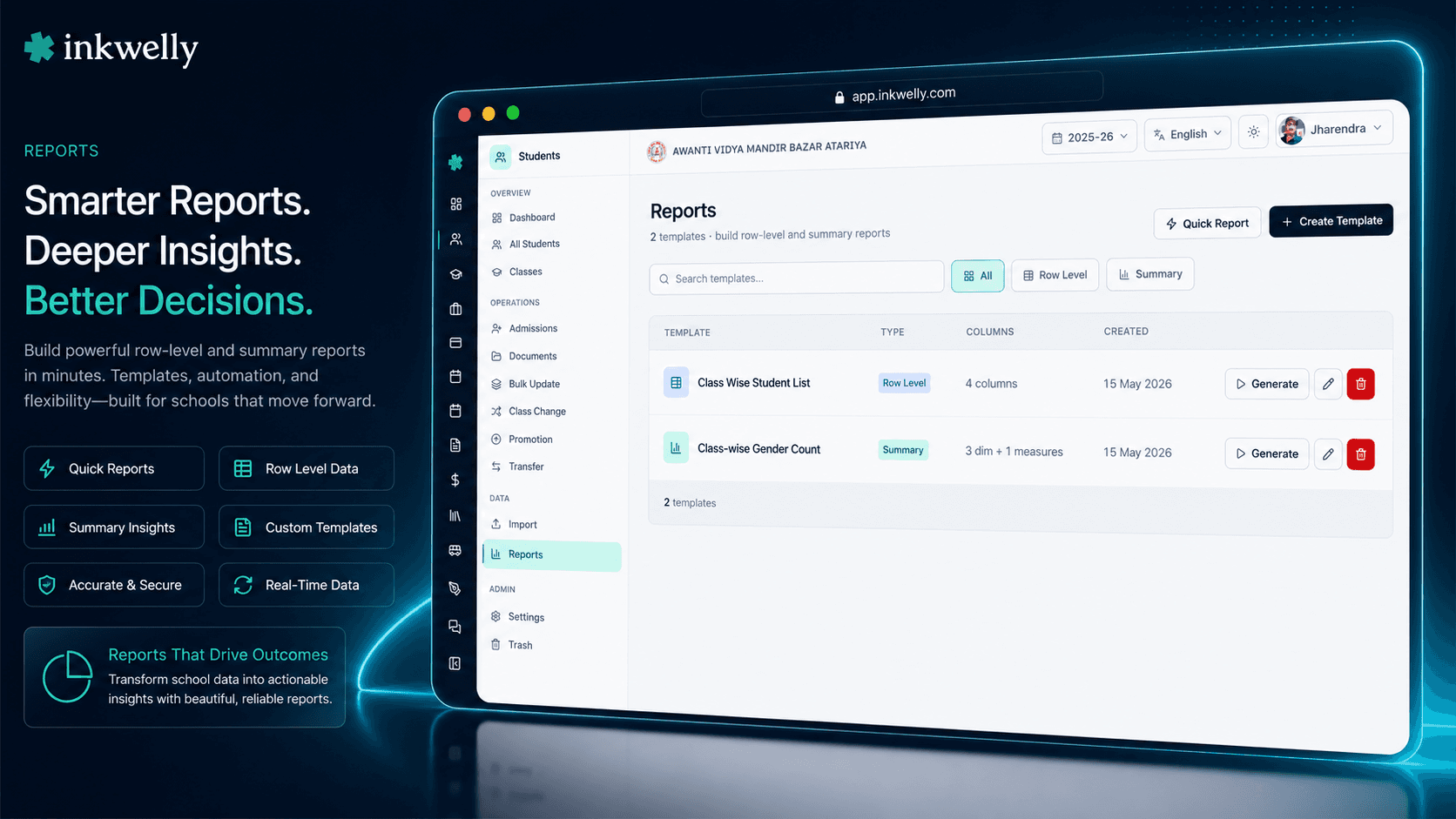
Student Information module के अंदर ही reports का एक पूरा workshop — fields चुनिए, students filter कीजिए, row-level list चाहिए या summary breakdown — एक click पर report तैयार। Template के रूप में save कर लीजिए, अगले April में फिर वही template Run कीजिए। CSV export एक click में। यह उन्हीं reports के लिए बना है जो इंडियन स्कूलों का office हर हफ़्ते print करता है — RTE roster, board affiliation list, district reporting, parent meeting attendance, fee category audit।
हर इंडियन स्कूल के office को एक असली reports tool क्यों चाहिए
सोमवार सुबह, 9:15 बजे। Principal office में आते हैं और RTE 25% admission list मांगते हैं — class-wise, parent contact के साथ। District Education Officer दोपहर 12 बजे visit पर आ रहे हैं। Office assistant 2 साल पुरानी एक Excel sheet निकालता है, current-session students के rows copy करता है, जो students छोड़ चुके उनको manually delete करता है, register से parent mobile dhundhta है, और print मारता है। DEO जब पहुँचते हैं, list 40 मिनट late है और 3 students उसमें miss हैं।
यह office assistant की failure नहीं है। यह system की failure है। इंडियन स्कूल हर महीने 20 अलग-अलग student lists बनाते हैं — RTE 25% reservation audit के लिए RTE roster, CBSE annual return के लिए gender breakdown, bus contractor के लिए transport route list, medical room के लिए blood group list, accountant के लिए fee category list, document compliance dashboard के लिए missing-Aadhaar list, class teacher के लिए parent meeting RSVP list, session-end पर transfer certificate hand-off list। हर एक list उसी तरह बनती है — कोई Excel खोलता है, कोई type करता है, कोई scroll करता है।
हमने सोचा — अगर office जो fields चाहिए चुन ले, जो students चाहिए filter कर ले, और 30 सेकंड में report तैयार हो जाए — print, export, या अगली April के लिए template के रूप में save? तो हमने यही बनाया। Inkwelly का Student Reports किसी भी office assistant या principal को 3 click में custom list या summary breakdown बनाने देता है। एक बार बनाओ। हर सोमवार वही चलाओ। अगला office assistant आए, उसी template से वही काम करे।
Student Reports कैसे काम करता है
Students → Reports खोलिए। Page पर हर वो report template दिखती है जो आपके स्कूल ने save कर रखी है — sortable, name से searchable, type से filterable। Header में 2 buttons हैं: Quick Report उस report के लिए जिसे save नहीं करना चाहते, + Create Template उस report के लिए जिसे हर हफ़्ते या हर महीने फिर से चलाना है।
Step 1 — Fields चुनिए। एक field selector खुलता है जिसमें हर student field 5 groups में बंटा है: Profile (name, DOB, gender, blood group, religion, caste, Aadhaar, mobile), Academic (class, section, roll number, admission number, registration number, RTE flag, status), Parent (father / mother name, occupation, education, mobile), Address (line 1, city, state, postal code), और Document IDs (APAAR, ABC ID, PEN)। जो columns चाहिए tick कीजिए। नीचे का grid real time में update होता है — आप देख सकते हैं कि report कैसी दिखेगी।
Step 2 — Scope filter कीजिए। Academic session चुनिए (एक या एक से ज़्यादा — year-over-year reports के लिए useful), classes चुनिए (एक section, पूरा grade, या सारे classes)। Filters automatically compose होते हैं। Class 5 के सिर्फ़ RTE students चाहिए, 2024-25 और 2025-26 दोनों sessions में? वो filters tick कीजिए, scope set हो गया।
Step 3 — Row-level या summary चुनिए। Row-level report हर student को एक row में list करती है। Summary report aggregate करती है — Total students, Boys | Girls | Other | Total, General | OBC | SC | ST | EWS | Other | Total, RTE | Non-RTE | Total, Hindu | Muslim | Sikh | Christian | Buddhist | Jainism | Other | Total, Active | Promoted | Suspended | Transferred | Graduated | Inactive | Total। जो breakdown audience को चाहिए, वो pick कीजिए।
Step 4 — Save या export। Save Template click कीजिए ताकि अगली बार use हो। Download CSV click कीजिए ताकि District Officer को आज ही bhej सकें। आज जो template save करते हैं, वही template 5 साल बाद का office assistant Run करेगा।
हर वो student field जो आपकी reports में आ सकता है
- Profile (12 fields): First/middle/last name, gender, date of birth, blood group, religion, caste category, mother tongue, nationality, mobile, email, profile photo flag।
- Academic (10 fields): Class, section, roll number, admission number, registration number, admission date, status (Active / Promoted / Suspended / Transferred / Graduated / Inactive), RTE student flag, sort order, active flag।
- Parent — Father (6 fields): Title, first/middle/last name, mobile, occupation, education — हर वो detail जो Bonafide और Transfer Certificate पर जाता है।
- Parent — Mother (6 fields): Title, first/middle/last name, mobile, occupation, education — state-board paperwork के लिए अलग से addressable।
- Address (6 fields): Line 1, line 2, city, state, country, postal code — वही address जो transport route assignment और scholarship eligibility चलाता है।
- Document IDs (4 fields): Aadhaar number, APAAR ID, ABC ID, PEN (Permanent Education Number) — जो identifiers इंडियन boards अब मांगते हैं।
- Multi-language fields: Names, parent names, occupation, education, work address, nationality, mother tongue — English value या Hindi/regional script value, जो भी locale audience को चाहिए।
- Computed fields: Age (DOB से report-run date पर compute होती है), full name (first/middle/last से जुड़ा), parent contact (father + mother mobile से जुड़ा)।
2 report modes — audience के हिसाब से सही mode चुनिए
इंडियन स्कूलों को reports tool से 2 बहुत अलग चीज़ें चाहिए। कभी आपको हर student list में चाहिए — name, class, parent mobile, address — parent meeting attendance sheet या board affiliation submission के लिए। यह row-level report है। हर student एक row, हर chosen column, sort और group जैसा आपने माँगा।
कभी आपको numbers चाहिए — class-wise gender count, grade-wise RTE students, section-wise missing Aadhaar। यह summary report है। Class rows पर, chosen breakdown columns पर, totals नीचे। CBSE annual return, UDISE+ submission, District Officer का gender-ratio query — सब summary reports हैं। Inkwelly दोनों handle करता है। वही field selector। वही filter system। वही template engine। सिर्फ़ mode का switch।
Routine reports के लिए templates, one-off के लिए Quick Report
हर report save करने की ज़रूरत नहीं। Principal call करके Class 8 के February में जन्मे students की list मांगते हैं — birthday assembly के लिए। Template की ज़रूरत नहीं। Quick Report click कीजिए, fields tick कीजिए, run कीजिए, CSV download कीजिए, tab बंद कर दीजिए। Inkwelly report भूल जाता है। Principal को 30 सेकंड में list मिल जाती है।
RTE 25% list, UDISE+ class-wise breakdown, parent-meeting RSVP list — ये हर term, हर साल, हर office assistant द्वारा चलते हैं जो आपके स्कूल से होकर गुज़रता है। इन्हें templates के रूप में save कीजिए। एक clear name दीजिए (RTE Students by Class — Annual), short description (हर March DEO को submit, parent contact शामिल), और वो report फिर कभी मत बनाइए। नया office assistant May में join करता है? Template पर click, Run, export — पहले दिन से productive।
Filters जो compose होते हैं — session, class, status, हर dimension
ज़्यादातर school ERPs जो reports tool ship करते हैं, वो सिर्फ़ एक चीज़ पर filter करने देते हैं। Inkwelly compose करता है। Session multi-select में 2024-25 + 2025-26 चुनिए। Class multi-select में Class 5 A + Class 5 B चुनिए। Report scope automatically वही intersection हो जाता है: उन 2 classes के, उन 2 sessions वाले students। 20 सेकंड।
सिर्फ़ RTE students चाहिए? RTE flag filter add कीजिए। सिर्फ़ active students चाहिए (promoted-out और transferred-away छोड़कर)? Status filter add कीजिए। Aadhaar field empty वाले students चाहिए? Field-completion filter add कीजिए। Filters automatically compose होते हैं — हर filter scope को और narrow करता है, हर change live grid को update करता है — save करने से पहले ही आप report देख लेते हैं। यही filter system row-level और summary दोनों reports को चलाता है — एक बार सीखिए, हर जगह use कीजिए।
वो 8 summary breakdowns जो इंडियन boards सच में मांगते हैं
Summary mode में 8 ready-made measures हैं, उन्हीं questions से बने जो इंडियन school boards और government departments routine में पूछते हैं:
- Total Count — class-wise students, filter scope-wise students।
- Gender breakdown — Boys | Girls | Other | Total। CBSE annual return हर साल यही मांगता है।
- Caste category breakdown — General | OBC | SC | ST | EWS | Other | Total। RTE 25% admission audit और state scholarship submissions के लिए critical।
- Religion breakdown — Hindu | Muslim | Sikh | Christian | Buddhist | Jain | Other | Total। Minority-status schools को board affiliation paperwork के लिए चाहिए।
- Status breakdown — Active | Promoted | Suspended | Transferred | Graduated | Inactive | Total। Year-end TC reconciliation एक report में।
- RTE breakdown — RTE | Non-RTE | Total। District Education Officer के annual visit का सबसे ज़्यादा पूछा जाने वाला question।
- Blood group breakdown — A+ | A- | B+ | B- | O+ | O- | AB+ | AB- | Total। Medical room की emergency contact list।
- Field completion —
Field Filled | Field Empty | Total। Aadhaar coverage, APAAR coverage, profile-photo coverage, parent-mobile coverage audit कीजिए। Auditor से पहले gaps खुद ढूँढिए।
Reports English में या आपकी regional script में — same template
इंडियन state boards अक्सर student records English और regional script दोनों में मांगते हैं। UP Board school के लिए Bonafide Certificate Devanagari में, Tamil Nadu Matric school के लिए Transfer Certificate Tamil में, West Bengal school के लिए scholarship application list Bengali में। ज़्यादातर school ERPs आपको system level पर एक language चुनने पर मजबूर करते हैं। Inkwelly नहीं।
Reports उस user की language preference inherit करते हैं जो उसे run कर रहा है। Principal वही template English में खोलते हैं — Rajendra A Verma दिखता है। Office assistant locale Hindi पर वही template खोलता है — राजेन्द्र अ वर्मा दिखता है। CSV export locale-correct value carry करता है। Multi-language fields (names, parent names, occupations, addresses) Bulk Update Students में एक बार store होते हैं — और हर उस report में correctly दिखते हैं जिसमें वो field include है। कोई double maintenance नहीं, कोई 2 parallel lists नहीं, parent को कभी भी wrong-script certificate नहीं।
“Pehle Class 5 A ki RTE list banane mein 30-35 minute lagte the — Excel mein names copy karna, parent number dhundhna, format karna. Ab template Run karte hain, 20 second mein CSV mil jaata hai. DEO ki visit ke pehle stress hi nahi rehta.”
हर महीने आपका office जो असली reports चलाता है
5 routine school-office reports जो traditionally Excel में हर एक 1 घंटा लेते हैं:
1. RTE 25% audit list (annual, March) — हर वो student जो RTE 25% reservation के तहत admit हुआ — class, section, parent name, parent mobile, EWS certificate status, और address के साथ। एक बार template बनाइए, हर March में 20 सेकंड में Run कीजिए, CSV export कीजिए, District Education Officer को email कीजिए। Templates के बिना: हर March 45 मिनट का Excel काम, और अगर DEO एक हफ़्ते बाद updated version मांगे तो और 30 मिनट।
2. CBSE annual return — gender-wise per class (annual, October) — Class rows पर, Boys / Girls / Other / Total columns पर, Pre-Nursery से Class 12 तक हर class, totals नीचे। बिल्कुल वो format जो CBSE मांगता है। Inkwelly का gender-breakdown summary measure इसे directly produce करता है। Run, export, affiliation portal में paste।
3. Missing-Aadhaar audit (any month) — हर वो student जिसका Aadhaar field empty है — class, parent mobile, admission date के साथ। Run, export, office assistant को parent follow-up calls के लिए दे दीजिए। Inkwelly का field-completion measure इसे एक click में handle करता है। बिना उसके: student list page पर एक-एक करके filter करना।
4. Transport route list (per route, monthly) — किसी specific transport route से जुड़े सारे students — name, class, boarding stop, parent mobile। Bus contractor की daily attendance check में use होती है। हर route के लिए template — Route 1, Route 2, Route 3 — हर एक 15 सेकंड में Run।
5. Parent meeting RSVP list (per term) — Class 8 के सारे parents — father mobile, mother mobile, और email। Class teacher parent-teacher meeting day से पहले CSV export करता है, उससे WhatsApp broadcast invitations चलाता है, और meeting में उसी list पर attendance लेता है।
हर महीने इंडियन स्कूल जो common reports बनाते हैं
- RTE 25% reservation list — District Education Officer audit के लिए, parent contact और EWS verification status के साथ।
- UDISE+ enrollment summary — class-wise, gender-wise, category-wise, RTE-wise — UDISE+ जो 4 breakdowns मांगता है।
- CBSE annual return — affiliation portal submission के लिए class-wise gender breakdown।
- Transport route lists — per-route student list bus contractor और route teacher के लिए।
- Medical room blood group list — emergency response के लिए class-wise blood group summary।
- Document compliance audits — Aadhaar, APAAR, ABC ID, PEN, या profile photo missing वाले students।
- Parent meeting RSVP — class-wise parent contact list WhatsApp broadcast और meeting attendance के लिए।
- Class roster with photos — student names, roll numbers, parent mobile के साथ class teacher's register के लिए printable list।
- Birthday list by month — किसी महीने में जन्मे students assembly recognition के लिए।
- Status reconciliation — Active vs Promoted vs Transferred vs Graduated, session-end पर transfer certificate generation के लिए use होती है।
- Caste-category report — state scholarship submissions के लिए General / OBC / SC / ST / EWS breakdown।
- Religion breakdown — minority-status schools को board affiliation paperwork के लिए चाहिए।
- Year-over-year enrollment trend — management review के लिए multi-session gender या category breakdown।
अपने स्कूल के data पर Student Reports देखिए, 30 मिनट में live
5 reports लाइए जो आपका office Excel में बनाता है। Demo में हम आपके स्कूल के classes set up करेंगे, सब 5 को Inkwelly templates के रूप में बनाएंगे, और आपके असली students पर चला कर CSV में आपको हाथ में देंगे।
Limits, safety, और small print
हर report run के लिए row limit। एक row-level report आपके school plan के row count तक capped है — standard plan के लिए 5,000 students, multi-school trust plan के लिए 25,000। जो schools इससे ज़्यादा हैं, run को session और class से segment कीजिए — हर Inkwelly school जिनके साथ हम काम करते हैं, इन limits के अंदर comfortably रहता है।
CSV-first export। हर report default पर CSV export करती है — Excel, Google Sheets, CBSE affiliation portal, UDISE+ portal, और हर government department portal के साथ universal compatibility जो file uploads accept करता है। PDF export per-template page-orientation setting (portrait या landscape) से available — printed registers और parent-meeting attendance sheets के लिए useful।
Filters data edit नहीं करते। Reports read-only हैं। Class पर filter करना और fields select करना कभी student record को modify नहीं करता। उसी scope में bulk-edit के लिए Bulk Update Students use कीजिए — field selector और filter UI बिल्कुल वही है, तो जो reports जानता है वो bulk update पहले से जानता है।
हर template का audit log। हर report run audit log में जाता है — user, timestamp, template ID (या 'ad-hoc'), filter parameters, result का row count, CSV export flag। Audit log school admin panel से exportable है। अगर किसी report की CSV वहाँ पहुँच जाए जहाँ नहीं पहुँचनी चाहिए थी, आप user, timestamp, और exact filter तक trace कर सकते हैं।
Role-based access। Reports Inkwelly के Identity & Access Management permissions respect करते हैं। Class teachers सिर्फ़ अपनी assigned section की reports देखते हैं, office staff पूरा स्कूल, principals सब कुछ। Aadhaar और दूसरे sensitive fields per-field permission rules के through non-admin roles से hide हो सकते हैं। Bulk download permission अलग से gate करने योग्य है — एक teacher screen पर report run कर सकता है, लेकिन CSV export नहीं कर सकता जब तक role allow न करे।
Multi-tenant isolation। हर Inkwelly module की तरह, reports strictly आपके स्कूल के data पर operate होती हैं। Multi-school trusts हर स्कूल पर independently reports run करते हैं — कोई cross-tenant access नहीं, गलती से दूसरे स्कूल की student list pull करने का कोई risk नहीं।
किस मॉड्यूल का हिस्सा
1 moduleअक्सर पूछे गए सवाल
7 सवालक्या एक class teacher सिर्फ़ अपनी section की reports run कर सकता है?
हाँ। Reports बाक़ी Inkwelly की तरह Identity & Access Management से वही role और section scope inherit करती हैं। एक class teacher वही template Run करता है जो principal — लेकिन सिर्फ़ अपनी assigned class section के students दिखते हैं। Principal को पूरा स्कूल। वही template, वही filters, वही CSV format — सिर्फ़ row scope बदलता है।
क्या मैं एक से ज़्यादा academic sessions पर report run कर सकता हूँ?
हाँ। Session filter multi-select है। Year-over-year compare करने के लिए 2024-25 और 2025-26 साथ चुनिए, या current report के लिए एक single session। Summary mode यहाँ ख़ासकर useful है — आप 2 sessions के Class 5 enrollment को gender breakdown के साथ side-by-side देख सकते हैं — management review और board affiliation paperwork के लिए useful।
क्या report Hindi या regional scripts support करती है?
हाँ। Reports run करने वाले user की locale preference inherit करती हैं। Bulk Update Students में multi-language values के रूप में store किए हुए names, parent names, occupations और addresses user की preferred locale में दिखते हैं — English, Hindi, Tamil, Bengali, Marathi या आपके स्कूल ने जो भी locale enable की हो। CSV export locale-correct value carry करता है — एक Hindi-medium parent को Devanagari Bonafide list मिलती है, English-medium parent को English list — एक ही template से।
क्या मैं अगले साल वही report फिर से बना सकता हूँ — दोबारा build किए बिना?
Templates इसी के लिए हैं। एक बार बनाइए, clear name और description के साथ save कीजिए, हर term Run कीजिए। अगले May में join करने वाला नया office assistant उन्हीं templates को Run करता है जो पिछले ने बनाए — पहले दिन से productive। Templates कभी भी edit, variants के लिए duplicate, या ज़रूरत न होने पर delete कर सकते हैं।
क्या ऐसा कोई तरीका है कि missing data वाले students दिखें — जैसे blank Aadhaar?
हाँ। Field-completion summary measure use कीजिए। यह 'Field Filled | Field Empty | Total' breakdown produce करता है — किसी भी field के लिए — Aadhaar, APAAR ID, ABC ID, PEN, profile photo, parent mobile, address। सब classes पर Run कीजिए और अगले compliance audit से पहले अपने gaps ढूँढिए। Gender breakdown के साथ combine कीजिए तो देख सकते हैं — मसलन Class 8 की कितनी girls के पास APAAR ID नहीं है।
क्या मैं report को PDF के रूप में export कर सकता हूँ — printing के लिए?
CSV default है — Excel, Google Sheets, और government portal uploads के लिए सबसे अच्छा। PDF export per-template page-orientation setting (portrait या landscape) के through available है। Printed parent-meeting attendance sheets और class registers के लिए useful। PDF हर page पर आपके school letterhead और running session name के साथ आता है।
क्या report runs audit-logged होते हैं?
हाँ — हर report run audit log में जाता है — user, timestamp, template ID (या Quick Report हो तो 'ad-hoc'), filter parameters, result का row count, और अगर user ने CSV download की तो CSV-export flag। Audit log school admin panel से exportable है। Role-based access और per-field permission rules के साथ मिलकर यह आपको पूरी traceability देता है — किसने कौन सा student data कब देखा।
आपको ये भी पसंद आ सकता है
2 लेखInkwelly आपके स्कूल पर — खुद देखें
30 मिनट का डेमो। आपके मौजूदा ERP को आपके साथ खोलकर, कॉल पर ही आपका डेटा Inkwelly में लोड करते हैं। कॉल ख़त्म होते-होते एक तय तारीख़ का गो-लाइव प्लान आपके हाथ में।