No more pink leave slips. Ek form. Ek approval. Auto-marked.
Indian schools के लिए digital leave application workflow — parents app से submit करते हैं optional medical certificate के साथ, principal one-click approve करती हैं, और days class register पर full audit trail के साथ Leave के रूप में auto-fill होते हैं।
Indian schools आज student leave कैसे handle करते हैं
Pune में Class 7 की student को typhoid है। Mother purane notebook के back से pink half-page पर leave application likhti hai — 'Respected Sir/Madam, my daughter Aaradhya Patil is suffering from fever and will be unable to attend school from 12 to 18 March 2026. Please grant her medical leave. Yours faithfully, Mrs. Patil.' Mother slip gardener के हाथ भेजती हैं जो 8 बजे school के पास से guzarta है। Slip 8:30 तक head clerk के desk पर गिरती है, 'forwarded' stamp लगती है, 11 बजे principal के desk पर जाती है, 1 बजे 'approved' sign होकर वापस आती है, 3 बजे तक leave-applications folder में जाती है।
Class teacher को slip end-of-day तक दिखती नहीं। इसलिए 8:05 बजे वो Aaradhya को Absent mark करती हैं। 13, 14, 15 March पर भी। 16 March को class teacher को leave के बारे में staff-room grapevine से पता चलता है। वो चार already-marked entries को Absent से Leave change करने की कोशिश करती हैं — कुछ edit हो पाते हैं, कुछ नहीं, school के lock periods configuration के अनुसार। Medical certificate office के folder में है; absence chronic-absentee watchlist पर दो weeks तक दिखती है जब तक head clerk paper file नहीं करती। April तक, वोही family ने तीन leave slips three different colours of paper पर file की हैं, सब एक ही folder में, और चौथी missing हो चुकी है।
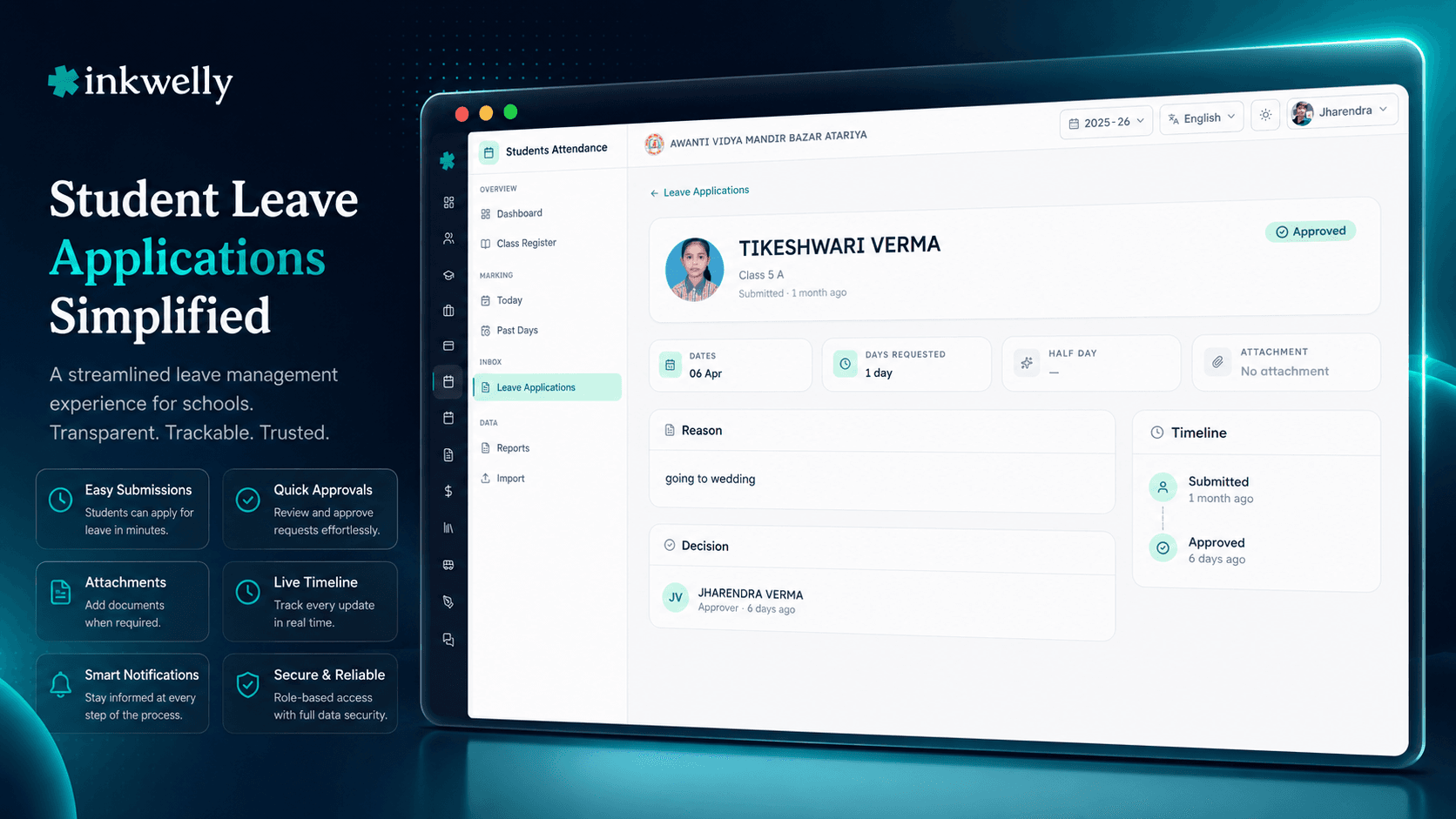
Inkwelly का Student Leave Applications flow इस paper trail को एक online form में बदल देता है। Parent phone से fill करता है। Principal one-click approve करती हैं। Class teacher mark-attendance screen खोलने से पहले देखती हैं। Days LEAVE के रूप में auto-fill होते हैं, medical certificate record से attached होता है, और audit log हर state change capture करता है। No paper, no folder, no missing slip, no contradictory data।
Student leave applications कैसे काम करती हैं
Aaradhya की mother 12 March की morning 7 बजे parent app खोलती हैं। Dashboard पर Apply for Leave tap करती हैं। Form खुलता है — student auto-selected (उनकी daughter Aaradhya), leave start date 12 March, leave end date 18 March (calendar पर दो tap), reason free-text 'typhoid, doctor advised one-week rest, will share medical certificate after consultation', attach file (optional, doctor visit के बाद add करेंगी), submit। Form 60 second लगता है। Confirmation मिलती है: 'Leave application submitted. The principal will review it shortly.'
7:15 बजे principal का dashboard '1 new leave application' badge दिखाता है। वो खोलती हैं, Aaradhya का नाम, photo, class, leave dates, reason, और 'Approve' / 'Reject' button pair देखती हैं। Approve click करती हैं — koi remarks ज़रूरी नहीं। System record करता है: 'leave application AAR-2026-03-12 approved by Principal at 7:16 a.m.' Mother को instant push notification मिलती है: 'Aaradhya's leave from 12 to 18 March has been approved.' Class teacher का mark screen 12 March के लिए roll number 28 row को status LEAVE के साथ पहले से fill दिखाता है — small badge 'approved leave' और application के साथ tap-to-view link के साथ।
तीन days बाद doctor medical certificate sign करते हैं। Mother parent app खोलती हैं, open leave application find करती हैं, Attach Certificate tap करती हैं, phone gallery से photo (या document scan) pick करती हैं, submit करती हैं। Certificate अब leave application record पर stored है, encrypted, और सिर्फ़ principal, head clerk और school nurse को visible है। Class teacher cell hover पर small 'cert attached' tag देखती हैं — actual certificate नहीं — क्योंकि medical detail उनका business नहीं है।
Agar school principal leave application reject करना decide करे (e.g., school ने requested dates को working day declare कर रखा है exam के लिए), वो Reject click करती हैं mandatory reason के साथ। 'Class 7 board pre-tests are scheduled on 15 March; please bring child for the exam.' Mother को rejection note immediately मिलती है reason के साथ। Class teacher को इन dates पर Leave नहीं दिखती — days normally mark करने के लिए छोड़े जाते हैं।
हर leave application क्या capture करती है
- Student — parent की child list से auto-selected, manual ID typing नहीं
- Start date और end date — calendar pickers, academic session boundaries के against validate
- Reason — free-text, mandatory, medical / function / family / sibling-wedding context capture करता है
- Attachment — optional medical certificate, doctor's note, function invitation — PDF या image, 10 MB तक
- Status — default PENDING, APPROVED, REJECTED, या CANCELLED पर transition
- Approver — हर approval / rejection user और timestamp record करती है
- Rejection reason — REJECTED status पर mandatory free-text, parent को visible
- Linked attendance entries — leave range के हर working day पर LEAVE status के साथ attendance record और इस application का foreign key
- Audit log — हर state change timestamped, user-tagged, immutable
- Parent app push — हर state change (submitted, approved, rejected) पर instant notification
- Principal dashboard count — pending leave applications dashboard पर badge के रूप में visible
- Student transfer पर auto-cancel — अगर student transfer होता है, future-dated leaves auto-cancel
- School-configurable rules — max leave days per term, advance-notice requirement, approver role hierarchy
Inkwelly parent app से parent submission
Parent app वोही है जिसे parent fee payments, attendance notifications, school events और homework के लिए already use करते हैं। Leave application add करना dashboard पर एक extra menu item है — separate app download करने की ज़रूरत नहीं। Form parent की preferred language (English, Hindi, और school-supported दूसरी languages) में है, calendar pickers school के working days और weekly off correctly दिखाते हैं ताकि parent accidentally Sunday के लिए leave request ना करे।
Form parent ने most recent leave reason categories use की थीं वो remember करता है — medical, family function, religious, weather, travel — quick-pick chips के रूप में, नीचे free-text field actual reason के लिए। Tier-3 cities में ship करने वाले schools बताते हैं कि 80% parents quick chip + एक line detail pick करते हैं; under 20% reason scratch से type करते हैं। Form deliberately एक screen पर stick करता है, no scrolling।
One-click principal approval audit के साथ
Principal apne Student Attendance dashboard पर 7:15 बजे '1 new leave application' badge देखती हैं। वो खोलती हैं, student photo, dates, reason, और attached certificate (अगर कोई) scan करती हैं। Routine medical या family-function leaves के लिए, वो Approve click करती हैं — koi remark ज़रूरी नहीं। Action उनकी user ID और exact timestamp के साथ logged होता है।
Cases जहाँ school leave grant नहीं कर सकता (requested dates पर exam scheduled, CCE assessment, board pre-test), वो Reject click करके mandatory reason type करती हैं। Reason parent को app में visible होता है — 'Class 7 board pre-tests are scheduled on 15 March; please bring Aaradhya for the exam.' यह parent और school office के बीच conversation force करता है — silent paper-trail rejection की जगह जो most schools today use करते हैं। Hamne dekha है schools एक term में 'leave-after-exam' surprise complaints 70% तक reduce कर लेते हैं सिर्फ़ इसलिए कि rejections अब reason के साथ आते हैं।
Approved range के लिए attendance auto-marks LEAVE
Jaise hi principal leave approve करती हैं, system leave range के हर working day के लिए attendance entries write करता है — status LEAVE, leave application के foreign-key reference के साथ। Class teacher अगली morning mark-attendance screen खोलने पर ये entries pre-filled देखती हैं। उन्हें leave remember करने की ज़रूरत नहीं; slip find करने की ज़रूरत नहीं। System already kaam kar diya है।
Agar principal backdated leave approve करे — e.g., 18 March को parent ने form submit की absence के लिए जो 12 March से start हुई — system past dates के लिए attendance entries write (या update) करता है, और chronic-absentee watchlist minutes में re-compute करती है। Student जो unexplained absences के लिए incorrectly flag थी उसकी percentage corrected होती है और watchlist row automatically drop off होती है। Monthly register पर manual cell-by-cell editing नहीं।
Medical certificate encrypted और need-to-know रहता है
Attached medical certificate — doctor's letterhead, prescription, hospital discharge note — at rest encrypted है और सिर्फ़ principal, head clerk, school nurse और किसी role को visible है जिसे school explicitly grant करे। Class teacher cell hover पर small 'certificate attached' tag देखती हैं, actual file नहीं। Parent submission के बाद kabhi bhi certificate attach कर सकता है — approval के बाद भी — और system इसे same leave record से link करता है approval status change किए बिना।
Mandatory medical certification run करने वाले schools के लिए (some boarding schools और ICSE day schools 3 days से ज़्यादा absences के लिए require करते हैं), leave form configure हो सकता है कि leave length threshold cross करने पर attachment require करे। Form उन cases में file के बिना submission block करता है। School की medical officer या nurse retrospectively certificate को 'verified' या 'requires follow-up' flag कर सकती हैं underlying leave status change किए बिना।
“Pehle parent ko slip likh ke peon se bhejna padta tha, fir clerk, fir principal, fir teacher ko bata na padta tha. Ab phone se apply karte hain, ek ghante mein sab khatam. Sab kuch ek jagah hai — koi paper nahin khoyega.”
पाँच real leave scenarios जो यह flow handle करतe है
1. Single-day medical leave। Mother 7 बजे submit करती है daughter को fever है; principal 7:15 बजे approve करती हैं; class teacher 8:05 बजे mark screen खोलने पर row Leave के रूप में pre-filled देखती हैं। Parent के लिए 60-second turnaround, class teacher के लिए zero work।
2. Week-long typhoid recovery। Mother day 1 पर 7-day leave submit करती है; doctor day 3 पर medical certificate sign करते हैं; mother same application खोलकर certificate attach करती हैं। Principal certificate को आने पर देखती हैं। Range का हर working day Leave auto-mark होता है। Student chronic-absentee watchlist पर risk के रूप में नहीं appear होती; 'leave-driven' row के रूप में appear होती है जिसे principal ignore कर सकती है अगर percentage ज़्यादा नीचे न गिरे।
3. Sibling wedding leave (3 days)। Father parent app के multi-child mode use करके apne दोनों children (Class 5 और Class 9) के लिए 3-day leave submit करता है। Both leaves principal को linked pair के रूप में जाते हैं। वो एक click में दोनों approve करती हैं। Both class teachers उन तीन days Leave देखती हैं; wedding school calendar की 'leave-driven' category में आती है जो school ने working days में count करने के लिए configure की है but chronic-absenteeism flagging में नहीं।
4. Pre-board rejection। Father apni Class 12 daughter के लिए 12-15 February को 4-day family-function leave submit करता है। Principal dates को Class 12 pre-board exams के साथ clash देखती हैं। Reject करती हैं reason: 'Pre-board exams scheduled 13 and 15 February; please prioritise. Family function leave can be granted before / after these dates.' Father re-submit करता है सिर्फ़ 12 February के लिए 1-day leave; principal approve करती हैं।
5. Sudden cancellation। Class 4 की mother Monday को 5-day medical leave submit करती हैं। Child fast recover करता है; Wednesday को mother same application खोलकर Cancel remaining leave tap करती हैं, और system Wednesday से आगे की attendance को 'unset' पर revert कर देता है — class teacher Wednesday की attendance normally mark करेगी उस morning। Cancellation timestamp और (optional) reason के साथ logged होता है। पहले दो days Leave marked रहते हैं।
Leave application पर common operations
- Submit leave — parent form fill करता है, optional certificate attach करता है, submit
- Approval से पहले edit — parent dates, reason, attachment edit कर सकता है जब तक principal act नहीं करती
- Approve — principal one-click action, audit logged
- Reason के साथ reject — mandatory reason, parent app में देखता है
- Bad में certificate attach — parent doctor's note kabhi bhi upload कर सकता है
- Remaining leave cancel — parent future-dated days revoke करता है; past days Leave marked रहते हैं
- Transfer पर auto-cancel — student school leave करता है, future leaves auto-cancel
- Linked attendance view — leave application से हर linked register cell पर jump
- PDF में export — office board affiliation evidence के लिए year-end leave report file करता है
- Approval hierarchy configure — some schools Class 1–5 leaves academic head को, Class 6–12 principal को route करते हैं
- Max leave per term configure — consecutive या cumulative leave days पर cap
- Mandatory cert configure — अगर leave N days से exceed करे तो certificate require
अपने school के data पर leave flow देखिए
Inkwelly demo school पर 20-minute walkthrough। हम parent submission, principal approval, class register पर auto-mark, audit log, और certificate-encryption flow live दिखाएँगे।
Limits, safety और the small print
Approval human है, automatic नहीं। हर leave application को human approver chahiye — default में school principal, optionally academic head या class teacher school की configured hierarchy के अनुसार। Hum length, reason, या attachment के basis पर auto-approve नहीं करते, intentionally। School leave relationship moment है, checkbox नहीं — हर approval से attached principal का नाम ही audit log को board affiliation reviews के दौरान credible बनाता है।
Backdated leaves academic session के अंदर allowed हैं। Parents same academic session के अंदर past dates के लिए leave submit कर सकते हैं। Principal इन पर 'backdated' indicator देखती हैं। Backdated approvals उन past dates के लिए attendance entries को Absent से Leave re-write करते हैं — clean audit trail के साथ जो original entry और change दिखाता है। Hum deliberately backdated submissions block नहीं करते, क्योंकि most parents medical certificates absence के बाद ही get करते हैं, पहले नहीं।
Future leave dates academic session से bounded हैं। Parent current academic session के outside dates के लिए leave submit नहीं कर सकता। Form session end के बाद dates block करता है। Class 12 students के लिए जिनके final exams session edge पर हैं, school admin override के साथ leave-form date range extend कर सकता है; rare but supported।
Cancellation behaviour। Parent parent app से future-dated leave cancel कर सकता है। Past-dated leave सिर्फ़ school staff 'office override' permission के साथ cancel कर सकते हैं, mandatory reason के साथ। Cancellations leave record delete नहीं करतीं — status CANCELLED पर update करती हैं और linked attendance entries unset पर revert होती हैं (या LEAVE पर रहती हैं अगर school ने day actually-leave-taken mark किया हो)।
Medical certificate की privacy। Certificate at rest encrypted है, school जो roles configure करे उन्हें ही visible (default: principal, head clerk, school nurse)। Class teacher और दूसरे students certificate file कभी नहीं देखते। Parents apne child का certificate parent app से kabhi bhi re-download कर सकते हैं। School year-end leave report में board affiliation evidence के लिए ही certificates export करता है, role-based access के साथ।
Pink leave slip को एक form से replace करें
Student leave applications सात [Student Attendance](/modules/students-attendance) features में से एक हैं जिन पर Indian schools हर term rely करते हैं। Demo book करें और अपने school के data पर देखें।
किस मॉड्यूल का हिस्सा
1 moduleअक्सर पूछे गए सवाल
10 सवालक्या वो parent जो smartphone use नहीं करता leave application submit कर सकता है?
Yes — school office parent के behalf पर submit कर सकता है। Head clerk apne desktop पर leave form खोलती हैं, student pick करती हैं, parent जो fields fill करता वही fill करके submit करती हैं। Application audit log में *'submitted by office on behalf of parent'* tag होती है। Hum dekhte हैं yeh tier-3 cities में grandparents के लिए most often use होता है जो child को pick up करते हैं और slip in person देना prefer करते हैं।
Agar leave आज से start हो और class teacher ने student को already Absent mark कर रखा हो तो?
Jab principal एक leave approve करती हैं जो already-marked dates से overlap करती है, system उन attendance entries को ABSENT से LEAVE update करता है — clean audit trail के साथ जो original entry, किसने mark किया, और change दिखाता है। Class teacher को कुछ करने की ज़रूरत नहीं। Chronic-absentee watchlist minutes में re-compute करती है।
क्या medical certificates mandatory हैं?
Default में नहीं। Schools *'mandatory certificate after N days'* rule configure कर सकते हैं — common setting *'leave longer than 3 consecutive days requires a certificate'* ICSE schools के लिए, *'leave longer than 5 days requires a certificate'* CBSE day schools के लिए, और *'all medical leaves require a certificate'* some boarding schools के लिए। जब rule apply हो, form attachment के बिना submission block करता है।
क्या parent leave approve होने के बाद certificate attach कर सकता है?
Yes। Parent same leave application parent app से खोलता है और *'Attach Certificate'* tap करता है। File leave record से add होती है approval workflow re-open किए बिना। School nurse या head clerk afterwards certificate को *'verified'* या *'requires follow-up'* flag कर सकती हैं — यह flags leave का APPROVED status change नहीं करते।
Medical certificate कौन देखता है?
Default: principal, head clerk, school nurse। School additional roles (e.g., academic head, vice principal) को role-permissions panel से view access grant कर सकता है। Class teachers और दूसरे students certificate file कभी नहीं देखते — सिर्फ़ cell hover पर *'cert attached'* tag। Certificate at rest encrypted है, Mumbai-based servers पर hosted, और DPDP Act 2023 compliant है।
क्या school per-term max-leave caps configure कर सकता है?
Yes। Some boarding schools *'max 7 leave days per term beyond which a parent meeting is required'* enforce करते हैं; some day schools *'max 14 leave days per academic year'* enforce करते हैं। Cap school level पर configure होता है और form cap breach पर submission block करता है — parent को clear message के साथ: *'You have used 13 of 14 leave days. Please contact the school office for an additional leave.'*
क्या leave application multi-child families support करती है?
Yes। School में दो children वाला parent single leave application submit कर सकता है जो दोनों पर apply हो — sibling-wedding leaves, family religious functions, hospital visits जहाँ एक child sick sibling को accompany करे के लिए useful। Principal दोनों children application में देखती हैं और pair के रूप में approve / reject, या split कर सकती हैं। Audit log linkage दिखाता है।
क्या principal leave approvals class teacher या academic head को delegate कर सकती हैं?
Yes। School admin approval hierarchy configure करता है — *'Class 1–5 leave approved by academic head'*, *'Class 6–12 leave approved by principal'*, *'leave longer than 7 days always requires principal approval regardless of class'*, etc। हर approver के actions same audit log पर जाते हैं। System multi-step approvals support करता है (e.g., class teacher recommend, principal approve)।
क्या leave applications UDISE+ submission का part हैं?
Yes — indirectly। UDISE+ Student Attendance schema per-student total absent days और total leave days ask करता है। System इन्हें per-day attendance entries से aggregate करता है, जिनमें approved applications की LEAVE entries include हैं। Excel export दोनों totals separately include करता है, ताकि school board को दिखा सके *'X absent days were leave-with-application, Y were unexplained.'*
Agar school approval के बाद revoke करना decide करे तो?
Possible — admin override के साथ। Principal leave application खोलती हैं, *'Revoke approval'* click करती हैं, mandatory reason type करती हैं। Status REJECTED में change होता है new reason के साथ; linked attendance entries unset पर revert होती हैं (class teacher को re-mark करना होगा)। Audit log original approval, revocation, और दोनों reasons record करता है। Hum dekhte हैं yeh very rarely use होता है — saal mein एक या दो cases per school जहाँ original approval के बाद additional information emerge हो।
आपको ये भी पसंद आ सकता है
2 लेखInkwelly आपके स्कूल पर — खुद देखें
30 मिनट का डेमो। आपके मौजूदा ERP को आपके साथ खोलकर, कॉल पर ही आपका डेटा Inkwelly में लोड करते हैं। कॉल ख़त्म होते-होते एक तय तारीख़ का गो-लाइव प्लान आपके हाथ में।