No more pink leave slips. One form. One approval. Auto-marked.
A digital leave application workflow for Indian schools — parents submit from the app with optional medical certificate, the principal approves with one click, and the days are auto-filled as Leave on the class register with full audit trail.
How most Indian schools handle student leave today
A Class 7 student in Pune has typhoid. Her mother writes a leave application on a pink half-page from the back of an old notebook — 'Respected Sir/Madam, my daughter Aaradhya Patil is suffering from fever and will be unable to attend school from 12 to 18 March 2026. Please grant her medical leave. Yours faithfully, Mrs. Patil.' The mother sends the slip with the gardener who walks past the school at 8:00 a.m. The slip lands on the head clerk's desk by 8:30, gets a 'forwarded' stamp, goes to the principal's desk by 11:00, comes back signed 'approved' by 1:00 p.m., and goes into a leave-applications folder by 3:00.
The class teacher does not see the slip until end-of-day. So at 8:05 a.m. that morning, she marks Aaradhya as Absent. The same on 13, 14, 15. On 16 March the class teacher finds out about the leave through the staff-room grapevine. She tries to change four already-marked entries from Absent to Leave — some can be edited, some cannot, depending on how the school configures lock periods. The medical certificate is in a folder in the office; the absence shows on the chronic-absentee watchlist for two weeks until the head clerk gets around to filing the paper. By April, the same family has filed three leave slips on three different colours of paper, all in the same folder, and a fourth went missing.
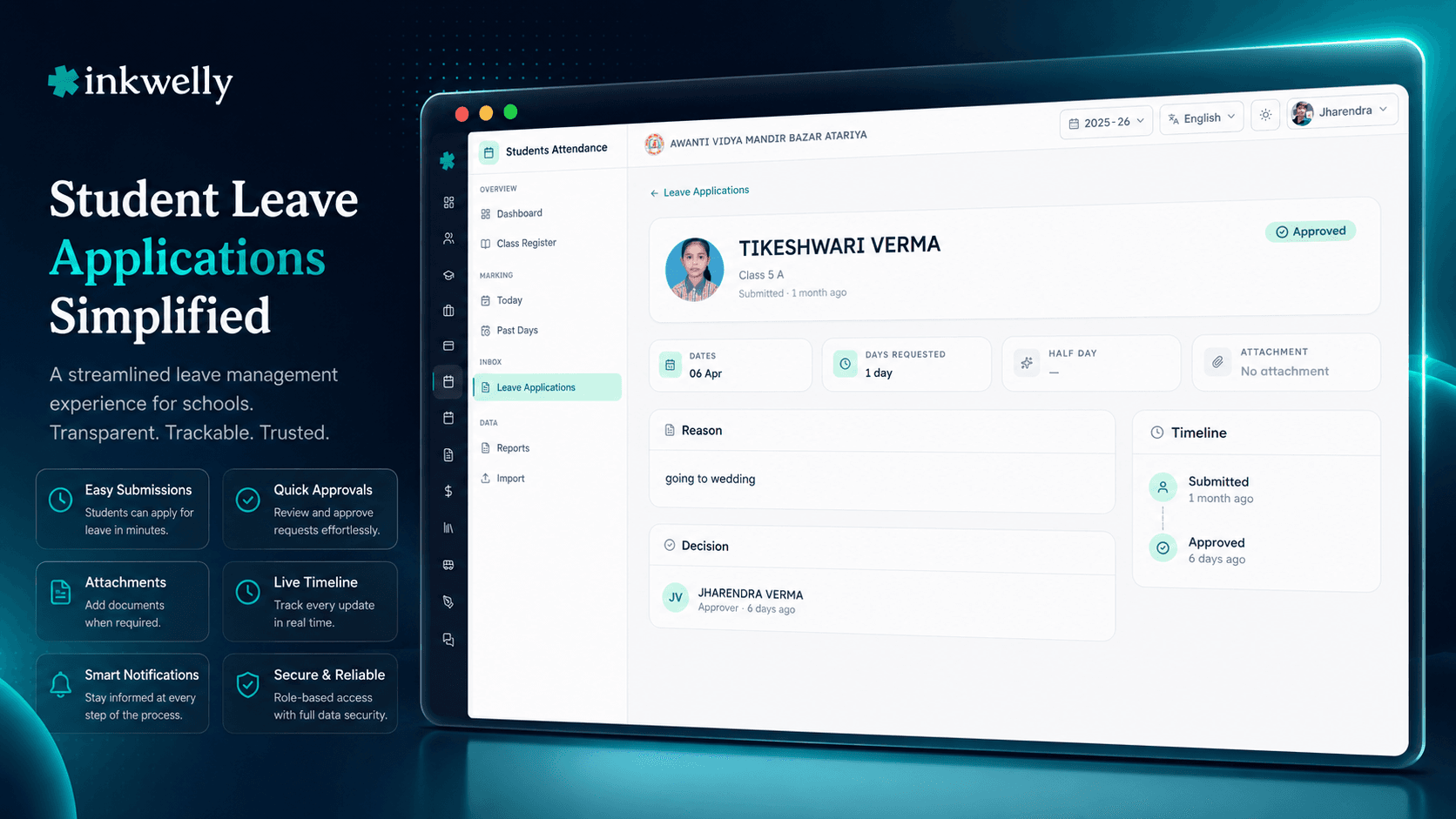
The Student Leave Applications flow in Inkwelly turns this paper trail into a single online form. The parent fills it from her phone. The principal approves it with one click. The class teacher sees it on her morning mark-attendance screen before she opens her register. The days auto-fill as LEAVE, the medical certificate is attached to the record, and the audit log captures every state change. No paper, no folder, no missing slip, no contradictory data.
How student leave applications work
Aaradhya's mother opens the parent app on her phone at 7:00 a.m. on the morning of 12 March. She taps Apply for Leave on the dashboard. The form opens — student auto-selected (her daughter Aaradhya), leave start date 12 March, leave end date 18 March (she taps the calendar twice), reason free-text 'typhoid, doctor advised one-week rest, will share medical certificate after consultation', attach file (optional, she will add the certificate after the doctor's visit), submit. The form takes 60 seconds. She gets a confirmation: 'Leave application submitted. The principal will review it shortly.'
At 7:15 a.m., the principal's dashboard shows '1 new leave application'. She opens it, sees Aaradhya's name, photo, class, leave dates, reason, and an 'Approve' / 'Reject' button pair. She clicks Approve with no remarks needed. The system records: 'leave application AAR-2026-03-12 approved by Principal at 7:16 a.m.' The mother gets an instant push notification: 'Aaradhya's leave from 12 to 18 March has been approved.' The class teacher's mark screen for 12 March now shows roll number 28 with status LEAVE — pre-filled, with a small badge 'approved leave' and a tap-to-view link to the application.
Three days later, the doctor signs the medical certificate. The mother opens the parent app, finds the open leave application, taps Attach Certificate, picks the photo from her phone gallery (or the document scan), and submits. The certificate is now stored on the leave application record, encrypted, and visible only to the principal, head clerk and the school nurse. The class teacher sees a small 'cert attached' tag on the cell hover — not the certificate itself — because the medical detail is not her business.
If the school principal decides to reject a leave application (for instance, the school has already declared the requested dates as a working day for an exam), she clicks Reject with a mandatory reason. 'Class 7 board pre-tests are scheduled on 15 March; please bring child for the exam.' The mother gets the rejection note immediately, with the reason. The class teacher does not see the dates as Leave in this case — the days remain to be marked normally.
What every leave application captures
- Student — auto-selected from the parent's child list, no manual ID typing
- Start date and end date — calendar pickers, validates against academic session boundaries
- Reason — free-text, mandatory, captures medical / function / family / sibling-wedding context
- Attachment — optional medical certificate, doctor's note, function invitation — PDF or image, up to 10 MB
- Status — PENDING by default, transitions to APPROVED, REJECTED, or CANCELLED
- Approver — every approval / rejection records the user who took the action and the timestamp
- Rejection reason — mandatory free-text when status is REJECTED, visible to the parent
- Linked attendance entries — every working day in the leave range gets an attendance record with status LEAVE and a foreign key to this application
- Audit log — every state change is timestamped, user-tagged, immutable
- Parent app push — instant notification on every state change (submitted, approved, rejected)
- Principal dashboard count — pending leave applications visible as a badge on the dashboard
- Auto-cancel on student transfer — if a student is transferred out, future-dated leaves auto-cancel
- School-configurable rules — max leave days per term, advance-notice requirement, approver role hierarchy
Parent submission from the Inkwelly parent app
The parent app is the same one the parent already uses for fee payments, attendance notifications, school events and homework. Adding a leave application is one extra menu item on the dashboard — not a separate app to download. The form is in the parent's preferred language (English, Hindi, and other school-supported languages), with calendar pickers showing the school's working days and weekly off correctly so a parent does not accidentally request leave for a Sunday.
The form remembers the most recent leave reason categories the parent has used — medical, family function, religious, weather, travel — as quick-pick chips, with a free-text field below for the actual reason. Schools that ship in tier-3 cities tell us 80% of parents pick a quick chip + add one line of detail; under 20% type the reason from scratch. The form sticks to one screen, no scrolling — deliberately.
One-click principal approval with audit
The principal sees a '1 new leave application' badge on her Student Attendance dashboard at 7:15 a.m. She opens it, scans the student photo, the dates, the reason, and the attached certificate (if any). For routine medical or family-function leaves, she clicks Approve — no remark needed. The action is logged with her user ID and the exact timestamp.
For cases where the school cannot grant the leave (an exam scheduled on the requested dates, a CCE assessment, a board pre-test), she clicks Reject and types a mandatory reason. The reason is visible to the parent in the app — 'Class 7 board pre-tests are scheduled on 15 March; please bring Aaradhya for the exam.' This forces a conversation between the parent and the school office, instead of the silent paper-trail rejection most schools use today. We have seen schools reduce 'leave-after-exam' surprise complaints by 70% in one term simply because rejections now come with a reason.
Auto-marks attendance as LEAVE for the approved range
The moment the principal approves the leave, the system writes attendance entries for every working day in the leave range — status LEAVE, with a foreign-key reference to the leave application. The class teacher sees these entries pre-filled when she opens the mark-attendance screen the next morning. She does not need to remember the leave; she does not need to find the slip. The system has already done the work.
If the principal approves a backdated leave — for instance, a parent submitted the form on 18 March for an absence that started on 12 March — the system writes (or updates) attendance entries for the past dates, and the chronic-absentee watchlist re-computes within minutes. A student who was incorrectly flagged for unexplained absences gets her percentage corrected and the watchlist row drops off automatically. No manual cell-by-cell editing on the monthly register.
Medical certificate stays encrypted and need-to-know
The attached medical certificate — doctor's letterhead, prescription, hospital discharge note — is encrypted at rest and visible only to the principal, head clerk, school nurse and any role the school explicitly grants. The class teacher sees a small 'certificate attached' tag on the cell hover, not the actual file. A parent can attach the certificate at any time after submission — even after approval — and the system links it to the same leave record without changing the approval status.
For schools running mandatory medical certification (some boarding schools and ICSE day schools require it for absences over three days), the leave form can be configured to require an attachment when the leave length crosses the threshold. The form blocks submission without the file in those cases. The school's medical officer or nurse can also retrospectively flag a certificate as 'verified' or 'requires follow-up' without changing the underlying leave status.
“Pehle parent ko slip likh ke peon se bhejna padta tha, fir clerk, fir principal, fir teacher ko bata na padta tha. Ab phone se apply karte hain, ek ghante mein sab khatam. Sab kuch ek jagah hai — koi paper nahin khoyega.”
Five real leave scenarios this flow handles
1. Single-day medical leave. Mother submits at 7:00 a.m. saying her daughter has fever; principal approves at 7:15 a.m.; class teacher sees the row pre-filled as Leave at 8:05 a.m. when she opens the mark screen. 60-second turnaround for the parent, zero work for the class teacher.
2. Week-long typhoid recovery. Mother submits a 7-day leave on day 1; doctor signs the medical certificate on day 3; mother opens the same application and attaches the certificate. The principal sees the certificate when it lands. Every working day in the range is auto-marked Leave. The student does not appear on the chronic-absentee watchlist as a risk; she appears as a 'leave-driven' row that the principal can ignore unless the percentage drops too far.
3. Sibling wedding leave (3 days). Father submits a 3-day leave for both his children (Class 5 and Class 9) using the parent app's multi-child mode. Both leaves go to the principal as a linked pair. She approves both with one click. Both class teachers see Leave on those three days; the wedding falls in the school calendar's 'leave-driven' category that the school has configured to count toward working days but not toward chronic-absenteeism flagging.
4. Pre-board rejection. Father submits a 4-day family-function leave for his Class 12 daughter on 12-15 February. The principal sees the dates clash with the Class 12 pre-board exams. She rejects with reason: 'Pre-board exams scheduled 13 and 15 February; please prioritise. Family function leave can be granted before / after these dates.' The father re-submits as a 1-day leave on 12 February only; the principal approves.
5. Sudden cancellation. A Class 4 mother submits 5-day medical leave on Monday. The child recovers fast; on Wednesday the mother opens the same application, taps Cancel remaining leave, and the system reverts the attendance for Wednesday onwards back to 'unset' — the class teacher will mark Wednesday's attendance normally that morning. The cancellation is logged with timestamp and (optional) reason. The first two days remain marked Leave.
Common operations on a leave application
- Submit leave — parent fills the form, attaches optional certificate, submits
- Edit before approval — parent can edit dates, reason, attachment until the principal acts
- Approve — principal one-click action, audit logged
- Reject with reason — mandatory reason, parent sees it in the app
- Attach certificate later — parent uploads the doctor's note any time
- Cancel remaining leave — parent revokes future-dated days; past days stay marked Leave
- Auto-cancel on transfer — student leaves the school, future leaves auto-cancel
- View linked attendance — jump from the leave application to every linked register cell
- Export to PDF — the office files a year-end leave report for board affiliation evidence
- Configure approval hierarchy — some schools route Class 1–5 leaves to the academic head, Class 6–12 to the principal
- Configure max leave per term — cap on consecutive or cumulative leave days
- Configure mandatory cert — certificate required when leave exceeds N days
See the leave flow on your school's data
20-minute walkthrough on the Inkwelly demo school. We will show the parent submission, the principal approval, the auto-mark on the class register, the audit log, and the certificate-encryption flow live.
Limits, safety and the small print
Approval is human, not automatic. Every leave application requires a human approver — by default the school principal, optionally an academic head or class teacher per the school's configured hierarchy. We do not auto-approve based on length, reason, or attachment, on purpose. School leave is a relationship moment, not a checkbox — the principal's name attached to every approval is what makes the audit log credible during board affiliation reviews.
Backdated leaves are allowed within the academic session. Parents can submit leave for past dates within the same academic session. The principal sees a 'backdated' indicator on these. Backdated approvals re-write the attendance entries for those past dates from Absent to Leave — with a clean audit trail showing the original entry and the change. We deliberately do not block backdated submissions, because most parents only get medical certificates after the absence, not before.
Future leave dates are bounded by the academic session. A parent cannot submit leave for dates outside the current academic session. The form blocks dates beyond the session end. For Class 12 students whose final exams fall right at the session edge, the school can extend the leave-form date range with admin override; this is rare but supported.
Cancellation behaviour. A parent can cancel future-dated leave from the parent app. Past-dated leave can only be cancelled by school staff with the 'office override' permission, with a mandatory reason. Cancellations do not delete the leave record — they update the status to CANCELLED and the linked attendance entries revert to unset (or stay as LEAVE if the school has marked the day as actually-leave-taken).
Privacy of the medical certificate. The certificate is encrypted at rest, visible only to roles the school configures (default: principal, head clerk, school nurse). The class teacher and other students never see the certificate file. Parents can re-download their own child's certificate from the parent app any time. The school exports certificates only as part of the year-end leave report for board affiliation evidence, with role-based access on the export.
Replace the pink leave slip with one form
Student leave applications are one of seven [Student Attendance](/modules/students-attendance) features Indian schools rely on every term. Book a demo and see it on your own school's data.
Belongs to
1 moduleFrequently asked
10 questionsCan a parent who does not use a smartphone submit a leave application?
Yes — the school office can submit on behalf of a parent. The head clerk opens the leave form on her desktop, picks the student, fills the same fields the parent would have, and submits. The application is tagged *'submitted by office on behalf of parent'* in the audit log. We see this used most often in tier-3 cities for grandparents who pick up the child and prefer to give the slip in person.
What happens if the leave starts today and the class teacher has already marked the student Absent?
When the principal approves a leave that overlaps with already-marked dates, the system updates those attendance entries from ABSENT to LEAVE — with a clean audit trail showing the original entry, who marked it, and the change. The class teacher does not need to do anything. The chronic-absentee watchlist re-computes within minutes.
Are medical certificates mandatory?
By default no. Schools can configure a *'mandatory certificate after N days'* rule — a common setting is *'leave longer than 3 consecutive days requires a certificate'* for ICSE schools, *'leave longer than 5 days requires a certificate'* for CBSE day schools, and *'all medical leaves require a certificate'* for some boarding schools. When the rule applies, the form blocks submission without an attachment.
Can the parent attach the certificate after the leave is approved?
Yes. The parent opens the same leave application from the parent app and taps *'Attach Certificate'*. The file is added to the leave record without re-opening the approval workflow. The school nurse or head clerk can also flag the certificate as *'verified'* or *'requires follow-up'* afterwards — these flags do not change the leave's APPROVED status.
Who sees the medical certificate?
By default: principal, head clerk, school nurse. The school can grant view access to additional roles (e.g., academic head, vice principal) via the role-permissions panel. Class teachers and other students never see the certificate file — only a *'cert attached'* tag on the cell hover. The certificate is encrypted at rest, hosted on Mumbai-based servers, and complies with the DPDP Act 2023.
Can the school configure max-leave caps per term?
Yes. Some boarding schools enforce *'max 7 leave days per term beyond which a parent meeting is required'*; some day schools enforce *'max 14 leave days per academic year'*. The cap is configured at the school level and the form blocks submission when the cap is breached — with a clear message to the parent: *'You have used 13 of 14 leave days. Please contact the school office for an additional leave.'*
Does the leave application support multi-child families?
Yes. A parent with two children in the school can submit a single leave application that applies to both — useful for sibling-wedding leaves, family religious functions, hospital visits where one child accompanies a sick sibling. The principal sees both children in the application and can approve / reject them as a pair, or split them. The audit log shows the linkage.
Can the principal delegate leave approvals to the class teacher or academic head?
Yes. The school admin configures the approval hierarchy — *'Class 1–5 leave approved by academic head'*, *'Class 6–12 leave approved by principal'*, *'leave longer than 7 days always requires principal approval regardless of class'*, and so on. Every approver's actions go to the same audit log. The system supports multi-step approvals (e.g., class teacher recommends, principal approves).
Are leave applications part of the UDISE+ submission?
Yes — indirectly. The UDISE+ Student Attendance schema asks for total absent days and total leave days per student. The system aggregates these from the per-day attendance entries, which include LEAVE entries from approved applications. The export Excel includes both totals separately, so the school can show the board *'X absent days were leave-with-application, Y were unexplained.'*
What if the school decides to revoke an approval after the fact?
Possible — with admin override. The principal opens the leave application, clicks *'Revoke approval'*, types a mandatory reason. The status changes to REJECTED with the new reason; the linked attendance entries revert to unset (the class teacher will need to re-mark them). The audit log records the original approval, the revocation, and both reasons. We see this used very rarely — once or twice a year per school for cases where additional information emerges after the original approval.
You might also like
2 readsSee Inkwelly on your school
30-minute demo. We open your current ERP with you and load your data into Inkwelly on the call. Dated go-live plan by the end of it.