Students को sections के बीच move करें — mid-session, seconds में। Single ya bulk. Roll numbers, effective date, audit — सब included.
Inkwelly का Class Change feature एक student को — या 50 students को — same academic session के अंदर एक class section से दूसरे में move करता है, effective date, reason, remarks और audit log के साथ — सब एक save में। Designed for उन routine reshuffles के लिए जो हर Indian school office July, October और January में करता है — जब sections rebalance होते हैं, parents section change request करते हैं, या RTE seats fill होती हैं।
Mid-year class changes हर Indian school में, हर term में होते हैं
School year 1 April को open होता है — हर section (Class 6 A, 6 B, 6 C) neatly 38 students पर balanced। July तक वो balance gone। 3 students sister branch से transfer in हुए और Class 6 चाहिए। 2 parents office में आकर insist करते हैं कि उनके बच्चे को उस section में move किया जाए जहाँ बेहतर Hindi teacher है। October में District Education Officer की RTE inspection 2 students को flag करती है जिनकी reservation seats Section A में हैं लेकिन admission Section C में हुआ। January में Class 6 B की teacher resign करती हैं और Principal decide करते हैं कि उनके 13 students को 6 A और 6 C में merge किया जाए।
Most school ERPs में यह हर move एक clerical war बन जाता है। Student profile open करो। Class dropdown change करो। नया roll number manually pick करो। Re-save करो। Hope करो कि parent app पर child का section update हो जाए। Hope करो कि fee ledger break ना हो। Hope करो कि audit log रिकॉर्ड करे किसने क्या कब change किया। Most ERPs effective date भी नहीं माँगते — change just हो जाता है, immediately, कोई reason record नहीं। 6 months बाद जब parent dispute करता है, trail कहीं नहीं मिलता।
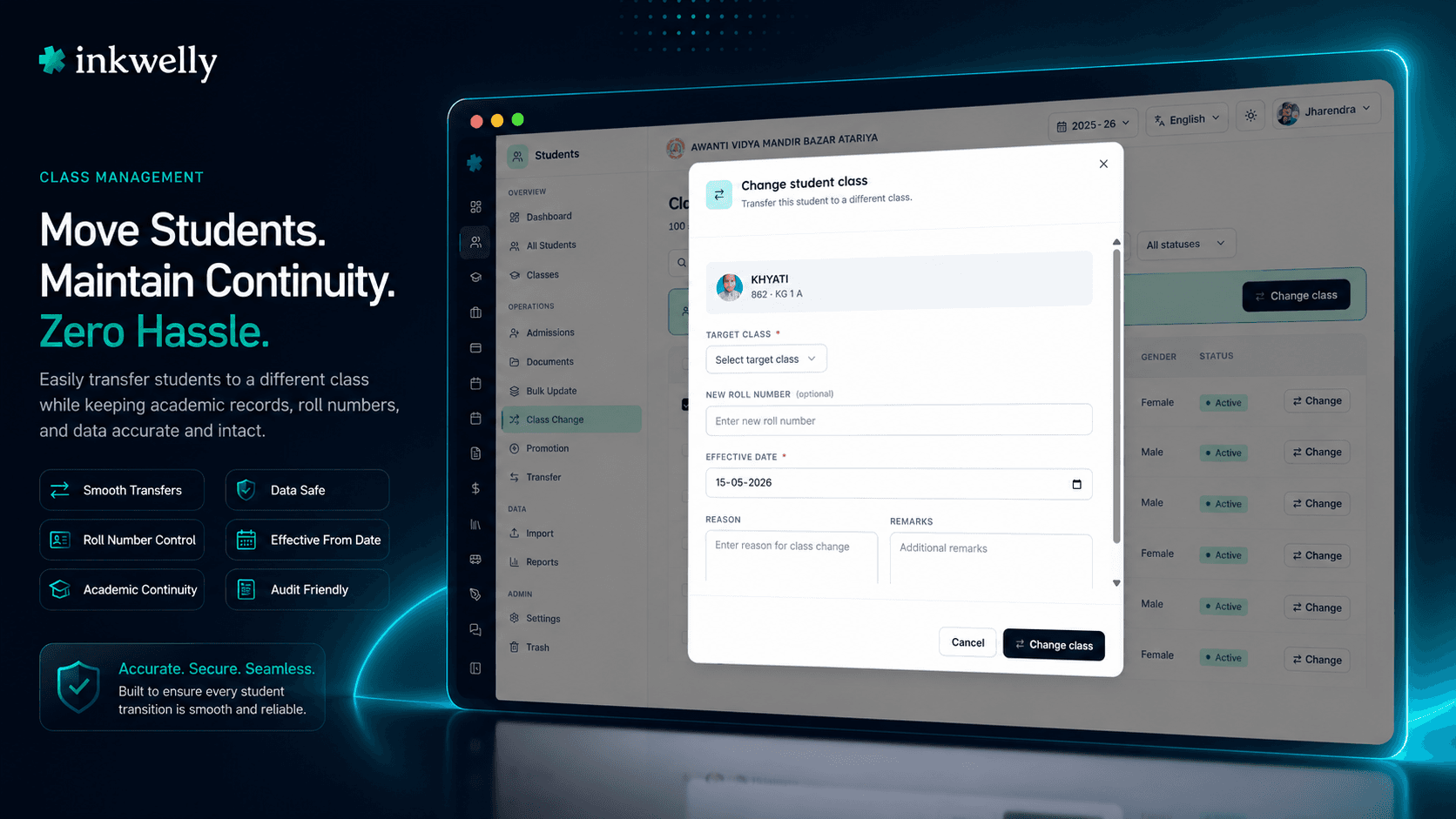
हमने Class Change को एक dedicated screen बनाया है जो यह routine बिना ceremony के handle करती है। Cohort पर filter लगाओ। उन students को tick करो जो move हो रहे हैं। Target class pick करो। Effective date set करो। चाहो तो one-line reason add कर लो। Save। Inkwelly नए roll numbers assign करता है, parent app refresh करता है, fee ledger update करता है, और हर student का audit-log entry लिखता है — सब एक single transaction में।
Class Change कैसे काम करता है — एक screen, एक save
Students → Class Change open करें session sidebar में। Page current session से 100 तक active students load करता है, alphabetical सॉर्ट में। Header पर 3 counters दिखते हैं — total students, active count, inactive count — ताकि office assistant तुरंत जान ले कि वो किस size के cohort पर काम कर रही है।
Step 1 — Cohort पर filter लगाओ। ऊपर 4 filters: free-text name search, class dropdown (आपके school की actual class list से populated — Pre-Nursery से Class 12 Commerce तक), gender, status (Active / Inactive / All)। Grid instantly update होता है। Most class-change runs एक section पर filter लगाते हैं — Class 6 B — 1,200 students को narrow करके 38 तक जिन पर actually act करना है।
Step 2 — Students pick करो। उन rows पर checkboxes tick करो जो students move हो रहे हैं। Selection bar ऊपर आता है — count और 'Change class' button के साथ। या किसी एक row के right-side button पर hover करें — सिर्फ उस one student के लिए one-click move, बिना checkbox के।
Step 3 — Move configure करें। Dialog open होता है। Same school class list से target class pick करें। Bulk selections के लिए, inline mini-table हर student के लिए नया roll number type करने देती है (optional — blank छोड़ दें, Inkwelly sequentially assign कर देगा)। Effective date set करें — default आज, back-dated record correction के लिए या forward-dated next term के लिए। चाहें तो reason और remarks add करें।
Step 4 — Save। Inkwelly हर student के लिए change apply करता है एक single batch में। Success toast count confirm करता है। Failed rows (target class में duplicate roll number, inactive class, capacity-full section) specific reason के साथ toast back करती हैं। Successfully moved students तुरंत reflect होते हैं class roster, fee ledger, attendance register, और parent app में — कोई दूसरा save नहीं, कोई manual refresh नहीं।
हर class change के साथ क्या record होता है
- Source class — student की current
Class 6 B(section के साथ) move के moment पर। - Target class — नया
Class 6 Aआपकी actual class list से, free-text नहीं। - नया roll number — हर student के लिए typed, या Inkwelly auto-assign करता है next available number target section में।
- Effective date — record correction के लिए back-datable, next-term moves के लिए forward-datable; default today।
- Reason — short text field human-readable cause के लिए: 'Section rebalancing', 'Parent request', 'RTE seat correction', 'Teacher merge'।
- Remarks — longer free-text field additional context के लिए जो office record पर रखना चाहे।
- Actor — वो user जिसने move किया, authenticated session से।
- Timestamp — server-side, timezone के साथ, audit log पर लिखा जाता है।
- Affected modules — fee ledger, attendance register, exam roster, transport route assignment सब auto-update होते हैं नए class के against।
- Per-student outcome — success या specific failure reason, हर row पर return — partial-success runs में जो changes go through हो गए वो lose नहीं होते।
- Soft history — पिछली class-membership row student की academic history में रहती है, ताकि year भर की reports दोनों sections को reflect करें।
पहले filter लगाओ — पूरे school को कभी open मत करो
Most school ERPs जिनके पास class-change screen भी है, वो हर student को एक giant table में dump कर देते हैं। 1,400 students एक साथ render होते हैं, page office laptop पर lag करता है, और office assistant उन 8 students को ढूंढने में scroll करती रहती है जिन पर actually act करना था। हम ऐसा नहीं करते।
Class Change के top पर filter bar 4 narrowing tools support करता है — free-text name search, class dropdown (आपकी real class list), gender filter, active/inactive toggle। Page size 100 students पर capped होने से grid 2,500 students वाले school पर भी fast रहता है। Class 6 B पर filter — 38 rows। Class 8 की सब girls पर — 32 rows। 'Ahmed' name match पर — 4 rows। आप सिर्फ वो students देखते हो जिन पर act करना है। कम scroll, कम misclick, faster save।
Header counter line — total students, active, inactive — एक glance में बताती है कि आपका filter सही cohort पर है या नहीं, single checkbox tick करने से पहले।
Single moves AND bulk moves — एक ही screen, एक ही dialog
Most school operations mixed होते हैं। Office assistant सुबह एक student move करती है जब parent section preference call करता है, फिर दोपहर में 30-student rebalance run करती है जब Principal दो sections merge करते हैं। उसको दो अलग screens सीखने पर force करना — यही busywork है जो school staff को ERPs से नफरत करवाता है।
Class Change दोनों एक ही screen से handle करता है। Single move के लिए, किसी row पर hover करें — right पर एक inline ArrowRightLeft button है जो dialog उस one student के साथ pre-selected open करता है। Bulk के लिए, row checkboxes tick करें, selection bar में 'Change class' click करें — same dialog open होता है, अंदर per-student roll number table embedded। Fields, validation, audit log behavior — दोनों identical। Office assistant एक flow सीखती है जो 1 student से 100 तक scale करता है।
Per-student roll numbers, dialog के अंदर ही
Indian schools roll numbers care करते हैं। Class 6 A की roll list morning assembly में पढ़ी जाती है। Exam seating plan roll से जाता है। Teachers students को roll-and-name से identify करते हैं attendance register में। जब student 6 B से 6 A move होती है, उसको नया roll number चाहिए — typically target section का next available, कभी-कभी specific number जो Principal reserve रखना चाहते हैं।
Class Change dialog में एक sticky-header mini-table है नए roll numbers के लिए। हर selected student की एक row — photo, name, admission number, और inline number input नए roll के लिए। Sequentially type करो — 40, 41, 42, 43 — या input skip करो और Inkwelly target class में next available number auto-assign कर देगा। दोनों pattern काम करते हैं, same flow में। Roll numbers target class के against validate होते हैं — अगर Class 6 A में पहले से roll 40 है, तो failed row specifically report करती है और editable रहती है, बाकी batch save हो जाती है।
Effective date, reason, remarks — हर change traceable
जो दो fields most ERPs भूल जाते हैं — effective date और reason — वही दो fields audit survive करते हैं। जब District Education Officer पूछते हैं कि October में Class 6 RTE student section क्यों change हुई, 'किसी ने change कर दिया' answer नहीं है। Class Change dialog answer को mechanical बना देता है।
Effective date default today है, but कोई भी date accept करता है — back-datable historical errors की cleanup के लिए (student actually 15 June से 6 A में थी, office आज enter कर रही है), forward-datable upcoming term moves के लिए (effective 1 October जब new term शुरू होता है)। Year भर की reports effective date honour करती हैं — Class 6 B का September attendance summary student को 6 B दिखाएगा, October में 6 A, automatically।
Reason एक one-line free-text field है। Most schools 4-6 standard phrases use करते हैं — 'Section rebalancing', 'Parent request', 'RTE seat correction', 'Teacher merge', 'Discipline transfer', 'Section closure'। Remarks longer field है context के लिए — parent's email reference, management committee meeting date, file note number। दोनों audit log पर लिखे जाते हैं actor और timestamp के साथ। 6 months बाद, trail intact है।
“October mein RTE inspection ke pehle hum ne 14 students ko sahi sections mein move kiya. Pehle 14 alag-alag profiles open karke save karna padta tha — pura din lag jata tha. Ab Class Change screen pe filter laga, tick kiya, save kiya — 9 minute. Reason field mein 'RTE seat correction' likh diya, audit log saaf hai. Inspector ne dekh ke poochha bhi nahi — date aur reason saamne tha.”
5 real Indian-school class-change scenarios
1. July section rebalancing (Tier-2 city CBSE day school)। Sister branch से 3 students transfer हुए। Class 6 A में 41 students, 6 B में 36, 6 C में 38। Principal कहते हैं कि office 2 students को 6 A से 6 B move कर दे ताकि even हो जाए। Class 6 A पर filter, 2 students नाम से tick, target class Class 6 B, effective date today, reason 'Section rebalancing'। 4 minutes में saved — including Principal के साथ conversation कि कौन से 2 students।
2. October DEO inspection से पहले RTE seat correction। 14 students RTE 25% reservation के under admit हुए, but document compliance audit reveal करती है कि उनकी reservation seats Class 1 A में assigned हैं जबकि actual classroom Class 1 B है। Filter admission-year-2026 + Class 1, 14 RTE students tick, target class Class 1 A, effective date back-dated admission date (1 April) पर, reason 'RTE seat correction'। 9 minutes में saved। DEO inspection के पास trail है।
3. Mid-year teacher resignation (residential school, January)। Class 6 B की form teacher resign करती हैं। Principal section merge करने का decide करते हैं — 13 students 6 A जाते हैं, 12 6 C। Class 6 B पर filter, पहले 13 roll number order में tick, target Class 6 A, नए roll numbers 40-52 type, effective date 1 February (forward-dated new term पर)। Save। फिर filter, बाकी 12 tick, target Class 6 C, roll numbers 38-49, save। 2 batches, total 11 minutes। Class 6 B का fee ledger और attendance register cleanly close होते हैं 31 January को।
4. Parent-teacher meeting के बाद parent request। Class 4 के एक parent Principal को letter लिखते हैं कि उनके बेटे को Class 4 B से Class 4 A में move किया जाए क्योंकि उसका closest friend वहाँ transfer हो गया। Principal approve करते हैं। Office assistant Class Change open करती है, student name से ढूंढती है, inline ArrowRightLeft button hit करती है, target Class 4 A, reason 'Parent request', remarks 'Letter dated 2026-08-10, file note PT-2026/47'। 90 seconds।
5. Discipline transfer (Tier-3 town state-board school)। Class 9 के एक student को Class 9 A से Class 9 C में move किया जाता है behavioural reasons पर, management committee decision के बाद। Office assistant single-row class change run करती है reason 'Disciplinary transfer per MC resolution dated 2026-09-14', remarks 'MC resolution PDF attached to student file'। Audit log move को management decision से link करती है — 3 साल बाद जब board appeal इसे reference करती है, trail intact है।
Common Indian-school class-change scenarios — सब एक screen में
- July में section rebalancing — late admissions land होने के बाद 41-36-38 sections को even out करें।
- RTE seat correction — reservation roster और classroom assignment के बीच mismatches fix करें।
- Teacher resignation merge — एक section close करें, students को siblings में redistribute करें।
- Parent request transfer — parent-teacher meeting के बाद single बच्चे को move करें।
- Disciplinary transfer — management committee decision को move के साथ record करें।
- Stream change — Class 11 student JEE-result review के बाद
CommerceसेArtsमें switch करे। - Boarding-house section split — boarding intake पर day scholars और boarders को अलग sections में move करें।
- Sibling co-section move — family request के बाद 2 siblings को same section में रखें।
- Hostel-block class re-mapping — जब residential schools hostel blocks को specific class sections को re-assign करते हैं।
- Mid-term affiliation change — same school के अंदर CBSE और State Board sections के बीच students को move करें।
- Forward-dated next-term move — 1 October का change आज record करें, next-term roster automatically apply हो जाएगा।
अपने school के sections पर live Class Change देखें
वो 5 routine class-change scenarios लाएँ जो हर term handle करते हैं। हम demo के दौरान आपकी school class list set up करेंगे, सब 5 scenarios live run करेंगे, और दिखाएँगे कि हर एक एक single audited save में कैसे बदलता है।
Limits, safety और small print
सिर्फ same session के अंदर। Class Change एक student को same academic session के अंदर 2 classes के बीच move करता है। Year-end moves के लिए — 2025-26 से 2026-27 — dedicated Promotion screen use करें instead। Promotion पूरे fee ledger, attendance register और exam roster की cross-session migration handle करता है; Class Change within-session reshuffle करता है।
100 students per page। Grid एक बार में 100 students तक load करता है — काफी एक entire class section के लिए, filtered cohort, या name search। Larger set पर act करने के लिए, filter से page through करें (Class 1, फिर Class 2, फिर Class 3 — 100 each) और successive saves run करें। हर save अपना atomic batch है अपने per-row outcomes के साथ।
Per-row atomicity। हर selected student अपनी own transaction के रूप में process होता है। Target class में duplicate roll number उस one row को fail करता है — बाकी batch save हो जाती है। Results toast successes और failures के specific reasons दिखाती है। कोई all-or-nothing rollback नहीं।
Effective date reports drive करती है। Year भर की reports effective date honour करती हैं — Class 6 B का September attendance summary student को 6 B दिखाएगा, October summary उसे 6 A दिखाएगा। Back-dated और forward-dated changes same way honour होते हैं। Audit log change-creation timestamp और effective date दोनों capture करती है।
हर change पर audit log। हर field change audit log पर लिखी जाती है — actor, timestamp, IP address, source class, target class, roll number, effective date, reason, remarks, source ('Class Change')। Audit log school admin panel से exportable है — यही CBSE renewal या DEO inspection के against खड़ा होता है।
Role-based access। Class Change default पर school admin और Principal roles पर gated है। Class teachers अपनी assigned section की individual student edits देखते हैं but bulk class-change screen नहीं। Permissions per role configure करें school IAM settings से।
Multi-tenant isolation। हर Inkwelly module की तरह, आपके school का Class Change strictly आपके school के records पर operate करता है। Multi-school trusts Class Change per-school independently run करते हैं — कोई cross-tenant access नहीं, गलत school के records edit होने का कोई risk नहीं।
Multi-language record handling। Non-English scripts (Devanagari, Bengali, Tamil) में names student record पर unchanged carry होते हैं — class change name fields को alter नहीं करता। Records state-board paperwork के लिए regional script में valid रहते हैं move के बाद।
किस मॉड्यूल का हिस्सा
1 moduleअक्सर पूछे गए सवाल
8 सवालClass Change और Promotion में क्या difference है?
Class Change एक student को SAME academic session के अंदर sections के बीच move करता है (e.g., Class 6 A से Class 6 B in 2025-26 में)। Promotion students को NEXT academic session में move करता है (e.g., Class 5 in 2025-26 से Class 6 in 2026-27 में)। Class Change within-session reshuffle है; Promotion year-end cross-session migration है। Class Change use करें July rebalancing, RTE corrections, teacher merges, parent requests और disciplinary transfers के लिए।
क्या मैं किसी student को different school session (year) के class में move कर सकती हूँ?
नहीं — Class Change strictly within-session है। Year-end moves के लिए 2025-26 से 2026-27 तक dedicated Promotion screen use करें। Promotion पूरे fee ledger, attendance register और exam roster की cross-session migration handle करता है। Class Change उन within-session reshuffles के लिए है जो हर Indian school office July, October, January और February में run करता है।
क्या change parent app और fee ledger में immediately reflect होगा?
हाँ। Save class roster, fee ledger, attendance register, exam roster, transport route assignment और parent-app dashboard को एक single transaction में update करता है। Parents next time app open करते ही updated section देखते हैं — typically seconds में। Effective date determine करती है कि कौन सी historical reports student को old vs new section में include करें।
क्या मैं record correction के लिए class change को back-date कर सकती हूँ?
हाँ। Effective date default today है but कोई भी date accept करती है — past या future। Back-dated changes historical records correct करते हैं (e.g., student actually 15 June से Class 6 A में थी, office 20 July को record कर रही है)। Forward-dated changes upcoming term moves record करते हैं (e.g., effective 1 October जब new term शुरू होता है)। Year भर की reports effective date automatically honour करती हैं।
अगर मैं जो roll number assign करूँ वो target class में पहले से लिया हुआ हो, तो क्या होगा?
वो specific row clear error के साथ fail होती है — 'roll number 40 already exists in Class 6 A'। आपके batch के बाकी students successfully save हो जाते हैं। Failed row editable रहती है ताकि आप दूसरा roll number pick करके retry कर सकें। कोई all-or-nothing rollback नहीं। अगर roll number blank छोड़ें, Inkwelly target class में next available number auto-assign कर देता है — कोई conflict possible नहीं।
क्या change audit-logged है?
हाँ। हर class change per-student audit-log entry लिखती है — actor, timestamp, IP address, source class, target class, roll number, effective date, reason, remarks, source ('Class Change')। Audit log school admin panel से exportable है और CBSE renewal, ICSE inspection या state-board RTE compliance audit के against खड़ा होता है। पिछली class-membership row student की academic history में रहती है — कभी delete नहीं होती।
क्या class teachers अपने section के लिए class changes run कर सकते हैं?
Default पर नहीं — Class Change school admin और Principal roles पर gated है। Class teachers अपनी assigned section की individual student edits देखते हैं but bulk class-change screen नहीं। Most schools इसको admin-only रखते हैं क्योंकि class change का impact fee ledger, attendance register और exam roster पर touch करता है। अगर आपके school को delegate करना है, वो school IAM settings से per-role permission के रूप में configurable है।
क्या यह सब CBSE / ICSE / State Board class structures support करता है?
हाँ। Class Change आपके school की actual class list use करता है — Pre-Nursery से Class 12 तक, science / commerce / arts streams, vocational classes, NIOS classes, hostel-block-specific classes, residential boarding sections, even non-standard names। CBSE day schools, ICSE residential schools, IB primary years, IGCSE secondary, NIOS और हर Indian state board (UP, Maharashtra, Karnataka, Tamil Nadu, West Bengal, Rajasthan, Madhya Pradesh, Kerala, Andhra Pradesh, Telangana, Bihar, Gujarat, Punjab और beyond) के लिए काम करता है।
आपको ये भी पसंद आ सकता है
3 लेखInkwelly आपके स्कूल पर — खुद देखें
30 मिनट का डेमो। आपके मौजूदा ERP को आपके साथ खोलकर, कॉल पर ही आपका डेटा Inkwelly में लोड करते हैं। कॉल ख़त्म होते-होते एक तय तारीख़ का गो-लाइव प्लान आपके हाथ में।