Timetable ek baar banaiye. Saal bhar isi par chaliye.
Ek timetable engine jo day structure (template) ko schedule (instance) से अलग रखता है, teacher aur room conflicts ko publish hone se पहले pakad leta hai, aur har substitute teacher aur room change ko ek audited override के तौर पर log karta hai. CBSE, ICSE, IB, IGCSE aur State Board schools ke liye — 5 se 60+ classes wale सब schools ke liye built.
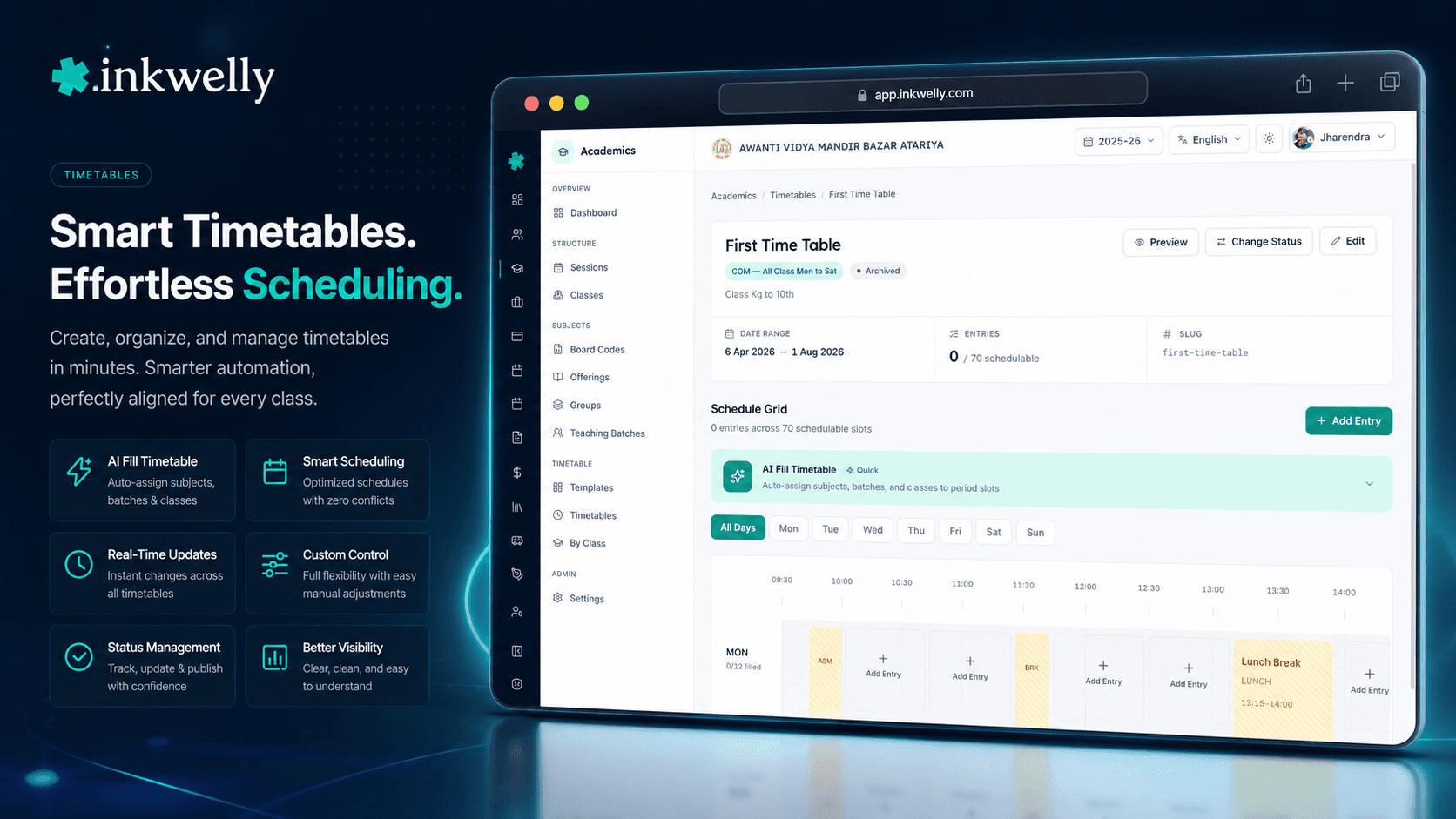
Aaj kal Indian schools timetable kaise banate hain
April ka दूसरा hafta hai. Lucknow mein ek CBSE upper-primary school mein Class 6 mein 82 naye students aaye hain, char section-wise class teachers re-assign hue hain, aur ek Mathematics teacher March mein chhod kar chali gayi. Timetable in-charge — usually ek senior PRT ya HOD jo additional duty कर रहे hain — subah 7 baje से ek lambi A3 sheet, pencil, aur teacher availability ki sticky note ke saath baithe hain. Hindi periods fit nahi ho rahe kyunki Section B ki class teacher ka 11:30 par pehle se Sanskrit period hai. Friday shaam tak office printer 12 revisions nikal chuka hai aur teen classes mein abhi bhi unresolved overlaps hain.
Ye sirf weekend ka nuksaan nahi hai. Naye session ke teesre din ek parent complaint office tak pahunchti hai — unki bachi ne do consecutive free periods baithe kyunki kisi ne check nahi kiya tha ki kaun sa subject teacher leave par hai. Ek hafte baad, Maths teacher ko पता चलता hai ki use Class 7-A aur Class 9-C mein har Tuesday 11:30 par double-book kiya gaya hai — original draft mein theek tha, lekin staff room ke liye print second-last revision se nikla. Library, lab assistant, aur bus route — sab "timetable" ki अलग copies par chal rahe hain. Canonical version kisi ke paas nahi hai.
Inkwelly ka Timetable feature is poore workflow ko ek structured engine se replace karta hai. Day structure (period slots, breaks, lunch, assembly) ek reusable TimetableTemplate ke roop mein rehta hai jo ek baar setup hota hai aur har session aur har NEP stage mein dobara use hota hai. Specific session aur term ka schedule ek Timetable instance ke roop mein rehta hai — status DRAFT, PUBLISHED ya ARCHIVED. Har period ke liye ek TimetableEntry row hoti hai jo real teaching batch, real teachers, aur real room ko point karti hai — aur conflicts publish hone se पहले flag ho jaate hain. Whiteboard wapas store room mein.
Inkwelly Timetable kaise kaam karta hai
Ye feature jaan-boojh ke teen screens mein बंटा hai jo teen alag workflows ko mirror karte hain. Templates page wahan hai jahan day structure define hota hai — Foundational stage template mein 8 teaching periods, 30-minute lunch aur ek homeroom slot ho sakta hai, jabki Secondary stage template mein 9 periods aur end-of-day remedial slot ho sakta hai. Har template PeriodSlot rows rakhta hai per dayOfWeek (Monday se Sunday) — slotNumber, slotType (TEACHING, BREAK, LUNCH, ASSEMBLY, ACTIVITY, HOMEROOM, ZERO_PERIOD, REMEDIAL), startTime, endTime, durationMins, aur ek isSchedulable flag — non-schedulable slots जैसे lunch aur zero period entries accept nahi karte.
Main Timetable page school ke active session ke saare timetables list karta hai — status badges, linked template, academic term, aur effective-from / effective-to range ke saath. Detail editor weekly grid mein open hota hai, day-filter tabs aur per period slot ek row ke saath. Cell par click karne par ek TimetableEntry add hoti hai — entry scope chuniye (BATCH for teaching batch, CLASS for class-wide events जैसे assembly, SCHOOL for school-wide events जैसे sports day), entry type chuniye (12 mein से ek — SUBJECT, LAB, ACTIVITY, ASSEMBLY, HOMEROOM, LIBRARY, CIRCLE_TIME, VOCATIONAL, BAGLESS_DAY, EXAM, FREE_PERIOD, OTHER), room aur ek ya zyada teachers (isPrimary=true lead teacher par, baaki co-teachers).
Classes page is sab ka read-only counterpart hai class teachers aur parents ke liye — class chuniye, us class ki published weekly grid dekhiye assigned teachers, rooms aur batch labels ke saath. Students aur teachers ke liye personalised view endpoints bhi hain: /view/student ek student ka full week return karta hai sab batches mein jisme woh enrolled hai, /view/employee teacher ka weekly schedule, aur /view/employee/today teacher ka aaj ka schedule jisme substitutions aur room changes pehle se applied hain.
Inkwelly Timetable mein kya kya hai
- Reusable templates per NEP stage — Foundational, Preparatory, Middle, Secondary — ek baar setup, har session mein use
- Per-day-of-week period structure — Saturday agar 5-period half-day par chal raha hai toh wo same template ki ek alag
dayOfWeekrow hai, alag template nahi - 8 slot types — Teaching, Break, Lunch, Assembly, Activity, Homeroom, Zero Period, Remedial — har slot par
isSchedulableflag - 3 entry scopes —
BATCH(teaching batch),CLASS(class-wide assembly, homeroom),SCHOOL(Independence Day, sports day) — saari classes mein ek saath - 12 entry types har period kind ko cover karte hain — Subject, Lab, Activity, Assembly, Homeroom, Library, Circle Time, Vocational, Bagless Day, Exam, Free Period, Other
- Multiple teachers per period — ek primary teacher aur kitne bhi co-teachers — language batches, lab assistants aur Bagless Day projects ke liye useful
- Status workflow —
DRAFT(editable),PUBLISHED(locked, teachers aur parents ko visible),ARCHIVED(sealed read-only) — effective-from aur effective-to dates ke saath - Term-aware — ek timetable
academicTermIdse linked hota hai, Term 1 vs Term 2 schedule changes ko support karta hai बिना poora timetable rebuild kiye - Conflict detection —
teacherDoubleBooked,roomDoubleBooked,classOverlap— editor mein statusPUBLISHEDhone se पहले flag ho jaate hain - AI Fill natural-language prompt से — schedule ko describe kariye ("Hindi twice on Monday, Sanskrit on Tuesday and Thursday, double Maths on Friday") aur system entries generate kar deta hai
- Bulk operations — entries ko day se, period slot se, ya ID list se create, update, delete — jab speed chahiye
- Date-specific overrides 4 actions ke saath —
SUBSTITUTE(teacher swap),CANCEL(period off),EXTRA_CLASS(extra unscheduled period add),ROOM_CHANGE(room change) - Personalised view endpoints — student, teacher, class — aaj ka schedule, weekly grid aur override list, alag-alag calls
Templates sessions se zyada chalte hain; instances sirf ek session ke liye
Zyada-tar school ERPs mein har April ko timetable scratch se rebuild hota hai. Inkwelly mein day structure schedule से अलग rehta hai. Ek TimetableTemplate periods, breaks aur lunch carry karta hai — Foundational stage ke liye ek baar setup, Preparatory ke liye ek baar, Middle ke liye ek baar, Secondary ke liye ek baar — aur har session mein dobara use hota hai jab tak school bell schedule revise nahi karna chahti.
Timetable instance jo rebuild hota hai — aur usually wo bhi previous session ka clone hai jisme adjustments hote hain. Har instance ek specific schoolAcademicSessionId aur optionally ek academicTermId se linked hota hai, toh agar koi school Class 12 ke liye Term 2 mein alag schedule chalata hai (CBSE mein September से February tak common hai), wo same template ke against ek dusra instance bana leta hai. Past sessions ke timetables ARCHIVED mein chale jaate hain automatically — hamesha readable, kabhi editable nahi.
Teen tarah ke conflicts, sabhi publish se पहले pakde jaate hain
Engine timetable ko PUBLISHED mark karne se mana kar deta hai jab tak teen tarah ke conflicts clear nahi ho jaate. teacherDoubleBooked — ek hi teacher do simultaneous batches ke liye scheduled. roomDoubleBooked — ek hi physical room do simultaneous classes ke liye. classOverlap — ek hi class same period mein do alag entries (manual editing mein copy-paste error से aksar hota hai).
Database constraints isko back karte hain. Ek TimetableEntry ek hi (timetableId, periodSlotId, teachingBatchId) ke liye dobara nahi ho sakti batch entries ke liye, ya same (timetableId, periodSlotId, classId) ke liye class entries ke liye. Editor conflicting entry IDs ko inline surface karta hai taaki timetable in-charge dekh sake exactly कौन si do cells collide kar rahi hain — aur dashboard inko ek conflict count mein roll up karta hai, type ke breakdown ke saath. Ab teen hafton baad पता nahi chalega ki Mathematics teacher ko Class 8 ki do sections ke liye har Tuesday 11:30 par book kar diya gaya tha.
AI Fill — schedule describe kariye, entries paaiye
Timetable editor mein ek AI Fill Timetable button hai jo natural-language prompt ko draft TimetableEntry rows mein convert karta hai. Type kariye "Hindi twice on Monday and Wednesday, Sanskrit on Tuesday and Thursday, double Mathematics on Friday morning, Library on Friday afternoon for Class 6 sections A and B" aur system ek candidate schedule generate karta hai jo in-charge apply karne se पहले review karta hai.
Under the hood, AI ko ek compact JSON milta hai — available period slots (IDs aur times ke saath), teaching batches in scope (codes, subject names aur periodsPerWeek constraints ke saath) aur class list. Wo ek entries proposal return karta hai foreign-key references ke saath jo same conflict-detection engine ke against validate hoti hai preview se पहले. School ya toh existing draft ko replace kar sakta hai ya new entries ko append — original DRAFT dono case mein publish tak preserved rehta hai.
Substitutions, cancellations, room changes — chaaron logged
Ek teacher Friday ko 2 din ki leave apply karti hai. Zyada-tar ERPs mein response hota hai — substitute timetable printout ke peeche scribble kar diya, Monday tak bhool gaye. Inkwelly mein response hota hai createOverride(action: SUBSTITUTE, substituteEmployeeId, overrideDate, reason) — aur wo ek row har downstream view ko drive karti hai.
TimetableOverride model 4 actions support karta hai. SUBSTITUTE ek date ke liye teacher (ya poori teaching batch) swap karta hai. CANCEL period ko off mark karta hai — class ko cancellation notice dikhti hai, teacher free hoti hai, parent app reflect kar deta hai. EXTRA_CLASS ek unscheduled period add karta hai — exams se पहले ya cancelled day ke makeup ke liye common. ROOM_CHANGE class ko alag room mein move karta hai bina teacher ya batch touch kiye. Har override reason, optional remarks, aur created-by audit entry rakhta hai. Teacher view /view/employee/today aur student view /view/student automatically us date ke liye override apply kar dete hain — koi duplicate update nahi.
“Pehle har Friday shaam ko substitute teacher ki list whatsapp pe bhejni padti thi. Ab leave apply hote hi system substitute pick kar leta hai, audit log mein dikh jata hai, aur Monday morning sab clear hota hai.”
Real-world use cases — schools is feature ka kya karte hain
-
Lucknow ka CBSE upper-primary school 3 sittings mein timetable rebuild karta hai. Pichla session naye
DRAFTmein cloned hota hai. Mathematics teacher jo chhod gayi uska bulk-update har entry par hota hai jahan wo primary thi. Class 9-D mid-session add hoti hai — uske 16 weekly periods AI Fill se fill hote hain syllabus distribution ke prompt से. Friday shaam tak conflicts zero. Monday subah 7:45 par timetablePUBLISHED. -
Bhopal ka ICSE school extended leave handle karta hai. English HOD 2 hafte ki medical leave apply karti hai. Har English entry ke against bulk override create hota hai un 14 working days ke liye, action
SUBSTITUTE, do alag substitute teachers availability ke हिसाब से picked. Teacher view/view/employee/todaysubstitute ko uska schedule dikhata hai, student view parent ko revised teacher list dikhata hai, aur audit trail capture karta hai ki principal ne 6:42 pm Tuesday ko substitution approve ki. -
Indore ka State Board school har alternate Saturday Bagless Day chalata hai. Mahine ke 3 Saturdays regular Saturday template par chalte hain; chautha
BAGLESS_DAYentry type use karta hai har Class 6 se 8 ke period ke liye, project work ya community visits ke liye slot repurpose karta hai. Teachers abhi bhi scheduled hain, lekin entry type marks-entry system ko bata deta hai ki is period ko academic recording ke liye skip kare. -
Pune ka IGCSE school ek labour-strike din handle karta hai. Principal us affected date par har entry ke liye bulk
CANCELoverride chalata hai,reason="State-wide bandh"ke saath. Parents ko parent app ke through auto-notify hota hai. Agle working day par ekEXTRA_CLASSoverride Saturday subah ka slot add karta hai lost time recover karne ke liye. UDISE+ working-day projection auto-adjust ho jaata hai. -
Coimbatore ke paas ek CBSE residential school co-teaching pilot chalata hai. Class 7 Mathematics aur Science 2 periods per week co-taught hote hain — ek primary teacher plus ek assistant teacher per slot. Inkwelly entry per period 2
TimetableEntryEmployeerows use karti hai (ekisPrimary=trueke saath, doosri बिना), aur dono teachers ko period apne personal weekly view par dikhta hai.
Common timetable operations
- Naya template create kariye — per day period count set kariye, lunch aur zero period ko non-schedulable mark kariye, NEP stage attach kariye
- Pichle session ka timetable naye
DRAFTmein clone kariye — teacher list adjust kariye, gaps par AI Fill chalaiye, conflicts validate kariye, publish - CSV se bulk-create entries — class × subject × teacher × periods-per-week paste kariye, Inkwelly distribute karega
- Day se bulk-delete entries — jab single Saturday ka schedule wipe karke event ke liye rebuild karna ho
- Single-date override apply kariye — substitute teacher, room change, cancel, ya extra class — reason aur audit log ke saath
- Date-range override apply kariye — October 1 se October 14 tak leave — auto-create one override per affected entry per date
- Teacher ka aaj ka schedule pull kariye —
GET /view/employee/today— substitutions resolved ke saath periods - Student ka weekly schedule pull kariye —
GET /view/student— har batch jisme student enrolled hai uske across joined - Class ka published timetable pull kariye —
GET /view/class— homeroom plus saari batch entries, time order mein DRAFTkoPUBLISHEDpromote kariye — sirf tab allow hota hai jab teen conflict types ka count zero ho- Session end par timetable archive kariye — status
ARCHIVED, read-only mark, saari entries aur overrides hamesha के liye preserved
Real CBSE dataset par Timetable live dekhiye
20-minute walkthrough — templates, conflict detection, AI Fill, substitution overrides aur personalised teacher / student views. Sales pitch nahi, sirf product.
Limits, safety, aur small print
Timetable engine jaan-boojh ke wahan strict hai jahan zaruri hai aur wahan flexible hai jahan flexibility zyada valuable hai. Conflict detection har save par chalta hai aur publish refuse karta hai jab tak count zero nahi ho jaata — lekin per-teacher weekly load caps ya periodsPerWeek matching ko publish-time par enforce nahi karta, kyunki schools regular special weeks chalate hain (revision week, exam week, internal assessment week) jo intentionally regular distribution break karte hain. Wo constraints editor par warnings ke roop mein dikhte hain, hard blocks ke roop mein nahi.
AI Fill feature ek starting point hai, lock nahi. Generated entries foreign keys ke against validate hoti hain (har teachingBatchId, classId, roomId, employeeId school ki real data mein resolve hona chahiye) aur same conflict-detection engine ke against bhi, lekin school se expect kiya jaata hai ki proposal ko apply karne se पहले review kare. Zyada-tar timetable in-charges AI Fill ko ek draft assistant ke roop mein treat karte hain — week ke bulk ke liye fast, last 10% tricky slots ke liye manual.
Overrides date-specific hote hain, pattern-specific nahi. Ek teacher 14 din ki leave (October 1 se October 14) par jaati hai toh per affected entry per date 14 alag override rows generate hoti hain — by design, taaki ek single bad assumption ("wo 10 ko hi wapas aa jayegi actually") ko individual dates ke liye unwound kiya jaa sake bina baaki ko touch kiye. Bulk override creation volume handle karta hai; audit trail har change ko traceable rakhta hai. Recurring pattern changes ke liye sahi tool (ek teacher ka permanent move from Class 7-A Mathematics to Class 8-B Mathematics) — underlying entry ko edit kariye, overrides stack mat kariye.
Finally, personalised view endpoints — student, teacher, class — read-only aur tenant-isolated hain. Ek teacher dusre teacher ka schedule nahi dekh sakti jab tak explicitly role permission na ho; ek parent dusre bachche ki class nahi dekh sakta. Saara access logged hai. Engine 60-bus, 2,500-student CBSE school ke liye scale hota hai jisme 75+ teachers aur 35 classes hain — aur 6-class Tier-3 budget school ke liye bhi jo principal ke office mein ek single laptop par chal raha hai. Dono shapes same conflict-detection, override aur view code paths se guzarte hain.
किस मॉड्यूल का हिस्सा
1 moduleअक्सर पूछे गए सवाल
10 सवालKya hum pichle saal ka timetable structure rakh sakte hain lekin schedule rebuild kar sakte hain?
Haan. `TimetableTemplate` (period-slot structure, breaks, lunch) `Timetable` instance (actual schedule) से अलग hota hai. Aap har NEP stage ke liye template ek baar setup karte hain aur har session mein use karte hain. Sirf instance rebuild hota hai — aur wo bhi usually previous session ka clone hota hai jisme naye teachers, naye sections aur naye subjects ke adjustments hote hain.
Agar koi teacher mid-session chhod kar chali jaaye toh kya hota hai?
Bulk update use kariye har `TimetableEntry` par jahan jaane wali teacher primary thi, naye teacher ke `employeeId` से replace kariye, aur system saare downstream views — teacher schedule, student schedule, class view, parent app — ko next page load par update kar deta hai. Purani assignments audit log mein hamesha rahti hain.
Kya conflict detection publishing block karta hai?
Haan. Ek timetable `DRAFT` se `PUBLISHED` tab tak nahi ja sakta jab tak `teacherDoubleBooked`, `roomDoubleBooked` aur `classOverlap` counts saare zero na ho. Editor conflicting entry IDs ko inline surface karta hai taaki in-charge dekh sake exactly कौन si do cells collide kar rahi hain.
Kya ek hi teacher do classes mein same time par appear kar sakti hai?
Nahi — engine dono level par refuse karta hai: data layer par (unique constraints) aur editor layer par (live conflict detection). Agar school genuinely same room mein do teachers chahti hai (co-teaching), ek hi entry par multiple `TimetableEntryEmployee` rows use kariye — ek `isPrimary=true` ke saath aur baaki co-teachers.
AI Fill button kaise kaam karta hai?
Natural-language prompt type kariye desired schedule describe karte hue ("Hindi twice on Monday, Sanskrit on Tuesday and Thursday, double Maths on Friday morning"). System available period slots, teaching batches aur class list ko Claude AI ko compact JSON ke roop mein bhejta hai, candidate entries receive karta hai, same conflict-detection engine ke through chalata hai, aur preview dikhata hai. Aap existing draft ko replace kar sakte hain ya new entries append — kuch bhi auto-applied nahi hota.
Parents aaj ka schedule substitutions ke saath kaise dekhte hain?
Parents aur students personalised view endpoint `/view/student` use karte hain, jo published timetable return karta hai har batch jisme student enrolled hai uske liye, with active `TimetableOverride` rows for that date pehle se applied. Agar aaj ka English period medical leave ke liye substituted hai, parent app substitute ka naam automatically dikhata hai.
Kya hum Term 1 aur Term 2 ke liye alag schedule chala sakte hain?
Haan. Ek `Timetable` ek specific `academicTermId` se linked hota hai. Class 12 (aur kai schools jo Class 10 chalate hain) syllabus complete hone ke baad alag Term 2 schedule use karte hain — board-revision style — same template ke against ek doosra instance bana ke. Term 1 ka instance term end par read-only ho jaata hai.
Saturday half-days ya Bagless Days ke baare mein kya?
Saturday ka period structure Monday se alag ho sakta hai — same template, alag `dayOfWeek` rows. Bagless Days `BAGLESS_DAY` entry type use karte hain, jo teacher aur slot ko scheduled rakhta hai lekin academic aur marks-entry modules ko bata deta hai ki is period ko project work treat karein, classroom teaching nahi.
Kya substitute automatically pick ho sakta hai?
Abhi nahi — override flow staff ke baaki members ka live free-period view dikhata hai taaki principal ya in-charge full context ke saath substitute manually pick kar sake. Subject qualification aur weekly load par auto-pick roadmap par hai.
Kya timetable data India mein store hoti hai?
Haan. Saari timetable data — templates, entries, overrides aur audit logs — AWS Mumbai par hoti hai. Platform Digital Personal Data Protection Act 2023 ke compliance के लिए built hai, including verifiable parental consent for minors aur 30-day breach notification.
आपको ये भी पसंद आ सकता है
3 लेखInkwelly आपके स्कूल पर — खुद देखें
30 मिनट का डेमो। आपके मौजूदा ERP को आपके साथ खोलकर, कॉल पर ही आपका डेटा Inkwelly में लोड करते हैं। कॉल ख़त्म होते-होते एक तय तारीख़ का गो-लाइव प्लान आपके हाथ में।