Build the timetable once. Run the year on it.
A timetable engine that separates the day structure (template) from the schedule (instance), catches teacher and room conflicts before publish, and logs every substitute and room change as an auditable override. Built for CBSE, ICSE, IB, IGCSE and State Board schools running 5 to 60+ classes.
How most Indian schools build the timetable today
It is the second week of April. A CBSE upper-primary school in Lucknow has eighty-two students newly admitted to Class 6, four section-wise class teachers reassigned, and a Mathematics teacher who left in March. The timetable in-charge — usually a senior PRT or a HOD doubling up — has been at it since 7 am with a long sheet of A3 paper, a pencil, and a list of teacher availabilities scribbled on a sticky note. The Hindi periods will not fit because Section B's class teacher already has a Sanskrit period at 11:30. By Friday evening, the office printer has run off twelve revisions and three classes still have unresolved overlaps.
The consequence is not just the lost weekend. On the third day of the new session, a parent complaint reaches the office: their child sat through two consecutive free periods because nobody had checked which subject teacher was on leave. A week later, the Maths teacher discovers she has been double-booked for Class 7-A and Class 9-C at 11:30 every Tuesday — the original draft had it correct, but the version printed for the staff room came from the second-last revision. The library, the lab assistant and the bus route are all running on different copies of "the timetable". Nobody owns the canonical version.
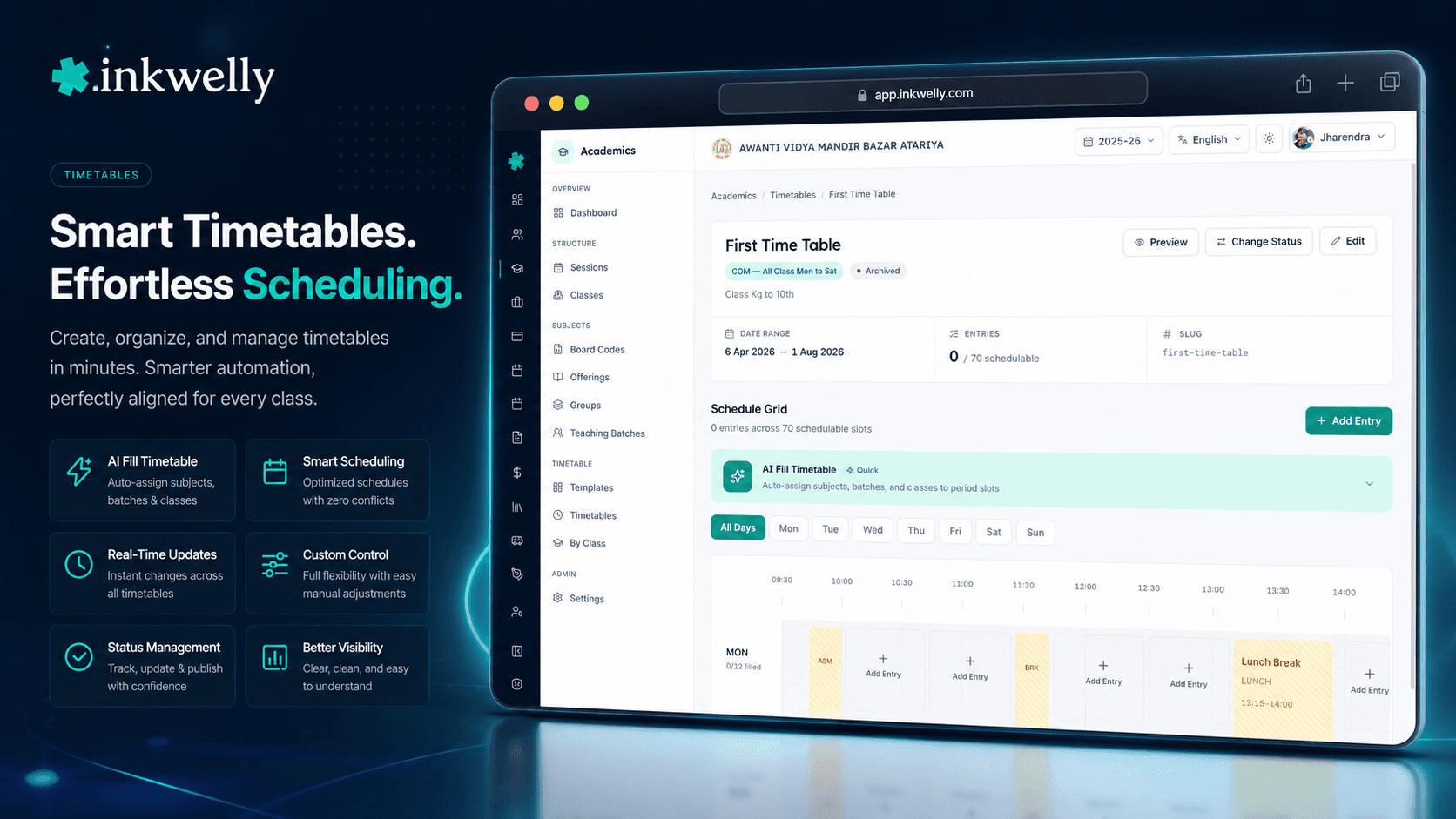
Inkwelly's Timetable feature replaces this entire workflow with a structured engine. The day structure (period slots, breaks, lunch, assembly) lives as a reusable TimetableTemplate that is set up once and reused across every session and every NEP stage. The schedule for a specific session and term lives as a Timetable instance with status DRAFT, PUBLISHED or ARCHIVED. Every period has a TimetableEntry row that points at a real teaching batch, real teachers, and a real room — and conflicts are flagged before the timetable can be published. The whiteboard goes back into storage.
How Inkwelly Timetable works
The feature is intentionally split across three screens that mirror three distinct workflows. The Templates page is where the day structure is defined — a Foundational stage template might have eight teaching periods, a thirty-minute lunch and a homeroom slot, while a Secondary stage template might have nine periods and an end-of-day remedial slot. Each template carries PeriodSlot rows per dayOfWeek (Monday to Sunday) with slotNumber, slotType (TEACHING, BREAK, LUNCH, ASSEMBLY, ACTIVITY, HOMEROOM, ZERO_PERIOD, REMEDIAL), startTime, endTime, durationMins, and an isSchedulable flag — non-schedulable slots like lunch and zero period cannot accept entries.
The main Timetable page lists every timetable for the school across the active session, with status badges, the linked template, the academic term and the effective-from / effective-to range. The detail editor opens into a weekly grid with day-filter tabs and one row per period slot. Clicking a cell adds a TimetableEntry — pick the entry scope (BATCH for a teaching batch, CLASS for class-wide events like assembly, SCHOOL for school-wide events like sports day), the entry type (one of twelve including SUBJECT, LAB, ACTIVITY, ASSEMBLY, HOMEROOM, LIBRARY, CIRCLE_TIME, VOCATIONAL, BAGLESS_DAY, EXAM, FREE_PERIOD, OTHER), the room and one or more teachers (with isPrimary=true on the lead teacher and the rest as co-teachers).
The Classes page is the read-only counterpart for class teachers and parents — pick a class, see the published weekly grid for that class with assigned teachers, rooms and batch labels. Students and teachers also have personalised view endpoints: /view/student returns a student's full week across every batch they are enrolled in, /view/employee returns a teacher's weekly schedule, and /view/employee/today returns the teacher's day with substitutions and room changes already applied.
Everything Inkwelly Timetable covers
- Reusable templates per NEP stage — Foundational, Preparatory, Middle, Secondary — set up once, used across every session
- Per-day-of-week period structure — Saturday running on a five-period half-day uses a different
dayOfWeekrow in the same template, not a separate template - Eight slot types — Teaching, Break, Lunch, Assembly, Activity, Homeroom, Zero Period, Remedial — with
isSchedulableflag per slot - Three entry scopes —
BATCH(teaching batch),CLASS(class-wide assembly, homeroom),SCHOOL(Independence Day, sports day) — across all classes at once - Twelve entry types covering every period kind — Subject, Lab, Activity, Assembly, Homeroom, Library, Circle Time, Vocational, Bagless Day, Exam, Free Period, Other
- Multiple teachers per period — one primary teacher and any number of co-teachers — useful for language batches, lab assistants and Bagless Day projects
- Status workflow —
DRAFT(editable),PUBLISHED(locked, visible to teachers and parents),ARCHIVED(sealed read-only) — with effective-from and effective-to dates - Term-aware — a timetable is linked to an
academicTermId, supporting Term 1 vs Term 2 schedule changes without rebuilding the whole timetable - Conflict detection —
teacherDoubleBooked,roomDoubleBooked,classOverlap— flagged in the editor before status moves toPUBLISHED - AI Fill from natural-language prompt — describe the schedule ("Hindi twice on Monday, Sanskrit on Tuesday and Thursday, double Maths on Friday") and the system generates the entries
- Bulk operations — create, update, delete entries by day, by period slot or by ID list — for the times you want speed over per-cell editing
- Date-specific overrides with four actions —
SUBSTITUTE(swap the teacher),CANCEL(mark the period off),EXTRA_CLASS(add an unscheduled period),ROOM_CHANGE(move to a different room) - Personalised view endpoints — student, teacher, class — with today's schedule, weekly grid and override list as separate calls
Templates outlive sessions; instances live for one session
In most school ERPs, a timetable is rebuilt every April from scratch. In Inkwelly, the day structure is decoupled from the schedule. A TimetableTemplate carries the periods, breaks and lunch — set up once for the Foundational stage, once for Preparatory, once for Middle, once for Secondary — and it is reused across every session until the school decides to revise the bell schedule.
The Timetable instance is what gets rebuilt — and even that is usually a clone of the previous session with adjustments. Each instance is tied to a specific schoolAcademicSessionId and optionally an academicTermId, so a school running a different Term 2 schedule (common in CBSE for Class 12 between September and February) creates a second instance against the same template. Past sessions' timetables move to ARCHIVED automatically — fully readable forever, never editable.
Three kinds of conflicts, all caught before publish
The engine refuses to mark a timetable PUBLISHED until three classes of conflict are clear. teacherDoubleBooked — the same teacher scheduled for two simultaneous batches. roomDoubleBooked — the same physical room scheduled for two simultaneous classes. classOverlap — the same class scheduled into two distinct entries at the same period (often a copy-paste error during manual editing).
Database constraints back this up. A TimetableEntry cannot exist twice for the same (timetableId, periodSlotId, teachingBatchId) for batch entries, or for the same (timetableId, periodSlotId, classId) for class entries. The editor surfaces conflicting entry IDs inline so the timetable in-charge sees exactly which two cells collide — and the dashboard rolls them up into a single conflict count, broken down by type. No more discovering three weeks into the session that a Mathematics teacher has been booked for two Class 8 sections at 11:30 every Tuesday.
AI Fill — describe the schedule, get the entries
The Timetable editor has an AI Fill Timetable button that turns a natural-language prompt into a draft set of TimetableEntry rows. Type "Hindi twice on Monday and Wednesday, Sanskrit on Tuesday and Thursday, double Mathematics on Friday morning, Library on Friday afternoon for Class 6 sections A and B" and the system generates a candidate schedule that the in-charge reviews before applying.
Under the hood, the AI receives a compact JSON of available period slots (with IDs and times), the teaching batches in scope (with codes, subject names and periodsPerWeek constraints) and the class list. It returns an entries proposal with foreign-key references that are validated against the same conflict-detection engine before being shown for preview. The school can either replace the existing draft or append the new entries — the original DRAFT is preserved either way until publish.
Substitutions, cancellations, room changes — all four logged
A teacher applies for two days' leave on a Friday. In most ERPs the response is a substitute scribbled on the back of the timetable printout and forgotten by Monday. In Inkwelly the response is createOverride(action: SUBSTITUTE, substituteEmployeeId, overrideDate, reason) — and that single row drives every downstream view.
The TimetableOverride model supports four actions. SUBSTITUTE swaps the teacher (or the entire teaching batch) for a single date. CANCEL marks the period off — the class sees a cancellation notice; the teacher is freed; the parent app reflects the change. EXTRA_CLASS adds an unscheduled period — common before exams or for makeup of a cancelled day. ROOM_CHANGE moves the class to a different room without touching the teacher or batch. Every override carries a reason, optional remarks, and a created-by audit entry. The teacher view at /view/employee/today and the student view at /view/student automatically apply the override for that date — no duplicate updates.
“Pehle har Friday shaam ko substitute teacher ki list whatsapp pe bhejni padti thi. Ab leave apply hote hi system substitute pick kar leta hai, audit log mein dikh jata hai, aur Monday morning sab clear hota hai.”
Real-world use cases — what schools actually do with this
-
CBSE upper-primary in Lucknow rebuilds the timetable in three sittings. The previous session is cloned to a new
DRAFT. The Mathematics teacher who left is replaced via bulk-update on every entry where she was primary. Class 9-D is added mid-session — its sixteen weekly periods are filled via AI Fill from a prompt referencing the syllabus distribution. Conflicts are zero by Friday evening. The timetable isPUBLISHEDon Monday at 7:45 am. -
ICSE school in Bhopal handles a teacher on extended leave. The English HOD applies for two weeks of leave for medical reasons. A bulk override is created against every English entry for those fourteen working days, action
SUBSTITUTE, with two different substitute teachers picked based on availability. The teacher view at/view/employee/todayshows the substitute her schedule, the student view shows the parent her child's revised teacher list, and the audit trail captures that the principal approved the substitution at 6:42 pm on a Tuesday. -
State Board school in Indore runs a Bagless Day every alternate Saturday. Three Saturdays a month run the regular Saturday template; the fourth uses a
BAGLESS_DAYentry type for every Class 6 to 8 period, repurposing the slot for project work or community visits. Teachers are still scheduled, but the entry type tells the marks-entry system to skip the period for academic recording. -
IGCSE school in Pune handles a labour-strike day. The principal runs a bulk
CANCELoverride for every entry on the affected date, withreason="State-wide bandh". Parents are auto-notified through the parent app. The next working day, anEXTRA_CLASSoverride adds a Saturday morning slot to recover the lost time. UDISE+ working-day projection auto-adjusts. -
CBSE residential school near Coimbatore runs a co-teaching pilot. Class 7 Mathematics and Science are co-taught for two periods per week — one primary teacher plus one assistant teacher per slot. The Inkwelly entry uses two
TimetableEntryEmployeerows per period (one withisPrimary=true, one without), and both teachers see the period on their personal weekly view.
Common timetable operations
- Create a new template — set period count per day, mark lunch and zero period as non-schedulable, attach to NEP stage
- Clone last session's timetable to a new
DRAFT— adjust the teacher list, run AI Fill on gaps, validate conflicts, publish - Bulk-create entries from a CSV — paste class × subject × teacher × periods-per-week and Inkwelly distributes them
- Bulk-delete entries by day — useful when a single Saturday's schedule needs to be wiped and rebuilt for an event
- Apply a single-date override — substitute teacher, room change, cancel, or extra class — with reason and audit log
- Apply a date-range override — leave from October 1 to October 14 — auto-creates one override per affected entry per date
- Pull a teacher's today schedule —
GET /view/employee/today— shows periods already with substitutions resolved - Pull a student's weekly schedule —
GET /view/student— joined across every batch the student is enrolled in - Pull a class's published timetable —
GET /view/class— homeroom plus all batch entries, in time order - Promote a
DRAFTtoPUBLISHED— only allowed when conflict count is zero across all three conflict types - Archive a timetable at session end — moves status to
ARCHIVED, marks read-only, preserves all entries and overrides forever
See Timetable live with a real CBSE dataset
20-minute walkthrough — templates, conflict detection, AI Fill, substitution overrides and the personalised teacher / student views. No sales pitch, just the product.
Limits, safety, and the small print
The timetable engine is intentionally strict where it matters and lenient where flexibility is more valuable than rigour. Conflict detection runs on every save and refuses to publish until the count is zero — but it does not enforce per-teacher weekly load caps or periodsPerWeek matching at publish time, because schools routinely run special weeks (revision week, exam week, internal assessment week) that intentionally break the regular distribution. Those constraints are surfaced as warnings on the editor, not as hard blocks.
The AI Fill feature is a starting point, not a lock. Generated entries are validated against foreign keys (every teachingBatchId, classId, roomId, employeeId must resolve to a real row in the school's data) and against the same conflict-detection engine, but the school is expected to review the proposal before applying. Most timetable in-charges treat AI Fill as a draft assistant — fast for the bulk of the week, manual for the tricky last 10% of slots.
Overrides are date-specific, not pattern-specific. A teacher on leave from October 1 to October 14 generates fourteen separate override rows per affected entry — by design, so a single bad assumption ("she'll be back by the 10th, actually") can be unwound for individual dates without touching the rest. Bulk override creation handles the volume; the audit trail keeps every change traceable. The right tool for recurring pattern changes (a teacher permanently moving from Class 7-A Mathematics to Class 8-B Mathematics) is to edit the underlying entry, not to stack overrides.
Finally, the personalised view endpoints — student, teacher, class — are read-only and tenant-isolated. A teacher cannot view another teacher's schedule unless explicitly granted role permission; a parent cannot view another child's class. All access is logged. The engine is built to scale to a 60-bus, 2,500-student CBSE school running 75+ teachers and 35 classes — and to a 6-class Tier-3 budget school running on a single laptop in the principal's office. Both shapes pass through the same conflict-detection, override and view code paths.
Belongs to
1 moduleFrequently asked
10 questionsCan we keep last year's timetable structure but rebuild the schedule?
Yes. The `TimetableTemplate` (period-slot structure, breaks, lunch) is decoupled from the `Timetable` instance (the actual schedule). You set up the template once for each NEP stage and reuse it across every session. Only the instance is rebuilt — and even that is usually a clone of the previous session with adjustments for new teachers, new sections and new subjects.
What happens if a teacher leaves mid-session?
Use bulk update on every `TimetableEntry` where the leaving teacher is primary, replace with the new teacher's `employeeId`, and the system updates all downstream views — teacher schedule, student schedule, class view, parent app — on the next page load. The old assignments remain in the audit log forever.
Does the conflict detection block publishing?
Yes. A timetable cannot move from `DRAFT` to `PUBLISHED` until `teacherDoubleBooked`, `roomDoubleBooked` and `classOverlap` counts are all zero. The editor surfaces conflicting entry IDs inline so the in-charge can see exactly which two cells collide.
Can the same teacher appear on more than one period at the same time across different classes?
No — the engine refuses both at the data layer (unique constraints) and at the editor layer (live conflict detection). If the school genuinely wants two teachers in the same room (co-teaching), use multiple `TimetableEntryEmployee` rows on a single entry — one with `isPrimary=true` and the others as co-teachers.
How does the AI Fill button work?
Type a natural-language prompt describing the desired schedule ("Hindi twice on Monday, Sanskrit on Tuesday and Thursday, double Maths on Friday morning"). The system sends the available period slots, teaching batches and class list to Claude AI as compact JSON, receives a candidate set of entries, runs them through the same conflict-detection engine, and shows you a preview. You can replace the existing draft or append the new entries — nothing is auto-applied.
How do parents see today's schedule with substitutions?
Parents and students use the personalised view endpoint at `/view/student`, which returns the published timetable for every batch the student is enrolled in, with any active `TimetableOverride` rows for that date already applied. If today's English period is substituted for medical leave, the parent app shows the substitute's name automatically.
Can we run a different schedule for Term 1 and Term 2?
Yes. A `Timetable` is linked to a specific `academicTermId`. Most schools running Class 12 (and many running Class 10) use a different Term 2 schedule once the syllabus completes — board-revision-style — by creating a second instance for Term 2 against the same template. Term 1's instance moves to read-only at term end.
What about Saturday half-days or Bagless Days?
Saturday's period structure can be different from Monday's — same template, different `dayOfWeek` rows. Bagless Days use the `BAGLESS_DAY` entry type, which keeps the teacher and slot scheduled but tells the academic and marks-entry modules to treat the period as project work, not classroom teaching.
Can a substitute be picked automatically?
Not yet — the override flow shows you the live free-period view of the rest of the staff so the principal or in-charge picks the substitute manually with full context. Auto-picking based on subject qualification and weekly load is on the roadmap.
Is the timetable data stored in India?
Yes. All timetable data — templates, entries, overrides and audit logs — sits on AWS Mumbai. The platform is built to comply with the Digital Personal Data Protection Act 2023, including verifiable parental consent for minors and 30-day breach notification.
You might also like
3 readsSee Inkwelly on your school
30-minute demo. We open your current ERP with you and load your data into Inkwelly on the call. Dated go-live plan by the end of it.