Components से payroll बनाएं। बनाएं।
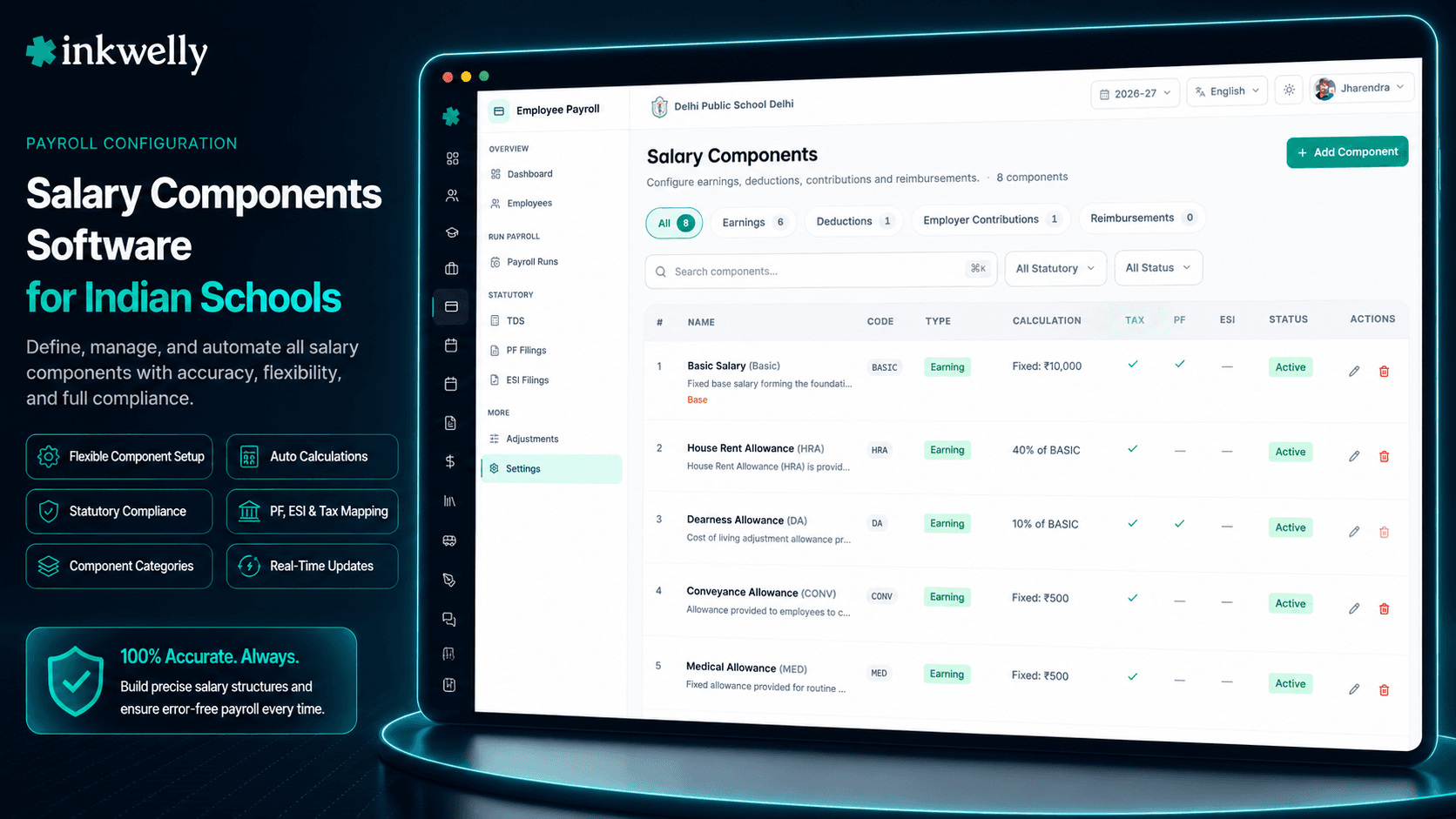
Earnings, deductions, employer contributions, reimbursements — एक बार plain English में define करें, हर salary structure, हर payslip, हर Form 16 में reuse करें। PF, ESI और gratuity जैसे statutory components सही Income Tax sections, EPFO wage rules, और ESIC wage ceilings से pre-mapped हैं। Engine 30 minutes में बनाएं; फिर कभी touch नहीं करना।
अधिकतर Indian schools आज payroll कैसे बनाते हैं
Lucknow के एक ICSE school के accountant के पास 2018-vintage Excel है जिसका नाम salary_master.xlsx है। Column A employee name है, column B BASIC, फिर HRA, DA, PF, ESI, TDS, transport reimbursement — और column N में एक hand-typed formula जो net pay compute करने वाला है। जब school नया component add करता है (कहो 2024 में one-time COVID hardship allowance), वो column copy करती है, formula edit करती है, उम्मीद करती है कि PF और ESI bases अभी भी compute हों, और प्रार्थना करती है कि auditor न पूछे।
April में वो Form 16 hand से generate करती है। Section 17(1) salary, Section 16 deductions, Section 80C investments — हर एक 12 monthly sheets across एक अलग SUMIF। वो submission से पहले तीन errors catch करती है और एक बाद में। October में HRA bump पाने वाली Hindi teacher Form 16 पर short है। Mumbai branch teacher का PT wrong slab use किया। Bus driver के लिए PF computation ने ₹15,000 EPFO ceiling apply नहीं किया। हर error 90-minute fix है और staff member को एक apology।
एक salary component एक बार define होना चाहिए — इसके type (earning vs deduction), इसके calculation rule (fixed vs percentage vs formula), और इसकी statutory linkage (PF? ESI? Section 10(13A) HRA?) के साथ — और फिर हर जगह reused होना चाहिए। Inkwelly यही करता है। Employee Payroll → Settings → Salary Components खोलें, और अपने school जो वाकई use करता है वो 9-15 components define करें: BASIC, HRA, DA, PF_EMP, PF_EMP_R, ESI_EMP, ESI_EMP_R, PT, GRATUITY, TDS, TRANSPORT_REIMB। उस moment से, हर salary structure, हर payslip, हर Form 16 same definition से read करता है।
Inkwelly का component system कैसे काम करता है
एक salary component आपकी component library में एक row है, 6 questions से defined:
1. Type क्या है? Pick from EARNING (gross में add होता है — BASIC, HRA, DA), DEDUCTION (gross से subtract — PF employee share, ESI employee share, TDS), EMPLOYER_CONTRIBUTION (employer का statutory contribution — PF employer 3.67%, EDLI 0.5%), या REIMBURSEMENT (expense reimbursement, gross का part नहीं — transport, medical, books)।
2. Calculate कैसे होता है? Pick FIXED (एक flat number — ₹15,000 BASIC), PERCENTAGE (एक base का % — PF wages का 12%), या FORMULA (एक expression जैसे (BASIC * 0.12) + (DA * 0.08) per payslip evaluated)।
3. Calculation base क्या है? PERCENTAGE/FORMULA components के लिए, pick from CTC, BASIC, GROSS, PF_APPLICABLE_WAGES (PF के लिए ₹15,000 पर capped Basic+DA), ESI_APPLICABLE_WAGES (ESI के लिए ₹21,000 पर capped gross), NET, या CUSTOM।
4. कौन सा statutory rule map होता है? Pick NONE, PF_EMPLOYEE, PF_EMPLOYER, PF_EMPLOYER_EDLI, PF_ADMIN_CHARGES, ESI_EMPLOYEE, ESI_EMPLOYER, PROFESSIONAL_TAX, GRATUITY, LWF_EMPLOYEE, LWF_EMPLOYER, NPS_EMPLOYEE, या NPS_EMPLOYER। एक बार non-NONE value set हो गई, तो field locks (Statutory type cannot be changed once set.) ताकि accountant accidentally mid-year EPFO contributions re-classify न कर सके।
5. Tax treatment क्या है? Toggle isTaxable (HRA 10(13A) के under partially exempt; transport reimbursement 10(14) के under fully exempt)। Optionally taxSection set करें (text जैसे '10(13A)', '10(14)', '17(2)', '80C') और taxExemptionLimit (annual cap)।
6. कौन से flags apply होते हैं? isPFApplicable, isESIApplicable, affectsGratuity (सिर्फ Basic+DA per Payment of Gratuity Act 1972 Sec 4), isBase (एक component base है — आम तौर पर BASIC), showOnPayslip, displayOrder। System one base per org enforce करता है — दूसरा mark करने की कोशिश करें और DUPLICATE_BASE_COMPONENT मिलता है।
यही पूरा model है। बाकी system math करता है। जब आप बाद में salary structure बनाते हैं, आप इन components से Lego blocks जैसे pick करते हैं। जब payrun चलता है, वो dependency order में formulas resolve करता है, caps apply करता है, payslip line items post करता है — componentCode: 'PF_EMP', 'HRA', 'TDS' के साथ। जब Form 16 generate होता है, वो हर component से taxSection read करके amount को right box पर automatically route करता है।
Pre-mapped Indian statutory components
- EPF & MP Act 1952 — PF_EMPLOYEE (PF wages का 12%), PF_EMPLOYER (3.67%), PF_EMPLOYER_EDLI (EDLI 1976 के under 0.5%), PF_ADMIN_CHARGES (0.5% A/C 2)।
PF_APPLICABLE_WAGEScalculation base auto-applies ₹15,000/month basic+DA की EPFO wage ceiling। - ESI Act 1948 — ESI_EMPLOYEE (0.75%), ESI_EMPLOYER (3.25%) ₹21,000/month तक के wages पर; ESI_APPLICABLE_WAGES base। contribution period में employee का gross ₹21,000 cross करते ही auto-stop।
- Payment of Gratuity Act 1972 — GRATUITY component contributing components पर
affectsGratuitytoggle के साथ (सिर्फ Basic+DA, per Sec 4) (Basic+DA) × 15/26 × years calculation के लिए। - Labour Welfare Fund (state-wise) — Maharashtra, Karnataka, Tamil Nadu LWF Acts के लिए LWF_EMPLOYEE और LWF_EMPLOYER (₹6-₹12/employee/month, half-yearly)।
- NPS under PFRDA Act — NPS_EMPLOYEE, NPS_EMPLOYER (10% Tier-I) state-government-aided schools जिनके teachers NPS subscribers हैं।
- Section 16(iii) Professional Tax — PT Slabs के against auto-resolved; deduction Form 16 box 3 में flow करता है।
- Section 10(13A) HRA exemption — HRA component पर
taxSection: '10(13A)'set करें; Form 16 Income Tax Rule 2A के अनुसार (actual HRA / 50% Basic for metro / rent paid - 10% Basic) में से lower automatically pick करता है। - Section 10(14) allowances — Children's education ₹100/month × 2, hostel ₹300/month × 2, transport ₹1,600/month normal employees के लिए। हर एक right exemption cap के साथ अपना component मिलता है।
- Section 17(2) perquisites — House rent, school fees waiver, vehicle, Form 12BA पर taxable।
- Section 80C — PF_EMPLOYEE auto-flagged Section 80C investment proof aggregation की ओर; same NPS_EMPLOYEE के लिए 80CCD(1) के under।
- TDS — payrun के TDS engine द्वारा computed
isTaxable=trueflagged components से YTD taxable income read करके।
PF, EPFO way — wage ceiling और सब
Employees' Provident Fund and Miscellaneous Provisions Act 1952 mandatory PF contributions को PF_APPLICABLE_WAGES के 12% पर cap करता है, जिसे EPFO Basic+DA ₹15,000/month तक define करता है। उस ceiling के बाद, PF voluntary है; अधिकतर schools इसे ₹1,800/month (₹15,000 का 12%) पर cap करते हैं।
Inkwelly में, आप PF_EMP नाम का एक component बनाते हैं: type DEDUCTION, calculationType PERCENTAGE, calculationBase PF_APPLICABLE_WAGES, defaultValue 12, statutoryType PF_EMPLOYEE। System payrun time पर wage-ceiling logic handle करता है — अगर employee का Basic+DA ₹12,000 है, PF ₹1,440 है; अगर ₹18,000 है, PF ₹1,800 है (capped)। आप cap formula नहीं लिखते। ECR file generation same component से read करता है।
HRA — spreadsheet maths के बिना Section 10(13A)
Section 10(13A) HRA exemption Income Tax Rule 2A के साथ read करने पर तीन values में से lower है: actual HRA received, metro cities के लिए Basic का 50% (non-metro के लिए 40%), या rent paid less 10% of Basic। साल में एक बार 60 staff के लिए manually compute करना exhausting है; monthly compute करना impossible है।
Inkwelly में, HRA component taxSection: '10(13A)' carry करता है और isTaxable: true marked है। Form 16 generator यह field read करता है और employee के declared rent, city tier, और Basic का use करके 10(13A) formula automatically apply करता है। Exemption Form 16 Section 10(13A) पर दिखती है; taxable portion Section 17(1) के under दिखती है। कोई accountant maths नहीं।
Formulas, dependency order में evaluated
Real payroll में dependencies होती हैं। DA BASIC का 5%। HRA non-metro के लिए BASIC का 40%। PF (BASIC + DA) का 12% ₹15,000 पर capped। बिना ordering के, आप BASIC से पहले HRA compute नहीं कर सकते, और DA से पहले PF compute नहीं कर सकते। Excel इसे row order से handle करता है; जब आप accidentally rows re-order करते हैं तो spreadsheets break होते हैं।
Inkwelly components एक FORMULA calculationType support करते हैं जहां body दूसरे component codes को verbatim reference करता है: HRA के लिए BASIC * 0.40, PF के लिए (BASIC + DA) * 0.12। Payrun time पर, engine dependency graph बनाता है, components को topological-sort करता है, और हर एक को order में evaluate करता है। Circular dependency बनाने की कोशिश करें (HRA DA पर depend, DA HRA पर) और validator save से पहले CIRCULAR_DEPENDENCY के साथ reject करता है।
Statutory type — एक closed enum, free text नहीं
Free-text statutory tags वो तरकीका है जिससे compliance टूटती है। कोई 'PF Emp' type करता है, अगला कोई 'EPF (employee)' type करता है, और तीन महीने बाद Form 24Q export नहीं बता सकता कि किसको count करना है। Inkwelly का statutoryType field 13 values का closed enum है — NONE, PF_EMPLOYEE, PF_EMPLOYER, PF_EMPLOYER_EDLI, PF_ADMIN_CHARGES, ESI_EMPLOYEE, ESI_EMPLOYER, PROFESSIONAL_TAX, GRATUITY, LWF_EMPLOYEE, LWF_EMPLOYER, NPS_EMPLOYEE, NPS_EMPLOYER।
Saved component पर एक बार set हो गया, तो field locked हो जाता है message 'Statutory type cannot be changed once set.' के साथ। यह accountant को mid-year EPFO contributions re-classify करने से रोकता है और ECR file consistency break होने से। Classification change करने के लिए, आप एक new component बनाते हैं, old को deprecate करते हैं, और affected salary structures को update करते हैं — सब audit-logged।
“Pehle har naye component ke liye Excel mein column add karte the. PF, ESI, gratuity ka formula har sheet mein alag tarah likha hua tha. Inkwelly mein 9 components banaye, ek baar. Form 16 generate karne mein 5 minute lagte hai ab.”
Real-world use cases — पांच scenarios जो वाकई होते हैं
1. नया CBSE school Excel से onboarding। March-2026 में 28 staff के साथ Bhopal CBSE school onboard करता है। Accountant 25 minutes में 11 components बनाता है: BASIC (Fixed, isBase), HRA (Percentage 40% of BASIC, taxSection 10(13A)), DA (Percentage 5% of BASIC), PF_EMP, PF_EMP_R, EDLI, ESI_EMP, ESI_EMP_R, PT, GRATUITY, TDS। April payrun सभी 28 staff के लिए 90 seconds में full statutory compliance के साथ चलता है।
2. School mid-year में children's education allowance add करता है।
Pune school October में Section 10(14) के under children's education allowance add करने का निर्णय करता है: ₹100/month per child, max 2 children। Accountant एक new component CHILD_EDU बनाता है: type EARNING, calculationType FIXED, defaultValue ₹200, isTaxable true, taxSection '10(14)', taxExemptionLimit ₹2,400/year। November payrun से, allowance payslip और Form 16 box 10(14) पर automatically flow करता है।
3. EPFO wage ceiling revision (hypothetical)। अगर EPFO wage ceiling ₹15,000 से ₹21,000 revise करता है, तो accountant PF_APPLICABLE_WAGES base पर cap एक जगह update करता है। PF_EMP use करने वाली हर existing salary structure अगले payrun पर new cap pick करती है। कोई structure-by-structure rebuild नहीं।
4. Audit trail — 'HRA percentage किसने change किया?'
November में auditor HRA computation question करता है। Accountant HRA component खोलता है और audit trail देखता है: 2024-04-01 पर BASIC के 12% पर created, 2024-09-15 पर user accountant.priya@school द्वारा principal-approved policy change ticket #PAY-211 के बाद 40% पर updated। हर change timestamped, attributed, और salary-structure-version snapshot से tied है।
5. School chain LWF वाले state में expand करता है। Bengaluru school chain Mumbai में branch खोलता है। Maharashtra में Labour Welfare Fund है। Accountant LWF_EMP (Fixed ₹6, statutoryType LWF_EMPLOYEE) और LWF_EMP_R (Fixed ₹18, statutoryType LWF_EMPLOYER) बनाता है। इन्हें Maharashtra branch की salary structures में add करता है। Bengaluru staff को LWF नहीं मिलता; Mumbai staff को half-yearly मिलता है।
Common operations जो office चलाता है
- एक new component create करें — 5 cards: Basic Info, Classification, Calculation, Tax & Compliance, Display
- एक component edit करें — statutoryType एक बार set होने पर lock होजाता है; बाकी सब editable
- Historical payslips break किए बिना component retire करने के लिए
isActive=falsemark करें - Component duplicate करें — right-click → Duplicate → differences edit करें (METRO_HRA vs NON_METRO_HRA जैसे variants के लिए perfect)
- Code (
PF_EMP) या name (Provident Fund Employee) से search करें - Type (EARNING / DEDUCTION / EMPLOYER_CONTRIBUTION / REIMBURSEMENT) से filter करें
- सारे PF या सारे ESI components एक view में देखने के लिए statutoryType से filter करें
- Component में drill करें हर salary structure देखने के लिए जो इसे use करता है (edit से पहले impact analysis)
- Auditor के लिए पूरी component library को CSV के रूप में export करें
- Display reorder करें — lower
displayOrdernumbers payslips पर पहले appear होते हैं (BASIC=1, HRA=2, DA=3, PF=10, TDS=20)
30 minutes में अपने school के components configured देखें
9-15 components के साथ demo जो आपका school वाकई use करता है। हम PF, ESI, HRA, gratuity, PT, LWF pre-map करते हैं — आप call पर fine-tune करते हैं।
Limits, safety, और small print
Components org-scoped हैं, school-scoped नहीं। आपकी बनाई हुई library आपके organisation के हर school, हर salary structure, हर FY across shared है। यह intentional है: salary semantics ('BASIC' का मतलब, PF कैसे compute होता है, HRA का tax section क्या है) आपके group across consistent होने चाहिए। Per-school component variations Form 24Q consolidation और ECR file generation break करते हैं।
isBase flag per org unique है — सिर्फ एक component base salary component के रूप में marked हो सकता है। System दूसरा try करने पर DUPLICATE_BASE_COMPONENT के साथ enforce करता है। यह matter करता है क्योंकि BASIC reference करने वाले formula expressions payrun time पर base component की value पर resolve होते हैं; यहां ambiguity downstream हर percentage calculation को break करती है।
code field uppercase alphanumeric केवल underscores के साथ है (regex ^[A-Z0-9_]+$) — case-sensitive, कोई spaces नहीं, कोई hyphens नहीं। यह intentional है: codes formula expressions ((BASIC * 0.12)) में appear होते हैं और parsing में unambiguous होने चाहिए। Friendly names ('House Rent Allowance') name field में रहते हैं।
statutoryType lock एक one-way door है। एक बार आप PF_EMPLOYEE के रूप में component save करते हैं, field permanently disable होजाता है। Re-classify करने के लिए, आप deprecate करते हैं (isActive=false set करते हैं) और correct statutoryType के साथ एक new component बनाते हैं। Deprecated component historical payslips पर अभी भी appear होता है; new component future payslips पर appear होता है। FY across ECR file consistency maintain करने का यही एकमात्र तरीका है।
Formulas strict dependency order में evaluate होते हैं, row order में नहीं। Dependency graph formula expression parse करके और referenced component codes find करके बनता है। अगर आप HRA के formula में BASIC reference करते हैं, HRA का calculationOrder BASIC के order से greater होना चाहिए। Validator INVALID_CALCULATION_ORDER return करता है अगर order dependency graph से match नहीं करता। Circular dependencies (HRA → DA → HRA) save पर immediately CIRCULAR_DEPENDENCY return करती हैं।
Salary Structures इन components को componentId से reference करते हैं। एक component update करना (HRA percentage 40% से 50% change) historical payslips को retroactively change नहीं करता — सिर्फ future payruns को। Historical payslips posting time पर component की resolved values का snapshot होते हैं। यह audit-correctness contract है: June 2025 का एक payslip हमेशा वो दिखाएगा जो June 2025 में compute हुआ था, नहीं कि आज क्या compute होगा।
किस मॉड्यूल का हिस्सा
1 moduleअक्सर पूछे गए सवाल
8 सवालInkwelly किन types के salary components को support करता है?
चार types: `EARNING` (gross में add — BASIC, HRA, DA), `DEDUCTION` (gross से subtract — PF employee, ESI employee, TDS, PT), `EMPLOYER_CONTRIBUTION` (employer का statutory contribution — PF employer 3.67%, EDLI 0.5%), और `REIMBURSEMENT` (expense reimbursements — transport, medical, books)। Reimbursements gross salary का part नहीं होती हैं और default से PF/ESI attract नहीं करती हैं।
PF और ESI जैसे statutory components कैसे handle होते हैं?
हर component में 13 values वाला `statutoryType` enum field है: PF_EMPLOYEE, PF_EMPLOYER, PF_EMPLOYER_EDLI, PF_ADMIN_CHARGES, ESI_EMPLOYEE, ESI_EMPLOYER, PROFESSIONAL_TAX, GRATUITY, LWF_EMPLOYEE, LWF_EMPLOYER, NPS_EMPLOYEE, NPS_EMPLOYER, plus NONE। Non-NONE value set करने पर component right wage definition (PF_APPLICABLE_WAGES ₹15,000 EPFO पर caps; ESI ₹21,000 ESIC पर caps) और right Income Tax section से automatically link होता है।
क्या एक component formula दूसरे components को reference कर सकता है?
हां। `calculationType: FORMULA` वाले components दूसरे component codes को verbatim reference कर सकते हैं (जैसे `(BASIC + DA) * 0.12`)। Payrun time पर, engine dependency graph बनाता है, components को topological-sort करता है, और हर एक को order में evaluate करता है। Circular dependencies (HRA DA पर depend, DA HRA पर) save time पर `CIRCULAR_DEPENDENCY` से catch होती हैं।
Section 10(13A) के under HRA exemption कैसे काम करता है?
HRA component पर `taxSection: '10(13A)'` set करें। Form 16 generation पर, system employee के declared rent, city tier (metro/non-metro), और Basic read करता है, और Income Tax Rule 2A apply करता है: (actual HRA received, metro के लिए Basic का 50% / non-metro के लिए 40%, rent paid less 10% of Basic) में से lower। Exemption Form 16 Section 10(13A) के under appear होता है; taxable portion Section 17(1) salary के under दिखता है।
save करने के बाद statutory type change क्यों नहीं कर सकते?
Statutory classification (PF_EMPLOYEE vs PF_EMPLOYER, ESI_EMPLOYEE vs ESI_EMPLOYER) ECR file generation, Form 24Q quarterly TDS, और EPFO/ESIC contribution period reconciliation drive करती है। Mid-year re-classification इन सबको break करती है। Lock accidental re-classification को रोकता है — change करने के लिए, आप deprecate करते हैं (isActive=false) और correct type के साथ एक new component बनाते हैं। System form में message *'Statutory type cannot be changed once set.'* दिखाता है।
क्या मैं अपने organisation के एकाधिक schools across components share कर सकता हूं?
हां — components org-scoped हैं। Library एक बार build करें और आपके group का हर school same component definitions use करता है। Per-school variations Form 24Q consolidation across schools break करती हैं और classification drift create करती हैं। Salary structures (जो components assemble करते हैं) school-scoped हैं — तो same group में Bengaluru school और Mumbai school same component definitions share करते हुए different component compositions use कर सकते हैं।
अगर मैं एक component update करूं तो historical payslips का क्या होता है?
कुछ नहीं। Historical payslips posting time पर component की resolved values का snapshot होते हैं। अगर आप आज HRA 40% से 50% पर change करते हैं, तो पिछले June के payslips अभी भी 40% दिखाते हैं (June posting पर value)। सिर्फ future payruns new percentage pick करते हैं। यह audit-correctness contract है — एक payslip हमेशा वो reproduce करना चाहिए जो paid था।
जो component मुझे अब ज़रूरी नहीं, उसे कैसे retire करूं?
Component पर `isActive=false` set करें। वो new salary structures और dropdowns में appear होना बंद होजाता है, लेकिन जिन historical payslips ने इसे reference किया था उन पर visible रहता है। Hard-delete posted payslips में foreign-key references से blocked है। Audit trail preserve करता है कि किसने deactivate किया और कब।
आपको ये भी पसंद आ सकता है
2 लेखInkwelly आपके स्कूल पर — खुद देखें
30 मिनट का डेमो। आपके मौजूदा ERP को आपके साथ खोलकर, कॉल पर ही आपका डेटा Inkwelly में लोड करते हैं। कॉल ख़त्म होते-होते एक तय तारीख़ का गो-लाइव प्लान आपके हाथ में।