Streams, electives, languages — bina spreadsheet ke. PCM vs PCB. Three-language formula. Optional subject pool.
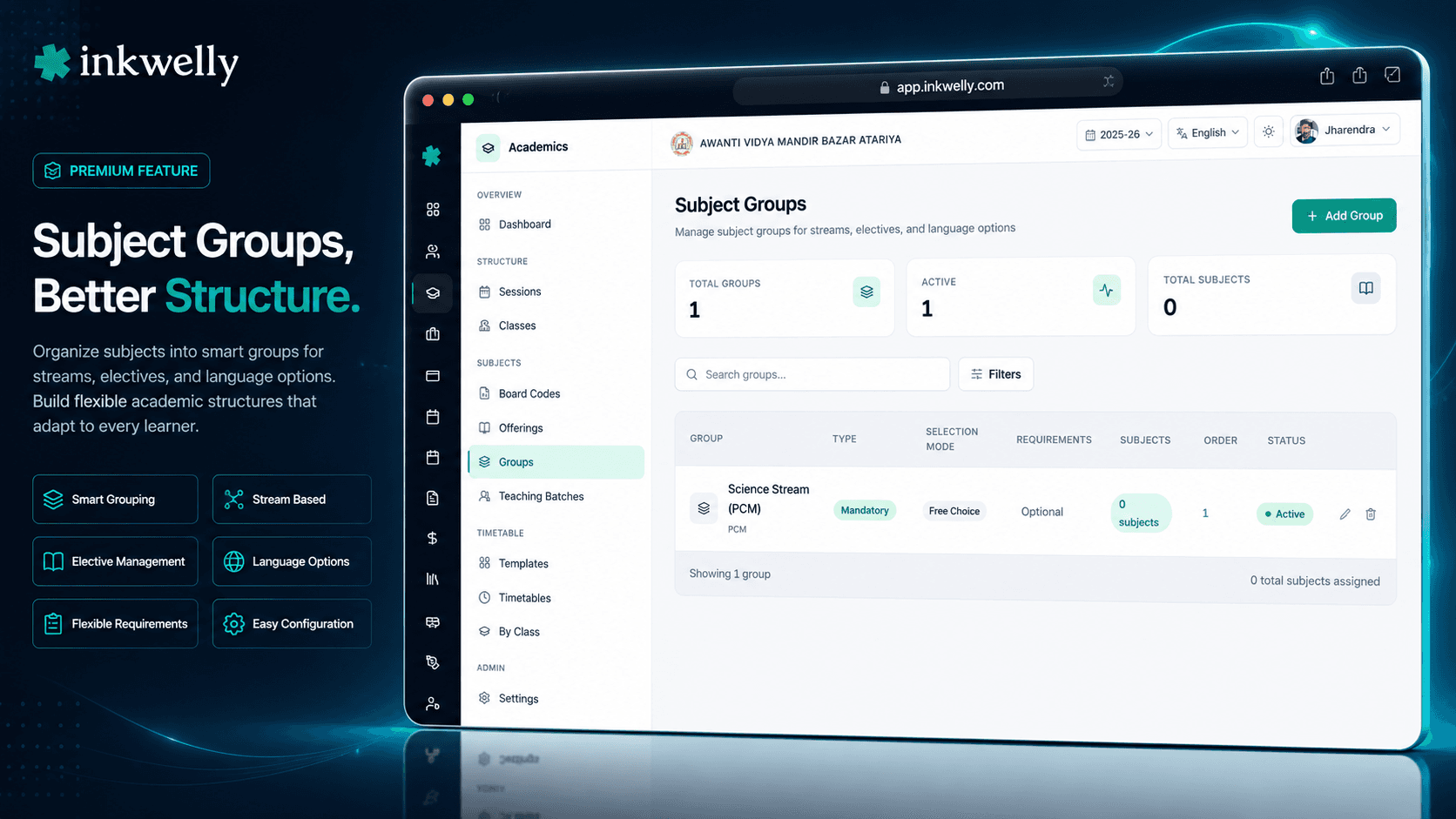
Streams, electives, language groups aur optional-subject pools define karein jo Class 9–12 students ke subject choices ko govern karte hain. Mutually exclusive PCM vs PCB, three-language formula, min-max range, prerequisites aur conditional rules — sab per session configurable.
Subject Groups kyon — Class 11 stream selection ki problem
May hai, Kanpur ke ek CBSE school me. Class 10 ke board results aaye hain. 240 students Class 11 me promote ho rahe hain aur academic office ke paas 6 hafte hain stream selection lock karne ke liye. Kuch students Science PCM chahte hain. Kuch Science PCB. Kuch Commerce me switch kar rahe hain. 3 students Humanities with Psychology chahte hain. 2 students Mathematics in Commerce as elective lena chahte hain. Ek student Physical Education as 6th subject Science stream me lena chahta hai.
Excel me yeh nightmare ban jata hai. Academic head 240 rows aur 12 columns wala spreadsheet kholti hain aur ticking shuru karti hain. 8 PM tak 47 students aise stream combinations me hain jo school actually run hi nahi karta. 2 students ek saath PCM aur PCB me hain. 4 ke paas second language nahi hai. Marksheet template break ho jata hai kyunki Class 11 PCB "Mathematics" offering exist hi nahi karti. Friday ki stream-allocation parent meeting principal cancel kar deti hain kyunki data ready nahi hai.
Inkwelly Subject Groups isse structural level par solve karta hai. Aap PCM, PCB, Commerce-with-Maths, Commerce-with-IP, Humanities ko 4 mutually exclusive groups ke roop me define karte hain Subject Offerings me. Second Language ko MANDATORY_ONE pool of 3 me define karte hain. Optional Sixth Subject ko FREE_CHOICE pool of 5 me define karte hain. Jab parent ya counsellor student ki enrolment screen kholta hai, system rules enforce karta hai. 2 students galti se PCM aur PCB me nahi pahunch sakte. Har student ke paas exactly ek second language hota hai. Marksheet template sahi se generate hota hai kyunki har student ka subject set internally consistent hota hai.
Subject Groups asal me kaam kaise karta hai
Ek Subject Group ek named container hai subject offerings ka, jisme woh rules hote hain jinka palan students ko unke beech choose karte waqt karna hai. 4 group types — STREAM, LANGUAGE_GROUP, ELECTIVE_GROUP, MANDATORY_GROUP — har Indian-school choice scenario ko cover karte hain, "sabhi Class 9 students ko Computer Applications lena hai" se le kar "Class 11 PCM students Applied Mathematics 7th subject ke roop me le sakte hain agar unhone Physical Education nahi liya" tak.
Selection Mode workhorse hai. MANDATORY_ALL ka matlab har subject group me auto-enrolled hota hai — PCM stream ka Physics + Chemistry + Mathematics aisa hi ek group hai. MANDATORY_ONE ka matlab student ko exactly ek pick karna hai — second-language pools (English, Hindi, Sanskrit) me common. MANDATORY_RANGE se aap kah sakte hain "4 ke elective pool me se 1 to 2 pick karein" — ICSE Group 2 electives me common. FREE_CHOICE se students kitne bhi (zero bhi) pick kar sakte hain — optional sixth subjects me common. CONDITIONAL se aap dependent rules encode kar sakte hain — "Advanced Mathematics tabhi available hai jab PCM selected ho".
Groups ek prerequisite declare kar sakte hain — Class 11 stream lock hone se pehle Class 11 second language pick nahi ho sakti. Groups mutually exclusive ho sakte hain — PCM choose karna PCB, Commerce aur Humanities ko exclude karta hai. Groups me ek conditionalRules JSON hota hai jo IF_SUBJECT aur IF_NOT_SUBJECT triggers support karta hai advanced cases ke liye. Ek baar group me koi active student enrolment ho jaye, deletion blocked ho jata hai — API SUBJECT_GROUP_HAS_ENROLLMENTS return karta hai aur safe Disable path par force karta hai.
Har group me kya configure hota hai
- Name aur code — "Science Stream PCM", code "PCM", school+session combination ke per unique
- Slug — name se auto-generated ("science-stream-pcm"), URL aur audit log me use hota hai
- Description — free text jo enrolment dialog par students aur parents ko dikhta hai
- Group Type — STREAM | LANGUAGE_GROUP | ELECTIVE_GROUP | MANDATORY_GROUP, colour-coded badge aur downstream marksheet routing drive karta hai
- Selection Mode — FREE_CHOICE | MANDATORY_ONE | MANDATORY_ALL | MANDATORY_RANGE | CONDITIONAL — woh rule jiska palan student ko karna hai
- minRequired aur maxAllowed — MANDATORY_RANGE ke liye lower aur upper bound (jaise min=1, max=2 ICSE Group 2 electives ke liye)
- Mutual exclusion flag — true hone par yeh group select karna kisi aur same-flagged group ki selection ko prevent karta hai (PCM vs PCB vs Commerce)
- Prerequisite group — dependent group available hone se pehle is group ko complete karna padta hai (stream pehle lock, fir language)
- Conditional rules JSON — cross-group dependencies ke liye IF_SUBJECT / IF_NOT_SUBJECT trigger logic
- Subject offerings list — is school+session ke active offerings se many-to-many link, student-facing display ke liye ordered
- Display order — student enrolment UI aur parent app par groups ka order control karta hai
- Active toggle — group ko mid-session off karein bina kisi historical enrolment data ko kho diye
- Audit trail — subjects, rules, mode aur toggle me har change inspection ke liye captured
CBSE Science PCM vs PCB — mutually exclusive streams
Zyaadatar CBSE schools 2 parallel Science streams chalate hain: PCM (Physics, Chemistry, Mathematics) aur PCB (Physics, Chemistry, Biology). Catch — ek baar student ek pick kar le, dusra galti se nahi pick kar sakta. Inkwelly me aap dono ko STREAM group type ke saath selectionMode=MANDATORY_ALL aur isMutuallyExclusive=true se create karte hain. Student enrolment UI PCM select hote hi PCB hide kar deta hai, aur API kisi bhi backend attempt ko reject karta hai jo same student ko dono me enrol karne ki koshish kare. Mid-year stream change us tareeke se kaam karta hai jaise hona chahiye: PCM drop karein, PCB pick karein, system clean audit trail banata hai aur naye term ka marksheet template adjust ho jata hai.
Three-language formula, 3 groups me configure
NEP 2020 schools se three-language formula ka palan expect karta hai — students apne region ki ek native language, ek official language, aur choice ki ek third language seekhte hain. Inkwelly me yeh 3 LANGUAGE_GROUP type groups ban jata hai. First Language me Hindi aur English MANDATORY_ONE ke roop me. Second Language me English, Hindi aur Sanskrit MANDATORY_ONE (jo first ke roop me chunay gaya woh auto-exclude). Third Language me French, German, Marathi, Bengali aur dusre FREE_CHOICE — student ek add kar sakta hai ya skip bhi kar sakta hai. Conditional Rules JSON exclude-if-chosen-as-first logic handle karta hai taaki student Hindi ko first aur second dono me pick na kar sake.
ICSE Group 2 — pool me se 1 to 2 pick karein
ICSE Class 9–10 compulsory subjects + Group 1 (3 of 4) + Group 2 (1 of 3) expect karta hai. Group 2 pool — Home Science, Business Studies, Economics — ELECTIVE_GROUP ke saath selectionMode=MANDATORY_RANGE, minRequired=1 aur maxAllowed=2 use karta hai. Student enrolment UI real-time count dikhata hai ("1 of 2 selected"). API save tab tak block karta hai jab tak count range me na ho. Marksheet template jaanta hai ki har student ne kaun se Group 2 subjects liye aur sirf wahi rows print karta hai. Year-end par ICSE board paperwork ek-click PDF export hai.
Prerequisites aur conditional rules
Real Indian schools me ordering rules hote hain. Class 11 stream second language se pehle pick karni hai. Advanced Mathematics sirf PCM students ko offered hai. Painting elective ke liye Class 9 Art credit chahiye. Subject Groups dono ko encode karta hai prerequisiteGroupId ke through (ek group dependent group ke selectable hone se pehle complete hona chahiye) aur conditionalRules JSON se (IF_SUBJECT / IF_NOT_SUBJECT triggers). Student enrolment UI dependent groups par locked icon dikhati hai jab tak prerequisite satisfy nahi hota. API server-side bhi validate karta hai, taaki custom integrations bhi rules bypass na kar saken. Cycle detection accidentally A → B → A chain banane se rokta hai; create endpoint PREREQUISITE_CYCLE_DETECTED return karta hai.
“PCM aur PCB ke beech students ka mix-up har saal Class 12 ke marksheet pe pakda jaata tha. Inkwelly ke Subject Groups me mutual exclusion daala — ab admission desk pe hi UI rok deta hai. Six months me ek bhi ghalti nahi hui.”
Indian schools ke real-world scenarios
1. CBSE school Class 11 stream selection lock kar raha hai. May me, academic head 4 STREAM groups create karti hain — PCM, PCB, Commerce-with-Maths, Commerce-with-IP, Humanities — sabhi isMutuallyExclusive=true. Har ek me sahi Subject Offerings hote hain. Class 10 ke results aate hain. Counsellors har student ki profile kholte hain aur dropdown se exactly ek stream pick karte hain. System sabhi MANDATORY_ALL subjects ko auto-enrol karta hai. 240-student stream allocation, jo pehle 3 hafte ki Excel work leti thi, end-to-end 5 din me khatam ho jati hai.
2. ICSE Class 9 elective allocation. School me Compulsory subjects (auto-enrolled), Group 1 = 3 of 4 (Hindi, History, Geography, Civics), Group 2 = 1 of 3 (Home Science, Business Studies, Economics), aur ek free-choice Music/Art/Dance pool hai. 4 Subject Groups isse handle karte hain — Compulsory ke liye MANDATORY_GROUP, Group 1 ke liye ELECTIVE_GROUP with MANDATORY_RANGE (3,3), Group 2 ke liye ELECTIVE_GROUP with MANDATORY_RANGE (1,1), Arts pool ke liye FREE_CHOICE. Student enrolment dialog live counts dikhata hai aur invalid saves block karta hai.
3. State Board school me NEP 2020 three-language formula. Pune ka ek Marathi-medium school Marathi (first language), English (mandatory second), aur Hindi/Sanskrit/French (third, optional) offer karta hai. 3 LANGUAGE_GROUP groups rules encode karte hain. Conditional Rules JSON ensure karta hai ki Marathi ko third language ke roop me bhi nahi pick kiya ja sakta. Parent app student profile par chunay gayi languages unke script me dikhata hai.
4. Mid-year stream change request. Ek PCB student October me PCM me switch karna chahta hai. Academic head student profile kholti hain, PCB deselect karti hain (jo Biology enrolment hatata hai), PCM select karti hain (jo MANDATORY_ALL ke through Mathematics enrolment add karta hai). Audit log change ko timestamp aur user ke saath capture karta hai. Term 1 ke Biology marks archived rahte hain; Term 2 ka marksheet ab Mathematics dikhata hai. Koi data corruption nahi, koi orphan rows nahi.
5. ICSE elective cap enforcement at scale. Class 9–12 me 1,800 students ka ek ICSE school enforce karna chahta hai "koi student 7 academic subjects se zyada nahi le sakta". Ek STREAM group (MANDATORY_ALL = 5 core), ek ELECTIVE_GROUP with MANDATORY_RANGE (1,2) Electives ke liye, plus FREE_CHOICE 0–1 hobby subjects ke liye. System har student configuration ko block karta hai jo cap se exceed kare. Principal ki quarterly board report audit log se har student ke stream-and-elective compliance dikhati hai.
Aam operations jo cover hote hain
- Class 11 / Class 12 ke liye auto-enrol logic ke saath naya STREAM group create karein
- First ya second language ke liye MANDATORY_ONE ke saath LANGUAGE_GROUP create karein
- ICSE Group 1, Group 2 ya IGCSE pools ke liye MANDATORY_RANGE ke saath ELECTIVE_GROUP create karein
- Groups ko mutually exclusive mark karein — PCM pick karna PCB, Commerce, Humanities ko auto-block karta hai
- Groups ko prerequisites se chain karein — stream pehle lock karein, Class 9 ko Class 10 promotion se pehle lock karein
- Detail page se group me subject offerings add ya remove karein
- Group ko active ya inactive toggle karein bina existing student enrolments khoye
- Per-session group configuration ko PDF me export karein — CBSE/ICSE board paperwork ke liye
- Per-group audit log — kisne kaun sa rule kab change kiya, previous value ke saath capture
- Groups ko type (STREAM, LANGUAGE_GROUP, ELECTIVE_GROUP, MANDATORY_GROUP) ya selection mode se filter karein
- Group name, code ya slug se search karein — Devanagari aur Latin dono supported
- Kisi group se teaching batches me drill-in karein jo uske subjects ko abhi use kar rahe hain
Real CBSE Class 11 stream allocation ko Subject Groups solve karta hua dekhein
30-minute walkthrough ek real Indian school ki Class 11 PCM/PCB/Commerce/Humanities setup par. Hum mutual exclusion, three-language formula aur ICSE Group 2 elective rules dikhayenge.
Limits, safety aur small print
Per group maximum subjects. Koi hard cap nahi, lekin UI 3–15 subjects per group ke liye optimized hai. 30 ke baad multiple smaller groups me split karne ka soch sakte hain taaki student enrolment dialog phone screen par scannable rahe.
Code aur slug uniqueness. Group code aur slug (school, session, organization) combination ke per unique hone chahiye. Duplicate creates SUBJECT_GROUP_ALREADY_EXISTS (HTTP 409) return karte hain. "PCM", "PCB", "COM-MATHS" jaise codes valid hain; spaces aur special characters slug se auto-strip ho jate hain.
Prerequisite cycles detect hote hain. Aap A → B → A ya A → B → C → A nahi bana sakte. Create endpoint topological-sort check chalata hai aur record likhe jaane se pehle PREREQUISITE_CYCLE_DETECTED (HTTP 400) return karta hai.
Subject offering active aur same session ka hona chahiye. Group sirf un offerings ko contain kar sakta hai jo same session ke liye already active hain. Agar aap aisi offering attach karne ki koshish karein jo is session me exist nahi karti, API SUBJECT_OFFERING_NOT_FOUND return karta hai — cross-session data leaks se protect karta hai.
Range validation. MANDATORY_RANGE ke liye maxAllowed ≥ minRequired hona chahiye. Validator silently clamp karne ke bajaye clear error message return karta hai. minRequired group ke subjects ke count se exceed nahi kar sakta.
Enrolments hone par deletion blocked. Ek baar group ke through koi active student enrol ho jaye, delete attempts par API SUBJECT_GROUP_HAS_ENROLLMENTS (HTTP 400) return karta hai. Active toggle se disable karein — historical enrolment data parent app, transcript aur inspection use cases ke liye intact rehta hai.
Permissions. Sirf wo roles jinke paas academics.subject_groups.write hai groups create, update, ya delete kar sakte hain. Yeh role Identity & Access Management ka hissa hai aur kisi regional academic head ko per-school basis par grant kiya ja sakta hai bina dusre school admin functions expose kiye.
किस मॉड्यूल का हिस्सा
1 moduleअक्सर पूछे गए सवाल
8 सवालKya mujhe Class 11 aur Class 12 streams ke liye alag Subject Groups chahiye?
Aam taur par nahi — wahi 4 streams (PCM, PCB, Commerce, Humanities) Class 11 aur 12 dono ko same subjects ke saath span karte hain. Aap per academic session ek set of groups create karte hain, aur Class 12 students wahi group me rehte hain jisme unhone Class 11 ke liye enrol kiya tha. Kuch schools alag Class 12 groups create karte hain jab woh extra Applied subjects sirf Class 12 ko offer karte hain — dono patterns kaam karte hain. Group ka display order control karta hai ki enrolment dropdown me kaun sa group pehle dikhega.
Kya ek student ek hi waqt do streams me ho sakta hai?
Nahi. STREAM groups jo `isMutuallyExclusive=true` flagged hain woh single-stream selection enforce karte hain. Student enrolment UI ek pick hote hi dusre mutually exclusive groups ko hide kar deta hai, aur agar koi backend integration second stream enrolment create karne ki koshish kare toh API validation error return karta hai. Yeh wahi bug hai jo CBSE schools ko har October me marksheet print time par pakad leta hai — Subject Groups isse structurally impossible bana deta hai.
Yeh NEP 2020 three-language formula ko kaise handle karta hai?
Aap 3 LANGUAGE_GROUP type groups create karte hain: First Language, Second Language, Third Language. First aur Second MANDATORY_ONE hain; Third FREE_CHOICE hai. Conditional Rules JSON *exclude-if-chosen-as-first* logic encode karta hai taaki student Hindi ko first aur second dono me pick na kar sake. Marksheet template har student ki sahi values ke saath teenon columns har report card par print karta hai.
Agar koi student mid-year stream change karna chahe to?
Student profile kholein, purana stream deselect karein, naya select karein. System purane MANDATORY_ALL subject enrolments ko hatata hai aur naye add karta hai. Drop kiye gaye subjects ke Term 1 marks archived rahte hain (transcripts unhe abhi bhi dikhate hain), aur Term 2 onwards naya stream use hota hai. Audit log change ko timestamp, user, aur previous configuration ke saath capture karta hai.
Kya ek hi trust ki alag branches alag groups chala sakti hain?
Haan. Subject Groups per-school per-session hain, even though underlying subjects organization level par live karte hain. Lucknow ka ek CBSE branch second language ke roop me Sanskrit chala sakta hai jab ki Bahraich ka ek ICSE branch third language ke roop me French chalata hai — dono same org subject catalogue share karte hain par apne groups independently configure karte hain. Trust ka central academic head sabhi branches across consolidated audit view dekhta hai.
Subject Groups marksheets aur report cards ko kaise feed karta hai?
Marksheet generator har student ke enrolled groups ko padhata hai, individual [subject offerings](/features/subject-offerings) me expand karta hai, aur sirf relevant rows print karta hai. Ek PCM student ka report card Physics, Chemistry, Mathematics, English Core aur chosen optional sixth subject dikhata hai — kabhi PCB ka Biology nahi. Group metadata (Stream Type, Selection Mode) bhi transcript par stamped hota hai taaki CBSE inspector document se hi scheme compliance verify kar sake.
CBSE inspection ke time historical group changes ka kya hota hai?
Subject Group me har change — name, type, mode, subjects added/removed, prerequisites, mutual exclusion flag — audit log me timestamp, user, aur before/after values ke saath captured hota hai. Audit log org dashboard se PDF ya CSV ke roop me exportable hai. "Aapki Session 2024-25 me stream allocation kaise kaam karti thi?" maangne wali inspections minutes me, na ki days me, verifiable answer paati hain.
Kya subject groups data India me store hota hai?
Haan. Saara Inkwelly data — subject groups, student enrolments, audit logs aur inspection-ready exports — Mumbai ke servers par store hota hai aur India ke DPDP Act 2023 ke compliant hai. Backups encrypted hain aur 30 days retain hote hain. Trust-level admins kabhi bhi full per-school data export request kar sakte hain.
आपको ये भी पसंद आ सकता है
2 लेखInkwelly आपके स्कूल पर — खुद देखें
30 मिनट का डेमो। आपके मौजूदा ERP को आपके साथ खोलकर, कॉल पर ही आपका डेटा Inkwelly में लोड करते हैं। कॉल ख़त्म होते-होते एक तय तारीख़ का गो-लाइव प्लान आपके हाथ में।