स्टाफ-वार्ड डिस्काउंट नियम कैसे सेट करें Inkwelly में
यह गाइड उन स्कूल अकाउंटेंट और HR प्रबंधकों के लिए है जो टीचर, ड्राइवर, सपोर्ट स्टाफ या प्रिंसिपल के बच्चों को एक स्थायी फीस छूट देना चाहते हैं। अंत में आपके पास एक श्रेणी-वार नियम होगा जो Inkwelly हर स्टाफ-वार्ड के invoice पर पूरे सत्र के लिए अपने-आप लागू करेगा।
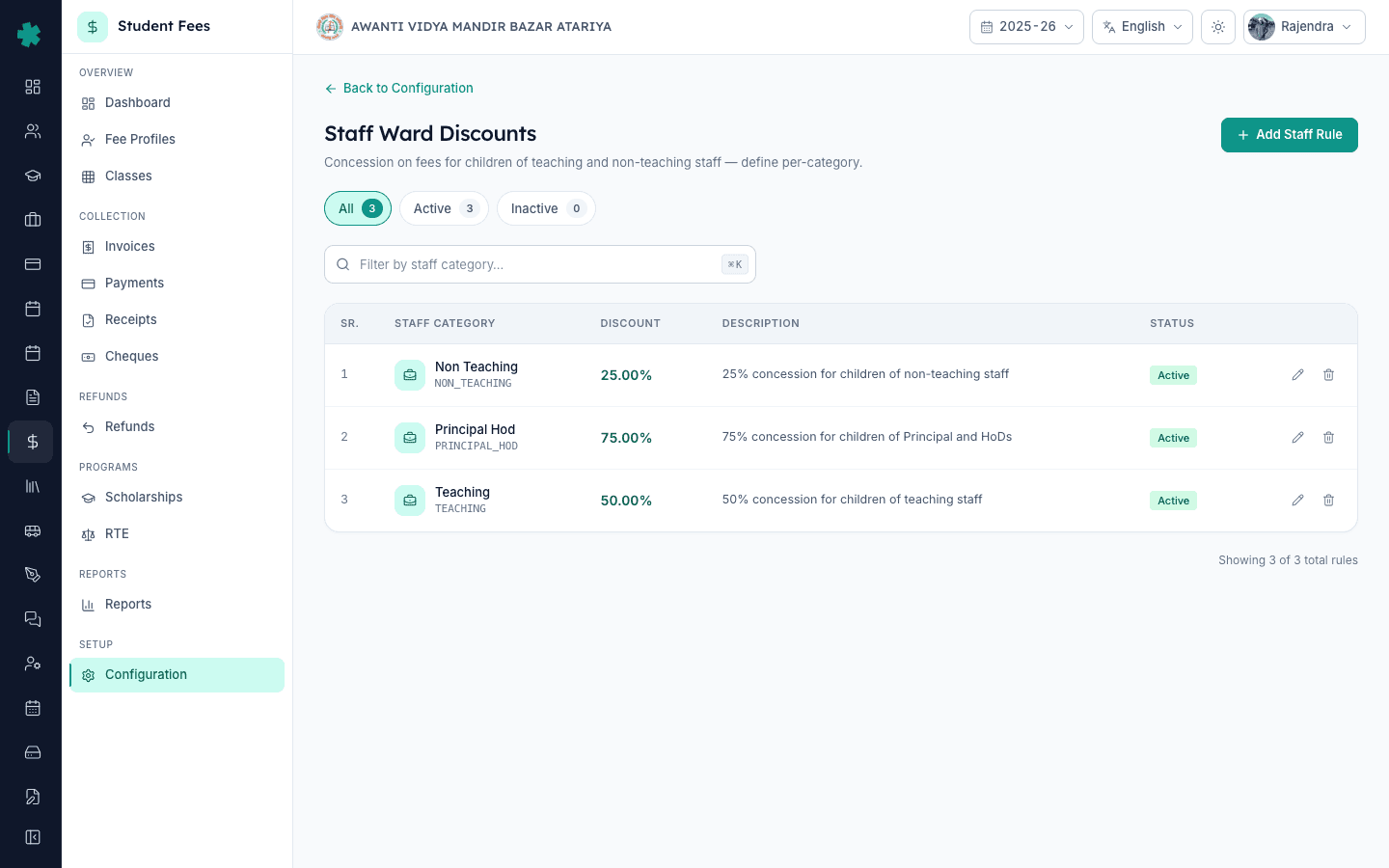
Inkwelly में स्टाफ-वार्ड डिस्काउंट सेट करने के लिए: Student Fee → Configuration → Staff Ward Discounts खोलें, Add Rule क्लिक करें, स्टाफ श्रेणी चुनें (Teaching, Non-Teaching, Admin, Support, Driver या कोई कस्टम), डिस्काउंट प्रतिशत भरें, Active रहने दें, और सेव करें। Inkwelly उस छूट को हर उस छात्र की फीस profile पर अपने-आप लागू कर देगा जिसके अभिभावक के रिकॉर्ड में वही स्टाफ श्रेणी टैग है — हर छात्र पर अलग से एडिट करने की ज़रूरत नहीं।
स्टाफ-वार्ड छूट कोई दान नहीं, बल्कि टीचर बनाए रखने का एक तरीका है। भारत में CBSE से जुड़े स्कूल टीचिंग स्टाफ के बच्चों को 25–100% फीस छूट देते हैं — 7वें वेतन आयोग का Children Education Allowance सरकारी कर्मचारियों के लिए ₹27,000 प्रति बच्चा प्रति वर्ष तय करता है, और निजी स्कूल अच्छे टीचर रोकने के लिए इसी पैटर्न का अनुसरण करते हैं। 1,200 छात्रों वाले CBSE स्कूल में लगभग 60 टीचर होते हैं, जिनमें से 18–22 स्टाफ-वार्ड परिसर में पढ़ते हैं; नियम-आधारित 50% छूट हर सत्र में ऑफिस के लगभग 240 manual edits बचाती है और फीस-वसूली के विवाद ख़त्म करती है। Inkwelly नियम को एक ही जगह रखता है ताकि promotion, salary revision या श्रेणी बदलने पर छूट चुपचाप टूटे नहीं।
1. Fee Configuration खोलें
बाएँ साइडबार से Inkwelly → Student Fee खोलें, फिर SETUP के अंतर्गत Configuration पर क्लिक करें। Fee Configuration पेज पर चार सेक्शन दिखेंगे — Fee Structure, Discounts, Penalties & Refunds और Preferences। Discounts सेक्शन तक scroll करें। Staff Ward Discounts टाइल Sibling Discounts और Early Payment Discounts के बीच में है, जिसका subtitle है 'Set up discounts for children of staff members.'
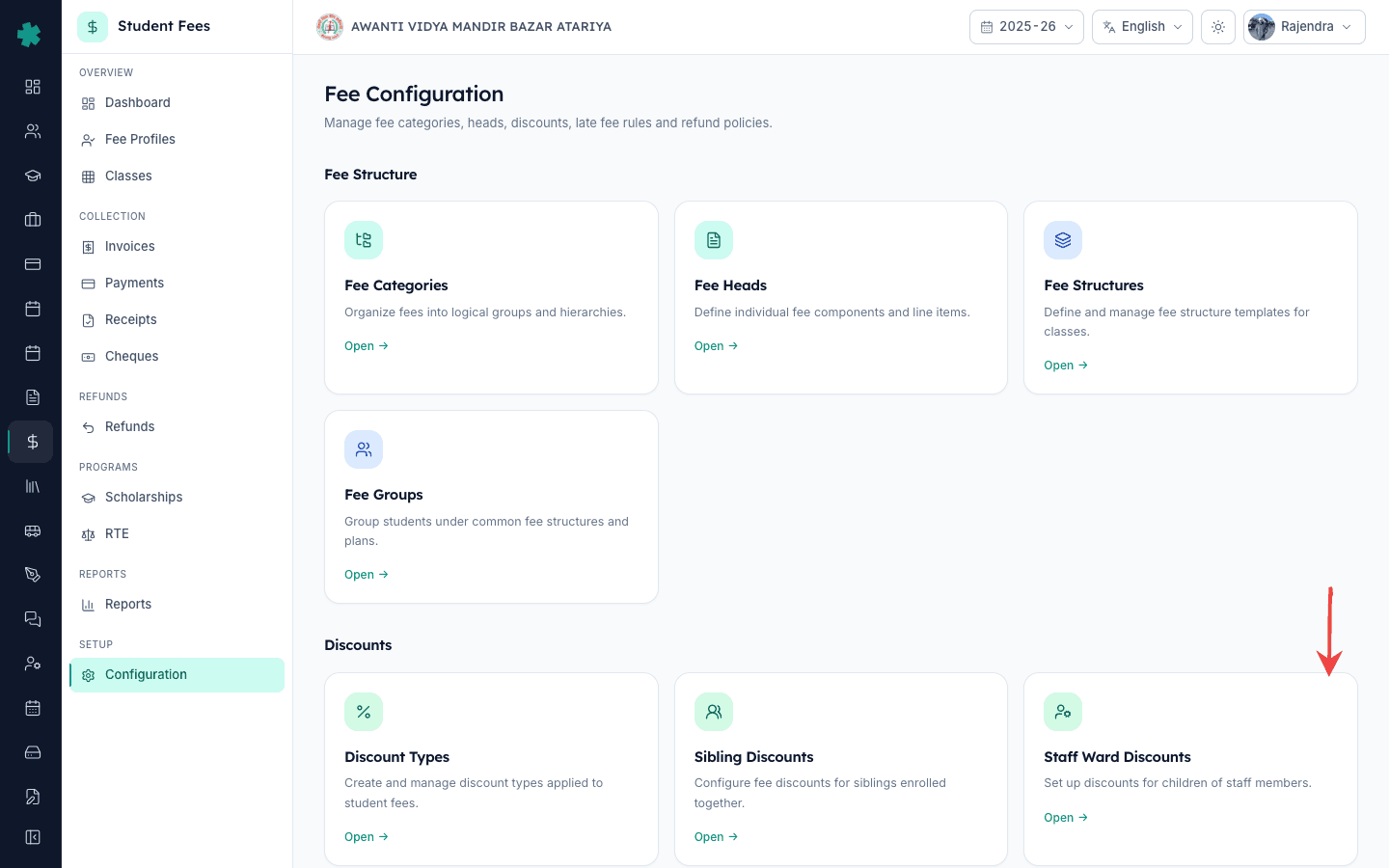
2. Staff Ward Discounts खोलें
Staff Ward Discounts टाइल पर Open क्लिक करें। Inkwelly सूची पेज खोलता है जहाँ हर नियम के लिए एक पंक्ति होती है — स्टाफ श्रेणी, प्रतिशत, विवरण और Active/Inactive pill के साथ। ऊपर दाईं ओर Add Rule बटन है और पेज के शीर्ष पर तीन KPI chips दिखते हैं — All, Active और Inactive — जिससे एक नज़र में पता चलता है कि कितनी श्रेणियाँ कवर हैं।
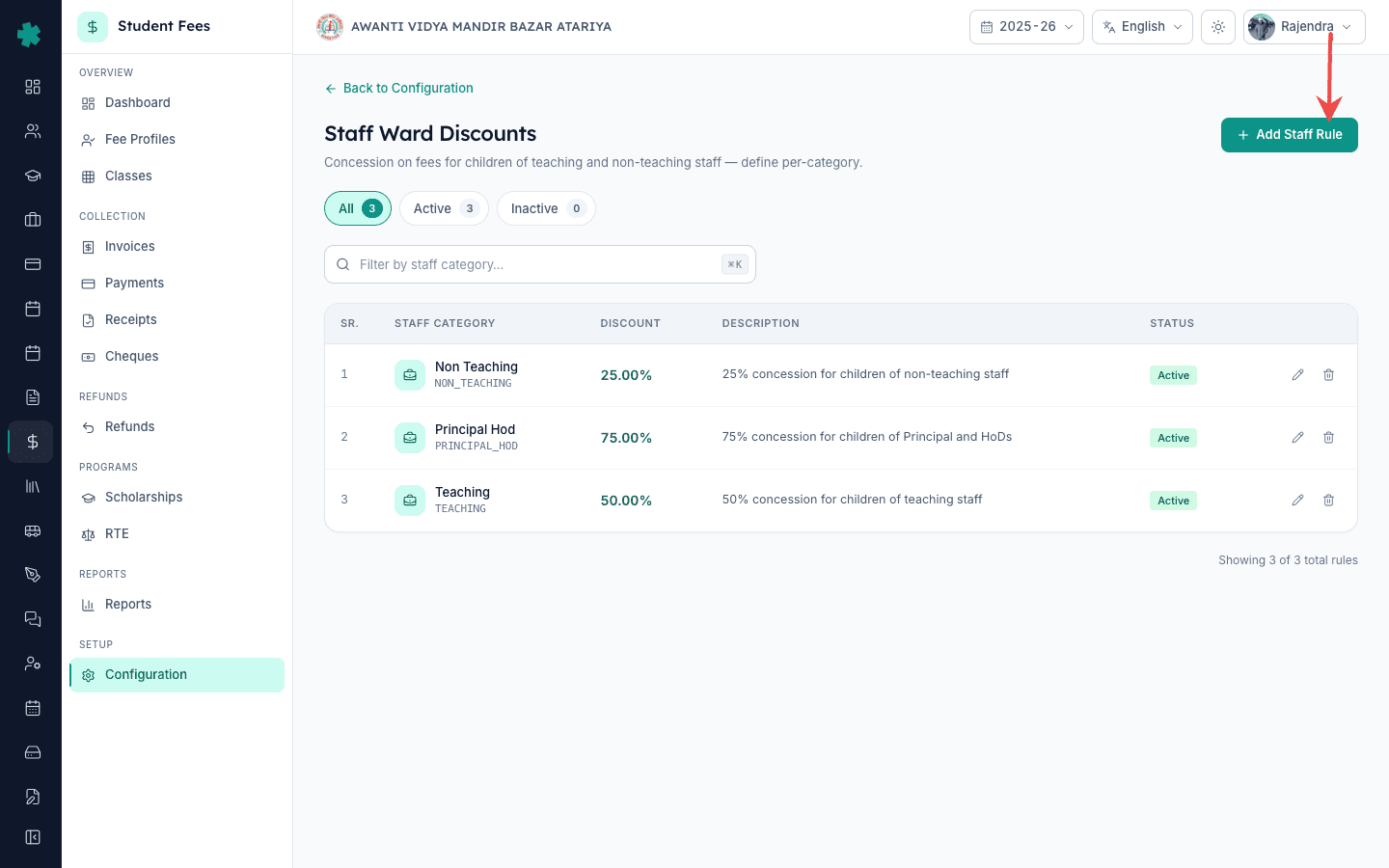
3. Add Rule क्लिक करें और स्टाफ श्रेणी चुनें
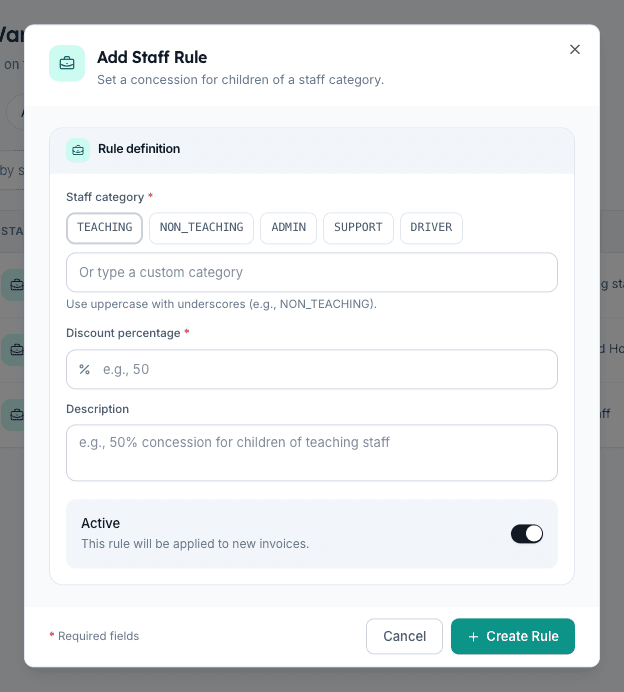
Add Rule पर क्लिक करें। डायलॉग में स्टाफ श्रेणी चुनें। पाँच quick-pick chips भारतीय स्कूल की आम taxonomy को कवर करते हैं — TEACHING, NON_TEACHING, ADMIN, SUPPORT, DRIVER — या underscore के साथ uppercase में कस्टम श्रेणी टाइप करें (उदाहरण PRINCIPAL_HOD या LIBRARIAN)। Inkwelly इस string को अभिभावक के HR रिकॉर्ड पर लगे स्टाफ-श्रेणी टैग से मिलाता है, इसलिए spelling बिल्कुल वही होनी चाहिए जो HR टीम पहले से उपयोग कर रही है।
4. डिस्काउंट प्रतिशत भरें
Discount Percentage फ़ील्ड में प्रतिशत भरें। 0 से 100 तक का मान स्वीकार्य है, दो दशमलव स्थान तक (उदाहरण 12.50)। सबसे आम भारतीय pattern हैं — टीचिंग स्टाफ के लिए 50%, नॉन-टीचिंग स्टाफ के लिए 25%, और प्रिंसिपल, वाइस-प्रिंसिपल व HoDs के लिए 75–100%। यह संख्या ट्रस्ट द्वारा अनुमोदित स्टाफ-बेनिफिट नीति से मेल खानी चाहिए; Inkwelly इसे base फीस स्ट्रक्चर के ऊपर, late fees से पहले और sibling छूट के बाद लागू करता है।
5. Description जोड़ें और Active रखें
Description फ़ील्ड में एक छोटा सा विवरण लिखें — जैसे '50% concession for children of teaching staff, as per board resolution dated 1 April 2025'। यह विवरण नियम की पंक्ति और फीस-profile audit log में दिखता है, जो फीस-समिति समीक्षा में छूट को सही ठहराने में मदद करता है। Active toggle चालू रखें ताकि Inkwelly नियम तुरंत लागू करना शुरू कर दे; इसे बंद तभी करें जब बीच सत्र में नियम को बिना configuration खोए रोकना हो।
6. Create Rule क्लिक करें और पंक्ति की पुष्टि करें
Create Rule पर क्लिक करें। Inkwelly नियम सेव करता है और सूची पेज पर लौटता है, नई पंक्ति ऊपर हरे Active pill के साथ दिखती है। हर ज़रूरी स्टाफ श्रेणी के लिए चरण 3 से 6 दोहराएँ — एक सामान्य भारतीय setup में तीन से पाँच नियम होते हैं जो Teaching, Non-Teaching, Admin या Support, Driver और Principal-HoD को कवर करते हैं। ऊपर के All, Active और Inactive counts नियम जोड़ने या रोकने पर अपडेट हो जाते हैं।
7. किसी स्टाफ-वार्ड फीस profile पर पुष्टि करें
Student Fee → Fee Profiles खोलें, किसी स्टाफ-वार्ड छात्र को खोजें और profile खोलें। Overview टैब पर Discounts टाइल Inkwelly द्वारा लागू छूट की राशि दिखाती है, और दाईं ओर Fee Breakdown panel स्टाफ-वार्ड छूट के बाद का net payable दिखाता है। यदि नियम invoice बनने के बाद जोड़ा गया है, तो Edit बटन के बगल वाले Recalculate आइकन पर क्लिक करें — Inkwelly profile को फिर से गणना करके खुली किस्तों पर छूट लागू कर देगा।
अगला कदम — इस नियम से पहले फीस स्ट्रक्चर और फीस ग्रुप तैयार करें, अन्यथा छूट को लागू करने के लिए कोई base नहीं होगा। यह भी सुनिश्चित करें कि आपकी फीस categories और फीस heads परिभाषित हों, ताकि छूट हर लाइन आइटम पर सही ढंग से कम करे। इस नियम engine से बाहर किसी एक-बार की रियायत — जैसे hardship case — के लिए फीस profile के per-student Discounts टैब का उपयोग करें।
Inkwelly Student Fees को काम करते हुए देखें
अक्सर पूछे गए सवाल
6 सवालभारतीय स्कूल आमतौर पर टीचर्स के बच्चों को कितनी फीस छूट देते हैं?
टीचिंग स्टाफ के बच्चों के लिए tuition पर 50% छूट सबसे आम भारतीय परंपरा है। नॉन-टीचिंग स्टाफ को आमतौर पर 25% और प्रिंसिपल, वाइस-प्रिंसिपल व HoDs को 75% से 100% मिलता है। यह संख्या ट्रस्ट या स्कूल प्रबंधन समिति लिखित रूप में तय करती है और 7वें वेतन आयोग के ₹27,000 प्रति बच्चा प्रति वर्ष के benchmark से मेल खाती है।
क्या स्टाफ-वार्ड छूट हर फीस head पर लागू होती है या सिर्फ़ tuition पर?
Inkwelly में यह नियम base फीस स्ट्रक्चर को समग्र रूप से कम करता है, इसलिए यह स्ट्रक्चर के हर लाइन आइटम — tuition, transport, library, lab और activities — पर लागू होता है। यदि ट्रस्ट के संकल्प में छूट केवल tuition तक सीमित है, तो स्टाफ वार्ड के लिए एक tuition-only फीस स्ट्रक्चर बनाएँ या उस profile पर per-student Discounts tab से नियम override करें।
Teacher ke bachhon ko fee discount kaise de Inkwelly me?
Student Fee menu kholiye, Configuration par jaiye, Staff Ward Discounts tile open kijiye, Add Rule click kijiye. Staff category me TEACHING select kijiye (ya custom uppercase category type kijiye), discount percentage me 50 dijiye, description likhiye, Active toggle on rakhiye, Create Rule dabaiye. Sab teacher-ward students par yeh discount apne aap apply ho jayega — har student ko alag se edit karne ki zaroorat nahi.
Staff ward ke liye kitna concession Inkwelly me set kare?
Standard Indian pattern follow kijiye — Teaching staff ke bachhon ke liye 50%, Non-Teaching staff ke liye 25%, Principal aur HoDs ke liye 75% se 100%. Trust resolution check kar lijiye pehle. Inkwelly me 0 se 100 ke beech koi bhi percentage chalega, do decimal tak. Rule save karne ke baad fee profile khol ke verify zaroor karen ki discount sahi se apply ho raha hai.
यदि कोई स्टाफ सदस्य बीच सत्र में इस्तीफ़ा दे दे तो छूट का क्या होगा?
यदि उस श्रेणी में कोई नहीं बचा है तो उस नियम को बंद कर दें, या इस्तीफ़ा देने वाले स्टाफ के बच्चे के per-student Discounts tab से अगली किस्त से छूट हटाएँ। Inkwelly पूरा audit trail रखता है — पिछली किस्तें collected रहती हैं और केवल भविष्य के invoice फिर से गणना होते हैं। अधिकांश स्कूल goodwill के तौर पर पूरे सत्र तक छूट जारी रखते हैं।
क्या Inkwelly स्टाफ-वार्ड छूट को sibling और early-payment छूट के साथ stack करता है?
हाँ। Inkwelly पहले sibling discount लागू करता है, फिर कम हुए base पर स्टाफ-वार्ड छूट, फिर बचे हुए पर कोई भी early-payment discount। छात्र profile पर Fee Breakdown panel हर परत अलग दिखाता है ताकि ऑफिस और अभिभावक दोनों देख सकें कि final net payable कैसे बना — इससे फीस counter पर अधिकांश विवाद ख़त्म होते हैं।
आपको ये भी पसंद आ सकता है
3 लेखस्रोत व संदर्भ
- 7th Central Pay Commission Report — Children Education Allowance · देखा गया 19 May 2026
The 7th Pay Commission fixed the Children Education Allowance at ₹27,000 per child per year for government employees — the benchmark Indian schools mirror when deciding teacher-ward concession percentages.
- CBSE Affiliation Bye-Laws — Chapter VIII, Staff Welfare · देखा गया 19 May 2026
CBSE requires affiliated schools to maintain documented staff-welfare provisions including fee concessions for children of teachers, which schools record as standing discount rules.
- Right of Children to Free and Compulsory Education Act, 2009 — Section 13 · देखा गया 19 May 2026
Section 13 of the RTE Act bars schools from collecting any fee beyond the published structure, making documented concession rules the legally compliant way to grant staff-ward discounts.
Inkwelly आपके स्कूल पर — खुद देखें
30 मिनट का डेमो। आपके मौजूदा ERP को आपके साथ खोलकर, कॉल पर ही आपका डेटा Inkwelly में लोड करते हैं। कॉल ख़त्म होते-होते एक तय तारीख़ का गो-लाइव प्लान आपके हाथ में।