फीस स्ट्रक्चर कैसे बनाएं शैक्षणिक सत्र के लिए
यह गाइड उन स्कूल अकाउंटेंट और प्रिंसिपल के लिए है जो नए सत्र की शुरुआत में फीस सेट कर रहे हैं। अंत में आपके पास Inkwelly में एक पूरा फीस स्ट्रक्चर तैयार होगा — क्लास, फीस हेड के अनुसार लाइन आइटम और तिथि सहित किस्तें — जो फीस ग्रुप से जोड़ने के लिए तैयार है।
Inkwelly में फीस स्ट्रक्चर बनाने के लिए: Student Fee → Configuration → Fee Structures खोलें, Add Structure पर क्लिक करें, प्लान का नाम और कुल राशि भरें, लागू होने वाली क्लास चुनें, स्ट्रक्चर खोलकर हर फीस हेड के लिए लाइन आइटम जोड़ें, फिर तिथि के साथ किस्तें जोड़ें। एक क्लास के लिए पूरा वार्षिक स्ट्रक्चर लगभग पाँच मिनट में तैयार हो जाता है और यही वह स्रोत है जिससे invoice generator हर छात्र के लिए invoice बनाता है।
फीस स्ट्रक्चर वह मास्टर प्लान है जिससे क्लास के हर invoice का आधार तय होता है। ज़्यादातर भारतीय CBSE और राज्य बोर्ड के स्कूल हर सत्र में तीन से पाँच स्ट्रक्चर रखते हैं — एक प्रति क्लास बैंड जैसे KG–Class 3, Class 4–5, Class 6–8, Class 9–10, Class 11–12 — क्योंकि tuition और activity फीस अलग होती है। 1,200 छात्रों वाला स्कूल हर साल इन स्ट्रक्चर के विरुद्ध लगभग 4,800 invoice जारी करता है; शुरुआत में मास्टर सही बनाने से ऑफिस को बाद में सैकड़ों सुधारों से बचाया जा सकता है। Tier-2 शहर के एक डे स्कूल का सामान्य KG–3 प्लान ₹5,000 से ₹25,000 प्रति वर्ष के बीच होता है, जिसमें Tuition, Transport और Activities शामिल होते हैं।
1. Fee Configuration खोलें
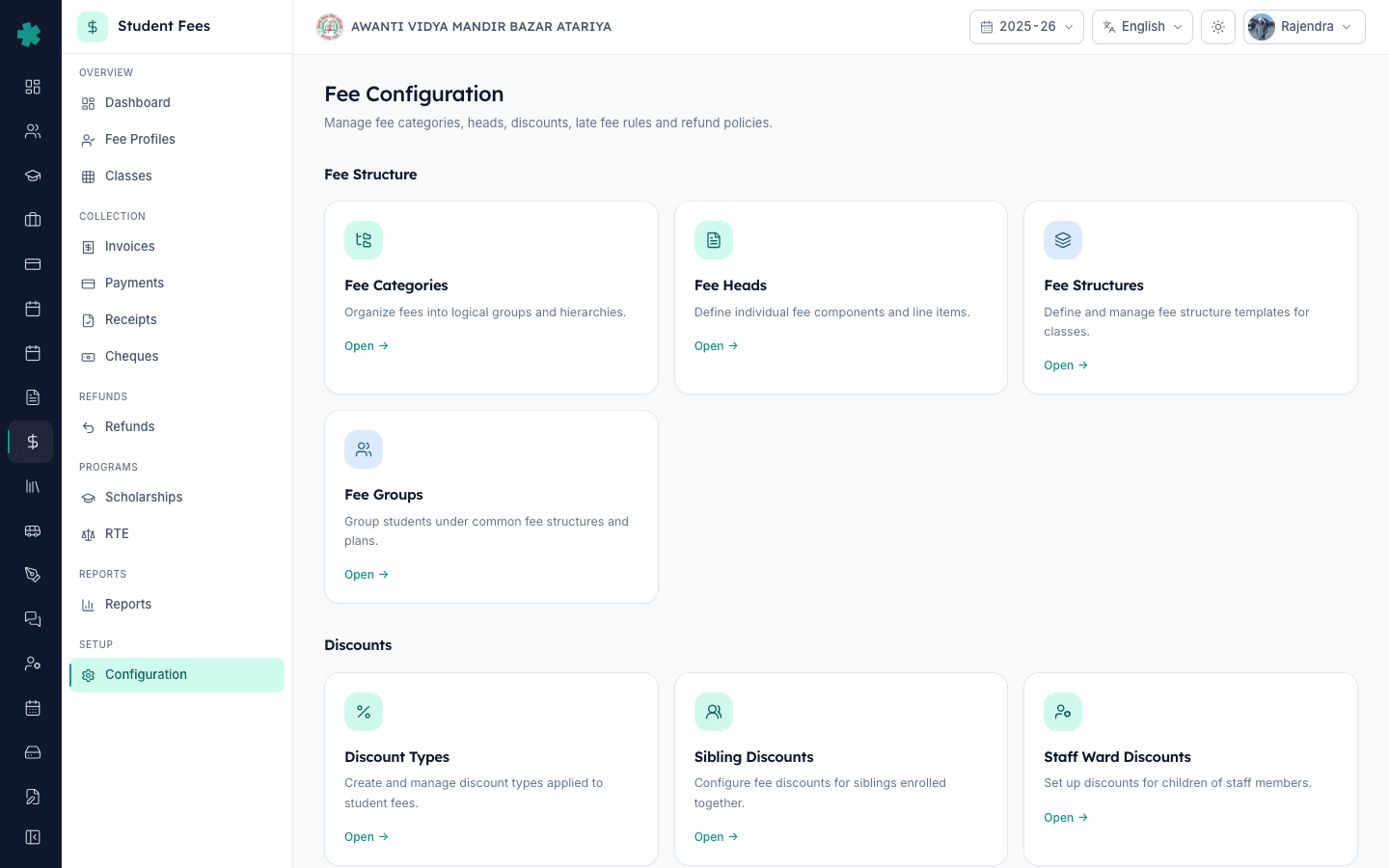
बाएँ साइडबार से Inkwelly → Student Fee खोलें, फिर SETUP के अंतर्गत Configuration पर क्लिक करें। Fee Configuration पेज पर चार सेक्शन दिखेंगे: Fee Structure, Discounts, Penalties & Refunds और Preferences। आपको Fee Structure सेक्शन चाहिए, और उसी के अंदर मौजूद Fee Structures टाइल में सत्र के सभी वार्षिक प्लान रखे जाते हैं।
2. Fee Structures टाइल खोलें
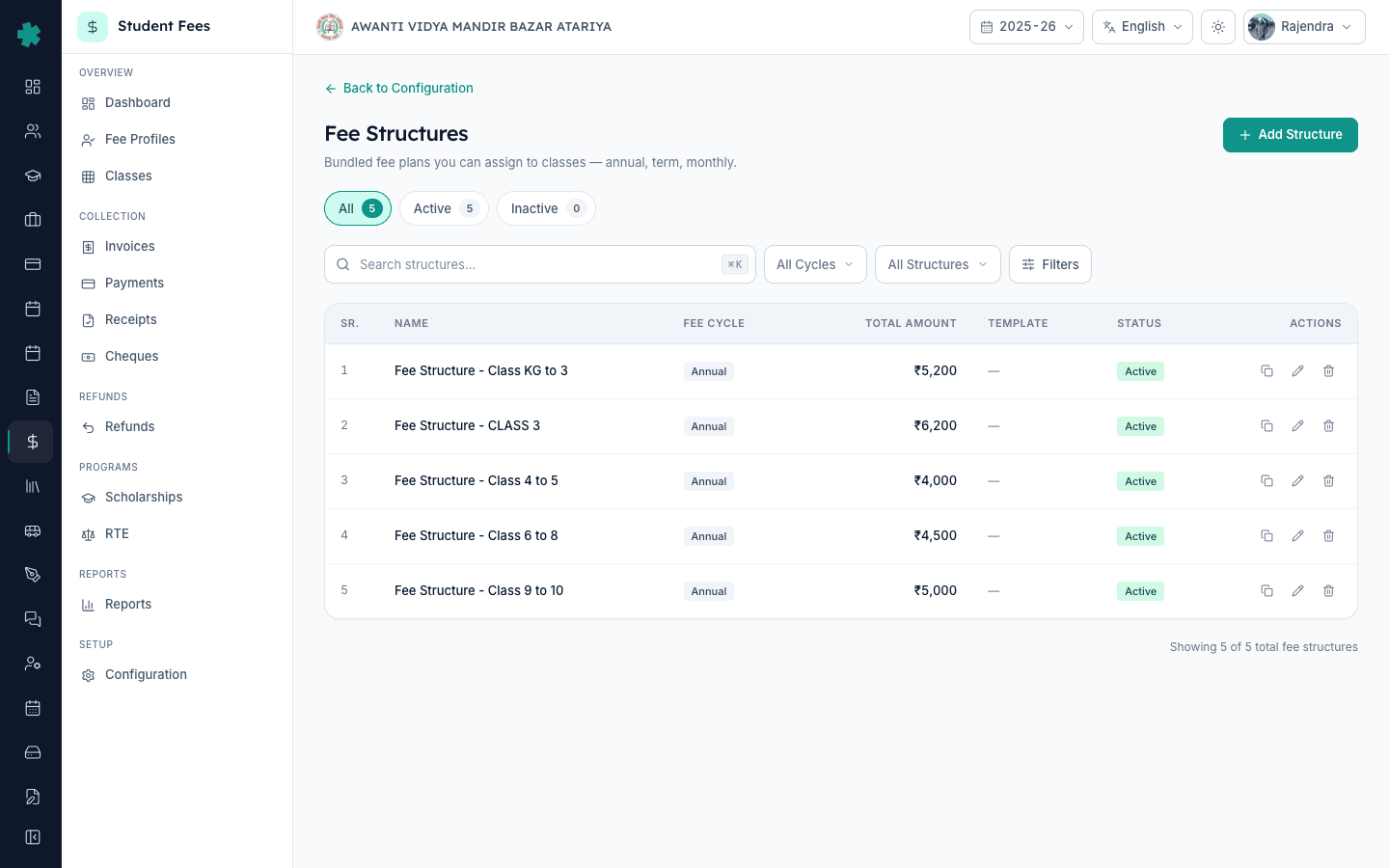
Fee Structures टाइल पर Open क्लिक करें। Inkwelly सत्र के लिए पहले से बनाए गए हर स्ट्रक्चर की सूची दिखाता है, हर कार्ड पर किस्तों की संख्या, कवर हुए छात्र और कुल राशि लिखी होती है। पेज के ऊपर दाईं ओर Add Structure बटन है — यहीं से हर नया वार्षिक प्लान शुरू होता है।
3. Add Structure क्लिक करें और प्लान का आधार भरें
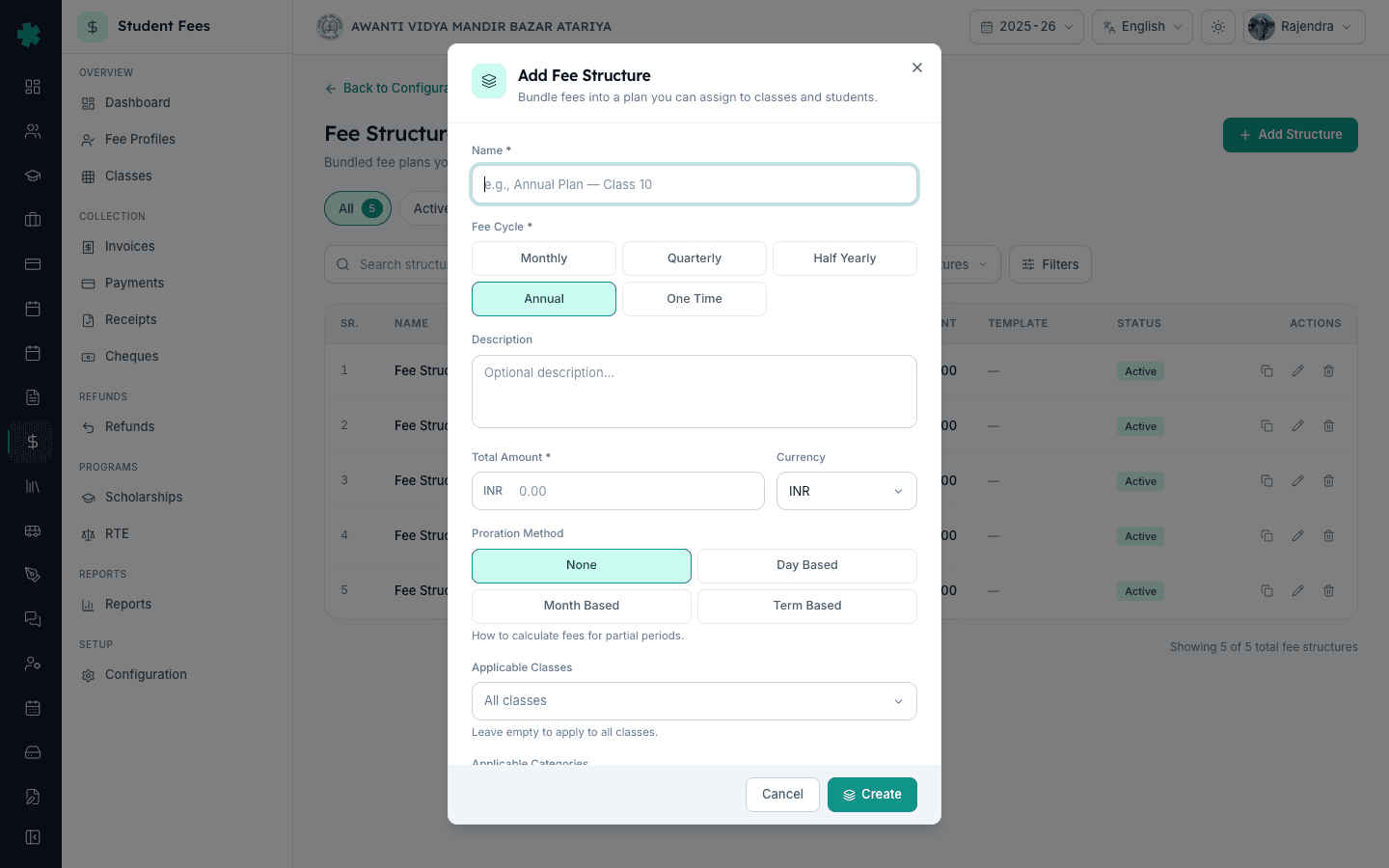
Add Structure पर क्लिक करें। डायलॉग में एक स्पष्ट नाम भरें जैसे Annual 2025-26 — Class 1 to 3 ताकि ऑफिस इसे हर invoice पर पहचान सके। Fee Cycle चुनें — ज़्यादातर भारतीय स्कूलों के लिए Annual डिफ़ॉल्ट होता है, Monthly hostel और transport-only प्लान के लिए उपयुक्त है। पूरे सत्र के लिए एक छात्र की कुल राशि Total Amount में भरें, Currency को INR रहने दें, और Proration को None रखें जब तक बीच सत्र में आने वाले छात्रों के लिए आंशिक बिलिंग ज़रूरी न हो।
4. लागू क्लास और श्रेणियाँ चुनें
इसी डायलॉग में Applicable Classes selector पर क्लिक करें और वे क्लास टिक करें जिन पर यह स्ट्रक्चर लागू होगा — उदाहरण Nursery, KG, Class 1, Class 2, Class 3। इसे खाली छोड़ने का अर्थ है हर क्लास पर लागू, जो प्रायः सही नहीं होता। यदि आपके स्कूल में श्रेणी (General, OBC, SC, ST, EWS, NRI) के अनुसार अलग फीस है, तो वह भी चुनें। Active टॉगल चालू करें और Create दबाएँ। Inkwelly स्ट्रक्चर को सेव करके खोल देगा।
5. हर फीस हेड के लिए लाइन आइटम जोड़ें
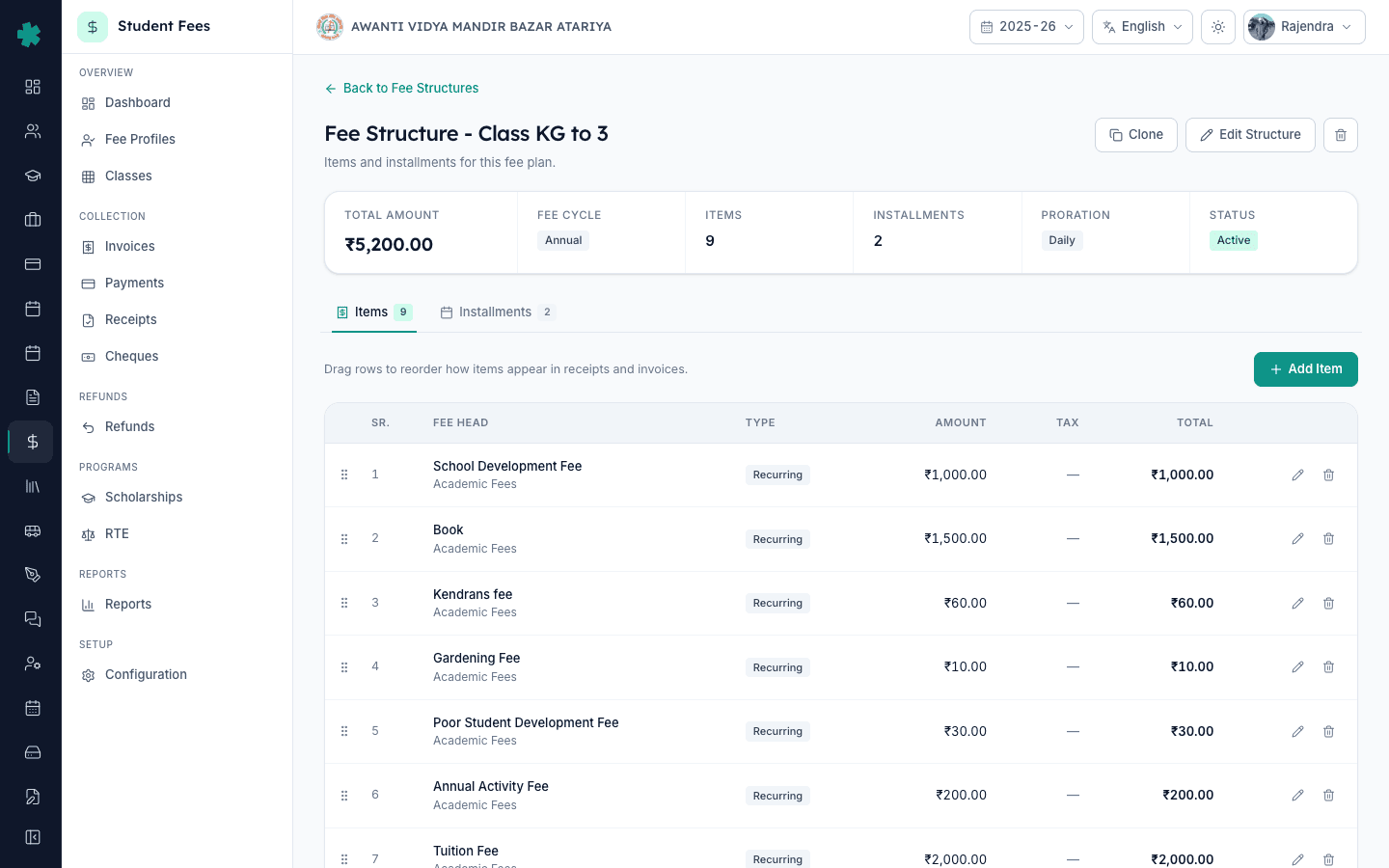
स्ट्रक्चर डिटेल पेज पर Items टैब पहले से चयनित होता है। Add Item पर क्लिक करें, एक Fee Head चुनें (Tuition, Transport, Library, Lab, Activities, Examination), उस हेड की राशि भरें, frequency सेट करें और सेव करें। हर हेड के लिए एक पंक्ति जोड़ें। इन लाइन आइटम का योग ऊपर summary कार्ड में दिखाए गए Total Amount के बराबर होना चाहिए — Inkwelly आइटम जोड़ते समय चालू कुल राशि दिखाता है।
6. Installments टैब खोलें और तिथियाँ जोड़ें
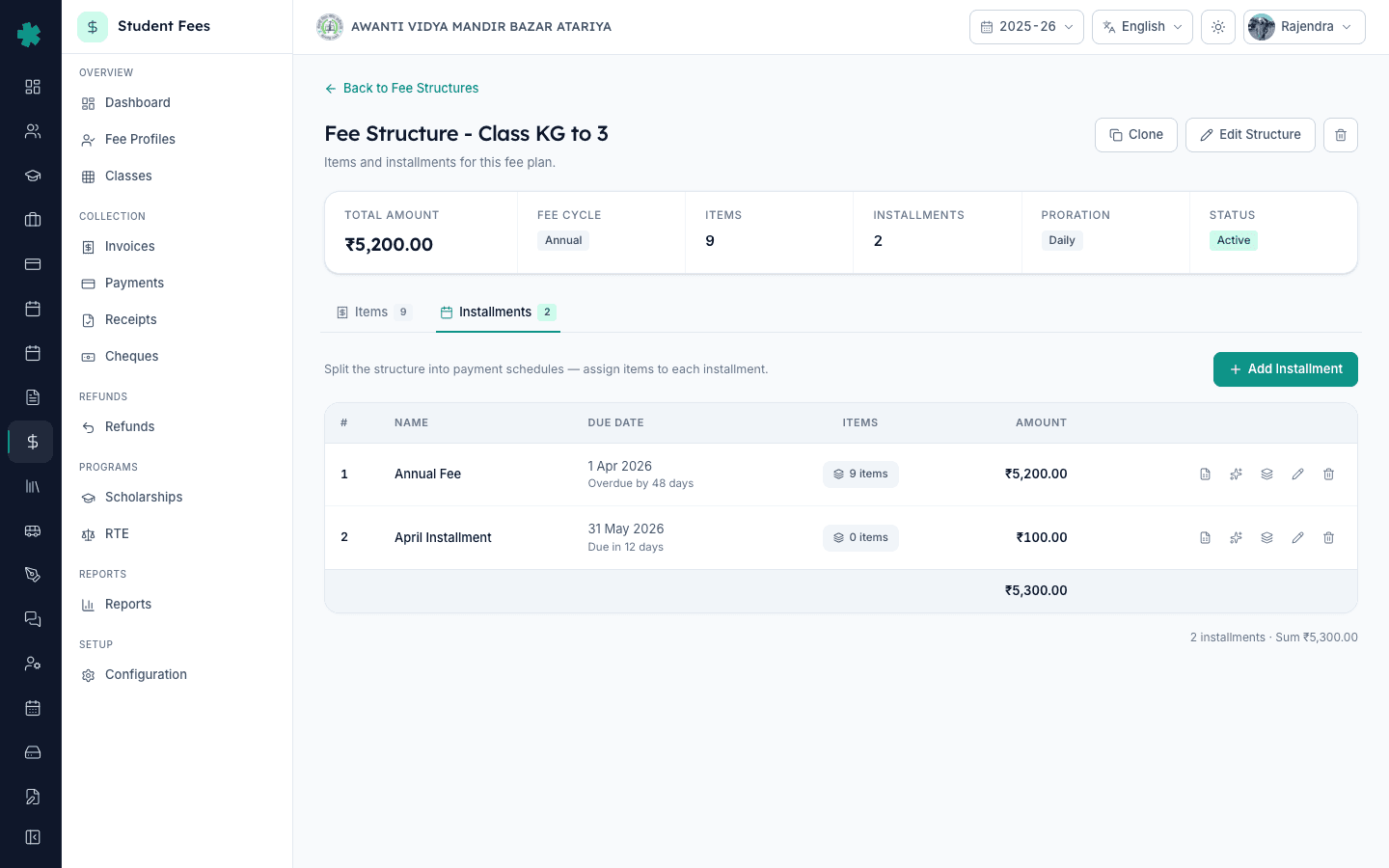
Installments टैब पर क्लिक करें। Add Installment पर क्लिक करें, उसका नाम रखें (Q1 — April-June, Q2 — July-September आदि), due date चुनें और उस किस्त की राशि भरें। ज़्यादातर भारतीय स्कूल चार तिमाही किस्तें रखते हैं; कुछ दस मासिक या एक वार्षिक एकमुश्त रखते हैं। तब तक दोहराएँ जब तक किस्तों का योग स्ट्रक्चर की कुल राशि के बराबर न हो जाए। Installments टैब हर किस्त को उसकी due date और कितने दिन शेष हैं — दोनों के साथ दिखाता है।
7. समीक्षा करें और फीस ग्रुप से जोड़ें
Fee Structures सूची पर वापस जाएँ। अब summary कार्ड पर किस्तों की संख्या, आइटम की संख्या और Active बैज दिखाई देगा। Configuration पेज से Fee Groups खोलें और इस स्ट्रक्चर को एक फीस ग्रुप से जोड़ें, फिर ग्रुप को उन क्लास से map करें जिन पर यह लागू है। अगली बार जब आप Invoices → Generate पेज खोलेंगे, यह स्ट्रक्चर Per-Structure कार्ड में bulk invoice निर्माण के लिए तैयार दिखाई देगा।
अगला कदम — फीस ग्रुप बनाएँ और उन्हें सही क्लास से map करें ताकि स्ट्रक्चर अपने आप छात्र के profile में पहुँचे; पूरी प्रक्रिया How to create fee groups and assign them to classes में बताई गई है। हर फीस हेड को एक स्पष्ट डिफ़ॉल्ट राशि और tax flag के साथ How to define fee categories and fee heads के अंतर्गत परिभाषित करें। स्ट्रक्चर और ग्रुप तैयार होने के बाद, हर तिमाही की शुरुआत में Invoices → Generate पर जाकर How to bulk-generate invoices for an installment का अनुसरण करें।
Inkwelly Student Fees को काम करते हुए देखें
20 मिनट का demo बुक करें — टीम आपके पहले फीस स्ट्रक्चर को live कॉल पर सेट करेगी ताकि आपका ऑफिस अगले सत्र से Excel sheet जुटाना बंद कर सके।
अक्सर पूछे गए सवाल
6 सवालएक स्कूल को Inkwelly में कितने फीस स्ट्रक्चर बनाने चाहिए?
ज़्यादातर भारतीय स्कूल हर सत्र में तीन से पाँच स्ट्रक्चर बनाते हैं — एक प्रति क्लास बैंड जैसे KG–Class 3, Class 4–5, Class 6–8, Class 9–10, Class 11–12 — क्योंकि tuition और activity शुल्क अलग होते हैं। Hostel छात्रों के लिए सामान्यतः एक अलग स्ट्रक्चर अतिरिक्त रखा जाता है। Inkwelly संख्या पर कोई सीमा नहीं रखता, लेकिन हर वास्तविक फीस बैंड के लिए एक स्ट्रक्चर रखना ऑफिस और अभिभावक दोनों के लिए स्पष्टता बनाए रखता है।
फीस स्ट्रक्चर, फीस ग्रुप और फीस हेड में क्या अंतर है?
फीस हेड एक चार्ज की पंक्ति है जैसे Tuition या Transport। फीस स्ट्रक्चर कई हेड को कुल राशि, किस्त योजना और लागू क्लास के साथ बाँधता है — यह मास्टर प्लान है। फीस ग्रुप एक या अधिक स्ट्रक्चर को क्लास के सेट से जोड़ता है ताकि सही स्ट्रक्चर अपने आप सही छात्र तक पहुँचे। पहले हेड, फिर स्ट्रक्चर, फिर ग्रुप सेट करें।
Fee structure kaise banaye Inkwelly me?
Student Fee menu kholiye, sidebar me Configuration par jaiye, Fee Structures tile Open kijiye, top-right ke Add Structure button par click kijiye. Naam (jaise Annual 2025-26 — Class 1 to 3), total amount, aur applicable classes select kijiye, Active toggle on rakhiye, Create dabaiye. Phir structure detail me Items tab se fee heads add kijiye aur Installments tab se due dates ke saath kishtein add kijiye.
Class wise alag-alag fee kaise lagaye?
Har class band ke liye alag fee structure banaiye. Add Structure dialog me Applicable Classes selector se sirf un classes ko tick kijiye jin par yeh structure laagu hoga — example Nursery, KG, Class 1, Class 2, Class 3 ek structure me, Class 4-5 doosre me, Class 6-8 teesre me. Phir Fee Group banaiye aur uske through structure aur classes ko jodiye.
क्या invoice बनने के बाद फीस स्ट्रक्चर बदला जा सकता है?
हाँ, लेकिन सावधानी से। Inkwelly किसी भी समय स्ट्रक्चर का नाम, लाइन आइटम और किस्तें संपादित करने देता है। पर पुराने स्ट्रक्चर पर पहले से बने invoice अपने आप दोबारा नहीं लिखे जाते — आपको प्रभावित छात्र फीस profile पुनः गणना (recalculate) करनी होगी या उन invoice को रद्द करके फिर बनाना होगा। बीच सत्र में दाम बदलने पर अधिकांश स्कूल पुराने स्ट्रक्चर को Clone करके Inactive कर देते हैं और नया स्ट्रक्चर आगे के लिए असाइन करते हैं।
तिमाही किस्तें भारतीय स्कूल के सत्र से कैसे जुड़ती हैं?
सबसे आम पैटर्न है Q1 (अप्रैल–जून, due 10 अप्रैल), Q2 (जुलाई–सितंबर, due 10 जुलाई), Q3 (अक्टूबर–दिसंबर, due 10 अक्टूबर), Q4 (जनवरी–मार्च, due 10 जनवरी)। CBSE और अधिकांश राज्य बोर्ड अप्रैल से सत्र शुरू करते हैं। कुछ स्कूल दस मासिक किस्तें रखते हैं और मई व दिसंबर छोड़ देते हैं। Inkwelly दोनों समर्थित करता है — हर किस्त की due date सेट करें और late-fee नियम बाकी संभाल लेता है।
आपको ये भी पसंद आ सकता है
1 लेखस्रोत व संदर्भ
- CBSE Affiliation Bye-Laws — Chapter VII, Fee Structure · देखा गया 19 May 2026
CBSE bye-laws require affiliated schools to publish a fixed annual fee structure approved by the school management committee for each academic session.
- Right of Children to Free and Compulsory Education Act, 2009 — Section 13 (No capitation fee) · देखा गया 19 May 2026
The RTE Act prohibits collecting any fee beyond the published structure, making a clearly defined and saved fee structure the legal record schools must maintain.
- Ministry of Education — UDISE+ Data Capture Format (School Finance section) · देखा गया 19 May 2026
UDISE+ annual returns require schools to report fee heads and amounts per class, which mirrors the per-class fee-structure model used in Inkwelly.
Inkwelly आपके स्कूल पर — खुद देखें
30 मिनट का डेमो। आपके मौजूदा ERP को आपके साथ खोलकर, कॉल पर ही आपका डेटा Inkwelly में लोड करते हैं। कॉल ख़त्म होते-होते एक तय तारीख़ का गो-लाइव प्लान आपके हाथ में।