Fee categories और fee heads कैसे बनाएँ Inkwelly में
यह guide उन school accountants और principals के लिए है, जो नए academic session के लिए fee module set कर रहे हैं। अंत में आपके पास साफ-सुथरी fee categories होंगी जो हर invoice line item को group करती हैं — Tuition, Transport, Activities, Facility — GST और refund flags के साथ, fee structure builder के लिए तैयार।
Inkwelly में fee categories और fee heads बनाने के लिए: Configuration खोलिए, Fee Categories पर click कीजिए, एक category add कीजिए (Tuition, Transport, Activities, Facility), फिर Fee Heads खोलिए और हर line item को उसकी parent category के अंदर add कीजिए — fee type (one-time या recurring) और GST flag के साथ। Inkwelly इन categories से reporting, RTE eligibility और refund policy चलाता है; heads वे line items हैं जो हर invoice पर छपते हैं।
Indian schools में एक session में अक्सर 8 से 15 तरह की fees ली जाती हैं — Tuition, Admission, Bus, Hostel, Activities, Lab, Library, Stationery, Examination, ID card, Uniform, और board की अलग charges। Inkwelly का दो-level model (Category → Head) invoices को पढ़ने लायक और reports को काम का रखता है। School की tuition पर GST नहीं लगता CBIC के school services exemption के कारण; Transport और stationery पर अक्सर लगता है (CBIC Notification 12/2017-Central Tax (Rate))। Inkwelly में हर head पर GST flag लगा सकते हैं ताकि invoice का maths automatic रहे।
1. Configuration खोलिए और Fee Structure ढूँढिए
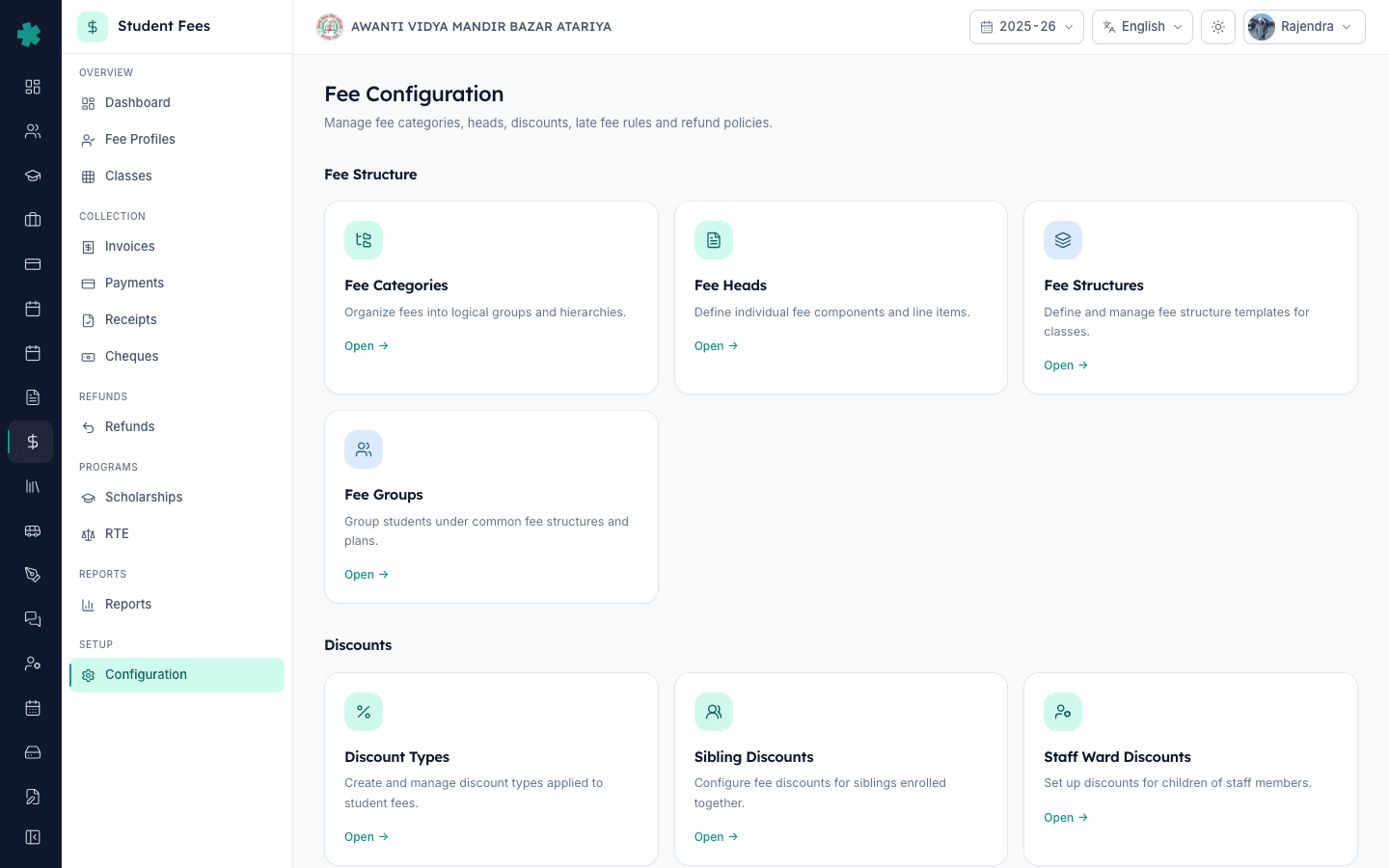
Inkwelly खोलिए → बाएँ sidebar में Student Fee → Configuration पर जाइए। Page grouped tiles के साथ खुलता है। पहला group, Fee Structure, में चार tiles हैं — Fee Categories, Fee Heads, Fee Structures और Fee Groups। Categories और Heads foundation हैं; बाकी दो इन्हीं पर निर्भर करते हैं, इसलिए सबसे पहले इन्हीं को बनाइए।
2. Fee Categories खोलिए और पहली category add कीजिए
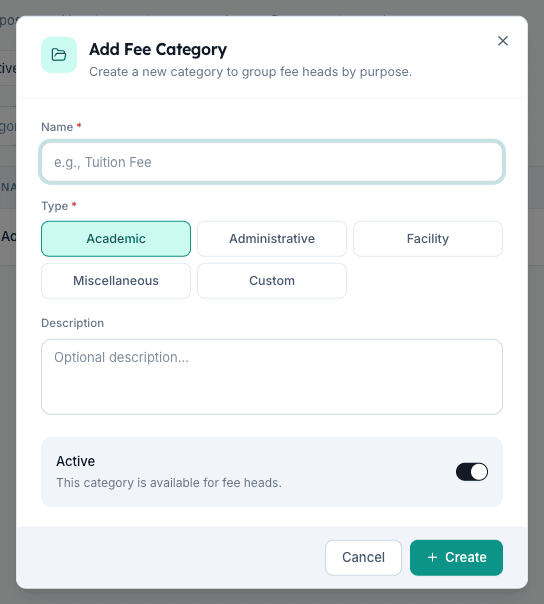
Fee Categories tile पर click कीजिए। ऊपर दाएँ Add Fee Category पर click कीजिए। नाम लिखिए (जैसे "Tuition Fees"), Type चुनिए पाँच options में से — Academic, Administrative, Facility, Miscellaneous या Custom — एक line का optional description लिखिए, और Create दबाइए। Inkwelly category save करेगा और list में दिखाएगा। Type से reporting groups और RTE eligibility decide होती है — Academic fees अक्सर RTE-reimbursable होती हैं; Administrative नहीं।
3. बाकी सारी categories add कीजिए
हर group के लिए यही steps दोहराइए: "Transport Fees" (Facility), "Activities Fees" (Academic), "Hostel Fees" (Facility), "Examination Fees" (Academic), "Miscellaneous" (Miscellaneous)। एक आम Indian school के लिए 5 से 7 categories सही रहती हैं — ज्यादा से invoice में noise बढ़ता है, कम से reporting बेकार हो जाती है। Rows को drag करके order बदलिए; यही order parent की printed invoice पर दिखता है।
4. Fee Heads खोलिए और हर category के अंदर head add कीजिए
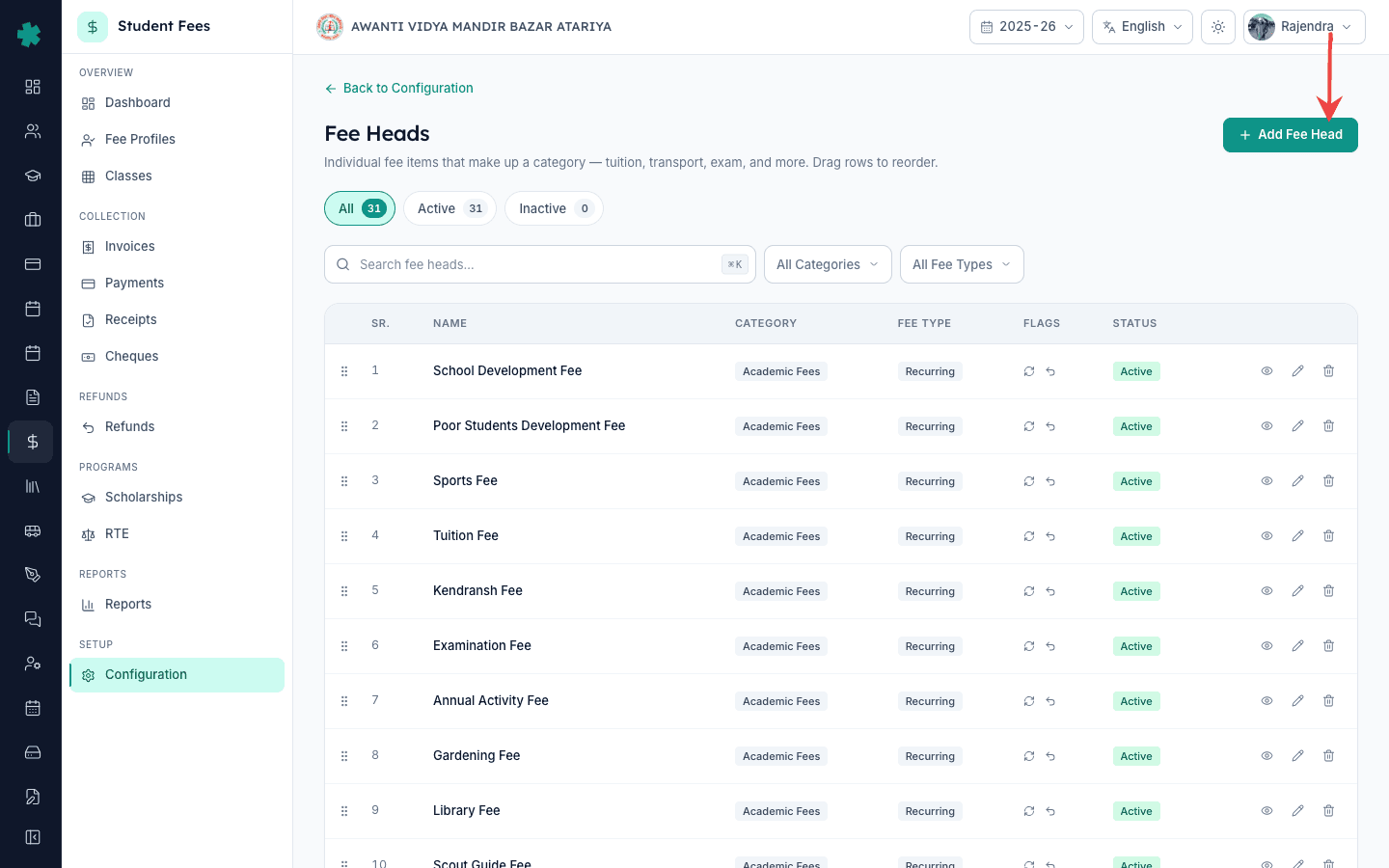
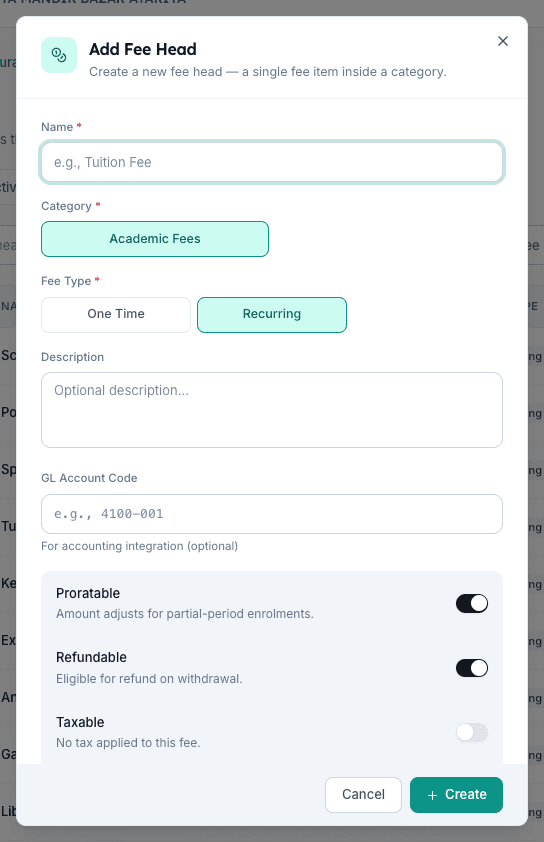
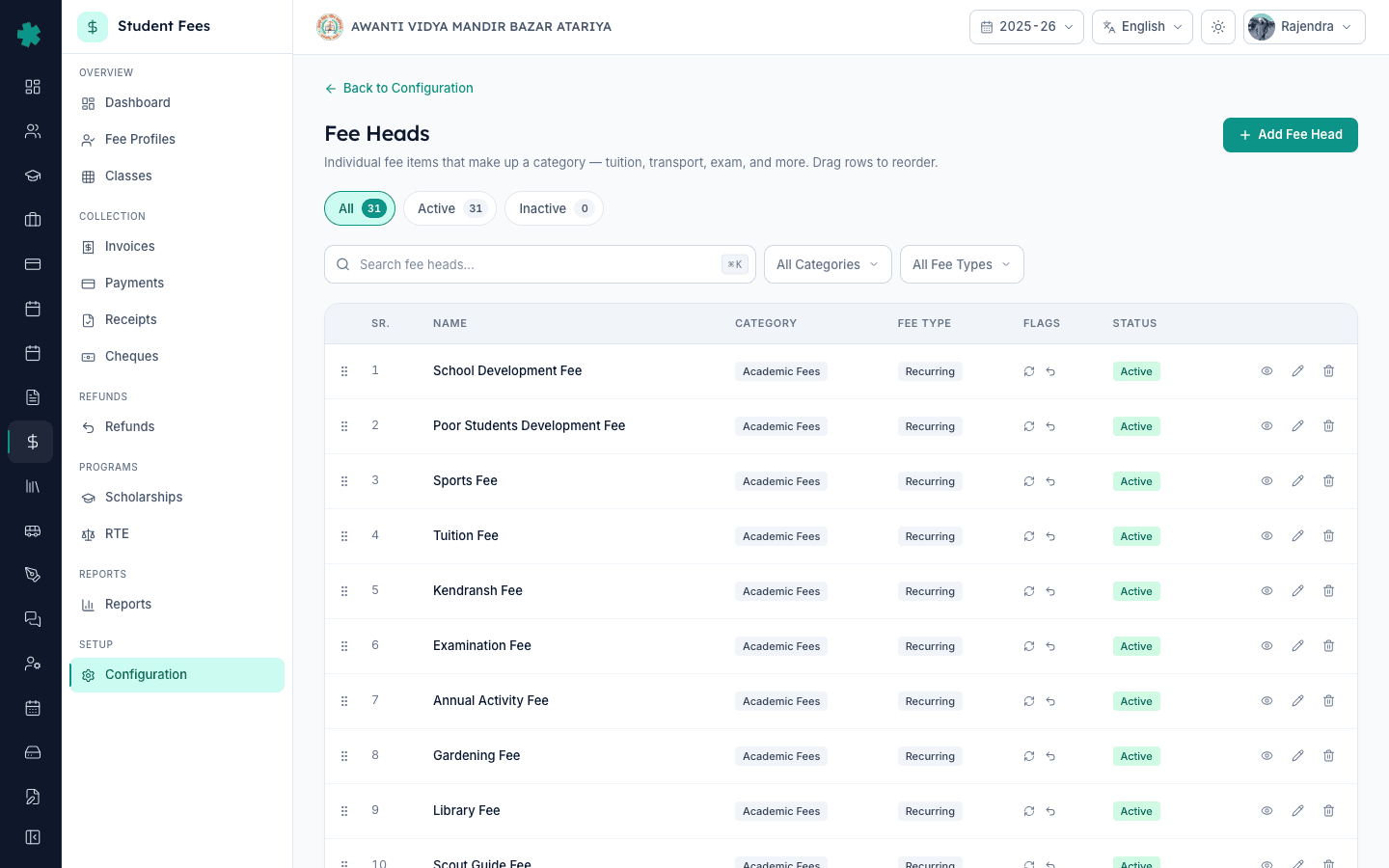
Back to Configuration पर click कीजिए, फिर Fee Heads tile पर जाइए। Add Fee Head दबाइए। Line item का नाम लिखिए जैसा invoice पर दिखाना हो (जैसे "Tuition Fee")। Parent Category picker से चुनिए। Fee Type चुनिए — One Time admission या ID-card जैसी charges के लिए, Recurring monthly, quarterly या term charges के लिए। Office staff के लिए optional description लिखिए।
5. Proratable, Refundable और Taxable flags set कीजिए
Flag panel तक scroll कीजिए। Proratable on रखिए उन fees के लिए जो mid-session join पर adjust होनी चाहिए (Tuition हाँ, Admission नहीं)। Refundable on रखिए उन fees के लिए जो TC withdrawal पर वापस करनी हों (Tuition हाँ, Activities नहीं)। Taxable on कीजिए GST-applicable heads के लिए (Transport, Hostel stationery), percentage डालिए (CBIC slabs के अनुसार 5%, 12%, या 18%), और Inkwelly हर invoice में maths automatic कर देगा। Tally export के लिए GL Account Code भी डाल सकते हैं। Create दबाइए।
6. अपनी हर line item के लिए head बनाइए
Step 4 और 5 हर fee के लिए दोहराइए — Tuition Fee, Admission Fee (one-time, non-refundable), Bus Fee (recurring, 5% GST), Activities Fee, Lab Fee, Library Fee, Examination Fee। ज़्यादातर Indian schools में 12 से 30 heads बनते हैं। Inkwelly 100+ heads संभाल सकता है, लेकिन invoices पढ़ने लायक तब तक रहती हैं जब तक एक student को एक cycle में 15 से कम heads दिखें।
7. Confirm कीजिए कि heads category के अंदर दिख रहे हैं
Fee Heads list को ऊपर के filter bar से category के हिसाब से filter कीजिए और देखिए कि हर category में सही heads हैं। जब आप Fee Structures बनाने जाएँगे, builder को भी यही list दिखेगी। अगर किसी head में category missing है तो edit करके फिर से चुनिए — बिना parent category के head save नहीं होता। अब आप class-wise fee structure बनाने के लिए तैयार हैं।
आगे, Student Fee module overview पर जाइए और class-wise fee structures बनाइए जो इन heads को जोड़ते हैं। Structures बन जाने के बाद, students को class के हिसाब से group कीजिए और सही structure एक bulk action में assign कीजिए। अगर school RTE के तहत free seats देता है, उन students को अलग mark कीजिए ताकि per-head amounts बाद में reimbursement claim में feed हो सकें। Inkwelly में हर head session भर editable रहता है — exam-fee top-ups या annual-day charges जैसी late additions पुरानी invoices को बिना तोड़े जुड़ जाती हैं।
एक ही बैठक में अपने school का fee module set कीजिए
Inkwelly की 20-minute की walkthrough book कीजिए — हम आपकी मौजूदा fee list को साफ-सुथरी categories और heads में map करने में मदद करेंगे, अगले billing cycle से पहले।
अक्सर पूछे गए सवाल
7 सवालInkwelly में fee category और fee head में क्या अंतर है?
Fee category parent group है (Tuition, Transport, Activities)। Fee head invoice पर छपने वाला line item है (Tuition Fee, Bus Fee, Annual Day Fee)। Inkwelly categories से reporting, RTE eligibility और refund grouping decide करता है; heads वे हैं जिन पर parents पैसा देते हैं। हर head केवल एक category में रहता है।
Fee head aur category mein kya farq hai?
Category parent group hota hai — jaise Tuition, Transport, Activities. Head asli line item hai jo invoice par chhapta hai — Tuition Fee, Bus Fee, Lab Fee. Inkwelly category se reporting aur RTE eligibility decide karta hai, aur head se actual paisa charge hota hai. Har head ek category ke andar hi save hoga.
Inkwelly में fee head पर GST कैसे जोड़ें?
Fee head खोलिए, Taxable toggle on कीजिए, और GST percentage डालिए — उस service के CBIC slab के हिसाब से 5%, 12% या 18%। Inkwelly हर invoice में base amount के ऊपर tax automatic जोड़ देता है। School की tuition GST-exempt है; Transport, hostel stationery और uniforms पर अक्सर GST लगता है। Academic heads पर Taxable on करने से पहले CBIC की GST exemption list देख लीजिए।
GST kaise add kare fee head pe?
Fee head edit kijiye, Taxable toggle on kar dijiye, aur percentage daal dijiye — 5, 12, ya 18 percent jaisa applicable ho. Inkwelly har invoice mein automatically GST jod dega. Tuition fees pe GST nahi lagta; Bus, hostel, stationery pe lagta hai. CBIC ka GST exemption list check kar lijiye pehle.
Academic session शुरू होने के बाद fee head बदल सकते हैं?
हाँ। Inkwelly में session के बीच में भी fee head का नाम, description, flags और tax percentage edit हो जाता है। पहले से बनी invoices अपनी पुरानी values रखती हैं (audit trail), नई invoices updated head use करती हैं। Parent category बदलना भी allowed है पर कम होता है — अक्सर इसका मतलब पहली बार categories गलत set हुई थीं।
एक आम CBSE Indian school को कितने fee heads बनाने चाहिए?
12 से 30 heads normal हैं — Tuition, Admission, Bus, Activities, Lab, Library, Examination, Annual Day, ID Card, Uniform, Transport, और board-specific charges (CBSE registration, ICSE practical, state-board annual)। Inkwelly 100+ heads संभालता है, लेकिन invoices पढ़ने लायक तब तक रहती हैं जब हर student को एक billing cycle में 15 से कम heads दिखें।
क्या हर fee head पर GL Account Code ज़रूरी है?
नहीं — GL Account Code optional है। जो schools Tally, Zoho Books या BUSY use करते हैं accounting के लिए, वे इसे भरते हैं ताकि Inkwelly का payment export हर transaction को सही ledger से tag कर दे। बिना accounting integration वाले schools इसे खाली छोड़ देते हैं। यह field बाद में भी editable है, इसलिए accountant के chart of accounts decide होने पर add कर सकते हैं।
आपको ये भी पसंद आ सकता है
1 लेखस्रोत व संदर्भ
- CBIC Notification 12/2017-Central Tax (Rate) — education services पर exemption · देखा गया 19 May 2026
स्थापित करता है कि higher secondary तक के educational institutions द्वारा ली जाने वाली tuition, examination, admission और curriculum services GST से exempt हैं।
- RTE Act 2009 — Section 12(2) free-seat fees के reimbursement पर · देखा गया 19 May 2026
Private schools को 25% free-seat quota के लिए state government द्वारा reimbursement अनिवार्य करता है, जो school की defined per-child fee categories पर calculate होता है।
- CBSE Affiliation Bye-Laws — Chapter VII school finances और fee structure पर · देखा गया 19 May 2026
CBSE-affiliated schools को हर साल parents और affiliating authority को transparent fee head classification publish करना अनिवार्य करता है।
Inkwelly आपके स्कूल पर — खुद देखें
30 मिनट का डेमो। आपके मौजूदा ERP को आपके साथ खोलकर, कॉल पर ही आपका डेटा Inkwelly में लोड करते हैं। कॉल ख़त्म होते-होते एक तय तारीख़ का गो-लाइव प्लान आपके हाथ में।