How to define fee categories and fee heads in Inkwelly
For school accountants and principals setting up the fee module for a new academic session. By the end you will have clean fee categories grouping every line item your invoices need — Tuition, Transport, Activities, Facility — with GST and refund flags ready for the fee structure builder.
To define fee categories and fee heads in Inkwelly: open Configuration, click Fee Categories, add a category (Tuition, Transport, Activities, Facility), then open Fee Heads and add each line item under its parent category with a fee type (one-time or recurring) and GST flag. Inkwelly uses these categories to drive reporting, RTE eligibility and refund policy; heads are the line items printed on every invoice.
Indian schools typically charge 8 to 15 different fee types in a single session — Tuition, Admission, Bus, Hostel, Activities, Lab, Library, Stationery, Examination, ID card, Uniform, plus board-specific charges. Inkwelly's two-level model (Category → Head) keeps invoices readable and reports usable. Tuition fees are GST-exempt under CBIC's school services exemption; Transport and stationery often are not (CBIC Notification 12/2017-Central Tax (Rate)). Inkwelly lets you flag GST per head so the invoice maths is automatic.
1. Open Configuration and find Fee Structure
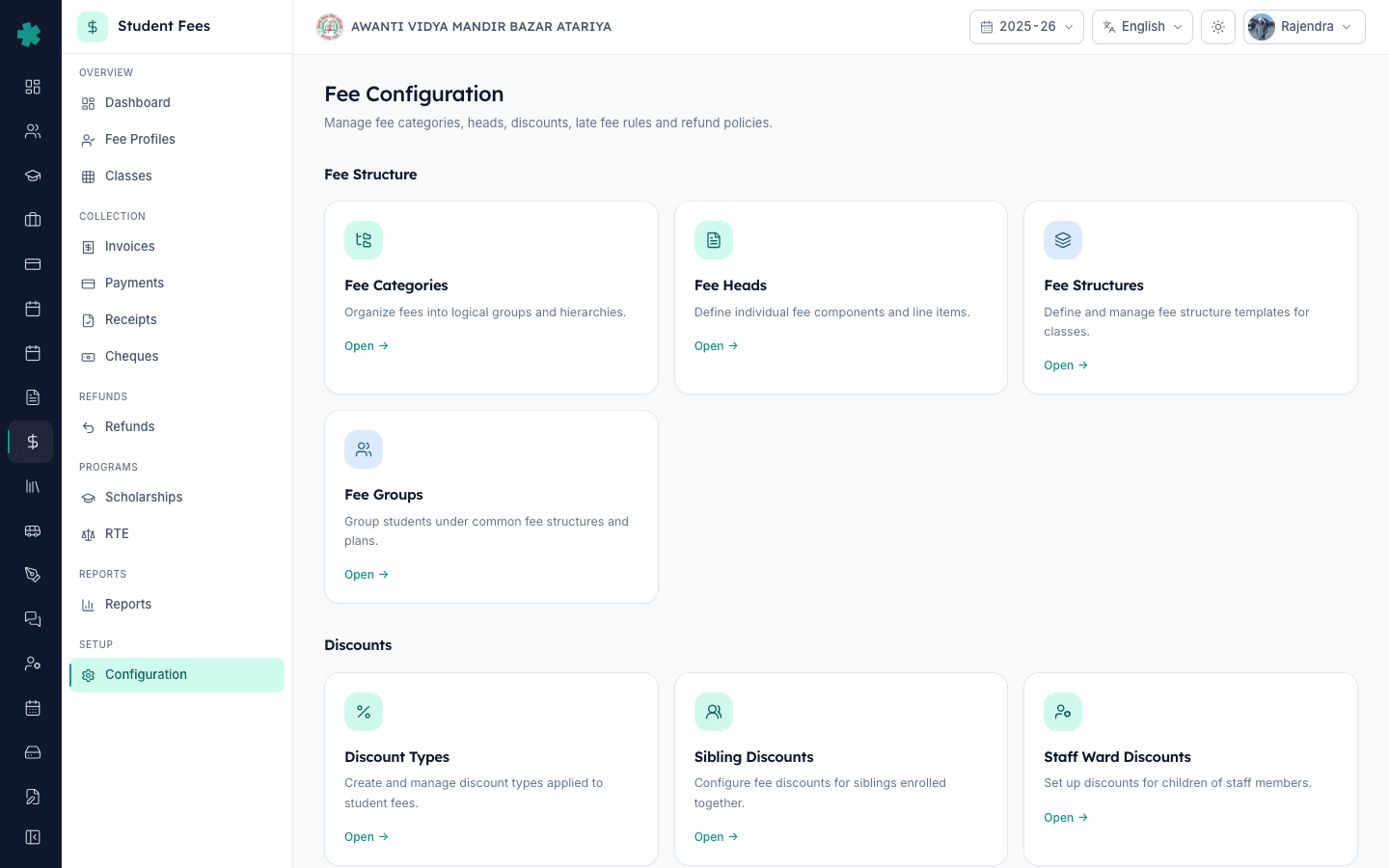
Open Inkwelly → Student Fee → Configuration in the left sidebar. The page opens with grouped tiles. The first group, Fee Structure, has four tiles — Fee Categories, Fee Heads, Fee Structures and Fee Groups. Categories and Heads are the foundation; the other two depend on them, so build these first.
2. Open Fee Categories and add your first category
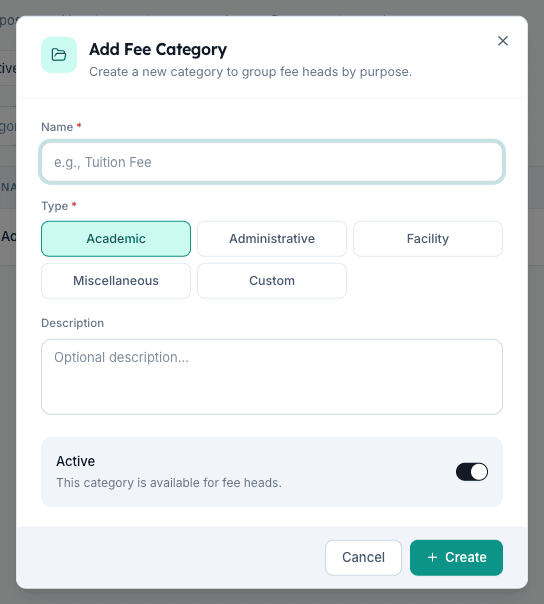
Click the Fee Categories tile. Click Add Fee Category in the top right. Type a name (e.g. "Tuition Fees"), pick a Type from the five choices — Academic, Administrative, Facility, Miscellaneous or Custom — write an optional one-line description, and click Create. Inkwelly saves the category and shows it in the list. Type drives reporting groups and RTE eligibility — Academic fees are RTE-reimbursable in most states; Administrative usually is not.
3. Add the rest of your categories
Repeat for every group your school charges: "Transport Fees" (Facility), "Activities Fees" (Academic), "Hostel Fees" (Facility), "Examination Fees" (Academic), "Miscellaneous" (Miscellaneous). Five to seven categories is the sweet spot for a typical Indian school — more becomes noise on parent invoices, fewer makes reporting useless. Drag the rows to reorder; the order here is the order parents see on the printed invoice.
4. Open Fee Heads and add a head under each category
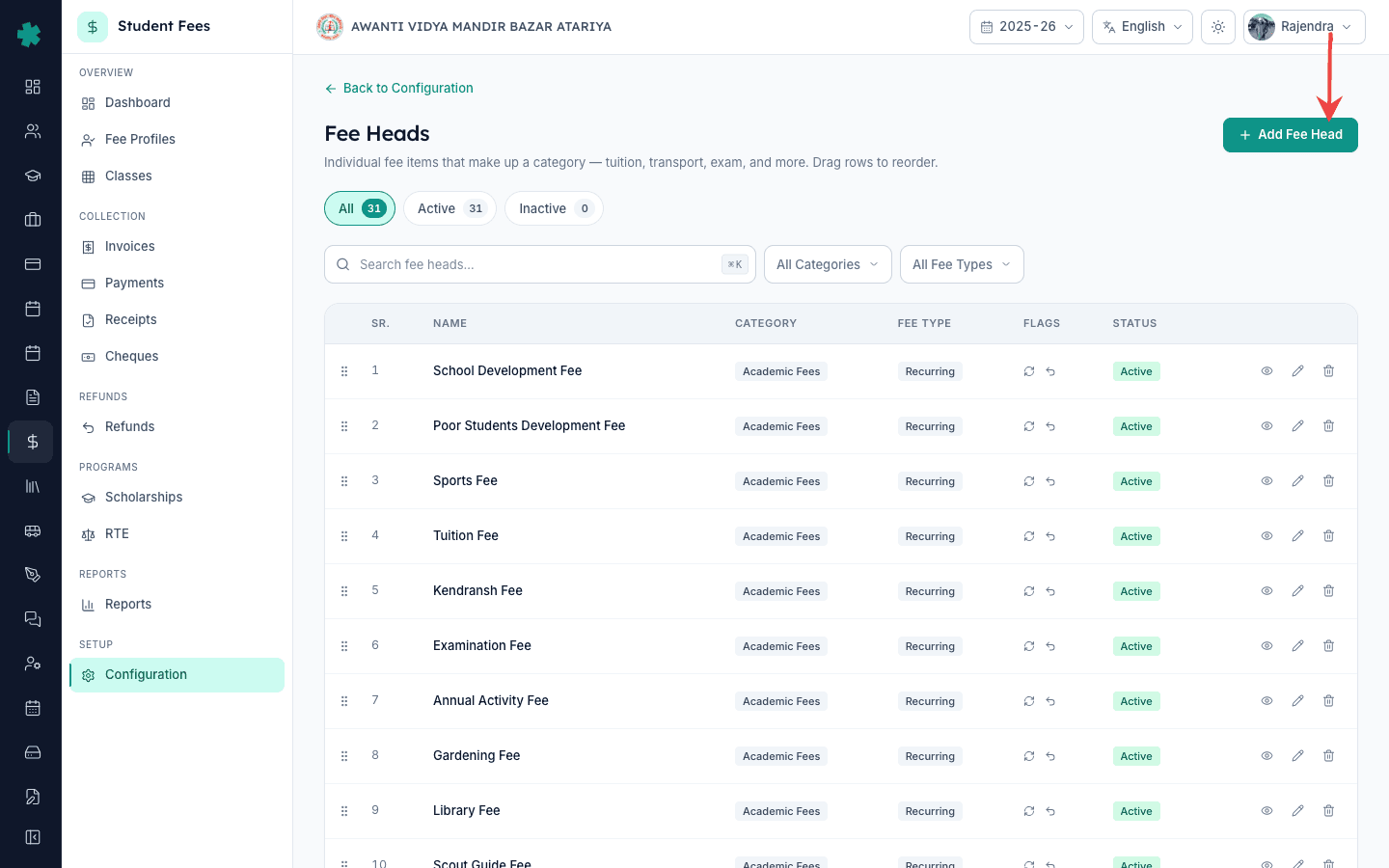
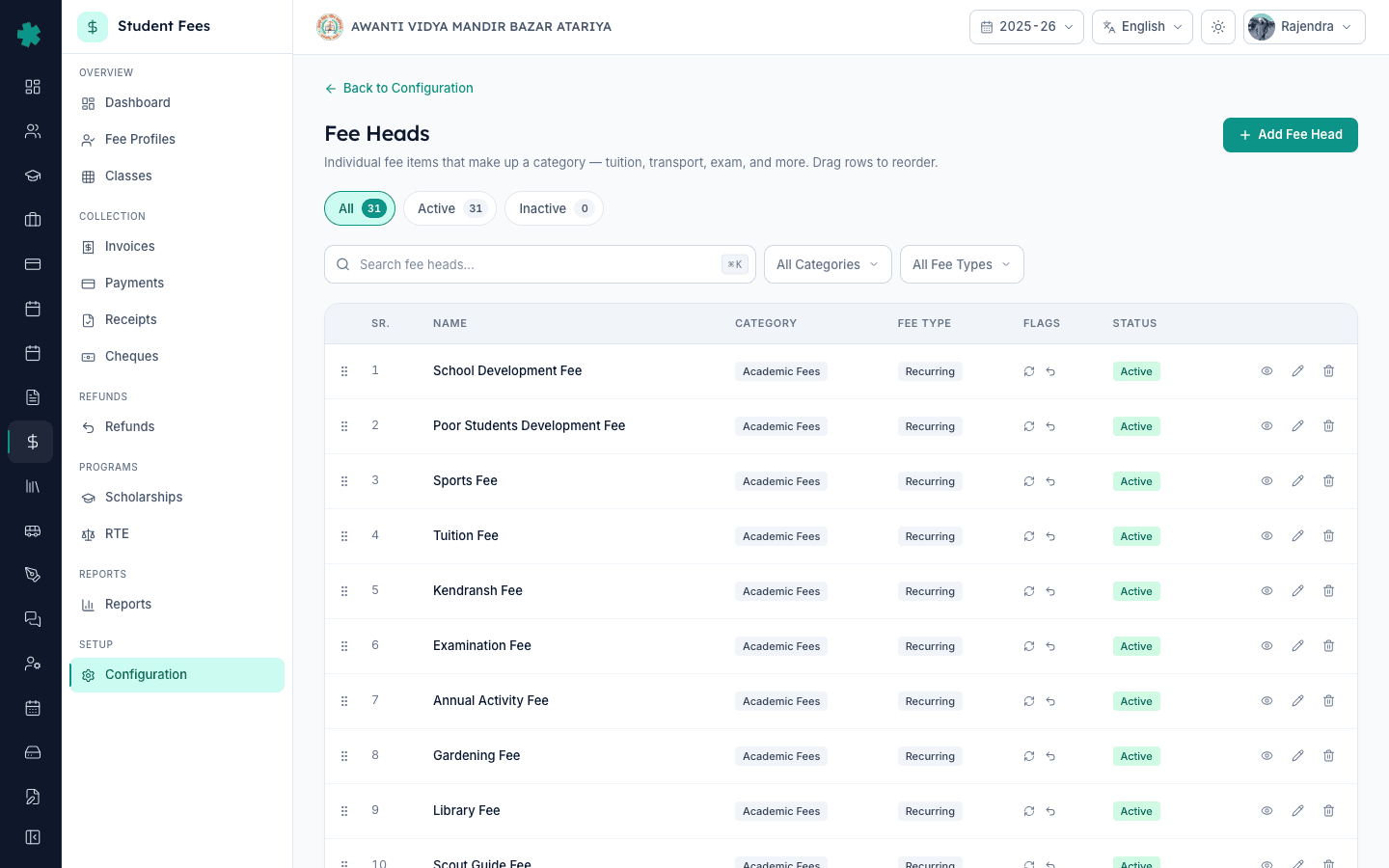
Click Back to Configuration, then click the Fee Heads tile. Click Add Fee Head. Type the line-item name as it should appear on the invoice (e.g. "Tuition Fee"). Pick the parent Category from the picker. Pick Fee Type — One Time for admission/ID-card charges, Recurring for monthly/quarterly/term charges. Write an optional description for your office staff.
5. Set Proratable, Refundable and Taxable flags
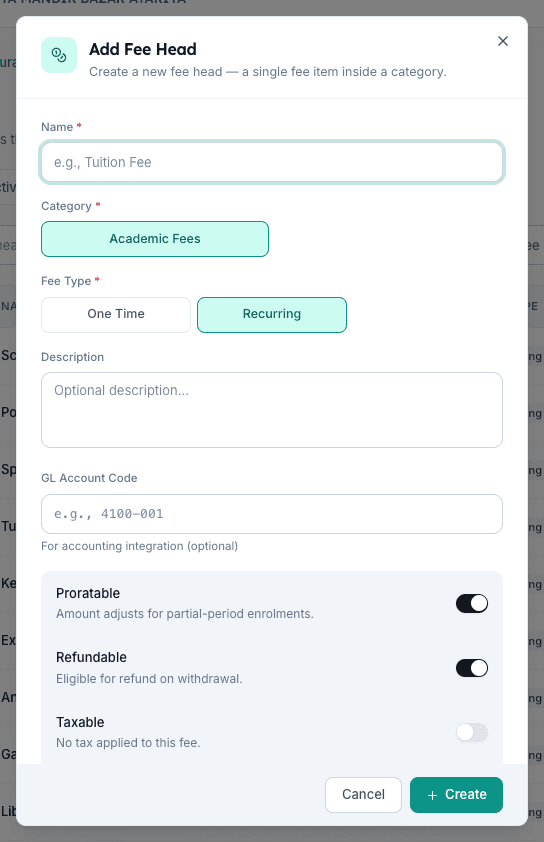
Scroll to the flag panel. Toggle Proratable on for fees that should adjust for a mid-session join (Tuition usually yes, Admission no). Toggle Refundable on for fees you'd repay on TC withdrawal (Tuition yes, Activities no). Toggle Taxable on for GST-applicable heads (Transport, Hostel stationery), enter the percentage (5%, 12% or 18% per CBIC slabs), and Inkwelly handles the maths on every invoice. Add a GL Account Code if your Tally export needs it. Click Create.
6. Add every line item your invoices need
Repeat step 4 and 5 for each fee — Tuition Fee, Admission Fee (one-time, non-refundable), Bus Fee (recurring, 5% GST), Activities Fee, Lab Fee, Library Fee, Examination Fee. Most Indian schools end up with 12 to 30 heads. Inkwelly handles 100+ heads per school cleanly, but invoices stay readable up to about 15 heads per student per cycle.
7. Confirm heads show up under their category in the picker
Filter the Fee Heads list by category (top filter bar) and confirm each category has the right heads. This is exactly what the Fee Structures builder will see when you start assembling class-wise structures next. If a head is missing a category, edit it and re-pick — heads cannot save without a parent category. You are now ready to build the actual class-wise fee structure.
Next, head to the Student Fee module overview to build the class-wise fee structures that pull these heads together. Once structures exist, group students by class and assign the right structure in one bulk action. If your school offers free seats under RTE, mark those students separately so the per-head amounts feed the reimbursement claim later. Inkwelly keeps every head editable for the rest of the session — late additions like exam-fee top-ups or annual-day charges slot in without breaking past invoices.
Set up your school's fee module in one sitting
Book a 20-minute Inkwelly walkthrough and we'll help you map your existing fee list to clean categories and heads before your next billing cycle.
Frequently asked
7 questionsWhat is the difference between a fee category and a fee head in Inkwelly?
A fee category is the parent group (Tuition, Transport, Activities). A fee head is the individual line item printed on the invoice (Tuition Fee, Bus Fee, Annual Day Fee). Inkwelly uses categories for reporting, RTE eligibility and refund grouping; heads are what parents pay against. Every head must belong to exactly one category.
Fee head aur category mein kya farq hai?
Category parent group hota hai — jaise Tuition, Transport, Activities. Head asli line item hai jo invoice par chhapta hai — Tuition Fee, Bus Fee, Lab Fee. Inkwelly category se reporting aur RTE eligibility decide karta hai, aur head se actual paisa charge hota hai. Har head ek category ke andar hi save hoga.
How do I add GST to a fee head in Inkwelly?
Open the fee head, toggle Taxable on, and enter the GST percentage — 5%, 12% or 18% as per the CBIC slab for that service. Inkwelly adds the tax on top of the base amount on every invoice automatically. Tuition for schools is GST-exempt; Transport, hostel stationery and uniforms usually attract GST. Check the CBIC GST exemption list before turning Taxable on for academic heads.
GST kaise add kare fee head pe?
Fee head edit kijiye, Taxable toggle on kar dijiye, aur percentage daal dijiye — 5, 12, ya 18 percent jaisa applicable ho. Inkwelly har invoice mein automatically GST jod dega. Tuition fees pe GST nahi lagta; Bus, hostel, stationery pe lagta hai. CBIC ka GST exemption list check kar lijiye pehle.
Can I change a fee head after the academic session has started?
Yes. Inkwelly lets you edit name, description, flags and tax percentage of any fee head mid-session. Existing invoices already generated keep their old values (audit trail), and new invoices use the updated head. Changing the parent category is also allowed but rare — usually a sign you set up categories wrong the first time.
How many fee heads should a typical Indian CBSE school create?
Twelve to thirty heads is normal — Tuition, Admission, Bus, Activities, Lab, Library, Examination, Annual Day, ID Card, Uniform, Transport, plus board-specific charges (CBSE registration, ICSE practical, state-board annual). Inkwelly handles 100+ heads cleanly, but invoices stay readable when each student sees no more than fifteen heads per billing cycle.
Do I need a GL Account Code on every fee head?
No — GL Account Code is optional. Schools using Tally, Zoho Books or BUSY for accounting fill it in so Inkwelly's payment export tags each transaction with the right ledger. Schools without an accounting integration leave it blank. The field is editable later, so you can add codes once your accountant decides the chart of accounts.
You might also like
3 readsSources & references
- CBIC Notification 12/2017-Central Tax (Rate) — exemption for education services · accessed 19 May 2026
Establishes that fees charged by educational institutions up to higher secondary for tuition, examination, admission and prescribed curriculum services are exempt from GST.
- RTE Act 2009 — Section 12(2) on reimbursement of free-seat fees · accessed 19 May 2026
Mandates state government reimbursement to private schools for the 25% free-seat quota, calculated on per-child fee categories defined by the school.
- CBSE Affiliation Bye-Laws — Chapter VII on school finances and fee structure · accessed 19 May 2026
Requires CBSE-affiliated schools to maintain a transparent fee head classification published annually to parents and the affiliating authority.
See Inkwelly on your school
30-minute demo. We open your current ERP with you and load your data into Inkwelly on the call. Dated go-live plan by the end of it.