Reach everyone — before they have to call you. before they have to call you
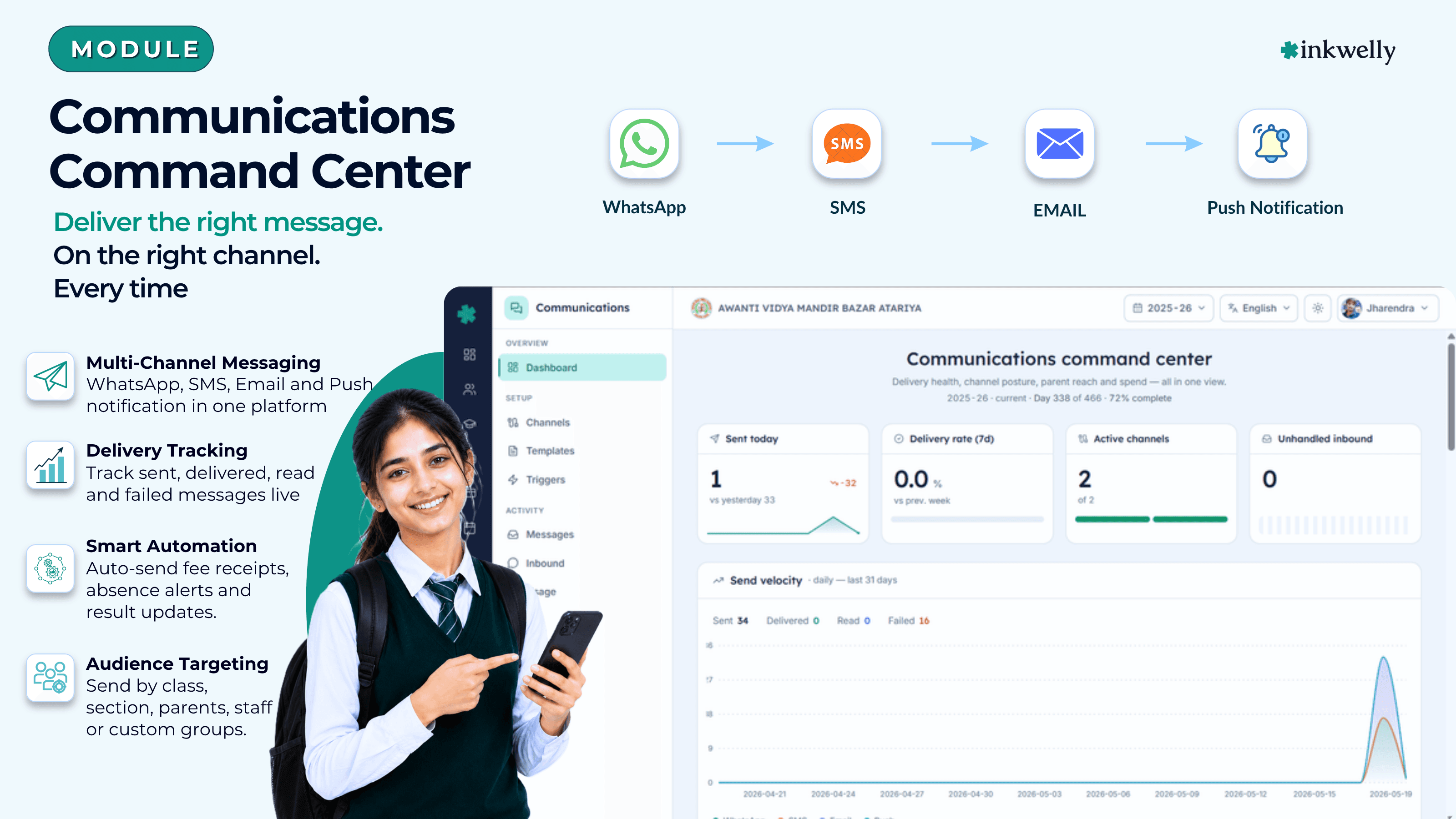
One workspace for every message a school sends — to parents, students and staff. Fee receipts, attendance alerts, exam results, admit cards, homework notices, payroll slips and duty rosters, automatically delivered on the channel each recipient prefers. DLT-compliant for SMS, Meta-approved for WhatsApp, DPDP-Act safe end-to-end.
How most Indian schools talk to parents today
In most schools the parent message system is a drawer of second-hand smartphones. One phone is for the WhatsApp broadcast list. Another holds the SMS sender login. A third is logged into the school Gmail. Every morning a junior office assistant copies absentee names from the attendance register, opens WhatsApp Web on the desk computer, and pastes the same line into 14 different parent groups one after another, crossing fingers that no message lands in the wrong class. By the time the principal arrives at 10 a.m., three parents have already called the office asking why the fee receipt for Saturday's UPI payment never arrived.
The cost compounds quietly. Two staff members spend three hours a day on what is mostly typing. SMS credits run out at 4 p.m. on result day. The school's WhatsApp number is blocked for 24 hours because too many parents marked a holiday-greeting message as spam. The accountant resends a fee receipt over email and the parent reports it to the bank as a phishing attempt. The principal asks for delivery proof in a complaint inquiry and the office has nothing — no record, no read marks, no way to show that the message actually went out. The most damaging cost is the silent one: parents who never received an attendance alert, fee reminder or admit card, never knew they missed it, and slowly lose confidence in the school month after month.
If any of this sounds familiar, you are not alone. Indian school communication has been a stitched-together patchwork of WhatsApp groups, SMS panels, Gmail accounts and printed letters for fifteen years. Inkwelly Communications is the workspace that finally replaces all of it — WhatsApp, SMS, Email and Push, with one inbox, one log, one consent record and one bill at the end of the month.
What Inkwelly Communications actually replaces
Inkwelly Communications is the messaging layer for the entire school — every parent, every student, every employee, every channel. Connect your school's WhatsApp Business number once. Paste your DLT-approved SMS credentials once. Verify a school email domain once. Set up the parent app push once. From that single setup, every meaningful event in the rest of Inkwelly — a fee payment, an absence marked, a marksheet published, an admit card issued, a homework posted — automatically lands on the parent's WhatsApp, SMS, Email or app push, in the language they prefer, within seconds.
No more copy-pasting from a register. No more remembering to send the result-day SMS at 5 p.m. when results are published at 4:30 p.m. No more juggling four logins. No more wondering whether the message reached the parent. The office staff stops being a part-time SMS desk and starts spending its time on real school work. The principal stops being asked "did this go out?" because she can see every message that left the building today, on a single dashboard, by channel and by class.
Everything Indian schools actually need to communicate, covered
- Four channels native — WhatsApp Business, SMS through your DLT-approved vendor, Email from your school domain, and Push to the Inkwelly parent app
- Ten ready-to-use message types — fee receipt, fee reminder, fine notice, payment link, invoice details, daily absence alert, marksheet published, admit card issued, homework assigned, and your own custom broadcasts
- Both automatic and manual messages — fee receipts go out the second a UPI payment settles; broadcasts go out when the office hits Send
- Bilingual out of the box — every message type ships with an English and a Hindi version for every channel
- Per-school message customisation — fork any ready-to-use template, edit the body, footer or buttons, and continue using it as your own
- Automatic alerts list — one screen lists every event the school can react to, with a switch per channel per event
- Audience filter built in — student only, parent only, student-with-parent-fallback, employees, or a custom class / section / individual pick
- Daily limits, quiet hours and promotional windows per school — protect parents from 11 p.m. messages and protect the school from runaway bills
- TRAI DLT-ready for SMS — your school's existing DLT registration is honoured; no re-registration wait
- DPDP Act 2023 ready — consent record per parent and per channel, automatic STOP-reply handling, one-click unsubscribe for email
- Two-way WhatsApp inbox — parent replies arrive in an Inkwelly thread; the office assigns it, makes notes, replies inside the same workspace
A complete communication operations toolkit
This is not "messaging as a feature inside the fee module". It is the messaging operating system for the whole school. Below is the surface area — every screen the office will live in, every workflow the principal will check once a week, every report the accountant will need at month-end.
Every screen the office will use
Channel Setup
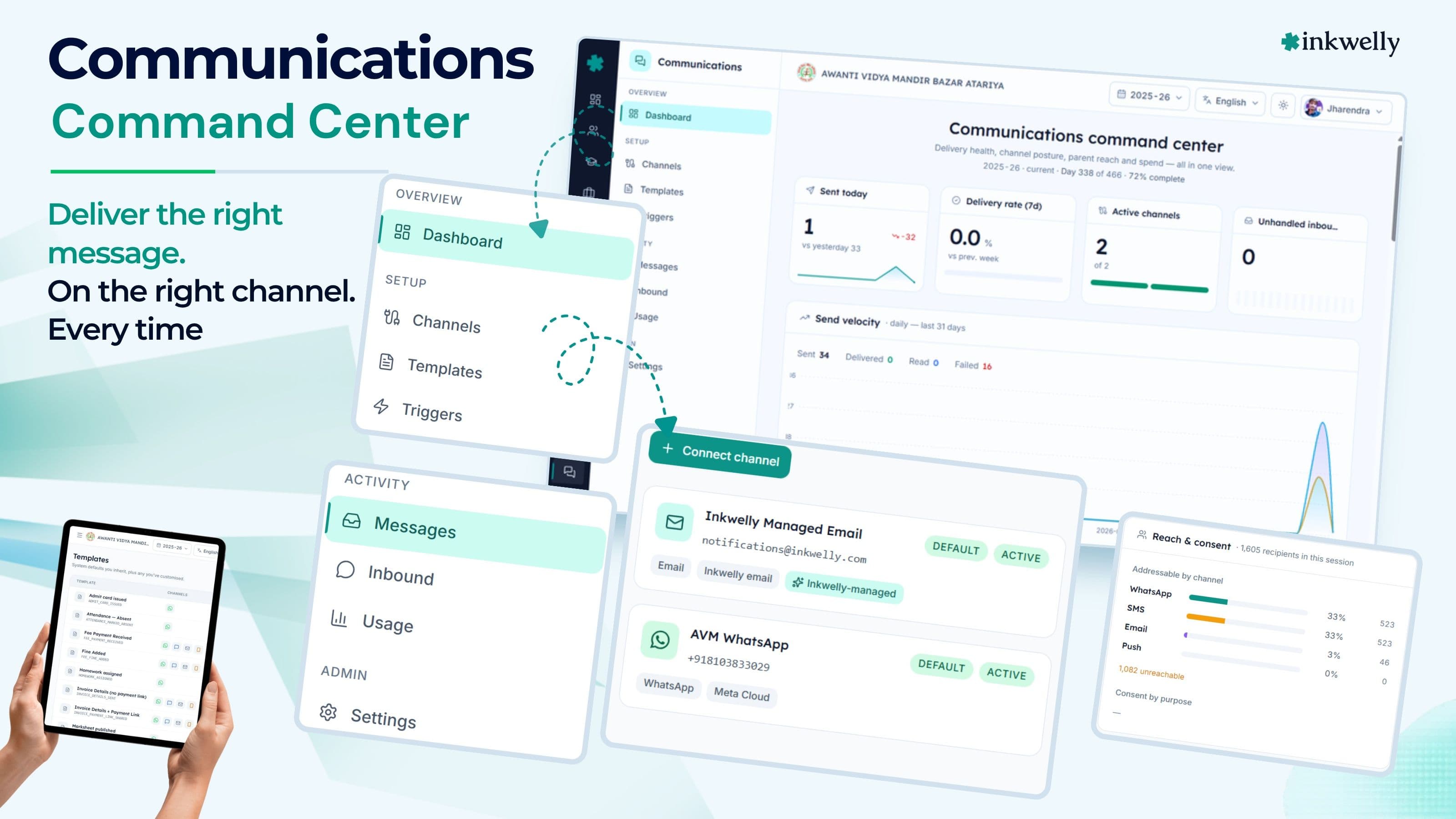
Connect WhatsApp Business, your DLT-approved SMS sender, your school email domain and the parent app push — all on one tab. Sender names, daily caps and monthly caps live here.
Templates
Ten ready-to-use templates plus your own school-specific edits. Subject, body, footer, attachments, action buttons — change it once and re-submit to WhatsApp from the same screen.
Automatic Alerts
Every event the school can react to — fee paid, child absent, results out, admit card ready, homework posted — listed on one screen with a switch per channel per event.
Broadcast Composer
Pick a template, pick an audience (class, section, individual, parents, students), preview in English and Hindi side-by-side, hit Send.
Inbound Inbox
Parents replying to a WhatsApp notification land in an inbox thread. The office assigns the thread to a class teacher or the principal, adds notes, replies inline.
Message Log
Every message ever sent, by channel, by template, by recipient, by event, with sent, delivered, opened and failed marks. Filter, search, export.
Audience Filter
Build a recipient list once — Class 10 parents who aren't fee defaulters, on weekday evenings only. Reuse across campaigns. Class teacher and section auto-detected from student records.
Consent Record
DPDP-Act-2023 consent for every parent and student, per channel, per purpose. Append-only audit trail. STOP reply unsubscribes the parent instantly.
Quiet Hours & Promo Window
Block promotional messages outside 10 a.m. – 6 p.m. IST. Defer or drop everything between 9 p.m. and 7 a.m. OTP login codes always bypass both.
Usage & Cost
Live spend dashboard — by channel, by category, by language. Compare today vs last month. See top templates, top recipients, monthly cap remaining.
Language Fallback
Each parent gets the message in their preferred language. School default kicks in if the parent has not set one. Add Tamil, Marathi or Bengali versions whenever you have them ready.
Settings
Sender name per channel, business hours, throttle, default message language. One settings screen the office configures once and rarely touches again.
One workspace, every channel your school needs
Indian school parents are not on one channel. Tier-1 city CBSE parents prefer WhatsApp. A grandmother in a small UP town reads SMS. A working IT-parent wants the receipt by email for ITR. A boarding-school parent wants a push notification on the Inkwelly app. Inkwelly Communications treats all four as first-class — same composer, same audit log, same consent record — so the school can pick the right channel per event without juggling four vendors.
WhatsApp Business — the channel parents actually open
Connect your school's WhatsApp Business number once. Inkwelly handles the rest — message approvals from Meta, conversation pricing, attachment delivery, and the moment-by-moment delivery status that parents notice when the two blue ticks appear.
Every WhatsApp template lives inside Inkwelly and is submitted to Meta from the same screen. Approval status and rejection reasons show up next to the template, in plain English. Fee receipts and marksheets are sent as PDF attachments with secure download links that work for 30 days — long enough for the parent to forward it to her accountant, short enough that a stolen screenshot stops being useful next month. WhatsApp read rates are higher than any other channel — fee-receipt templates routinely cross 92% read in the schools Inkwelly serves.
SMS — the channel that still reaches the grandmother
SMS is not dead in India — it is the channel that reaches every Jio, VIL and Airtel handset without an app install, without a data pack, without a smartphone. Inkwelly works with both MSG91 and Fast2SMS so the school can pick on price and on which one already holds the school's DLT registration.
Your school's existing TRAI DLT registration is honoured as-is — no re-registration, no two-week wait. Inkwelly's template-edit screen produces the exact text and variable shape your DLT portal needs, so adding a new template is a copy-paste, not a rewrite. STOP replies from parents are auto-routed to the consent record and the parent is unsubscribed without staff intervention.
Email — for receipts, results and the ITR-shaped parent
Many Indian school parents want a fee receipt in their inbox. ITR submission, employer reimbursement, scholarship documentation — all of it needs an email-form proof, not a WhatsApp screenshot. Inkwelly sends school email from your verified school domain, so it looks like real school email, not a generic mass-mailer. Bounces and unsubscribe replies flow back into the same delivery log.
Every email carries a one-click unsubscribe link that turns off promotional sends for that parent. The body is generated from the same template engine that drives WhatsApp and SMS, so the office writes a fee-receipt template once and three channel versions render automatically.
Push — the only channel cheaper than free
The Inkwelly parent app receives a push notification whenever a fee receipt is generated, an absence is marked, a marksheet is published or homework is assigned — same template engine, same variables, same consent gate, same audit log. The cost is zero.
Push is the channel that travels the lock-screen. A parent who muted the school WhatsApp group still sees the absence alert at 9:14 a.m. on the phone's lock screen. When a parent uninstalls the app, Inkwelly notices and stops sending — the school never spends time chasing why a parent stopped receiving notifications.
Templates — write once, render in two languages on four channels
A template inside Inkwelly is not a sentence. It is a small program. It declares the pieces of the message that change for each recipient — the student's name, the amount paid, the payment date, the receipt download link — and renders into a WhatsApp body with the right amounts highlighted, a 160-character SMS that passes TRAI DLT, an email with the school letterhead, and a push notification that fits on a lock screen. One author edit, four channel versions, both English and Hindi.
Ten templates, every one bilingual
The school does not start from a blank screen. Inkwelly ships with ten production-ready templates, each with English and Hindi versions on every channel — fee paid, fee receipt resend, fine added, payment link sent, invoice details sent, payment-link reminder, attendance absence, marksheet published, admit card issued, homework assigned.
The templates are not bland filler. They are written in the voice Indian school parents actually trust — short, warm, professional, with amounts in bold and a clear next action. The Hindi versions mix Devanagari grammar with English domain words (Fee, Payment, Invoice, Receipt, Class) the way principals actually speak. The result reads like a real school message, not a textbook translation from English.
Fork any template into your school's own version
Want to add your school's address line to the email footer? Want to change the WhatsApp greeting from "Dear parent" to "Pranam" in your Hindi marksheet template? Click Customize on the ready-to-use template. Inkwelly creates a version that is your school's, independent of the original. Edit the body, the subject, the footer, the buttons. Submit your version to WhatsApp for re-approval from the same screen.
Your school's version is yours — Inkwelly will never silently overwrite your edits when the ready-to-use template is updated. School groups with multiple branches can publish one version once at the group level and have every branch use it.
Pieces that change for each recipient
Every template has pieces that change for each parent — the student's name, the amount, the date, the download link. Inkwelly cleans the value before sending: amounts come out in Indian-rupee notation (₹1,200.00), dates come out as 15/03/2026 not 2026-03-15, phone numbers come out in the +91 format your parents recognise.
If a piece is missing — for example, a custom note that the office did not fill in — the template falls back to a sensible default instead of sending a half-finished sentence. If a download link is not ready yet, the system quietly omits the attachment instead of sending a broken link. If something is genuinely wrong, the message appears in the failed-messages list with the reason, so the office finds the bug immediately.
Secure download links that last 30 days
A fee receipt PDF or a marksheet PDF cannot live at a public URL — a forwarded WhatsApp message would leak the document. Inkwelly mints a secure download link the moment the template is rendered, attaches it to the WhatsApp message, and serves the file only to a parent who clicks that exact link.
The link works for 30 days for the parent who received it. After that the link expires and the document is no longer accessible — no broken links, no exposed PDF. The same secure-link approach is used for admit cards and result PDFs, so every Inkwelly-sent attachment carries the same protection, by default.
Automatic alerts — every meaningful school event, ready to fire
A template is just a body. An automatic alert is the wire from a school event to that body. Inkwelly ships with one screen that lists every alert the school can fire — ten events, four channel switches per event. The office turns SMS on for fee receipts and off for homework. Turns Email on for marksheet publication so parents get a printable PDF. Turns Push on for everything because it is free.
Fires automatically, school still in control
A fee payment is recorded in Student Fee at 11:47 a.m. on a Saturday. Inkwelly Communications picks the right template, picks WhatsApp + Email per the school's channel switches, finds the parent and the student, checks the consent record, checks the promotional window (fee receipts bypass it because they are transactional), renders the body in Hindi because the parent's preferred language is Hindi, and queues a WhatsApp send.
By 11:47:04 a.m. the parent sees Fee paid — receipt attached on her phone with a PDF. By 11:48 a.m. an email with the same receipt arrives. Both events are logged together so the principal, at audit time, can pull up every message that was triggered by that one payment, on every channel, with sent, delivered and read times.
Per-school, per-event, per-channel switches
The automatic-alerts list has sensible defaults across the platform, optional overrides for a school group, and per-school overrides for the individual school. The school is free to override per event — SMS off for homework alerts because parents complain about volume, SMS on for daily absence alerts because reliability matters more.
Turning all channels off for an event silences it cleanly — no message goes out, no credit is spent, the alert is still registered for the day the school changes its mind. Re-enabling is one click. Inkwelly never silently breaks: an event with all channels off is shown clearly on the dashboard as "idle", never as "failed", so the office knows the difference between "we chose not to" and "something is broken".
Manual broadcasts the office can run with confidence
The Diwali greeting, the parent-teacher meeting reminder, the unexpected school-closure notice — none of these are automatic events. The office writes them, picks an audience, and sends. Inkwelly's broadcast composer is the screen the office actually uses: pick a template (or write a free-form message), pick an audience (Class 10 parents whose fees are not in default), pick channels (WhatsApp + Push), preview in English and Hindi side-by-side, hit Send.
Before anything leaves, Inkwelly reports back — "247 will get this message, 8 will not (4 are outside promotional hours, 4 have unsubscribed), and 3 do not have a phone number on file for WhatsApp." The office sees the breakdown before the credit is spent. No silent under-delivery. No surprise bills.
Audience filters that already know your school
The filter is not a free-form query language. Inkwelly already understands your school's structure — class, section, parent vs student, class teacher, fee status, attendance trend. Pick "All parents of Class 10 A" in two clicks. Pick "Mothers of girl students in Class 8" in three. Pick "Parents of students who were absent yesterday" with one toggle.
Individual selection is a power feature: a class teacher can pick six students by name from a search box and send a single parent-teacher-meeting reminder to those six families, on WhatsApp, in 12 seconds. Audiences can be saved and reused — "Class 10 parents" gets defined once, and every parent-teacher-meeting reminder, fee-reminder and exam-schedule update reuses it.
Before and after Inkwelly Communications
“Pehle attendance ke 200 SMS bhejne mein admin staff ko 45 minute lagte the. Ab attendance mark karte hi auto chala jata hai — WhatsApp pe receipt, SMS pe alert, agar wo nahi mila to push. Sab kuch ek workspace mein, ek log mein. Parents ne complaint karna band kar diya.”
Built for every person who touches a school message
A communications workspace is not used by one person. The principal needs the spend report and the delivery proof. The office assistant runs the daily broadcasts. The class teacher answers parent replies. The accountant reconciles the SMS bill. The IT head connects the channel accounts. Each role gets a screen tuned to their need — and all of them work on the same data, the same consent record and the same audit trail.
For the Principal
A single dashboard with the numbers the management committee asks at every meeting — messages sent this month, delivery rate by channel, top alert, top template, monthly spend vs cap, inbound replies vs resolved, complaints SLA. Drill into any number to see the underlying records. Approve message volume that crosses the office's daily authority limit. View unsubscribe trends — a spike in STOP replies from a particular class is a warning to investigate, and Inkwelly surfaces it without the principal having to look for it.
For the Office Assistant
The daily worklist — broadcasts to send today (parent-teacher-meeting reminder, holiday notice, result-day batch), inbound parent replies awaiting assignment, failed messages to retry, channels with low credit. The composer is the only screen the assistant lives in, with one-click reuse of yesterday's audience and a credit pre-flight that catches an over-budget broadcast before it goes out.
For the Class Teacher
A filtered inbound view — only replies from parents of this teacher's class section. The teacher reads the parent's message, replies inside Inkwelly (the parent's WhatsApp shows the same school number), and the principal still has the audit trail. No personal phone numbers exchanged, no separate WhatsApp groups, no after-hours pressure on the teacher's private phone.
For the Accountant
The usage screen is the accountant's friend. By channel, by category, by language — the spend is itemised exactly the way the accountant thinks. Monthly caps mean no surprise bills. Per-channel daily limits mean no runaway from a misconfigured alert. Year-end audit is a single export — every SMS sent, every WhatsApp conversation initiated, every email dispatched, with cost per send.
TRAI DLT, WhatsApp approvals, DPDP Act — Indian rules, baked in
Indian school communication is regulated. SMS goes through TRAI's DLT framework. WhatsApp goes through Meta's template-approval queue. Email goes through bounce and unsubscribe rules. All of it is bound by the Digital Personal Data Protection Act, 2023. Inkwelly is built to make the school's job easier on every one of these — not just to claim compliance, but to provide the evidence trail that compliance authorities and worried parents both ask for.
Compliance built into the workflow, not bolted on at the end
- Your existing TRAI DLT registration — Principal Entity, sender header, approved template IDs — is honoured as-is
- The May 2025 header-suffix mandate (-T, -S, -P, -G) is handled automatically based on whether the message is an OTP, a transactional notice, a promotional send or a government-style notification
- Every WhatsApp template carries its current Meta approval status — submitted, approved or rejected — with the rejection reason in plain English
- A separate, append-only consent record per parent and per channel, with one row per change of mind
- STOP replies on WhatsApp or SMS auto-unsubscribe the parent from promotional sends within seconds
- Every email carries a one-click unsubscribe link
- OTP login codes always go through — they bypass quiet hours, promotional windows and unsubscribes, because regulators expect them to reach
- Every delivery record from your vendors is stored with timestamps and signatures, so there is no he-said-she-said dispute about whether a message went out
Connected to every module that creates a parent moment
A communications system that lives in isolation is a glorified SMS console. Inkwelly Communications is wired into every other Inkwelly module that creates a moment worth telling a parent about — the fee payment that just settled, the absence just marked at morning roll call, the marksheet just published, the admit card just generated, the homework just posted. Each integration is a real production wire, not a roadmap promise.
Wired into Fees, Attendance, Examinations and Homework
For each module Inkwelly ships, Communications has a matching alert and a matching template. Student Fee fires the receipt the second a UPI / Razorpay payment lands. Student Attendance fires the daily absence alert after morning roll call. Examinations fires the result and admit-card notifications. Homework fires the homework alert to the right class section.
No separate setup. No copy-pasting student lists. The parent's phone number, the language preference, the consent state and the channel choice are all resolved automatically from the student's profile in Student Information.
One profile change, every message updated
A parent's phone number changes mid-session. The office updates it once on the Student Information profile. From that moment, every WhatsApp send, every SMS send, every Email send routes to the new number. The old number stops receiving, the delivery log shows the change, the consent record preserves the parent's prior consent (it follows the parent, not the number).
A parent unsubscribes from promotional messages via the parent app or a STOP reply. From that moment, every promotional send (alumni-event invitations, scholarship-launch announcements) skips that parent automatically. Transactional and OTP messages — fee receipts, login codes, attendance alerts — still go out, because the parent has not unsubscribed from those. One record, three purposes, zero confusion.
vs the Excel-and-broadcast-list era
Quiet hours, promotional windows, daily limits — protecting parents and the school
A messaging system that hammers parents at 11 p.m. with a fee reminder is not a feature, it is a complaint waiting to happen. Inkwelly Communications is engineered to protect the school from itself. Three controls — quiet hours, promotional windows, daily limits — are first-class settings on every school. None of them apply to OTP login codes, because regulators require those to reach instantly. All of them apply to everything else, by default, the day the school goes live.
Quiet hours — hold or drop, the school decides
A quiet-hours window is set per school in IST — typically 9 p.m. to 7 a.m. Inside that window, messages can either be held (queued, sent the moment the window opens at 7 a.m.) or dropped (silently discarded with a log entry). The setting is one toggle on the settings screen.
OTP login codes always bypass quiet hours, because a regulator-defined failure to deliver an OTP is a different kind of problem from a parent-irritation problem. Transactional notices like fee receipts and attendance alerts follow the school's chosen behaviour. Promotional sends always hold at minimum — Inkwelly never sends a promotional message during quiet hours, even if the school accidentally tried.
Promotional window — keep promo sends to working hours
India's WhatsApp Business policy and Meta's spam metric punish schools that send promotional content at the wrong time. Inkwelly enforces a promotional window — typically 10 a.m. to 6 p.m. IST — per school. Promotional templates are gated to that window: outside it, the message is held until the window opens or dropped with "outside promo hours" as the reason.
Transactional and OTP messages bypass the promotional window entirely. The school can send a fee receipt at 11:43 p.m. — the parent paid, the parent expects the receipt, that is transactional, not promotional, and Inkwelly knows the difference. Daily and monthly limits per channel add a third layer of protection: a daily cap of 5,000 messages prevents one runaway alert from spending the school's whole monthly credit on one absent-minded broadcast.
Usage and cost — see every rupee, owe none in surprises
The usage dashboard is the screen the accountant opens on the first of every month. Live spend by channel — WhatsApp conversation cost from Meta, SMS rates from your DLT-approved vendor, email rates from your email provider, push at zero. Daily trend, top templates by send count, top recipients by message count, monthly cap remaining. One screen, the whole picture.
What you see on the usage dashboard
- Total spend this month, this week, today — with comparison to last month
- Spend by channel — WhatsApp, SMS, Email, Push — both ₹ amount and message count
- Spend by category — transactional vs promotional vs OTP — useful for board reviews
- Spend by language — EN vs HI vs others — useful for capacity planning
- Daily trend chart — see the result-day spike, the fee-deadline spike
- Top 10 templates by send count — what is actually getting used
- Top 10 recipients by message count — usually fee defaulters, sometimes signal of a bug
- Monthly cap remaining (if a cap is set) — green / amber / red traffic-light
Migration — moving from WhatsApp groups, SMS panel, or another ERP
The biggest blocker every school flags is migration. "We have eight different WhatsApp broadcast lists", "the SMS template IDs took two months to get DLT-approved last year", "our old ERP has 18 months of message history we need to keep". Inkwelly's onboarding for Communications is built around the opposite assumption — every school should be live in two weekends with the data and approvals they already have, and migration should never start with "throw away your existing DLT registrations".
From WhatsApp groups and your existing SMS panel
If the school already runs on 14 WhatsApp broadcast lists and a personal SMS account, Inkwelly's onboarding team gives the school a single mapping spreadsheet. Paste the parent phone numbers per class section. Paste your DLT-approved sender ID and template IDs. Paste the WhatsApp Business number. Inkwelly imports the contacts into the student profiles, attaches the DLT IDs to matching templates, verifies the WhatsApp connection.
Two weekends, fully live. The school's existing DLT approvals are honoured — no re-registration, no two-week wait. The personal SMS account is decommissioned once the school's Inkwelly-issued account is verified. The WhatsApp Business number stays the same — parents see the same sender, but every message now flows through Inkwelly's audit trail.
From another school ERP
If you are switching from Fedena, Entab, Campus, MyClassboard or any other ERP, Inkwelly has done this migration enough times to make it boring. We export message templates from the previous system, map them to Inkwelly's template catalogue, validate the variables, import. DLT IDs already registered to the school stay with the school. Historical message log — sent, delivered, failed — is migrated as a read-only archive so the principal can still pull up last year's result-day SMS batch.
The previous ERP's communication module is kept read-only for one term. Parents see no disruption — the WhatsApp number, the SMS sender ID and the email domain stay the same. By the second term, the old system is decommissioned and the school has one workspace instead of two.
See Communications on a real school dataset
Twenty minutes. A real school's WhatsApp / SMS / Email / Push setup. Bring your own pain points. We will show how each one is handled, end to end. No sales pitch.
vs imported global tools (HR / messaging suites)
What's included with Communications
- Four channels — WhatsApp Business, SMS through your DLT-approved vendor, Email from your school domain, and Push to the Inkwelly parent app
- Ten ready-to-use templates — fee paid, fee receipt resend, fine added, payment link sent, invoice details, payment-link reminder, attendance absence, marksheet published, admit card issued, homework assigned
- Bilingual out of the box — English and Hindi on every channel for every template
- Per-school template forks with their own approval status
- Automatic alerts list with per-event, per-channel switches and a sensible default
- Broadcast composer with audience filter, channel picker, and side-by-side EN+HI preview
- Two-way WhatsApp inbox with thread assignment and internal notes
- Per-message audit log — sent, delivered, opened — with reasons for the ones that did not get through
- DPDP Act 2023 consent record per parent × channel × purpose, append-only
- TRAI DLT-honoured from day one; May 2025 header-suffix mandate handled automatically
- Quiet hours and promotional windows per school, hold or drop behaviour configurable
- Daily and monthly limits per channel; live spend dashboard by channel, category and language
- Auto-wired to Student Fee, Student Attendance, Examinations, Homework — no extra setup
Stop the 'did this reach them?' question
Twenty minutes. A real school dataset. Decide afterwards. We will not chase you with sales emails.
What’s new
4 updatesFrequently asked
14 questionsDo we need our own WhatsApp Business account, or does Inkwelly provide one?
Your school connects its own WhatsApp Business number. This keeps the sender identity in the school's name (parents see the school, not Inkwelly), keeps the WhatsApp conversation pricing on the school's account, and means the school is not locked into Inkwelly for WhatsApp. We walk you through the WhatsApp Business setup as part of onboarding — typically 2-3 days end-to-end, including phone-number verification.
We already have DLT-approved SMS templates with MSG91 — do we need to re-register them?
No. Your existing TRAI DLT registration — Principal Entity, sender header, approved template IDs — is honoured by Inkwelly during onboarding. There is no re-registration wait. If you add new templates later, Inkwelly's template-edit screen produces the exact text your DLT portal needs, so submitting a new one is a copy-paste, not a rewrite.
Will parents see Inkwelly's name, or our school's name, as the sender?
Your school's name on every channel. WhatsApp shows the school's verified business name and number. SMS shows the school's DLT-approved sender ID. Email is sent from your verified school domain (yourschool.com). Push notifications are titled with the school name. Inkwelly is invisible to the parent — it is the workspace your office uses, not the brand the parent sees.
What happens to a parent who replies STOP to a WhatsApp or SMS message?
The reply is parsed, the consent record is updated, and the parent is immediately unsubscribed from future promotional sends on that channel. Transactional messages and OTP login codes still go through (the parent has not asked to stop those, and regulators expect them to reach). A separate STOPALL reply unsubscribes from every purpose. The office sees the change in the audit trail and on the parent's profile.
Can the school turn off SMS for some events and keep it on for others?
Yes — that is exactly what the automatic-alerts screen is for. SMS can be on for the daily absence alert (where reliability matters) and off for homework alerts (where volume would burn SMS credits). The toggle is per school, per event, per channel. Turning all channels off for an event makes it silent without disabling the rest of the school's communications.
How does Inkwelly handle parents who speak Hindi, English or both?
Every template ships in English and Hindi on every channel. Inkwelly picks the parent's preferred language first, the school's default next, and English as the ultimate fallback. A parent who has set Hindi in the parent app gets the Hindi WhatsApp, the Hindi SMS and the Hindi push — automatically, no extra configuration per send. Tamil, Marathi and Bengali versions can be added in the same template structure when the school is ready.
What does the audit trail look like if a parent claims they never got the message?
Open the message log, filter by recipient. Every message ever sent shows up with channel, template, language, sent time, delivered time, and (for WhatsApp) opened time. If the message failed, the reason is on the row — wrong number, parent unsubscribed, outside promotional hours. For WhatsApp, the 'opened' timestamp is proof that the parent saw the message.
Is parent data — phone numbers, message bodies — stored in India?
Yes. All Inkwelly data, including phone numbers, message bodies, delivery records, the consent record and the two-way inbox, is stored on servers in Mumbai. Inkwelly is compliant with India's Digital Personal Data Protection Act, 2023. Consent for transactional, promotional and OTP purposes is captured digitally during admission and is auditable. Promotional consent can be revoked any time by the parent via the parent app or a STOP reply.
What about OTP login codes — do they respect quiet hours?
No, by design. Both TRAI's DLT framework and Meta's WhatsApp policy require OTP login codes to reach the parent instantly, regardless of quiet hours or promotional windows. Inkwelly honours this — an OTP at 11:43 p.m. goes out at 11:43 p.m. Transactional messages (fee receipts) and promotional messages (parent-teacher-meeting reminders) respect the configured time windows.
How much does it cost per WhatsApp / SMS message?
WhatsApp conversation cost is what Meta charges your business account — Inkwelly does not add a per-message margin on top. Typical transactional conversations cost about ₹0.30 each in India; promotional conversations cost about ₹0.80. SMS rates depend on your DLT-registered vendor — MSG91 typically prices at ₹0.15-0.20 per SMS for transactional and ₹0.20-0.25 for promotional. Email at school volumes costs roughly ₹0.01 per email. Push notifications via the parent app are free.
Can a class teacher reply to a parent message without sharing her personal number?
Yes — that is the point of the two-way inbox. Parent replies to the school WhatsApp Business number land in an Inkwelly thread. The class teacher opens the thread, reads the message, replies inside Inkwelly. The parent sees the school number (not the teacher's personal phone). The principal can see the entire conversation in the audit trail. Teachers stop being on-call on their personal phones after 9 p.m.
What if a fee payment fires the receipt template but the parent has unsubscribed from promotional sends?
The receipt still goes out. A fee receipt is a transactional message — the parent paid, the parent expects the receipt — and transactional sends do not require promotional consent. Consent in Inkwelly is per purpose, not per recipient — a parent can unsubscribe from promotional sends and still receive transactional messages like fee receipts, attendance alerts and result notifications.
How long does initial setup take for a school with around 800 students?
Two weekends typically. Weekend 1 — WhatsApp Business number verification (~2-3 days end-to-end), DLT credentials paste, school email domain verification, parent-app push setup. Weekend 2 — import existing parent phone numbers into student profiles, review the ten ready-to-use templates, customise any school-specific versions, test the automatic alerts with the school's actual data. By Monday morning the first fee receipt fires automatically.
Can we use Inkwelly Communications for staff messages too, not just parent messages?
Yes. The audience filter supports staff as a recipient type, so the same composer that sends parent broadcasts can send staff-only messages — payroll notifications, holiday declarations, exam-duty rosters, fire-drill reminders — over WhatsApp, SMS, Email or Push. The same consent record applies. The same audit trail applies. The same templates can be forked into staff-specific versions.
You might also like
6 readsSee Inkwelly on your school
30-minute demo. We open your current ERP with you and load your data into Inkwelly on the call. Dated go-live plan by the end of it.