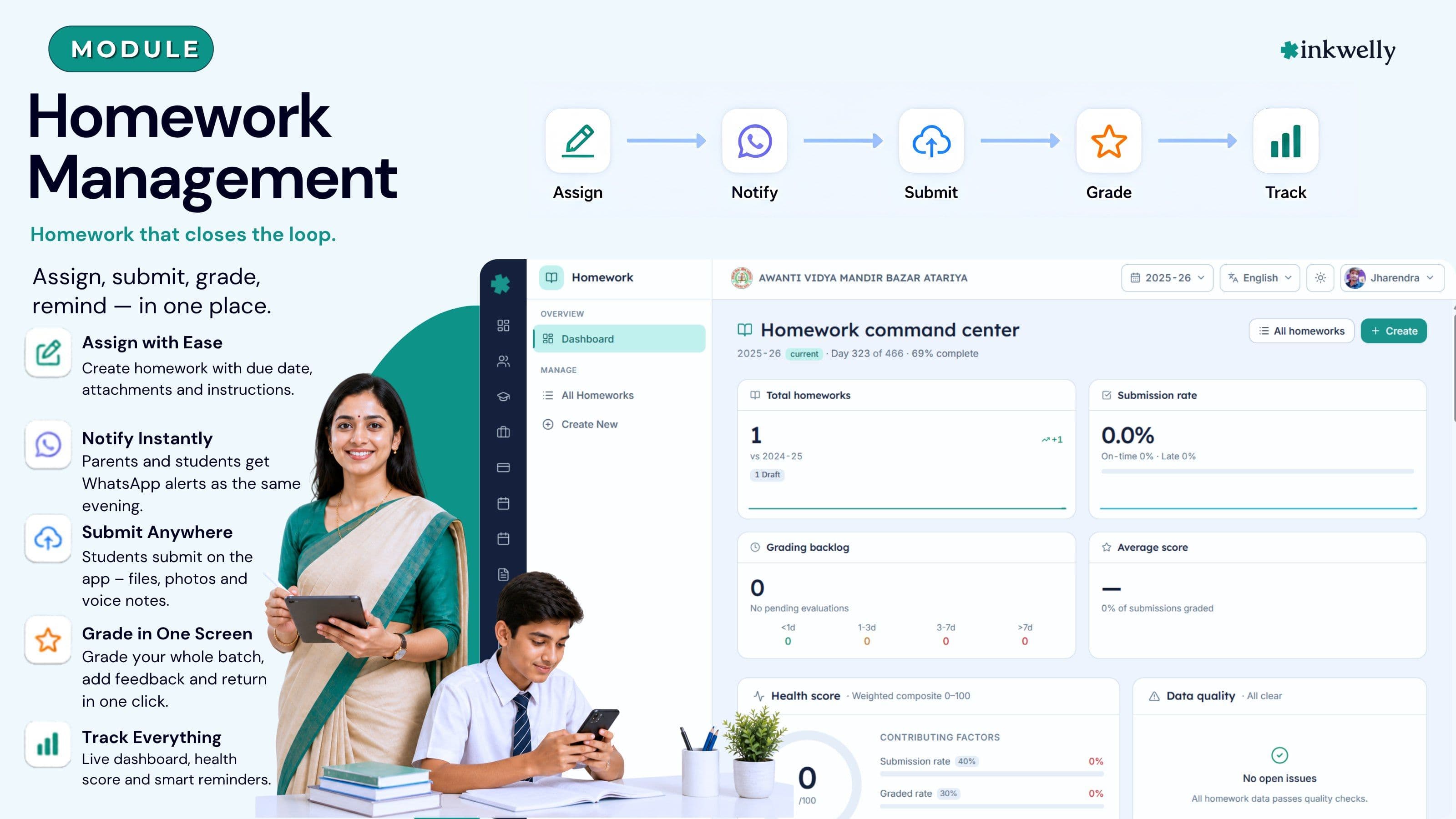
Homework that closes the loop. Assign, submit, grade, remind — in one place.
A homework system that runs the full cycle for an Indian school — class teacher posts it once, parents see it on WhatsApp the same evening, students submit on the app, and the teacher grades a whole batch in a single screen. Built for CBSE, ICSE, IB and State Board schools from Class 1 to Class 12.
How most Indian schools manage homework today
It is 4:35 pm in a CBSE school in Lucknow. The Class 6 maths teacher has just finished the last period and is writing the day's homework on the blackboard while students copy it into their diaries. Two students copied wrong, one was absent, three forgot the diary at home. By the time the school bus reaches Aliganj at 5:20, the parent WhatsApp group of Class 6-B has nine messages asking the same question — "aaj ka homework kya hai?" — and the class teacher who lives in Indira Nagar is already off-duty.
By Wednesday morning, the same teacher has a stack of 38 notebooks on her desk. She grades 22 before the second-period bell. The remaining 16 sit in the cupboard till Saturday. A parent calls the office on Friday to ask why her daughter's notebook hasn't been checked since Monday. Nobody has a structured answer. The principal pulls the teacher into the staffroom; the teacher is upset; the trust between school and parent erodes a millimetre. Multiply this by 28 sections, six days a week, three terms.
Inkwelly's Homework module replaces this with one closed loop. Teachers assign homework to a teaching batch once; the system fans it out to every student and parent automatically; submissions come back digitally or on paper; grading happens in one screen; and the principal sees a live health score for the entire school on a single dashboard. No WhatsApp groups, no parent calls to the office, no "who checked Class 6-B's notebooks last week" arguments.
What we built instead
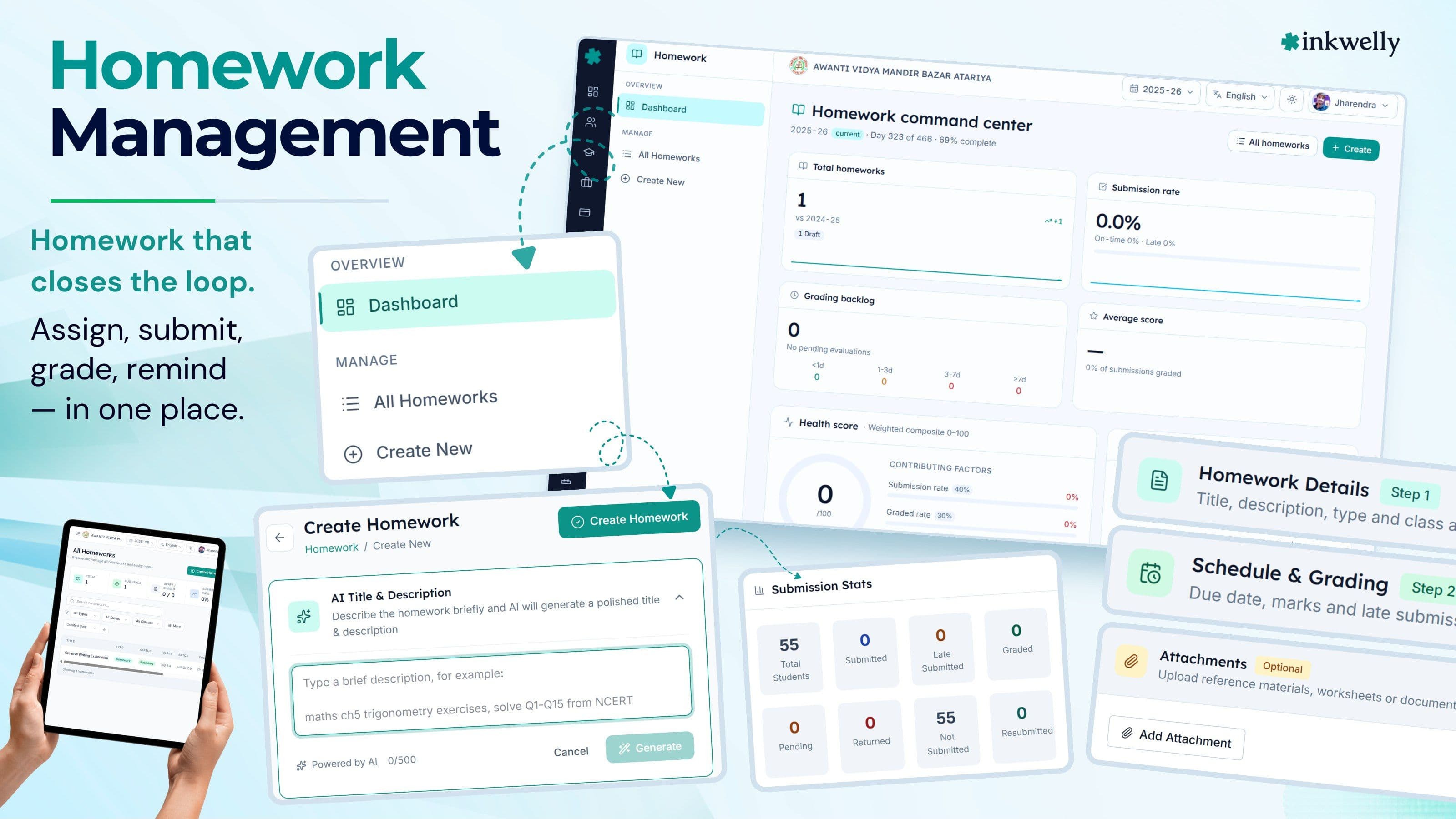
A single workflow per assignment — Draft → Published → Due → Submitted → Graded → Returned — with real database identifiers (homeworkId, submissionId, teachingBatchId) at every step. Teachers post once and the assignment travels to every student in the batch without any copy-paste. Parents see it the same evening on WhatsApp. The principal sees a daily health score that surfaces stuck assignments before they become parent complaints.
The module sits on top of Inkwelly's Academics module, so a homework assignment is always tied to a real subject offering, a real teaching batch, and a real teacher — never a free-text label that nobody can audit later. Closed sessions seal homework records read-only; you can still answer a parent's question about a 2023-24 assignment two years later, in seconds.
What the Homework module covers
- Assignment authoring — title, instructions, attachments (PDF, image, audio), due date, max marks, late-submission policy, and per-batch publish.
- Multi-batch publish — one assignment can target Class 6-A, 6-B and 6-C in a single click without duplicating the record.
- Lifecycle funnel — Draft, Published, Due, Overdue, Submitted, Graded, Returned, Closed — auditable at every step.
- Submission funnel — On time, Late, Missing, Excused — broken down by class, by student, by week.
- Grading workspace — open one screen, grade 38 students, attach voice feedback in Hindi or English, save once.
- Auto WhatsApp reminders — published, due-in-2-days, overdue, graded — using Inkwelly's WhatsApp Business API.
- Health score — five-axis daily score (publish discipline, submission rate, grading turnaround, parent reach, teacher load).
- Weekly trend — assignments published vs. submissions received, plotted week-over-week, classroom-by-classroom.
- Grading backlog — every assignment older than 72 hours without grading shown to the principal automatically.
- Performance — class-average, subject-average, and individual student trends across the term.
- Per-student timeline — a parent can see every assignment given to her child this term, with submission status and marks.
- Closed-session read-only — last year's homework records are never lost; they remain searchable forever, never editable.
Built around the Indian school day
Most imported global homework tools assume a one-teacher-per-class model and a Monday-to-Friday calendar. That breaks the moment you map it to an Indian school: a CBSE school has 8–10 subject teachers per class, a six-day week, and a parent who works on a daily wage and cannot install three different apps. Every default in Inkwelly's Homework module is set for an Indian school first.
Six-day week, period-aligned due dates
Due dates default to the next class period for that subject — not 24 hours later. A Wednesday Maths assignment in Class 6-B with three Maths periods a week defaults to 'due Friday before 8:30 am' automatically. Saturday is treated as a working day; Sunday is excluded. State-board schools that follow a four-Saturday-on, two-Saturday-off cycle can configure their working-day pattern once at the school level — every assignment respects it.
WhatsApp first, app second
In Tier-2/3 cities the parent messaging channel that actually works is WhatsApp. Inkwelly sends every homework alert as a real WhatsApp message — not a passive push notification — using the official WhatsApp Business API. The message is in Hinglish by default (configurable per school), carries the assignment title, due date, the attachment, and a deep link that opens the parent app. Parents who never install the app still receive every reminder.
Paper submissions are first-class
A Class 4 student in a UP Board school does not have her own phone. She still writes homework in a notebook. Inkwelly's grading workspace lets the teacher mark a student as 'Submitted on paper' in one tap; the digital record is created, parents see the submission status, the grading flow continues unchanged. The 'app-only' assumption that breaks every imported tool simply does not apply here.
Voice feedback in any language
Many primary-class teachers find written feedback slow and impersonal. Inkwelly lets them attach a 30-second voice note to any submission — in Hindi, English, Marathi, Tamil or Hinglish, no language selector needed. The student hears the teacher's actual voice; the parent hears it too. For lower primary classes this lifts engagement dramatically without adding any teacher workload.
Late, Missing, Excused — explicit
Most schools track 'submitted' vs. 'not submitted'. Inkwelly tracks four states — On time, Late, Missing, Excused — with a reason field on Excused that audits cleanly. A child absent for a wedding gets 'Excused — family event' on her submission row, not a 'missing' that her father has to call the office about. The audit trail makes parent disputes a non-event.
Grading backlog visible to the principal
The principal opens her homework dashboard at 9:15 am. She sees that 14 assignments across three teachers have been pending grading for more than 72 hours. She sends a polite WhatsApp to each teacher from inside the app. By Friday the backlog is zero. No staff meeting needed, no public embarrassment — just gentle, accountable visibility.
“Pehle har Sunday mujhe Class 5 ki maa-baap ki shikayat aati thi ki notebook check nahi hua. Ab Inkwelly ka backlog screen mujhe Tuesday ko hi dikha deta hai. Sunday wali kahaani band ho gayi.”
Before and after Inkwelly Homework
Who uses it, and how
Four very different people use the Homework module on a normal Monday. Each gets a workflow tuned to their role — and exactly the data they need, no more.
Class teacher
Opens the app at 8:10 am, posts the day's homework for her batch in 30 seconds, and gets on with the period. At 4:30 pm she opens the grading workspace, marks 38 students for yesterday's assignment in 12 minutes, attaches a Hindi voice note to two students who need help, and is done. No notebook stack on her desk.
Principal
Opens the homework dashboard once in the morning. Sees the five-axis health score, the grading backlog, and the two classes where parent reach has dropped below 90 percent this week. Sends one WhatsApp from inside the app to the relevant teacher. Closes the laptop. Total time: 4 minutes.
Parent
Gets a WhatsApp at 4:45 pm — "Today's Maths homework for Aarav: ..." with the PDF attached. Reads it during dinner, nudges the child. The next morning the parent sees the submission status in the app. By Wednesday evening the graded result is visible — with the teacher's voice note. No app login required to receive the alerts.
Student
Middle and senior students who own a phone get the student app. Today's homework, due tomorrow's homework, and last week's graded results sit on the home screen. Submitting is a single button — photo, audio, PDF or text. For senior classes preparing for boards, this becomes the single source of truth for what was assigned and what was returned.
How it connects to the rest of Inkwelly
The Homework module is not a separate silo. Every assignment links to a real teaching batch in Academics, draws students from Student Information, uses the same WhatsApp delivery layer as fee receipts and attendance alerts, and feeds graded marks into the per-student timeline that parents browse. Change a student's section in March — every homework record auto-rebinds. No double entry, ever.
Migration from your current setup
Most schools come to Inkwelly Homework from one of three places — a paper diary system, a homework feature inside their existing ERP (Fedena, Entab, campus tools), or a WhatsApp-only workflow. Migration is short for all three because there is almost nothing to migrate; homework is forward-looking by nature.
From paper diaries
Nothing to import. The school imports its class structure and student list (which is needed for every other module too), and from day one teachers can publish homework digitally. The paper diary can run in parallel for a term while parents adjust — Inkwelly has been adopted mid-session in November without any disruption.
From an existing ERP
We export your last 6 months of homework records in CSV (or a direct database read where the vendor allows it) and seal them as historical entries — searchable, never editable. New homework is published from Inkwelly. We have done this for schools migrating off Fedena, Entab, and three regional ERPs in 4 days flat.
From WhatsApp-only workflows
The most common starting point in Tier-2/3 schools. Parents already receive homework on WhatsApp, just informally. Inkwelly keeps that channel — parents continue to receive WhatsApp messages from the same Inkwelly Business number — but adds the lifecycle, audit and grading layer underneath. Parents notice a cleaner format; the school gets a real system.
Closed-session sealing
At year-end, when the academic session is closed in Academics, every homework assignment from that session is sealed read-only. It remains queryable forever. A parent in 2026 can ask about her child's Class 6 assignments from 2024 and the office can answer in 30 seconds — without changing any data.
See Inkwelly Homework live
20-minute walkthrough on a real CBSE dataset — assigning a homework, parent WhatsApp delivery, grading workflow, and the principal's health-score dashboard.
Security, privacy and DPDP compliance
Homework artefacts are children's work; they need careful handling. All attachments, voice notes and graded feedback are stored on Inkwelly's India-region infrastructure (Mumbai). Access is role-scoped — a class teacher sees only her batches; a subject teacher sees only her subject; a parent sees only her child. Aligned with the DPDP Act 2023 minor-data provisions, parental consent is captured at admission and is auditable. Closed-session records are sealed for retention without becoming editable.
What's included with the Homework module
- Unlimited assignments, unlimited submissions, unlimited classes
- WhatsApp Business delivery — included in plan, no separate setup
- Teacher app, parent app, student app — Android + iOS
- Voice feedback recording on any submission, any language
- Five-axis health score with daily refresh
- Grading backlog tracking with automatic principal alerts
- Per-student term timeline — auto-generated, exportable to PDF
- Closed-session read-only retention — forever
- Six-day week support, configurable working Saturdays
- DPDP-compliant data residency in Mumbai, India
- Onboarding + training — 2 sessions, included in setup
Run a closed homework loop next term
Switch from diary + WhatsApp groups to a single audited workflow before April 1, 2026. Setup completes in under a week.
Frequently asked
10 questionsWill my parents need to install yet another app?
No. Every homework alert goes to WhatsApp via the official Business API — your parents already have WhatsApp. The Inkwelly parent app is optional; parents who install it get a richer view (timeline, attachments, voice feedback playback) but nothing is lost if they only use WhatsApp.
What happens to homework assigned in the previous session?
When the academic session closes in Academics, every homework record from that session is sealed read-only. Marks, attachments, feedback and submission states remain searchable forever — a parent in 2026 can ask about a 2023 assignment and the office can answer in seconds — but nothing can be edited. This is by design for audit and dispute resolution.
Can teachers grade on mobile, or do they need a laptop?
Either. The grading workspace runs identically on Android, iOS and a browser. A typical primary-class teacher grades 38 submissions on her phone in under 15 minutes, including voice feedback. A senior-class subject teacher who reviews longer answers usually prefers a laptop.
How does it handle paper submissions?
Paper is a first-class submission type. The teacher marks the student as 'Submitted on paper' with one tap; the digital record is created, parents see the submission status, marks and feedback can be added later. Lower primary classes that do all their work on paper notebooks use this every day.
Can one homework go to multiple sections at once?
Yes. A Class 6 maths teacher who teaches 6-A, 6-B and 6-C can publish a single assignment to all three teaching batches in one click. Each batch retains its own submission funnel, its own grading workspace, and its own per-student records — but the source assignment stays one record.
Does this work for IB and IGCSE schools that use rubrics, not marks?
Yes. Each subject offering carries its own grading scheme — numeric marks, IB 1-7, IGCSE A*-G, or qualitative criteria with a rubric. The grading workspace adapts. A school running CBSE for the main wing and IGCSE for the senior wing uses both schemes inside one Inkwelly instance.
What languages does the WhatsApp message support?
Hinglish by default. Pure Hindi, English, Marathi, Tamil, Bengali, Gujarati, Kannada, Telugu and Malayalam are configurable per school — and per parent if you collect language preference at admission. Brand names, dates and class names always stay in English script for clarity.
What if a teacher leaves mid-session?
Reassignment in Academics carries forward — the new teacher inherits the open assignments, the grading queue, and the per-student timeline. Closed (already-graded) assignments stay attributed to the original teacher in the audit log. Nothing is lost; nothing has to be re-keyed.
How is this different from Google Classroom?
Google Classroom is great for tech-comfortable schools where every parent has Gmail and every student has a laptop. Inkwelly is built for the 95 percent of Indian schools where parents use WhatsApp, students share family phones, and class teachers grade on the go. WhatsApp delivery, paper-submission support, voice feedback in regional languages, and the Indian school calendar are first-class — not workarounds.
Can the principal see one teacher's load vs. another?
Yes. The teachers card on the dashboard shows assignments published, submission rate received, grading turnaround, and parent reach for every active teacher. Useful for both equity reviews and identifying teachers who need help. The data is observational, not punitive — the school decides what to do with it.
You might also like
4 readsSee Inkwelly on your school
30-minute demo. We open your current ERP with you and load your data into Inkwelly on the call. Dated go-live plan by the end of it.