लेट फीस नियम कैसे सेट करें फ्लैट, पर्सेंटेज, स्लैब या हाइब्रिड
यह गाइड स्कूल अकाउंटेंट और फ्रंट-ऑफिस स्टाफ के लिए है, जिन्हें overdue फीस invoice पर एक स्पष्ट और न्यायसंगत penalty लगानी है। अंत में आपके पास Inkwelly में एक सेव किया हुआ late fee नियम होगा — फ्लैट प्रति दिन, outstanding पर पर्सेंटेज, दिनवार स्लैब, या हाइब्रिड — ग्रेस दिनों और अधिकतम सीमा के साथ, invoice पर लागू करने के लिए तैयार।
Inkwelly में late fee नियम सेट करने के लिए: Student Fee → Configuration → Late Fee Rules खोलें, + Add Rule पर क्लिक करें, नियम का नाम भरें और calculation type चुनें (Flat Rate, Percentage, Slab Based या Hybrid), rate भरें, grace days और वैकल्पिक अधिकतम सीमा सेट करें, Active या Default चालू करें और Create दबाएँ। Slab Based नियम के लिए सेव किया हुआ नियम खोलकर day-range स्लैब जोड़ें। उसके बाद यह नियम overdue invoice पर अपने आप लागू होता है।
Late fee नियम वह सूत्र है जिसका उपयोग Inkwelly तब करता है जब कोई अभिभावक due date के बाद invoice का भुगतान करता है। अधिकांश भारतीय CBSE और राज्य बोर्ड स्कूल हर साल लगभग 4% से 8% invoice देरी से वसूल करते हैं (UDISE+ school finance returns, 2023), और 1,200 छात्रों वाला स्कूल इस तरह हर सत्र में लगभग 200 overdue invoice देखता है। Inkwelly चार calculation types समर्थित करता है ताकि वही नियम अभिभावकों को न्यायसंगत लगे: Flat Rate प्रति दिन, सप्ताह या माह; outstanding का Percentage; Slab Based पैमाना जो देरी के साथ बढ़ता है; या Hybrid जो पहले flat होता है और एक निश्चित सीमा के बाद percentage पर चला जाता है। डे स्कूल की late fee आमतौर पर सात दिनों की ग्रेस अवधि के बाद ₹50 से ₹100 प्रति दिन के बीच होती है।
1. Configuration के अंतर्गत Late Fee Rules खोलें
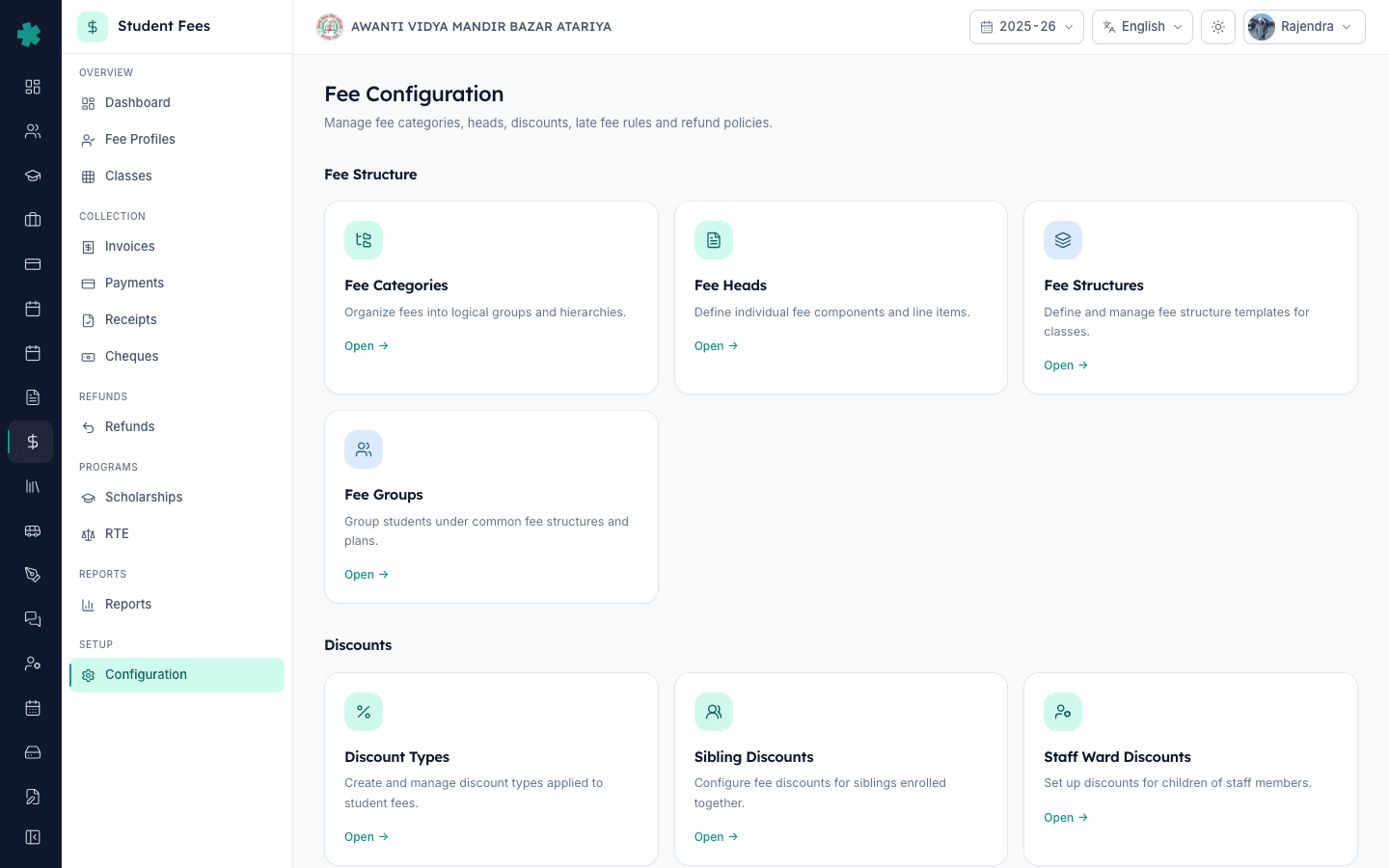
बाएँ साइडबार से Inkwelly → Student Fee खोलें, फिर SETUP के अंतर्गत Configuration पर क्लिक करें। Fee Configuration पेज पर चार सेक्शन दिखेंगे: Fee Structure, Discounts, Penalties & Refunds और Preferences। Penalties & Refunds सेक्शन में Late Fee Rules टाइल पर Open क्लिक करें। यही वह एक जगह है जहाँ स्कूल के सभी penalty नियम रखे जाते हैं।
2. + Add Rule क्लिक करें और नियम का नाम भरें
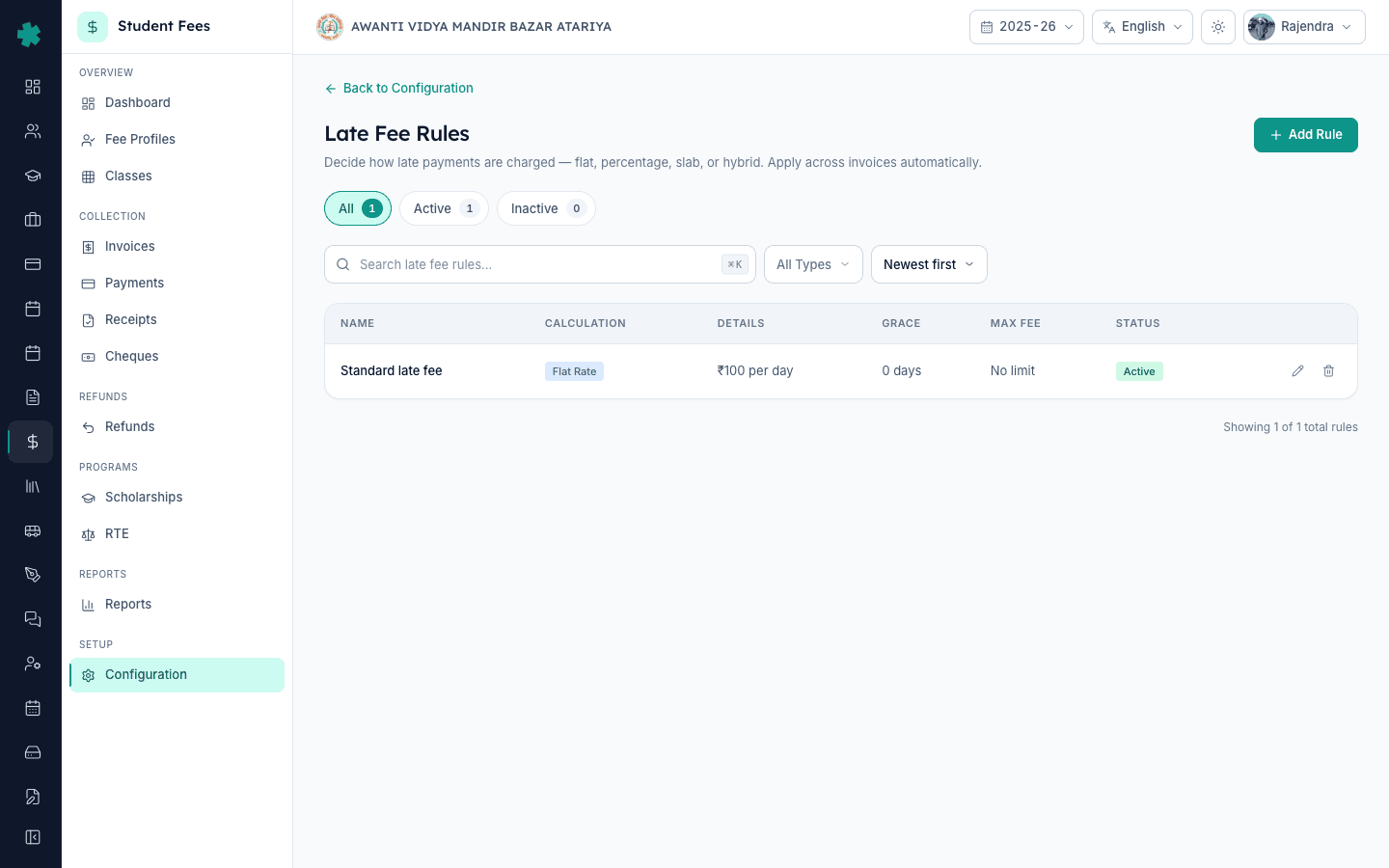
सूची के ऊपर दाईं ओर + Add Rule बटन पर क्लिक करें। डायलॉग में एक स्पष्ट नाम भरें जैसे Standard late fee — Annual 2025-26, ताकि invoice देखने वाला हर व्यक्ति इसे पहचान सके। यह नाम late fee वाले हर invoice और fee receipt पर दिखता है, इसलिए इसे अभिभावकों के लिए पठनीय रखें — कोड या संक्षिप्त रूप से बचें।
3. अपनी नीति के अनुसार calculation type चुनें
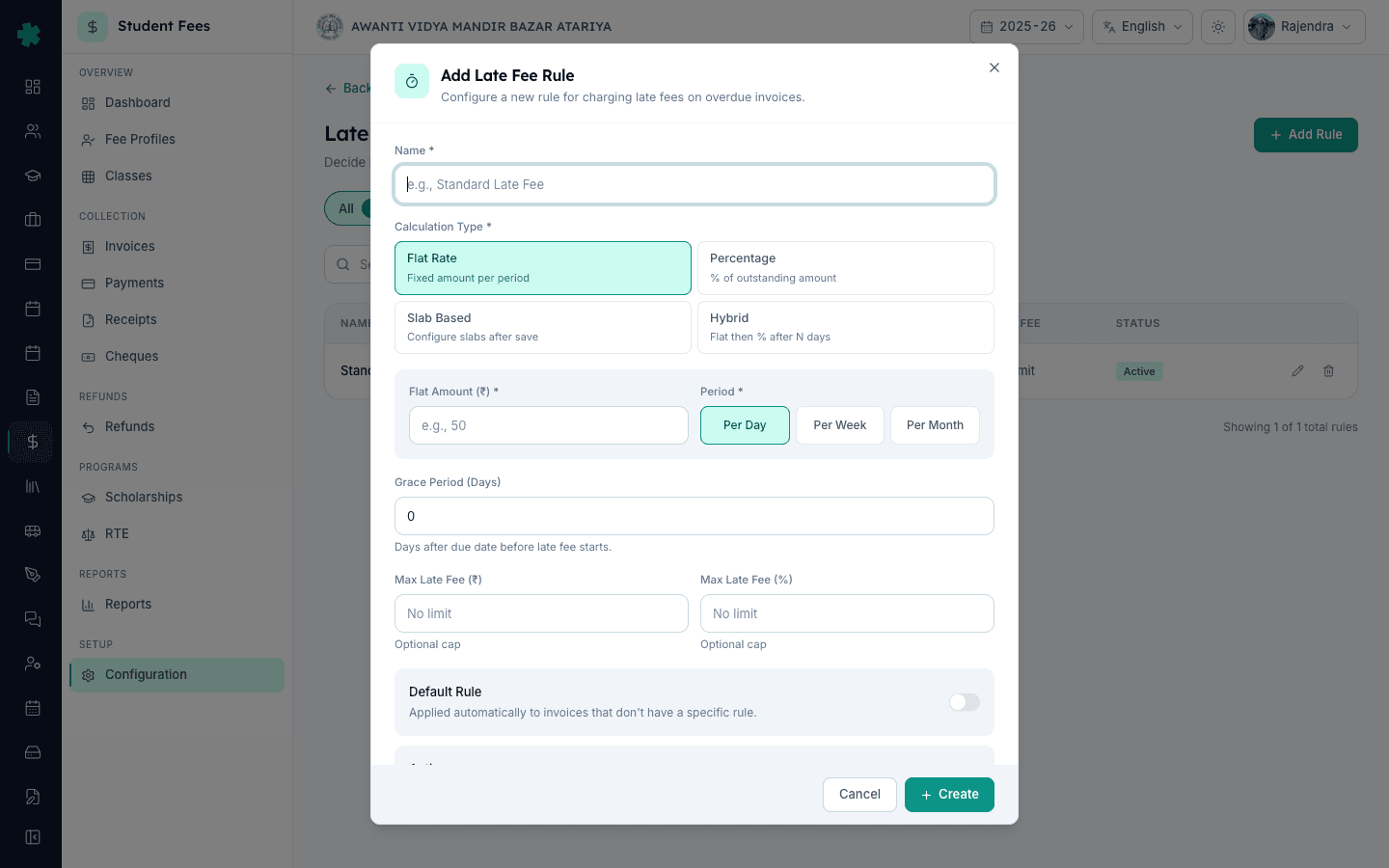
Inkwelly चार टाइल दिखाता है: Flat Rate (प्रति अवधि निश्चित राशि), Percentage (outstanding राशि का प्रतिशत), Slab Based (सेव के बाद स्लैब configure करें) और Hybrid (N दिनों तक flat, फिर percentage)। जब आपके circular में लिखा हो ₹100 per day after due date, तब Flat Rate चुनें। जब लिखा हो 5% of outstanding after due date, तब Percentage चुनें। जब penalty देरी के साथ बढ़ती है तब Slab Based चुनें — जैसे सप्ताह 1 में ₹50/day, सप्ताह 2 में ₹100/day, उसके बाद ₹200/day। जब नियम ₹100 flat, फिर 7 दिनों के बाद outstanding का 2% हो, तब Hybrid चुनें।
4. चुने हुए type के अनुसार rate फ़ील्ड भरें
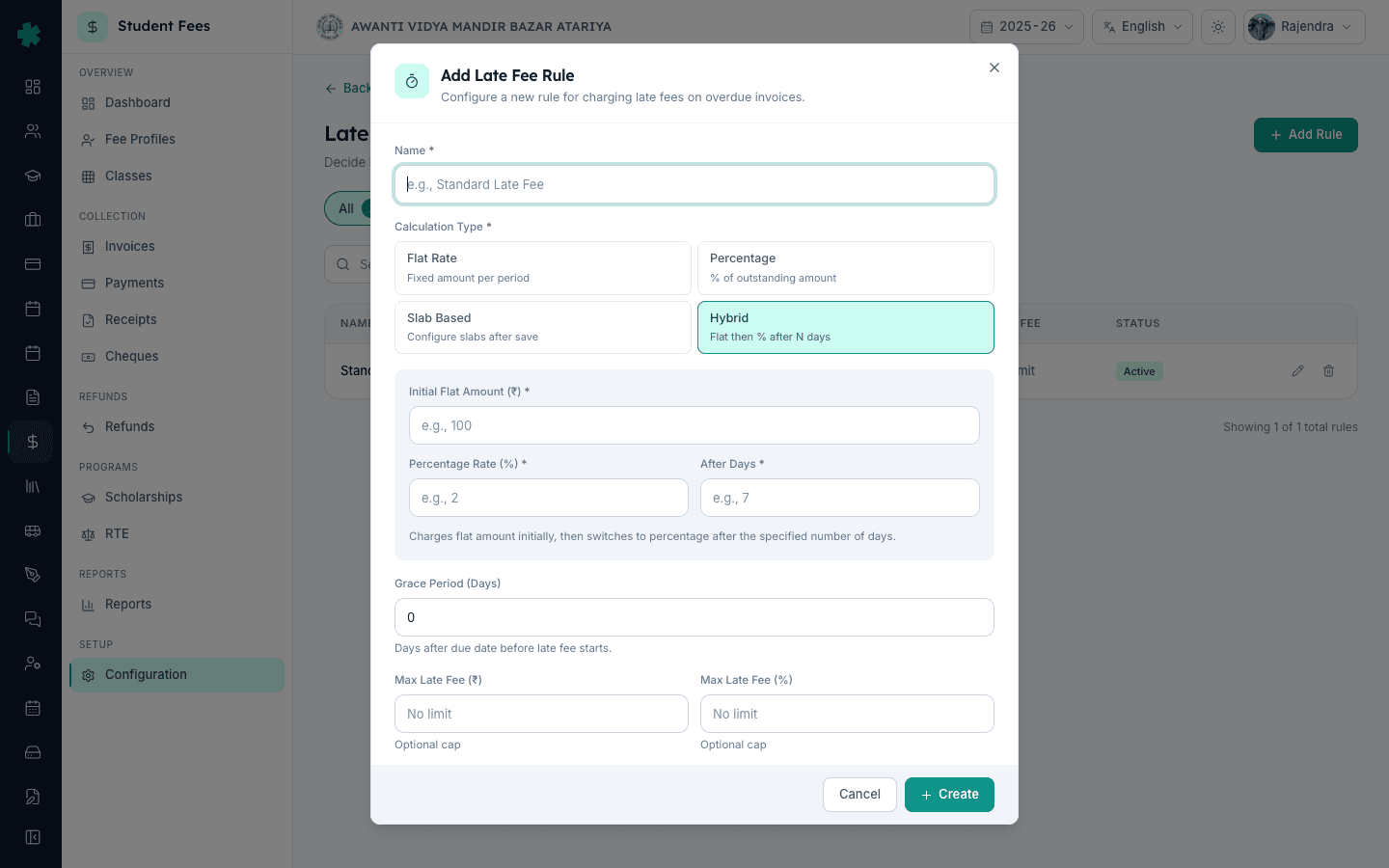
Flat Rate के लिए Flat Amount रुपये में भरें और Period चुनें — Per Day, Per Week या Per Month। Tier-2 डे स्कूल में ₹50 से ₹100 Per Day सामान्य सेटिंग है। Percentage के लिए 0 से 100 के बीच Percentage Rate भरें — 2 से 5 सामान्य है। Hybrid के लिए Initial Flat Amount, Percentage Rate और After Days भरें, जिसके बाद Inkwelly flat से percentage पर चला जाता है — जैसे पहले 7 दिनों के लिए flat ₹100, फिर outstanding का 2%। Slab Based यहाँ कोई rate नहीं माँगता — स्लैब save करने के बाद बनते हैं।
5. Grace days और अधिकतम सीमा सेट करें
Grace Period (Days) भरें — due date के बाद कितने दिनों तक Inkwelly कोई late fee नहीं लगाएगा। 0 का अर्थ है late fee अगले दिन से शुरू; 7 भारतीय स्कूलों में सबसे आम सेटिंग है। फिर वैकल्पिक Max Late Fee रुपयों में और Max Late Fee invoice के प्रतिशत के रूप में सेट करें — दोनों खाली छोड़ने का अर्थ है कोई सीमा नहीं। यह सीमा parent-fairness का मुख्य लीवर है; अधिकांश स्कूल late fee को मूल invoice के 25% से अधिक नहीं रखते।
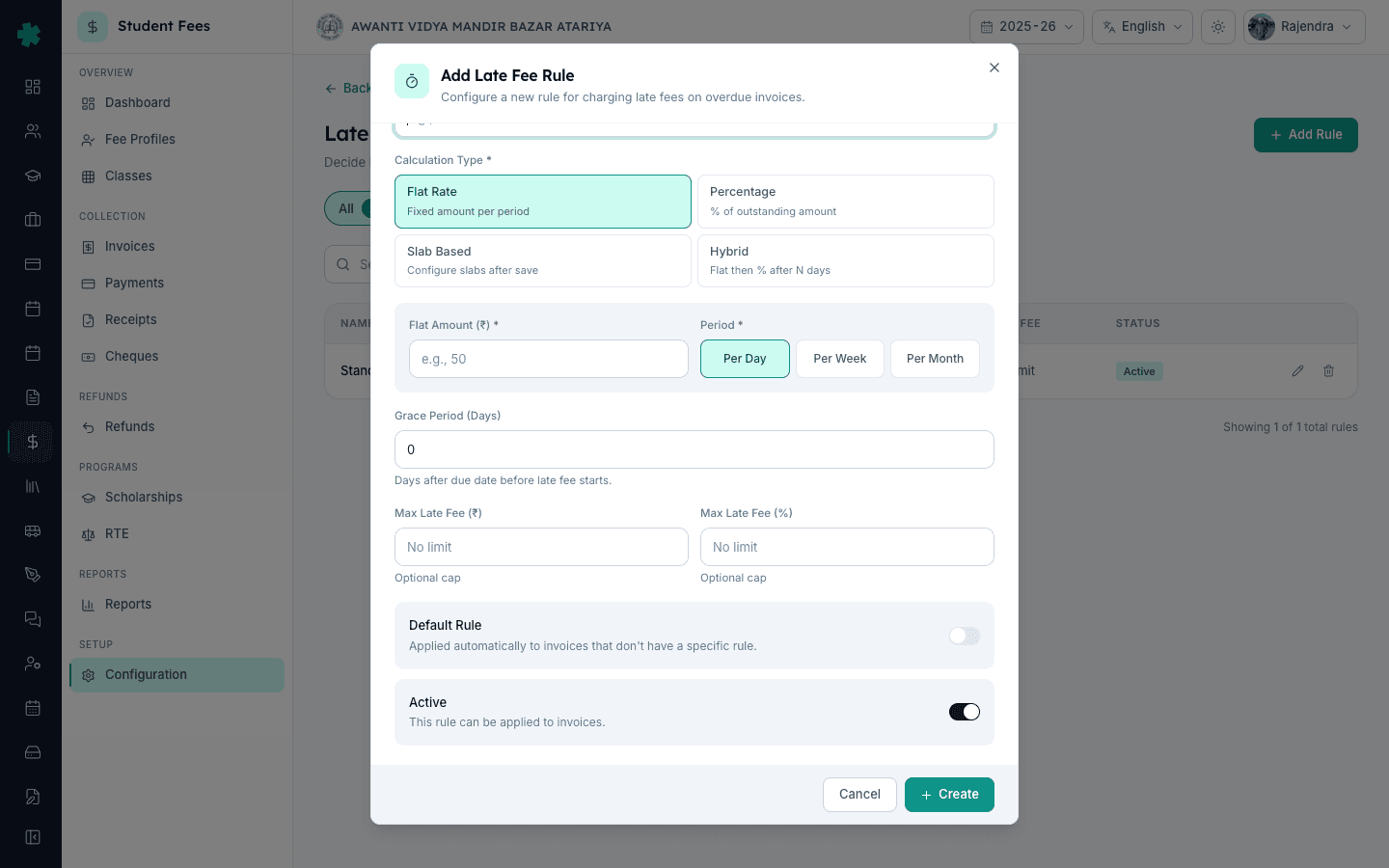
6. Default और Active चालू करें, फिर Create दबाएँ
यदि यह नियम हर उस invoice पर लागू होना चाहिए जिस पर कोई विशिष्ट late fee नियम नहीं है, तो Default टॉगल चालू करें — ऑफिस आमतौर पर हर सत्र में एक ही Default रखता है। Active को चालू रखें ताकि Inkwelly नियम आज से लागू करे; इसे बंद करने पर नियम उपलब्ध तो रहेगा पर शुल्क नहीं लगेगा। Create दबाएँ। Inkwelly नियम सेव करता है और सूची में calculation पिल, rate विवरण (जैसे ₹100 per day), grace days, max fee और Status पिल के साथ दिखाता है।
7. Slab Based नियम के लिए day-range स्लैब जोड़ें
यदि आपने Slab Based चुना है, तो सूची में सेव किए हुए नियम पर क्लिक करके slab editor खोलें। Add Slab क्लिक करें, From Day और To Day भरें (onwards के लिए To Day खाली रखें), फिर रुपयों में Amount या Percentage भरें — दोनों नहीं। एक विवरण जोड़ें जैसे Week 1 — gentle nudge। हर tier के लिए दोहराएँ — जैसे Day 1 से 7 पर ₹50, Day 8 से 14 पर ₹100, Day 15 onwards पर ₹200। ये सभी स्लैब मिलकर बताते हैं कि देरी के साथ penalty कैसे बढ़ती है।
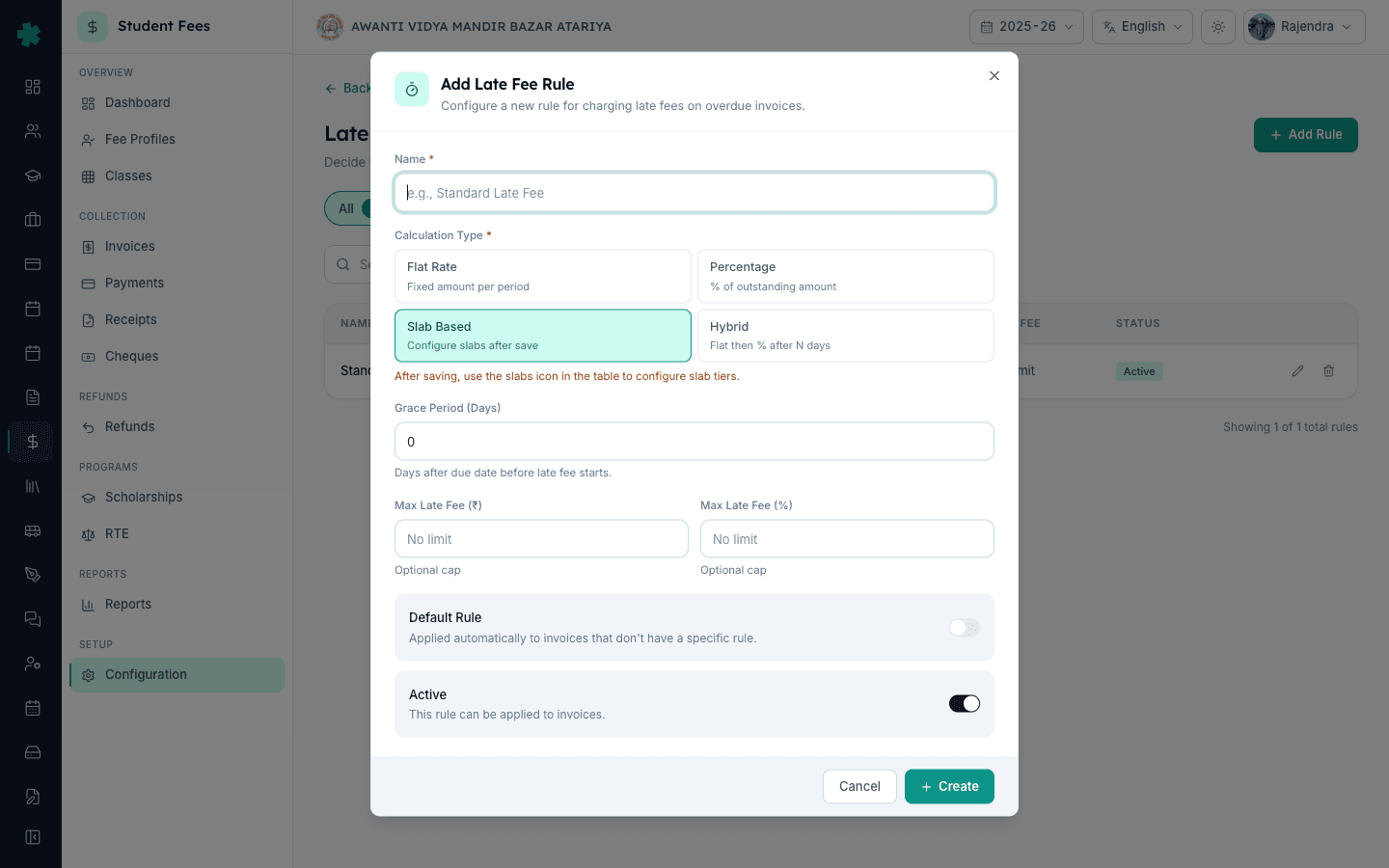
अगला कदम — इस नियम को अपने collection workflow से जोड़ें। पहले How to create a fee structure for the academic session देखकर fee chart और due date की जाँच करें। फिर How to create fee groups and assign them to classes के अनुसार क्लास सही ग्रुप में रखें। अंत में How to define fee categories and fee heads के अंतर्गत हर fee head की पुष्टि करें। नियम सेट होने पर parent reminder, public receipt और ऑफिस collection report — हर जगह penalty एक अलग पंक्ति में दिखेगा, मैन्युअल जोड़ने की ज़रूरत नहीं।
Inkwelly Student Fees को काम करते हुए देखें
अक्सर पूछे गए सवाल
7 सवालभारतीय स्कूल को प्रति दिन कितनी late fee लेनी चाहिए?
अधिकांश Tier-2 और Tier-3 डे स्कूल 5 से 7 दिनों की ग्रेस अवधि के बाद ₹50 से ₹100 प्रति दिन लेते हैं; मेट्रो स्कूल और residential स्कूल अक्सर outstanding राशि का 2% से 5% प्रति माह लेते हैं। राज्य बोर्ड सूचनाओं की अपेक्षा होती है कि कुल late fee सीमा में रहे — कई स्कूल इसे मूल invoice के 25% पर रोक देते हैं। Inkwelly इनमें से किसी भी पैटर्न को समर्थित करता है और late fee को invoice पर एक अलग पंक्ति में दिखाता है।
Percentage और Slab Based late fee नियम में क्या अंतर है?
Percentage पूरे overdue अवधि पर एक ही दर outstanding राशि पर लगाता है — जैसे due date के बाद outstanding का 5%। Slab Based हर day-range के लिए अलग amount या percentage रखता है — जैसे सप्ताह 1 में ₹50 प्रति दिन, सप्ताह 2 में ₹100 प्रति दिन, उसके बाद ₹200 प्रति दिन। जब एक ही flat दर पर्याप्त हो तब Percentage चुनें; जब अभिभावक जितनी देर करे penalty उतनी बढ़नी चाहिए तब Slab Based चुनें।
क्या एक अधिकतम सीमा सेट कर सकते हैं जिससे late fee कभी मूल invoice से अधिक न हो?
हाँ। Add Rule डायलॉग में Max Late Fee (₹) और Max Late Fee (%) दोनों फ़ील्ड हैं। दोनों या किसी एक को सेट किया जा सकता है। उदाहरण के लिए, Max Late Fee (%) को 25 सेट करने पर late fee कभी भी मूल invoice के 25% से अधिक नहीं होगी। दोनों खाली छोड़ने का अर्थ है कोई सीमा नहीं। हर recalculation पर यह सीमा लागू होती है, इसलिए अभिभावक हमेशा late fee की उचित ऊपरी सीमा देखते हैं।
Late fee kaise lagaye Inkwelly me?
Student Fee → Configuration → Late Fee Rules kholiye, top-right ka + Add Rule button dabaiye. Naam (jaise Standard late fee — 2025-26) bhariye, calculation type chuniye — Flat Rate, Percentage, Slab Based ya Hybrid. Rate aur grace days set kijiye, Max cap bhariye agar chahiye, Default aur Active toggle on kijiye, Create dabaiye. Slab Based rule ke liye saved rule khol kar day-range slabs add kijiye.
Percentage aur Slab Based me kya farq hai?
Percentage rule ek hi rate poore overdue period par lagata hai — jaise 5% of outstanding after due date. Slab Based har day-range ke liye alag amount ya percentage rakhta hai — jaise Day 1-7 par ₹50/day, Day 8-14 par ₹100/day, Day 15 onwards par ₹200/day. Jab penalty delay ke saath badhni chahiye, Slab Based use kijiye.
क्या invoice बनने के बाद late fee नियम बदला जा सकता है?
हाँ। Inkwelly किसी भी समय calculation type, rate, grace days और सीमा संपादित करने देता है। पहले से बने invoice अपनी मौजूदा late fee बनाए रखते हैं; अगली recalculation पर — दैनिक cron से अपने आप या fee profile से मैन्युअल — नए दिनों की देरी के लिए updated नियम का उपयोग होता है। शुल्क लगाना बंद करने के लिए नियम delete करने के बजाय Active switch बंद कर दें ताकि history बनी रहे।
Grace days और due date में क्या अंतर है?
Due date वह दिन है जब अभिभावक से भुगतान की अपेक्षा होती है। Grace days वह buffer हैं जिसके दौरान Inkwelly due date के बाद late fee शुरू नहीं करता। 10 अप्रैल की due date और 7 grace days का मतलब है late fee 18 अप्रैल से लगनी शुरू होगी। Grace days उतने ही रखें जितने आपके fee circular में अभिभावकों को बताए गए हैं, ताकि invoice और circular पर penalty का पहला दिन एक ही हो।
आपको ये भी पसंद आ सकता है
3 लेखस्रोत व संदर्भ
- CBSE Affiliation Bye-Laws — Chapter VII, Fee Structure · देखा गया 19 May 2026
CBSE bye-laws require affiliated schools to publish the fee chart and any late fee in the approved fee structure shared with parents, which the late fee rule in Inkwelly enforces consistently.
- Right of Children to Free and Compulsory Education Act, 2009 — Section 13 · देखा गया 19 May 2026
The RTE Act prohibits collecting any amount beyond the published fee, so the late fee rule and its cap are part of the published structure for parents to see.
- Ministry of Education — UDISE+ Data Capture Format (School Finance section) · देखा गया 19 May 2026
UDISE+ annual returns ask schools to report fee heads and outstanding dues, which depends on a clearly defined penalty rule applied consistently across invoices.
Inkwelly आपके स्कूल पर — खुद देखें
30 मिनट का डेमो। आपके मौजूदा ERP को आपके साथ खोलकर, कॉल पर ही आपका डेटा Inkwelly में लोड करते हैं। कॉल ख़त्म होते-होते एक तय तारीख़ का गो-लाइव प्लान आपके हाथ में।