एक click में Transfer Certificate जारी करें — और गलती को उतनी ही जल्दी ठीक करें। CBSE / ICSE / State Board के लिए तैयार। Session-end पर bulk exits। Legacy students seconds में import।
Inkwelly का Transfer Management hub स्कूल साल का सबसे मुश्किल हफ्ता — जब 30 से 200 students अपनी TC लेकर जाते हैं, parents printed certificate के लिए call कर रहे हैं, और office पहले से next year के admissions में पीछे है — कुछ clicks में बदल देता है। एक click में board-compliant Transfer Certificate जारी करें — allocated number, downloadable PDF, QR verification और audit trail के साथ। Session-end पर पूरे cohort के लिए bulk exits चलाएं। अपने पुराने ERP से हर legacy transfer को import करें। और जब किसी student को गलती से transfer कर दिया जाए — दो साल पहले भी हो — उसे seconds में restore करें।
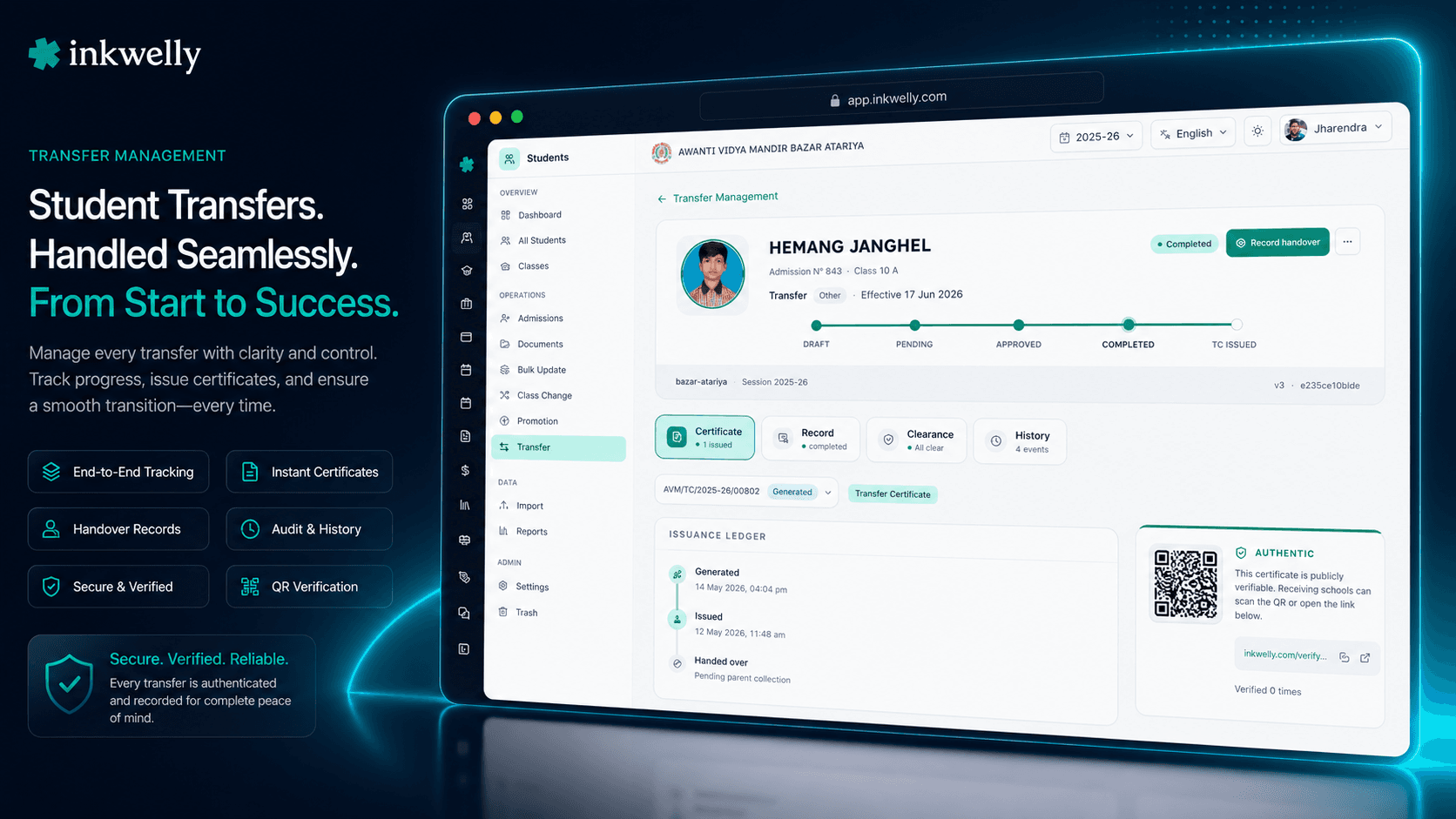
Student exit week हर school office को क्यों तोड़ देता है
Indore में एक CBSE school में March का आखिरी हफ्ता है। 58 students जा रहे हैं — 8 दूसरे शहरों में transfer हो रहे हैं क्योंकि parents को Bangalore और Hyderabad में jobs मिली, 12 अपनी Class 10 board exam के बाद migrate कर रहे हैं, 6 medical कारणों से mid-session withdrawn हुए, और बाकी Class 12 से graduate हो रहे हैं। हर parent April 5 से पहले Transfer Certificate चाहता है, क्योंकि receiving school का admission counter उसके बिना नई application process नहीं करेगा। Office assistant की desk पर 58 blank pre-printed TC books का ढेर है, एक Class 10 student की मां speakerphone पर पूछ रही है कि certificate ready क्यों नहीं है, और कल का Principal का signature backlog अभी unsigned है।
ज्यादातर school ERPs में यह एक manual treadmill बन जाता है। Student profile खोलें। Transferred mark करें। TC module में switch करें। Template pick करें। Hand से TC number type करें — एक register से जो पिछली office assistant ने रखा था (और जिसका last page खो गया)। Leaving date type करें। Reason type करें। Conduct grade type करें। Attendance summary type करें। Fee balance type करें। Parent का name तीन बार type करें क्योंकि form में father, mother और guardian की name अलग fields में है। Stationery पर print करें। Principal का signature लें। Parent को दें। 57 बार और दोहराएं। पिछला TC number KSM/TC/2024-25/00342 था; अगला KSM/TC/2024-25/00343 होना चाहिए — लेकिन office assistant ने student #18 पर गलती से 00344 type कर दिया, और अब school के official register में एक missing number है जिसे CBSE affiliation renewal inspector अगले साल flag करेगा।
हमने Transfer Management को एक dedicated hub के रूप में बनाया है जो पूरे student-exit lifecycle को एक जगह handle करता है। structured reason, optional approval gate, और fees, library books और transport के लिए clearance checks के साथ एक transfer initiate करें। एक बार 'Generate & Issue TC' click करें और Inkwelly atomically next certificate number allocate करता है (कोई gaps नहीं, कोई duplicates नहीं, कोई register-keeping नहीं), school के letterhead और principal की seal के साथ bilingual PDF render करता है, secure cloud storage पर store करता है, और एक QR code stamp करता है जिसे कोई भी receiving school seconds में verify कर सकती है। पूरे Class 12 graduating cohort के लिए session-end bulk exit चलाएं और हर TC parallel में issue होती है। जब parent दो महीने बाद आकर कहता है कि transfer एक mistake था — परिवार आखिर Indore में ही रुक गया — एक click में student को active status पर restore करें, भले ही system का reversal window expire हो चुका हो। जो हफ्ता school से डरता था वह एक Tuesday afternoon बन जाता है।
Transfer Management कैसे काम करता है — एक hub, हर exit type
Students → Transfers session sidebar में खोलें। Hub current academic session पर auto-filter करता है — 2025-26 अगर URL में यही है — ताकि Indore office assistant जो इस साल के exits manage कर रही है उसे last year के records नहीं दिखें। ऊपर stats cards pending approvals, completed this month, changes requested, और rejected दिखाते हैं — सब full filtered dataset को reflect करते हैं, सिर्फ visible page नहीं। नीचे list latest leaving date से sort करती है।
Step 1 — Transfer initiate करें। 'Initiate Transfer' click करें और student pick करें। तीन exit kinds first-class हैं: TRANSFER (TC के साथ दूसरी school जाना), WITHDRAWAL (पढ़ाई continue किए बिना leaving), MIGRATION (Class 10 या Class 12 के बाद board से completely exit)। एक structured reason pick करें — relocation, financial, academic, medical, family, better opportunity, या other — और effective date। External school के लिए receiving school का name, board affiliation, UDISE code, और address capture करें।
Step 2 — Clearance probes। Completion से पहले Inkwelly four mandatory clearance gates probe करता है: fees outstanding, library books not returned, active transport assignment, hostel allotment। हर probe student के actual records के against चलता है — manual checklist नहीं। Fees clearance Student Fee module से read करता है और exact outstanding amount दिखाता है, settle-or-override option के साथ। हर override audit-logged होता है।
Step 3 — Transfer Certificate generate और issue करें। Completed transfer पर detail page से 'Generate TC' click करें। एक click में Inkwelly atomically next certificate number allocate करता है per-(school, session, prefix) sequence से, frozen student/school snapshots के साथ PDF render करता है, secure storage पर upload करता है, document पर unique QR verification token stamp करता है, और status ISSUED पर flip करता है।
Step 4 — Hand over और (अगर जरूरत हो) reverse करें। अगर parent वापस आकर कहता है कि transfer mistake था, record पर 'Reverse Transfer' click करें। Inkwelly student को ACTIVE पर restore करता है, issued TC को revoke करता है (QR code scan करने पर revoked status return करना शुरू कर देता है), parent portal access reactivate करता है, और एक RESTORATION audit entry लिखता है। Reversal कितने भी time पहले student गया हो काम करता है — 30-day window configurable है लेकिन legacy-imported records इसे bypass करते हैं।
हर transfer पर क्या capture कर सकते हैं
- तीन exit kinds first-class — TRANSFER (TC के साथ), WITHDRAWAL (continuing studies नहीं), MIGRATION (board exit)। हर एक अलग downstream behaviour drive करता है और reports अलग होती हैं।
- Structured exit reason — Relocation, Financial, Academic, Medical, Disciplinary, Family, Better Opportunity, Transferred to Another School, Dropped Out, Deceased, Other — dropdown से pick किया जाता है ताकि reports cleanly group हों।
- Effective date — इस school में student का last working day, TC पर leaving date drive करता है और उस दिन से हर report पर।
- Receiving school — external transfers के लिए name, board (CBSE/ICSE/State/IGCSE/IB/NIOS), UDISE code, address, city और state capture करें।
- Trust में inter-school — multiple schools चलाने वाले trusts के लिए, destination को same org की दूसरी Inkwelly school के रूप में mark करें और Inkwelly automatically destination admission बनाता है admission-number continuity के साथ।
- Clearance gates — fees outstanding, library books, transport assignment, hostel allotment। हर gate per school configurable है required या optional के रूप में। Authorised users एक failed gate को logged reason के साथ override कर सकते हैं।
- Approval workflow — per school opt-in। When on, transfers PENDING_APPROVAL में जाते हैं जब तक principal approve नहीं करता।
- Reversal window — days में configurable; isLegacy-imported records इसे completely bypass करते हैं।
- Per-record audit log — हर state change actor, timestamp, IP, from-state, to-state, और reason के साथ append-only event लिखता है। CBSE renewal और state-board RTE inspection के लिए तैयार।
- Optimistic locking — दो office assistants जो एक ही transfer को एक ही instant में approve करें: एक cleanly जीतता है, दूसरे को clear conflict toast मिलता है। कोई silent overwrites नहीं।
“March mein 58 students ki TC banane mein pehle 5-6 din lagte the, aur 2 baar number repeat ho gaya tha jo CBSE inspection mein problem ban gaya. Ab Generate & Issue TC ek click hai — number automatic, PDF download ho jaata hai, QR bhi lag jaata hai. Bulk Transfer Wizard se Class 12 ke 78 students ek dopahar mein nikal gaye. Ek mother ne galti se transfer hua bola — ek click se reverse, baccha wapas active. Saara process audit log mein bhi hai.”
Transfer Management को अपनी school के data पर live देखें
पिछले साल का TC register और अपने पुराने ERP की transferred-student list लेकर आएं। हम demo के दौरान आपकी Transfer Settings और TC template set up करेंगे, पूरे cohort के लिए session-end bulk run करेंगे, और दिखाएंगे कि कैसे एक हफ्ते का office काम एक afternoon में बदल जाता है — legacy import सहित।
Limits, safety, और छोटी details
Atomic number allocation, no gaps. TC numbers same database transaction में allocate होते हैं जिसमें certificate row create होती है, per-(school, session, prefix) sequence से row-level lock के साथ। दो office assistants जो same instant में 'Issue' click करें: एक जीतता है, एक को clean conflict response मिलता है, कोई number कभी skip या duplicate नहीं होता।
हर state change पर optimistic locking. Approve-twice, reverse-twice, complete-twice — हर state transition version check use करता है ताकि second action conflict return करे silently overwrite करने के बजाय।
Append-only audit log. हर state change एक TransferEvent row लिखता है from-state, to-state, actor, timestamp, IP और notes के साथ। CANCELLED, REJECTED, REVERSED, REVOKED और REPLACED terminal states हैं — कभी delete नहीं, कभी edit नहीं।
QR verification public-facing है. हर issued TC का QR एक unique token encode करता है जो /verify-tc/<token> पर resolve होता है — login की जरूरत नहीं। Default response minimal है (TC number, school, student name, class, validity) privacy के लिए। Optional full details captcha-gated और access-logged हैं। Rate-limited 10 requests per IP per minute, 3 per token per minute पर।
Multi-tenant isolation. हर transfer operation strictly उस school को respect करता है जिसमें यह run हुआ। 6 schools चलाने वाला trust Transfer Management per-school independently चलाता है, no cross-school leak।
Reversal window. Per school configurable, default effective date से 30 days। Window के बाद reversal block हो जाता है clear error के साथ, unless record isLegacy=true है (जो window को bypass करता है) या authorised user को explicitly unlimited-reversal permission मिली है।
किस मॉड्यूल का हिस्सा
1 moduleWhat’s new
1 updateअक्सर पूछे गए सवाल
9 सवालTransfer, Withdrawal और Migration में क्या difference है?
TRANSFER तब है जब एक student दूसरी school में join करने के लिए Transfer Certificate के साथ leaves — Indian schools में सबसे common case। WITHDRAWAL तब है जब एक student पढ़ाई continue किए बिना leaves — health reasons, family decisions, या dropping out। MIGRATION तब है जब एक student `Class 10` या `Class 12` के बाद board से completely exit करता है — typical post-board-exam migration। तीनों first-class exit kinds हैं Inkwelly में अलग reports, अलग audit trails, और same Transfer Certificate document workflow के साथ।
Inkwelly duplicate TC numbers कैसे prevent करता है?
TC numbers atomically same database transaction में allocate होते हैं जिसमें certificate creation होती है, per-(school, session, prefix) sequence row से। Postgres row-level locking ensure करती है कि भले ही दो office assistants exact same millisecond में 'Issue' click करें different students पर, कोई दो TCs कभी same number share नहीं करतीं। Sequence per academic session reset होती है — `KSM/TC/2025-26/00001` `KSM/TC/2026-27/00001` से independent है।
क्या मैं Hindi-medium school के लिए Hindi में Transfer Certificate issue कर सकता हूं?
हां। हर TC template English-only render या English+Hindi side-by-side render support करता है, per template configured। PDF generator school की preferred language को issue time पर resolve करता है और student name, parent names, class name, declarations, और official certifying statement chosen language में render करता है। Numbers Latin digits में रहते हैं (Indian schooling convention के अनुसार)। Brand names जैसे CBSE, ICSE, UP Board Hindi version पर भी English script में रहते हैं।
अगर student galti se transfer हो गया तो — क्या मैं इसे undo कर सकता हूं?
हां — record पर 'Reverse Transfer' click करें। Inkwelly student को ACTIVE status पर restore करता है, leaving date clear करता है, exit reason clear करता है, parent portal access reactivate करता है, issued TC revoke करता है (QR code immediately REVOKED return करता है), और एक structured restoration audit entry लिखता है। Student के marks, attendance, fees और हर दूसरा record intact रहता है — सिर्फ status flip back होता है। Default reversal window effective date से 30 days है, per school configurable।
हमारे `Class 12` के end पर 200 students जा रहे हैं। क्या मैं उनकी सारी TCs एक साथ issue कर सकता हूं?
हां — Bulk Transfer Wizard use करें। Phase 1 validates: cohort pick करें, shared parameters pick करें (kind = MIGRATION, reason, effective date, optional auto-issue-TC checkbox), और Inkwelly per-student verdict return करता है। Phase 2 executes: हर passing student transferred होता है और उनकी TC parallel में generate और issue होती है, हर certificate को अपना atomically-allocated number मिलता है। एक 200-student cohort typically 5-10 minutes में done हो जाता है।
हम दूसरे ERP से switch कर रहे हैं और हमारे पास सैकड़ों historical transferred students हैं। क्या Inkwelly उन्हें carry over करेगा?
हां। आपकी data migration के बाद, Transfer Hub हर student को detect करता है जो TRANSFERRED, WITHDRAWN या MIGRATED status में है और जिसके पास transfer record नहीं है, और एक banner surface करता है: 'You have N legacy transfers from before this module. Import to view and manage.' एक click bulk-backfill run करता है — हर legacy student को isLegacy=true के साथ synthesised transfer record मिलता है, original leaving date preserved, exit reason source database से mapped। Records immediately searchable, fully audit-logged और (importantly) restorable हैं।
Receiving school के लिए Transfer Certificate verification कैसे काम करता है?
हर issued TC एक QR code carry करता है जो unique verification token encode करता है। Receiving school का office staff QR scan करता है (कोई भी phone camera काम करता है) जो public verification URL खोलता है — login की जरूरत नहीं। Default response minimal है — TC number, school name, student name, class, board, issue date, और validity tag (VALID, REVOKED, REPLACED, BLOCKED)। Optional captcha-gated full details parent names, conduct, attendance और fee status दिखाते हैं। Endpoint rate-limited है (10 requests per IP per minute, 3 per token per minute)। Revoked या replaced certificates immediately उस status को reflect करते हैं।
क्या Inkwelly pre-printed Transfer Certificate stationery support करता है?
हां। जो schools physical pre-printed TC books prefer करती हैं वे template type को DIGITAL के बजाय PRE_PRINTED configure करती हैं, हर value के लिए field-mapping coordinates (X/Y position in mm) के साथ। Inkwelly सिर्फ values — TC number, student name, class, dates, declarations — pre-printed form पर print करता है, school letterhead, seal area और signature block को pre-printed background के रूप में छोड़ता है। Calibration offsets minor printer-tray drift handle करते हैं। Same template DIGITAL पर flip किया जा सकता है parents के लिए जो QR verification के साथ soft copy चाहते हैं।
क्या मैं alumnus के लिए duplicate TC issue कर सकता हूं जिसने original खो दिया?
हां। Transfer Certificates list में original TC ढूंढें (alumnus के leaving year पर switch करने के लिए session filter use करें), record खोलें, और 'Issue Duplicate' click करें। Inkwelly same student/school/academic snapshot, fresh atomically-allocated certificate number, duplicateNumber counter (पहले duplicate के लिए 1, दूसरे के लिए 2, और इसी तरह), fresh QR verification token, और original के लिए back-link के साथ नया TC बनाता है। नए TC का अपना audit trail है duplicate reason के साथ। Original और duplicate दोनों valid रहते हैं — verification responses correctly identify करते हैं कि कौन original है और कौन duplicate copy।
आपको ये भी पसंद आ सकता है
2 लेखInkwelly आपके स्कूल पर — खुद देखें
30 मिनट का डेमो। आपके मौजूदा ERP को आपके साथ खोलकर, कॉल पर ही आपका डेटा Inkwelly में लोड करते हैं। कॉल ख़त्म होते-होते एक तय तारीख़ का गो-लाइव प्लान आपके हाथ में।