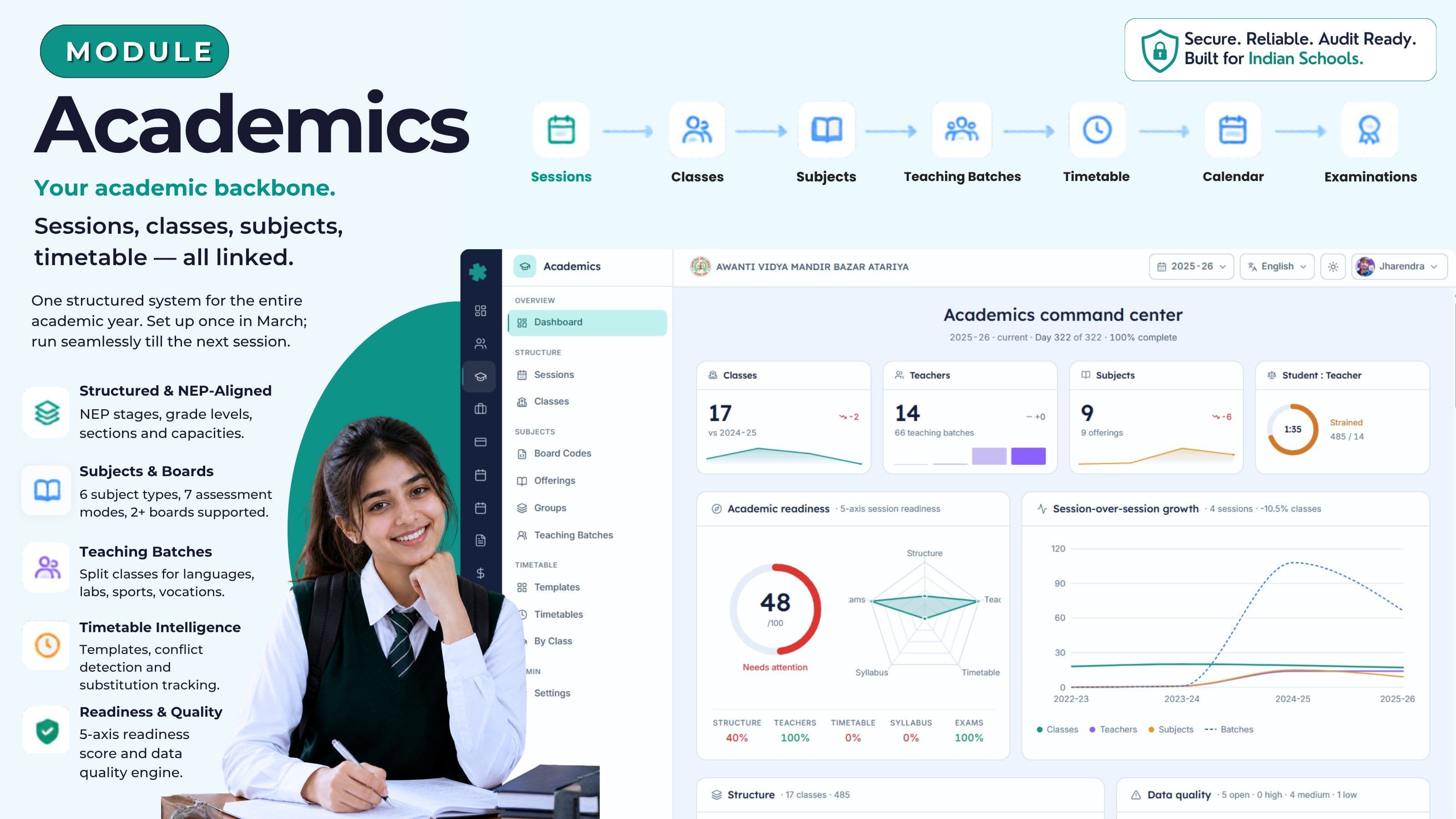
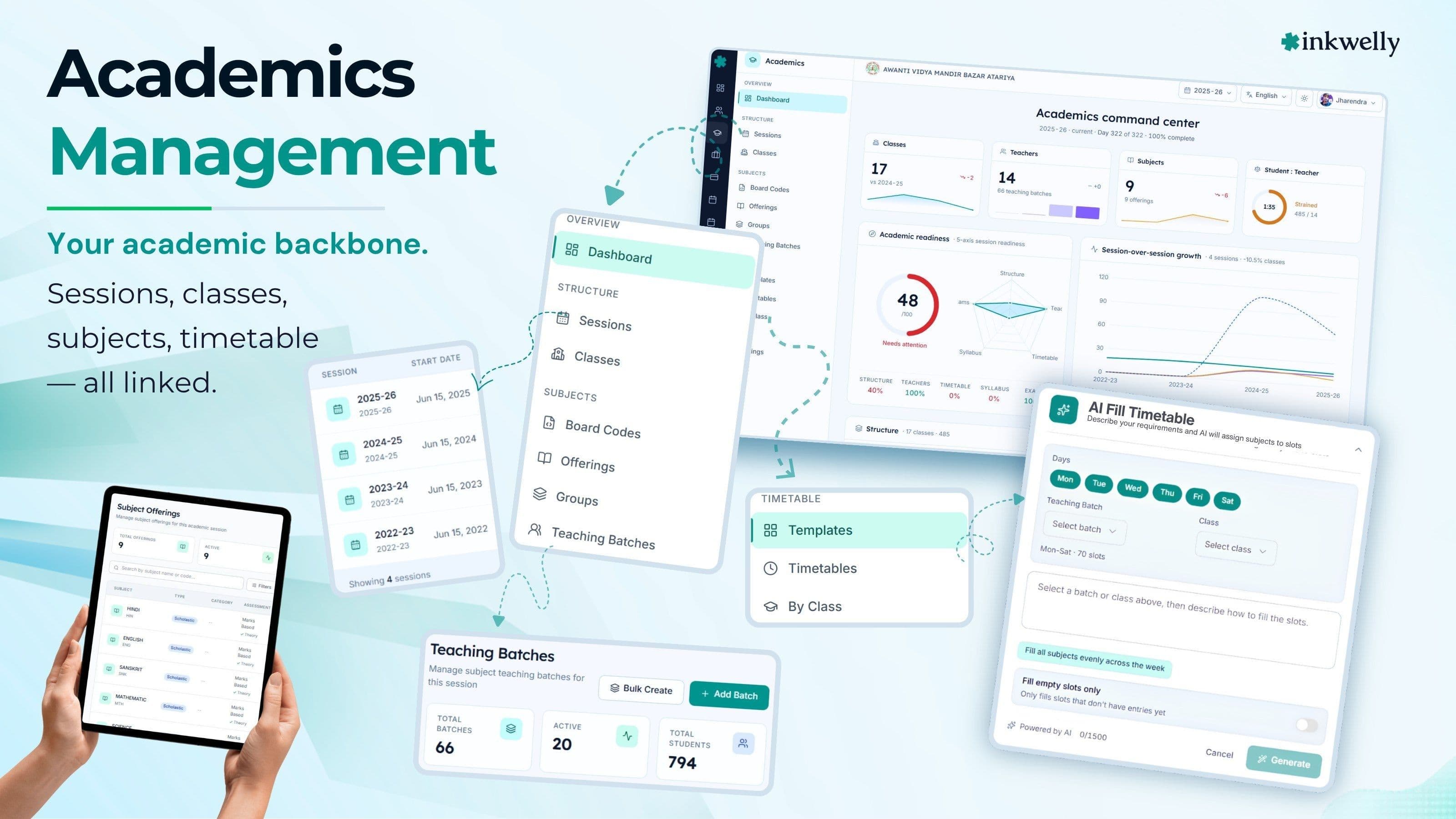
Your academic backbone. Sessions, classes, subjects, timetable — all linked.
Sessions, classes, sections, subjects, board codes, teaching batches, timetable and a daily readiness score — one connected backbone for the Indian school year. Set up once in March; run it for every CBSE, ICSE, IB, IGCSE and State Board year without rebuilding the structure every April.
How most Indian schools manage academics today
It is the third week of March. Admissions are tapering, results are being entered, and the principal of an upper-primary CBSE school in Bhopal has four versions of "what classes will we run next session" sitting on her desk. The class teachers' Excel master, mailed three years ago and edited every April, has the section list. The exam coordinator's printout has the subject mapping — but only for Class 8 onwards. The timetable in-charge keeps a whiteboard pinned next to the staff-room photocopier; one column has been erased seven times. The CBSE affiliation cell asks, mid-call, how many periods of Hindi the school taught in 2024-25. Nobody has the same answer.
By the second week of April, the school has rebuilt the timetable from scratch on Excel. A teacher who left in January is still on three slots. Section C of Class 9 has been added to handle 18 over-strength admissions, but the bus route, library category and attendance app have not caught up — three different staff are calling parents to "just confirm one more time". UDISE+ submission lands in October and somebody asks for the class-wise subject list with hours per week. It takes two days and a phone call to the previous office assistant who has since moved to Indore.
Inkwelly's Academics module replaces this with one connected backbone. Sessions, classes, subjects, board codes, teaching batches, timetable, examinations and the academic calendar live inside one structure. Update a section once and the timetable, attendance roster, fee ledger, library category, parent app and bus route all read the same change — no second entry, no Friday-night sync.
What we built instead
Academics in Inkwelly is built around a single daily readiness number. The dashboard checks five things — is the class and section structure in place, is every class assigned a class teacher, is the timetable published, is the syllabus loaded against subjects, and are the term exams scheduled. The result is a 0-100 score the principal can show the trustees without preparing a presentation.
Underneath the dashboard sit nine sub-systems you and your office staff actually use through the day: academic sessions, classes aligned to the NEP grade structure, a subject library with assessment modes for every Indian board, board-specific subject codes, subject groups for streams and electives, teaching batches for split-section delivery, a timetable with reusable templates and live conflict alerts, the academic calendar with terms and holidays, and a data-quality engine that flags specific problems — like 'this class has no timetable yet' or 'this teacher is double-booked at 11:30 on Tuesday' — instead of a vague 'something is not okay' badge.
What the Academics module gives you
- Academic sessions with start and end dates and a 'current session' flag — works for April-March, January-December and any custom calendar your board requires
- Class structure with grade level, section, capacity and medium of instruction — Pre-Primary to Class XII, mapped to NEP 2020 stages (Foundational, Preparatory, Middle, Secondary)
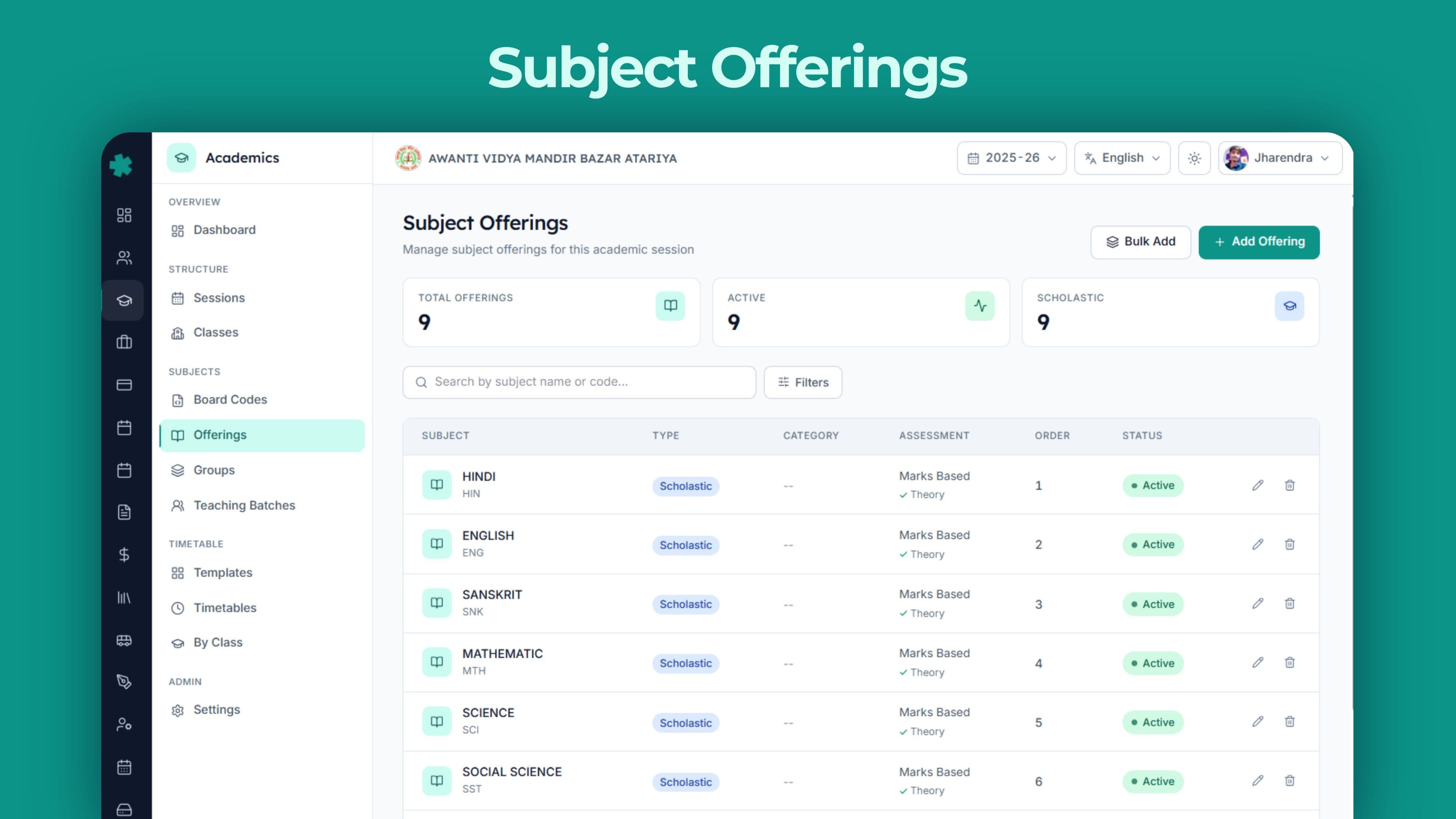
- Subject library covering six subject types — academic, co-scholastic, health and physical education, art education, work education, vocational — and six assessment modes from straight marks to portfolio and competency-based
- Board code mapping for 23 Indian and international boards — CBSE, ICSE, ISC, every major State Board (UP, Maharashtra, Karnataka, Tamil Nadu, Kerala, Gujarat, Rajasthan, MP, West Bengal, Bihar, Andhra, Telangana, Odisha, Assam, Jharkhand, Chhattisgarh, Haryana, Punjab), IB and Cambridge IGCSE — plus a custom slot for any board not on this list
- Subject groups for streams, language groups, electives and mandatory groups, with five selection rules — free choice, pick one, all required, pick within a range, or rule-based selection
- Teaching batches with a batch code, name, weekly periods and capacity — split a class for languages, labs, sports or vocational sessions
- Vocational subject support with NSQF level (1-10), NSDC code, required practical hours, industry partner flag and certification body — built for CBSE Skill Subjects and NEP vocational pilots
- Credit support — every subject can carry credits, credit type and credit hours — aligned to APAAR and the Academic Bank of Credits
- Timetable templates per NEP stage with eight slot types — teaching, break, lunch, assembly, activity, homeroom, zero period, remedial — and per-day slot configuration
- Conflict detection — same teacher in two places, same room booked twice, same class with overlapping entries — flagged before a timetable is published, not after parents call
- Substitution overrides — substitute teacher, cancel period, extra class, room change — every change carries a reason and an audit trail
- Learning outcomes per subject with Bloom levels tagged for curriculum auditors
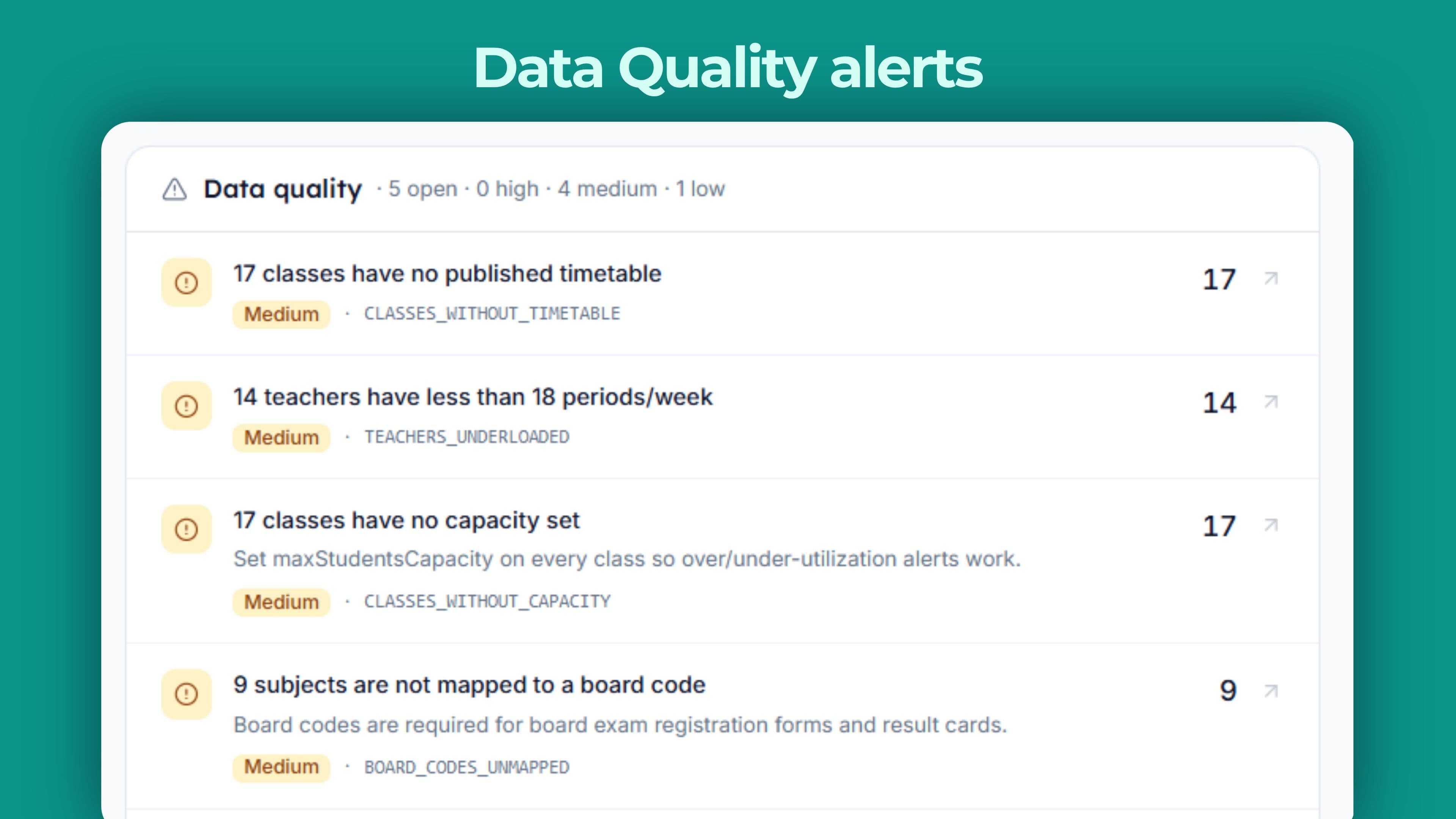
- Data-quality alerts with severity grading — every alert links straight to the screen where the fix is one click away
See it in action
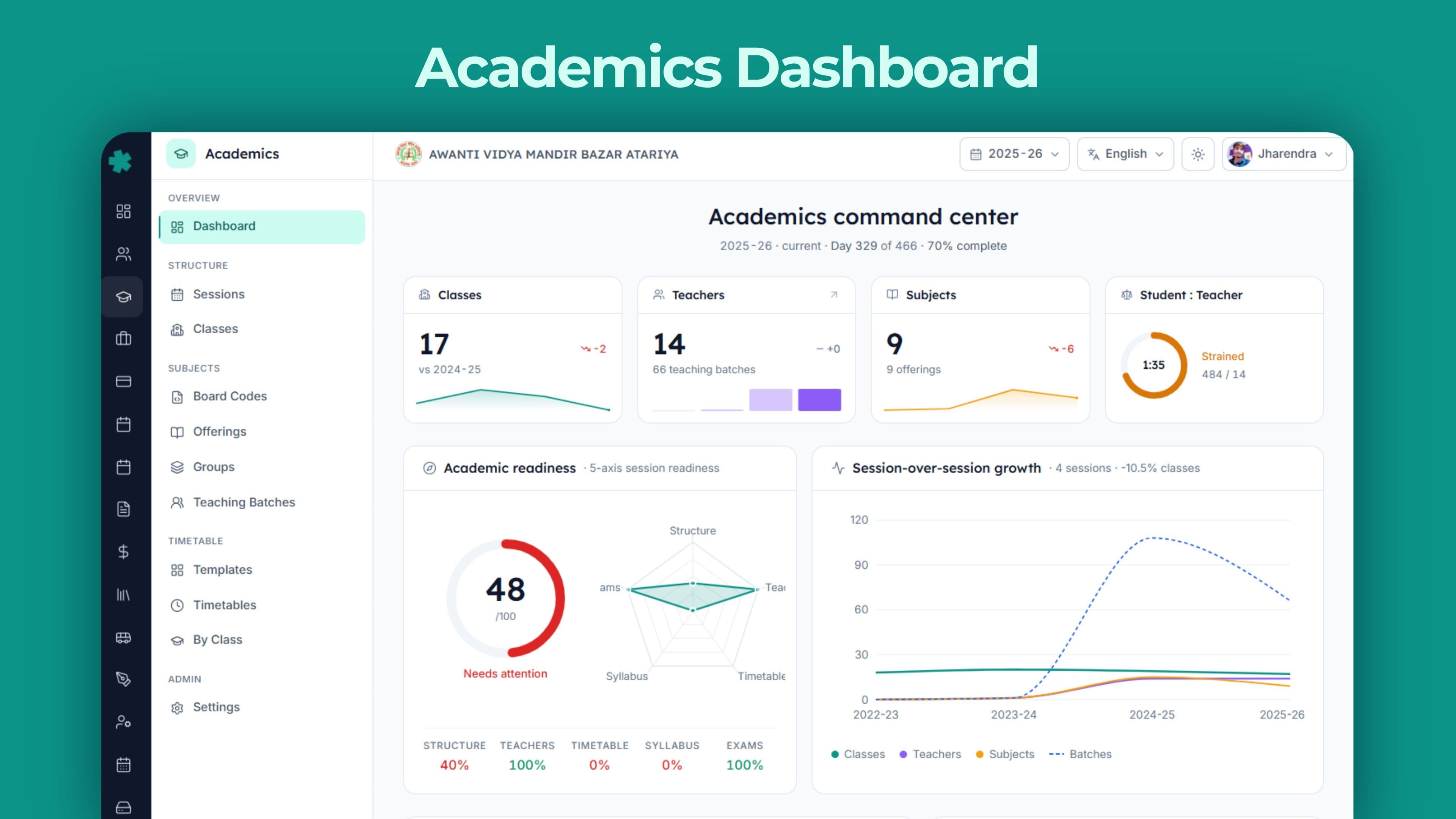
The whole academic year, on one page
The Academics dashboard is intentionally dense. It is not a marketing screen — it is what the principal opens at 8:15 am and closes at 4:30 pm. Every card tracks a real piece of school operations and links straight to the screen where data is entered.
Below is what every card surfaces. None of these are vanity metrics — every one maps to a question a CBSE inspector, a UDISE submission, a parent on a WhatsApp call, or a trustee in a quarterly meeting will eventually ask. Most school ERPs show five or six dashboard cards because that is what fits on a sales screenshot. Inkwelly shows twelve because that is what running a real CBSE upper-primary actually needs.
Twelve cards on the dashboard, all real
Hero KPIs
Classes, teachers, subjects and student-teacher ratio with growth versus last session. Each marked Healthy, Acceptable, Strained or Critical against CBSE, ICSE and RTE benchmarks.
Readiness Score
Five-axis 0-100 score covering structure, class-teacher assignment, timetable publication, syllabus and exam scheduling. Tells the principal in one number whether the school year is ready to go.
Structure
NEP-stage stacked bar (Foundational, Preparatory, Middle, Secondary) with grade-level breakdown, mediums of instruction, streams, and over-capacity and under-utilised classes flagged.
Subjects
Donut by subject type, top five by enrolment, board-code coverage percentage, mandatory coverage. Twenty-three Indian and international boards pre-loaded.
Teachers
Load distribution against an 18-24 periods-per-week benchmark, top five most-loaded with class-teacher badge, qualification match, gender mix and last 30-day substitution count.
Timetable
Class coverage percentage, daily-load heatmap across classes and days, conflict count split into teacher and room double-bookings.
Curriculum
Learning outcomes per subject with Bloom levels tagged, syllabus coverage status and lesson-plan publish rate.
Examinations
Term exams by status, the next exam ahead with date and class list, and term-wise marks-entry progress.
Calendar
Session progress percentage, term progress for each term with status, working-day projection and the next 30 days of events with affected-class counts.
Data-Quality Alerts
Specific issues with severity grading — class without timetable, class without teacher, teacher conflict, electives unfilled, missing mandatory subject — each with a one-click jump to the fix screen.
Growth
Session-over-session trend for enrolment, class count, subject offerings and teaching batches. Useful for trustee meetings and CBSE affiliation renewal forms that ask for three-year movement.
Activity
Audit log of recent academic actions — promote session, add subject offering, create teaching batch, override timetable — with the user, timestamp and affected entity.
Sessions and the Indian school year
The academic session is the root of every academic record. It carries a start date, an end date, a 'current session' flag and a slug like 2025-26 or 2026-27. The structure does not assume April-March: schools running on the IB or IGCSE January-December calendar configure their sessions the same way, and a multi-school trust can run one school on April-March and another on January-December under the same organisation without contortions.
When the next session begins, the principal marks it current with a single switch. The previous session is not deleted — its records remain in the same database under their original identifiers, so marks, attendance, behaviour notes, transfer certificates and parent communications from older sessions stay queryable. Three years later, when the same student applies for a foreign university and the admissions office calls for verification, the 2022-23 record is one search away — not in a steel almirah.
Two boards under one roof? Handled.
Many Indian schools run two boards in parallel — CBSE for the main wing and IGCSE for the senior wing, or CBSE plus the State Board for an aided pre-primary section. Inkwelly handles this without forcing two systems. Each class can be tagged to its own board; subject offerings, board codes, examination patterns and timetables are kept separate per board, while the student list, fee ledger and staff directory remain shared.
A sibling group split between CBSE Class 8 and IGCSE Class 9 still appears as one family for parent communication, fee discounts and address-change updates. The accountant does not maintain two student rosters; the principal does not log in to two systems. One school, two boards, one operational view.
Mid-session changes without a restart
It is the third week of August. Class 9 admissions overflowed Section C and the school needs a Class 9-D — twelve days from now. In most ERPs this means a 'data correction request' to the vendor, two weeks of follow-up calls, and a Friday-night data import that breaks the parent app for three classes.
In Inkwelly, adding a section is a two-minute screen. Set the grade level, the section, the capacity and the medium of instruction; assign a class teacher; the new class appears in the timetable, attendance roster, fee ledger and parent app on the next page load. Add an optional language for Class 6 mid-year, change a teaching batch's weekly periods, swap a room — all without locking the system. The school year does not have to be perfect on day one.
Past sessions stay queryable, not archived away
Closing a session in Inkwelly does not push it into a separate system or an offline backup. Records stay where they are and remain searchable. A teacher who left in June 2024 still has her exact teaching assignments visible in 2025-26's records — useful when a previous student returns three years later for a Bonafide Certificate, or a CBSE inspector asks for the 2022-23 timetable to verify language teaching hours.
This is what makes Academics survive a CBSE renewal cycle. Affiliation paperwork frequently asks for three-year movement of subject offerings, teacher load and student strength. With previous sessions still queryable, the answer is a one-click export, not a four-day reconciliation between an old Excel and the current ERP.
Classes, sections, and the NEP stage tree
A class in Inkwelly carries a grade level, a section, a capacity, an enrolment count, a medium of instruction and a name — with optional regional-script variants for certificates and marksheets. The grade-level taxonomy is aligned to the National Education Policy 2020 — every grade carries its NEP stage (Foundational for Pre-K to Class 2, Preparatory for Class 3 to 5, Middle for Class 6 to 8, Secondary for Class 9 to 12) along with age range and grade number.
Why this matters: timetable templates, exam patterns, attendance rules and assessment modes are configured per NEP stage, not per individual class. Set up a Foundational template once and every Pre-Primary, Class 1 and Class 2 in your school inherits it. Change the assessment mode for the Secondary stage and Class 9 through 12 update together. The work scales sub-linearly as the school grows.
Pre-Primary to Class XII with NEP-aligned stages
The class structure supports Pre-Primary (Nursery, LKG, UKG), Class 1 to 12, and the Science, Commerce and Humanities streams at Class 11 and 12 — all rendered in the structure card with stacked bars per NEP stage. A Pune school running CBSE Pre-Primary to XII sees a four-segment stack (Foundational, Preparatory, Middle, Secondary); a Tier-3 school in Bahraich running only Class 1 to 8 sees three; an aided Madrasa upper-primary sees two.
Grade levels can be added or modified per board: a Cambridge IGCSE school maps Cambridge Lower Secondary to Middle and IGCSE to Secondary; an IB school maps PYP, MYP and DP to the same NEP frame for UDISE compliance. Inkwelly stores both the school's labels and the NEP-mapped category — the latter is what UDISE+, RTE reports and trustee dashboards use.
Capacity, medium of instruction, and class teachers
Every class carries a capacity and a live enrolment count. Over-capacity classes are flagged in the structure card; under-utilised classes are flagged below the configured threshold (typically 40 percent). For trustees and the affiliation team, this is the single screen that answers 'how full is the school' without anyone running a database query.
Class-teacher assignment is a first-class workflow. Pick the employee, mark them as primary; secondary class teachers (often a co-teacher or a wing in-charge) can be added too. Class-teacher coverage as a percentage shows up on the teachers card — and any class without a primary teacher shows up in the alerts feed before the academic year goes live.
Subjects, board codes, and the subject library
A subject in Inkwelly is more than a name on a marksheet. Each subject is classified by its broad type (academic, co-scholastic, health and physical education, art education, work education or vocational), its academic family (language, mathematics, science, social science, computer, commerce, humanities, physical education, arts, vocational skill or other), and how it is assessed (straight marks, grade only, rubric-based, portfolio, descriptive or competency-based). Language flags handle the first-language, second-language and third-language paperwork that every UDISE submission and CBSE renewal asks for.
Each subject can be mapped to one or more board codes — the bridge between Inkwelly's internal label ('Hindi Course-A') and the board's official code ('CBSE 002'). The mapping carries theory marks, practical marks, internal marks, pass marks and weightages — exactly what the marksheet generator needs to produce a board-compliant result without anyone touching a calculator.
Six subject types, six assessment modes — every Indian board fits
Indian school subjects do not fit into a single column. Mathematics is academic and marks-based; Yoga is health-and-physical-education and rubric-based; Art is art-education and portfolio; SUPW is work-education and descriptive; an NEP-aligned Bagless Day project is co-scholastic and competency-based. CBSE's CCE-era schools, ICSE schools running rubrics for art, IB schools using portfolios, and State Boards mixing marks and grades — all map cleanly onto these dimensions without forcing one assessment style on every subject.
This is why Inkwelly does not need a separate 'CCE module' or 'rubrics module'. The assessment shape lives on the subject itself; the marks-entry and report-card screens read it directly. Theory marks plus a practical component (common in Computer Science and the Sciences) are handled through board-specific component configurations — no per-subject hacks.
Board codes for 23 Indian and international boards
Twenty-three boards ship pre-loaded out of the box — CBSE, ICSE, ISC, the International Baccalaureate, Cambridge IGCSE, plus every major State Board: Maharashtra, Karnataka, Tamil Nadu, Kerala, Gujarat, Rajasthan, UP Board, West Bengal, Bihar, MP Board, Andhra Pradesh, Telangana, Odisha, Assam, Jharkhand, Chhattisgarh, Haryana and Punjab. A custom 'Other' slot covers any minority, NIOS or madrasa board not on this list — no rebuild needed on your end.
For each board, the subject's code, the board's official subject name (often different from the school's label), theory marks, practical marks, internal marks, pass marks and weightages are stored once. The marksheet template, the transcript export, the APAAR-linked transcript and the migration certificate all read from this single source. No more 'check the printed circular' to find the correct CBSE code 086 vs 087 the night before result publication.
Vocational subjects with NSQF level and NSDC code
NEP 2020 pushed vocational education from a side stream to a core requirement. Inkwelly bakes it in. Vocational subjects carry a category (IT-ITeS, Healthcare, Agriculture, Retail, Tourism, Beauty & Wellness, Banking & Finance, Construction, Automotive, Electronics, Apparel, Media, Food Processing, Logistics, Manufacturing, Sports & Fitness, Telecom, Security, Plumbing, Electrical or Other), an NSQF level from 1 to 10, an NSDC code for the National Skill Development Corporation qualification pack, a required practical-hours count, an industry-partner-required flag and a certification body (NIELIT, the relevant Sector Skill Council, and so on).
When CBSE asks 'how many students completed Level 2 NSQF in IT-ITeS this session', the answer is a one-screen filter, not a phone call to the vocational coordinator. When DGT or NSDC wants the practicum-hour return, it is a one-click export. Schools running CBSE Skill Subjects, ITI integration or NEP vocational pilots get this without a separate vocational ERP.
Credits and the Academic Bank of Credits (ABC)
NEP 2020 ties Indian education to the Academic Bank of Credits — every learning experience, from a regular subject to an online course to a community-service stint, can carry credits that follow the student across institutions. Inkwelly bakes this in. Every subject can carry credits, a credit type (academic, vocational, experiential, community service, co-curricular or online course) and credit hours.
When CBSE or your board enables APAAR-linked credit transfers — and it will — your records are already in shape. Marksheets can show credit summaries, transcripts can stream into the APAAR-linked ABC framework, and vocational and co-curricular contributions appear alongside academic ones, not buried in a separate annexure at the back.
“If the structure of your school year is not in one place, it is not your school year — it is four people's interpretation of it.”
Before and after Inkwelly Academics
Subject groups and teaching batches — the heart of NEP-aligned delivery
Indian school subjects rarely follow a single global rule. Class 9 students at a CBSE Mumbai school typically pick one of three languages (Hindi, Sanskrit, French) at the same period. Class 11 Science students choose Mathematics or Biology as the fourth scholastic subject. NEP-aligned schools split a Class 5 PE period into individual / pair / team batches each running in parallel. None of this fits a single 'class has subjects' table.
Inkwelly handles all of it through two linked things — a subject group (which defines the rule) and a teaching batch (which is the actual delivery). Subject groups carry a type (stream, language group, elective group, mandatory group) and a selection mode (free choice, mandatory one, mandatory all, mandatory range, conditional), plus optional minimum and maximum counts, a mutually-exclusive flag and a prerequisite link for branching electives. The combination expresses every CBSE, ICSE, IB and State Board elective rule cleanly.
Streams, electives, language groups — one model fits all
A Class 11 Science stream is a stream group with a mandatory-range selection (pick four, allow five) over Physics, Chemistry, Mathematics, Biology, Computer Science and Physical Education. A Class 9 third-language group is a language group with a mandatory-one selection from Hindi, Sanskrit, French or German. A Class 6 art elective is an elective group with free choice and a mutually-exclusive flag — the student picks one out of dance, drama, music or visual art.
Selection rules can chain. A prerequisite link lets you say: only students who took Biology in Class 9 are eligible for the Bio-tech stream in Class 11. Conditional rules handle board-specific quirks — like CBSE's rule that students opting out of Mathematics at Class 9 must take a vocational subject. The system enforces the rule at enrolment, not after marks are entered.
Teaching batches — the real unit of delivery
A subject group is the rule; a teaching batch is the room. Each batch carries a code, a name, the subject it delivers, the grade level, a capacity, a current strength, a periods-per-week count and a preferred room. A Class 9 with three language batches running in parallel is three teaching batches; a Class 11 Science stream is one batch per subject; a co-scholastic art class with two batches (one for each section) is two batches.
Teacher assignment is separate — a batch can have a primary teacher plus one or more assistant teachers. Bulk-create is supported for schools setting up a fresh session — paste a list of class × subject pairs and the batches generate, ready for teacher assignment. Bulk-delete works the same way when the year ends.
Inkwelly Academics vs generic Indian school ERPs
Timetable: templates, conflicts, substitutions
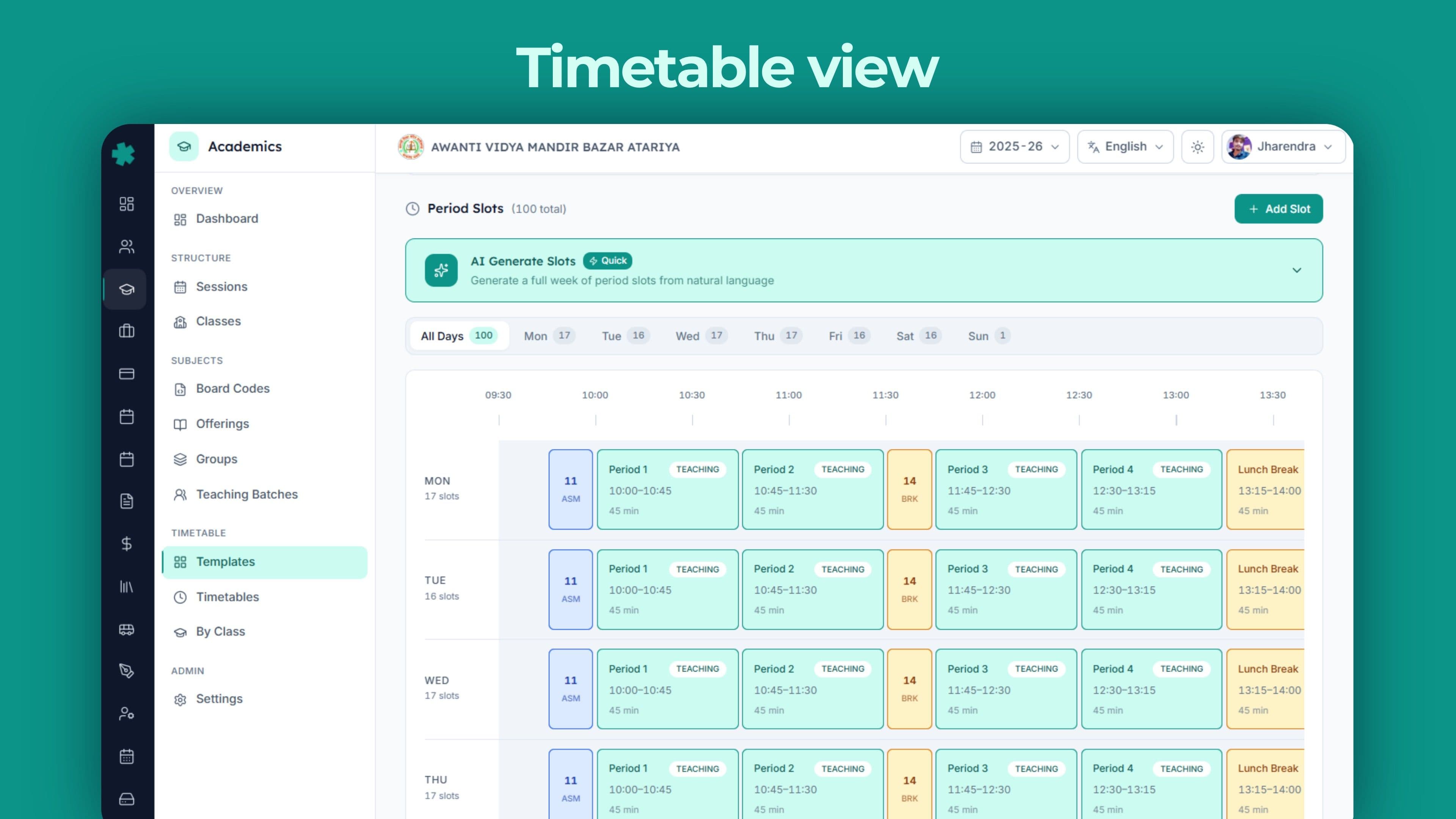
Inkwelly draws a clear line between a timetable template and a timetable instance. A template is a reusable period structure tied to an NEP stage — for example, a 'Primary Template' with eight teaching periods per day, a mid-morning recess, lunch at slot 5 and a homeroom period at the end of Friday. The template has period slots per day of the week, each with a slot number, a slot type (teaching, break, lunch, assembly, activity, homeroom, zero period or remedial), a start time, an end time, a duration and a 'schedulable' flag.
A timetable is an actual instance — usually one per class per session, optionally per academic term. It moves from Draft to Published to Archived over its life. Inside the timetable, each entry says what happens in a slot — a batch entry schedules a teaching batch (the most common case), a class entry schedules class-wide events like assembly or activity, and a school entry schedules school-wide events like Independence Day or sports day across every class at once.
Reusable templates per NEP stage
Most ERPs ask schools to rebuild the timetable per class every April. Inkwelly inverts this — templates live longer than sessions. A 'Foundational Stage Template' (with shorter periods and a longer activity slot) is reused for every Pre-Primary class in 2025-26, every Pre-Primary class in 2026-27 and every Pre-Primary class in 2027-28 until the school decides to revise the day structure.
Per-day-of-week period structure is fully supported. Saturday running on a half-day with five periods instead of eight is a different day-row inside the same template, not a separate template. A Madrasa school running additional Friday classes for moral instruction adds a Friday-only slot type. The day-structure decision is made once per stage, not per class per session. New sessions inherit; new classes adopt.
Three kinds of conflicts, all flagged before publish
The timetable engine detects three classes of conflicts. Teacher double-booking — the same teacher scheduled for two simultaneous batches. Room double-booking — the same physical room booked for two simultaneous classes. Class overlap — the same class scheduled into two distinct entries at the same period (often a copy-paste error).
Every conflict shows exactly which two entries collide. The dashboard shows a single conflict count with breakdown — for example, three teacher double-bookings and one room double-booking — and the timetable view marks the offending cells in red. Conflicts must clear before a timetable's status can move from Draft to Published. No more discovering on day three of the new session that the Maths teacher has been booked for two Class 8 sections at 11:30 every Tuesday since August.
Substitution overrides — four actions, full audit
A teacher applies for two days' leave on Friday. In most ERPs, the school's response is to scribble a substitute schedule on the back of the timetable printout and forget it. In Inkwelly, the response is to record the override on the date itself — pick the action (substitute, cancel, extra class or room change), the substitute teacher (if needed), an optional new room, and a reason.
Each override carries the user who created it, the timestamp, the reason and optional remarks. Recent overrides can be pulled up by action, by class or by teacher — so leadership can see whether one wing keeps running on substitutes.
Why this matters: when a parent calls in November asking why their child's Hindi class did not happen on October 15, the answer is a one-row record — substitute teacher's name, the reason, and the time the override was logged.
Every student gets their own timetable
In a single-section school, the class timetable is the student timetable. But the moment you have electives, streams or language groups, every Class 11 student's week looks different — one student has Physics-Chemistry-Maths-Biology, another has Physics-Chemistry-Maths-Computer Science, a third has Commerce with Maths instead of Economics.
Inkwelly generates a personal timetable per student that reflects their batch choices. The student app shows the right period at the right time, the right teacher, the right room. Parents see the same thing. When a substitute is recorded for one of those batches, only the affected students' timetables show the change — not every Class 11 student in the school.
Readiness, data quality, calendar, exams — the operational dashboard
The Academics dashboard is the screen the principal opens every morning. The five-axis readiness score sits in the top-right; the structure card in the centre; the teachers, subjects and timetable cards along the next row; curriculum, examinations, calendar, alerts, growth and activity below.
The data-quality alerts feed is the most underrated piece. It surfaces specific issues — a class with no timetable yet, a class with no class teacher, a class over its enrolment capacity, a subject missing its board code, a mandatory subject not offered to a grade, an elective group with no students enrolled, a teacher with two conflicting batches, a room booked twice, a subject scheduled less than its required periods per week — each marked high, medium or low severity and each linked to the screen where the fix is one click away. By the time the office assistant arrives at 9 am, the principal has already cleared the morning's alerts.
Inkwelly Academics vs imported global SIS tools
Migrating from Excel, Fedena, Entab or Campus Care
Most schools that switch to Inkwelly are not switching from nothing — they are switching from a combination of Excel, a previous ERP that did not survive the last pandemic, and a class teacher's intimate knowledge that has not been written down. The migration is structured around exactly this reality.
Excel and CSV imports are the default — paste your class list, your subject list, your teacher roster, and the system maps columns to Inkwelly fields with a preview. From other Indian ERPs (Educomp, Campus Care, MyClassCampus, Vidyalaya, Teachmint) we accept the standard export and run a column-mapping pass with the school's data team. Most schools see a 95 percent mapping rate and a manual cleanup pass for the remainder. End-to-end is typically two weeks for a 1,000-student school.
From Excel and printed registers
The most common starting point. The school has a class master in Excel, a subject list in another sheet, a teacher roster in a third, and a printed timetable taped to the staff-room wall. Inkwelly's onboarding team starts with the Excel files — they are easier to map than the printed register, but the register catches subjects and electives that the spreadsheet missed.
A typical migration order: sessions and grade levels first; then classes and sections; then subjects with their type and assessment mode; then board-code mapping (we ship pre-loaded codes for the major boards — pass them through); then subject offerings per class; then teaching batches; then teacher assignments; then timetable templates and instances. Two weeks for a 1,000-student school is the median.
From Educomp, Campus Care, MyClassCampus, Vidyalaya, Teachmint
These five cover roughly 70 percent of the schools that approach us with an existing ERP. We have done the migration mapping for each. From Campus Care, the typical export drops class, section, subject and teacher data in a clean CSV that maps almost cleanly. From Educomp, the export is split across modules but the subject-to-class relationship survives. From MyClassCampus and Teachmint, the timetable export tends to be the friction point — those tools store schedules in a slot-by-slot format that needs translation to our period-by-period structure.
In every migration, the team reconstructs the subject group rules (electives, languages, streams) by looking at which students are enrolled in which subjects. This is the part that requires school input — but it is one structured conversation, not a six-month consulting engagement.
See your academic year set up live
20-minute walkthrough — sessions, subject offerings, teaching batches, timetable and the readiness dashboard with a real CBSE school dataset.
Built for Indian schools, from Tier-1 to Tier-3
Inkwelly Academics is designed for CBSE schools running Class 6 to 12 with 800 to 2,500 students; ICSE and ISC schools that are smaller and slower-moving but exacting on board codes; State Board schools that are the largest by count and most price-sensitive; and a small but growing tail of IB and IGCSE schools that need the multi-board model. The screen, the workflows and the alerts feed look the same. The data underneath does the work.
What's included with the Academics module
- Academic sessions with April-March, January-December and custom calendars; multi-school trust support
- Class structure with NEP stages (Foundational, Preparatory, Middle, Secondary), grade levels Pre-Primary to Class XII, sections, capacity, medium of instruction
- Subject library with six types, six assessment modes, language flags, vocational fields (NSQF level, NSDC code, NIELIT or Sector Skill Council certification, practical hours)
- Board code mapping for 23 Indian and international boards — CBSE, ICSE, ISC, IB, IGCSE and every major State Board — plus a custom slot for anything not listed
- Subject groups — streams, languages, electives, mandatory — with five selection modes and prerequisite chaining
- Teaching batches with bulk-create, primary and assistant teacher assignment, capacity tracking and per-week period count
- Credits, credit type and credit hours on every subject — APAAR and Academic Bank of Credits ready
- Timetable templates per NEP stage with eight slot types (teaching, break, lunch, assembly, activity, homeroom, zero period, remedial) and an AI helper for the first draft
- Conflict detection — teacher double-booked, room double-booked, class overlap — flagged before publish
- Substitution overrides with four actions and a full audit trail per change
- Per-student personal timetable that reflects each student's elective and batch choices
- Five-axis readiness score that tells you whether the school year is ready to go
- Data-quality alerts feed with named issues, severity grading and one-click navigation to fix screens
- Learning outcomes per subject with Bloom levels tagged
- Academic terms, holidays, working-day projection and 30-day upcoming events feed
- Examinations with status tracking, marks-entry progress, admit-card generation and grading scales
- Hindi and regional language UI for ops staff who prefer it; multi-language storage of class, section and subject names for certificates and marksheets
Run your school year on Inkwelly Academics
Most CBSE schools are live in two weeks. Migration from Excel, Educomp, Campus Care, MyClassCampus, Vidyalaya or Teachmint is free for the first 200 students.
What’s new
2 updatesFrequently asked
12 questionsHow does year-end promotion work?
Open the previous session, click Promote. Pick the source and destination sessions, review the auto-suggested retention list (students who failed or are below the attendance threshold), apply per-student overrides, confirm. Every active student moves to the next class with their fee profile, transport route, library category and parent links carried forward. Marks, attendance and certificates from the previous session stay queryable in the office for verifications, transfer certificates and CBSE renewal.
Can we run two boards (CBSE + IGCSE or CBSE + State Board) in the same school?
Yes. Each class can be tagged to its board, with its own subject offering, its own timetable and its own exam pattern. The student list, fee ledger and staff directory remain shared, so a sibling group split between CBSE Class 8 and IGCSE Class 9 still appears as one family for parent communication and fee discounts.
Does timetable auto-generation respect teacher availability?
Yes. The AI helper considers each teacher's weekly load cap, off-day, language qualifications and any blocked slots (department meetings, prayer assembly). Conflicts are flagged before the timetable is published, with a visual indicator showing exactly which teacher is double-booked. Manual edits remain available — auto-generation is a starting point, not a lock.
Can we change subject offerings or add a section mid-session?
Yes. Add a Class 9-D section in August because admissions overflowed Section C — students, timetable, attendance and parent app update without restart. Add a new optional language for Class 6 — it becomes available for marks entry from the next exam cycle. The system never forces you to wait for a new session to fix structural mistakes.
Does it support session calendars other than April-March?
Yes. Sessions accept any start and end date. IGCSE and Christian-administered schools commonly run January-December, some pre-primary wings run June-April — all supported. A multi-school trust can have one school on April-March and another on January-December without conflict.
Are CBSE, ICSE and State Board subject codes pre-loaded?
Yes. CBSE official subject codes (041 Mathematics, 086 Science, 087 Social Science, 184 English Communicative, and so on), ICSE / ISC codes, and the major State Board codes ship with the system. They flow straight into marksheets, transcripts and APAAR-linked transcripts — no manual lookup or template patching.
Can we generate a UDISE+ class-wise subject offering report?
Yes. UDISE+ requires a class-wise list of subjects taught, hours per week, language of instruction and number of teachers per subject. Inkwelly produces this directly from your subject offering and timetable data — exportable as a UDISE-compatible Excel one click before the October submission window.
How does substitute teacher coverage work?
When a teacher applies for leave, the timetable view shows every period that becomes vacant, alongside a live free-period view of the rest of the staff. Pick a substitute and the system updates the class roster, sends a WhatsApp note to the substitute, and logs the swap in the audit trail. No phone calls, no last-minute scrambles.
What about teaching batches — splitting a class for languages or sports?
Each class can be split into multiple teaching batches for any subject. A typical Class 9 with three language options (Hindi, Sanskrit, French) runs three parallel teaching batches at the same period — all reflected in the timetable, attendance roster and marks entry. Sports periods and activity slots are modelled the same way.
Does each student get their own timetable when electives are involved?
Yes. The moment electives, streams or language groups are in play, each Class 11 student's week looks different. Inkwelly generates a personal timetable per student based on their batch choices — the student app and the parent app each show only the periods that belong to that student. When a substitute is recorded for one of those batches, only the affected students' timetables show the change.
Do credits and the Academic Bank of Credits (ABC) work?
Yes. Every subject can carry credits, a credit type (academic, vocational, experiential, community service, co-curricular or online course) and credit hours. When CBSE or your board enables APAAR-linked credit transfers, your records are ready — no rebuild required on your end.
Can we run the interface in Hindi or our regional language?
Yes. The Inkwelly interface is available in English and Hindi, with regional language packs (Bengali, Tamil, Telugu, Kannada, Marathi, Gujarati, Punjabi) for staff who prefer it. Subject names, class names and section names can be stored in English plus your regional script for use on certificates and marksheets.
You might also like
4 readsSee Inkwelly on your school
30-minute demo. We open your current ERP with you and load your data into Inkwelly on the call. Dated go-live plan by the end of it.