An attendance register that looks like your school's paper book looks like your school's paper book
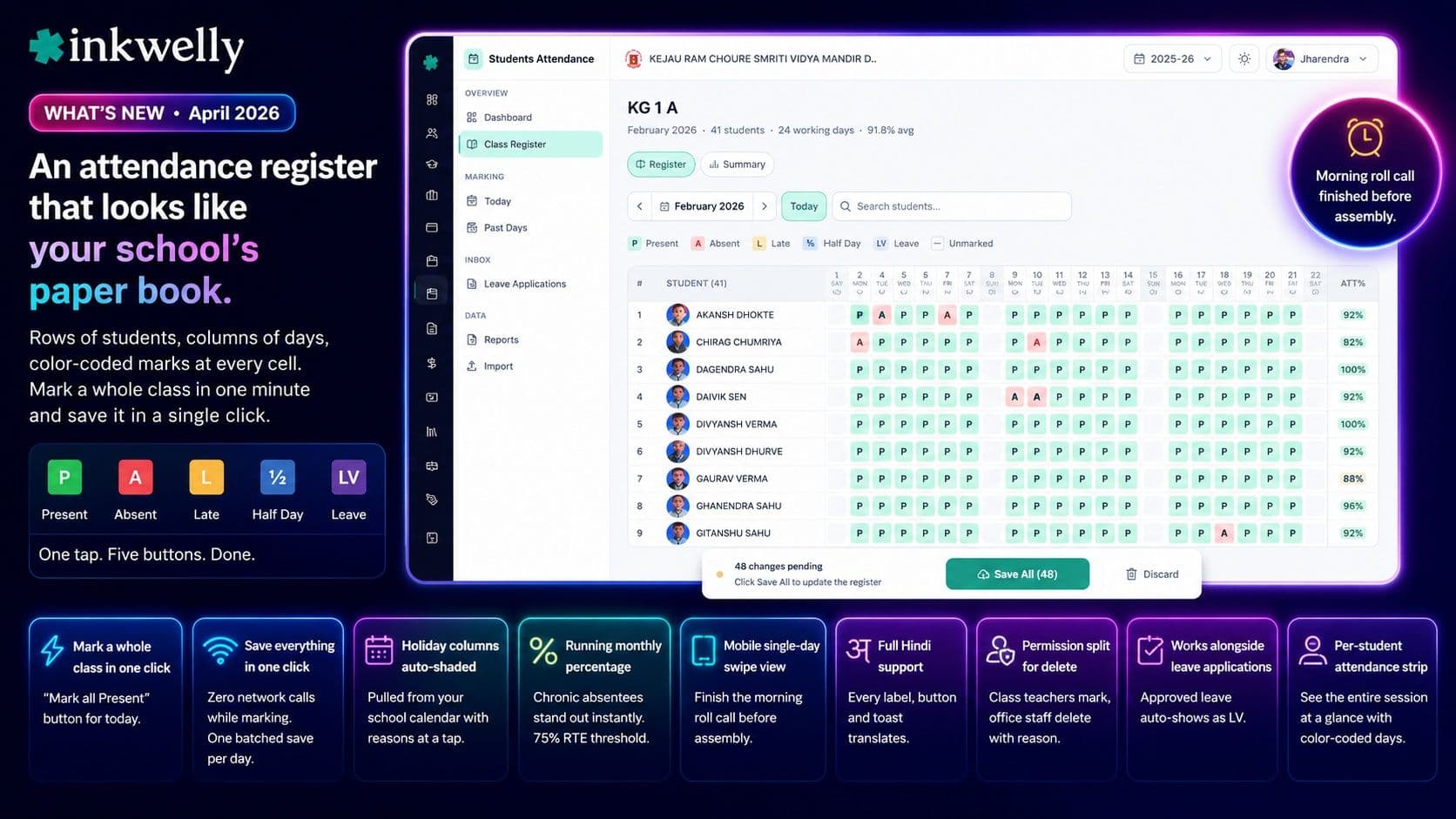
Rows of students, columns of days, color-coded marks at every cell. The same shape your office uses today — but mark a whole class in one minute and save it in a single click.
What we shipped
Walk into any Indian school office on a Monday morning and you see the same scene — a class teacher leaning on her desk with the हाजिरी रजिस्टर open, calling out roll numbers, ticking columns. The paper register works because it shows everything at once: every student, every day, all month, on one page. Most school ERPs throw that away. They give you a daily form, one class at a time, three clicks per student, twelve clicks per class — and a teacher with 50 students stops using the software within a week.
So we built the register itself. Open any class in the student information module and you now see a monthly grid — students as rows, days as columns, color-coded marks at every cell. The layout matches what your school has used for fifty years. Class teachers recognise it before you finish the sentence.
Underneath, it runs like a modern app. One tap on a cell opens a five-button picker. The teacher taps Present, the popover closes, the cell paints green. Mark fifty students like that — zero network calls. A floating Save All bar at the bottom shows the count. One click flushes every change to the server in a single batched request. The morning roll call, finished before the assembly bell.
What's inside the new register
- Monthly student × day matrix — sticky-left student column, sticky-top date row, scrollable in between. Looks like the paper register, fits every grade from Nursery to Class 12.
- Five-button status picker — P / A / L / ½ / LV. One tap commits the mark and closes the popover. No per-cell save button, no remarks dialog blocking the next student.
- Holiday columns auto-shaded — pulled live from your school calendar. Mahavir Jayanti, Diwali, sports day, exam break — each column shows its reason in a tap-to-reveal info bubble.
- Sundays and other week-offs greyed out by default — the system won't let you mark attendance on a non-working day, so no surprise rejection messages mid-class.
- Today's column is accent-bordered — class teachers find the right column in one glance even mid-month.
- Right-edge sticky column shows each student's running monthly percentage — chronic absentees jump out without needing a separate report.
- Class switcher arrows in the toolbar — step through Class 1-A, 1-B, 1-C without going back to a list. A grade-level teacher finishes all sections in one continuous flow.
- Full Hindi (Devanagari) support — every label, button and toast translates. Marathi, Tamil, Bengali and other Indian languages follow the same pattern.
Built for the way Indian schools actually run attendance
- 'Mark all Present today' button — one click marks every student Present for the current day, with a confirm. Solves the most common case: 47 of 50 came to school, only 3 are out.
- Students always alphabetical — matches the principal's roll-call order; a serial-number column on the left makes verification obvious.
- Mobile single-day swipe view — on a 5-inch Android phone the grid switches to a vertical day view; teachers finish the morning roll call before they reach the staff room.
- Per-student attendance strip — click any student name to see their entire session at a glance: green for present days, red for absent. Useful for parent-teacher meetings and TC requests.
- Permission split for 'mark' vs 'delete' — a new
student_attendance:deletepermission means class teachers can mark but only the office can erase past records, with a reason captured for audit. - Works alongside leave applications — students with approved leave auto-show LV in the register, no separate marking needed.
Why this matters for Indian schools
A class teacher in Indore loses about two hours a week to attendance UI clicks across 200 working days a session — that's roughly eight working days of teaching time per year, gone to a software workflow that didn't fit. Multiply that by a 40-teacher school and you lose more than a full teaching post worth of effort to clicking around.
The register view drops attendance marking to under a minute per class. The buffered save means it works on the same office WiFi that struggles to load Gmail at 9 AM. And the visual matches the one schools have used since the 1970s — there is nothing new for the class teacher to learn.
For the principal, the same view doubles as a chronic-absenteeism flag — the right-edge percentages turn red below 75%, which is the Right to Education (RTE) Act 2009 attendance threshold most boards quietly enforce. CBSE, ICSE and most State Boards already require this report; now it's one screen, not three exports.
See the attendance register on your school's class
20-minute walkthrough on real student data. We'll mark a class live and you can keep the demo data afterwards.
Covers modules
2 modulesFrequently asked
4 questionsWill class teachers adopt this if they're used to the paper register?
Most schools migrating from a paper attendance book need 5–10 minutes of orientation. The grid layout, the colour-coded letters (P / A / L / ½ / LV) and the alphabetical order match what teachers already know. In Tier-2 city schools we've onboarded, the head clerk demos it once and every class teacher uses it the next morning without a follow-up question.
What happens when a teacher tries to mark attendance during a school holiday?
She can't — and that's the point. Holiday and Sunday columns are pre-shaded grey, the cells aren't clickable, and the column header shows an info button with the reason (Mahavir Jayanti, Diwali, founder's day, sports day). The school calendar drives this, so once your principal adds events for the year, every teacher sees the right column state automatically — no support ticket required.
Does this work on cheap Android phones with weak network?
Yes. Below 768px viewport the grid switches to a single-day vertical swipe view that works on a 5-inch phone. The buffered Save All model means even on 2G, the morning roll call sends one batched request instead of fifty — a 50-student class flushes to the server in under three seconds.
Can a principal see who marked attendance and correct it?
Yes. Every mark records who entered it (recordedBy), when (recordedAt), and who last updated it (updatedBy). The new student_attendance:delete permission lets you give class teachers mark-only access while the office handles corrections — every deletion captures a reason that is surfaced in your audit log.
You might also like
1 readsSee Inkwelly on your school
30-minute demo. We open your current ERP with you and load your data into Inkwelly on the call. Dated go-live plan by the end of it.