The class your teacher actually teaches. Not the section, not the subject — the real roster.
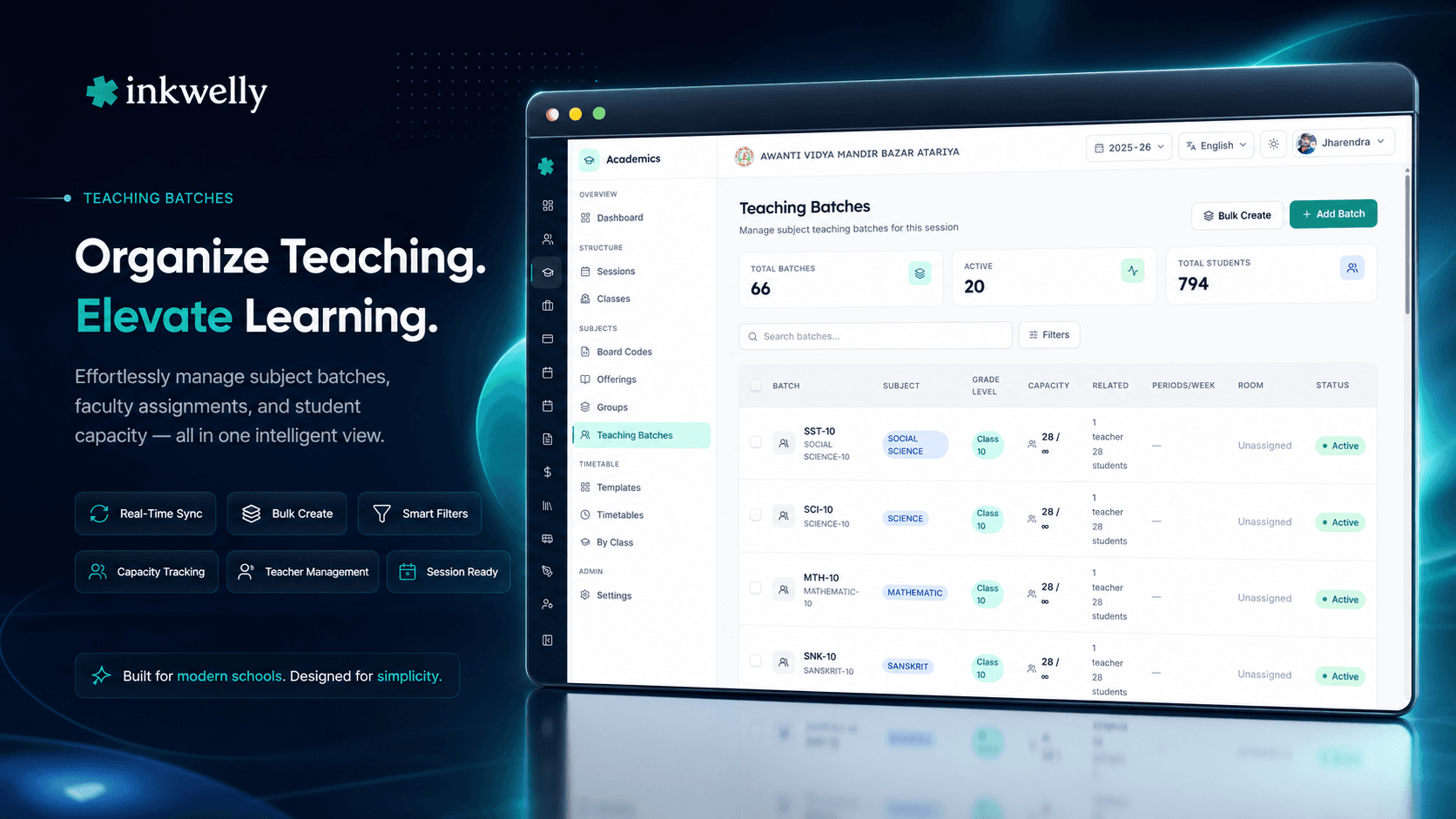
A teaching batch is the teacher-subject-student combination that powers daily school life. Span sections for a combined Hindi class, split a Class 10 Physics group for lab, run an optional Sanskrit batch — with capacity, primary plus co-teachers and bulk student enrolment.
Why "section" and "subject" alone are not enough
It is 7:55 AM at a CBSE school in Indore. The Class 10 Hindi teacher walks into Section A's classroom — except today, it is not Section A. She is teaching combined Hindi for sections A, B and C, all squeezed into the auditorium because three sections share one Hindi teacher in this school. Down the hallway, the Class 10 Physics lab is running with 22 students from Section A while the other 18 are with the Mathematics teacher in Section A's classroom. In the next building, the Sanskrit elective batch — 12 students drawn from Class 9 A and Class 9 B — is starting. Three teachers, three groups, none of which match a clean section.
Most school ERPs assume one teacher teaches one subject for one section. The reality of an Indian school is messier. Combined classes, lab splits, electives, language groups, sports coaching, music batches, remedial groups, NTSE coaching after school, peer-mentoring batches — every one of these is a real classroom that needs a teacher, a subject, a student roster, attendance, and marks. When the ERP only models "section + subject", every one of these real classrooms gets shoe-horned into a fake section or a manual Excel sheet that the principal manages personally.
Inkwelly Teaching Batches models this directly. A batch is a teacher (or teachers) + a subject offering + a student roster + a capacity. Batches can span sections, sub-divide a section, merge sections, draw across class levels, or be exclusive to a hand-picked group. Once the batch exists, attendance, marks entry, exams, gradebook and timetable all read from it. The combined Hindi teacher takes attendance for one batch with 90 students. The Physics lab teacher takes attendance for a different batch with 22. No fake sections, no parallel Excel.
How Teaching Batches actually works
For every active subject offering you decide how many batches the school will run. Class 10 Mathematics with three sections of 40 might be one batch (one teacher takes all 120, like in some old-pattern schools), three batches (one per section, the most common pattern), or four batches (three section-aligned plus a fourth Foundation Maths remedial batch). Each batch has a batchCode (10A-MATH, LAB-PHY-A, SAN-OPT-9), a batchName with multilingual support, an optional gradeLevelId filter, an optional maxCapacity, and a currentStrength count maintained automatically by the enrolment engine.
Teachers are assigned through Teaching Assignments — you mark one as primary and add zero or more co-teachers. The primary teacher's dashboard, parent app messages, marks entry permissions and gradebook all default to this person. Co-teachers can be added for team-teaching, shadow teaching, language-bridge support or substitute coverage; their access can be revoked any day with a soft-delete that preserves history.
Students enrol through Student Enrolments with three types: MANDATORY (auto-enrolled core subjects), ELECTIVE (chosen via Subject Groups, traceable back to which group enforced the rule), and ADDITIONAL (sixth or seventh subject taken voluntarily). Enrolments carry a status — ENROLLED, WITHDRAWN, EXEMPTED — because real schools need to track "this student stopped attending Sanskrit in November but stays on the roster for transcript continuity". Bulk enrol 30+ students at a time across multiple sections; the API atomically inserts every valid enrolment and returns a clean error per row that fails.
What every batch carries
- Batch code (max 50 chars) — short identifier like "10A-MATH", "LAB-PHY-A", "COM-HINDI-AB", unique per subject offering and session
- Batch name (max 100 chars, multilingual via batchNameI18n) — human-readable name shown to teacher, parent and student
- Subject offering — immutable link to a Subject Offering; cannot be changed after batch creation
- Grade level filter — optional; restricts which classes can enrol into this batch (Class 10 only, Class 9-10 mixed, etc.)
- Maximum capacity — optional integer; null means unlimited; the system warns at 80% utilization and blocks at 100%
- Current strength — auto-computed count of ENROLLED students (excludes WITHDRAWN and EXEMPTED)
- Periods per week — optional integer used by the timetable generator to plan slot allocation
- Preferred room — optional link to a physical room (Lab 2, Music Room, Classroom 11A) for timetable conflict resolution
- Active toggle — disable the batch mid-session without losing any historical attendance or marks
- Primary teacher — default contact for parent communication, marks entry and gradebook ownership
- Co-teachers list — zero or more, with isActive flag for soft-delete; each can be granted scoped marks-entry permission
- Student enrolment list with type (MANDATORY / ELECTIVE / ADDITIONAL) and status (ENROLLED / WITHDRAWN / EXEMPTED)
- Audit trail — every teacher add/remove, student enrol/withdraw, capacity change captured for inspection
Section-spanning batches — the combined Hindi class
Many Indian schools run combined classes when one teacher handles multiple sections. Class 10 Hindi often runs as a single batch covering all three sections (A, B, C) because the school has one Hindi teacher and three classrooms with limited time slots. In Inkwelly you create one batch with batchCode = COM-HINDI-10, attach Sections A, B and C via grade-level filter (or simply enrol all 90 students manually), assign the Hindi teacher as primary, and you are done. The teacher's dashboard shows one combined attendance roll for 90 students. The auditorium is the preferred room. The timetable generator allocates one slot. Parents on the parent app see Hindi attendance correctly attributed to their child.
Sub-section batches — the Physics lab split
A single Class 10 section of 40 might split for the Physics practical — 22 students go to the lab on Tuesday, 18 stay in the classroom for theory recap; on Thursday they swap. In Inkwelly you create two batches under the same Physics offering: LAB-PHY-A (22 students, lab teacher, Lab 2 room, 2 periods/week) and THY-PHY-A (18 students, theory teacher, Classroom 10A, 4 periods/week). Section A stays as one section in the student information module; the batch split is purely an academic-delivery model. Marks for the lab and theory feed back to the same Physics offering on the marksheet.
Cross-section elective batches — Sanskrit, French, Music
Elective subjects rarely match a section. The Sanskrit elective in Class 9 might draw 12 students from Section A, 8 from Section B and 5 from Section C — 25 students total in one batch. In Inkwelly the batch sits under the Sanskrit subject offering; students enrol into it as enrolmentType=ELECTIVE with a back-reference to the Subject Group that enforced the choice. The Sanskrit teacher's dashboard shows a 25-student roll. The student's parent app shows Sanskrit attendance and marks correctly. The student's primary section (A, B, or C) stays untouched — they continue to receive announcements and homework for their primary class.
Bulk enrol 35 students at once
Session start, the academic head needs to enrol every Class 10 student into Mathematics. Open the batch, click Bulk Enrol, filter by class, multi-select 120 students from sections A, B, C, set enrolment type to MANDATORY in one step, save once. The API processes every valid enrolment atomically; capacity overflow, missing fee compliance or duplicate-section conflicts come back per row with reasons. We have tested 200+ students in a single bulk enrol for Class 10 board-prep batches without timeouts.
“Hamare school me Hindi ek combined class hai — 9th ke A, B, C teen sections ek saath. Pehle attendance teen alag registers me leni padti thi, aur agar ek bachcha absent ho to manually 3 jagah update. Ab ek batch hai, ek attendance, parent app pe sahi data jaata hai.”
Real-world scenarios from Indian schools
1. CBSE school running combined Sanskrit for Class 9. 25 students out of 120 in Class 9 opt for Sanskrit. The school creates one Sanskrit batch under the Class 9 Sanskrit offering. The Sanskrit teacher (PRT/TGT-level) is primary. Students from sections A, B and C enrol with enrolmentType=ELECTIVE, back-referencing the "Class 9 Second Language" Subject Group. The teacher takes attendance for the batch's 25 students; the marksheet correctly attributes Sanskrit marks per student.
2. ICSE Class 10 Physics lab split for board exam practice. Section A has 36 students. The Physics offering runs as two batches: theory (36 students, all of Section A, theory teacher) and practical (split into two practical batches of 18 students each rotating across two days). Students belong to all three batches. Attendance and marks consolidate per offering for the marksheet — the practical mark and theory mark sum to the Physics term mark per ICSE rules.
3. State Board school's combined Hindi class. A UP Board school in Bareilly runs Class 8 Hindi as one combined class for sections A, B, C — all 117 students together in the assembly hall, 5 periods per week, one Hindi teacher. The batch carries currentStrength = 117, maxCapacity = 120, preferredRoomId = AssemblyHall. The teacher's daily attendance is one click; absences flow to each student's primary section's parent in their language.
4. International school running IB DP Mathematics HL and SL. Mathematics is a single offering at the school level but splits into two batches: Mathematics HL (8 students, advanced teacher) and Mathematics SL (24 students, standard teacher). Both are tied to the same Mathematics subject offering; the IB transcript prints HL or SL based on which batch each student was enrolled in.
5. NTSE coaching batch after school hours. A CBSE school runs a free NTSE Stage 1 prep batch — 30 hand-picked students from Classes 9 and 10. The batch sits under a custom "NTSE Prep" subject offering (CO_SCHOLASTIC type) and is isActive=true from August to October. Coaching teachers (some external) get co-teacher access. After NTSE Stage 1 in November, the batch is toggled inactive; results stay archived in the audit log.
Common operations covered
- Create a single batch under any active subject offering with batch code, name, capacity, periods-per-week
- Bulk-create 10–100 batches at session start (one per section per subject) using a CSV-style template
- Assign one primary teacher and any number of co-teachers; revoke co-teacher access without losing history
- Bulk-enrol 30+ students across multiple sections and classes in one action with type selection
- Withdraw a student from a batch with a reason — attendance and marks history preserved
- Exempt a student (e.g., medical exemption from PE) without removing them from the marksheet
- Toggle a batch active or inactive without losing any historical attendance or marks data
- Search by batch code, batch name, primary teacher name or subject — Devanagari and Latin both supported
- Filter by section coverage, capacity, current strength, periods per week, active status
- Export the per-batch student roster as PDF — used for board exam admit-card preparation
- Audit log per batch — every teacher and student change captured with timestamp and user
- Drill from a batch into the timetable slot allocation or the exam seating plan
See Teaching Batches replace your fake-section workarounds
30-minute walkthrough on how a real CBSE school's section-spanning Hindi batch, lab split, and Sanskrit elective batches integrate end-to-end with attendance, marks entry and parent communication.
Limits, safety and the small print
Subject offering is immutable after batch creation. Once a batch is linked to a subject offering, the link cannot change. The whole purpose of the batch is to be the operational home for that subject — to swap subjects, archive the old batch and create a new one. The API rejects subjectOfferingId changes after creation.
Batch code uniqueness. A batch code must be unique within a subject offering for a given session. Duplicate batch creates return BATCH_CODE_ALREADY_EXISTS (HTTP 409). The Bulk Create wizard pre-validates and reports duplicates before the transaction starts.
Capacity is enforced at enrol time. If maxCapacity is set and currentStrength would exceed it, the API returns BATCH_CAPACITY_EXCEEDED (HTTP 400). The UI shows a soft warning at 80% and blocks at 100%. Capacity is null-allowed for unlimited batches (recommended for combined-class scenarios).
Withdraw and Exempt preserve history. Both transitions keep the student's enrolment row but flip its status. Attendance taken before the transition stays. Marks entered before the transition stay. The marksheet generator checks status on the marksheet print date — a student withdrawn before Term 1 will not show in Term 1 marksheet, but a student withdrawn during Term 2 will show Term 1 marks correctly.
Deletion is blocked when enrolments exist. Even withdrawn or exempted enrolments count for delete-protection — the API returns BATCH_HAS_ENROLLMENTS (HTTP 400). Toggle isActive=false instead. This protects the audit trail and parent-app history from accidental loss.
Multilingual rendering. batchNameI18n carries translations for the school's supported languages. Combined Hindi batch on the parent app renders as संयुक्त हिंदी — कक्षा 9 A, B, C for Hindi-medium parents and "Combined Hindi — Class 9 A, B, C" for English-medium parents. Same data, two languages, no manual translation.
Permissions. Roles with academics.teaching_batches.write can create, edit and delete batches. Teachers see only the batches they are assigned to (primary or co-teacher). Marks-entry, attendance and parent-message permissions all derive from teacher-batch assignments via Identity & Access Management so a temporary substitute teacher can be granted scoped access for a fortnight without unlocking other teacher-only screens.
Belongs to
1 moduleFrequently asked
8 questionsWhy do we need batches when we already have sections?
Sections track who a student belongs to administratively (Class 10 A, roll number 12). Batches track who a teacher actually teaches in a classroom (the Class 10 combined Hindi class with 90 students from sections A, B and C). The two are different. Sections drive admin reports, fees and parent communication; batches drive attendance, marks entry, timetable and gradebook. Most Indian schools have at least 5–10 batches that do not align with sections — lab splits, language electives, optional subjects, combined classes, NTSE/coaching groups.
Can one student be in multiple batches for the same subject?
Yes, when the school's academic model requires it. ICSE Class 10 Physics, for instance, often runs as one theory batch (full section, theory teacher) and one practical batch (half-section, lab teacher). The student is in both batches and attendance/marks are tracked per batch but consolidated under the same Physics [subject offering](/features/subject-offerings) on the marksheet. The system enforces no double-marking — each mark column is unique per batch + assessment type.
How does this work with the timetable?
Teaching Batches feed the [timetable](/modules/academics) generator. Each batch carries `periodsPerWeek` (e.g., 5 for Mathematics, 2 for Practical, 3 for an elective). The timetable generator allocates slots per batch and avoids teacher conflicts (no teacher in two batches at the same time), room conflicts (no two batches in the same lab at the same time), and student conflicts (no student in two batches simultaneously — important for cross-section electives). Combined-class batches use one timetable slot for all participating sections.
What happens if a teacher leaves mid-session?
Open each of their batches, switch the primary teacher to the replacement, and (optionally) keep the leaving teacher as an inactive co-teacher for transcript history. Attendance, marks and gradebook continue uninterrupted under the new primary teacher. The audit log captures the handover with timestamp. Parent-app messaging defaults to the new primary teacher from the next message onwards. The leaving teacher's historical marks entries stay attributed to them in the audit log so future inspections can verify provenance.
Can teachers grant temporary access to a substitute teacher?
A school admin or principal can add the substitute as a co-teacher on the relevant batches with a date range. The co-teacher gets scoped permission — attendance, marks entry, parent messages — only for those specific batches. Once the date range ends, access auto-expires. The audit trail captures the temporary access window for inspection. This is the recommended pattern for guest faculty, exam-paper external invigilators and inter-branch teacher exchange.
How do we handle a student moving sections mid-year?
The student's section change is handled in [Student Information](/modules/student-information). Their batch enrolments stay attached — because batches are about teacher-student-subject combinations, not section combinations. If the section change should also change the batch (e.g., student moves from Section A to Section B and the Mathematics batch is per-section), the academic head withdraws the student from the old batch and enrols them in the new section's batch. Attendance and marks history is preserved on both sides.
Does the parent app show batch-specific information?
Yes. Parents see attendance and marks attributed to each batch their child is enrolled in. For combined classes, the parent sees "Hindi (Combined Class 9 A/B/C)" so it is clear the attendance is for the combined batch. For lab splits, parents see Theory and Practical separately for the same Physics subject. The parent app uses `batchNameI18n` so the rendering is in the parent's preferred language.
Is the batch enrolment data stored in India?
Yes. All Inkwelly data including teaching batches, teacher assignments, student enrolments, attendance and marks is stored on servers in Mumbai and is compliant with India's DPDP Act 2023. Backups are encrypted and retained for 30 days. Parent app and teacher dashboards use the same Indian-region database with no cross-border data flow.
You might also like
2 readsSee Inkwelly on your school
30-minute demo. We open your current ERP with you and load your data into Inkwelly on the call. Dated go-live plan by the end of it.