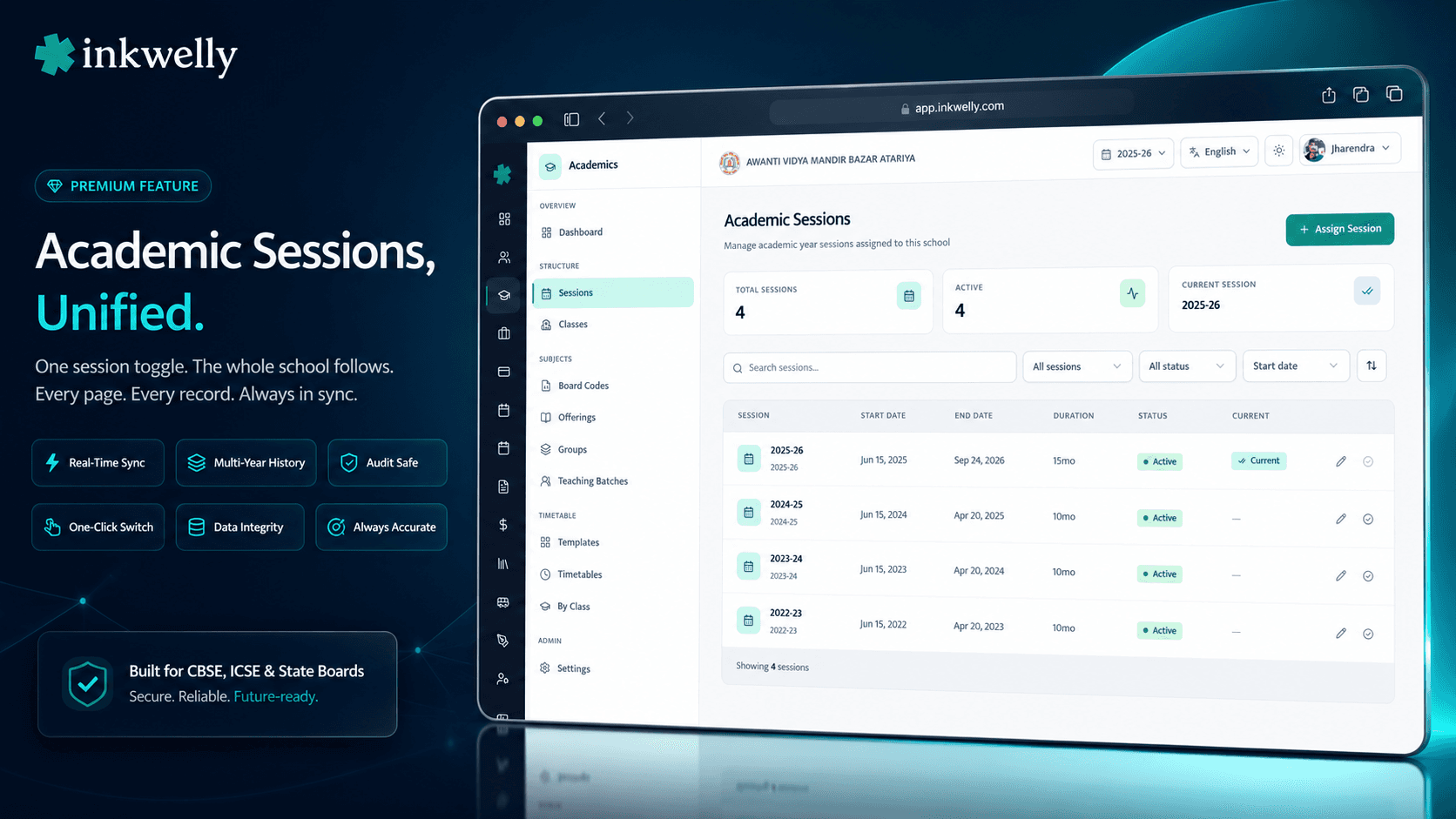
One session toggle. The whole school follows. Set 2025-26 as current. Every page knows.
Academic-year sessions in Inkwelly run the entire CBSE, ICSE or State Board calendar end-to-end. Assign each org-level session to the school, mark one as current, and every fee receipt, attendance register, class list, marksheet and timetable auto-scopes to that year. Year-over-year history stays intact for CBSE renewals, RTE audits and the parent who walks in two years later asking for a Bonafide Certificate.
Why every school office needs this — and why most ERPs get it wrong
It is the third week of March 2026 in a CBSE day school in Lucknow. The principal has just signed the last 2025-26 board scrutiny letter, the office assistant is printing 240 progress reports, and the accountant is trying to close the year's fee ledger before the Sunday auditor visit. Meanwhile, three Class 6 parents are at the front desk asking whether the new term starts on April 1st or April 8th, and which fee structure applies to their child after May 15th.
In most school ERPs that the office has used before, this is when things break. The 'session' is a configuration value buried in Settings — change it on April 1st and the previous year's attendance suddenly disappears from the menu. Forget to change it and 50 parents pay May fees against the 2024-25 ledger. The exam coordinator runs a query for last year's marksheet, and the system serves a half-rolled-over view that mixes old and new students. The principal opens the affiliation portal and cannot answer 'how many sections of Class 8 ran in 2024-25' because the section list got overwritten when the new session was created.
We built Academic Sessions so this never happens. Every session — past, current and future — exists as its own scoped year. The current one is whichever the school explicitly marks. Switching is one click. History is permanent. Every fee, attendance row, marksheet, transfer certificate and timetable is bound to its own session forever.
How sessions work in Inkwelly
Every session has four properties: a name (e.g., '2025-26'), a start date, an end date, and two flags — isActive and isCurrent. Together they describe whether the session is alive, which one is the live operating year, and what date range it covers.
Step 1 — Assign the session. Open Academics → Academic Sessions → click Assign Session. The dialog lists every academic year your organisation has set up centrally — usually 2024-25, 2025-26, 2026-27 in advance. Pick one, set startDate (e.g., 2025-04-01) and endDate (e.g., 2026-03-31), confirm. The session is now part of this school's history forever.
Step 2 — Edit dates if needed. The Edit dialog lets you adjust startDate, endDate and isActive. The session name itself is locked — it comes from the org-level Academic Year. CBSE schools often need to extend an end date by a week when board exams stretch; ICSE schools sometimes shift start by 4 days for results day; both work.
Step 3 — Set as current. Click the green checkmark on the row you want to make current. A confirmation dialog appears with a clear warning: 'This will automatically unset the previous current session. Only one session can be current at a time.' Click Confirm. The previous current session quietly drops the badge — its data stays untouched. Every page in Inkwelly that depends on the current session — the dashboard, the fee ledger, attendance markers, class lists, the timetable, marksheets, the homework planner — refreshes to show the new year. No restart, no clear-cache step, no manual data migration.
What a session controls — fields that exist on every record
- Session name — comes from the org-level
AcademicSession(e.g., '2025-26', '2024-25', '2026-27'). Cannot be edited at the school level — keeps every school in a multi-school trust on the same naming. - Start date and end date — the operating window for that year. CBSE/ICSE default is April 1 → March 31; international schools (IB, IGCSE) often run July → June. Inkwelly accepts any window; just set the dates.
isCurrentflag — exactly one session per school is current at a time. Set-current is atomic — the previous current is unset in the same DB transaction. Never two current, never zero.isActiveflag — independent ofisCurrent. An active-but-not-current session can hold archive operations (re-issuing a transfer certificate from last year). An inactive session refuses new enrollments; useful for read-only year-end states.- Slug — auto-generated as the session name lower-cased (
2025-26). Drives the URL path:/school/avm/bazar-atariya/2025-26/.... Switching the current session does not change historic URLs — last year's TC link still resolves. - Duration — computed on the fly, shown in the table as
12mo,30d, etc. Useful when a school runs a 6-month bridge session for new admissions or a midterm CBSE relaxation. - Stat tiles at the top — Total Sessions, Active count, and the Current session name. The principal sees the year's state at a glance every time she opens the page.
Switching sessions is atomic — never two current, never zero
Most office assistants who have lived through an April session change in another ERP have a horror story. The system flips half the modules to the new year, the other half stays on the old one, and parents who paid fees on April 2nd see their receipts under the wrong session for two days while the IT lead 'syncs the database'.
In Inkwelly, set-current is a single database transaction. The new session's isCurrent flag flips ON; the old one's flips OFF; both happen or neither happens. No two-current race, no zero-current gap. The audit log records who clicked the button, the previous current session, and the new one — for the principal's record, for the auditor's record, and for the rare case when someone asks 'who switched the year on March 28th instead of April 1st?'.
Session slugs in the URL — historic links keep working
Inkwelly's URL structure puts the session slug right in the path: /school/avm/bazar-atariya/2025-26/students/admission/.... When you set 2026-27 as current next April, the dashboard sidebar and quick-nav switch to that year — but the 2025-26 URL still resolves to the same admission record it always did.
This matters more than it looks. Parents WhatsApp share Inkwelly URLs with each other for fee receipts and TC downloads. Class teachers bookmark a class roster URL to open every morning. The CBSE renewal officer asks for a link to last year's enrollment list. With session-in-the-URL, every one of those links keeps working forever. No 404 in October when somebody tries to open an April 2024 message.
isActive vs isCurrent — two separate switches for a reason
A session can be Active without being Current. It can be Current without being Inactive. The two flags do different jobs.
isCurrent decides which session every Inkwelly page operates on by default. The dashboard, fee collection screen, attendance register, today's timetable — all show the current session's data. Exactly one session is current at a time, school-wide.
isActive decides whether the session can take new operations. Inactive sessions refuse new admissions, fee creation and attendance marking — but they remain readable. Useful when the office wants to lock 2024-25 for audit while 2025-26 is current and accepting writes. An inactive session can also be 'reopened' by toggling isActive back on; if you need to re-issue a TC for a student who left two years ago, flip that single switch, run the operation, flip it back.
Filter and search — find any session in seconds
Most CBSE schools that have used Inkwelly for 3+ years have 4 to 6 sessions in their history. State Board schools that came in mid-cycle often have 8 or 9. Filtering matters.
The Sessions page filter bar takes search (matches the session name), isCurrent (Yes / No / Any) and isActive (Yes / No / Any). Sort by start date ascending or descending. The default sort puts the most recent session at the top — usually the current one. For an audit query like 'show me all the inactive sessions from 2022 onwards', two filter clicks narrow the table; the office staff exports the matched rows to CSV from the same page.
“Pehle session change karte hi, fee ledger gadbad ho jata tha। 2024 mein April 1st ko hum bhool gaye toh 50 parents ne purani session mein pay kiya। Ab Inkwelly mein ek button click — 2025-26 set as current — sab cleanly switch ho gaya, aur 2024-25 ka data bhi waise ka waise hai। CBSE renewal mein last year ki section list bhi turant mil gayi।”
Real-world scenarios that depend on session-scoped data
Five school-office routines that only work when sessions are first-class:
1. April 1st promotion week. The school promotes 600 students from one class to the next. Inkwelly's Promotion module reads the previous session's class roster, applies the promotion mapping, and writes new enrollments into the current session. Both years stay intact — last year's class teacher can still pull her March attendance from the 2024-25 view.
2. CBSE affiliation renewal (every 3-5 years). The CBSE inspector asks: 'How many sections of Class 8 ran in 2023-24? What were the subject offerings? Who taught Maths?' The principal opens Sessions, switches the session filter to 2023-24, opens Classes — every detail is exactly as it was when the school operated that year.
3. Parent re-issues a Transfer Certificate. A parent walks in 2 years after their child left. The TC was issued in March 2024. Office assistant searches by student name, opens the 2023-24 session, finds the original TC, and re-prints with the school's current letterhead. No data migration ritual.
4. RTE 25% reservation audit. The District Education Officer asks for the EWS/DG admission list across the last three sessions. Switch session to 2023-24 → export RTE student list. Switch to 2024-25 → export. Switch to 2025-26 → export. Three CSVs, each session-scoped, ready for the DEO.
5. Re-running last year's marksheet. A parent claims their child's 2024-25 final report card had a typo. The exam coordinator switches sessions, opens Examinations → Final Report Cards → finds the original record, fixes the typo with full audit trail, re-issues. Every other year is untouched.
Common operations the session model unlocks
- Year-on-year reporting — compare 2024-25 enrollment vs 2025-26 enrollment by section, by class, by gender, by RTE category — no separate spreadsheet, no merged dataset.
- Mid-year session creation — schools that admit students in October or January can create a half-year session and run it parallel to the main year, both with full feature support.
- Future-session planning — assign the 2026-27 session in February 2026 and pre-load classes, subjects and the next year's fee structure before April; flip the current flag on April 1st.
- Historic transfer certificates — re-issue a 2022-23 student's TC in 2026 without restoring backups or migrating data.
- CBSE / ICSE / State Board renewals — pull prior-year section list, subject mapping and staff allocation from any past session for affiliation paperwork.
- Attendance audit — RTE Section 12 monitoring requires daily attendance logs going back the full enrollment period — Inkwelly serves any session's daily registers.
- Parent transparency — parents in the parent app see their child's full multi-year academic timeline as a single timeline scoped per year.
- Staff history — when a teacher's PF record asks 'when did she join 2024-25 service' the HR module pulls the exact session boundary.
See session switching live on your school's data
30-minute walkthrough — bring your past 3 academic years' details. We'll set up your sessions in real time and show how every Inkwelly module re-scopes to the current year with one click.
Limits, safety, and the small print
Exactly one current session per school. Set-current is atomic at the database transaction level. The previous current is unset in the same write. There is no UI path to accidentally have two current sessions or zero — the constraint is enforced server-side and indexed at the DB layer.
Org-level session naming. The session name (e.g., '2025-26') comes from the organisation's central AcademicSession table, not from the school. This keeps every school in a multi-school trust on identical naming conventions for cross-school reports. Date ranges are per-school — a Mumbai school can run April 1 → March 31 while a sibling Bangalore IB school runs July 1 → June 30 in the same '2025-26' session.
End date validation. The Edit dialog blocks endDate ≤ startDate before the API call. The backend re-validates. A null endDate is also rejected — every session has a hard window.
Cannot change session name on the school side. The Edit dialog shows the academic-session name as a read-only header. To rename, the org admin updates it centrally and every school's row reflects the change immediately.
Audit log on every change. Every assign-session, edit-dates, set-active and set-current action writes to the audit log with user, timestamp, IP, previous values and new values. The log is exportable from the school admin panel — auditors love it.
Role-gated actions. Assigning sessions, editing dates and setting current are gated to the principal and school admin role by default — class teachers and accountants do not see those buttons. Configure per-role permissions from school IAM settings.
Multi-tenant strict isolation. Like every Inkwelly module, sessions are scoped to your school. A multi-school trust's central admin can see all schools' sessions in the org dashboard but cannot mutate one school's session from another school's view. Cross-tenant access is never possible — enforced at the API guard layer.
Belongs to
1 moduleFrequently asked
8 questionsWhat happens to last year's data when I set a new session as current?
Nothing. The previous session's fee receipts, attendance records, marksheets, class lists, transfer certificates and timetables stay exactly as they were. Setting a new session as current only changes which session every Inkwelly page operates on by default. To view or operate on the previous year, switch the session filter — every record is right there. We never overwrite, archive or hide historic data.
Can two sessions be current at the same time?
No, never. Set-current is a single atomic database transaction — the new session's isCurrent flag flips on while the old one flips off in the same write. The constraint is enforced at both the API layer and the database layer, so there is no path through the UI, API or even direct DB error to land in a state with two currents or zero currents. The audit log records every transition with timestamps.
Can I run a 6-month bridge session in addition to the main year?
Yes. Sessions in Inkwelly accept any startDate and endDate window. CBSE schools that run an October-March bridge admission session for relocated students can create that session in parallel to the main April-March one. Each session holds its own enrollments, fees, attendance and marksheets. Only one is current at a time, but you can flip current between two short bridge sessions and a main session as the school year progresses.
How do I re-issue a Transfer Certificate from 3 years ago?
Open Academic Sessions, switch the session filter to the year the student left (e.g., 2022-23), open the Students module, search for the student, click Print TC. The original TC data renders exactly as it was when first issued, with the school's current letterhead applied. No data migration, no backup restore — Inkwelly keeps every session's data online forever.
What's the difference between isActive and isCurrent on a session?
isCurrent decides which session every page operates on by default — exactly one is current school-wide. isActive decides whether the session accepts new write operations like admissions and fee creation. An active-but-not-current session is read-only for default views but can be operated on by switching the filter. An inactive session refuses new writes everywhere — useful for locking last year for audit. Both can be toggled independently from the Edit Session dialog.
Do CBSE affiliation renewal forms require multi-year session data?
Yes — CBSE renewal happens every 3 to 5 years and asks for prior-year section enrollment, subject offerings, staff allocation and exam pass rates. Inkwelly serves every prior session as a fully queryable view. Switch the session filter to the year CBSE asks about; the affiliation forms can be exported directly from the academics module. ICSE / IGCSE / IB and most State Boards have similar multi-year audit requirements; Inkwelly handles them all the same way.
Can class teachers see other sessions' data?
By default, class teachers see only the current session's data — that is what they need for daily attendance, homework and class management. Office staff and the principal see the session switcher and can move between past sessions. Per-role visibility is configurable from school IAM settings — for example, a senior class teacher promoted to academic head can be granted multi-session view without granting admin rights.
Will the URL change when I switch the current session?
URLs in Inkwelly include the session slug in the path: /school/avm/bazar-atariya/2025-26/students/admission/abc123. When you set 2026-27 as current, the dashboard nav and default links switch to that year — but the 2025-26 URLs keep working. Parents who saved a fee receipt link from last year will still open it correctly. Class teachers who bookmarked their class roster page will see the bookmarked year, not the current one. This is intentional — historic links must always resolve.
You might also like
3 readsSee Inkwelly on your school
30-minute demo. We open your current ERP with you and load your data into Inkwelly on the call. Dated go-live plan by the end of it.