Inkwelly में parent notifications हिन्दी में कैसे भेजें
Hindi-medium और bilingual schools (UP, Bihar, MP, Rajasthan, Chhattisgarh, Jharkhand, Haryana, Uttarakhand, Delhi NCR) के लिए जिनके parents English से जल्दी Hindi पढ़ते हैं। इस गाइड के बाद हर fee receipt, attendance alert, admit card और homework notification Hindi में जाता है — या तो school default के रूप में या हर parent की भाषा preference के हिसाब से।
Inkwelly में parents को Hindi में notifications भेजने के लिए: Communications → Settings → Language खोलें और स्कूल का default हिन्दी (hi) चुनें। Save पर click करें। Inkwelly का हर template पहले से Hindi variant के साथ आता है, इसलिए अगला जो event chalega वह हर parent को HI body भेजेगा। Mixed school के लिए default को Auto पर रखें और हर parent के contact record पर preferredLanguage set करें — Inkwelly Hindi-set parents को HI variants से और बाकी को EN से अपने आप route कर देता है।
भारत में Hindi-medium parents WhatsApp messages को Devanagari script में होने पर 31% ज़्यादा खोलते हैं बजाए उसी message को English में (Inkwelly customer telemetry, 2024 fee cycle)। यह असर Tier-2 और Tier-3 स्कूलों में सबसे ज़्यादा है — जहाँ parents fluent Hindi पड़ लेते हैं लेकिन English को अनपड़े दफ़्तरी paperwork की language मानते हैं। Inkwelly हर parent-facing template के साथ Hindi variant out of the box देता है, इसलिए यह बदलाव translation नहीं configuration है — आप चुनते हैं कि कौन सी language जाए, message खुद नहीं लिखना पड़ता।
1. जिन templates पर काम करना है उन पर Hindi variants होने की पुष्टि करें
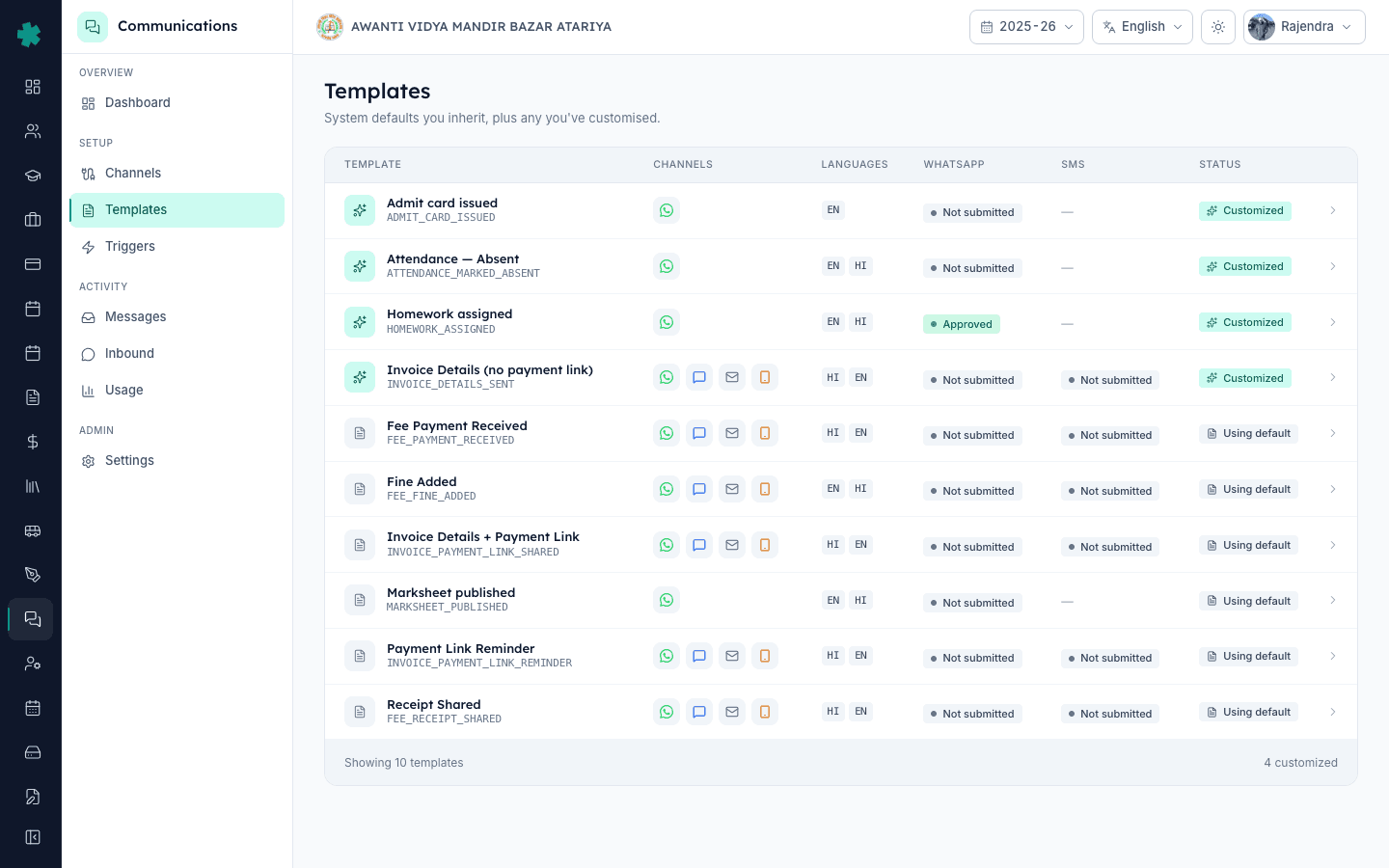
Inkwelly में Communications → Templates खोलें। हर row पर दिखता है कि उस template के साथ कौन सी language badges shipped हैं — ज़्यादातर पर EN और HI दोनों होते हैं। Fee Payment Received, Invoice Payment Link Shared, Payment Link Reminder, Receipt Shared, Fine Added, Attendance Marked Absent, Admit Card Issued, Marksheet Published और Homework Assigned — सब Day 0 पर HI variant के साथ आते हैं। अगर किसी ज़रूरी template पर केवल EN है तो Customise पर click करके हिन्दी body जोड़ें ([[how-to-customise-a-parent-notification-in-inkwelly]] देखें)।
2. (Option A) Hindi को school-wide default बनाएँ
जिन स्कूलों में लगभग हर parent हिन्दी पड़ता है, वहाँ Communications → Settings → Language खोलें और स्कूल default के रूप में हिन्दी (hi) चुनें। Save करें। Inkwelly का हर notification HI body भेजने लगेगा — बशर्ते किसी parent ने अपने contact record पर preferredLanguage को English पर set न किया हो। जिन templates पर HI variant नहीं है वे English पर अपने आप fall back करते हैं — इसलिए customisation पूरी होने से पहले भी यह setting safely flip कर सकते हैं।
3. (Option B) हर parent की preference को decide करने दें
Mixed schools में जहाँ कुछ parents Hindi पड़ते हैं और कुछ English, वहाँ school default को Auto पर रखें। Students → एक student → Parents खोलें और parent का preferredLanguage hi या en edit करें। Inkwelly preference को parent contact पर save कर लेता है, और उस student के लिए जो भी event chalega वह preference को honour करता है। School-default route उन parents के लिए fallback है जिनकी कोई preference दर्ज नहीं है — इसलिए एक cohort एक बार में बदल सकते हैं।
4. हज़ारों parents के लिए preferredLanguage bulk-import करें
बड़े स्कूलों के लिए preference को existing Student Bulk Import flow से bulk में set करें। अपने CSV में parentPreferredLanguage column जोड़ें (values: en, hi, mr, ta, te, kn, bn, gu — ISO-639-1 codes जो Inkwelly के templates support करते हैं)। Students → Import से upload करें। Inkwelly language preference को name और phone के साथ-साथ हर parent contact पर merge कर लेता है। Existing parents update हो जाते हैं; new parents पहले row के अनुसार preference के साथ बनते हैं।
5. Hindi WhatsApp variants को Meta पर submit करें
Meta हर template-language pair को अलग asset मानता है — EN की approval HI को cover नहीं करती। जिन templates को Hindi में WhatsApp पर भेजना है उनकी HI row पर Submit to Meta पर click करें। ज़्यादातर स्कूल पहले EN submit करते हैं Meta acceptance pattern समझने के लिए, फिर HI को second pass में submit करते हैं। Communications dashboard का Templates & triggers card एक नज़र में दिखाता है कि कौन से HI variants अभी Not submitted हैं।
6. Hindi SMS variants को DLT पर register करें
DLT भी हर language को अलग template entry मानता है। हर template का SMS tab खोलें, HI body को word-for-word अपने DLT operator portal पर copy करें, register करें, 19-digit Hindi template ID का wait करें और फिर Inkwelly में paste करें। SMS variant APPROVED तबी होता है जब वह HI-specific DLT ID जगह पर हो। Email variants को कोई provider step नहीं चाहिए — HI body save होते ही Hindi email dispatch करने लगता है।
7. Routing को test send से verify करें
Communications → Messages → Send test पर जाएँ। किसी एसे parent contact को चुनें जिसका preferredLanguage HI हो और एक real template send चलाएँ। Inkwelly dispatch time पर language resolve करता है: अगर parent का preferredLanguage है और matching HI variant exist करता है तो HI body जाएगा; नहीं तो school default; नहीं तो English। Messages log हर row पर यह record करता है कि कौन सी language इस्तेमाल हुई, जिससे misrouted parents पकड़ना आसान होता है।
ज़्यादातर Hindi-medium स्कूल एक दोपहर में switch पूरा कर लेते हैं: हर Meta resubmission पर करीब दस मिनट और हर DLT re-registration पर दस मिनट। Communications dashboard Templates & triggers card पर वह हर HI variant दिखाता है जिसकी अभी approval बाकी है, इसलिए progress देखने के लिए एक जगह है। Marathi, Tamil, Telugu, Kannada, Bengali या Gujarati में भेजने वाले स्कूलों पर वही flow लागू होता है — template body उस language में customise करें, parent का preferredLanguage matching code पर set करें और dispatch करें।
Inkwelly में Hindi-first parent notification flow end-to-end देखें
20 मिनट का walkthrough जिसमें एक UP-Board स्कूल अपने mixed parent base के लिए fee receipts, attendance और homework alerts Hindi के साथ-साथ English में route करता है।
अक्सर पूछे गए सवाल
6 सवालक्या Hindi template मुझे खुद लिखना पड़ेगा, या Inkwelly पहले से एक देता है?
Inkwelly हर parent-facing template पर Hindi variant out of the box देता है — Fee Payment Received, Invoice Details, Payment Link, Receipt Shared, Fine Added, Attendance Marked Absent, Admit Card Issued, Marksheet Published, Homework Assigned। HI body Devanagari व्याकरण में लिखी गई है जिसमें technical terms English में हैं — वही तरीका जिससे भारतीय parents 2025 में पड़ते हैं। अगर स्कूल की अपनी आवाज़ कारण है तो customise कर सकते हैं; editorial defaults Day 0 पर ship करने के लिए पूरी तरह से काफ़ी हैं।
अगर स्कूल में कुछ parents Hindi चाहते हैं और कुछ English, तो क्या करें?
School default को Auto पर रखें और हर parent का preferredLanguage parent contact record पर अलग-अलग set करें। Bulk-import भी चलता है — Students CSV में parentPreferredLanguage column जोड़ें। Inkwelly हर send पर language resolve करता है: पहले parent preference, फिर school default, फिर English fallback। इस तरह mixed school को alag triggers के बग़ैर chala sakte hain।
अगर केवल English variant को Meta ने approve किया है तो क्या WhatsApp Hindi template deliver करेगा?
नहीं। Meta EN और HI को अलग template assets मानता है, इसलिए WhatsApp पर dispatch होने से पहले HI variant को अपनी approval चाहिए। Inkwelly इसे सख्ती से रोकता है: जिस HI WhatsApp send पर कोई APPROVED HI variant नहीं है वह सीधे SMS या email पर fallback हो जात है — dispatch fail नहीं होता। Communications dashboard missing HI approvals दिखाता है ताकि अप एक ही batch में submit कर सकें।
क्या एक ही parent को वही notification Hindi और English दोनों में भेज सकते हैं?
Inkwelly जान-बूझकर हर parent को एक event पर एक ही language भेजता है — दो बार भेजने से दो messages जाते हैं और स्कूल का खर्च दोगुना हो जाता है बिना समझ बड़हाए। Bilingual households का साफ़ रास्ता यह है कि parent का preferredLanguage उस language पर set करें जिसे वे तेज़ी से पड़ते हैं; cohort-level साफ़ rastaa है एक customised template जो body में Devanagari और Latin script मिलाता हो (ज़्यादातर Indian Hindi-medium parents इसे आराम से पड़ लेते हैं)।
Inkwelly me parents ko Hindi me notifications kaise bheje?
Communications → Settings → Language par jaaiye aur school default Hindi (hi) chuniye. Har Inkwelly template Hindi variant ke saath aata hai, isliye agla event ki body Hindi me jayegi. Mixed school ke liye default Auto rakhiye aur student ke parent record par preferredLanguage hi ya en set kijiye — Inkwelly har parent ke liye sahi language pick karta hai dispatch time par.
Inkwelly me kaunsi regional languages ke variants available hain abhi?
English aur Hindi Day 0 par har parent-facing template ke saath ship karte hain. Marathi, Tamil, Telugu, Kannada, Bengali, Gujarati aur Punjabi Customise flow se mil jate hain — editorial team aapke school ki language par variant add kar deti hai request par. Inkwelly parents par preferredLanguage ko ISO-639-1 codes me store karta hai (mr, ta, te, kn, bn, gu, pa), to variant save hote hi dispatch sahi body apne aap pick kar leta hai.
आपको ये भी पसंद आ सकता है
3 लेखस्रोत व संदर्भ
- Government of India — Constitution, Eighth Schedule (Scheduled Languages) · देखा गया 18 May 2026
Hindi sahit 22 scheduled Indian languages list karta hai, jiska source set Inkwelly regional template variants ke liye use karta hai.
- Meta — WhatsApp Business Platform: Message Templates · देखा गया 18 May 2026
Meta ka rule define karta hai ki har template-language pair ko alag approval chahiye — isi liye Inkwelly ke HI variants ko apna Submit to Meta pass chahiye.
Inkwelly आपके स्कूल पर — खुद देखें
30 मिनट का डेमो। आपके मौजूदा ERP को आपके साथ खोलकर, कॉल पर ही आपका डेटा Inkwelly में लोड करते हैं। कॉल ख़त्म होते-होते एक तय तारीख़ का गो-लाइव प्लान आपके हाथ में।