Inkwelly में parent notification को कैसे customise करें
उन principals और Communications Admins के लिए जो चाहते हैं कि fee receipts, attendance alerts, admit cards और homework notices school की अपनी आवाज़ में जाएँ — principal का signature, school का helpline, culturally appropriate greeting। इस गाइड के बाद Inkwelly के किसी भी template की school-owned copy ready होती है।
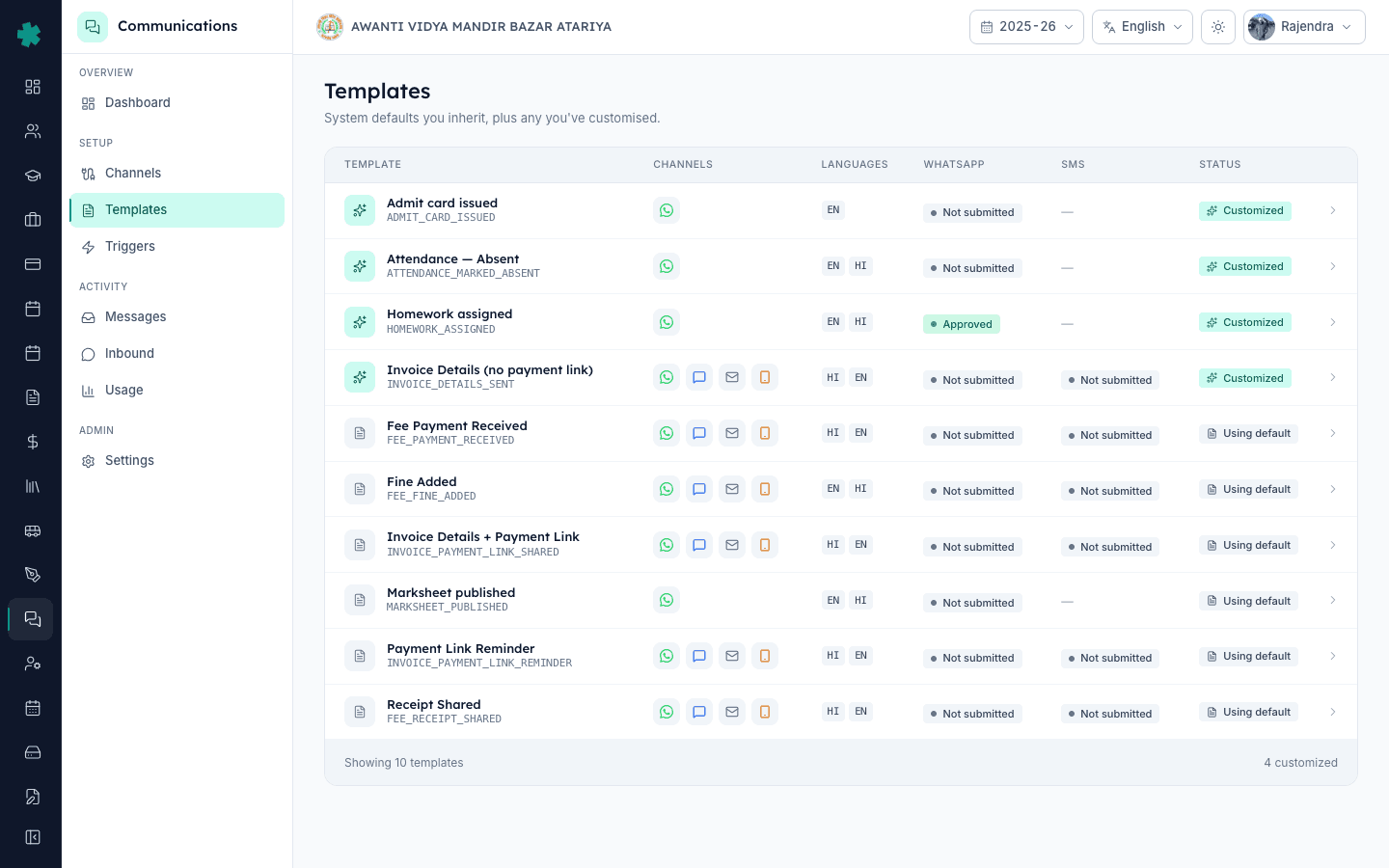
Inkwelly में parent notification को customise करने के लिए: Communications → Templates खोलें, जिस template को बदलना है उस पर click करें, channel tab (WhatsApp, SMS या Email) पर जाएँ और जिस language variant को edit करना है उस पर Customise पर click करें। Inkwelly system default को स्कूल की अपनी copy में fork कर देता है। Variable placeholders जस के तस रखते हुए body edit करें, save करें — और अगले send से ही parents को customised version जाएगी।
Inkwelly दस parent-facing templates pre-written देता है — editorial team ने इन्हें साफ़ Indian-school English और Hindi में लिखा है, जो ज़्यादातर स्कूलों के लिए एक भी शब्द customise किए बिना live होने के लिए काफी हैं। जो स्कूल customise करते हैं वे तीन वजहों से करते हैं: (क) brand voice (principal का नाम, स्कूल का motto, अंत में helpline), (ख) regional language preference (Hindi की जगह Marathi, Tamil, Telugu, Kannada, Bengali), और (ग) policy-specific wording (CBSE board school को APAAR ID का zikr ज़रूरी हो सकता है, state-board school को admit-card की sub-line)। तीनों default से एक click पर fork होते हैं।
1. Templates page खोलें
Inkwelly में Communications → Templates खोलें। List में स्कूल के लिए available हर notification template दिखता है। हर row पर एक badge बताता है कि स्कूल अभी Inkwelly की default copy इस्तेमाल कर रहा है (ग्रे Using default tag) या अपनी customised copy (teal Customized tag)। जिस template को बदलना है उस पर click करें — Invoice Details + Payment Link, Fee Payment Received, Attendance Marked Absent — list में जो भी हो।
2. जिस channel और language को बदलना है उस पर जाएँ
Template detail page पर ऊपर तीन channel tabs हैं — WhatsApp, SMS, Email — साथ ही app-only स्कूलों के लिए Push tab भी। जिस channel को customise करना है उस पर click करें; हर channel का अपना body होता है क्योंकि वही notification 160-character SMS पर अलग पड़ता है और rich formatting वाले WhatsApp message पर अलग। उसी tab के अंदर हर language (EN, HI और भी) एक अलग row है। जो row चाहिए वह चुनें।
3. Customise पर click करें
उसी language row पर Customise button पर click करें। Inkwelly system default को स्कूल की अपनी copy में fork कर देता है और editor unlock हो जाता है। अब page पर एक तरफ़ read-only पुराना body दिखता है और दूसरी तरफ़ एक editable text area जो शुरुआत में वही शब्दों से pre-filled होता है — यानी starting point एक जैसा है और हर बदलाव साफ़ दिखता है। Template का status APPROVED से Customized · Not submitted (WhatsApp के लिए) पर आ जाता है, जिससे एक नज़र में साफ़ होता है कि कौन से variants default से अलग हो चुके हैं।
4. Variables जस के तस रखते हुए body edit करें
Body edit करें। हर variable placeholder को उसी जगह रखें — WhatsApp पर {{1}}, {{2}}; SMS पर {#var#} style; Email पर {{studentName}} style। Inkwelly इन्हें send time पर real student, fee या attendance data से भरता है। Variables को reorder या rename करने से substitution टूट जाता है। Variables के आस-पास static text जैसे स्कूल का नाम, sign-off line या emergency contact आज़ादी से जोड़ सकते हैं — ज़्यादातर स्कूल customisation का बड़ा हिस्सा इसी जगह करते हैं।
5. Parent का view preview करें
Editor के दाएँ pane पर live preview दिखता है जो वैसा ही render होता है जैसा real parent को दिखेगा: WhatsApp का chat-bubble style bold और italics के साथ, SMS का plain 160-character view (Inkwelly segments गिनता है), Email का पूरा HTML phone-width frame में। Variables के sample values स्कूल के अपने dataset से आते हैं, इसलिए preview एक real outgoing notification जैसा दिखता है — save करने से पहले typos, awkward line breaks और length की problem पकड़ लें।
6. Customisation को save करें
Save पर click करें। Inkwelly नए body को school + channel + language के साथ जोड़कर संभाल लेता है और row पर customizedAt timestamp stamp करता है। Customised templates sessions के बीच बने रहते हैं और बाकी school admin team को भी दिखते हैं। Templates list में Customized badge Using default की जगह आ जाता है — कल dashboard पर जो भी चलेगा वह देख सकेगा कि यह template अब स्कूल की अपनी है।
7. जहाँ ज़रूरी हो वहाँ दोबारा approval के लिए submit करें
WhatsApp variants के लिए उसी screen पर Submit to Meta पर click करें — customised wording Meta के लिए नया template asset है और Inkwelly customised लेकिन unapproved WhatsApp variant से dispatch नहीं करता। SMS variants के लिए, नया body अपने DLT operator portal पर copy करें, register करें और नया 19-digit template ID Inkwelly में वापस paste करें। Email variants तुरंत dispatch-ready होते हैं क्योंकि Inkwelly email पर provider-side approval नहीं मांगता।
एक template पर स्कूल की अपनी आवाज़ आ जाने के बाद जिन templates को अगले customise करना सबसे ज़्यादा faydeमंद है, वे वही हैं जिन्हें parents सबसे ज़्यादा देखते हैं: Fee Payment Received (क्योंकि receipt पर स्कूल का नाम और accountant का signature चाहिए), Invoice Details + Payment Link (क्योंकि payment-link की वजह पर school-specific context का फायदा होता है), और Attendance Marked Absent (क्योंकि absent message पर अक्सर parents को call-back करने के लिए स्कूल का helpline number चाहिए)। हर एक का fork save करने में कुल मिलाकर करीब पंद्रह मिनट लगते हैं।
Inkwelly का template customisation editor live देखें
20 मिनट का walkthrough जिसमें एक real Indian school अपने fee-receipt template को अपनी आवाज़ में दोबारा लिखता है, phone पर preview करता है और Meta पर दोबारा submit करता है।
अक्सर पूछे गए सवाल
6 सवालक्या customise करने के बाद Inkwelly का default template चलना बंद हो जाएगा?
नहीं। System default Inkwelly की template library में जस का तस पड़ा रहता है; आपकी customisation एक अलग school-owned fork है। अगर आप customisation reset कर दें तो default तुरंत वापस चलने लगता है। किसी भी समय एक click में roll back कर सकते हैं। Inkwelly के template system में कहीं भी destructive editing नहीं है।
क्या customised template को हर बार Meta या DLT पर दोबारा submit करना पड़ेगा?
WhatsApp के customised variants पर दोबारा Submit to Meta ज़रूरी है क्योंकि Meta किसी भी body change को नए asset के रूप में approval के लिए देखता है। SMS के customised variants पर operator portal पर नए सिरे से DLT registration और Inkwelly में नया 19-digit template ID paste करना पड़ता है। Email customised variants तुरंत dispatch-ready होते हैं — email पर किसी provider approval की ज़रूरत नहीं।
क्या एक ही template के दो customised version रख सकते हैं — एक primary के लिए, एक secondary के लिए?
Inkwelly में customisation school + channel + language पर होती है — किसी class या cohort पर नहीं। अगर primary और secondary के parents को एक ही event पर अलग messaging चाहिए, तो साफ़ रास्ता है class-segmented triggers (future release) — या फिलहाल template को एसा रखें जो दोनों पर fit हो और grade-specific detail follow-up message में भेजें। Customisation language से आगे fork नहीं होती।
अगर मैं बीच send में template customise करूँ तो queued messages का क्या होगा?
जो messages पहले से queue में दाखिल हो चुके हैं और provider ने accept कर लिए हैं, वे उसी body से dispatch होते रहते हैं जिसके ऊपर build हुए थे — आप half-customised run में नहीं फंसते। Customisation save होने (और जहाँ ज़रूरी हो वहाँ दोबारा approval होने) के बाद उस पल से जो भी trigger चलेगा वह नए body से जाएगा। Communications → Messages साफ़ दिखाता है कि हर historical send के पीछे कौन सा body था।
Inkwelly me parent template kaise customise kare?
Communications → Templates pe jaaiye, jis template ko change karna hai uspe click kijiye. Channel tab (WhatsApp, SMS, Email) chuniye aur language row pe Customise dabaiye. Body edit kijiye, variables ko vaise ka vaisa rakhiye, preview check kijiye aur Save dabaiye. WhatsApp variant ko Meta resubmit aur SMS variant ko DLT re-register karna padega.
Inkwelly me kaise dekhe kaunse templates pehle se customise ho chuke hain?
Communications → Templates par right-most column har template ke liye Customized ya Using default dikhati hai. Communications dashboard ke Templates and triggers card par sabse recently customised templates highlight hote hain. Koi alag chhupa hua list nahi hai — Templates page hi single source of truth hai school ke liye.
आपको ये भी पसंद आ सकता है
3 लेखस्रोत व संदर्भ
- Meta — WhatsApp Business Platform: Message Templates · देखा गया 18 May 2026
Meta ka rule define karta hai ki kisi bhi body change ko naya template asset mana jata hai — isi liye Inkwelly customisation ke baad Submit to Meta button dobara open karta hai.
- TRAI — Telecom Commercial Communications Customer Preference Regulations (TCCCPR), 2018 · देखा गया 18 May 2026
Har commercial SMS body ke DLT template registration ko mandatory karta hai — isi liye customised SMS variant ko naya 19-digit template ID chahiye.
Inkwelly आपके स्कूल पर — खुद देखें
30 मिनट का डेमो। आपके मौजूदा ERP को आपके साथ खोलकर, कॉल पर ही आपका डेटा Inkwelly में लोड करते हैं। कॉल ख़त्म होते-होते एक तय तारीख़ का गो-लाइव प्लान आपके हाथ में।