Inkwelly में parent को test message कैसे भेजें
यह एक छोटी सी practical गाइड है उन स्कूल admin के लिए जो fee-week या result-day broadcast से पहले parent message template को end-to-end verify करना चाहते हैं। इस पेज के अंत तक आप Inkwelly के Send a test message dialog के जरिए एक real dispatch भेज चुके होंगे और Messages log में SENT या DELIVERED status live देख लेंगे।
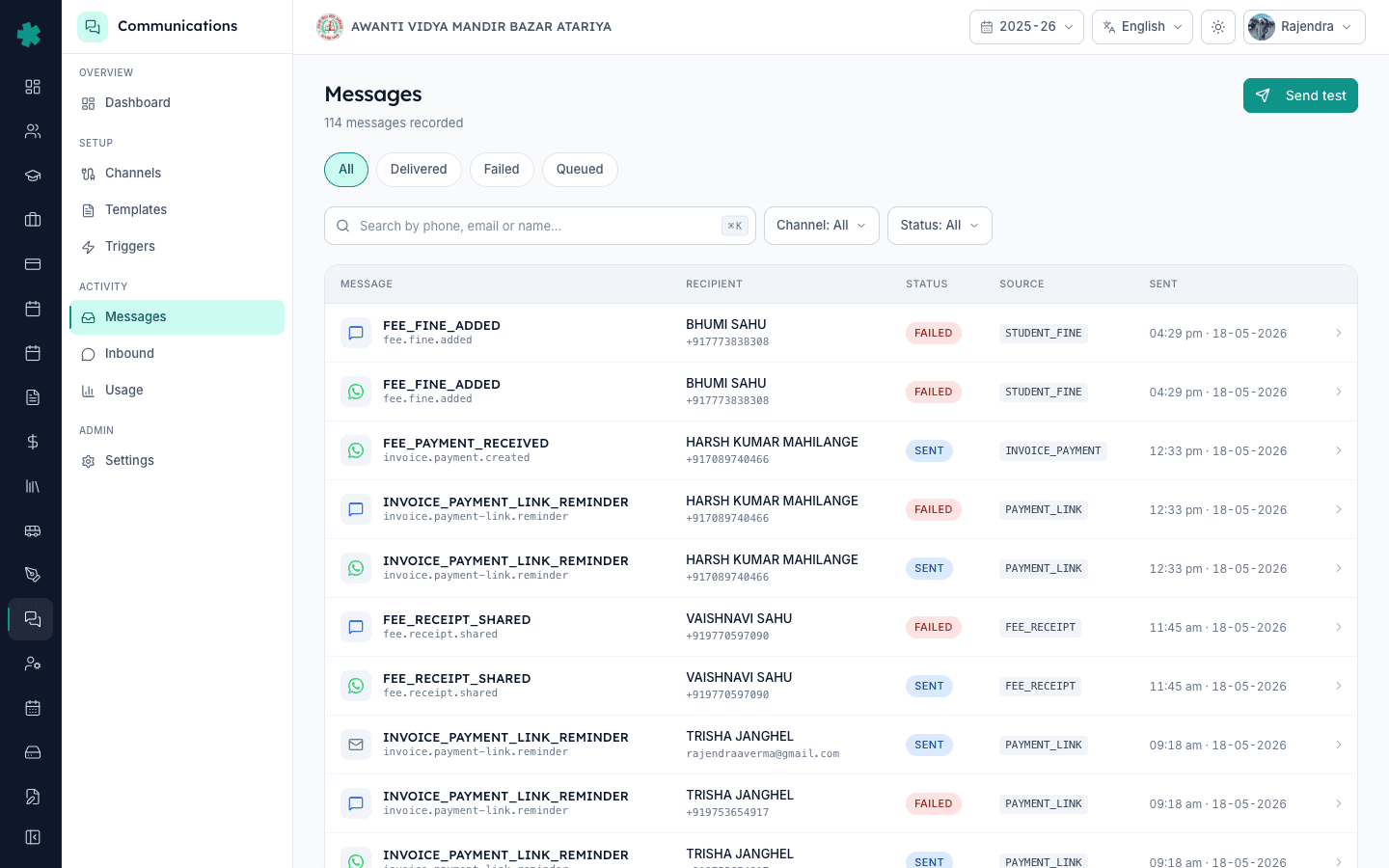
TL;DR — Communications खोलें, Messages पर click करें, फिर ऊपर दाईं तरफ Send test button पर click करें। Template code (जैसे FEE_PAYMENT_RECEIVED) type करें, Student profile ID paste करें जिसके parent contact में आपका अपना number हो, channel चुनें (WhatsApp, SMS, email या push), Variables JSON edit करें, और Send को click करें। Inkwelly आपके live provider के जरिए एक real send dispatch करता है और Messages log में नतीजा SENT, DELIVERED या FAILED status के साथ दिखाई देता है।
Fee-week की कई disasters का कारण एक ही template variable के गलत name से शुरू होता है — template में JSON का नाम amountPaid होता है लेकिन producer amount_paid भेज देता है, और parents को Hi <name>, your payment of {amountPaid} was received जैसा message जाता है। एक ही test send इस तरह की bug को 600 parents तक पहुंचने से पहले पकड़ लेता है। Send a test message dialog वही template render करता है जो production code path render करेगा, एक real Inkwelly student profile के खिलाफ, real provider account के जरिए — mock नहीं। जब test आपके अपने phone पर साफ-सुथरे तरीके से आ जाता है, तो 30 सेकंड में यह confidence मिल जाता है कि स्कूल का नाम, फीस, payment date और balance सब सही resolve हो रहे हैं। India rates पर WhatsApp utility message की कीमत लगभग Rs 0.10 से Rs 0.15 है, इसलिए 5 send वाला test एक रुपए से भी कम में पूरा हो जाता है।
1. Messages पेज खोलें
Admin के रूप में login करें। बाएं sidebar से Communications पर click करें। Communications workspace में Activity group से Messages पर click करें। Messages पेज खुलता है जिसका heading Messages है और नीचे message count है (जैसे 114 messages recorded)। पेज पर filter pills (All, Delivered, Failed, Queued), search field, Channel और Status dropdowns, और recent sends की table है जिसमें MESSAGE, RECIPIENT, STATUS, SOURCE, SENT columns होते हैं। यही आपका live message log है।
2. ऊपर दाईं तरफ Send test button पर click करें
Messages पेज के ऊपर दाईं तरफ Send test button (paper-plane icon वाला, primary हरे रंग वाला) पर click करें। Send a test message नाम का modal dialog खुलता है जिसके नीचे sub-line है Render a template against a real recipient. Sends record in the message log। एक सेकंड रुककर इस line को पढ़ें — real शब्द इरादातन है। यह simulator नहीं है। Dispatch आपके स्कूल के connected WhatsApp, SMS या email account के जरिए जाता है और मासिक खर्च में गिना जाता है।
3. Template code type करें
Template code field में अपने template का पूरा uppercase code type करें — जैसे FEE_PAYMENT_RECEIVED, INVOICE_PAYMENT_LINK_REMINDER, FEE_FINE_ADDED या HOMEWORK_PUBLISHED। येही codes Messages log के Source column में नार्मल sends के साथ दिखते हैं। अगर spelling गलत हुई तो Inkwelly No such template एर्र दे देता है जबकि अभी कोई खर्च भी नहीं हुआ होता, इसलिए छोटी सी typo से समस्या नहीं होती।
4. Student profile ID paste करें
Student profile ID field में एक real Inkwelly student profile id paste करें (cuid string जो oxfnbsvyuirk59m20gl2a0uh की तरह दिखती है)। Field के नीचे description पढ़ता है Resolves the student's parents as recipients. Required unless you provide an explicit user list। एक एसा student profile चुनें जिसके parent contact में आपका अपना phone (या एक office staff phone) हो, ताकि rendered content आप verify कर सकें। Test के लिए किसी paying parent का number इस्तेमाल न करें।
5. Channel चुनें
Channels के नीचे एक pill पर click करें — WhatsApp, SMS, Email या Push। Active होने पर pill हरा हो जाता है। वही channel test करें जो स्कूल इस template के लिए सच में इस्तेमाल करता है। WhatsApp utility template के लिए WhatsApp चुनें — SMS buttons render नहीं करेगा। Email-only digest के लिए Email चुनें। अगर template एक से ज्यादा channels पर approved है तो हर channel पर एक बार test चलाएं, हर channel का अपना per-message rate अलग से लगता है।
6. Variables JSON भरें
Variables (JSON) field एक छोटा JSON object दिखाता है जिसमें इस template को जरूरी variables होते हैं — जैसे studentName, invoiceNumber, amountPaid, paymentDate, balanceDue, schoolName। Values को realistic लेकिन साफ दिखते testy values पर edit करें, जैसे studentName: TEST PARENT, invoiceNumber: INV-TEST-001, amountPaid: 5000। Field के नीचे footnote पढ़ता है Must include every variable required by the template। एक छोड़ दी तो Inkwelly send से पहले एक साफ missing-variable एर्र दे देता है।
7. Send पर click करें और Messages log देखें
Dialog के नीचे दाईं तरफ Send button पर click करें। Inkwelly आपके live provider के जरिए message dispatch करता है और dialog बंद हो जाता है। Messages पेज refresh करें या ऊपर scroll करें — आपका test send सबसे नए row के रूप में दिखेगा, पहले SENT status में, फिर कुछ seconds में DELIVERED (और WhatsApp पर READ) में बदलता हुआ। Row को खोलने पर पूरा render, passed variables, provider message id और timestamp दिखेगा। Source column हर send का trigger origin बताता है।
इस dialog का इस्तेमाल हर नए template के live जाने से पहले और किसी भी template-text change के बाद करें। हर fee-week broadcast के लिए 3-message test set चलाने की आदत डालें — एक fee-due reminder, एक payment-link reminder, एक payment-received receipt — अपने phone पर dispatch किए गए। कुल cost एक रुपए से कम है और 80 प्रतिशत typos और variable-name mismatches पकड़ लेता है, जो parents के सामने स्कूल की छवि खराब कर सकते हैं। अगर कभी test garbled variables या गलत भाषा में आए तो actual class list पर भेजने से पहले template fix करें।
Inkwelly का Communications module live स्कूल पर देखें
20 मिनट का demo book करें और हम आपके अपने phone पर एक real test send चलाकर Meta-approved templates, DLT-routed SMS, audit ledger और मासिक बजट एक स्कूल account पर दिखाएंगे।
अक्सर पूछे गए सवाल
6 सवालक्या Inkwelly में test send की कीमत एक real send के बराबर है?
हां। Inkwelly का Send a test message dialog आपके connected WhatsApp, SMS या email provider के जरिए एक real message dispatch करता है — mock नहीं। चैनल के per-message rate के हिसाब से cost लगता है, India में आमतौर पर Rs 0.10 से Rs 0.85 (WhatsApp utility लगभग Rs 0.12-0.16, DLT SMS Rs 0.18-0.25, AWS SES email एक पैसे से भी कम, push free)। Template setup के दौरान समझदारी से इस्तेमाल करें।
Student profile ID कहां मिलेगा जिसे dialog में paste करना है?
Students module से छात्र का profile खोलें — ID वह cuid string है जो URL में /students/ के बाद आती है (oxfnbsvyuirk59m20gl2a0uh जैसी)। Messages log के किसी row को खोलकर linked student को पढ़कर भी मिल जाएगा। हमेशा वह student चुनें जिसके parent contact में आपका अपना या office staff का phone हो।
क्या एक एसे WhatsApp template को test कर सकते हैं जो Meta से पास नहीं हुआ?
नहीं। WhatsApp केवल Meta-approved templates को ही official business API के जरिए render करता है। Draft template dispatch करने पर Inkwelly एक साफ unapproved-template एर्र दे देता है। पहले Meta approval flow पूरा करें (हमारी WhatsApp Business template approval वाली LEARN page देखें), फिर test चलाएं।
अगर JSON में एक जरूरी variable छोड़ दूं तो क्या होगा?
Dialog dispatch से मना कर देता है और एक साफ missing-variable एर्र देता है जो उस variable का नाम बताता है। कोई cost नहीं लगती। Missing field को realistic value के साथ जोड़कर Send दोबारा click करें। JSON field के नीचे footnote पहले ही चेतावनी देता है — Must include every variable required by the template।
Inkwelly me test message FAILED kyu dikh raha hai log me?
Failed row khol ke neeche provider error string padhein. Indian schools me 3 common reasons hain: number WhatsApp par registered nahi hai (alag test phone use karein), DLT header mismatch on SMS (template aapke TRAI DLT account me alag header par filed hai), aur missing ya galat variable jo provider ne reject kar diya. Kaaran fix karein aur dobara test karein.
Inkwelly me parent ko test message bhejne ke liye teacher allowed hai ya sirf admin?
Sirf Communications admins. Send test button admin permission ke peeche hai — teachers ko apni Messages page par yeh button dikhta hi nahi. Iska kaaran spend protection hai, kyunki test sends ka real cost lagta hai. Teachers apne normal templated messages standard workflow se bhejte rehte hain, koi nayi permission ki zaroorat nahi.
आपको ये भी पसंद आ सकता है
3 लेखस्रोत व संदर्भ
- TRAI TCCCPR 2018 - Telecom Commercial Communications Customer Preference Regulations · देखा गया 18 May 2026
Indian SMS sends ke liye DLT registration aur header-template binding, test sends sameted
- Meta WhatsApp Business pricing for India · देखा गया 18 May 2026
Per-conversation utility, authentication aur marketing pricing jo Indian school ke WhatsApp test sends par lagti hai
Inkwelly आपके स्कूल पर — खुद देखें
30 मिनट का डेमो। आपके मौजूदा ERP को आपके साथ खोलकर, कॉल पर ही आपका डेटा Inkwelly में लोड करते हैं। कॉल ख़त्म होते-होते एक तय तारीख़ का गो-लाइव प्लान आपके हाथ में।