How to register SMS templates on DLT inside Inkwelly
For schools with a DLT-onboarded SMS sender connected to Inkwelly that now need each notification template registered on DLT and the 19-digit template ID pasted back into Inkwelly. By the end every SMS-eligible Inkwelly trigger carries a TRAI-compliant template ID and dispatches without provider rejection.
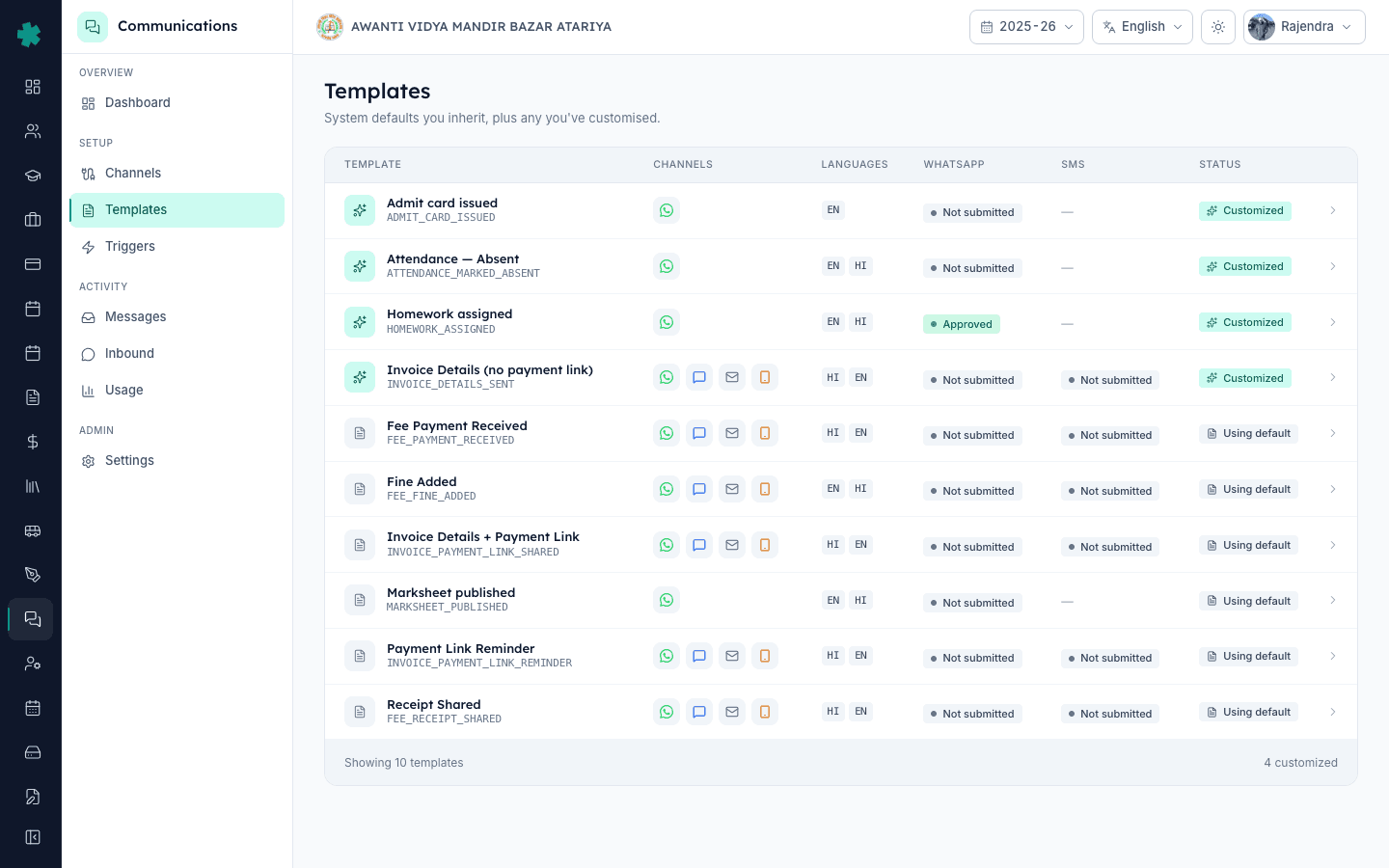
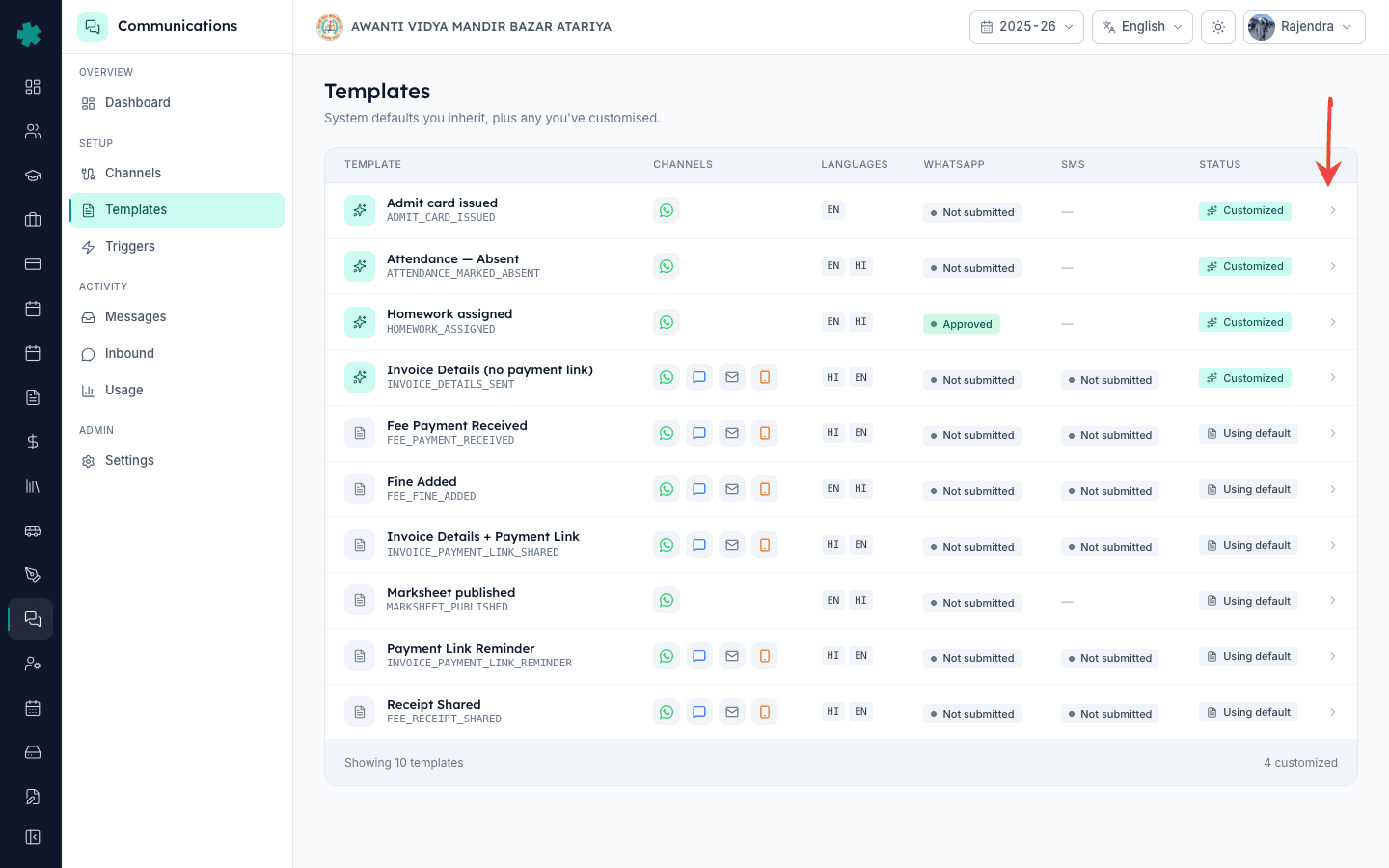
To register an SMS template on DLT inside Inkwelly: open Communications → Templates, click the template, open the SMS tab. Copy the template body, paste it into your DLT operator portal (Jio, Airtel, Vi or BSNL), submit and wait for DLT to issue the 19-digit template ID. Come back to Inkwelly, paste that ID into the Paste DLT id field on the same SMS tab, click Save. Status flips to APPROVED and SMS dispatch unlocks for that template.
DLT in India is a two-step process by design: senders and templates are registered separately. Connecting your SMS provider to Inkwelly handles the sender side; registering the template body on DLT and bringing back the 19-digit template ID handles the template side. Until both halves are in place, the provider rejects the send at the gateway — not Inkwelly. The TRAI rule has been live since 2018 and the portal flow is identical regardless of which operator's portal you used to onboard.
1. Open the template in Inkwelly
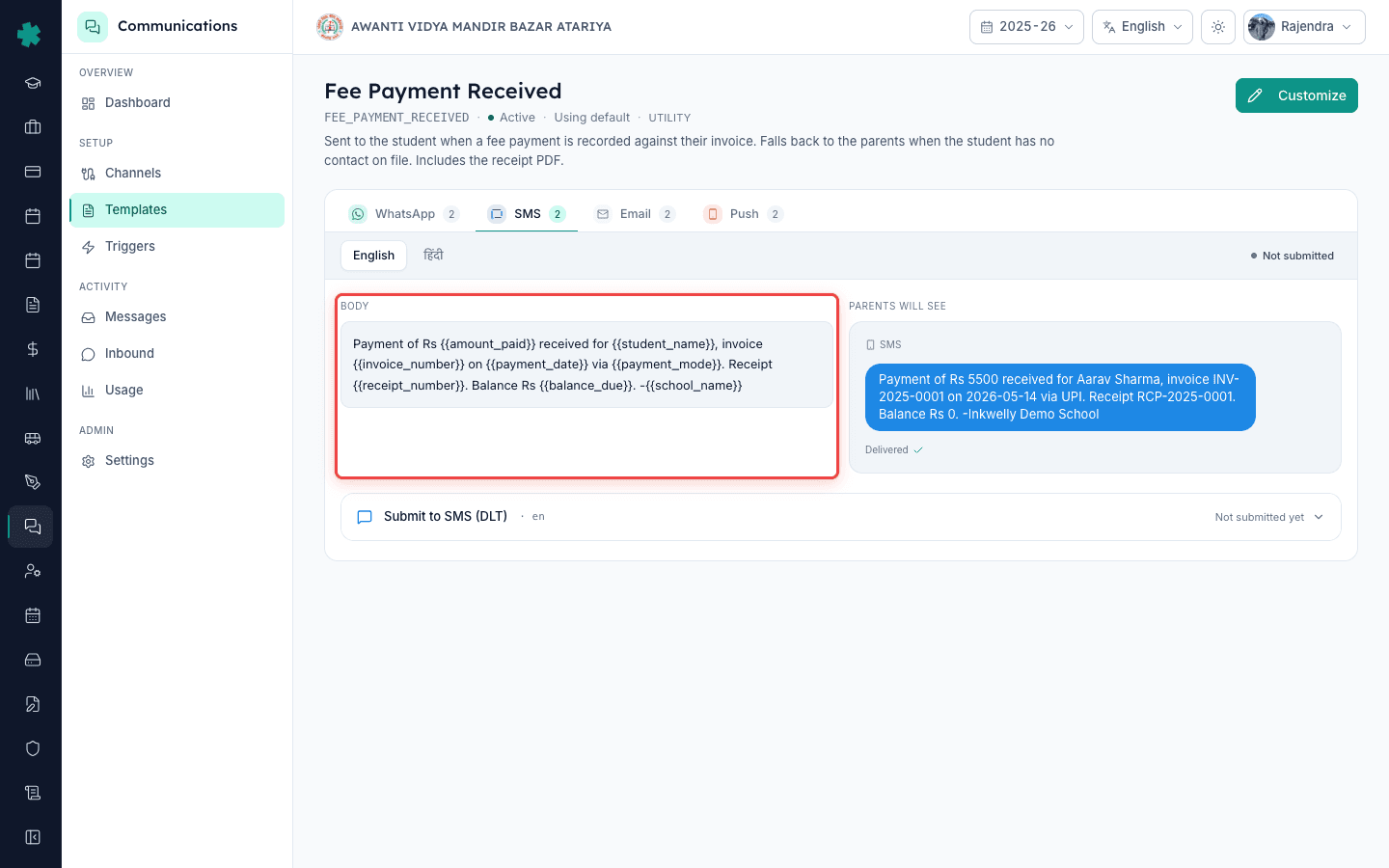
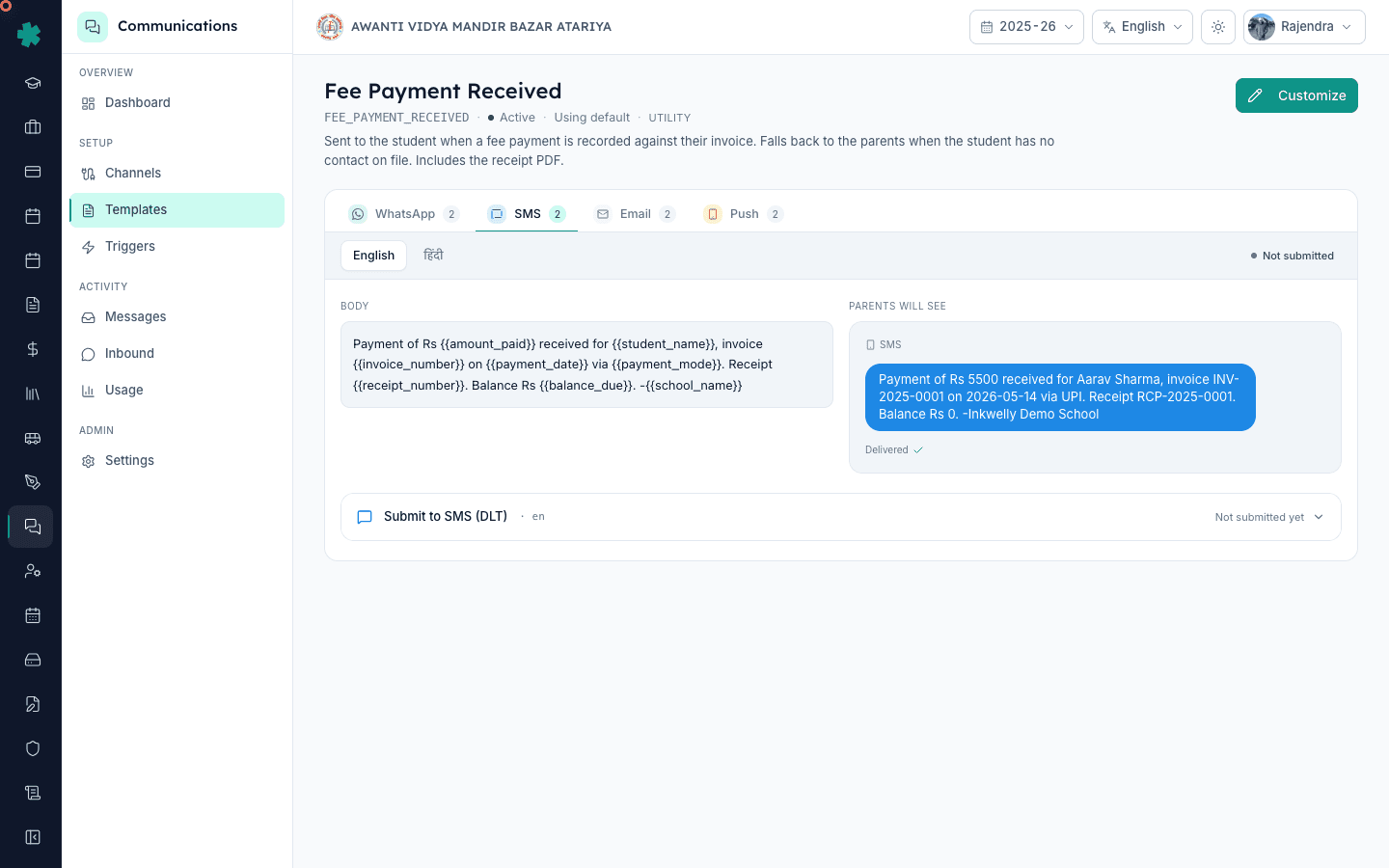
In Inkwelly open Communications → Templates and click the template you want to register — say Fee Payment Received. The detail page opens with three tabs across the top: WhatsApp, SMS, Email. Click the SMS tab. Each row in this tab is one language variant of the SMS body: English, Hindi, sometimes more. Each variant has its own DLT template ID because DLT treats every language as a separate registered asset.
2. Copy the SMS body exactly as it ships
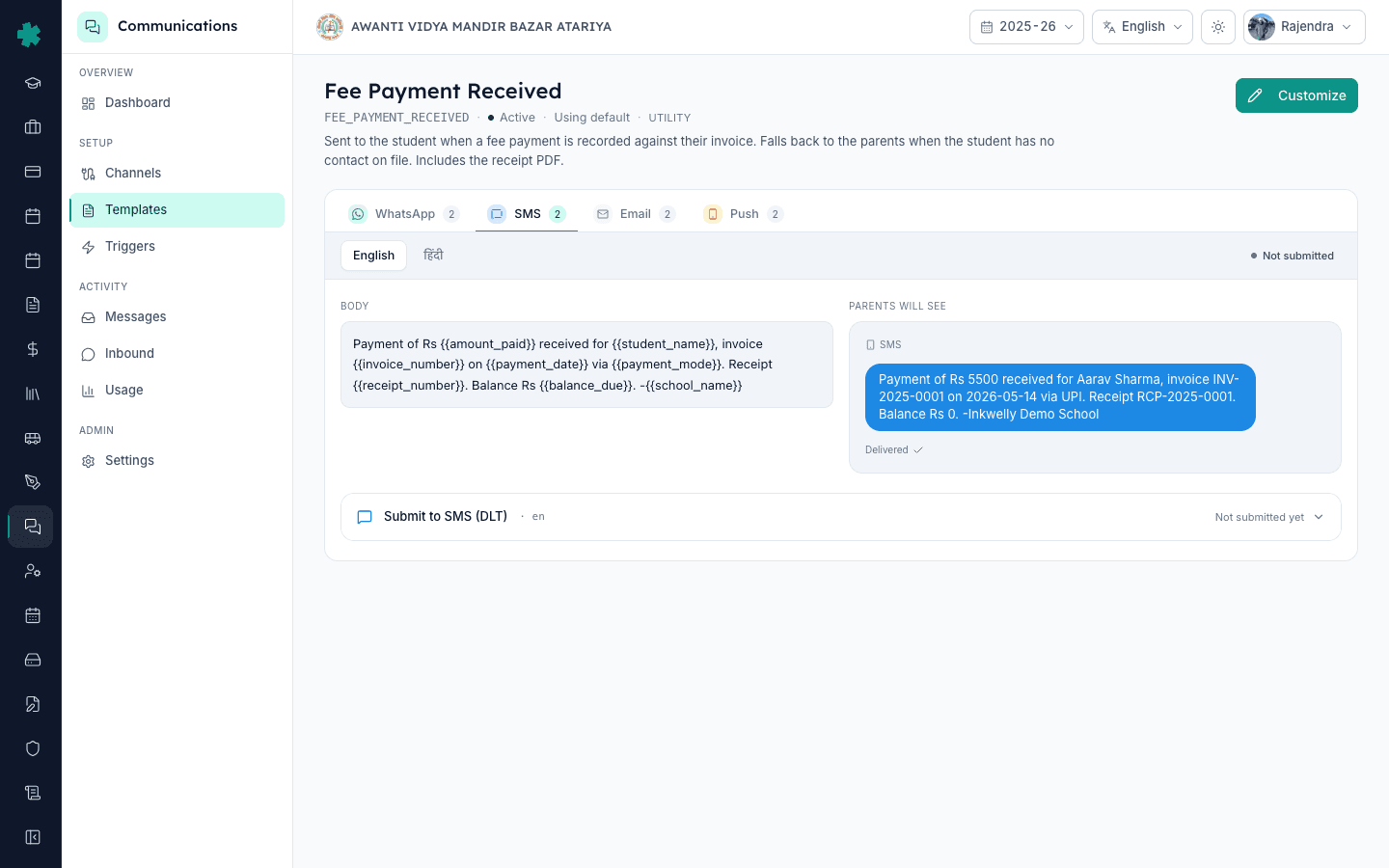
The SMS body is displayed in a read-only block with the variable placeholders visible ({#var#} style — Inkwelly converts to DLT's variable format automatically). Copy the body word-for-word. Do not paraphrase — DLT requires the body you submit to be byte-identical to what Inkwelly will dispatch, or the provider drops the SMS at send time with a "Template Mismatch" error. Inkwelly's preview block shows exactly what to copy.
3. Switch to your DLT operator portal and create a template
Log in to your DLT portal — Jio TrueConnect (trueconnect.jio.com), Airtel IQ, Vi or BSNL — whichever your Principal Entity is registered with. Navigate to Templates → Add Template. Pick the category: Service Implicit for transactional alerts (fee receipts, attendance, OTPs). Paste the exact Inkwelly body. Add one entry per variable in the variable declaration section, marking each as static or dynamic per DLT rules.
4. Pick the right header and submit
Attach the template to the same DLT sender header you registered with Inkwelly (for example AVMBZA). Submit. The DLT portal queues the template for the operator's review. Typical turnaround for Service Implicit templates is under 2 hours during business days; Service Explicit (promotional) templates can take up to 24 hours. The operator emails the registered DLT admin once approved — the email contains the 19-digit DLT template ID.
5. Copy the 19-digit DLT template ID
From the operator's approval email or from the Templates list on the DLT portal, copy the 19-digit DLT Template ID. It looks like 1234567890123456789 — always exactly nineteen digits. Each language variant has its own ID. Most schools maintain a small spreadsheet linking template names → EN DLT ID, HI DLT ID to make pasting them back into Inkwelly faster.
6. Paste the ID into Inkwelly's SMS variant
Return to the same template in Communications → Templates in Inkwelly and open the SMS tab. Each language variant has an inline Paste DLT id field with a Save button. Paste the 19-digit ID for the matching language. Click Save. Inkwelly validates the format (numeric, 19 digits), stamps the ID against that variant, and updates the providerApprovalStatus to APPROVED.
7. Verify dispatch works
Go to Communications → Messages → Send test and trigger a test send of this template over SMS to your own phone. Inkwelly attaches the DLT template ID and the sender header in the provider call; the provider verifies the pair against DLT's registry and sends if they match. A successful send confirms the template is fully registered on both sides and ready for parent traffic.
Now that the first template is DLT-registered, the highest-leverage next step is to do the same for the four other revenue-critical SMS templates: Invoice Payment Link Shared, Payment Link Reminder, Receipt Shared and Fine Added. Schools that process online fee collection through Inkwelly recover roughly 15–20% more pre-deadline payments once SMS reminders go out alongside WhatsApp — because SMS is the one channel that lands even when the parent has no WhatsApp installed. Register HI variants in the same flow after EN.
See Inkwelly's full DLT registration flow end-to-end
20-minute walkthrough showing a real Indian school registering its first three SMS templates on Jio TrueConnect and pasting the IDs back into Inkwelly.
Frequently asked
6 questionsDoes Inkwelly auto-submit my SMS templates to the DLT portal?
No. The DLT portal is a separate system controlled by your telecom operator (Jio, Airtel, Vi, BSNL) and TRAI rules require the school to submit templates itself. Inkwelly's job is to show you exactly what body to register and then to accept the 19-digit ID back. The portal step takes about 10 minutes per template inside the operator's UI.
How long does DLT take to approve an SMS template?
Service Implicit templates (transactional fee receipts, attendance, OTPs) typically clear in under 2 hours on business days. Service Explicit (promotional) templates take longer, up to 24 hours. Inkwelly does not poll DLT — the operator emails your DLT admin the 19-digit template ID, and you paste it into Inkwelly when ready.
Inkwelly me SMS template DLT par kaise register kare?
Communications → Templates pe template kholiye, SMS tab pe SMS body word-for-word copy kijiye. Jio TrueConnect / Airtel IQ / Vi / BSNL portal pe login karke Templates → Add Template par paste kijiye, sender header attach kijiye, submit kijiye. Operator email se 19-digit DLT template ID milta hai. Wapas Inkwelly aakar SMS tab pe Paste DLT id me paste kijiye aur Save dabaiye — APPROVED ho jata hai.
Why does Inkwelly want the body byte-identical to what's on DLT?
The provider (MSG91, Fast2SMS) verifies every outgoing SMS against the DLT registry at dispatch time. If even one space or comma differs between Inkwelly's dispatched body and the body registered on DLT, the provider drops the SMS with a Template Mismatch error and the parent never sees it. Inkwelly's preview shows the exact bytes so you can copy without paraphrasing.
Do I need to register EN and HI templates as two separate DLT entries?
Yes. DLT treats each language as a separate template asset; an English template approved on DLT does not cover its Hindi sibling. Both languages get their own 19-digit IDs and you paste both back into Inkwelly on the SMS tab. Most schools do EN first across all templates, then a second pass for HI in a single afternoon.
What happens to SMS sends if the DLT template ID is not yet pasted into Inkwelly?
Inkwelly blocks the dispatch — it never sends an SMS without a registered DLT template ID. The status pill on the SMS variant stays as Not submitted. This is intentional: it prevents the provider from rejecting the message at the gateway and saves the school from invisible failed sends. WhatsApp continues to deliver normally in the meantime.
You might also like
2 readsSources & references
- TRAI — Telecom Commercial Communications Customer Preference Regulations (TCCCPR), 2018 · accessed 18 May 2026
Mandates separate registration of DLT templates and senders — the regulation Inkwelly's DLT-ID flow operationalises for Indian schools.
- Jio TrueConnect — Template registration help · accessed 18 May 2026
One of the four operator portals where Indian schools register the SMS templates Inkwelly will dispatch.
See Inkwelly on your school
30-minute demo. We open your current ERP with you and load your data into Inkwelly on the call. Dated go-live plan by the end of it.