Inkwelly में customised template को default पर कैसे reset करें
उन principals के लिए जिन्होंने template customise किया, फिर मन बदल लिया — शायद नया wording Meta ने reject किया, शायद customise करने वाला principal चला गया, शायद school को editorial default वापस चाहिए। इस गाइड के बाद आपका template Inkwelly की tested default body पर वापस आता है — agle send se।
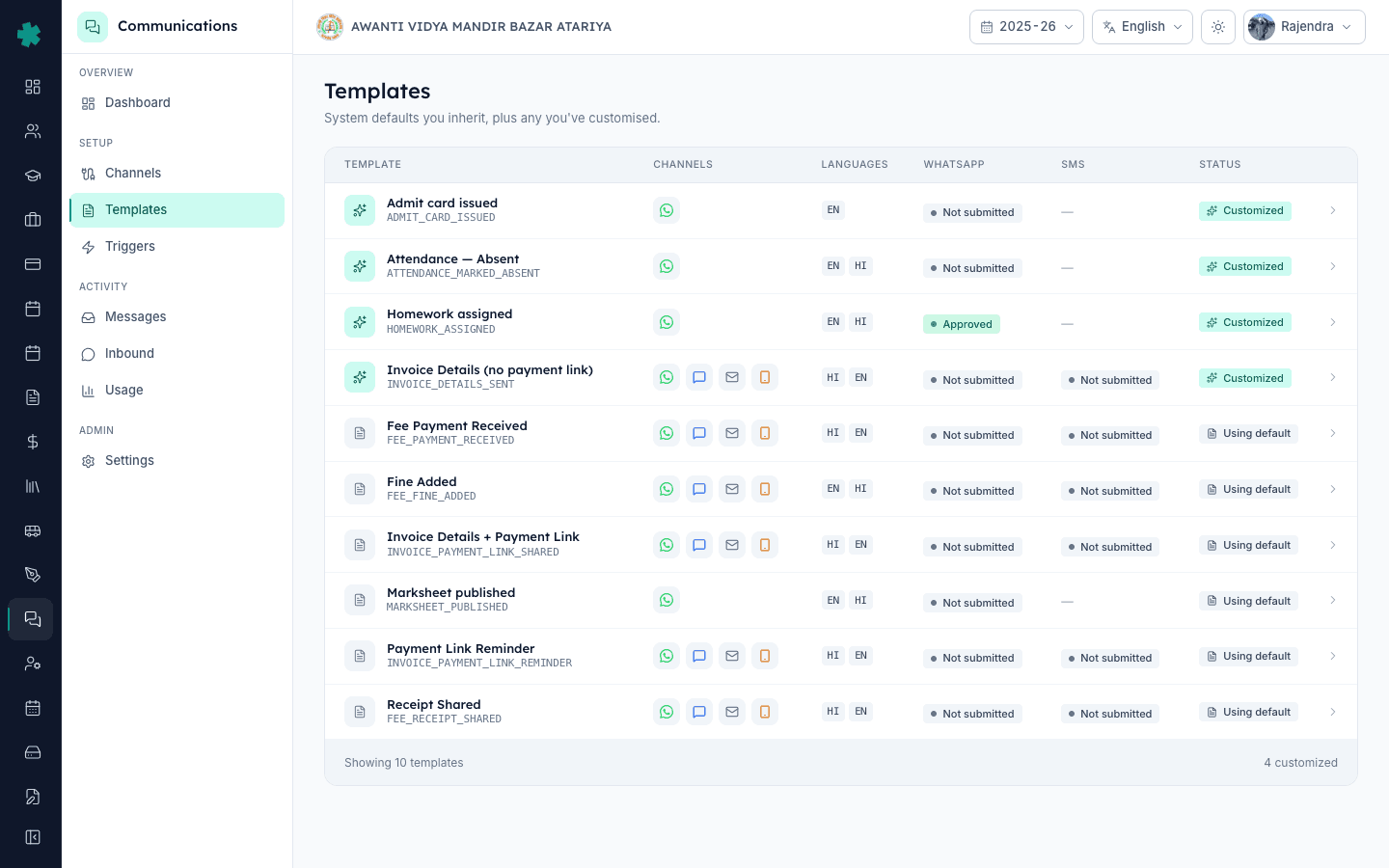
Inkwelly में customised template को reset करने के लिए: Communications → Templates खोलें, जिस template पर Customized badge है उस पर click करें, जिस channel और language variant को revert करना है उस पर जाएँ और Reset to default पर click करें। Dialog में confirm करें। Inkwelly स्कूल के fork को हटा देता है और editorial default वापस attach कर देता है — अगला जो event chalega वह Inkwelly का tested body भेजेगा।
Reset इस मायने में destructive है कि यह आपकी edited body को हटा देता है — लेकिन Inkwelly कभी in-place edit नहीं करता। System default स्कूल की customisations से अलग रहता है: हर reset स्कूल को एक saaf, known-good copy पर वापस ले जाता है जिसके ऊपर Meta approval और DLT registration Inkwelly की editorial library से पहले से file हैं। कोई provider re-approval का wait नहीं, कोई DLT re-registration नहीं, parents को कोई rebrand announcement भी नहीं। Reset के बाद जो पहला event chalega वह seconds में editorial default body भेज देता है।
1. Templates page खोलें
Inkwelly में Communications → Templates खोलें। जो templates अभी स्कूल के fork पर चल रहे हैं उन पर right-most column में teal Customized badge है; editorial default वाले templates पर Using default दिखता है। List scan करके वह customised template ढूंढें जिसे revert करना है। Detail page खोलने के लिए row पर click करें।
2. वह channel और language variant चुनें जिसे reset करना है
Template detail page पर channel tabs हैं (WhatsApp, SMS, Email, Push)। हर channel को दूसरों से अलग customise किया जा सकता है — हो सकता है स्कूल ने WhatsApp body customise की हो लेकिन SMS जस का तस छोड़ा हो। जिस channel को revert करना है उस tab पर click करें। उस tab के अंदर हर language variant (EN, HI और भी) एक अलग row है — reset भी language पर होता है। वह खास row पहचानें जिस पर Customized की स्थिति है।
3. Reset to default पर click करें
Customised variant row पर Reset to default पर click करें। Inkwelly एक confirmation dialog खोलता है जो मौजूदा customised body और editorial default को side by side दिखाता है। यही वह पल है compare करने का — अगर customised wording पर स्कूल का ज़रूरी context है (phone number, principal का नाम signature में), तो confirm करने से पहले उसे notes app में copy कर लें, ताकि बाद में चाहें तो दोबारा लगा सकें।
4. Reset को confirm करें
Confirm reset पर click करें। Inkwelly template-customisation table से स्कूल का fork हटा देता है, system default attached छोड़ता है और एक resetAt audit row stamp कर देता है जिससे बदलाव traceable रहता है। Status pill Customized · Approved (या जो भी fork का state था) से Using default · Approved पर एक transition में आ जाती है। बीच में Not submitted जैसा कोई state नहीं आता क्योंकि default पहले से Meta approved और DLT registered है।
5. वापस live हुए editorial default को verify करें
Communications → Templates पर row अब right-most column में Using default दिखाती है। Detail page एक बार फिर खोलें — उस channel की language variant का body Inkwelly की editorial copy से match करना चाहिए, वही content जो हर दूसरा Inkwelly school default पर देखता है। Reset to default button की जगह अब Customise button है, जो बताता है कि स्कूल editorial track पर वापस है और जब चाहे फिर से fork कर सकता है।
6. (Optional) test send से confirm करें कि parents को default ही दिख रहा है
Communications → Messages → Send test पर जाएँ और इस template को अपने phone या email पर trigger करें। जो body पहुँचे वह Inkwelly की editorial wording होनी चाहिए, customised नहीं। अगर test send पर customised wording दिखे तो Templates page refresh करें — reset अगले dispatch से लागू होता है लेकिन पहले से queued message अभी in-flight हो सकता है।
Reset एक no-regret operation है — जब चाहें Customise पर click करके एक बार फिर editor में जा सकते हैं और fork दोबारा बना सकते हैं। Inkwelly customisation history save नहीं करता, इसलिए पिछला customised body अपने आप recoverable नहीं है; अगर आदि चान्स है कि वह वापस चाहिए तो confirm करने से पहले copy कर लें। जो स्कूल ज़्यादा customise करते हैं उनके लिए resetAt timestamp audit row यह जानने में मदद करता है कि किस template को कब किसने flip किया।
Inkwelly का template reset flow live देखें
20 मिनट का walkthrough जिसमें एक स्कूल fee-receipt customisation को undo करता है और बिना parent-facing break के Meta-approved editorial default पर वापस जाता है।
अक्सर पूछे गए सवाल
6 सवालअगर मैं customised template को reset कर दूं तो क्या मेरे स्कूल की wording हमेशा के लिए चली जाएगी?
हाँ — Inkwelly customisation history को retain नहीं करता, इसलिए reset के बाद school-specific body अपने आप recoverable नहीं होती। अगर wording पर ज़रूरी context है (phone number, principal का नाम signature में) तो reset confirm करने से पहले उसे copy कर लें। Customise पर click करके वही wording किसी भी समय दोबारा लगा सकते हैं।
क्या reset के बाद Meta या DLT पर कुछ दोबारा submit करना पड़ेगा?
नहीं। Inkwelly का editorial default हर WhatsApp variant पर पहले से Meta-approved है और हर SMS variant पर DLT-registered है। Reset स्कूल को उसी pre-approved copy पर वापस जोड़ देता है, इसलिए dispatch तुरंत शुरू होता है — कोई provider round-trip नहीं, operators का wait नहीं। स्कूल में किसी भी student के लिए जो पहला event chalega वह editorial body से जाएगा।
क्या एक language variant को reset करके दूसरे पर customisation रख सकते हैं?
हाँ। Reset हर channel और हर language पर अलग से चलता है। जिन स्कूलों ने English WhatsApp body customise की थी लेकिन Hindi body जस की तस छोड़ी थी, वे केवल English row को reset कर सकते हैं — Hindi customisation जिस की तिस रहती है। इसी तरह स्कूल customised WhatsApp body को रखकर केवल SMS variant को reset कर सकते हैं। Control fine-grained है।
Reset के पल पर parents को Inkwelly की wording दिखेगी या customised?
Reset channel-language row पर atomic है — confirmation click के बाद जो पहला event chalega वह editorial default से जाएगा। जो messages reset से पहले provider ने accept कर लिए थे, वे customised wording के साथ dispatch होते रहते हैं — आप unhe mid-flight में नहीं पकड़ सकते। Communications → Messages हर historical send पर जो body इस्तेमाल हुई वह saaf stamp करता है।
Inkwelly me customised template ko default par kaise reset kare?
Communications → Templates kholiye, jis template par Customized badge hai uspe click kijiye. Channel tab (WhatsApp, SMS ya Email) chuniye aur jis language variant ko revert karna hai uspe Reset to default click kijiye. Dialog me confirm dabaiye. Agla event Inkwelly ki editorial default body se jata hai — koi Meta ya DLT resubmission nahi.
Inkwelly me template reset karne ke baad audit trail kya rehti hai?
Inkwelly ek resetAt timestamp aur jis user ne Reset click kiya uska naam internal audit row par stamp karta hai — aap dekh sakte hain kisne kaunsa template kab flip kiya. Pichla customisation body khud hata diya jata hai, lekin yeh fact ki school ne customise kiya tha aur date X par reset hua tha preserve rehta hai. Yeh staff turnover ke beech template-history samajhne me kaam aata hai.
आपको ये भी पसंद आ सकता है
3 लेखस्रोत व संदर्भ
- Meta — WhatsApp Business Platform: Message Templates · देखा गया 18 May 2026
Meta ka rule document karta hai ki approved template tab tak approved rehta hai jab tak body change na ho — isi liye Inkwelly ka reset to default re-approval require nahi karta.
- TRAI — Telecom Commercial Communications Customer Preference Regulations (TCCCPR), 2018 · देखा गया 18 May 2026
Har commercial SMS body ke DLT registration ko mandate karta hai — isi liye Inkwelly ke pre-registered editorial defaults reset par turant dispatch-ready hote hain.
Inkwelly आपके स्कूल पर — खुद देखें
30 मिनट का डेमो। आपके मौजूदा ERP को आपके साथ खोलकर, कॉल पर ही आपका डेटा Inkwelly में लोड करते हैं। कॉल ख़त्म होते-होते एक तय तारीख़ का गो-लाइव प्लान आपके हाथ में।