Fee Collection Center dashboard कैसे पढ़ें Inkwelly में
यह गाइड उन प्रिंसिपल, finance committee और हेड क्लर्क के लिए है जो हर सुबह fee dashboard खोलते हैं। अंत में आपको हर टाइल का मतलब, सबसे पहले किस number पर action लेना है, और Inkwelly कैसे दिन की collection को board के सामने रखने लायक तस्वीर बनाता है — सब स्पष्ट होगा।
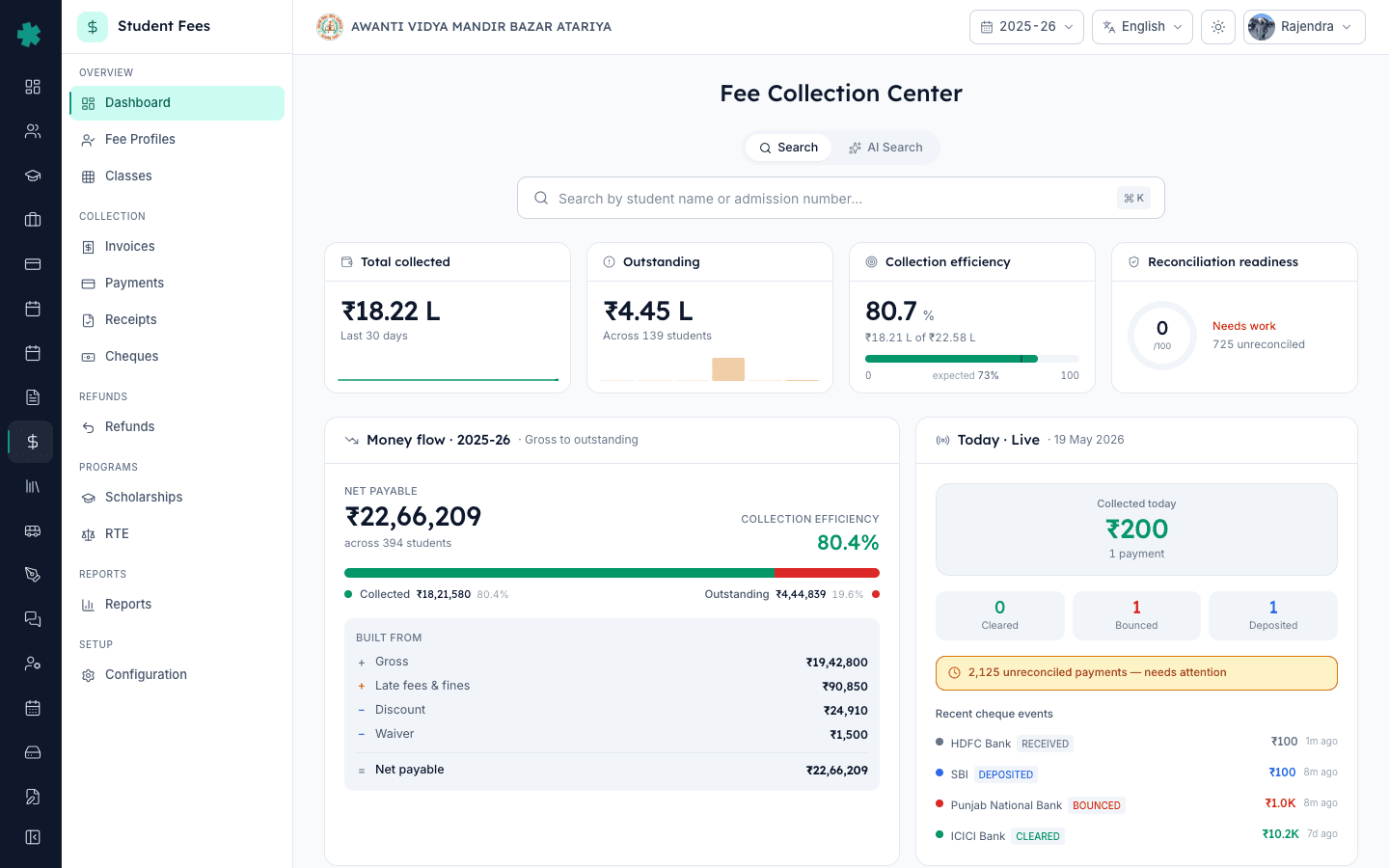
Inkwelly → Student Fee खोलिए और Fee Collection Center पर पहुंचिए। इसे तीन नज़रों में ऊपर से नीचे पढ़िए — चार hero KPIs बताते हैं कि सत्र कहां खड़ा है, Money Flow Waterfall यह दिखाता है कि gross fee कैसे collected money में बदली, और नीचे की टाइल्स आज के action पर इशारा करती हैं — cheque follow-up, SLA के करीब refunds, pending RTE claims, और हर बदलाव की audit trail। पूरा dashboard दो मिनट से कम में समझ जाता है।
Fee Collection Center वह एक पेज है जिसे प्रिंसिपल हर महीने की पहली तारीख को finance committee की briefing के लिए खोलता है। CBSE से संबद्ध स्कूलों को school management committee से अनुमोदित वार्षिक fee chart प्रकाशित करना और सत्र-वार collection की reconciliation रखनी होती है, और Income Tax की Section 44AB के अंतर्गत प्रायः वही चित्र एक दूसरे format में मांगा जाता है। Inkwelly सत्र के हर invoice, receipt, cheque, discount, waiver और RTE claim को जोड़कर एक स्क्रीन में रख देता है, जिससे प्रिंसिपल को चार alag-alag रजिस्टर हाथ से जोड़ने की आवश्यकता नहीं पड़ती।
1. Fee Collection Center खोलिए
बाएं sidebar से Inkwelly → Student Fee खोलिए। OVERVIEW के अंतर्गत dashboard लोड होता है। ऊपर दाईं ओर session switcher में वर्तमान सत्र दिखता है — पिछले वर्ष की collection देखने के लिए इसे बदलिए। हेडर के नीचे search box में student name, admission number या roll number टाइप करने पर Inkwelly fee profile और student matches को side panel में दिखाता है। search खाली छोड़ने पर पूरा tile grid दिखता है।
2. चार hero KPIs पढ़िए
ऊपरी पंक्ति में वह चार संख्याएं हैं जिन्हें प्रिंसिपल को ज़ुबानी याद होनी चाहिए। बाएं Total collected के साथ 30 दिन की sparkline होती है, जिससे रकम के साथ trend भी साथ दिखे। इसके बाद Outstanding में छोटी aging bars और बकाया रखने वाले छात्रों की संख्या दिखाई देती है। Collection efficiency net payable का वह प्रतिशत है जो एकत्रित हो चुका है, और साथ में आज तक सत्र का कितना हिस्सा बीत चुका है इसका benchmark line दिखता है। दाएं Reconciliation readiness 0–100 का score होता है — 85 से ऊपर मतलब सत्र audit-ready है, 60 से नीचे मतलय अभी कितने unreconciled payments बाकी हैं इसे खंगालना है।
3. Money Flow Waterfall पर पैसे की यात्रा देखिए
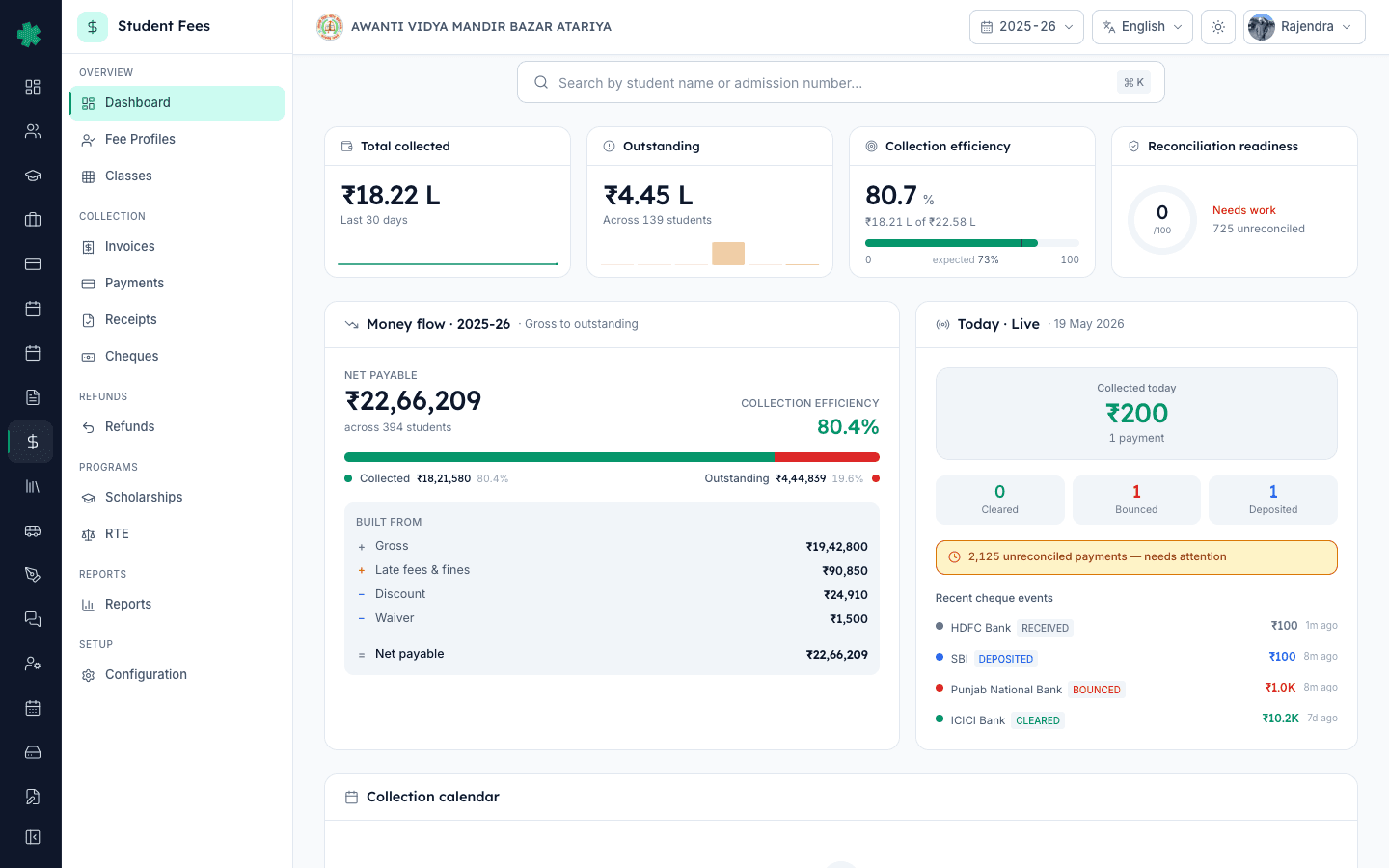
बाएं की waterfall एक सवाल का उत्तर देती है — पैसा गया कहां। Bar का क्रम है Gross, इसमें से Discount घटा, फिर Scholarship घटा, फिर Waiver घटा — जो बचा वह Net payable है; इसे Collected और Outstanding दो हिस्सों में बांटकर दिखाया जाता है। डाईं ओर Today · Live पैनल में आज के payments की संख्या, आज एकत्रित रकम और आज के cheque events (deposited, cleared, bounced) दिखते हैं। दोनों टाइल्स साथ में सत्र की बड़ी कहानी और आज की छोटी सुबह को अलग कर देती हैं।
4. Cheque pipeline जांचिए
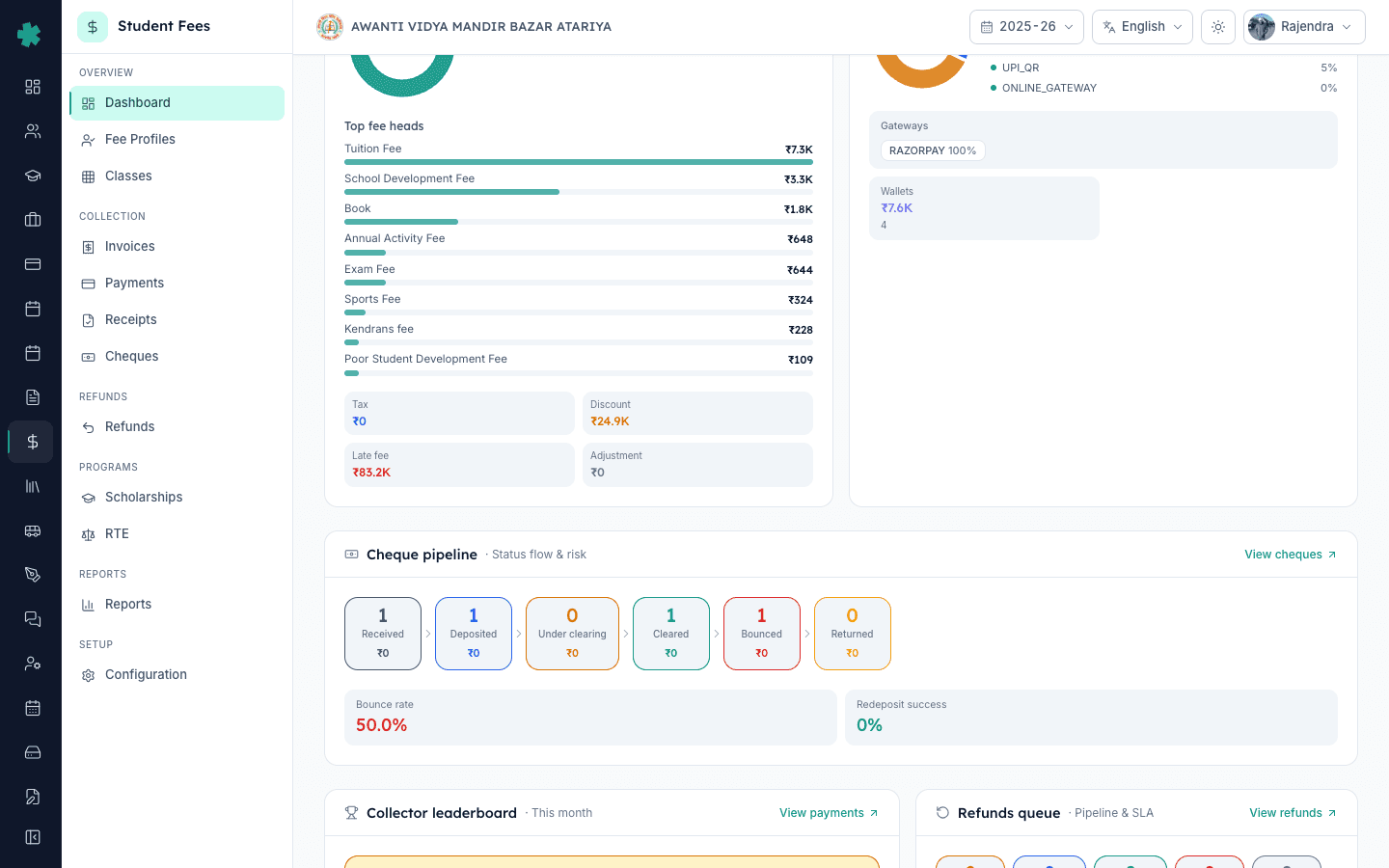
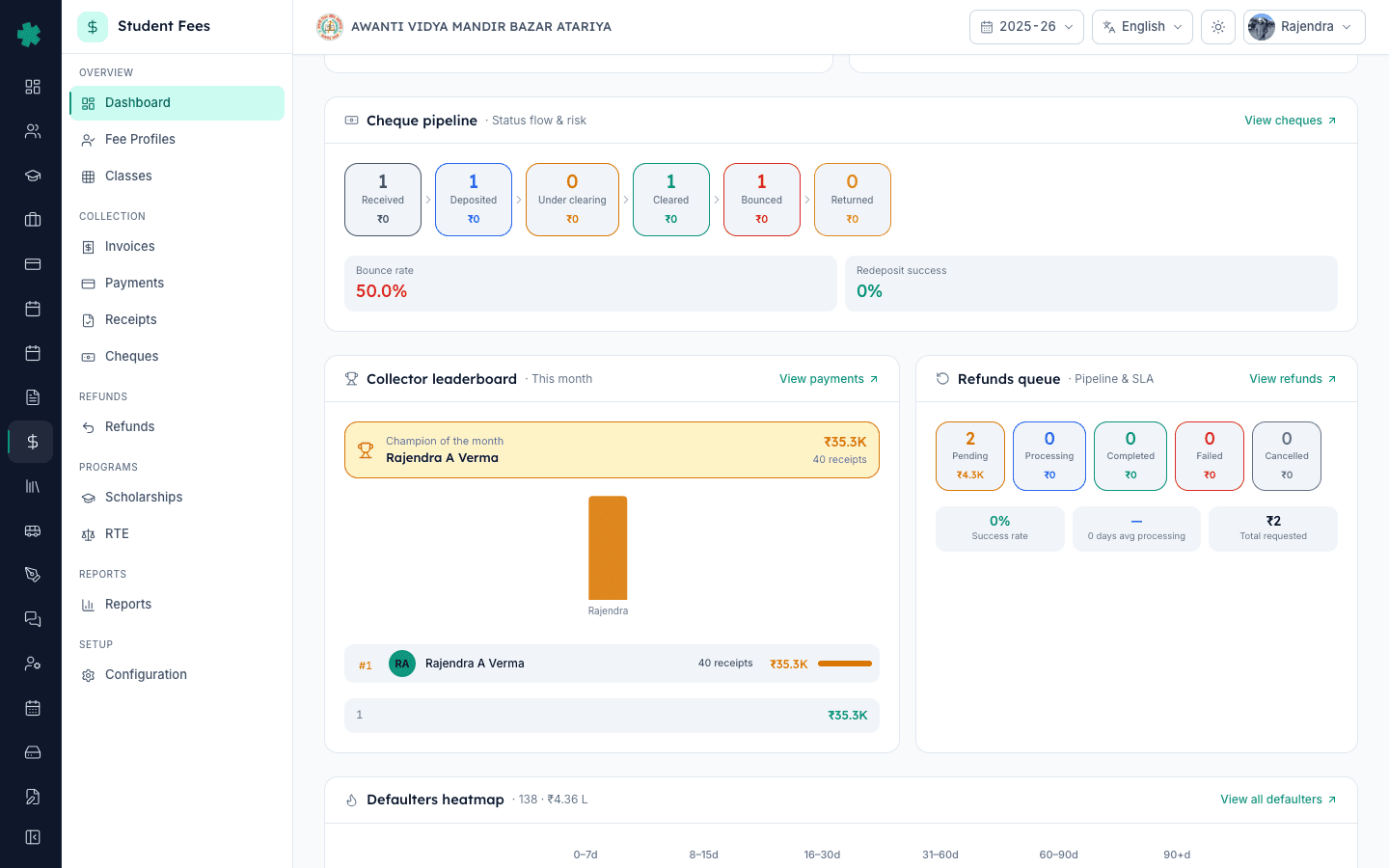
Cheque pipeline टाइल एक funnel की तरह पढ़ी जाती है — Received, Deposited, Under clearing, Cleared, और Bounced एवं Returned के अलग गिनती। funnel के पीछे की कहानी तीन secondary संख्याओं से पता चलती है — bounce rate (वापस आए cheques का अनुपात), redeposit success (कितने bounced cheques दोबारा jama करने पर cleared हुए), और PDC window (अगले तीस दिनों में due post-dated cheques)। bounced cheque वह रकम है जो एक बार paid गिनी जा चुकी होती है और अब वापस लौटानी पड़ती है — इसलिए यह टाइल उसी दिन अभिभावक को फ़ोन करने का early-warning संकेत है।
5. Collector leaderboard और Refunds queue एक साथ देखिए
Collector leaderboard यह दिखाती है कि इस महीने किस staff ने सबसे अधिक receipts जारी किए, एक Champion of the month चुनती है, और average receipt तथा कुल में हिस्सा भी दिखाती है। बगल में Refunds queue टाइल में total requested, pending, completed, success rate और औसत processing days के साथ SLA alerts की सूची होती है — वे refunds जो अपने वायदे के करीब या पार जा चुके हैं। जो स्कूल parents के refunds सात दिन में पूरे कर देता है, वह अगले सत्र में parents को बांधे रखता है — SLA list इस वायदे को सामने रखती है।
6. Concessions, Fines, Scholarships और RTE की चार टाइल्स देखिए
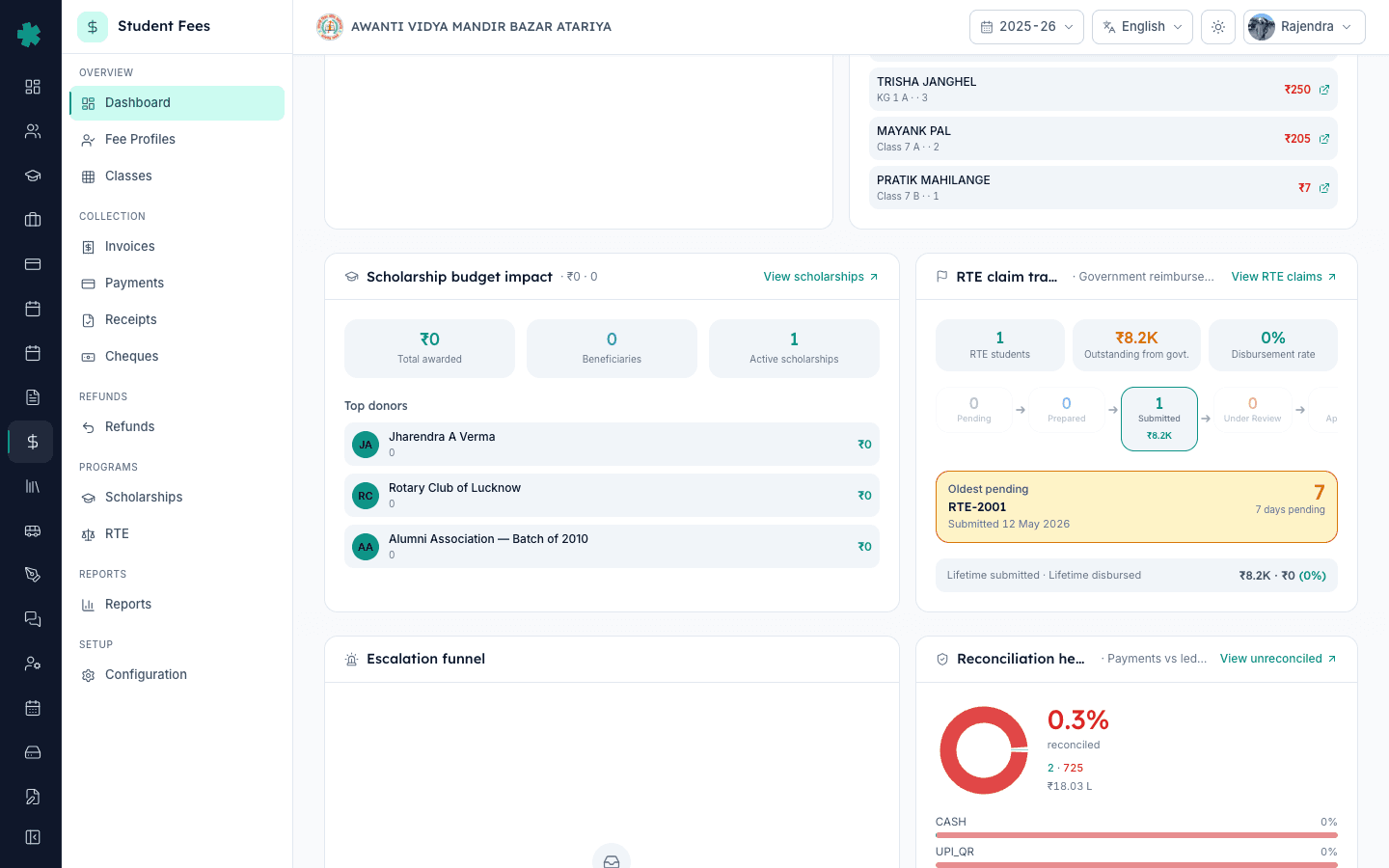
नीतिगत कारणों से fee कम होने या वसूल होने वाले हर आंकड़े को चार टाइल्स संभालती हैं। Concessions & waivers Discounts, Scholarships और Waivers में बटी foregone revenue का कुल दिखाता है और principal की मंज़ूरी के इंतज़ार में approval queue भी दिखती है। Fines & late fees में Applied, Collected, Waived और Outstanding के साथ Top fined students की सूची होती है। Scholarship budget impact हर donor के बजट का इस्तेमाल और भरे हुए recipient slots दिखाता है। RTE claim tracker RTE छात्रों की संख्या, सरकार के पास बकाया राशि, lifetime submitted बनाम disbursed और सबसे पुराना pending claim दिखाता है। ये चार टाइल्स वह नीतिगत लेखा हैं जो auditor और school management committee दोनों मांगते हैं।
7. Aging Cliff, alerts और audit trail पर दिन खत्म कीजिए
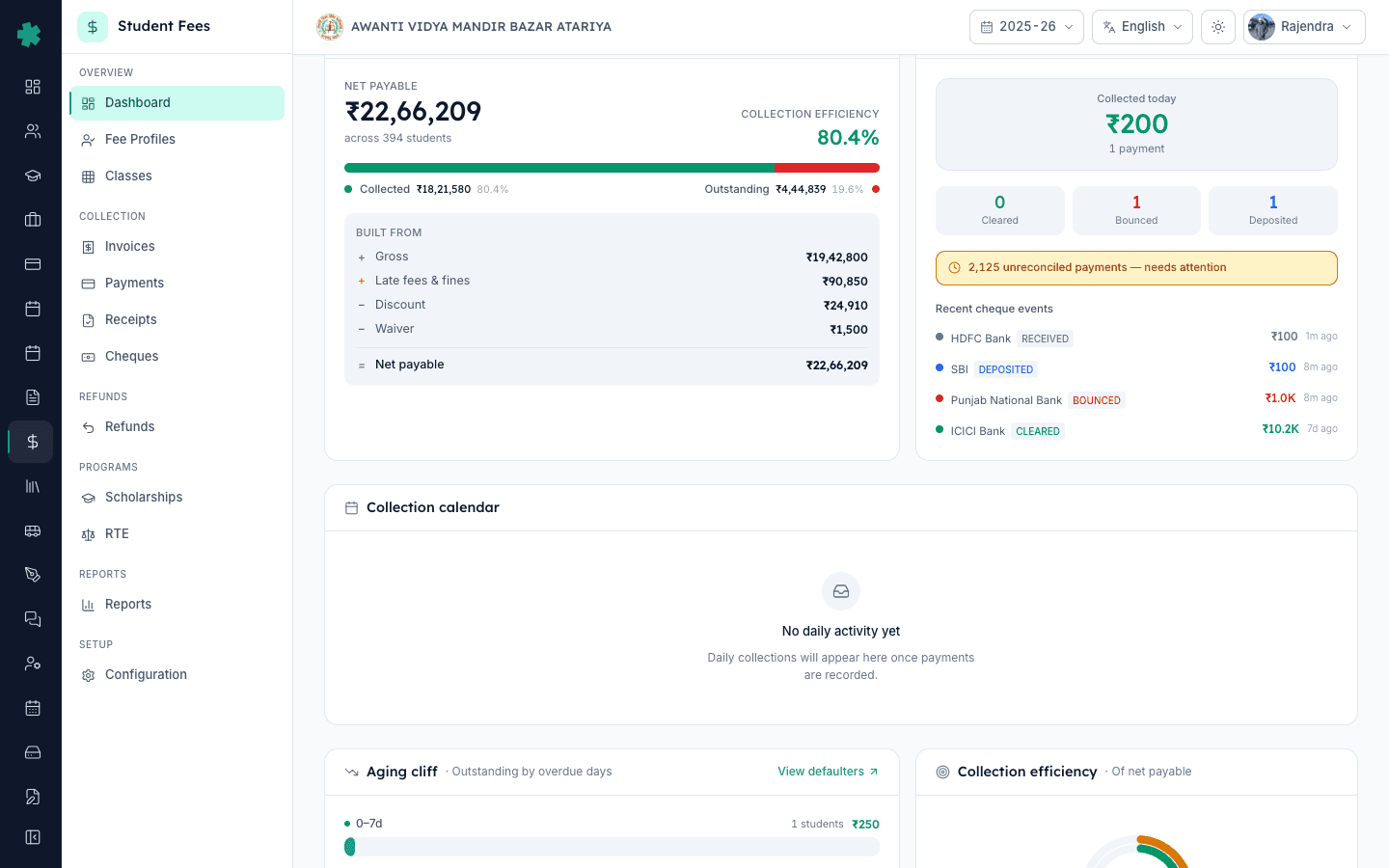
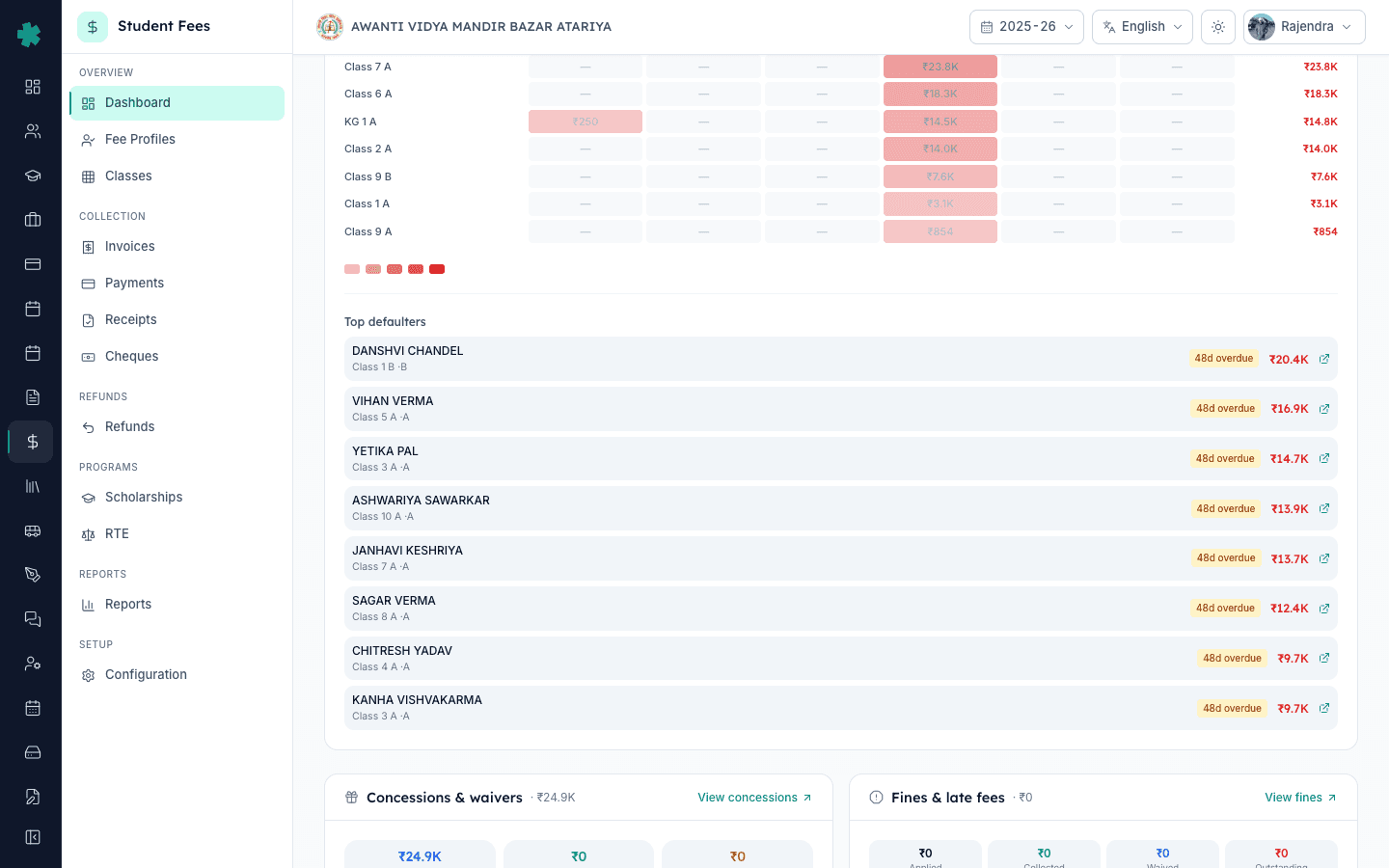
सबसे नीचे Recent activity feed है — सत्र का हर fee event किसने किया और कब किया, audit टीम की दरकार की retention अवधि तक सुरक्षित रखा गया। इसके बाएं Pending actions में principal की मंज़ूरी के इंतज़ार में खड़े discount, waiver और scholarship awards दिखते हैं। Alerts एक जगह पर सदा जरूरी चीज़ें जोड़ देता है — overdue invoices, unreconciled payments, stale cheques। Recent activity के ऊपर Aging Cliff Outstanding को 0–30, 31–60, 61–90 और 90+ दिन के bucket में बांटता है — reminders सबसे पहले इसी और जाने चाहिए। इन तीन सेक्शन के साथ dashboard बंद करना अर्थात दिन का काम पूरा।
dashboard साफ़ होने के बाद आम तौर पर दो follow-up काम सामने आते हैं। late fee rules का इस्तेमाल करके वह नियम सेट कीजिए जो हर overdue charge को चलाता है, और bulk invoice generation से अगली तिमाही के invoices एक साथ जारी कीजिए ताकि Aging Cliff चड़ी हुई न रहे। सबका आधार है ही fee structure — यहीं से हर invoice बनता है। trust committee briefing के लिए dashboard के साथ refund policy और scholarship donors भी रखिए, ताकि foregone revenue का हिसाब लाइन-दर-लाइन सामने रहे।
Inkwelly Student Fees को काम करते हुए देखिए
बीस मिनट का walkthrough बुक कीजिए — टीम आपके अपने data पर dashboard खोलकर दिखाएगी कि पहले किस टाइल पर action लेना है और दस मिनट की रोज़ की review सेट करके देगी जिसे आपका ओफ़िस खुद चला सके।
अक्सर पूछे गए सवाल
7 सवालInkwelly का fee dashboard प्रिंसिपल हर सुबह कैसे पढ़ें?
इसे तीन नज़रों में पढ़िए। चार hero KPIs — Total collected, Outstanding, Collection efficiency और Reconciliation readiness — सत्र की तस्वीर देते हैं। Money Flow Waterfall और Today · Live यह दिखाते हैं कि gross fee कैसे collected money में बदली और आज क्या हुआ। नीचे की टाइल्स आज के action दिखाती हैं — under clearing cheques, SLA के करीब refunds, pending approvals और audit trail। पूरा dashboard दो मिनट से कम में पढ़ा जाता है।
Inkwelly dashboard में Collection efficiency का क्या मतलब है?
Collection efficiency वह प्रतिशत है जितना net payable fee सत्र में अब तक collect हो चुका है। Inkwelly इसके साथ session-progress benchmark भी दिखाता है — आज तक सत्र का कितना भाग बीत चुका है। जो स्कूल सत्र का 50% पार कर चुका है उसे लगभग 50% पर होना चाहिए; 35% पर रहना मतलब office को 31–60 दिन वाली aging bucket में reminders तेज़ करने होंगे।
Reconciliation readiness क्या है और इसका score कैसे बनता है?
Reconciliation readiness 0 से 100 का score है जो बताता है कि सत्र की collection कितनी audit-ready है। यह उस अनुपात के साथ बढ़ता है जिसमें payments bank statement से मिलाए जा चुके हैं और stale unreconciled items जमा होने पर गिरता है। 85 से ऊपर ready है, 60 से 85 के बीच लगभग ready, और 60 से नीचे का अर्थ है कि किसी भी monthly close या board briefing से पहले office को unreconciled payments साफ़ करने हैं।
Dashboard kaise padhe Inkwelly me?
Inkwelly → Student Fee kholiye. Upar ki char hero KPIs dekhiye — Total collected, Outstanding, Collection efficiency aur Reconciliation readiness. Phir Money Flow Waterfall dekhiye jo Gross se Net payable tak ka sara hisab dikhata hai. Aaj ki collection Today Live tile me hoti hai. Niche Cheque pipeline, Refunds queue, RTE tracker aur Recent activity tile dikhayi denge. Roz subah do minute me poora session ka picture mil jata hai.
Collection efficiency kya hota hai aur kitna hona chahiye?
Collection efficiency yeh batati hai ki session ke net payable fee me se kitna percent collect ho chuka hai. Inkwelly iske saath session ka progress benchmark bhi dikhata hai — yaani aaj ki tareekh tak session ka kitna hissa beet chuka hai. Agar session ka 50% beet chuka hai par collection 35% par hai, to office ko 31-60 din wali aging bucket me reminders bhejne ki zaroorat hai. Acche schools session ke saath bilkul barabar chalte hain.
Cheque pipeline टाइल में Bounce rate और Redeposit success क्यों होते हैं?
Bounced cheque वह fee है जो एक बार paid गिनी जा चुकी होती है और अब वापस लौटानी पड़ती है, इसलिए office को उसी दिन पकड़ना होता है जिस दिन bank उसे लौटाए। Bounce rate सत्र भर में कितने cheques वापस आए यह बताती है, और redeposit success बताता है कि दोबारा जमा करने पर कितने cleared हुए। उच्च bounce rate और कम redeposit success मिलने पर office को repeat bouncer parents से UPI या card पर शिफ्ट होने के लिए कहना चाहिए।
Dashboard के Recent activity feed में data कहाँ से आता है?
Inkwelly हर fee event पर audit trail में एक entry दर्ज करता है — invoice generated, payment recorded, receipt cancelled, discount approved, scholarship awarded, RTE claim submitted, refund disbursed। हर entry में किसने किया, कब किया और क्या बदला यह दर्ज होता है। Recent activity tile नवीनतम entries dashboard पर दिखाती है और पूरा log भारतीय स्कूल के लिए जरूरी audit retention अवधि तक संरक्षित रहता है।
स्रोत व संदर्भ
- CBSE Affiliation Bye-Laws — Chapter VII (Fee Structure and accounts) · देखा गया 19 May 2026
CBSE bye-laws require affiliated schools to maintain a published fee structure and reconcile session-wise collections through accounts approved by the school management committee.
- Income Tax Act, 1961 — Section 44AB (Tax audit thresholds for educational institutions) · देखा गया 19 May 2026
Section 44AB requires educational institutions above the prescribed turnover threshold to undergo a statutory audit, which is built on reconciled receipts and a complete audit trail of every fee transaction.
- Ministry of Education — UDISE+ Data Capture Format (School Finance section) · देखा गया 19 May 2026
The UDISE+ annual return asks each school for fee heads, amounts collected and outstanding by class — the same picture Inkwelly stitches into the Fee Collection Center for daily use.
Inkwelly आपके स्कूल पर — खुद देखें
30 मिनट का डेमो। आपके मौजूदा ERP को आपके साथ खोलकर, कॉल पर ही आपका डेटा Inkwelly में लोड करते हैं। कॉल ख़त्म होते-होते एक तय तारीख़ का गो-लाइव प्लान आपके हाथ में।