How to register scholarship donors in Inkwelly
For trustees, principals and fee-office staff registering the people and organisations that fund scholarships at the school. By the end you will have a complete donor record in Inkwelly — name, type, PAN for 80G receipts, contact details — and the donor linked to a specific scholarship like Merit Scholarship.
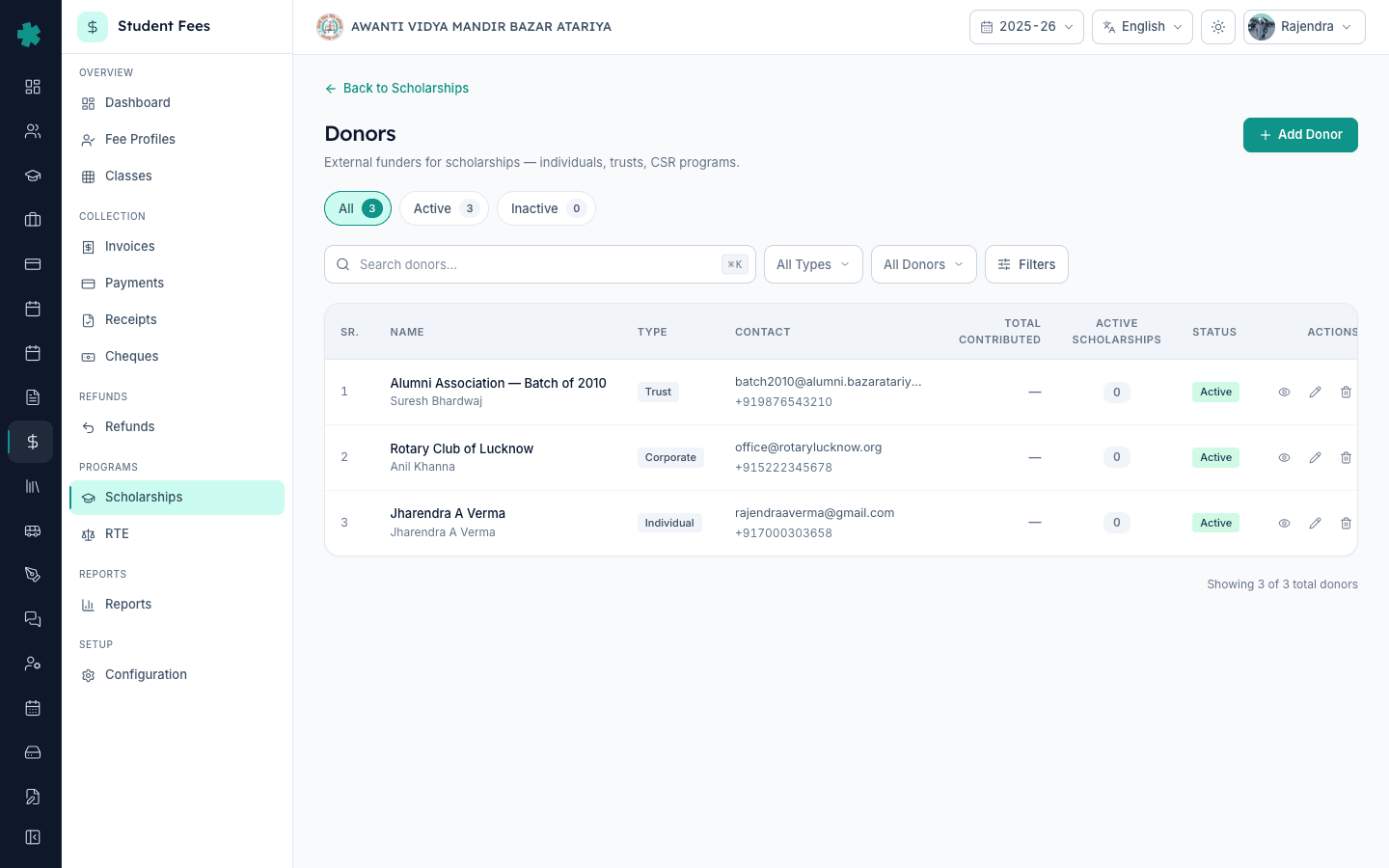
To register a scholarship donor in Inkwelly: open Student Fee, click Scholarships from the sidebar, click Manage Donors on the top right, click + Add Donor, fill in the name, pick the donor type (Individual, Corporate, Trust, Government), add contact details and PAN if you plan to issue 80G receipts, then click Create. The donor is now available to attach to any scholarship and the school keeps a clean audit trail of every contribution.
Indian private and trust schools receive scholarship funding from a wide mix of donors — local Rotary or Lions clubs, alumni associations of older batches, family trusts of the founder, parents pooling for need-based aid, and corporates routing CSR money under Schedule VII of the Companies Act 2013. A registered school trust that holds 80G certification can issue donation receipts for these contributions, which is a meaningful incentive for donors. Inkwelly keeps a separate Donor record per funder so the school can attach the same donor to multiple scholarships, track the total contributed across sessions, and print 80G receipts with the donor's PAN already on file.
1. Open Scholarships under Student Fee
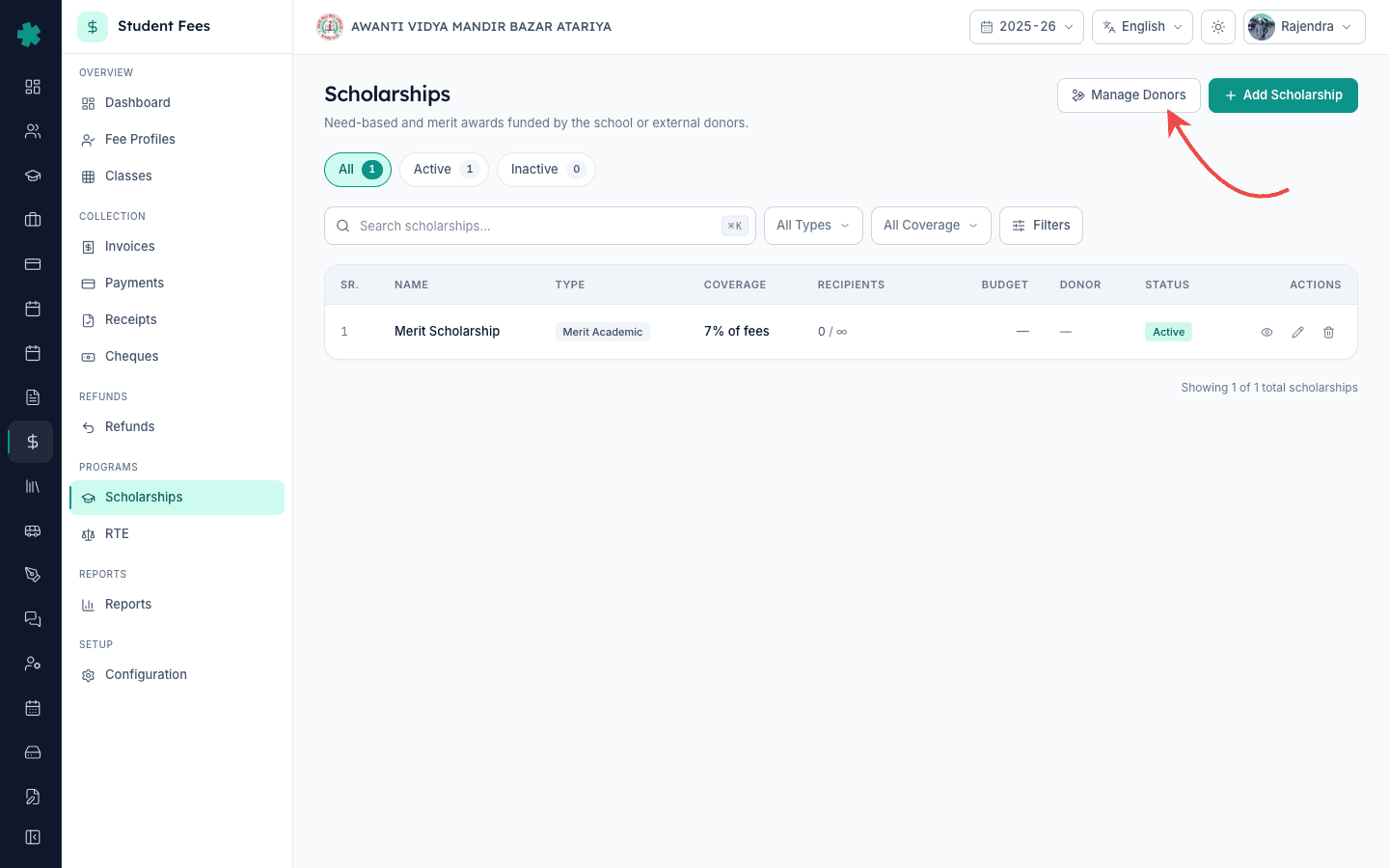
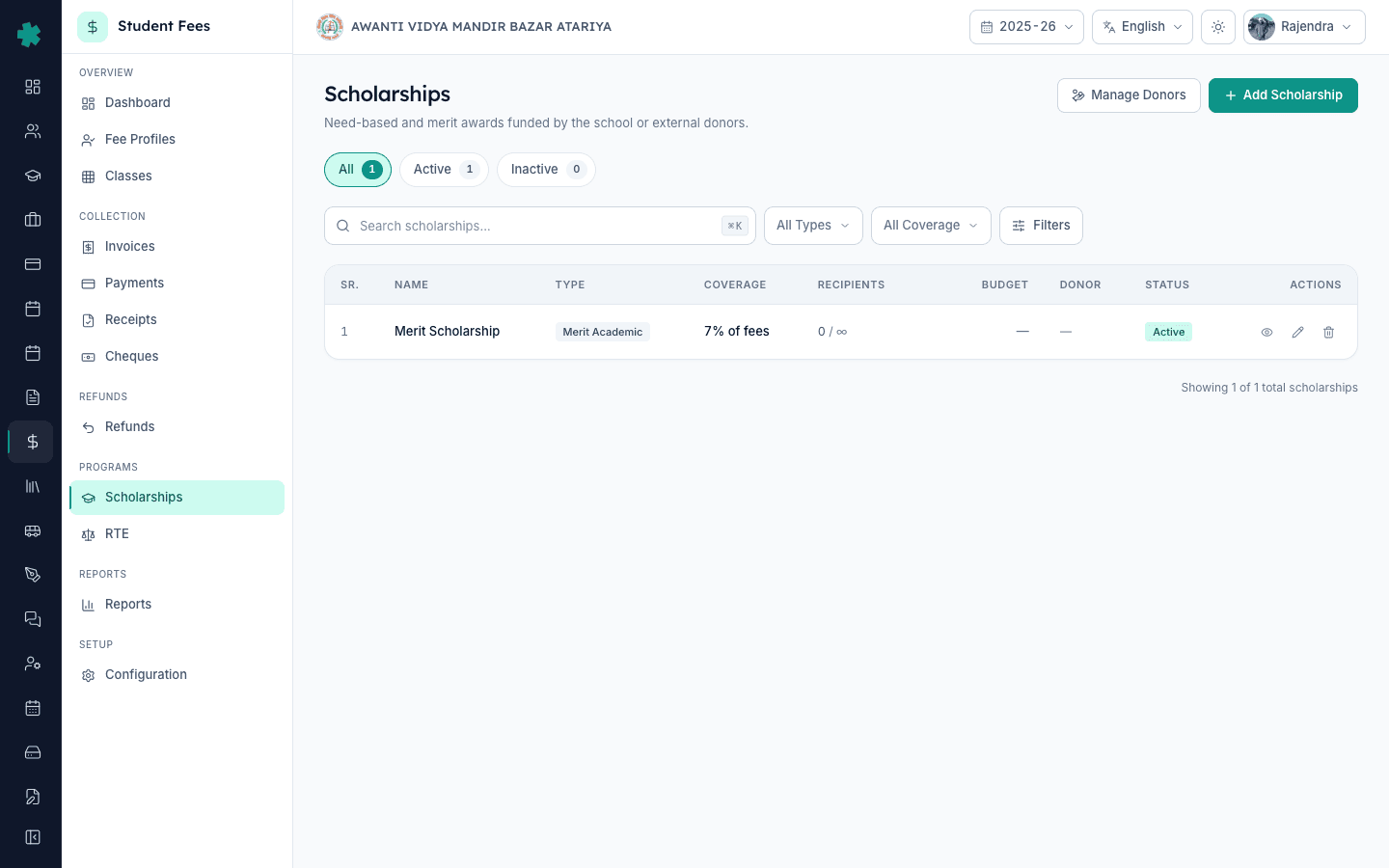
Open Inkwelly → Student Fee, then click Scholarships under the PROGRAMS section of the left sidebar. The Scholarships page lists every scholarship the school runs, with coverage percentage, recipients and the donor attached. The top-right has two buttons: Manage Donors and + Add Scholarship. Click Manage Donors. This is the home of every funder Inkwelly tracks for the school.
2. Click + Add Donor
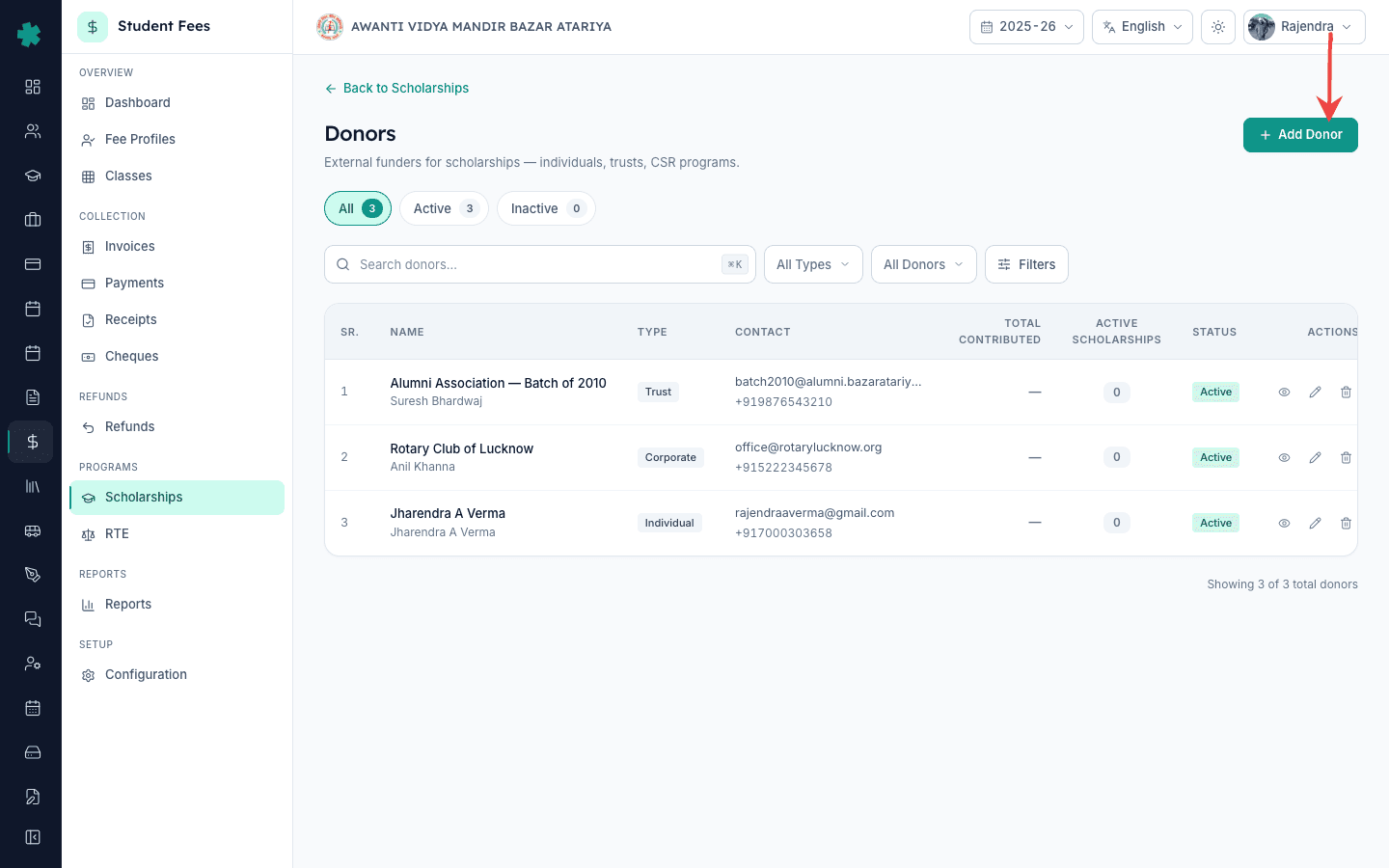
The Donors page shows every donor already on file with columns for name, type, contribution total and active status. Counts at the top break down All, Active and Inactive donors. Click the + Add Donor button on the top right. Inkwelly opens the Add Donor dialog — a single form that captures everything needed to attach this donor to a scholarship and, later, to issue an 80G receipt.
3. Fill in name and donor type
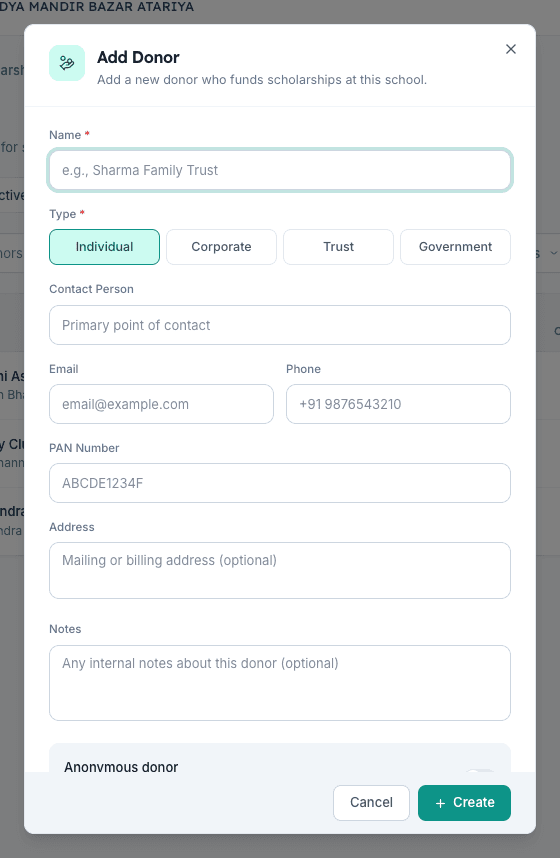
Type the donor's full legal name in the Name field — Inkwelly recommends the form most parents and trustees will recognise on a public scholarship list. Examples: Rotary Club of Lucknow, Alumni Association — Batch of 2010, Sharma Family Trust, Ministry of Minority Affairs. Then pick a Type from the four pills: Individual for a single patron, Corporate for a company or club routing CSR funds, Trust for registered family or community trusts and alumni associations, Government for state or central department schemes.
4. Add contact person, email, phone and PAN
Add a Contact Person — the single human the fee office speaks to about this funding. Fill Email and Phone for the contact person. Add the PAN of the donor (or the trust / company) in the PAN Number field — Inkwelly validates the 10-character format ABCDE1234F. PAN is optional, but it is mandatory the moment the school wants to issue an 80G receipt to the donor under Section 80G of the Income Tax Act, 1961. Fill the Address if the donor wants printed acknowledgments posted.
5. Set anonymous and active flags
Toggle Anonymous donor on if the funder asks the school to keep the name off public scholarship listings — common for senior alumni and family trusts that prefer a quiet contribution. Inkwelly still keeps the full name in the internal ledger and on 80G receipts; only the public scholarship card hides it. Leave Active on for any donor the school will attach to new scholarships this session. Click Create. The donor appears in the Donors list.
6. Open the donor detail to confirm
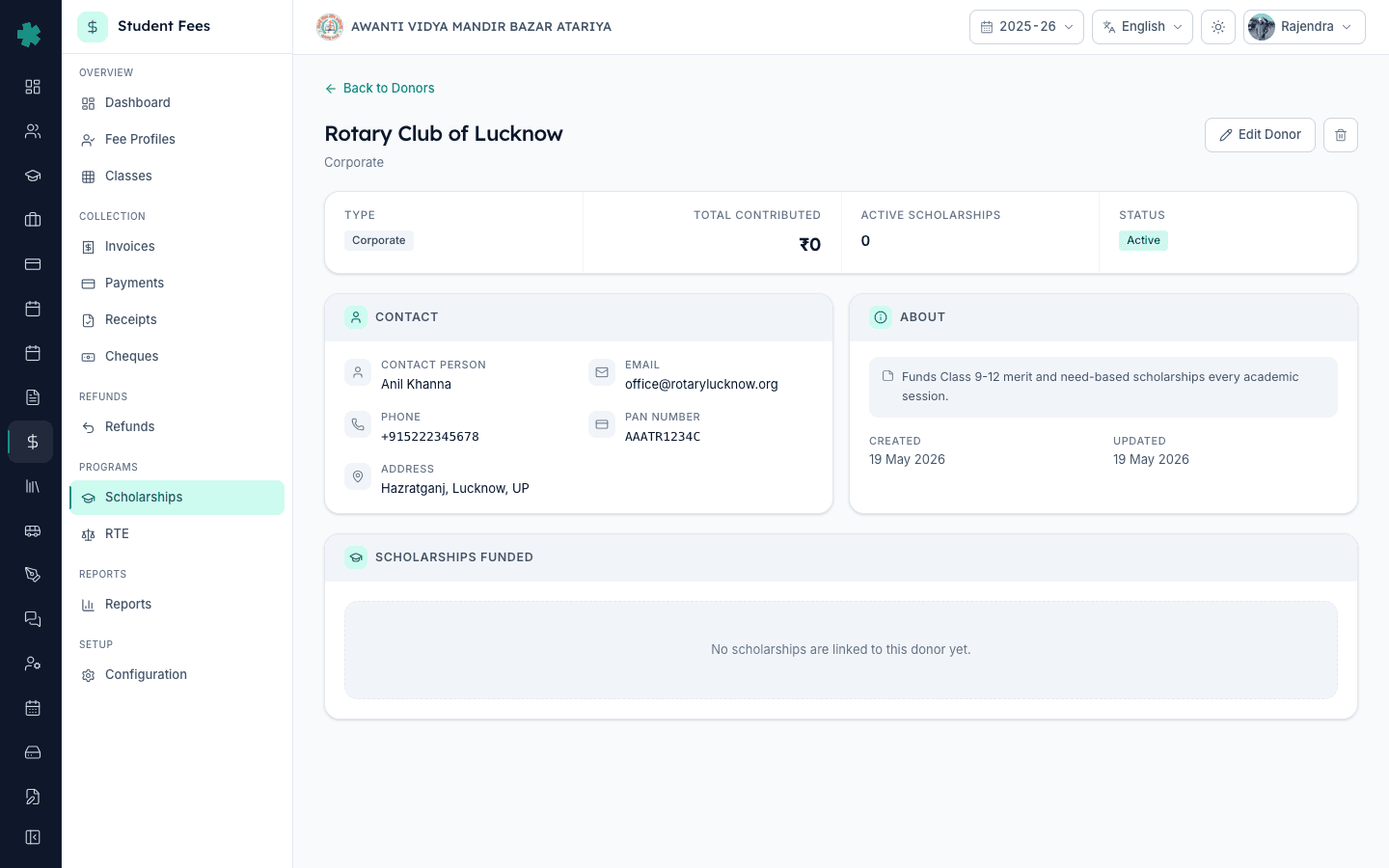
Click the donor row to open the detail page. The header shows name, type, contact details and the total contributed across all linked scholarships. A Linked Scholarships section lists every scholarship the donor is currently funding — empty for a fresh donor — alongside the contributed amount per scholarship. From here the office can edit the donor at any time without disturbing the linked scholarships.
7. Link the donor to a scholarship
Go back to Scholarships and open the scholarship being funded — for example Merit Scholarship covering 7% of the annual fee. Click Edit on the scholarship and pick the new donor from the Donor dropdown — the same dropdown lists every Active donor the school has registered. Save. Inkwelly now shows the donor name on the Scholarships table next to that scholarship, and the donor's total contribution updates automatically as awards are disbursed to students.
Next steps — once the donor is registered, award and approve the scholarship for the right students using the workflow at #ref:how-to-award-and-approve-scholarship-for-student. Schools issuing donation receipts should also confirm the trust's 80G certificate number is on file in the school's accounting register, and review the broader fee programme by reading #ref:how-to-define-fee-categories-and-fee-heads. For schools setting up the underlying fee plan first, see #ref:how-to-create-fee-structure-for-academic-session and #ref:how-to-create-fee-groups-and-assign-classes.
See Inkwelly Student Fees working end-to-end
Frequently asked
6 questionsCan a single donor fund multiple scholarships in Inkwelly?
Yes. Inkwelly keeps one Donor record per funder and lets the school attach that donor to any number of scholarships — Merit, RTE top-up, Girl-child class 11-12 fund, and so on. The donor detail page shows every linked scholarship and the contribution per scholarship. The total contributed across all scholarships is summed automatically and printed on the donor's 80G acknowledgment.
Is PAN compulsory when registering a scholarship donor?
PAN is optional in the Add Donor form, so schools can register a donor immediately even when PAN is still being collected. PAN becomes mandatory the moment the school wants to issue an 80G donation receipt under Section 80G of the Income Tax Act, 1961 — without PAN the donor cannot claim the deduction. Inkwelly validates the format ABCDE1234F so typos do not reach the receipt.
Should anonymous donors still be added to Inkwelly?
Yes. Toggle Anonymous donor on while creating the record. Inkwelly will mask the donor name on the public Scholarships list, on parent-facing acknowledgments and on the public website, but the full name stays on the internal donor ledger, on the school's audit trail and on any 80G receipt the school issues. The donor stays attachable to multiple scholarships exactly like a public donor.
Donor kaise add kare Inkwelly me?
Student Fee menu kholiye, sidebar me Scholarships par jaiye, top-right ke Manage Donors button par click kijiye. Donors page par + Add Donor button dabaiye. Naam (jaise Rotary Club of Lucknow), Type (Individual/Corporate/Trust/Government) chuniye, contact person aur phone email bhariye, agar 80G receipt deni hai to PAN add kijiye, Create dabaiye. Donor list me turant dikh jayega.
Alumni donation track kaise kare?
Pehle alumni batch ko ek Trust type donor ke roop me register kijiye — jaise Alumni Association — Batch of 2010. Phir jis scholarship ke liye batch fund kar raha hai usko us donor se link kijiye (Scholarships → Edit → Donor dropdown). Inkwelly har scholarship me jitne students ko award diya jata hai uske hisab se donor ka total contribution apne aap badhata rahega aur donor detail page par dikhega.
How does Inkwelly handle CSR funding from a company?
Register the company as a Corporate-type donor with PAN, address and a single contact person from the CSR team. Companies routing CSR money under Schedule VII of the Companies Act 2013 — education is an eligible activity — typically ask for an acknowledgment with their CSR registration number; add that to the donor Notes field. Inkwelly's donor detail and 80G receipt then carry the data the company's CSR auditor needs.
You might also like
3 readsSources & references
- Income Tax Act, 1961 — Section 80G (Deduction in respect of donations to certain funds, charitable institutions, etc.) · accessed 19 May 2026
Section 80G allows donors to claim deduction on contributions to approved trusts and institutions, provided the recipient holds a valid 80G certificate and issues a receipt with the donor's PAN.
- Income Tax Act, 1961 — Section 12A / 12AA (Registration of trusts and institutions) · accessed 19 May 2026
Schools operating as registered trusts must hold 12A registration to claim income exemption, which is the precondition for issuing 80G donation receipts to scholarship donors.
- Companies Act, 2013 — Schedule VII (Activities permitted as CSR) · accessed 19 May 2026
Schedule VII lists promotion of education — including scholarships and special education — as a permitted CSR activity, which is the legal basis for corporate donors routing CSR money to school scholarship programmes.
See Inkwelly on your school
30-minute demo. We open your current ERP with you and load your data into Inkwelly on the call. Dated go-live plan by the end of it.