छात्र पर fine कैसे लगाएं और कैसे waive करें
यह गाइड उन office staff, class teacher और accountant के लिए है जिन्हें library overdue, damaged textbook, late pickup या uniform breach जैसा छोटा disciplinary या recovery charge लगाना होता है, और जरूरत पड़ने पर उसे वापस भी लेना होता है। अंत में Inkwelly के student profile में category, amount और reason के साथ एक saved fine आपके पास होगा, और पूरी या आंशिक waiver की प्रक्रिया भी आप जान जाएंगे।
Inkwelly में fine लगाने के लिए: student fee profile खोलिए, Fines tab पर जाइए, + Add Fine दबाइए, category चुनिए (Library, Late Attendance, Damage, Uniform, Discipline, Exam Misconduct या Custom), title, amount और reason भरकर save कर दीजिए। Fine waive करने के लिए, fine row के kebab menu से Waive खोलिए, reason लिखिए और पूरा या आंशिक waiver चुनिए। हर fine FINE-### entry बन जाती है जो student के fee profile, dashboard की Fines tile और Top fined students card पर दिखती है।
Fine एक छोटा, named charge है जो किसी एक छात्र पर fee structure से अलग raise किया जाता है। भारतीय स्कूलों के fine ledger में library overdue सबसे ऊपर रहता है — NCERT की School Library Guidelines (2019) के अनुसार प्रति किताब रोज़ ₹1 से ₹5 तक का overdue शुल्क सुझाया गया है, जिसकी अधिकतम सीमा किताब की कीमत है। Right to Education Act, 2009 की Section 17 शारीरिक दंड पर रोक लगाती है, पर स्कूल नियमों में लिखा गया उचित monetary दंड स्पष्ट रूप से अनुमत है — इसलिए सही category और reason के साथ लगा fine सजा का कानूनी विकल्प बनता है। एक 1,200 छात्रों के day school में सत्र में लगभग 80 से 150 fine लगते हैं — Library, Late Attendance और Uniform मिलकर लगभग 70% volume बनाते हैं, जबकि Damage और Discipline में amount बड़ी होती है।
1. Student fee profile खोलिए
बाएँ साइडबार से Inkwelly → Student Fee → Fee Profiles खोलिए। admission number, name या class के अनुसार search कीजिए — जैसे YETIKA या Class 3 A। row पर click करके profile खोलिए। Profile header में छात्र का नाम, class, enrolment date, fee structure और एक row में Payments, Receipts, Refunds, Cheques, Discounts, Scholarships, Credits, Waivers, Fines और Carry-forward dues की overview tiles दिखती हैं।
2. Fines tab पर जाइए
Profile के ऊपरी हिस्से में tabs की एक row होती है: Overview, Fee Structure, Invoices, Payments, Receipts, Refunds, Cheques, Discounts, Scholarships, Credit Balances, Waivers, Fines, Carried Forward Dues और Ledger। Fines पर click कीजिए। Inkwelly इस छात्र पर लगे हर fine को एक कार्ड में दिखाता है — title, category pill, raised date, amount, due amount और status pill (Pending, Partially Paid, Paid, Waived या Cancelled)।
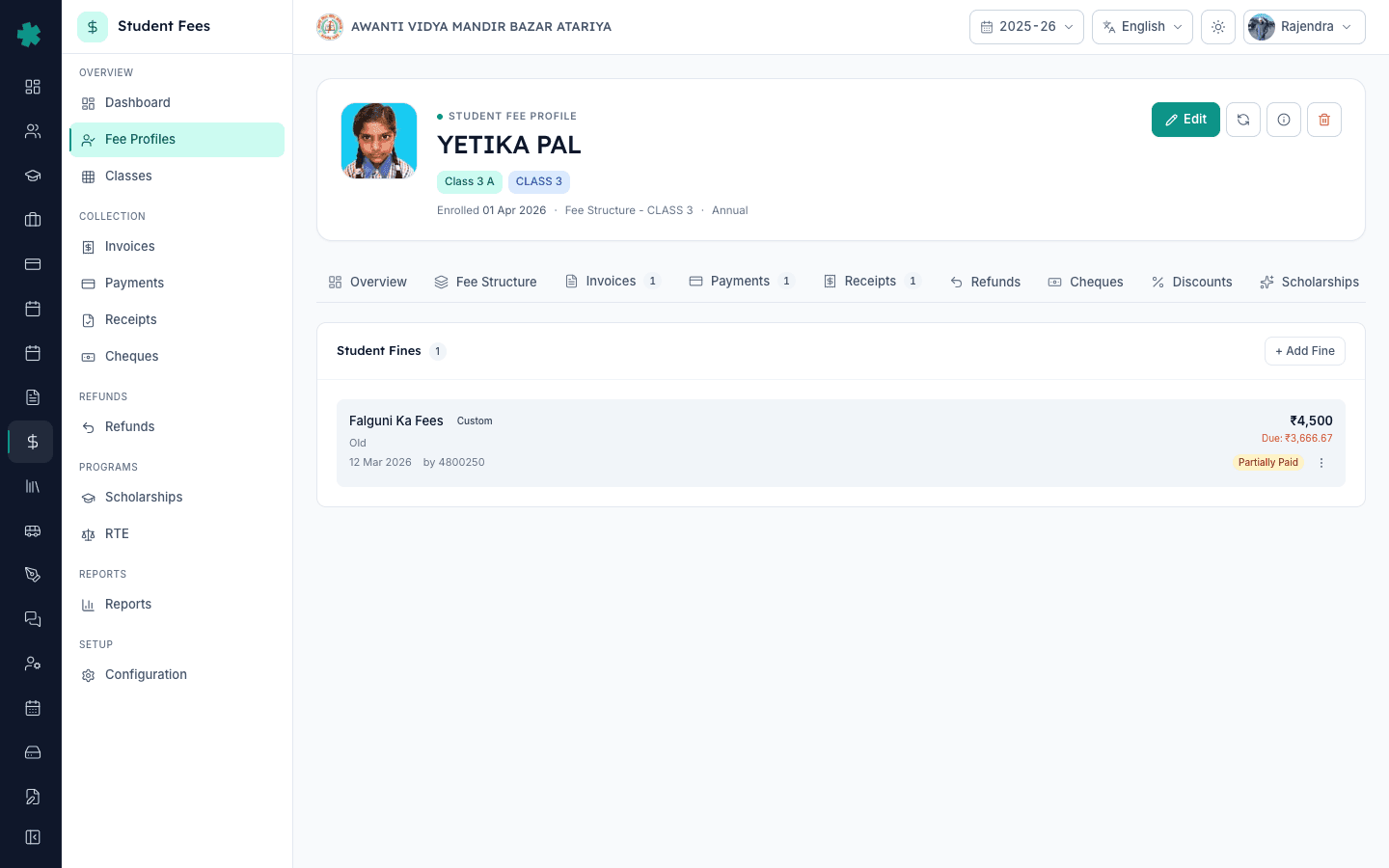
3. + Add Fine पर click करें और category चुनिए
Fines tab के ऊपर दाईं ओर + Add Fine button दबाइए। dialog में एक छोटा title भरिए जो parent को invoice और receipt पर दिखेगा — जैसे Library overdue — Panchatantra या Late pickup — 12 Mar। category dropdown से Library, Late Attendance, Damage, Uniform, Discipline, Exam Misconduct या Custom में से एक चुनिए। यह category Student Fee dashboard की Fines tile का breakdown तय करती है, इसलिए सही category चुनना principal की weekly review के लिए ज़रूरी है।
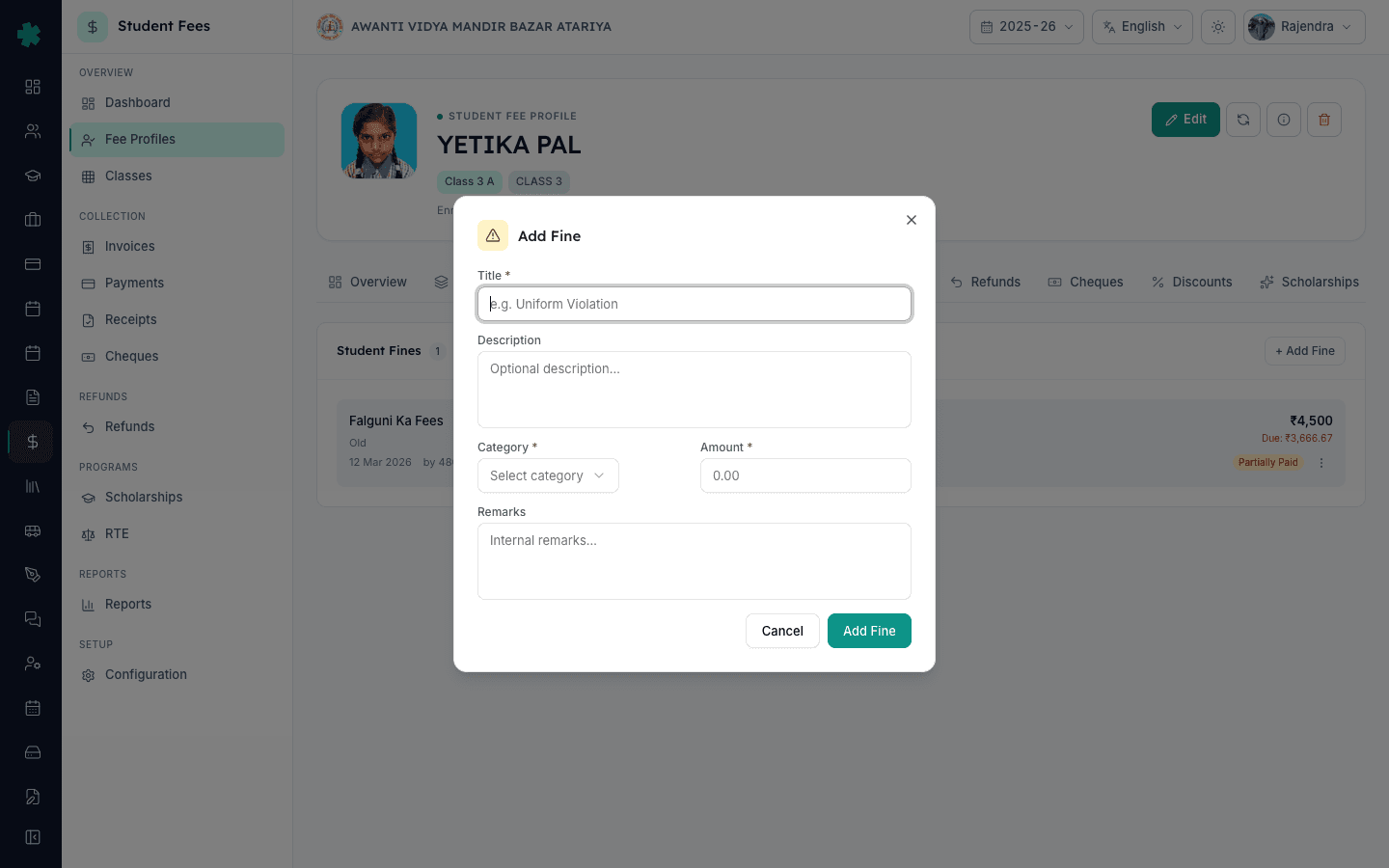
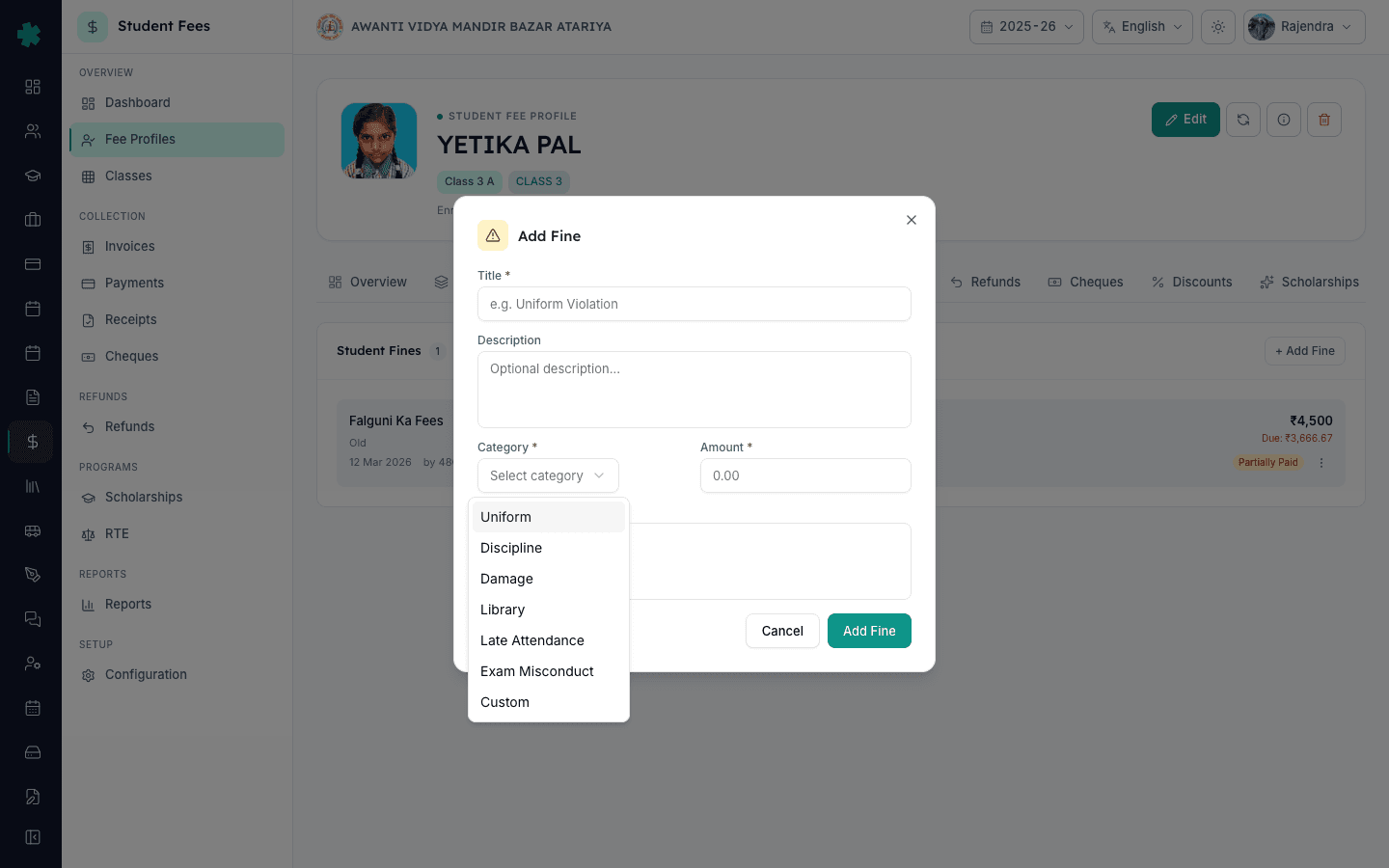
4. Amount और reason भरिए
rupee Amount भरिए — वह दर जो स्कूल ने इस category के लिए तय की है। Tier-2 स्कूल की सामान्य दरें: Library ₹2 प्रति दिन और cap किताब की कीमत पर, Late Pickup ₹50 प्रति incident, Uniform breach ₹100 प्रति incident, Damage पर असली repair या replacement cost। Description field में घटना का कारण लिखिए — book number, period, क्षतिग्रस्त सामान। यदि office के लिए कोई internal note है जो parent को नहीं दिखाना, तो Remarks में लिखिए। Add Fine दबाइए। Inkwelly fine save करके Fines tab की list में दिखा देता है।
5. FINE invoice और dashboard counters verify कीजिए
Save होते ही fine का FINE-### entry बन जाती है — Inkwelly अगला sequential number देता है। छात्र की Fine tile और net outstanding तुरंत update हो जाते हैं। Student Fee → Dashboard पर वापस जाइए। Fines & late fees कार्ड में Applied राशि बढ़ जाती है और category breakdown में आपकी entry जुड़ जाती है। उसी dashboard पर Top fined students कार्ड इस सत्र में सबसे ज़्यादा fine वाले छात्रों को रैंक करता है — principal की weekly disciplinary review के लिए उपयोगी।
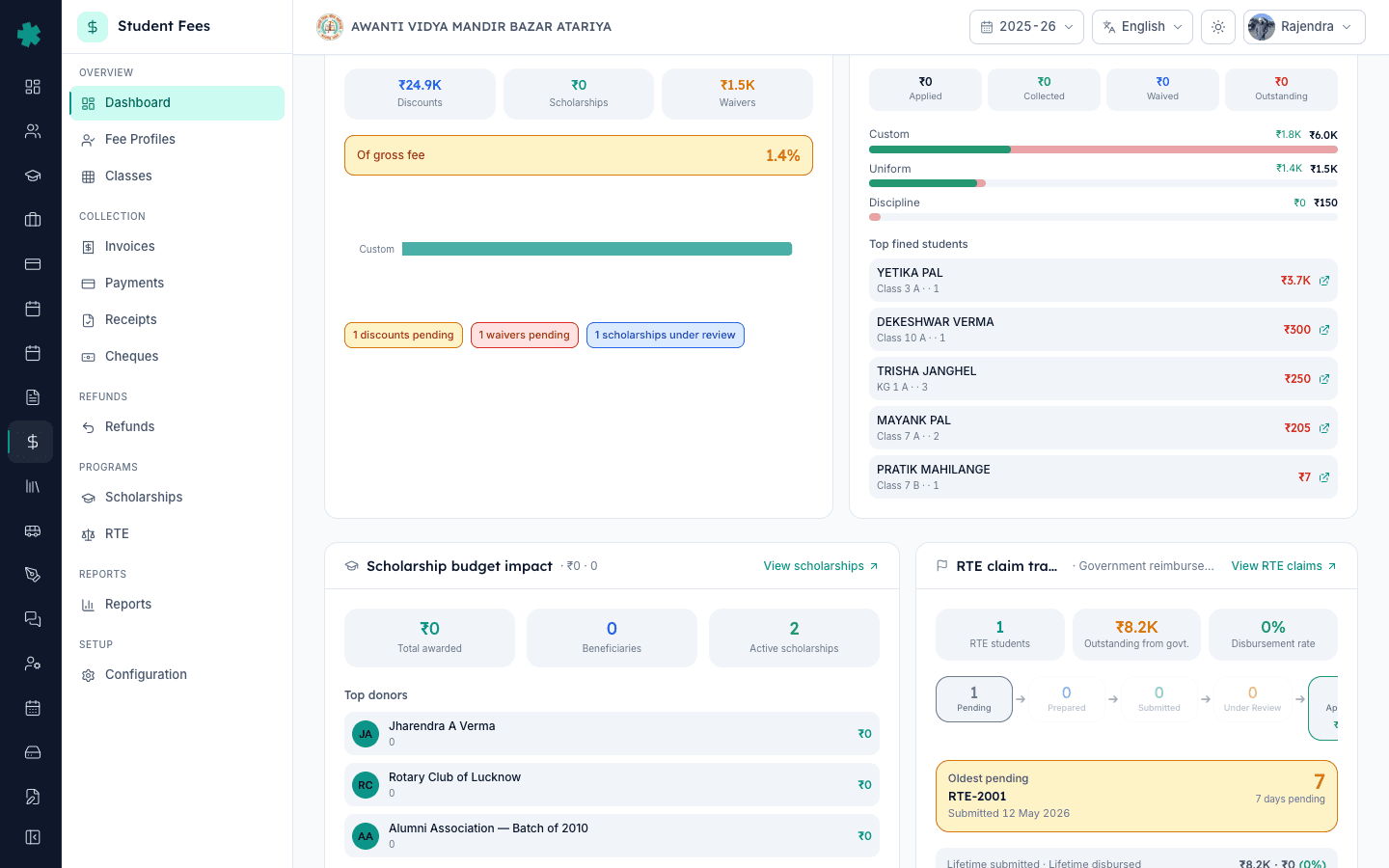
6. Kebab menu से fine waive कीजिए
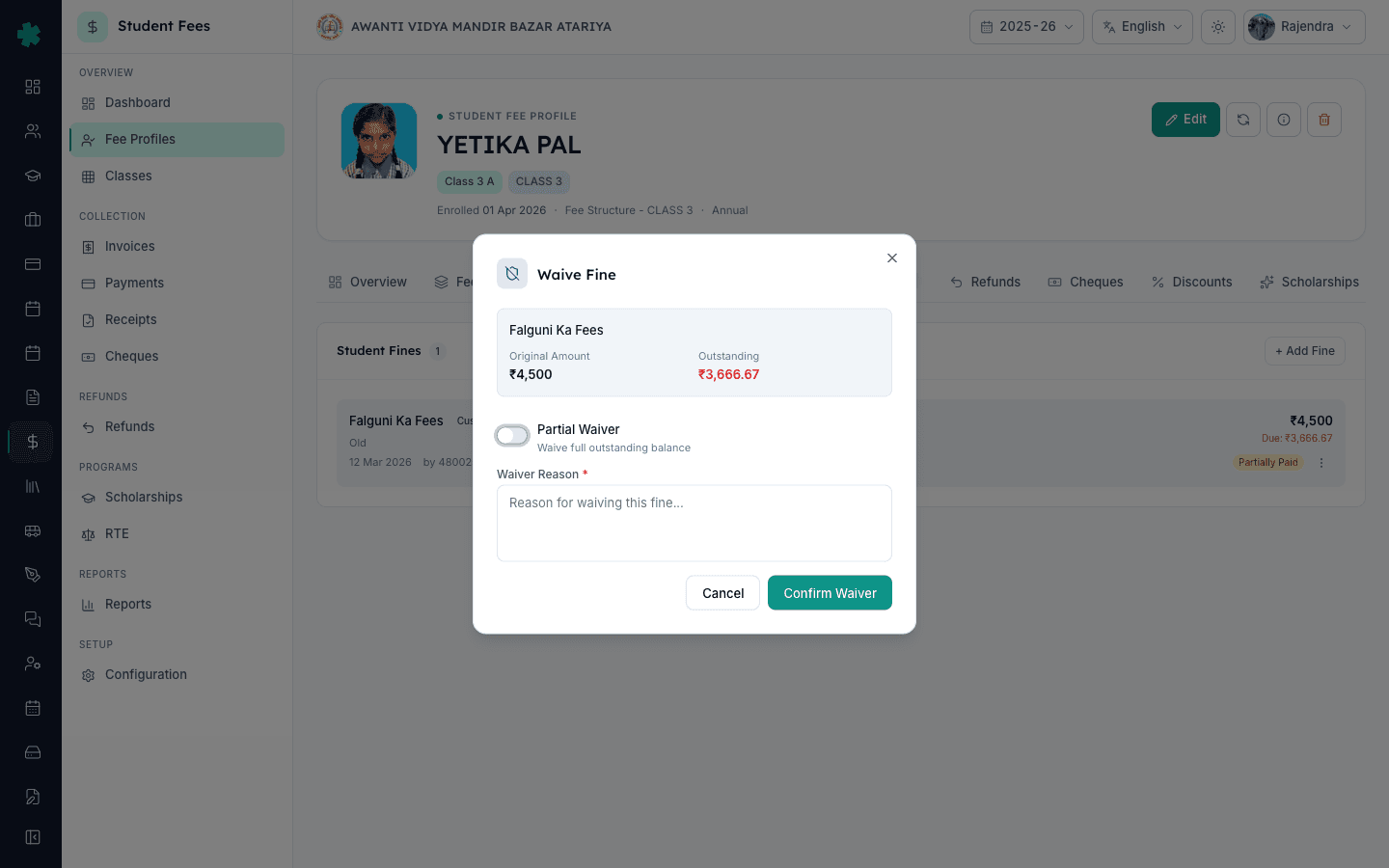
गलत लगे fine, goodwill या आंशिक निपटान के लिए, छात्र profile के Fines tab पर जाइए, fine row के दाईं ओर तीन-बिंदु kebab menu खोलिए और Waive पर click कीजिए। Waive Fine dialog में fine का title, amount और outstanding दिखेगा। पूरा outstanding waive करने के लिए Partial Waiver toggle off रखिए। कुछ हिस्सा waive करने के लिए toggle on कीजिए और rupee में Waived Amount भरिए। Reason field में स्पष्ट लिखिए — जैसे Returned book on the same day; library staff confirmed या Principal approval — first offence। Waive दबाइए।
7. Row पर Waived status verify कीजिए
Fine row तुरंत update हो जाती है। पूरी waive हुई fine पर Waived pill आता है और वह amount profile के Outstanding total से हट जाती है। आंशिक waive हुई fine अब भी Partially Paid दिखेगी, पर smaller outstanding और title के नीचे Waived: ₹X chip के साथ। उसी profile का Waivers tab इस waiver को reason और approve करने वाले user के साथ record करता है। Student Fee dashboard के Fines & late fees कार्ड पर Waived counter भी उतनी ही rupee से बढ़ जाता है — reversal के बाद भी audit chain अक्षुण्ण रहती है।
Fining office routine का हिस्सा बनते ही recovery पक्ष को मज़बूत करें। parent-facing penalty को स्कूल circular के अनुरूप रखने के लिए How to set up late fee rules देखिए। Invoice पर structure सही है यह सुनिश्चित करने के लिए How to create a fee structure for the academic session पढ़िए। Principal dashboard को सही पढ़ें इसके लिए category list को How to define fee categories and fee heads से align कीजिए। एक-बार के recoveries के लिए How to set up a refund policy with time-based slabs उल्टा रास्ता बताती है।
Inkwelly Student Fees को काम करते हुए देखें
अक्सर पूछे गए सवाल
7 सवालIndian school में library overdue पर कितना fine लेना चाहिए?
NCERT की School Library Guidelines (2019) के अनुसार प्रति किताब रोज़ ₹1 से ₹5 तक का overdue शुल्क सुझाया गया है, जिसकी अधिकतम सीमा किताब की कीमत है। अधिकतर Tier-2 day school ₹2 प्रति दिन रखते हैं और cap किताब की कीमत पर। Inkwelly में Library category चुनिए, Add Fine में rupee amount भरिए और Description में book number लिखिए ताकि invoice पर parent को साफ़ दिखे कि fine किस कारण से है।
क्या RTE Act और CBSE bye-laws के तहत छात्र पर fine लगाना कानूनी है?
हाँ। Right to Education Act, 2009 की Section 17 शारीरिक दंड और मानसिक उत्पीड़न पर रोक लगाती है, पर यदि स्कूल नियमों में स्पष्ट रूप से लिखा गया हो तो उचित monetary दंड की अनुमति है — एक स्पष्ट लिखित disciplinary policy ही कानूनी कवच है। CBSE Affiliation Bye-Laws हर parent-charge को itemised रूप में रखने को कहते हैं, और Inkwelly की FINE-### entry ठीक यही करती है। हर fine पर category, amount और reason रखिए — स्कूल NCPCR guidelines के अनुरूप बना रहता है।
क्या parent द्वारा आंशिक भुगतान के बाद भी fine waive किया जा सकता है?
हाँ। छात्र profile के Fines tab पर जाइए, row के kebab menu से Waive खोलिए। Partial Waiver toggle on करके waive की राशि भरिए — Inkwelly outstanding से ज़्यादा waive नहीं करने देगा। एक स्पष्ट reason लिखिए जैसे `Goodwill — first offence, principal approval`। Row का इतिहास बना रहता है; dashboard का Waived counter उसी rupee से बढ़ता है, और audit trail अक्षुण्ण रहती है।
Student ko fine kaise lagaye Inkwelly me?
Student Fee → Fee Profiles kholiye, student search kijiye aur profile open kijiye. Fines tab par jaiye, top-right ka + Add Fine button dabaiye. Title bhariye (jaise Library overdue — Panchatantra), category chuniye (Library, Late Attendance, Damage, Uniform, Discipline, Exam Misconduct ya Custom), amount aur reason bhariye, phir Add Fine dabaiye. Fine FINE-### number ke saath save ho jayega aur dashboard ki Fines tile par count badh jayega.
Galat fine waive kaise kare?
Student profile ke Fines tab par jaiye, fine row ke kone me three-dot kebab menu kholiye, Waive par click kijiye. Full waiver chahiye to Partial toggle off rakhiye; partial chahiye to toggle on karke rupee amount bhariye. Reason field me saaf likhiye — kyon waive kar rahe hain, kisne approve kiya. Waive dabaiye. Row me Waived ka pill aa jayega aur dashboard ka Waived counter usi rupee se badh jayega.
Inkwelly में fine, late fee और waiver में क्या अंतर है?
Fine एक बार वाला charge है जो किसी एक छात्र पर किसी विशेष घटना के लिए manually लगाया जाता है — library overdue, breakage, uniform breach। Late fee एक स्वचालित दंड है जिसे Inkwelly late fee rule के आधार पर overdue invoice पर लगाता है। Waiver किसी मौजूदा fine या invoice के हिस्से की reason के साथ recorded reversal है — यह मूल entry को मिटाता नहीं, इसलिए audit trail साफ़ रहती है।
क्या fine को waive करने के बजाय cancel या delete किया जा सकता है?
हाँ, पर सिर्फ़ उन fine पर जिनके विरुद्ध अभी कोई भुगतान नहीं हुआ। Pending fine पर kebab menu में Cancel विकल्प आता है और outstanding total से वह हट जाता है। पर एक बार parent ने आंशिक भुगतान भी कर दिया, तो उस row को सिर्फ़ waive किया जा सकता है, cancel नहीं — यह design ही ऐसा है ताकि receipt history अक्षुण्ण रहे। अधिकतर स्कूल Cancel के बजाय Waive पसंद करते हैं क्योंकि reason field principal को पूरा audit trail देती है।
आपको ये भी पसंद आ सकता है
3 लेखस्रोत व संदर्भ
- Right of Children to Free and Compulsory Education Act, 2009 — Section 17 (Prohibition of physical punishment and mental harassment) · देखा गया 19 May 2026
RTE Section 17 शारीरिक दंड पर रोक लगाती है, जिससे स्कूल नियमों में प्रकाशित monetary fine ही disciplinary मामलों का कानूनी विकल्प बनता है।
- CBSE Affiliation Bye-Laws — Chapter VII (Fees and Other Charges) · देखा गया 19 May 2026
CBSE bye-laws के अनुसार parent से लिया गया हर charge — fine सहित — itemised और justified होना चाहिए, और Inkwelly हर fine के title, category और reason fields के माध्यम से यही व्यवस्था करता है।
- NCPCR Guidelines on Eliminating Corporal Punishment (2017) · देखा गया 19 May 2026
NCPCR guidelines के अनुसार disciplinary उपाय गैर-शारीरिक होने चाहिए और reason के साथ रिकॉर्ड किए जाने चाहिए, जो category और reason field वाली एक Inkwelly fine सीधे पूरा करती है।
Inkwelly आपके स्कूल पर — खुद देखें
30 मिनट का डेमो। आपके मौजूदा ERP को आपके साथ खोलकर, कॉल पर ही आपका डेटा Inkwelly में लोड करते हैं। कॉल ख़त्म होते-होते एक तय तारीख़ का गो-लाइव प्लान आपके हाथ में।